Best Fortnite Ping Reducer to Fix Ping Spikes and Latency
Fortnite can feel delayed even when your internet speed looks fine. High ping, ping spikes, packet loss, unstable routing, or temporary server-side issues may all make your builds, edits, shots, and movement feel less responsive.
LagoFast works as a Fortnite ping booster and lag reducer for PC, helping optimize your connection route to Fortnite servers, reduce network-related lag, ease packet loss-related issues, and stabilize gameplay before you enter a match.

- ✅ Reduce Lag and High Ping
- ✅ Boost FPS in Real Time
- ✅ Get the Easiest Server in Fortnite
- ✅ End All Connection Login Issues.
- ✅ Support 8000+ Online Games.
- ✅ Multiplatform: PC, Mobile, Console
Fortnite Overview
Fortnite is a fast-paced battle royale game where every millisecond can affect building, editing, aiming, and close-range fights. For PC players, lag is not always caused by low FPS. High ping, ping spikes, packet loss, unstable routing, or server-side issues can also make the game feel delayed.
That is why many players look for a Fortnite ping booster or lag reducer: they want a tool that can help stabilize the connection route before matches, not just another general settings checklist.
Why Fortnite Has High Ping, Lag, or Packet Loss
Fortnite lag can come from several different sources. Your internet speed may look good, but the route between your PC and Fortnite servers can still be unstable. Common causes include long-distance server routing, crowded Wi-Fi, background downloads, ISP routing issues, packet loss, ping spikes, or temporary Fortnite server problems.
Epic Games explains that latency, also called ping, is the time it takes for data to travel from your device to Fortnite servers and back, and that routing can affect your ping. You can review Epic’s official Fortnite latency and ping troubleshooting for more background.
A Fortnite ping booster is most useful when your local network is working normally, but your connection route to Fortnite servers is unstable or inefficient. In that case, LagoFast can help optimize the route, reduce connection instability, and make Fortnite feel more responsive on PC.
If your issue is region-specific, you can also check our guide to Fortnite server locations and server issues .
How LagoFast Works as a Fortnite Ping Reducer
LagoFast is designed for PC players who want a faster and more stable route to Fortnite servers. Instead of changing every Windows, router, and game setting manually, you can use LagoFast as a Fortnite ping booster to search for Fortnite, choose a suitable acceleration route, and launch the game with optimized connection support.
With LagoFast, Fortnite players can:
- Optimize the connection route to Fortnite servers.
- Help reduce high ping and sudden ping spikes.
- Ease packet loss-related lag and unstable connection issues.
- Check real-time ping and packet loss before or during gameplay.
- Start Fortnite directly after selecting a route.
LagoFast does not change how Fortnite is played. It focuses on connection optimization, helping PC players reduce network-related lag and keep gameplay more stable during matches.
How to Use LagoFast for Fortnite
Follow these steps to use LagoFast as a Fortnite ping booster and lag reducer on PC:
Step 1: Download LagoFast and activate your free trial in the software.
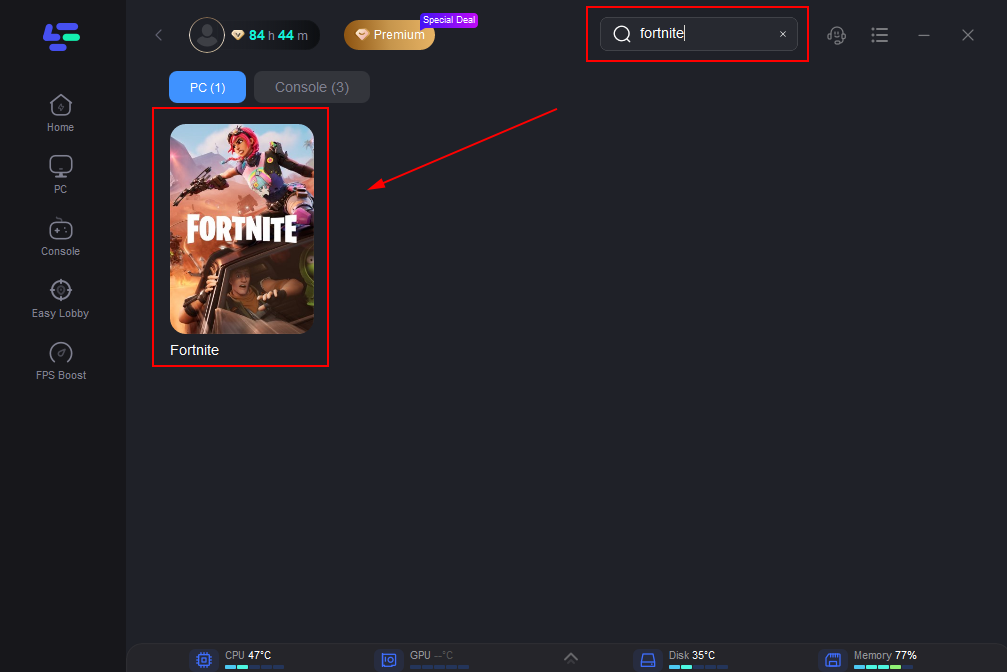
Step 2: Find Fortnite in the Game Library.
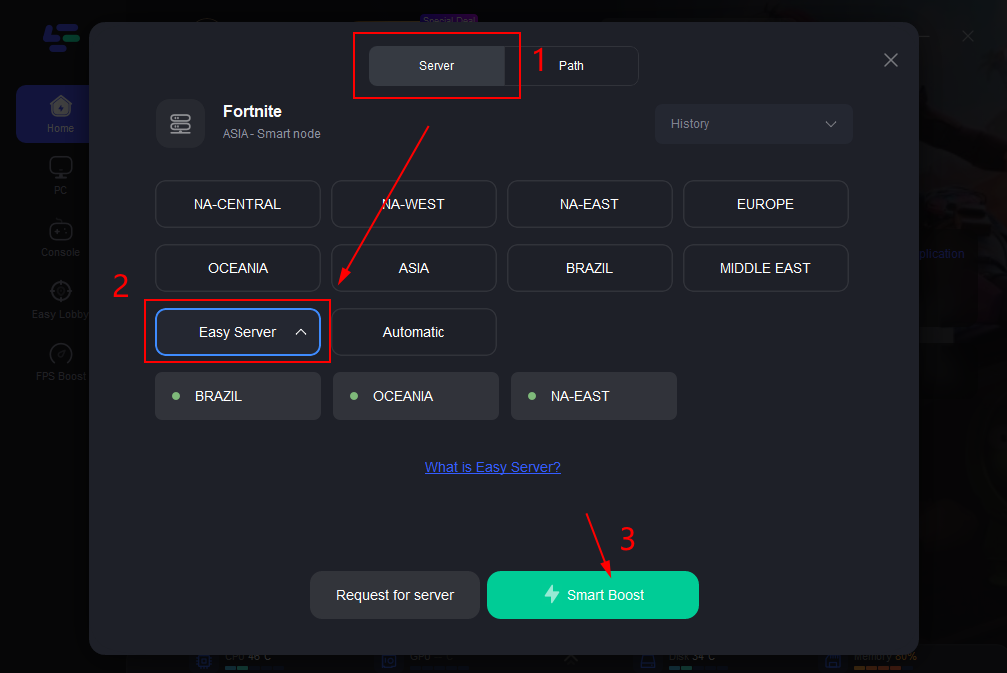
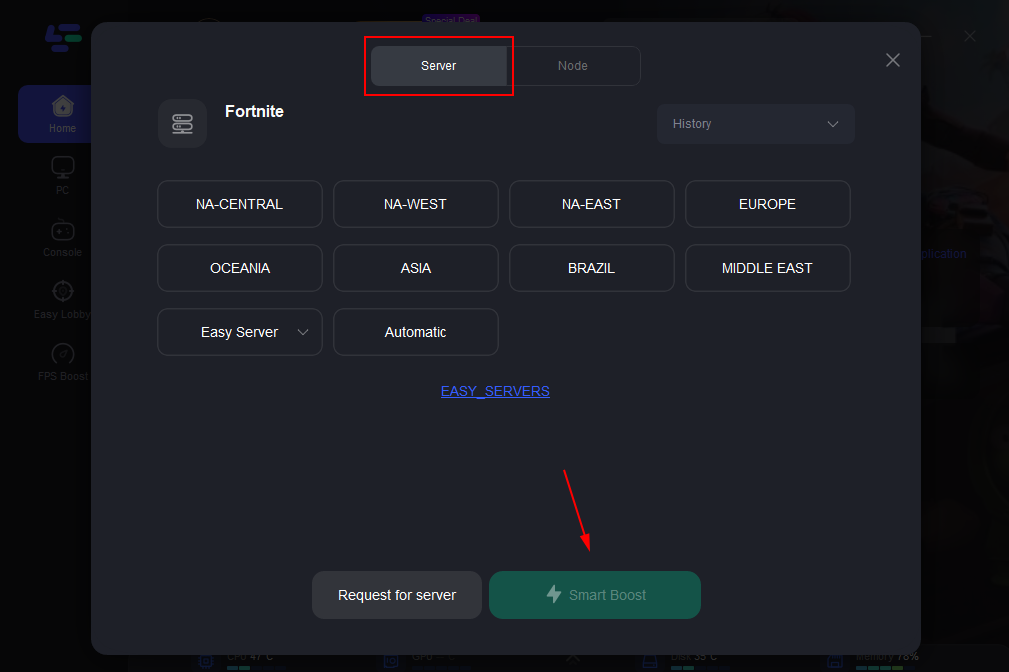
Step 3: Select the Server you're playing and the node with the lowest ping, the software will put the best node on the top of the node list.
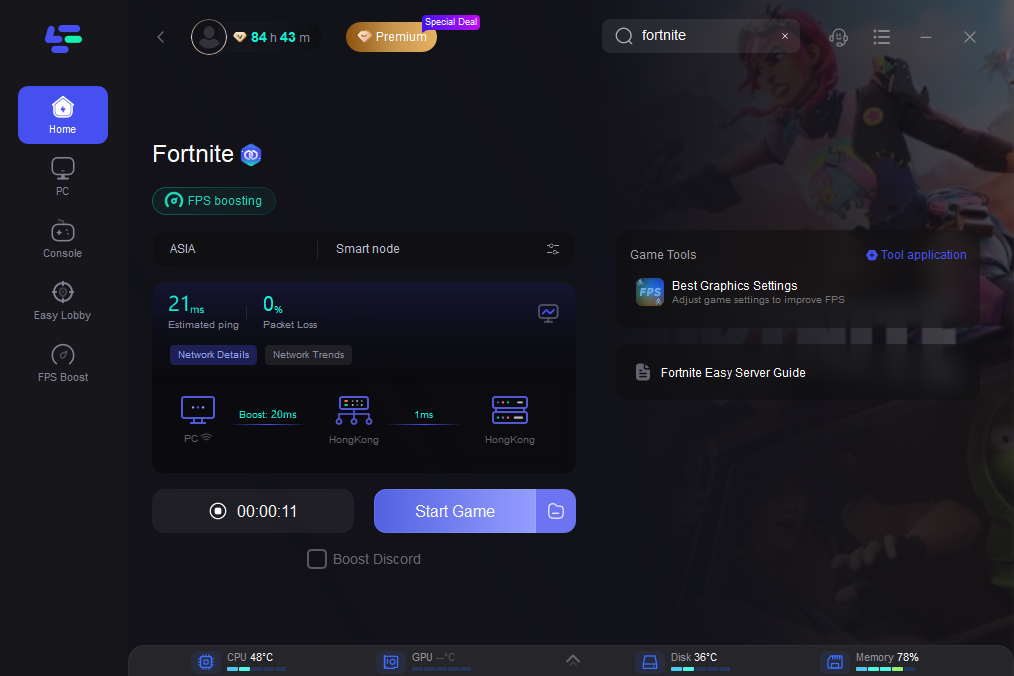
Step 4: Press Start Game button and enjoy your Fortnite without lag and high ping. You could always check your real time game ping and packet loss in the software.
Fortnite Lag Reducer for Packet Loss and Ping Spikes
If Fortnite feels smooth for a few seconds and then suddenly delays, freezes, rubber-bands, or makes shots register late, the issue may be ping spikes or packet loss. Packet loss means some data does not reach its destination correctly, which can lead to unstable gameplay even when your average ping does not look extremely high.
Epic Games explains how players can turn on Net Debug Stats to see ping and packet loss during a real match. You can check the official guide on how to check packet loss in Fortnite .
LagoFast can help reduce network-related lag by optimizing the route between your PC and Fortnite servers. This is especially useful when the issue is caused by unstable routing, long-distance connection paths, or packet loss-related connection drops.
How to Reduce Ping and Lag in Fortnite
A ping booster can help when your Fortnite lag is related to unstable routing, but you should still check the basics first:
- Turn on Net Debug Stats and watch your ping and packet loss in a real match.
- Use a wired connection when possible.
- Pause downloads, cloud sync, and background apps.
- Check whether Fortnite servers are having issues.
- Use LagoFast when your connection route to Fortnite servers feels unstable.
For a full step-by-step troubleshooting guide, read our guide on how to get better ping in Fortnite .
How to Boost FPS in Fortnite
FPS drops and high ping are different problems. Low FPS usually comes from PC performance, graphics settings, drivers, or background programs, while high ping is related to network latency and server connection. Both can make Fortnite feel laggy, but they require different fixes.
If your ping is stable but Fortnite still looks choppy, you may need to adjust graphics and PC performance settings instead of only using a ping booster.
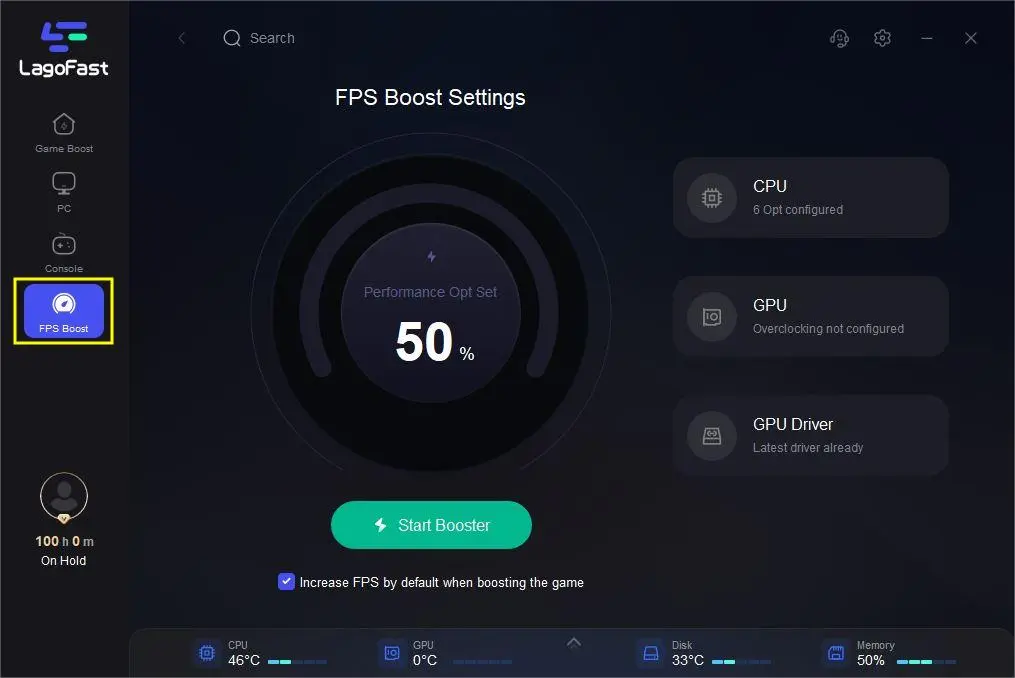
Step 1: Select FPS Boost function in LagoFast.
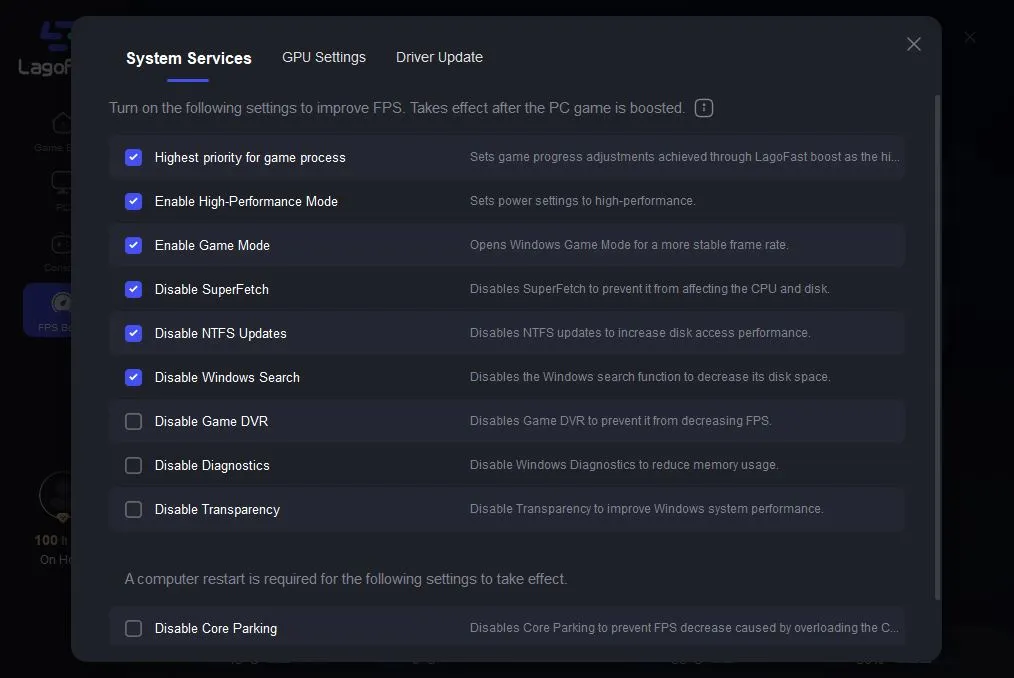
Step 2: Click and turn on the settings you approve to improve FPS.
Fortnite Server Route Selection and Connection Stability
Fortnite connection quality can vary by region, route, and server condition. If your current route feels unstable, LagoFast can help you test different acceleration routes and choose a more suitable connection path for Fortnite.
The goal is not to change competitive fairness. The goal is to help PC players find a more stable route, reduce high ping, and improve network consistency during matches.
Check Fortnite Server Status Before Changing Settings
Sometimes Fortnite lag is caused by server-side issues rather than your PC, router, or ISP. Before changing too many settings, check whether Fortnite game services, login, matchmaking, or related Epic services are experiencing problems.
You can review the official Epic Games Public Status page to see whether Fortnite services are degraded or under maintenance. If the issue is server-side, waiting for service recovery may be the best option.
- ✅ Reduce Lag and High Ping
- ✅ Boost FPS at the Same Time
- ✅ Support 8000+ Popular Online Games
- ✅ Support Easy Lobby Fortnite