
Fortnite servers have moved back from Mumbai to the Middle East, with the current routing now pointing to Doha, Qatar.
If you play Fortnite in the Middle Eastern regions, you may have noticed a sudden change in your connection recently. Many players who normally get around 30–50ms ping are now seeing it spike to 150–200ms or even higher, making edits feel delayed and fights much harder to win. Because of this, a growing number of players are saying the Middle East servers feel almost unplayable right now. The problem also seemed to appear very suddenly, leaving many players confused about what actually happened. So why is this happening, and what can you do to reduce the ping and keep playing smoothly?

- ✅ Reduce Lag and High Ping
- ✅ Boost FPS in Real Time
- ✅ Get the Easiest Server in Fortnite
- ✅ End All Connection Login Issues.
- ✅ Support 8000+ Online Games.
- ✅ Multiplatform: PC, Mobile, Console
Part 1: Middle East Servers Are UNPLAYABLE for Many Players
Part 2: Why Is There a Fortnite High Ping Issue in Middle Eastern Servers?
Part 3: How to Play Fortnite on Middle East Servers with Low Ping
Part 1: Middle East Servers Are UNPLAYABLE for Many Players
Many frustrated players have been sharing their experiences online, especially on Reddit. According to several reports, the situation became much worse after a recent Fortnite update earlier this year.
One player said they used to get a stable 30–50ms ping from Mumbai, but after the update the connection suddenly changed:
“Ever since the v39.20 update, the ME servers have been a complete disaster. My ping jumps to 200ms+ overnight with constant yellow and red connection bars.”
Other players reported the same pattern. Their connection suddenly becomes unstable, with problems such as:
- Ping randomly spiking between 150 and 250 ms
- Connection bars constantly turning yellow or red
- Matches feeling delayed or barely playable
What makes the issue more confusing is that internet speed doesn’t seem to be the real problem. One Reddit user mentioned they have a 200 Mbps Ethernet connection, yet the ping still stays extremely high.
Some players even noticed something unusual: mobile data sometimes performs better than home internet.
For example:
- Wi-Fi connection: around 180ms ping
- Jio mobile data: around 80–90 ms ping
This clearly suggests the problem isn’t just about internet speed. Instead, it may be related to how players are being routed to the Middle East servers.
Part 2: Why Is There a Fortnite High Ping Issue in Middle Eastern Servers?
The current high ping issue on Middle East servers is likely caused by several network factors rather than a single problem. Recently, changes in regional infrastructure and routing have affected how players connect to game servers.
Regional network disruptions
Recently, parts of the Middle East have experienced ongoing internet service disruptions, which can increase latency when connecting to online games.
Even if your internet speed is good, these disruptions can affect how traffic travels between your device and the servers, resulting in higher ping.
Submarine cable and cloud infrastructure instability
Another possible factor is instability in submarine cables and cloud infrastructure used in the region.
Many online games rely on large cloud platforms such as AWS to host servers and manage traffic. When these systems experience disruptions, connections may be rerouted through longer paths, which increases latency.
Poor ISP routing
In some regions, ISP routing can also be part of the problem.
Instead of connecting directly to the nearest server, traffic may pass through multiple international nodes first, adding extra delay. This is why some players report that European servers sometimes show similar or even lower ping than Middle East servers.
Part 3: How to Play Fortnite on Middle East Servers with Low Ping
Use LagoFast to optimize your connection
If the Middle East servers keep giving you high ping, another option is to optimize the connection route instead of relying on the default network path. Tools like LagoFast are designed to do exactly that. It can reroute your connection through more stable nodes and even let you connect through European or North American servers, which can sometimes provide a smoother experience. By improving the routing path, LagoFast can reduce ping, fix packet loss, and stabilize the connection, helping Fortnite run much more smoothly when the regional servers are unstable.
Besides network optimization, LagoFast also includes several additional tools that can help improve overall game performance:
- Game Crash Fix – Repair DirectX 12, C++ Runtime, and other common game environment issues with one click.
- FPS Boost 2.0 – Apply optimized game settings and frame generation to improve performance.
- Best Graphics Settings—Automatically adjust game settings to increase FPS and maintain smoother gameplay.
Tutorial to Use LagoFast to Fix Fortnite High Ping Issue:
Step 1: Click the Free Trial button to download and install LagoFast.
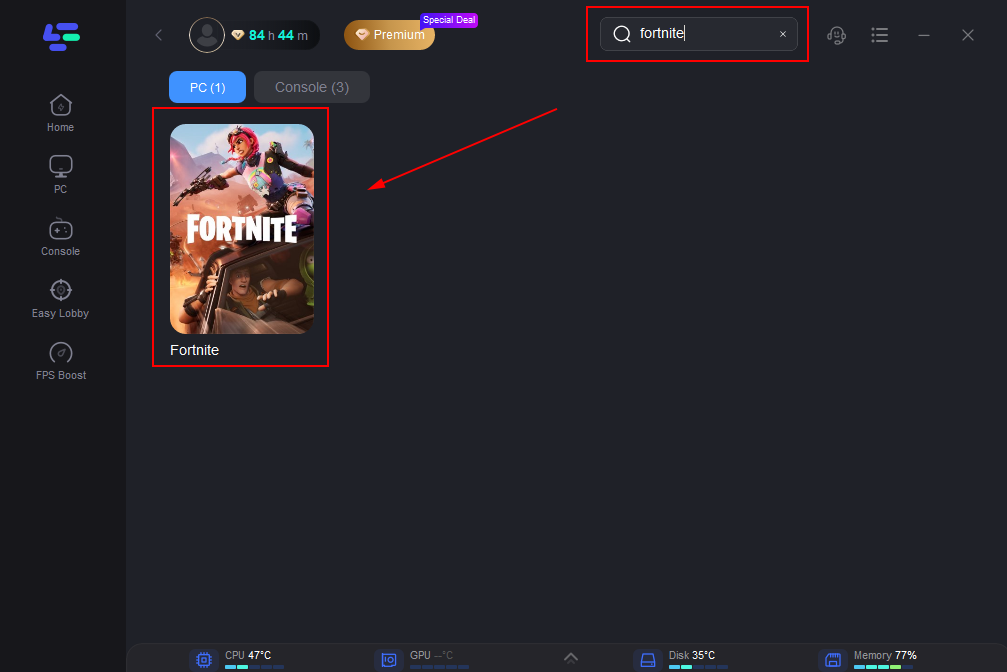
Step 2: After installation, search "Fortnite" in the search bar and select the game.
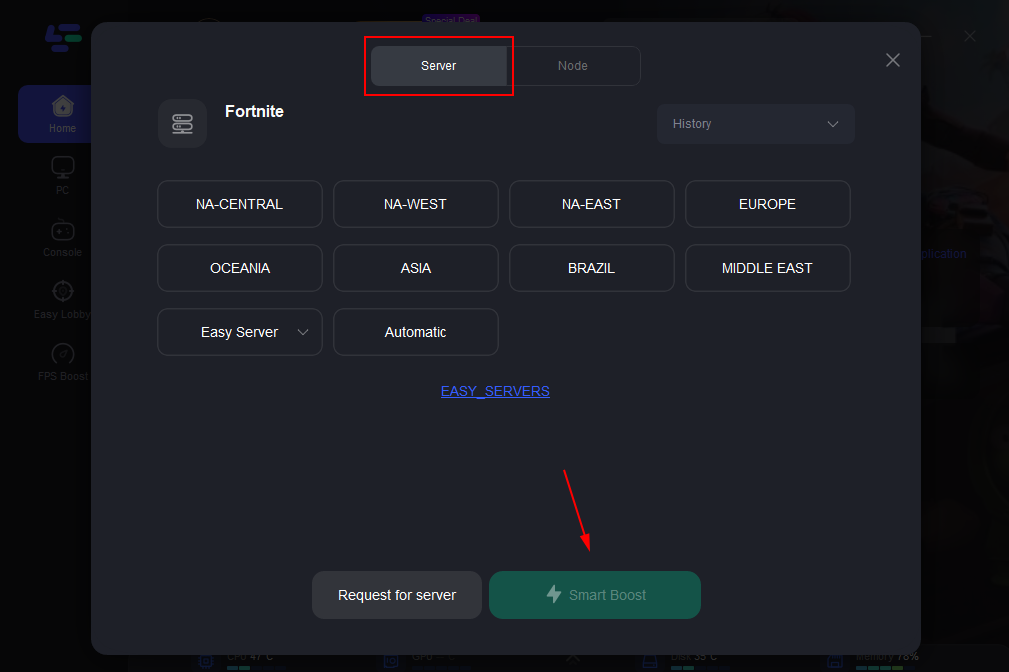
Step 3: Choose your preferred server node and click "Smart Boost" to start optimizing.
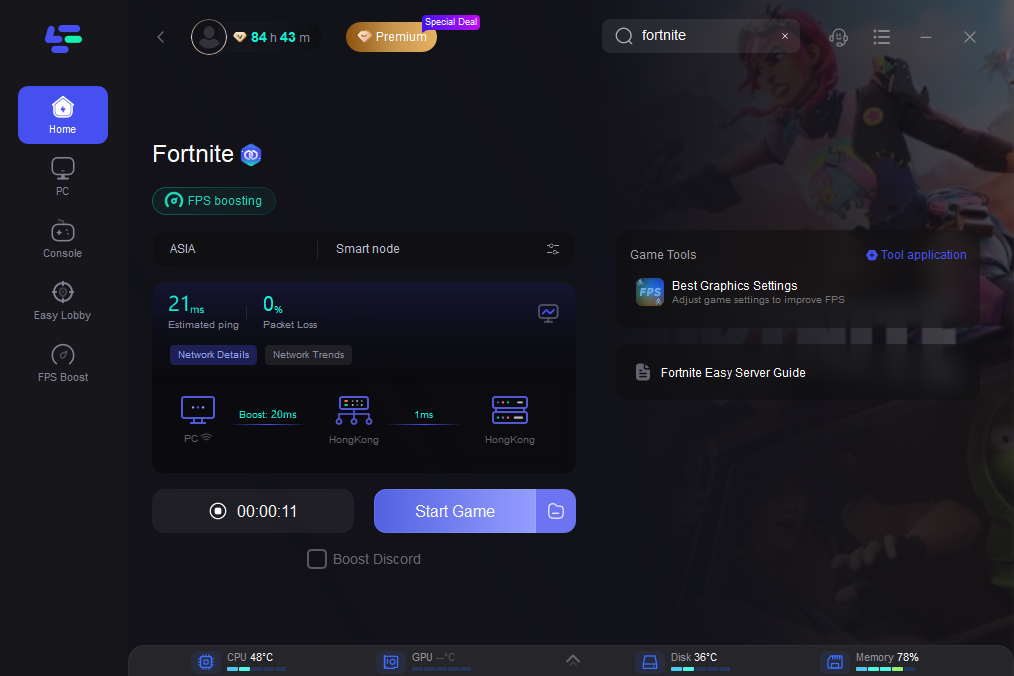
Step 4: Launch your game and enjoy smooth, optimized gameplay with lower ping and no stutter.
Use a wired connection and reduce background traffic
Even though the main issue may come from regional networks, using a wired Ethernet connection instead of Wi-Fi can still improve stability and reduce packet loss during matches.
You should also close downloads, streaming apps, or other background programs while playing to make sure Fortnite gets the most stable connection possible.
Restart your router or refresh your network route
Sometimes high ping is caused by temporary routing problems from your ISP. Restarting your router or modem can refresh the connection and occasionally result in a better route to the game servers.
Wait for network routing to stabilize
Since the issue appears to be related to regional network disruptions and infrastructure changes, some problems can only be resolved by network providers or server operators.
As the network routing stabilizes, the connection to Middle East servers should gradually improve.
Conclusion
The recent high ping issues on Middle East Fortnite servers have made the game frustrating for many players, especially those who previously enjoyed stable low latency. While the problem is likely related to regional network disruptions, routing issues, and infrastructure changes, there are still ways to improve your experience. Tools like LagoFast, along with simple steps such as using a wired connection or restarting your router, can help stabilize your connection. Until the regional network situation improves, these methods can make Fortnite much more playable.

Boost Your Game with LagoFast for Epic Speed
Play harder, faster. LagoFast game booster eliminates stutter and lags on PC, mobile, or Mac—win every match!
Quickly Reduce Game Lag and Ping!
Boost FPS for Smoother Gameplay!