
The wait is over. The Horizon Festival has finally landed in Japan! However, nothing kills the hype faster than clicking "Play" only to find Forza Horizon 6 not launching or getting stuck on a permanent loading screen. Whether you are dealing with PC crashes or Xbox startup errors, we have the solutions you need.
Quick Answer: How to Fix Forza Horizon 6 Not Launching?
If your trip to the neon streets of Tokyo is cut short by a launch error, try these rapid solutions:
- The All-in-One Solution: Use LagoFast Game Booster to repair game files, optimize network routes, and bypass launcher glitches automatically.
- Update Graphics Drivers: Ensure your NVIDIA/AMD drivers are ready for the May 2026 release.
- Verify Game Integrity: Use Steam or the Xbox App to repair corrupted installation data.
- Disable Conflicting Overlays: Turn off Discord, MSI Afterburner, or Steam overlays, which often cause the game to crash on startup.

- ✅ Reduce Lag and High Ping.
✅ Boost FPS at the Same Time.
✅ Repair Crashing and Freezing.
✅ Change Server without Latency.
✅ Boost Game Loading Speed. - ✅ Fix Disconnection Issues
Part 1: Forza Horizon 6 Not Launching on PC & Xbox: Causes Explained
Part 2: Why Common Fixes Often Do Not Work?
Part 3: How to Fix Forza Horizon 6 Not Launching on Xbox & PC? - Top Solutions
Part 4: Forza Horizon 6 Map Location & Features
Part 5: Forza Horizon 6 Gameplay Tips For New Players
Part 1: Forza Horizon 6 Not Launching on PC & Xbox: Causes Explained
Different symptoms usually point to different underlying technical hurdles. Use the table below to identify your specific issue.
|
Symptom |
Primary Cause |
Platform |
|
Instant Crash to Desktop |
Outdated GPU drivers or lack of Administrator privileges. |
PC (Steam/MS Store) |
|
Stuck on Splash Screen |
Conflict with Antivirus software or background apps. |
PC |
|
Infinite Loading Wheel |
Network synchronization errors or corrupted save data. |
Xbox & PC |
|
"Operation Took Too Long" Error |
Slow HDD/SSD read speeds or server-side handshake failure. |
Xbox Series X/S |
|
Black Screen on Startup |
Incorrect resolution settings or DirectX incompatibility. |
PC |
Part 2: Why Common Fixes Often Do Not Work?
Many players find that standard advice, like restarting the router or reinstalling the game, fails to fix Forza Horizon 6 won't start. This is often because FH6 uses a sophisticated new engine build (ForzaTech) optimized for the 2026 hardware landscape.
Common fixes ignore deep-rooted system issues such as unoptimized CPU scheduling, fragmented game files, or Visual C++ Redistributable conflicts. When the game fails to "handshake" with your hardware or the Xbox Live servers within a specific millisecond window, it simply terminates the process. This is where specialized optimization tools become necessary.
Part 3: How to Fix Forza Horizon 6 Not Launching on Xbox & PC? - Top Solutions
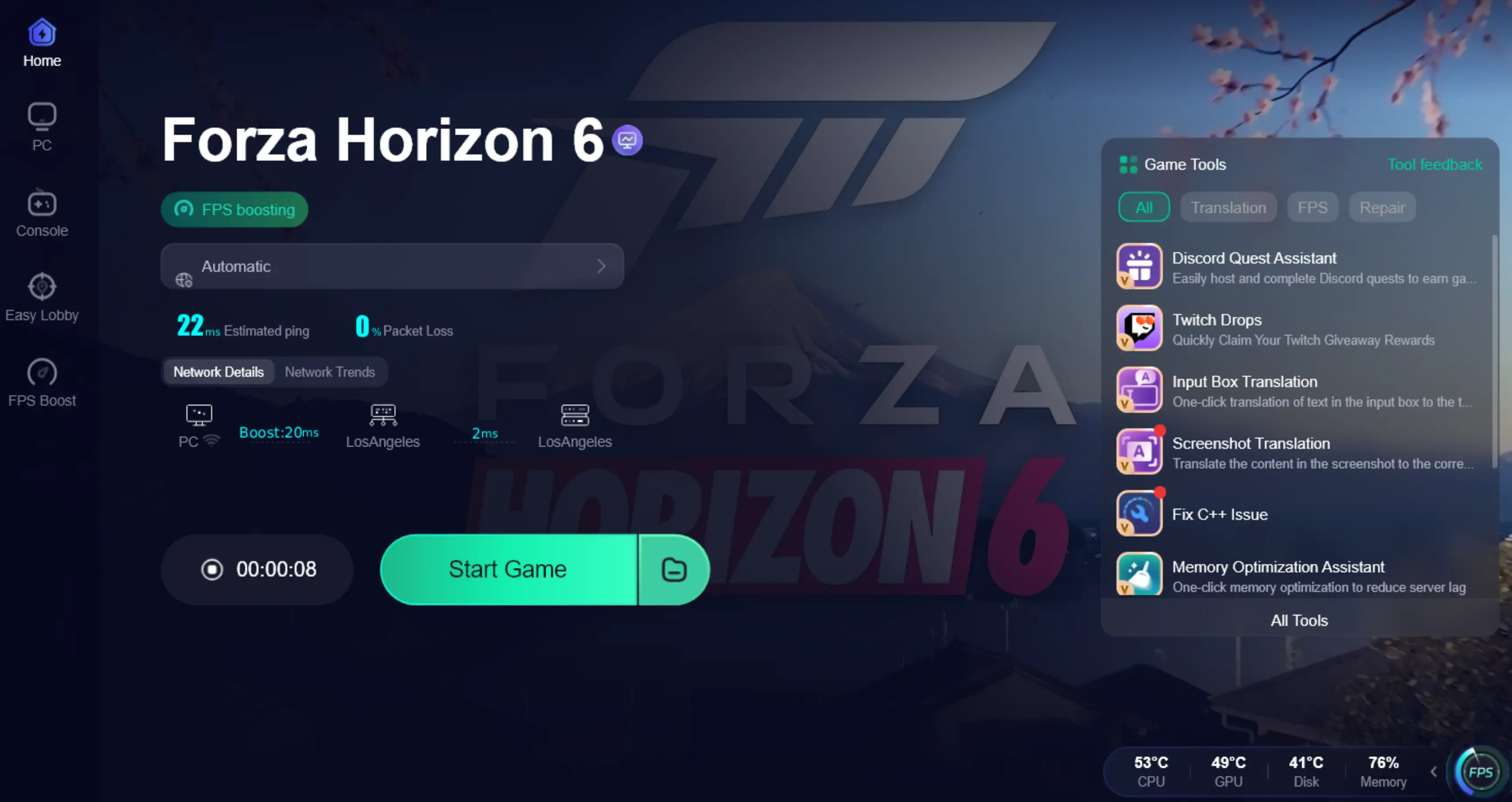
The Pro Solution: LagoFast Game Booster
When standard troubleshooting fails, LagoFast is the most effective tool to bridge the gap between your system and the game. LagoFast is a game booster designed to eliminate the technical friction that causes Forza Horizon 6 not working.
If your game is stuck on the loading screen or failing to authenticate with the Japan-based servers, LagoFast’s global network of optimized nodes ensures a stable "handshake." It also features a dedicated "Repair" tool that specifically targets the C++ and DirectX issues that frequently prevent Forza titles from initiating.
Key Features of LagoFast:
- One-Click Launch Fix: Automatically detects and repairs common registry and DLL errors preventing launch.
- Real-time FPS Boost: Optimizes CPU and GPU resources to ensure your PC meets the demand of a 5x larger Tokyo map.
- Cross-Platforms Support: Boosts performance on PC and Console platforms like PS5.
- Multipath Connection: Reduces ping and prevents "stuck on loading" issues by finding the fastest route to game servers.
Tutorial to Use LagoFast to Fix FH6 Launching Issue:
Step 1: Click the Free Trial button to download and install LagoFast.
Step 2: After installation, search "Forza Horizon 6" in the search bar and select the game.

Step 3: Choose your preferred server node and click "Smart Boost" to start optimizing.

Step 4: Launch your game and enjoy smooth, optimized gameplay with lower ping and no stutter.
Update Graphics Drivers (PC)
Forza Horizon 6 utilizes heavy ray-tracing and photogrammetry. If your drivers are even a month old, the game may refuse to launch.
Step 1. Open NVIDIA GeForce Experience or AMD Software.
Step 2. Check for the "Game Ready Driver" specifically released for Forza Horizon 6.
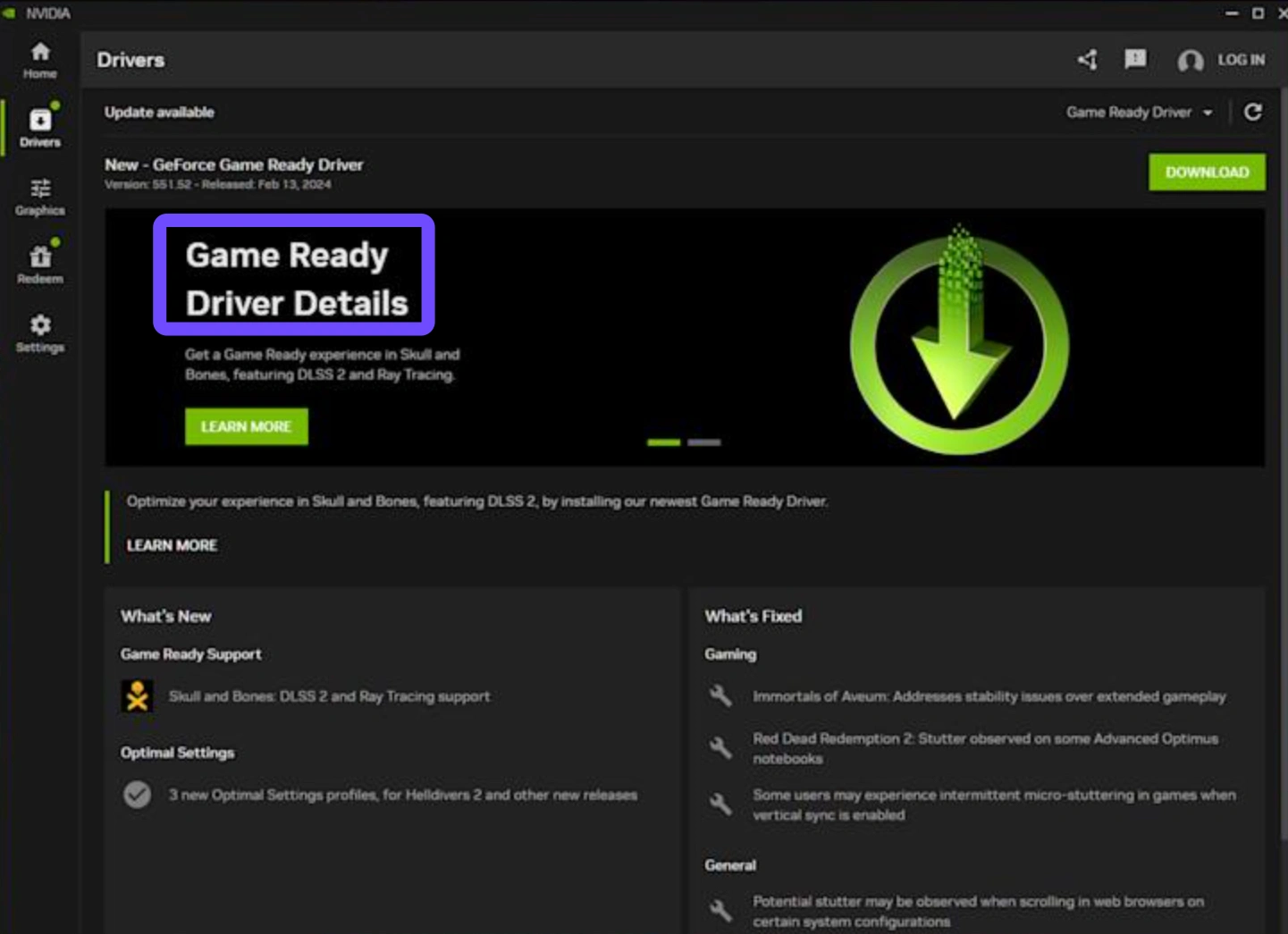
Step 3. Perform a "Clean Installation" if you continue to experience crashes to desktop.
Clear the Microsoft Store/Xbox Cache (PC)
If you are playing via PC Game Pass and the game won't open, the Store cache is likely the culprit.
Step 1. Press Win + R, type wsreset.exe, and hit Enter.
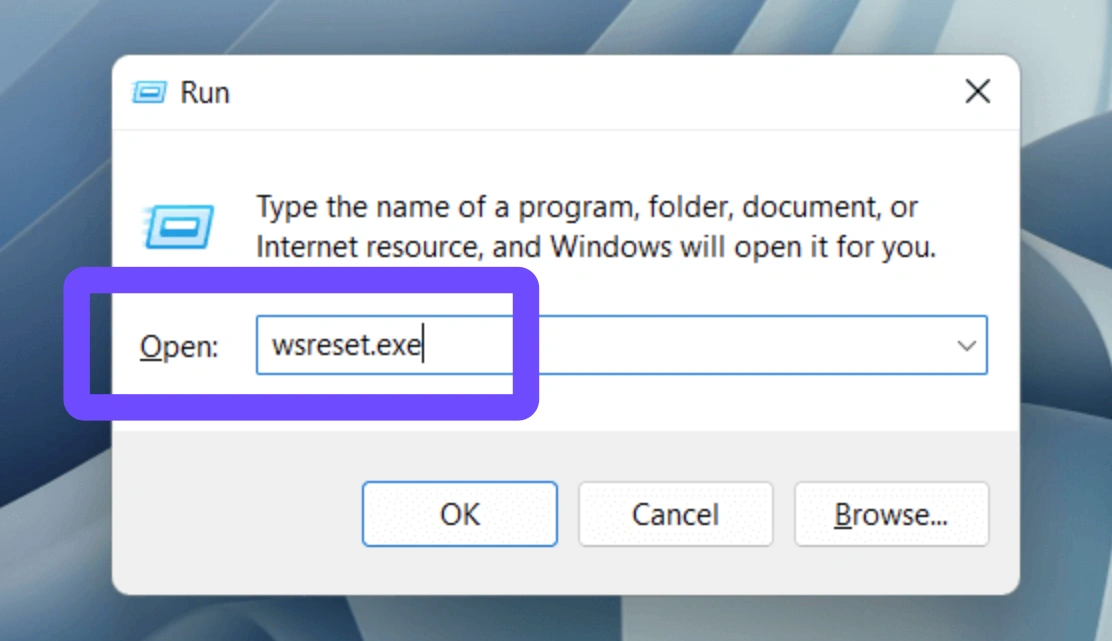
Step 2. A blank Command Prompt will appear; wait for it to close automatically and for the Store to reopen.
Step 3. Try launching FH6 again from the Xbox App.
Disable Conflicting Overlays (PC)
Third-party overlays are a notorious cause for Forza Horizon 6 not launching pc fix.
Step 1. Disable Discord Overlay, Steam Overlay, and MSI Afterburner.
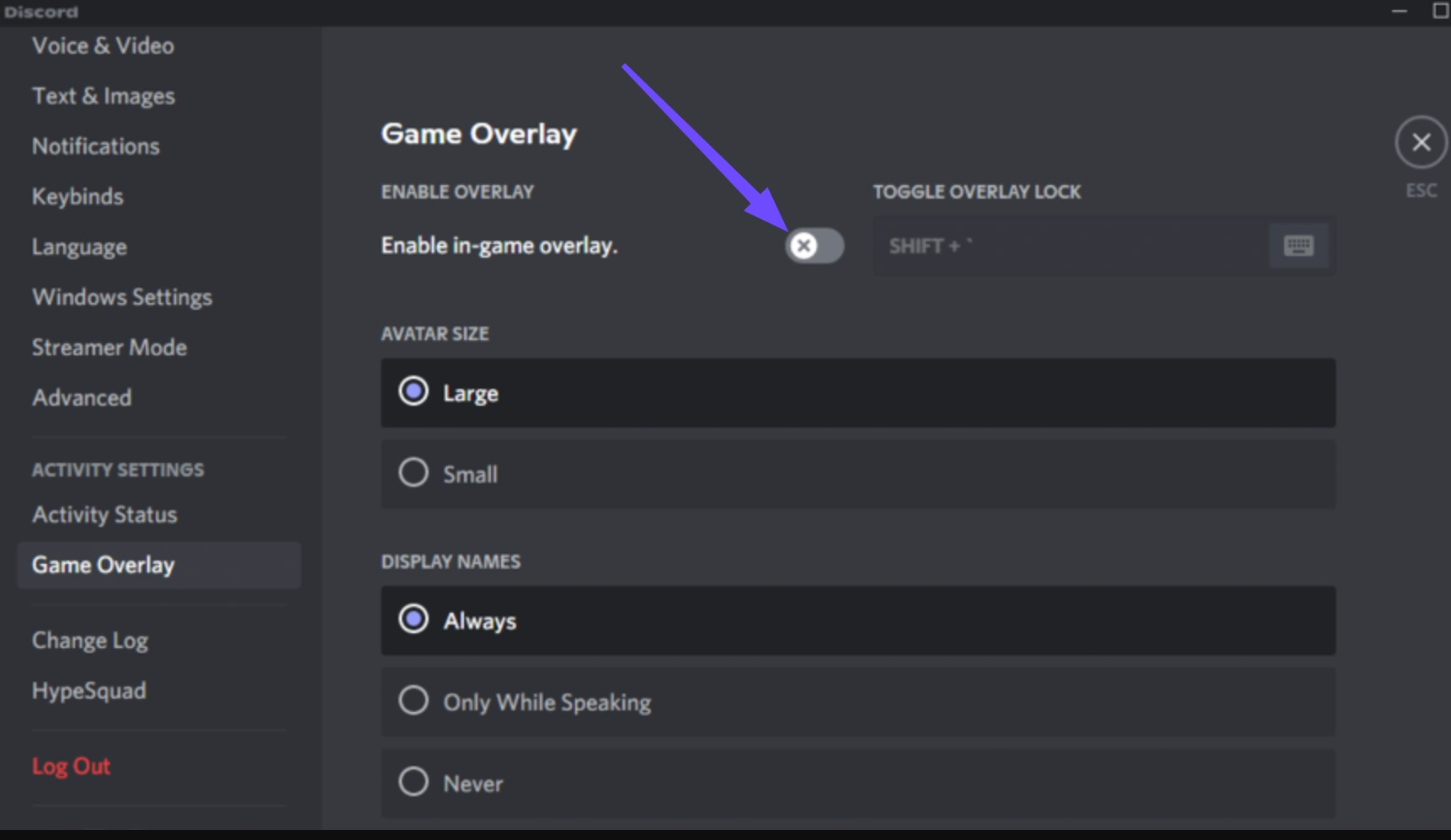
Step 2. Turn off Windows Game Mode temporarily to see if it resolves the conflict.
Step 3. Check your Antivirus "Quarantine" folder to ensure ForzaHorizon6.exe hasn't been falsely flagged.
Perform a Full Power Cycle (Xbox)
On Xbox Series X|S, the "Quick Resume" feature can sometimes corrupt the game's launch state.
Step 1. Hold the power button on the front of the console for 10 secondƒs until it shuts down.
Step 2. Unplug the power cable for 30 seconds.
Step 3. Plug it back in and restart. This clears the system cache and forces a fresh launch of the game executable.
Re-register Your Profile (Xbox)
Sometimes the "handshake" between your digital license and the console becomes corrupted, leading to Forza Horizon 6 not starting despite a perfect installation.
Step 1. Press the Xbox button to open the guide.
Step 2. Go to Profile & system, Settings, Account, and click Remove accounts.
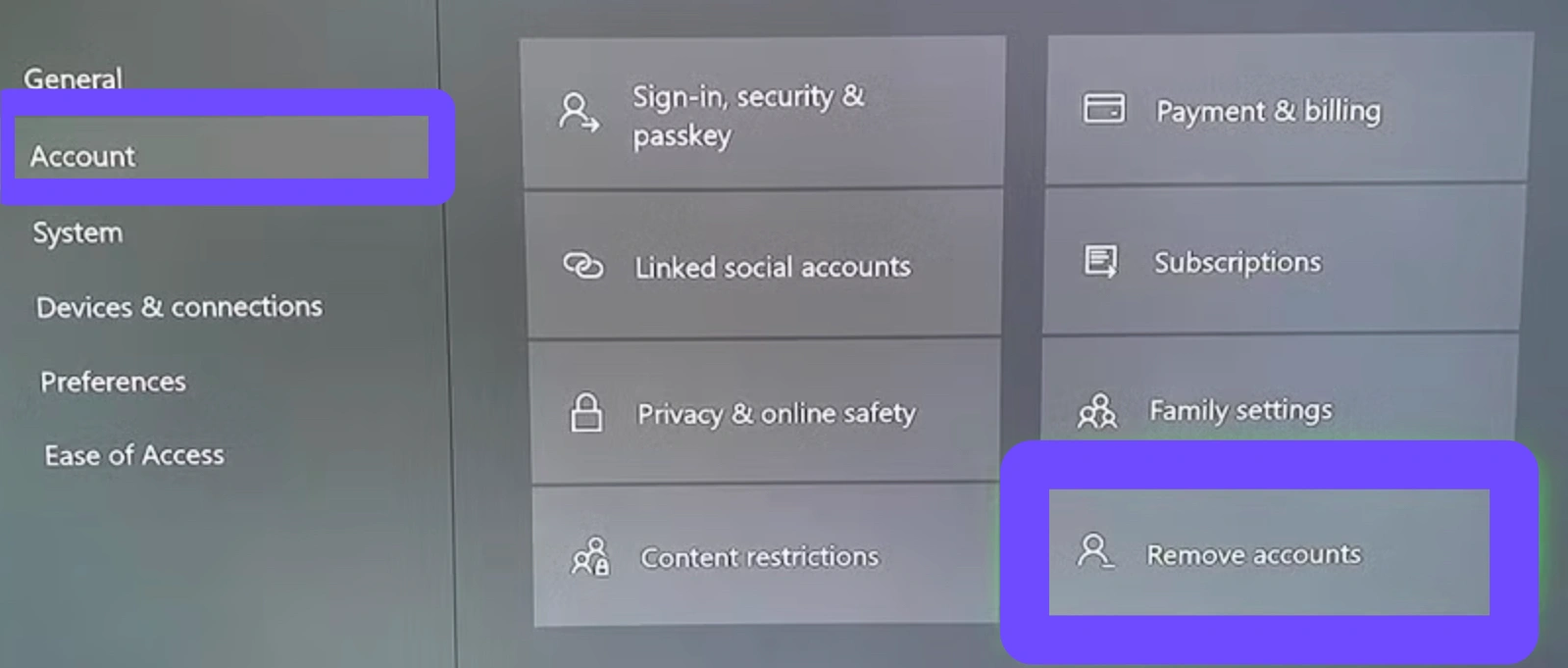
Step 3. Select the account you use for Forza Horizon 6 and choose Remove.
Step 4. Once removed, hold the power button on your console for 10 seconds to perform a hard reset.
Step 5. Turn the console back on, go back to Profile & system, and select Add or switch and select Add new.
Step 6. Sign back in with your Microsoft credentials and launch the game. This forces the system to re-verify your Game Pass or Store license from scratch.
Part 4: Forza Horizon 6 Map Location & Features
Set in the breathtaking landscape of Japan, Forza Horizon 6 features the series' most ambitious map to date. Players can explore a hyper-detailed recreation of Tokyo, featuring elevated highways (inspired by the Shuto Expressway) and iconic districts like Shibuya.
Beyond the city, the map expands into the Japanese Alps, offering snowy mountain passes perfect for "Touge" drifting, and serene rural villages filled with cherry blossoms. The new "Fog of War" mechanic encourages exploration, as the map only reveals itself as you drive through new sectors.
Part 5: Forza Horizon 6 Gameplay Tips For New Players
- Master the Touge: Night-time mountain racing is a core part of FH6. Practice your drifting early to earn massive Skill Points.
- Use Car Meets: Unlike previous games, Car Meets in Japan are social hubs. Visit them to find "Barn Find" rumors and trade liveries.
- Check the Seasons: Japan’s four seasons drastically change road grip. Winter in the Alps requires snow tires, while Summer in Tokyo is perfect for high-speed drag racing.
- Collect "JDM" Classics: Focus on unlocking Japanese Domestic Market legends like the Nissan Skyline or Toyota Supra early to dominate the Street Scene events.
Part 6: FAQs
Why is Forza Horizon 6 stuck on the loading screen?
This is usually a network synchronization issue. Use LagoFast to stabilize your connection or ensure your Xbox Live/Microsoft account is correctly signed in.
Does FH6 work on Windows 10?
Forza Horizon 6 is optimized for Windows 11. While it may run on Windows 10 (version 22H2 or later), upgrading to Windows 11 is recommended for DirectStorage support and better stability.
Is there a "Day One" patch?
Most "not launching" issues are solved by the Day One patch. Ensure your game client is fully updated (approx. 120GB) before attempting to play.
Why does FH6 crash when I use a steering wheel?
Ensure your wheel drivers (Logitech/Fanatec) are updated. Some older firmware can cause a conflict during the game's initial input-device scan.
Why does Forza Horizon 6 keep crashing on my PC?
Most crashes are caused by outdated graphics drivers or background software like antivirus programs flagging the game data streaming as suspicious.
What are the minimum requirements for Forza Horizon 6?
You generally need at least an NVIDIA GTX 1070 or AMD RX 5700, along with 8GB of RAM, though 16GB is recommended for Tokyo's dense environments.
Key Takeaways
Fixing Forza Horizon 6 not launching usually comes down to ensuring your system environment is clean and your connection is stable. By combining manual steps like updating drivers and clearing caches with the automated power of LagoFast, you can spend less time troubleshooting and more time exploring the vibrant streets of Japan.
Boost Your Game with LagoFast for Epic Speed
Play harder, faster. LagoFast game booster eliminates stutter and lags on PC, mobile, or Mac—win every match!
Quickly Reduce Game Lag and Ping!
Boost FPS for Smoother Gameplay!