
Quick Answer
If your TBH Task Bar Hero Chests are not opening, the most common cause is a full inventory or the built-in chest cooldown. To fix this, clear your backpack by synthesizing or selling items. If the issue is technical, go to Settings > Others > Steam Inventory Issue Resolved, then restart the game and refresh your mailbox. For a permanent solution to chest opening failures during AFK sessions, using the Auto AFK Assistant in LagoFast Game Booster ensures all chests are opened instantly without cooldown or inventory bottlenecks.
Introduction
Taskbar Hero (TBH) is designed to be a seamless idle experience, but nothing ruins a long AFK session like returning to a screen full of unopened chests. Whether it's a mechanical limitation of the game or a synchronization error with Steam, chest issues are the top complaint among the community. This guide dives into the "why" and "how" of fixing these blockers so you never miss a legendary drop again.

- ✅ Reduce Lag and High Ping.
✅ Boost FPS at the Same Time.
✅ Support 2000+ Popular Online Games.
✅ Change Server without Latency.
✅ Boost Game Loading Speed.
Part 1: Why Chests Are Not Opening in TBH
Part 2: Chest Cooldown Explained: The Built-in Bottleneck
Part 3: Inventory Full and Chest Opening Failure
Part 4: Steam Inventory Sync Issue: The Technical Fix
Part 5: Mailbox Refresh Delay and Missing Loot
Part 6: What to Do Before Going AFK Overnight
Part 7: How to Enhance Your Game Experience with LagoFast Game Booster
Part 8: TBH Task Bar Hero FAQs
Part 1: Why Chests Are Not Opening in TBH
The frustration of TBH Task Bar Hero Chests Not Opening usually stems from one of three areas: game mechanics, inventory management, or server-side synchronization.
Mechanically, the game imposes limits on how quickly you can open chests to prevent rapid progression. From an management perspective, the game simply stops opening chests if there is no "slot" for the loot to land in. Finally, because TBH integrates with the Steam Market, any hiccup in the connection between the game client and Steam's inventory servers can cause chests to "ghost"—appearing in your UI but refusing to open.
Part 2: Chest Cooldown Explained: The Built-in Bottleneck
Many players assume their game is bugged when, in reality, they are hitting the Chest Cooldown.
- Common Chests: These have a standard cooldown of 300 seconds (5 minutes) for the auto-open feature.
- Rare and Boss Chests: Higher-tier chests, such as those from Stage Bosses, have a 600-second (10-minute) cooldown.
- Manual vs. Auto: While you can manually click to open chests faster, the "Auto-Open" feature in the settings is strictly bound by these timers. If you are clearing stages faster than the cooldown resets, you will inevitably see a backlog of unopened chests on your taskbar.
Part 3: Inventory Full and Chest Opening Failure
The most frequent reason for TBH Task Bar Hero Chests Not Opening during long AFK sessions is a full inventory.
- The Chain Reaction: Monsters drop gear and materials directly into your backpack. Once your backpack is full, the "Auto-Open" script stops. It won't even attempt to open a chest because it cannot verify if the resulting item can be stored.
- The AFK Trap: If you leave the game running overnight without a way to clear your inventory, you might only get 30 minutes of actual loot before your backpack hits its limit. The remaining 7 hours of farming are essentially wasted as chests pile up and eventually disappear or stop dropping.
Part 4: Steam Inventory Sync Issue: The Technical Fix
Since TBH items can be traded on the Steam Market, the game must constantly sync with Steam. If you see an "Item Synchronization Error," follow these steps:
- In-Game Settings: Open the Settings menu and navigate to the Others tab.
- The "Magic" Button: Click on "Steam Inventory Issue Resolved." This button forces a re-handshake between the game and Steam.
- Restart: Close the game completely and relaunch it.
- Confirm: Upon relaunch, check your mailbox. Often, the "stuck" chests will be delivered there as a fallback measure.
Part 5: Mailbox Refresh Delay and Missing Loot
Sometimes, chests don't open because they've already been "processed" but haven't appeared in your inventory yet. This is common during high server load.
- Mailbox Fallback: If a chest fails to open due to a crash or sync error, the game attempts to send the contents to your in-game mailbox.
- The Refresh Bug: The mailbox doesn't always update in real-time. You may need to click the "Refresh" button multiple times or switch between tabs (e.g., from 'Mail' to 'Shop' and back) to force the UI to display your items.
Part 6: What to Do Before Going AFK Overnight
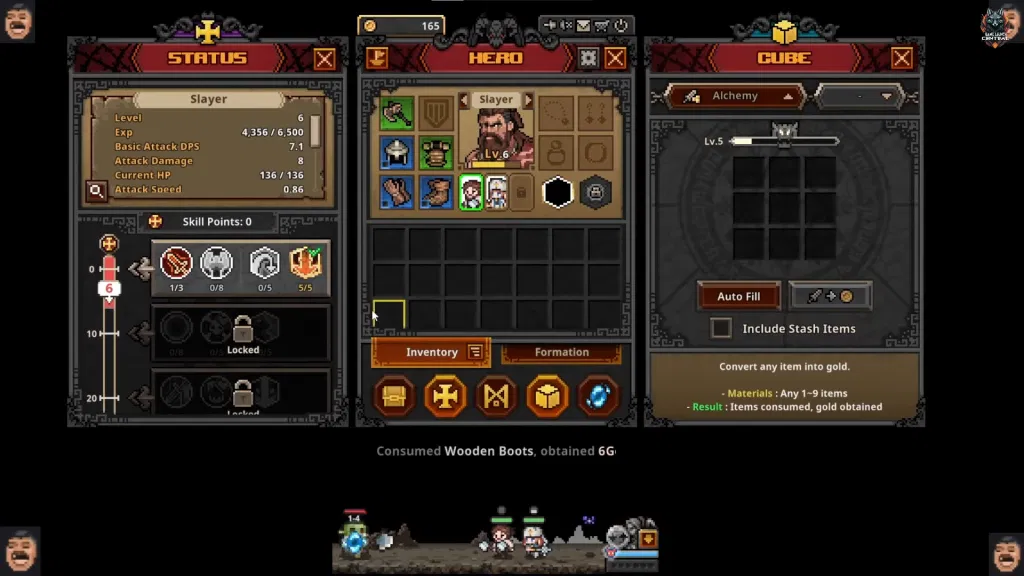
To minimize the chances of returning to a "Chests Not Opening" error, follow this pre-AFK checklist:
- Clear Backpack: Synthesize all low-level gear into higher tiers to maximize free slots.
- Warehouse Dump: Move all non-essential materials to your warehouse.
- Check Connection: Ensure your Steam status is "Online." If Steam goes into maintenance mode, your chests will stop opening.
- Set Auto-Retry: Ensure the auto-retry toggle is active so your hero doesn't get stuck on a defeat screen.
Part 7: How to Enhance Your Game Experience with LagoFast Game Booster
When chest opening issues and inventory bottlenecks start stacking up during long AFK sessions, the core problem is usually not just game mechanics, but overall session stability—things like connection consistency, background syncing, and how efficiently the game handles continuous drops over time. Improving these areas can make the entire experience smoother, and this is where a tool like LagoFast Game Booster comes in.
Rather than only focusing on single functions, it provides a broader optimization layer: it helps stabilize the connection to game servers, reduce lag spikes, and streamline repetitive in-game processes that normally require manual handling. On top of that, it includes an Auto AFK Assistant designed to manage routine gameplay tasks in a more automated way.
Detailed Steps to Use LagoFast Auto AFK Assistant:
Step 1: Click the Free Trial button to download and install LagoFast.
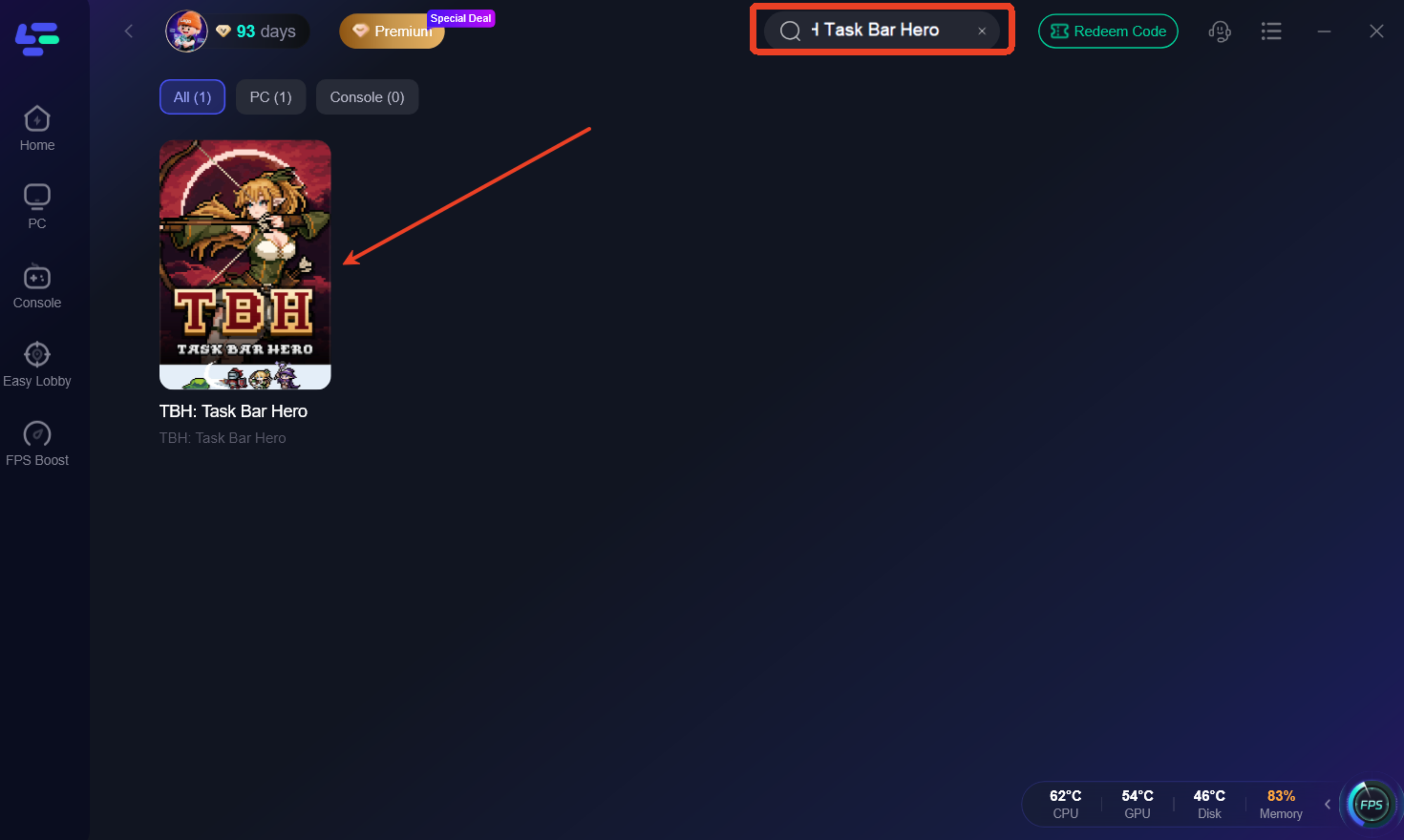
Step 2: Open LagoFast, then click the PC button on the left, search for TBH: Taskbar Hero Tracker in the search bar, and click it after it appears.
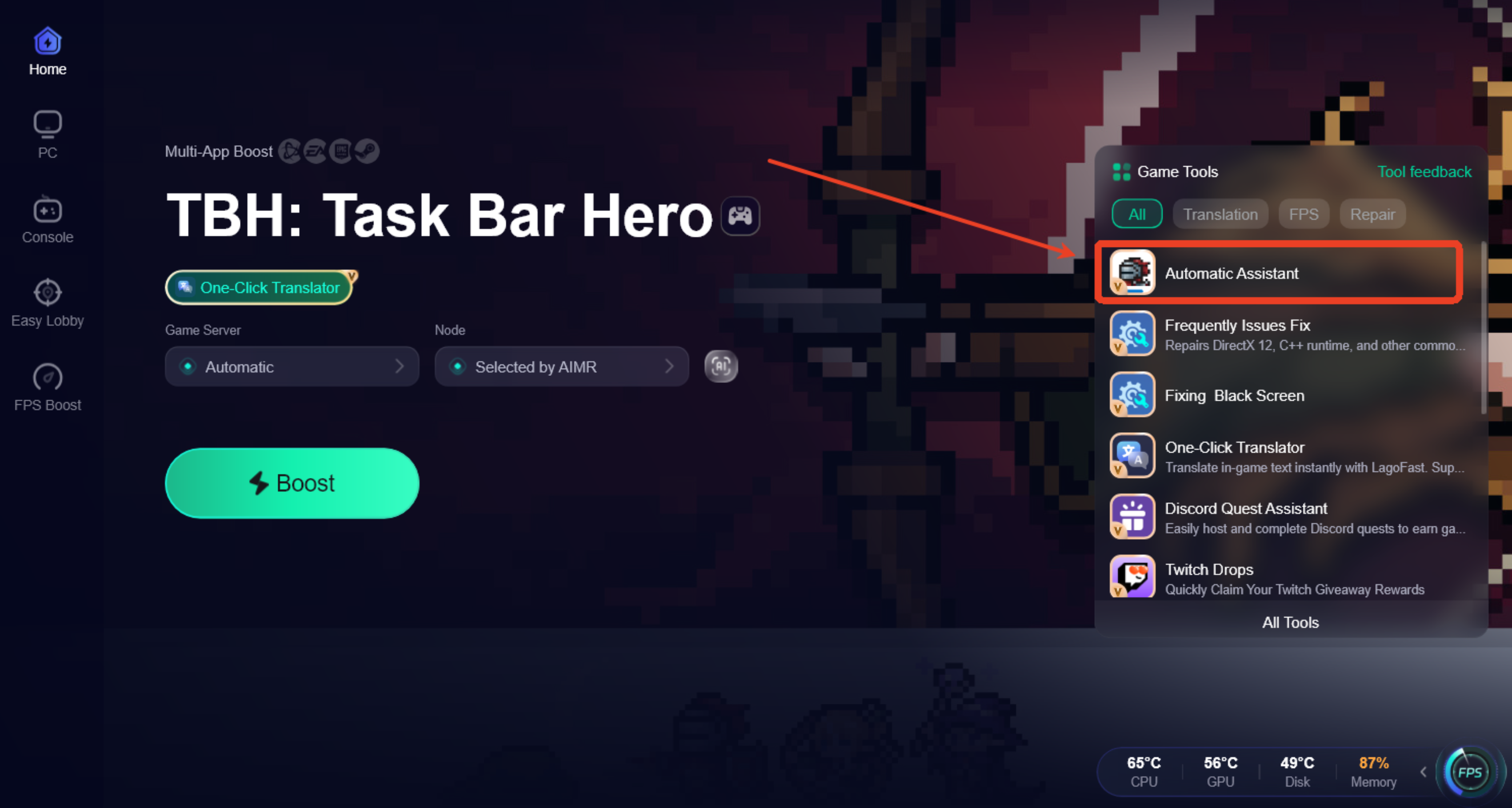
Step 3. Click the Automatic Assistant icon in the Game tool Section.
Step 4. Launch the Auto AFK Assistant, and the assistant will sync with your active portal session and begin managing your cooldowns, chest openings, and storage automatically.
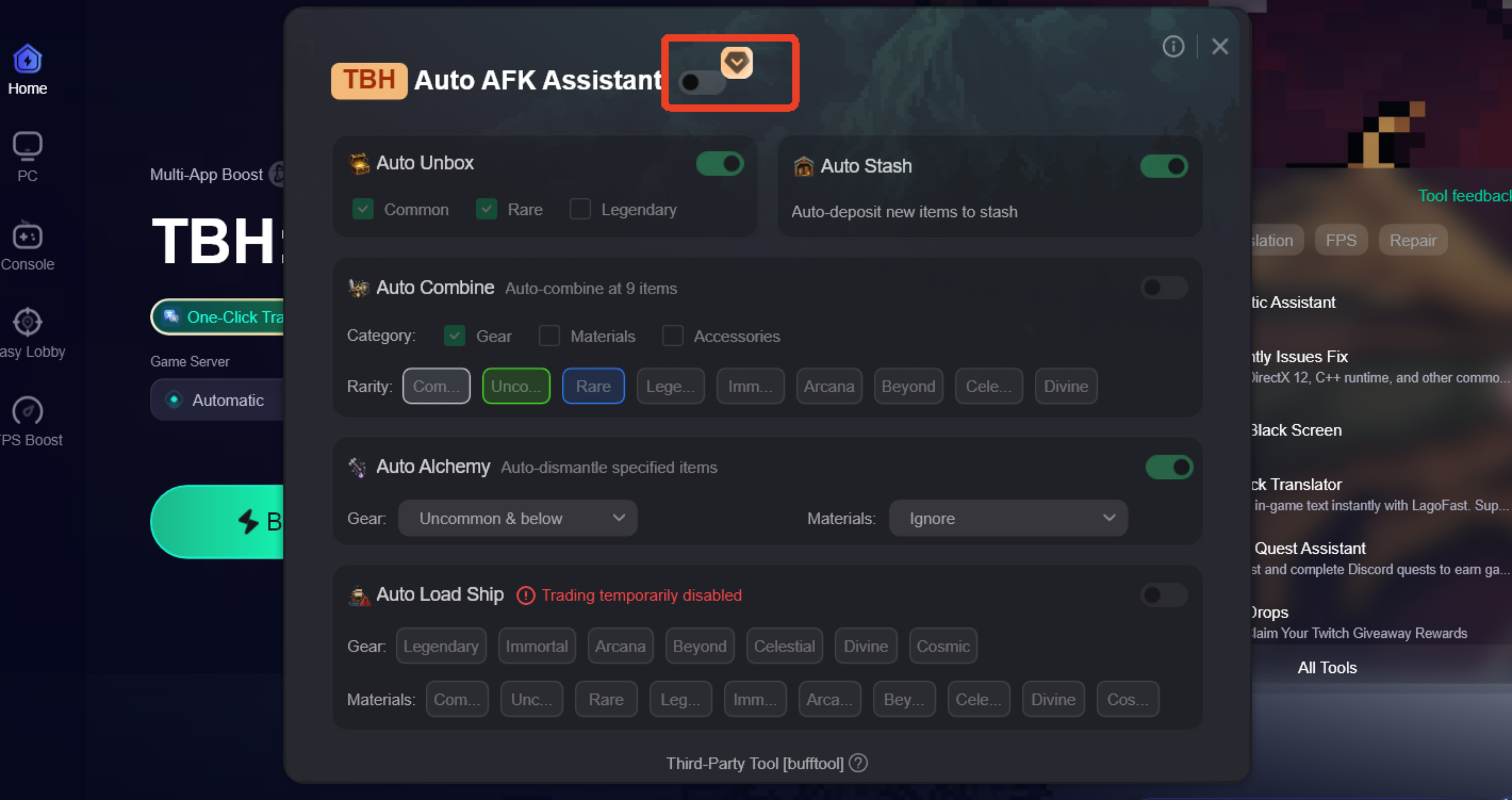
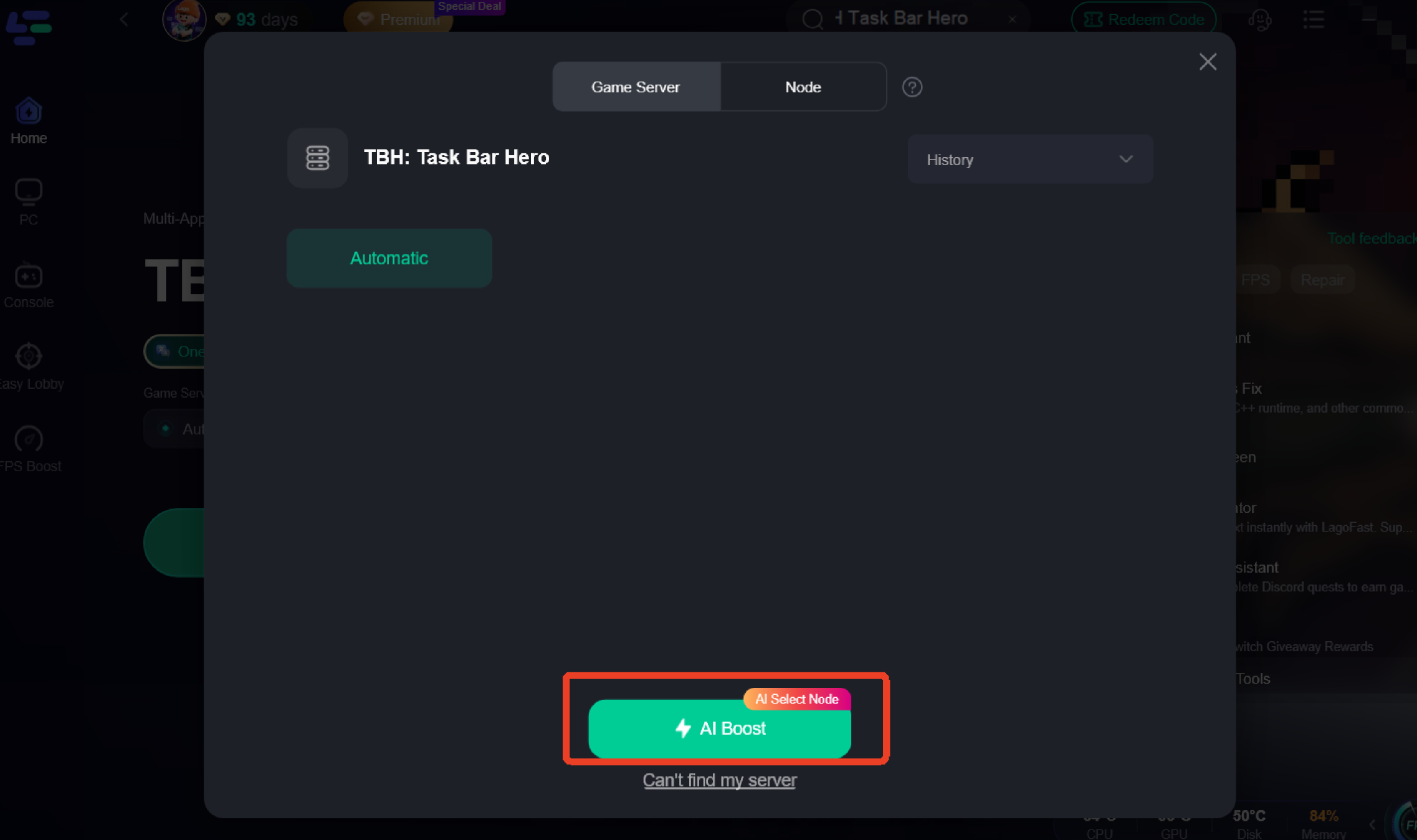
Step 5: Go back to the main interface and click on Server to change to a better server that ensures a better gaming experience, then click on Boost to fix TBH: Taskbar Hero Tracker lag and stuttering.
Step 6: Check the specific game ping, packet loss, and multiple path connections on the right side. Finally, click “Start Game” to play the game.
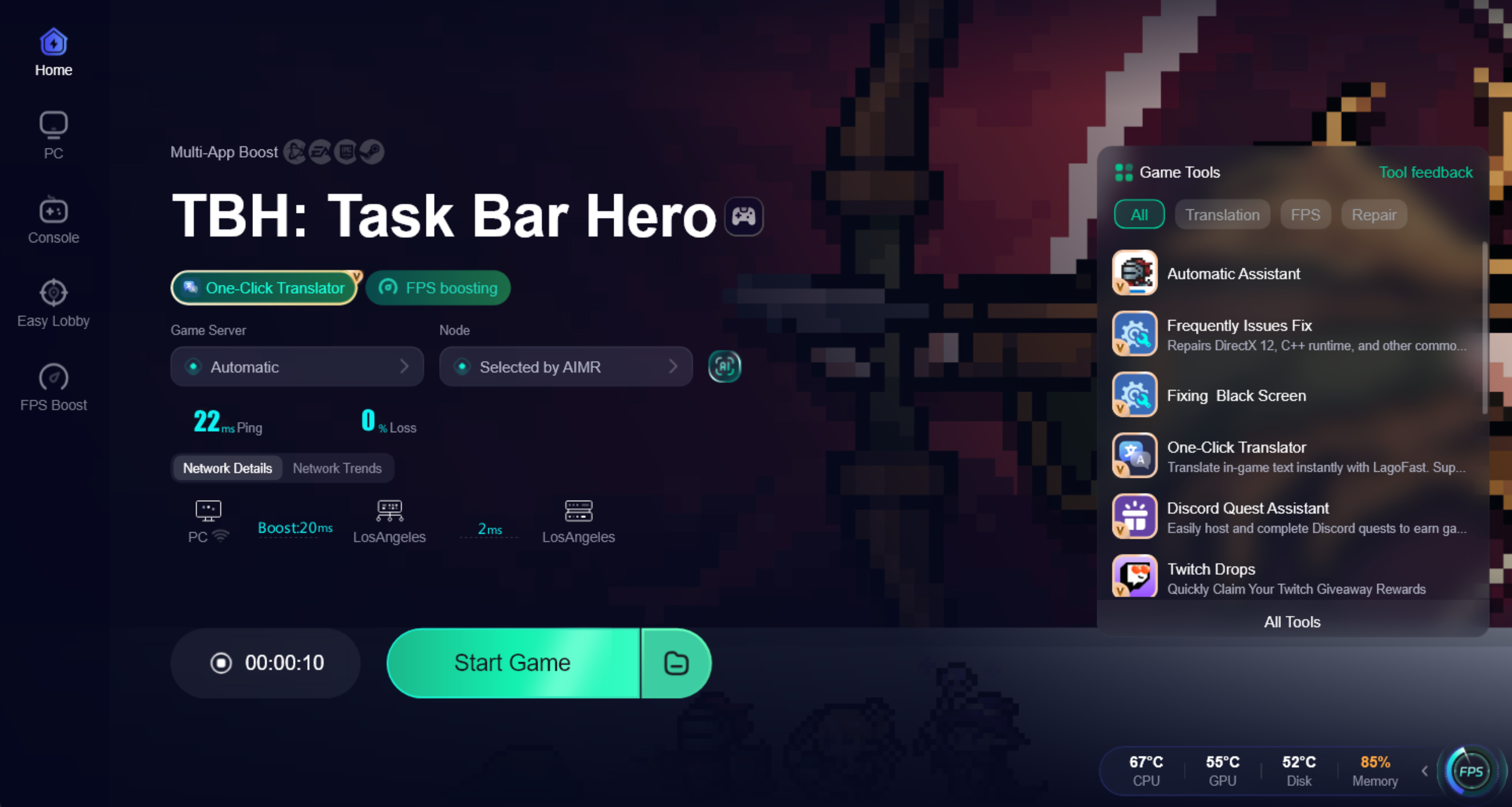
After completing the above settings, you can check real-time network performance on the right panel, including ping, packet loss, and multi-path connection status. This helps confirm whether your current route is stable and suitable for long AFK sessions. Once everything looks stable, click Start Game to enter the game and enjoy an optimized experience.
In the end, tools like LagoFast are not only useful for automation features, but also for improving overall connection stability during gameplay. By optimizing routing paths and reducing lag spikes, it helps ensure smoother data transmission and fewer interruptions, which ultimately leads to a more stable and consistent gaming experience during extended play sessions
Part 8: TBH Task Bar Hero FAQ
Why are my chests disappearing instead of opening?
If your inventory is full and you leave the game for too long, the game may stop rendering old chests to save memory, or they may be lost due to a sync timeout with Steam.
Can I open Legendary chests automatically?
The base game's auto-open feature often struggles with Legendary and Immortal chests. Using a tool like the LagoFast Auto AFK Assistant is the only reliable way to automate high-tier chest opening.
How many slots do I need for an 8-hour AFK session?
Without automated synthesis, you would need hundreds of slots. With Auto Synthesis, you can survive an 8-hour session with as few as 20-30 free slots.
What does "Steam Inventory Issue Resolved" actually do?
It clears the local cache of your Steam inventory and requests a fresh list from Valve's servers, which fixes most "ghost chest" issues.
Is using LagoFast safe for my Steam account?
Yes. LagoFast's tools work as an external assistant and do not modify the game's executable or violate Steam's Terms of Service. It is used by millions of players to optimize their gaming experience.
Key Takeaways
- Inventory is Priority: A full backpack is the #1 cause of chest opening failure.
- Respect the Cooldown: Understand that the built-in auto-open has a 5-10 minute timer.
- Sync Regularly: Use the "Steam Inventory Issue Resolved" button if you see errors.
- Automate for Success: Use LagoFast's Auto AFK Assistant to bypass cooldowns and manage your inventory automatically.
- Check the Mail: Always check your mailbox after a restart if chests seem missing.
By following these fixes, you can ensure that your TBH Task Bar Hero journey is productive, profitable, and—most importantly—uninterrupted.
Boost Your Game with LagoFast for Epic Speed
Play harder, faster. LagoFast game booster eliminates stutter and lags on PC, mobile, or Mac—win every match!
Quickly Reduce Game Lag and Ping!
Boost FPS for Smoother Gameplay!