
Quick Solutions to Fix Forza Horizon 6 Lag
If you’re stuck in the middle of a race in Tokyo and need a fix right now, here are the top three most effective ways to stop the lag:
- The All-in-One Solution: Use LagoFast Game Booster. It automatically handles route optimization, reduces server desync (teleporting), and boosts FPS with a single click across PC and Xbox.
- Wired Connection: Ditch the Wi-Fi. A Cat6 Ethernet cable is the fastest way to eliminate packet loss and "teleporting" issues.
- DNS Flush (PC) or MAC Reset (Xbox): Clearing your network cache can instantly stabilize a shaky connection to the Forza servers.
Introduction
The neon-soaked streets of Tokyo in Forza Horizon 6 are breathtaking, but nothing kills the immersion faster than seeing your rival’s car teleport across the Shinjuku highway. Whether you are dealing with "ghost hits" where your inputs don't register or massive frame stutters, lag is the ultimate enemy of the Horizon Festival. In this guide, we will break down exactly why Forza Horizon 6 lag issues happen and provide a step-by-step roadmap to achieving a buttery-smooth racing experience.

- ✅ Reduce Lag and High Ping.
✅ Boost FPS at the Same Time.
✅ Support 2000+ Popular Online Games.
✅ Change Server without Latency.
✅ Boost Game Loading Speed. - ✅ Fix Disconnection Issues
Part 1: What “Lag” Actually Means in Forza Horizon 6
Part 2: How to Fix Forza Horizon 6 Lagging - Standard Fixes
Part 3: Why Standard Fixes Often Fail
Part 4: The Ultimate Solution: Optimizing with LagoFast
Part 5: Pro Game Tips for Newbies
Part 1: What “Lag” Actually Means in Forza Horizon 6
In Forza Horizon 6, “lag” does not simply mean choppy visuals. Many newcomers confuse low FPS (stuttering graphics) with lag, but in reality, true “lagging” is primarily a network synchronization issue.
The Core of Lag (Key Point)
Lag = your actions are not synchronized with the game server, not a lack of GPU performance.
When data transmission between your device and the server becomes unstable, various issues start to appear.
Common Signs of Network Lag
- “Teleporting” effect: other players’ cars jump forward or backward suddenly
- Input delay: drifting, accelerating, or activating skills feels delayed
- Server correction: your screen shows smooth driving, but the game suddenly snaps you back to a different position
These are all caused by latency, packet loss, or jitter—not graphics performance.
Common Misconceptions
- Lowering graphics will fix everything → ineffective for network lag
- Assuming your GPU is too weak → often unrelated
- Focusing only on FPS → stable FPS does not mean stable connection
Tips for New Players
- If menus are smooth but cars are teleporting, check your network first
- If visuals are choppy without teleporting, then adjust graphics settings
- Use a wired connection whenever possible to reduce instability
In short:
Stuttering visuals = performance issue (FPS)
Teleporting/delay = network issue (lag)
Understanding this distinction is essential for applying the right fixes.
Part 2: How to Fix Forza Horizon 6 Lagging - Standard Fixes
Depending on whether you are tearing up the asphalt on a high-end PC or an Xbox Series X/S, the solutions will vary. Here are four detailed methods to stabilize your performance.
For PC Players
Optimize Windows Network Priority
Windows often treats game data the same as a background Windows Update. You need to force your PC to prioritize Forza.
Step 1. Open Task Manager (Ctrl + Shift + Esc) while the game is running.
Step 2. Go to the Details tab and find ForzaHorizon6.exe.
Step 3. Right-click it, select Set Priority, and choose High.
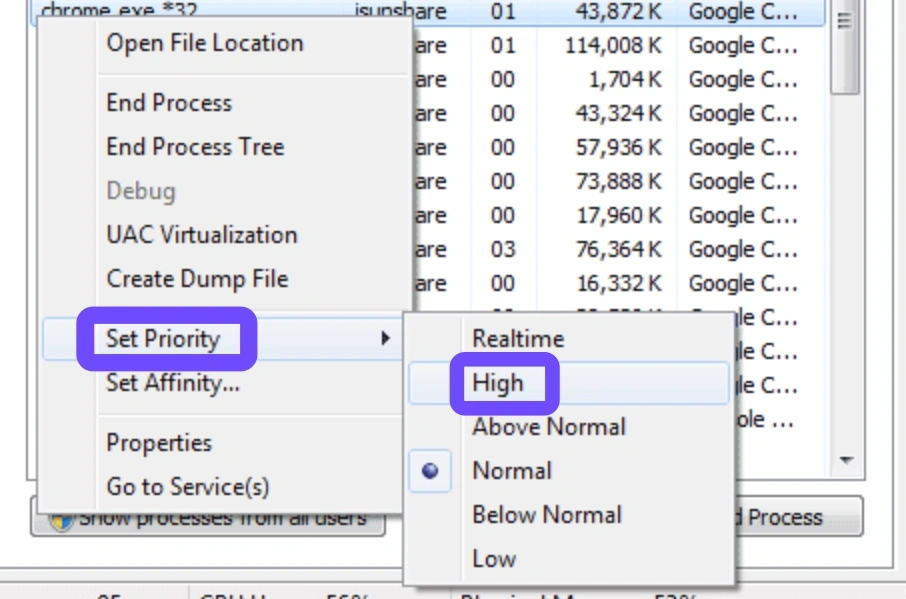
Note: Avoid "Realtime," as it can cause system instability.
Flush DNS and Reset IP Stack
Step 1. Old cache data can cause "routing loops" that increase your ping.
Step 2. Type cmd in the Windows Search bar and run it as Administrator.
Step 3. Type ipconfig /flushdns and hit Enter.
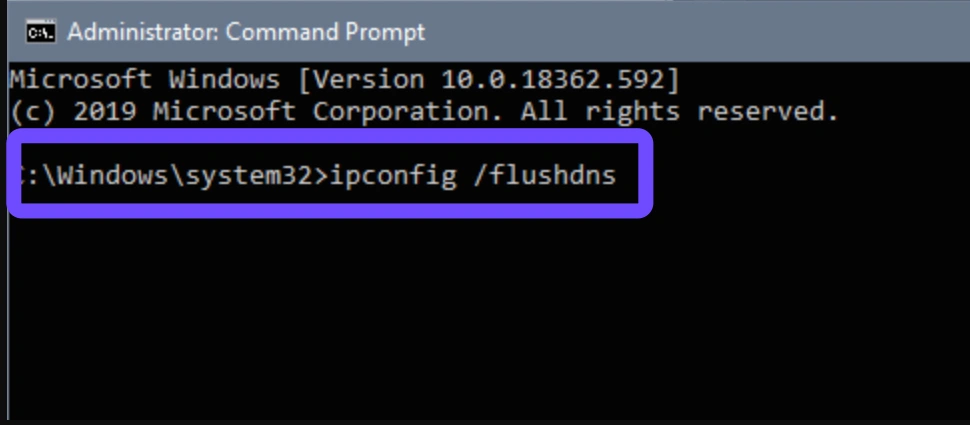
Step 4. Type netsh int ip reset and hit Enter.
Step 5. Restart your PC and launch the game via the Xbox App.
For Xbox Players
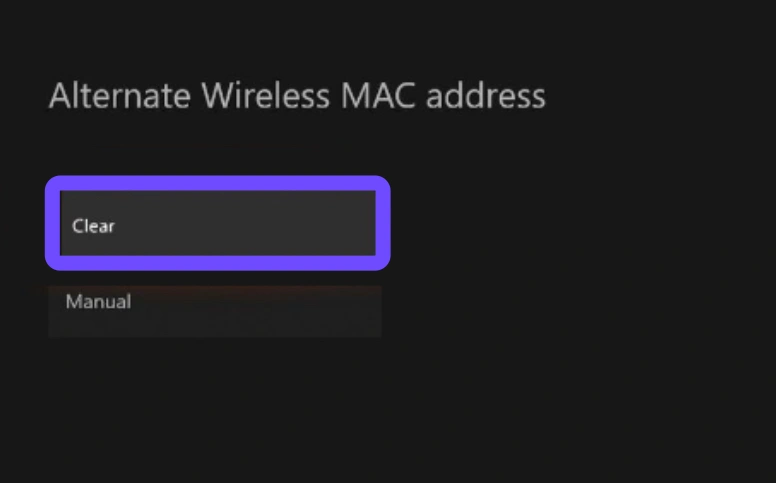
Clear Alternate MAC Address
This is a classic Xbox fix that refreshes your network identification and can resolve "Strict NAT" issues that cause lagging in multiplayer.
Step 1. Press the Xbox button and go to Settings.
Step 2. Select General and click Network Settings.
Step 3. Choose Advanced Settings and select Alternate MAC Address.
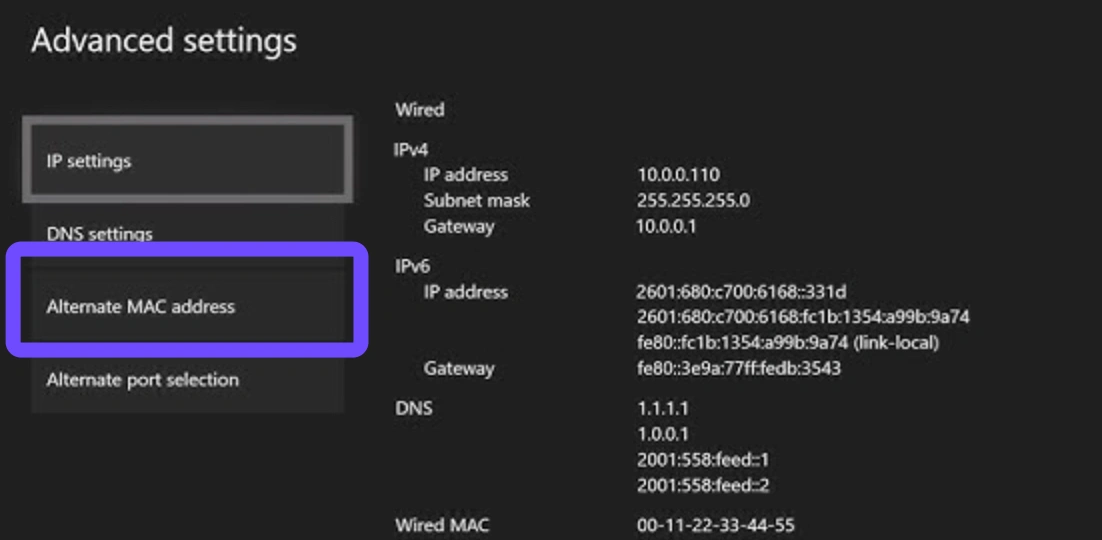
Step 4. Select Clear and allow the console to restart.
Change to a Public DNS (Google or Cloudflare)
Standard ISP DNS servers are often slow and contribute to high latency.
Step 1. In Network Settings, go to Advanced Settings and select DNS Settings.
Step 2. Select Manual.
Step 3. Enter 8.8.8.8 for Primary and 8.8.4.4 for Secondary (Google DNS).
This often provides a more direct path to Microsoft’s gaming servers.
Part 3: Why Standard Fixes Often Fail
You can have the fastest fiber-optic internet in the world and still experience Forza Horizon 6 lag. Why? Because the internet is like a highway system. Standard fixes only check your "car" (your device) and your "driveway" (your router). They don't account for the traffic jams (congestion) and broken roads (poor routing) on the way to the Forza servers.
If your ISP is routing your data through three different cities before it reaches the game server, your ping will remain high regardless of your hardware. This is where specialized gaming network technology becomes a necessity.
Part 4: The Ultimate Solution: Optimizing with LagoFast
When standard troubleshooting isn't enough, LagoFast is the professional-grade tool designed to bridge the gap. Unlike a standard VPN that can actually increase latency by adding encryption layers, LagoFast is a dedicated game booster that finds the shortest, most stable path to the Forza Horizon 6 servers.
It serves as the best solution for racers because it addresses both sides of the coin: network stability and hardware performance. By using its global network of dedicated gaming nodes, LagoFast bypasses ISP throttling and regional congestion, effectively ending the "teleportation" and desync issues that plague high-speed races.
Key Features of LagoFast:
- FPS Boost: Automatically fine-tunes your system settings and GPU resources to ensure maximum frame rates in dense areas like Tokyo.
- Cross-Device Support: Whether you are on PC or using the LagoFast Box for Xbox, you get the same premium optimization.
- Multipath Connection: It uses multiple data paths simultaneously to ensure that if one route fails, you don't disconnect.
- Real-time Ping Monitoring: See exactly how your connection is performing and switch to the fastest node with one click.
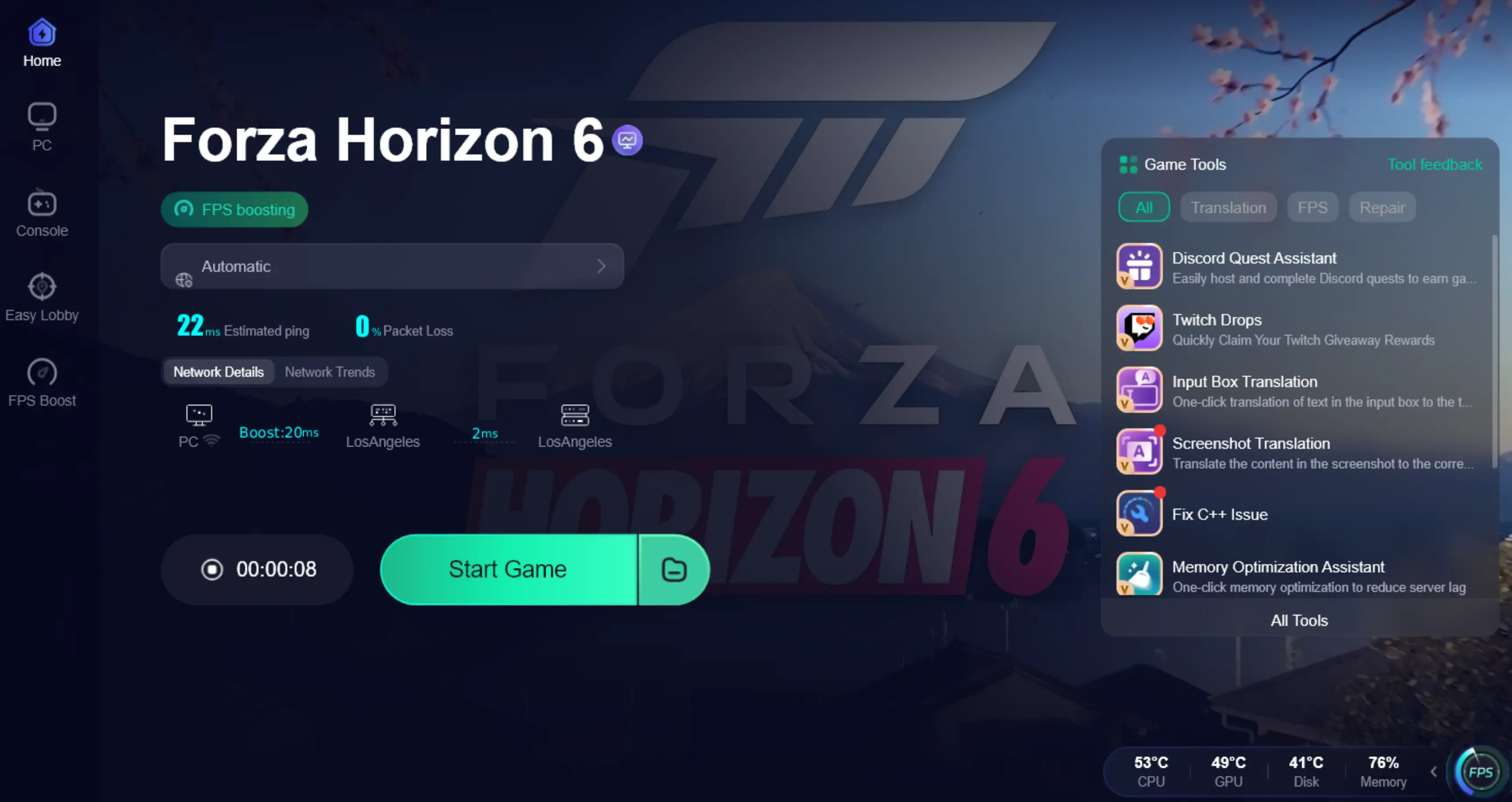
Tutorial to Use LagoFast to Fix FH6 Lag:
Step 1: Click the Free Trial button to download and install LagoFast.
Step 2: After installation, search "Forza Horizon 6" in the search bar and select the game.

Step 3: Choose your preferred server node and click "Smart Boost" to start optimizing.

Step 4: Launch your game and enjoy smooth, optimized gameplay with lower ping and no stutter.
Part 5: Pro Game Tips for Newbies
If you are a "Tourist" just arriving at the Horizon Festival, keep these tips in mind to avoid common pitfalls:
- Don't Over-Tune Early: A common mistake is taking a C-class car and immediately bumping it to S2. This makes the car uncontrollable and prone to physics-based "lag" (where the game engine struggles to calculate high-speed collisions).
- Learn the Map in B-Class: The streets of Tokyo are tight and vertical. Start with a nimble, lower-class car to learn the braking points before jumping into a hypercar.
- Finish the Qualifiers: Before you worry about your online rank or lag in competitive modes, finish the Horizon Invitational qualifiers to unlock the full stability of the game's progression system.
Part 6: FAQs
Why is my car teleporting in Forza Horizon 6?
This is caused by high packet loss or "jitter." Your connection isn't sending data fast enough, so the server has to "guess" where you are and then snap you back to the correct position.
Will lowering my graphics fix the lag?
Only if the lag is actually "stuttering" (low FPS). If players are teleporting but your menus are smooth, it’s a network issue, not a graphics issue.
Does Forza Horizon 6 require an "Always-Online" connection?
While you can play offline, the "Horizon Life" features and Drivatars require a stable connection to sync with the cloud.
Can I fix Xbox lag without a PC?
Yes, you can use a LagoFast Box or configure your router's DNS and NAT settings to "Open" to improve console performance.
What is a good ping for Forza Horizon 6?
Ideally, you want a ping under 50ms. Once you cross 100ms, you will start to see significant desync and "ghost" collisions in multiplayer.
Is Forza Horizon 6 more demanding than Horizon 5?
Yes, due to the dense urban environments of Tokyo, it requires more VRAM and a faster SSD for asset streaming.
Key Takeaways
- Identify the lag type: Distinguish between network ping (teleporting) and low FPS (choppy visuals).
- PC Users: Clear your Xbox Identity Provider cache and use DLSS/FSR.
- Xbox Users: Change your DNS to 8.8.8.8 and clear your MAC address.
- The Best Fix: Use LagoFast as an all-in-one tool to handle both network stability and FPS optimization.
- Hardware: Ensure the game is installed on an SSD to prevent streaming-related stutters.

Boost Your Game with LagoFast for Epic Speed
Play harder, faster. LagoFast game booster eliminates stutter and lags on PC, mobile, or Mac—win every match!
Quickly Reduce Game Lag and Ping!
Boost FPS for Smoother Gameplay!