
Forza Horizon 6 has finally arrived, transporting players to the breathtaking, neon-lit landscapes of Japan. The promise of high-speed races through bustling cityscapes and serene countryside is an exhilarating prospect. However, for many PC players, this excitement is often overshadowed by frustrating performance issues, ranging from consistently low frame rates to sudden, jarring FPS drops and stutters. These technical hiccups can transform a visually stunning racing experience into a choppy, unresponsive mess, severely impacting immersion and competitive edge. This comprehensive guide is designed to help you diagnose and resolve the most common performance problems in Forza Horizon 6, ensuring you can enjoy the Horizon Festival as it was meant to be played: smoothly and without interruption.

- ✅ Reduce Lag and High Ping.
✅ Boost FPS at the Same Time.
✅ Support 2000+ Popular Online Games.
✅ Change Server without Latency.
✅ Boost Game Loading Speed.
Part 1. Understanding the Difference: Low FPS vs. FPS Drops in Forza Horizon 6
Part 2. Why is Forza Horizon 6 FPS Suddenly Dropping on PC?
Part 3. Fix Forza Horizon 6 FPS Drop/Low FPS On PC: The Essential Checklist
Part 4. How to Fix FPS Drops & Stuttering Forza Horizon 6 (Advanced Methods)
Part 5. Forza Horizon 6 Max FPS Guide: Pro Tips for Newcomers
Part 6. How to Enhance Your Game Experience with LagoFast Game Booster
Part 1. Understanding the Difference: Low FPS vs. FPS Drops in Forza Horizon 6
Before diving into solutions, it is crucial to differentiate between two distinct, yet often conflated, performance issues: Low FPS and FPS Drops/Stuttering. Understanding which problem you are facing is the first step toward an effective fix.
|
Feature |
Low FPS |
FPS Drops / Stuttering |
|
Symptom |
Consistently low frame rate (e.g., always 30-40 FPS) |
Sudden, erratic dips in frame rate (e.g., from 90 FPS to 30 FPS for a moment) |
|
Primary Cause |
Insufficient hardware for chosen settings, or overly demanding graphics settings |
Background processes, VRAM overflow, CPU bottlenecks, thermal throttling, shader compilation |
|
Feel |
The game feels generally "heavy" or "slow" |
The game feels "choppy," "jittery," or experiences momentary freezes |
|
Impact |
Reduced fluidity, slower reactions |
Disrupted immersion, missed inputs, competitive disadvantage |
|
Best Fix |
Lower graphics settings, upgrade hardware |
Optimize background tasks, manage VRAM, check thermals, use game boosters |
Low FPS indicates that your system simply cannot maintain a high frame rate with the current game settings. This is often a hardware limitation or an aggressive graphics configuration. FPS Drops and Stuttering, on the other hand, occur when your frame rate is generally good but experiences sudden, unpredictable dips or hitches. These are typically caused by temporary bottlenecks or resource contention within your system.
Part 2. Why is Forza Horizon 6 FPS Suddenly Dropping on PC?
Forza Horizon 6, built on a demanding engine, can be particularly susceptible to sudden FPS drops due to how it interacts with your PC’s hardware and software environment. The most common causes include the following:
Shader Compilation
A frequent issue in modern games, including Forza titles. The game compiles shaders in the background during gameplay, especially when entering new areas or after updating graphics drivers. Until this process finishes, you may experience noticeable stuttering, often called “shader stutter.”
VRAM Overload
Using very high texture settings (such as “Extreme”) on a GPU with limited VRAM (for example, 8GB when 12GB is recommended) can overload memory. When this happens, the game starts transferring data to system RAM, causing severe FPS spikes and stuttering.
CPU Bottlenecks
Even with a strong GPU, a weaker CPU can limit performance. If a single CPU core reaches 100% usage while others remain underutilized, the GPU has to wait for instructions. This results in frame delivery interruptions, especially in dense environments or large in-game events.
Background Bloat
Overlays from apps like Discord, Steam, or the Xbox Game Bar, along with heavy background programs such as web browsers or recording tools, can consume CPU and RAM resources. This competition can disrupt frame timing and cause micro-stutters, even if your average FPS is high.
Additionally, high polling rate gaming mice (e.g., 8000Hz) can put extra strain on the CPU by generating excessive input data, which may lead to stuttering during fast movements.
Part 3. Fix Forza Horizon 6 FPS Drop/Low FPS On PC: The Essential Checklist
Before diving into complex technical tweaks, every PC racer should ensure their foundational setup is optimized. These essential steps address the most common "low-hanging fruit" that can significantly improve your Forza Horizon 6 performance.
Thermal Management and Hardware Health
Forza Horizon 6 is a demanding title that pushes both your CPU and GPU to their limits. If your components get too hot, they will automatically "throttle" or downclock to prevent damage, leading to massive FPS drops. Ensure your PC has adequate airflow, clean out any dust from your fans, and monitor your temperatures using tools like MSI Afterburner. If your GPU is consistently hitting 85°C+ or your CPU is reaching 90°C+, you likely have a thermal issue that needs addressing.
In-Game Graphics Optimization
Certain settings in Forza Horizon 6 are notorious "FPS Killers" that offer diminishing visual returns for their performance cost. To stabilize your frame rate, consider the following adjustments:
- Shadow Quality: This is heavily dependent on the CPU. Lowering this from "Extreme" to "Ultra" or "High" can significantly reduce stuttering in dense city areas.
- Environment Geometry: This setting affects the complexity of the world. Reducing it can help alleviate CPU bottlenecks during high-speed driving.
- Ray Tracing: While visually impressive, Ray Tracing is extremely taxing on VRAM and GPU power. For the smoothest competitive experience, it is often best to keep this off outside of "Photo Mode."
- Texture Quality: Ensure this matches your GPU's VRAM capacity. If you have 8GB of VRAM, avoid "Extreme" textures to prevent the stuttering caused by VRAM swapping.
System-Level Maintenance
Always ensure your graphics drivers (NVIDIA or AMD) are up to date, as manufacturers often release specific optimizations for new titles like FH6. Additionally, ensure your Windows Power Plan is set to "High Performance" or "Ultimate Performance." The default "Balanced" mode can sometimes cause the CPU to downclock mid-race to save power, resulting in sudden performance dips.
Part 4. How to Fix Fps Drops & Stuttering Forza Horizon 6 (Advanced Methods)
If the basic checklist doesn't resolve your issues, it's time to look at more advanced technical solutions that target the root causes of frame timing inconsistencies.
Process Priority and CPU Load
Windows sometimes deprioritizes game processes in favor of background tasks. You can manually override this by opening the Task Manager (Ctrl+Shift+Esc), going to the "Details" tab, right-clicking ForzaHorizon6.exe, and setting the priority to "High." This ensures the game gets the CPU cycles it needs. Furthermore, if you notice your CPU hitting 100% load frequently, consider limiting your maximum frame rate to a value your CPU can consistently handle. This prevents the "peak load" spikes that cause jarring stutters.
Shader Cache Optimization
To combat "Shader Stutter," you can increase the size of your shader cache in your GPU's control panel. For NVIDIA users, go to the NVIDIA Control Panel -> Manage 3D Settings -> Shader Cache Size, and set it to 10GB or "Unlimited." This prevents the system from constantly deleting and re-compiling shaders, which is a major cause of hitching when entering new areas of the map.
Correct Frame Delivery: V-Sync vs. G-Sync
For the smoothest experience, you should avoid using traditional V-Sync in the game menu, as it can introduce input lag and cause stuttering if your frame rate drops even slightly below your monitor's refresh rate. Instead, if you have a G-Sync or FreeSync compatible monitor, enable it in your GPU control panel and turn off V-Sync in the game. This allows your monitor to synchronize its refresh rate with the game's actual output, eliminating tearing and smoothing out minor FPS fluctuations.
Part 5. Forza Horizon 6 Max FPS Guide: Pro Tips for Newcomers
Achieving the highest possible FPS isn’t just about having powerful hardware—it’s about using that hardware efficiently. Many new players assume “Ultra” settings are necessary for the best experience, but in practice, a balanced mix of High and Ultra settings often delivers nearly identical visuals with significantly smoother performance and better responsiveness.
One commonly overlooked factor is RAM configuration. Make sure XMP (Intel) or DOCP (AMD) is enabled in your BIOS so your memory runs at its rated speed. The Forza series is particularly sensitive to memory bandwidth, and faster RAM can noticeably improve minimum FPS, which has a big impact on overall smoothness.
It’s also worth checking your BIOS settings for Resizable BAR. While this feature can improve performance in some games, certain players have reported stuttering issues with the Forza engine when it is enabled. If you encounter inconsistent frame pacing, try disabling it to see if stability improves.
In short, focus on balanced graphics settings, properly configured memory, and stable system behavior rather than pushing every option to the maximum. This approach typically results in a smoother and more consistent gameplay experience
Part 6. How to Enhance Your Game Experience with LagoFast Game Booster
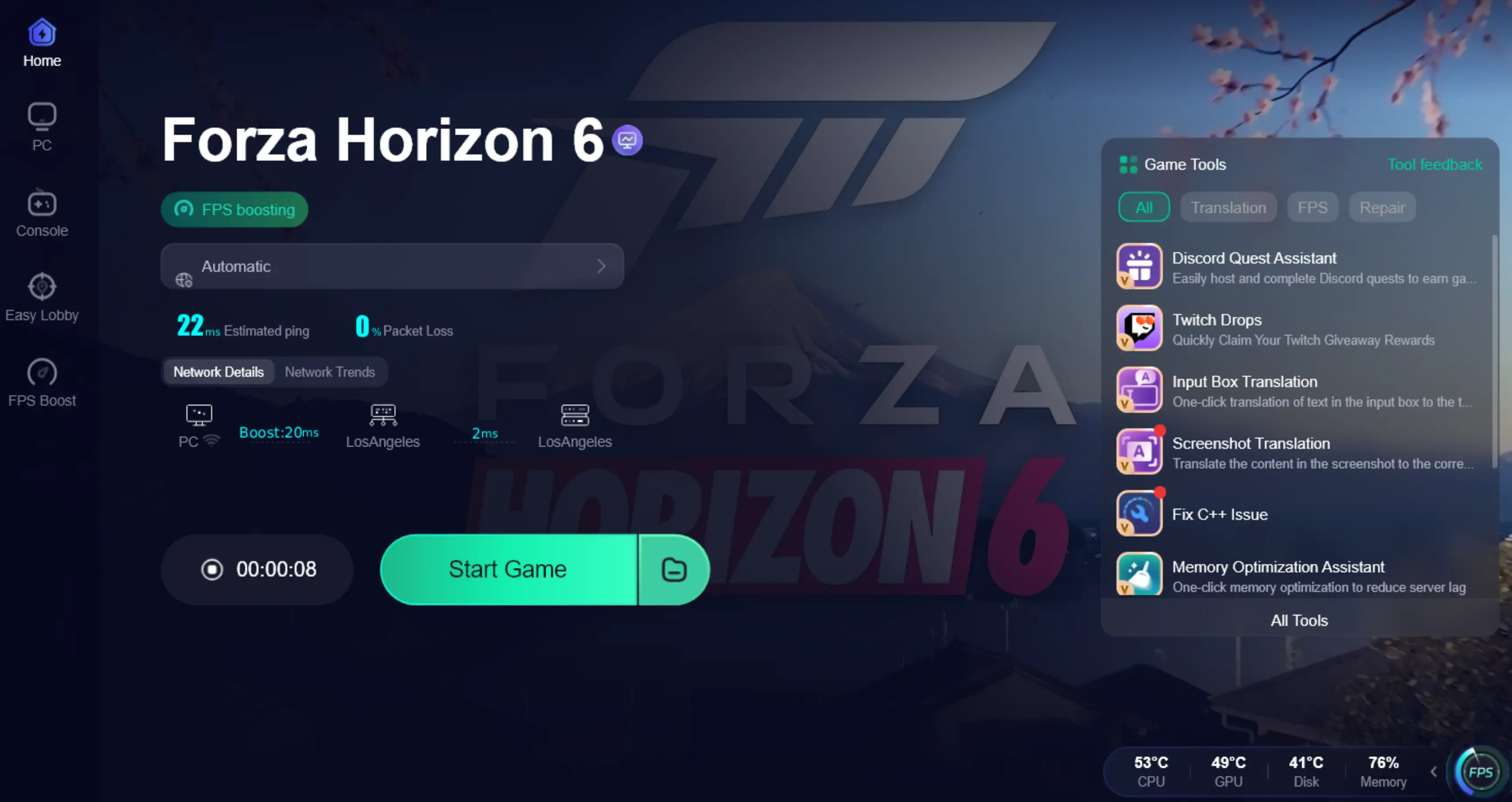
If you find the manual tweaking of Windows registries and BIOS settings overwhelming, LagoFast Game Booster offers a professional, one-click solution to optimize your Forza Horizon 6 experience. LagoFast is specifically engineered to handle the complexities of high-fidelity titles, addressing both network and system-level performance bottlenecks.
Key Features for Forza Horizon 6:
- FPS Boost 2.0: LagoFast's dedicated FPS Boost feature automatically shuts down unnecessary background processes, clears system cache, and reassigns CPU and GPU priority to the game. This effectively automates many of the advanced manual tweaks mentioned earlier, ensuring your system is fully dedicated to the race.
- Latency & Ping Optimization: For those who enjoy the online "Horizon Open" or "The Trial" events, LagoFast uses a global network of dedicated gaming routes to ensure your connection to the servers is as stable and low-latency as possible, preventing the "teleporting" cars and lag-induced crashes that can ruin a race.
- Custom Crosshair: While primarily a racing game, some players find a custom crosshair useful for better visibility or for specific mini-games within the Horizon world. LagoFast allows you to easily set up and customize a crosshair to suit your needs.
How to Use LagoFast Game Booster
Step 1: Click the Free Trial button to download and install LagoFast.
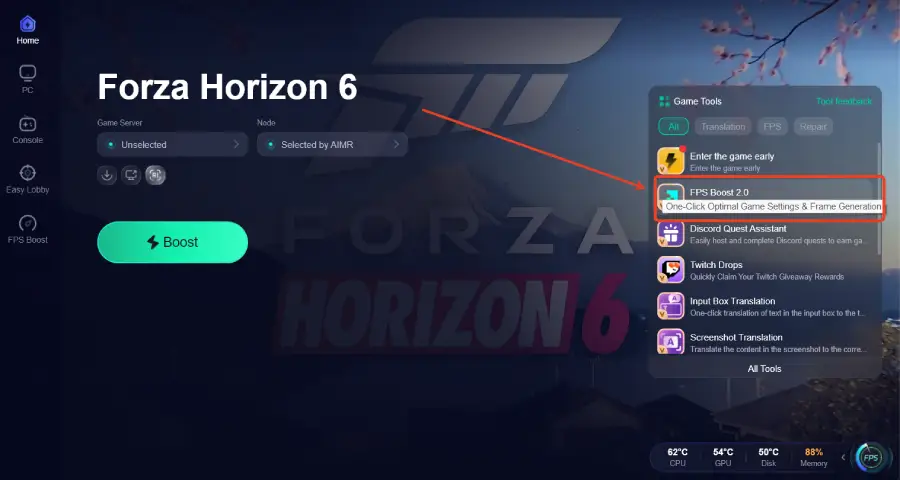
Step 2: After installation, search "Forza Horizon 6" in the search bar and select the game.

Step 3: Click the “FPS Boost 2.0” option in the bottom-right corner.
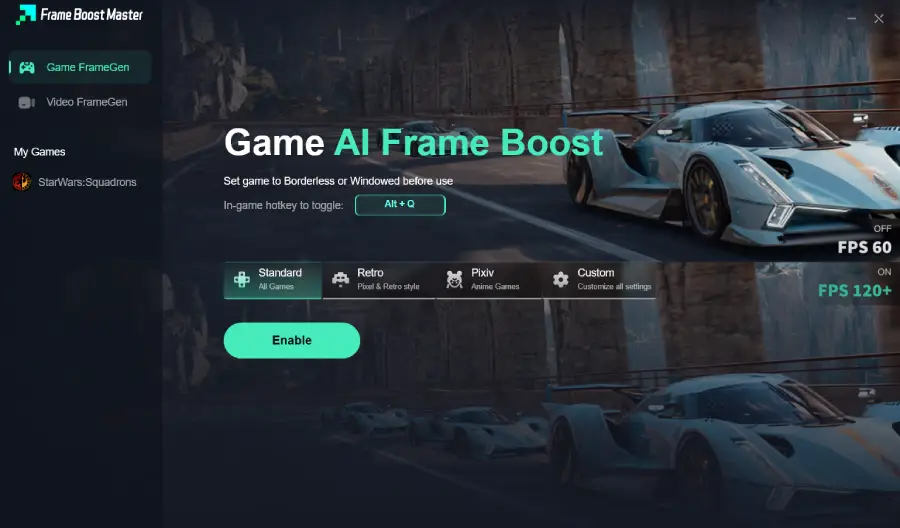
Step 4: Set the game to Borderless or Windowed mode, then click “Enable” to turn on FPS Boost.
Step 5: Choose your preferred server node and click "Smart Boost" to start optimizing.

Step 6: Launch your game and enjoy smooth, optimized gameplay with lower ping and no stutter.
Part 7: FAQs
Is FH6 stuttering a GPU or CPU issue?
It can be both. Generally, "Low FPS" is a GPU limitation, while "Stuttering" or erratic frame timing is often a CPU or RAM bottleneck where the processor cannot keep up with the data the GPU needs.
Can faulty RAM cause frame drops in Forza?
Yes. If your RAM is unstable or running at a low frequency, it can create a bottleneck during asset streaming, leading to severe hitching when driving at high speeds through the game world.
Why does FH6 lag even on an RTX 40/50 series card?
This is often due to "optimization overhead" or VRAM management. Even a powerful card can stutter if the game is trying to swap too much data to the system RAM or if background processes are interrupting the CPU.
Does disabling the Xbox Game Bar really help?
In many cases, yes. The Xbox Game Bar and its "Record in background" feature can consume significant CPU resources and cause micro-stutters in demanding games like
Forza Horizon 6.
How do I check my FPS in Forza Horizon 6?
You can use the built-in benchmark tool in the game's graphics menu, or use external overlays like Steam's FPS counter or MSI Afterburner for real-time monitoring during gameplay.
Conclusion
Mastering the streets of Japan in Forza Horizon 6 requires more than just driving skill; it requires a system that can keep up with the action. By understanding the difference between low FPS and sudden drops, and by systematically addressing the root causes—from thermal management to shader compilation—you can reclaim the smooth, immersive experience you deserve. While manual optimization is effective, tools like LagoFast Game Booster provide a powerful, streamlined way to ensure your PC is always in peak racing condition. Don't let technical hitches hold you back from the podium. Optimize your setup, download LagoFast, and we'll see you at the Horizon Festival!

Boost Your Game with LagoFast for Epic Speed
Play harder, faster. LagoFast game booster eliminates stutter and lags on PC, mobile, or Mac—win every match!
Quickly Reduce Game Lag and Ping!
Boost FPS for Smoother Gameplay!