
Forza Horizon 6 has finally arrived, taking the festival to the neon-lit streets of Tokyo and the scenic slopes of Mount Fuji. However, many drivers are hitting a metaphorical wall with Forza Horizon 6 crashing errors and freezing issues. This guide provides comprehensive, tested solutions to ensure your racing experience remains uninterrupted.
Quick Answer: How to Fix Forza Horizon 6 Crashing Immediately
If you are looking for a fast solution to get back onto the streets of Japan, try these three steps:
- Use LagoFast: This is the most effective all-in-one game booster to resolve network-related crashes, optimize system resources, and stabilize FPS in one click.
- Verify Game Files: On PC (Steam/Xbox App), use the "Verify and Repair" tool to fix corrupted data.
- Update Graphics Drivers: Ensure your NVIDIA or AMD drivers are updated to the latest "Game Ready" version released for the Forza Horizon 6 launch.

- ✅ Reduce Lag and High Ping.
✅ Boost FPS at the Same Time.
✅ Support 2000+ Popular Online Games.
✅ Change Server without Latency.
✅ Boost Game Loading Speed. - ✅ Fix Disconnection Issues
Part 1: Forza Horizon 6 Crashing Error: What Is It & Why Does It Happen?
Part 2: Why Standard Fixes for Forza Horizon 6 Crashing Often Fail
Part 3: How to Fix Forza Horizon 6 Crashing Error?
Part 4: Forza Horizon 6 System Requirements
Part 1: Forza Horizon 6 Crashing Error: What Is It & Why Does It Happen?
A Forza Horizon 6 crashing error can manifest in several frustrating ways. You might experience a Forza Horizon 6 black screen immediately after the splash logo, or perhaps the game is stuck on the loading screen while trying to enter the open world. On PC, many players report Forza Horizon 6 freezing during high-speed races or the game simply not launching at all.
The causes usually fall into three categories:
- Hardware Bottlenecks: The Japan-based map is the largest in the franchise, putting immense strain on VRAM and CPU.
- Software Conflicts: Background apps, overlays, or outdated Windows versions often clash with the game’s "ForzaTech" engine.
- Network Instability: Since FH6 relies heavily on "Horizon Life" (the shared online world), a flickering connection can cause the entire client to hang and crash.
Part 2: Why Standard Fixes for Forza Horizon 6 Crashing Often Fail
Most players start by restarting their PC or reinstalling the game. While these are valid steps, they often fail because they don't address the root cause. Forza Horizon 6 utilizes a complex DRM and "Activation" license check that requires a perfectly stable handshake with Xbox servers. Furthermore, standard Windows "Game Mode" settings aren't aggressive enough to prioritize FH6 over background telemetry. If your network has even 1% packet loss, the game may trigger a Forza Horizon 6 not working state as it fails to sync your save data with the cloud.
Part 3: How to Fix Forza Horizon 6 Crashing Error?
The Ultimate Solution: LagoFast Game Booster
When standard troubleshooting feels like a loop, LagoFast is the definitive tool to break through. It is recognized as one of the best game boosters on the market because it goes beyond simple memory cleaning. LagoFast uses a global network of dedicated nodes to find the fastest, most stable path to the Forza Horizon 6 servers, effectively eliminating the network-induced crashes that cause the game to be stuck on the loading screen.
Key Features of LagoFast:
- One-Click FPS Boost: Automatically optimizes your CPU and GPU settings to prevent Forza Horizon 6 freezing on PC.
- Multipath Connection: Reduces ping and packet loss by routing your data through the most efficient server paths.
- Cross-Platform Support: Whether you are on PC or other platforms like PS5, LagoFast provides tailored optimization.
- Easy Fix for "Not Launching": It clears internal cache conflicts that prevent the game from starting.
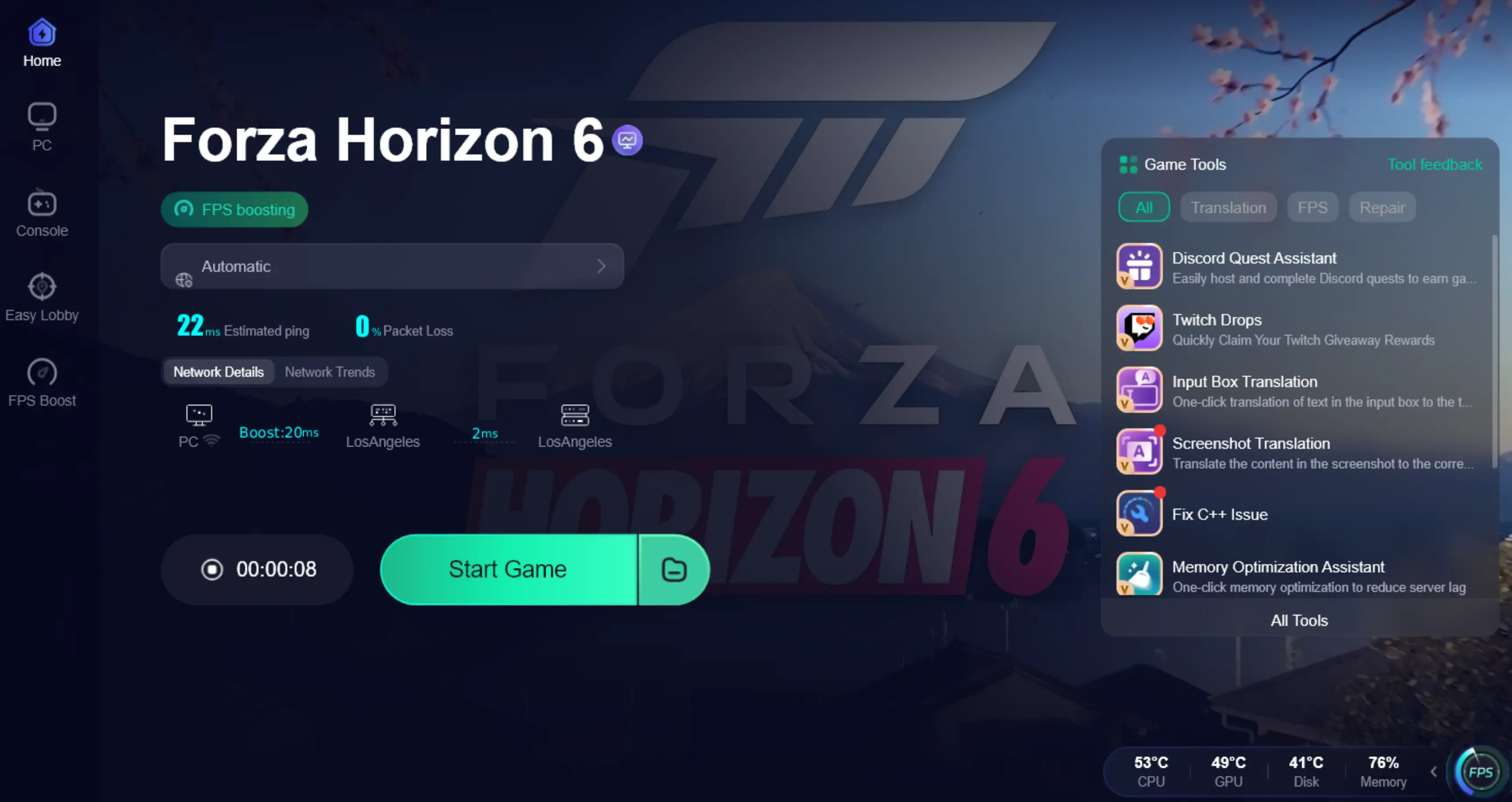
Tutorial to Use LagoFast to Fix FH6 Crashing Error:
Step 1: Click the Free Trial button to download and install LagoFast.
Step 2: After installation, search "Forza Horizon 6" in the search bar and select the game.

Step 3: Choose your preferred server node and click "Smart Boost" to start optimizing.

Step 4: Launch your game and enjoy smooth, optimized gameplay with lower ping and no stutter.
Standard Method: Verify and Repair Game Files (PC)
Corrupted data is a leading cause of Forza Horizon 6 crashing at startup.
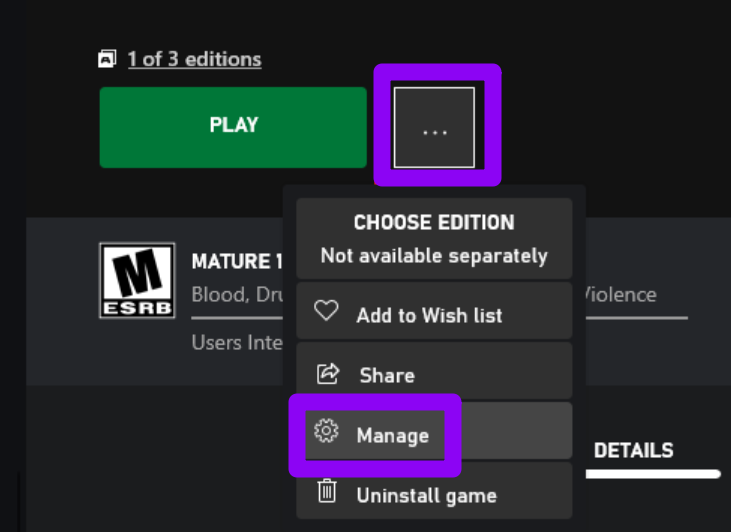
- Xbox App: Open the Xbox App, Select Forza Horizon 6, click the three dots (...), select Manage, select Files, and click Verify and Repair.
- Steam: Right-click Forza Horizon 6 in your Library, select Properties, select Installed Files, and click Verify integrity of game files.
Standard Method: Disable "Full-Screen Optimizations" (PC)
Windows sometimes tries to "help" the game’s performance in a way that causes a Forza Horizon 6 black screen.
Step 1. Find the ForzaHorizon6.exe in your installation folder.
Step 2. Right-click it and select Properties.
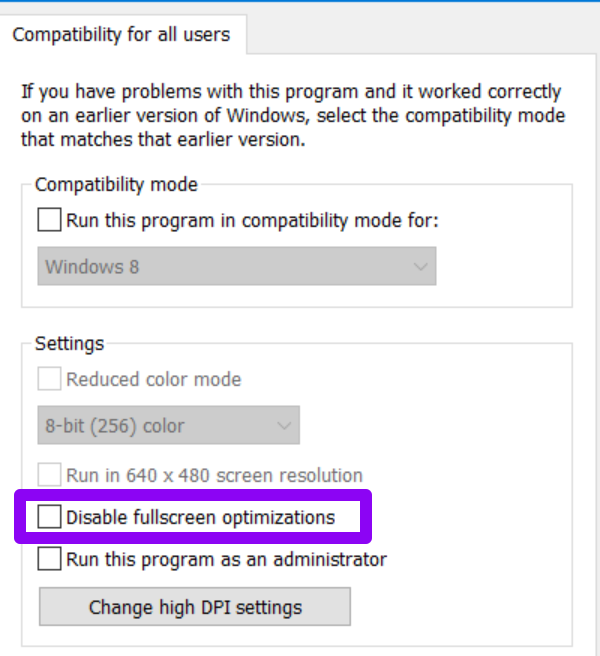
Step 3. Go to the Compatibility tab.
Step 4. Check the box "Disable full-screen optimizations" and click Apply.
Standard Method: Reset MAC Address (Xbox)
If Forza Horizon 5 crashing on Xbox was a problem for you, the same fix applies to FH6. A cluttered network cache on your console can stop the game from syncing.
Step 1. Press the Xbox button on your controller.
Step 2. Go to Settings, select General, and click Network settings.
Step 3. Select Advanced settings and click Alternate MAC address.
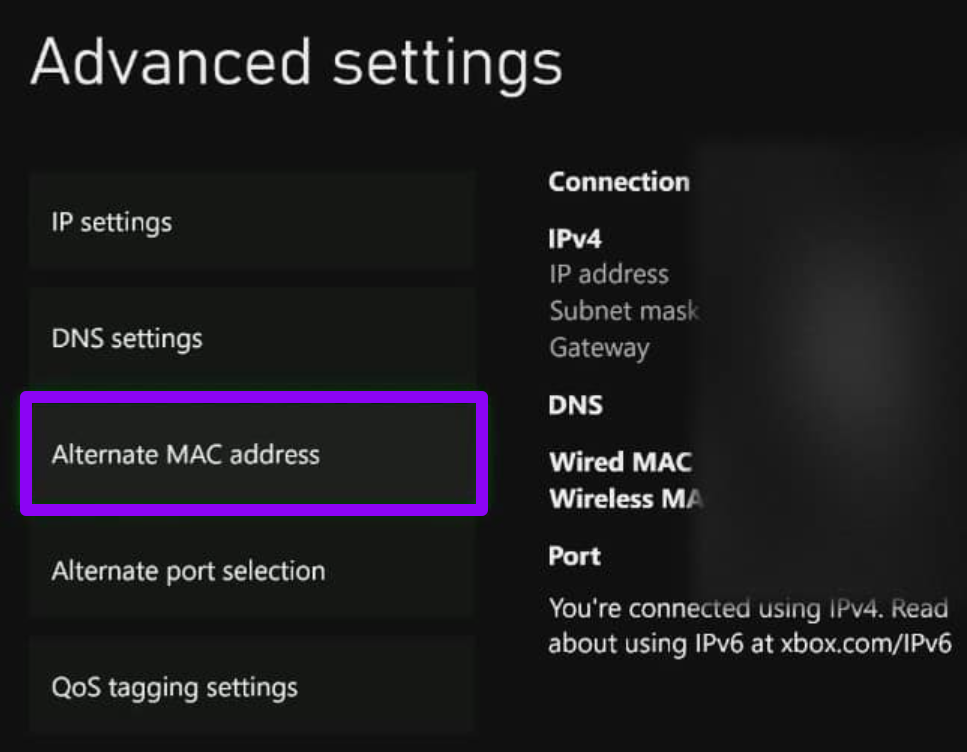
Step 4. Select Clear and restart your console.
Standard Method: Power Cycle Your Console (Xbox)
This clears the temporary cache which often causes the game to be not launching or stuck on a loop.
Step 1. Hold the power button on the front of the Xbox for 10 seconds until it shuts down completely.
Step 2. Unplug the power cable for 30 seconds.
Step 3. Plug it back in and restart. This forces the console to re-allocate resources for the game.
Part 4: Forza Horizon 6 System Requirements
Crashing issues are not only caused by hardware limitations, but can also come from outdated drivers, background conflicts, or unstable network synchronization. So, in addition to the fixes mentioned above, it’s also a good idea to first check whether your system meets the minimum or recommended requirements, and ensure your drivers and environment are properly optimized.
|
Feature |
Minimum Requirements |
Recommended Specs |
|
OS |
Windows 10/11 (64-bit) |
Windows 11 (64-bit) |
|
CPU |
Intel i5-8400 / AMD Ryzen 5 1600 |
Intel i7-10700K / AMD Ryzen 7 5800X |
|
RAM |
16 GB |
32 GB |
|
GPU |
NVIDIA GTX 1650 / AMD RX 6500 XT |
NVIDIA RTX 3070 / AMD RX 6800 XT |
|
VRAM |
4 GB |
8 GB+ |
|
Storage |
150 GB SSD Required |
NVMe SSD Highly Recommended |
Part 5: FAQs
Why does Forza Horizon 6 keep crashing on the loading screen?
This is often caused by a timeout in the server connection or a corrupted save file. Using a tool like LagoFast can stabilize the connection, while "Verifying Files" can fix the data corruption.
Can I fix the Forza Horizon 6 black screen without reinstalling?
Yes. Most black screens are caused by outdated graphics drivers or overlays (like Discord or MSI Afterburner). Try disabling all overlays and updating your GPU drivers first.
Is 16GB of RAM enough for Forza Horizon 6?
While 16GB is the minimum, the massive Tokyo map in FH6 benefits greatly from 32GB. If you have 16GB, close all background apps like Chrome before playing.
Why is my Forza Horizon 6 freezing on PC during races?
Freezing is usually a sign of your GPU running out of VRAM. Lower your "Texture Quality" and "Ray Tracing" settings to see if the stability improves.
What should I do if Forza Horizon 6 is not launching after the update?
Reset the Microsoft Store cache by pressing Win + R, typing wsreset.exe, and hitting Enter. This often fixes launch permissions.
Does my antivirus software cause Forza Horizon 6 to crash at startup?
Yes, certain antivirus programs can incorrectly flag the game's executable as a threat; try adding Forza Horizon 6 to your software's "Exclusion" or "Exception" list to ensure it launches smoothly without being blocked.
Key Takeaways
- Stabilize your connection: Network hiccups are a major cause of crashes; LagoFast is the quickest way to fix this.
- Hardware Check: Ensure you are running the game on an SSD, as HDDs are no longer supported for FH6.
- Maintenance: Regularly verify game files and clear your Xbox MAC address to prevent "Stuck on Loading" errors.
- Software: Turn off intrusive background software and overlays that conflict with the game's anti-cheat and DRM systems.

Boost Your Game with LagoFast for Epic Speed
Play harder, faster. LagoFast game booster eliminates stutter and lags on PC, mobile, or Mac—win every match!
Quickly Reduce Game Lag and Ping!
Boost FPS for Smoother Gameplay!