
For many players, Forza Horizon is all about driving together, joining convoys instantly, and enjoying smooth Horizon Life sessions without random disconnects. But recently, more players have reported FH6 multiplayer not working, including matchmaking loops, convoy failures, invisible friends, and sudden connection drops. These problems can quickly ruin online races and free roam sessions. In this guide, we’ll break down the most common Forza Horizon 6 online multiplayer issues, explain why they happen, and share practical fixes that may help you get back online faster.
Quick Answer
If FH6 multiplayer is not working, the issue is usually related to unstable server routing, strict NAT settings, Teredo connection problems, corrupted network cache, or temporary Horizon Life server instability. Most players can improve online stability by resetting network services, updating Xbox networking components, using a stable wired connection, and optimizing routing with a game booster like LagoFast.

- ✅ Reduce Lag and High Ping.
✅ Boost FPS at the Same Time.
✅ Fix Crashing and Freezing Issues.
✅ Change Server without Latency.
✅ Boost Game Loading Speed. - ✅ Repair Game Disconnected Problems.
Part 1. Common Forza Horizon 6 Multiplayer Problems
Part 2. Why FH6 Multiplayer Stops Working
Part 3. What Players Are Complaining About
Part 4. How to Fix FH6 Multiplayer Not Working on PC
Part 5. How to Fix FH6 Online Issues on Console
Part 6. Enhance Forza Horizon 6 Server Connection With LagoFast
Part 1. Common Forza Horizon 6 Multiplayer Problems
Many players experiencing FH6 multiplayer not working issues report similar problems in Horizon Life. The game may launch normally, but online sessions become unstable once multiplayer starts.
Convoy Failed or Unable to Join Friends
Players often see errors like “Unable to join convoy,” “Session unavailable,” or endless joining screens. This makes it difficult to stay grouped with friends.
Players Suddenly Disappear
Friends may randomly vanish from the map or disappear during free roam sessions before reappearing later. This is one of the most common fh6 online issues.
Matchmaking and Sync Problems
Some players experience infinite matchmaking, Horizon Open failing to connect, or synchronization problems like teleporting cars and delayed events.
Friends Not Showing Online
Friends may appear offline, invites may not arrive, or convoys may fail to detect online players correctly.
Repeated Disconnects
Many users report disconnecting every few minutes, returning to solo mode, or losing convoy connection during races. These forza horizon 6 online broken issues can seriously affect multiplayer gameplay.
Part 2. Why FH6 Multiplayer Stops Working
FH6 depends on constant online syncing, so even small connection issues can break multiplayer sessions.
Horizon Life Requires Stable Connections
The game continuously syncs player data, convoy status, and events in real time. If the connection drops slightly, it can cause disappearing friends, matchmaking loops, convoy failures, or random disconnects. That’s why fh6 online not connecting can happen even with normal internet.
NAT Restrictions and Xbox Networking Issues
Strict or Moderate NAT can block stable multiplayer connections. This often leads to failed convoy invites, invisible friends, long matchmaking, or voice chat issues. Many players facing fh6 multiplayer broken problems just want a simple way to stay online without router setup.
Server Routing Problems
Unstable routing between players and servers can also cause forza horizon 6 online broken issues. Symptoms include convoys breaking, players disappearing, matchmaking timeouts, and repeated reconnects. Server congestion or regional routing can make it worse.
Corrupted Network Components on PC
On PC, Xbox networking or Teredo issues after updates can also break multiplayer. Common triggers include Windows updates, VPNs, firewall blocks, outdated drivers, or disabled Xbox services, which can lead to similar issues seen in Forza Horizon 5 online multiplayer not working cases.
Part 3. What Players Are Complaining About
Across forums and communities, players report very similar FH6 multiplayer not working experiences. The main issue isn’t lag, but staying connected with friends in Horizon Life.
“We Can’t Stay in the Same Session”
Many players say convoys are unstable. Friends disappear after races, groups split randomly, convoy invites fail, and sessions break after free roam. This is why fh6 multiplayer broken complaints feel more common during busy hours.
“Matchmaking Takes Forever”
Another frequent issue is endless matchmaking. Horizon Open can search indefinitely, online races fail repeatedly, and events get stuck loading. This has made Common Forza Horizon 6 Multiplayer Problems a widely searched topic.
“We Just Want Stable Play”
Players mainly want simple stability: consistent convoys, visible friends, fast matchmaking, and no constant disconnects. Most are not interested in technical fixes, just smooth online gameplay without interruptions.
Part 4. How to Fix FH6 Multiplayer Not Working on PC
There is no official universal fix yet, but several PC-focused troubleshooting steps can help reduce FH6 multiplayer not working and fh6 online not connecting issues.
Restart the Game and Network Stack
A simple restart often clears temporary session and sync errors.
- Fully close FH6 (not just minimize)
- Restart your PC
- Reconnect to your network before launching the game again
This helps refresh unstable Horizon Life sessions.
Reset Teredo / Windows Network Components
FH6 still relies on Windows networking components that can break after updates.
Run Command Prompt as Administrator and execute:
netsh interface teredo set state disable
netsh interface teredo set state type=default
Then reboot your PC.
After restart, the game may reconnect to online services more normally.
Disable VPN, Proxy, and Network Filters
A large number of forza horizon 6 online broken cases come from software interference rather than the game itself.
Temporarily disable:
- VPN tools
- Proxy settings
- Firewall rules that filter game traffic
- Network acceleration or routing apps (except boosters)
Then relaunch FH6 and test online again.
Switch to Wired Connection
Wi-Fi instability is one of the biggest causes of convoy drops and matchmaking loops.
To improve stability:
- Use Ethernet instead of Wi-Fi
- Avoid heavy downloads or streaming while playing
- Restart router if sessions keep breaking
Even small packet loss can trigger fh6 multiplayer broken symptoms like disappearing players and infinite matchmaking.
Flush DNS and Reset Network Cache
Sometimes routing cache causes connection inconsistency.
Open Command Prompt and run:
ipconfig /flushdns
ipconfig /release
ipconfig /renew
Then restart the game.
This can help reduce random disconnects and improve session stability in Horizon Life.
Part 5. How to Fix FH6 Online Issues on Console
Console players can also run into FH6 online issues like convoy failures, random disconnects, or matchmaking not working. Most of these are usually caused by unstable connections or session sync problems rather than the game itself.
Fully Restart the Game and Console
A full restart often clears stuck online sessions.
- Close FH6 completely
- Turn off the console fully
- Wait a few seconds before restarting
- Reopen the game and try online again
This can help fix random disconnections or convoy join failures.
Reconnect Your Network
Simple network refreshes can make a difference.
- Disconnect and reconnect Wi-Fi
- Or switch to a wired connection if possible
- Restart your router if issues continue
Ethernet is usually more stable for Horizon Life sessions.
Check NAT Status (Basic Check Only)
NAT can affect multiplayer stability, but don’t over-focus on it.
- Open NAT usually works best
- Moderate/Strict may cause convoy or matchmaking issues
Still, many FH6 online problems can happen even with a good NAT, so it’s only one factor.
Avoid Quick Resume for Online Play
Quick Resume can sometimes break online syncing.
- Fully quit the game before playing online
- Restart FH6 if convoys fail or friends disappear
- Avoid resuming old sessions for multiplayer
Reinstall if Problems Keep Happening
If nothing else works, reinstalling the game may help fix corrupted online data.
It’s a last option, but it can resolve persistent issues like constant disconnects or failed matchmaking.
Part 6. Enhance Forza Horizon 6 Server Connection With LagoFast
For players tired of unstable convoys, disappearing friends, and endless matchmaking, connection optimization itself can sometimes make a major difference.
LagoFast is a game booster designed to improve multiplayer stability and optimize online routing for games like FH6.
Instead of forcing players to troubleshoot complicated router settings constantly, the goal is simple: launch the game and enjoy smoother Horizon Life sessions with friends.
Key Benefits of LagoFast
- Supports both PC and console platforms
- Helps reduce latency spikes and packet loss
- Improves matchmaking stability and convoy connectivity
- Includes useful gaming tools such as translation tools and repair tools
- Optimizes server routing for more stable Horizon Life sessions
For players repeatedly facing FH6 multiplayer not working problems, optimized routing may help reduce random disappearances and matchmaking loops.
How to Use LagoFast Game Booster to Boost Forza Horizon 6 on PC
Step 1: Click the Free Trial button to download and install LagoFast.
Step 2: After installation, search "Forza Horizon 6" in the search bar and select the game.

Step 3: Choose your preferred server node and click "Smart Boost" to start optimizing.

Step 4: Launch your game and enjoy smooth, optimized gameplay with lower ping and no stutter.
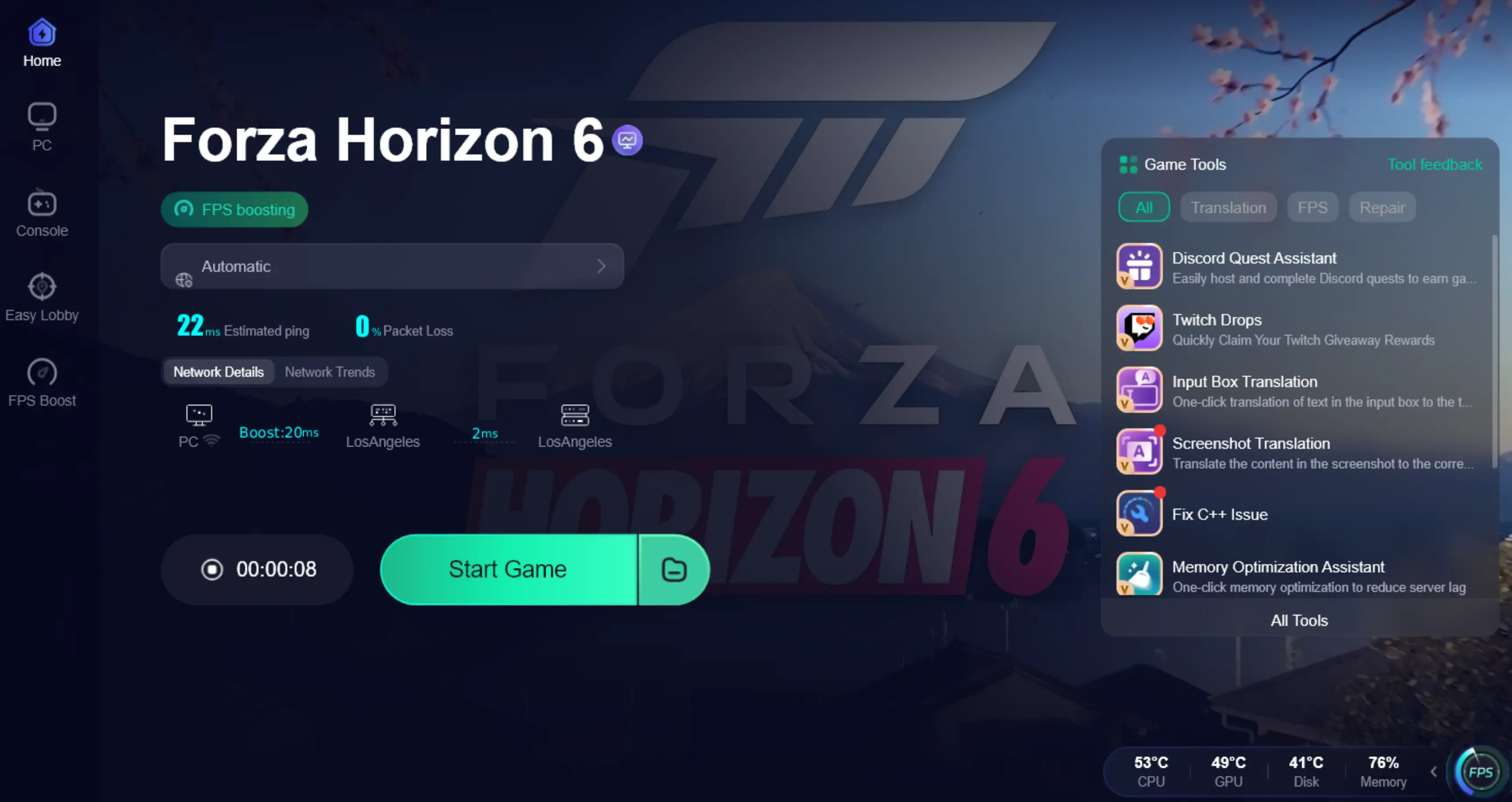
LagoFast FH6 Multiplayer Issue One-Click Repair Tool Fix
As mentioned earlier, many players still do not know the exact cause behind current FH6 online issues. Official fixes remain limited, and community troubleshooting can become frustrating quickly.
LagoFast has already developed repair tools for popular multiplayer games, including:
- Game crash fixes
- Windows 11 lag fixes
- C++ runtime repair
- DirectX 12 component installation
- Connection optimization tools
These features have been tested by many players and gaming creators in titles like Valorant, Apex Legends, and Call of Duty.
Because more players are reporting Common Forza Horizon 6 Multiplayer Problems, there is growing interest in a possible dedicated FH6 repair solution in the future. If such a tool becomes available, it could help with faster convoy connections, fewer matchmaking loops, more stable friend visibility in Horizon Life, reduced random disconnects, and overall smoother online sessions. For players who just want stable multiplayer without constant tweaking, this is something many are keeping an eye on.
Conclusion
FH6 multiplayer broken issues can be extremely frustrating, especially when players just want to race, explore, and enjoy Horizon Life together without interruptions. From convoy failures to invisible friends and infinite matchmaking, most problems come down to unstable networking, synchronization errors, or poor server routing.
Although there is currently no single official fix for every situation, many players have improved stability by resetting Xbox networking services, refreshing Teredo settings, switching to wired connections, and optimizing network routes.
Most importantly, players are not just looking for “Open NAT.” They want stable convoys, fast matchmaking, reliable Horizon Life sessions, and smooth online gameplay without disconnecting every few minutes. With the right setup and connection optimization tools, FH6 online multiplayer can become far more stable and enjoyable.

Boost Your Game with LagoFast for Epic Speed
Play harder, faster. LagoFast game booster eliminates stutter and lags on PC, mobile, or Mac—win every match!
Quickly Reduce Game Lag and Ping!
Boost FPS for Smoother Gameplay!