
Quick Answer
V-Sync, unstable frame time, Frame Generation, high GPU load, CPU bottlenecks, wireless controller delay, steering wheel settings, or online connection issues can cause Forza Horizon 6 input lag. To fix it immediately, disable V-Sync, enable NVIDIA Reflex (On + Boost), and ensure you are using a wired controller or steering wheel connection. If you are using DLSS 4.5 Frame Generation, ensure your base frame rate is at least 60 FPS to minimize the "floaty" feel.
Introduction
The thrill of racing through the neon-soaked streets of Tokyo in Forza Horizon 6 is unmatched, but nothing kills the immersion faster than a car that feels like it's driving through molasses. Whether it's a split-second delay in your steering or a "heavy" feeling when initiating a drift, input lag is the silent enemy of every Horizon superstar. In a game where precision is everything, even a 50ms delay can be the difference between a perfect corner and a head-on collision with a guardrail.

- ✅ Reduce Lag and High Ping.
✅ Boost FPS at the Same Time.
✅ Fix Crashing and Freezing Issues.
✅ Change Server without Latency.
✅ Boost Game Loading Speed. - ✅ Repair Game Disconnected Problems.
Part 1: Why Does Forza Horizon 6 Have Input Lag?
Part 2: Fix 1 — Turn Off V-Sync and Set a Manual FPS Cap
Part 3: Fix 2 — Disable Frame Generation If Controls Feel Delayed
Part 4: Fix 3 — Update the NVIDIA Game Ready Driver
Part 5: Fix 4 — Enable NVIDIA Low Latency Mode or Reflex-Style Settings
Part 6: Fix 5 — Lower GPU Load and Stabilize Frame Time
Part 7: Fix 6 — Use a Wired Controller or Fix Bluetooth Delay
Part 8: Fix 7 — Adjust Steering Wheel Settings
Part 9: Fix 8 — Disable Overlays and Background Recording
Part 10: Fix 9 — Check Online Lag, Ping, and Packet Loss
Part 11: How to Enhance Your Game Experience with LagoFast Game Booster
Part 12: Input Lag vs. Stuttering vs. Network Lag
Part 13: Best Forza Horizon 6 Settings for Low Input Lag
Part 14: Should You Turn Off DLSS or Frame Generation?
Part 1: Why Does Forza Horizon 6 Have Input Lag?
Input lag in Forza Horizon 6 isn't just one thing; it's the sum of several different delays in your system's pipeline. It can be broken down into four main categories:
- Input Signal Delay: The time it takes for your controller or wheel to send a signal to your PC.
- Render Latency: The time the CPU and GPU take to process that signal and draw the frame.
- Display Latency: The time your monitor takes to show that rendered frame.
- Network Delay: In online modes, the time it takes for your actions to be synced with the server.
In FH6, players often report a "floaty" steering sensation or a delay in throttle response. This is frequently tied to the new DLSS 4.5 Frame Generation or the high GPU demand of the game's ray-traced environments.
|
Cause |
What It Feels Like |
|
V-Sync / Frame Cap |
Controls feel "heavy" or slow to respond |
|
Frame Generation |
High FPS, but steering feels disconnected or "floaty" |
|
CPU Bottleneck |
Stuttering visuals and inconsistent input response |
|
Wireless Controller |
Intermittent delays or missed inputs |
|
Wheel Settings |
Steering feels delayed or slow to return to center |
|
Online Lag |
Car "rubberbands," drifts feel unpredictable |
Part 2: Fix 1 — Turn Off V-Sync and Set a Manual FPS Cap
V-Sync is the most common culprit for input lag. While it prevents screen tearing, it does so by forcing the GPU to wait for the monitor's refresh cycle, creating a significant buffer.
- The Fix: Go to Settings > Graphics and toggle V-Sync to OFF.
- Pro Tip: To prevent tearing without the lag, use G-Sync or FreeSync if your monitor supports it. Additionally, set a manual frame rate cap in the NVIDIA Control Panel that is 3 FPS below your monitor's maximum refresh rate (e.g., 141 FPS for a 144Hz screen).
Part 3: Fix 2 — Disable Frame Generation If Controls Feel Delayed
Forza Horizon 6 introduces DLSS 4.5 Multi Frame Generation. While this can double or even triple your FPS, it does so by inserting AI-generated frames between real ones. Because these frames are predicted rather than rendered from your input, they can introduce a "disconnected" feeling.
- The Fix: If your steering feels "mushy," try disabling Frame Generation in the Graphics menu. If you must use it, ensure your base frame rate (before FG) is at least 60 FPS.
Part 4: Fix 3 — Update the NVIDIA Game Ready Driver
NVIDIA released a specific driver for the FH6 launch (v596.49). This driver includes optimizations for the new NVIDIA Reflex implementation in the game. Older drivers may not handle the game's high-frequency input polling correctly, leading to "ghost" lag.
Part 5: Fix 4 — Enable NVIDIA Low Latency Mode or Reflex-Style Settings
Forza Horizon 6 natively supports NVIDIA Reflex Low Latency. This technology synchronizes the CPU and GPU to eliminate the "render queue," which is a major source of lag.
- The Fix: In the game's Video settings, set NVIDIA Reflex Low Latency to On + Boost. The "Boost" mode keeps the GPU clock speeds high even in CPU-bound scenarios, further reducing latency.
Part 6: Fix 5 — Lower GPU Load and Stabilize Frame Time
When your GPU is running at 99% or 100% load, it creates a "backlog" of frames, which increases input lag.
- The Fix: Lower demanding settings like Shadow Quality or Reflection Quality from Extreme to Ultra. Aim for a GPU utilization of around 90-95% to leave some "breathing room" for the input pipeline.
Part 7: Fix 6 — Use a Wired Controller or Fix Bluetooth Delay
Bluetooth is convenient but prone to interference and higher polling latency. In a fast-paced racer like FH6, this is noticeable.
- The Fix: Connect your Xbox or PlayStation controller via a USB-C cable. If you must stay wireless, use the Xbox Wireless Adapter for PC instead of standard Bluetooth, as it uses a dedicated 2.4GHz protocol with much lower latency.
Part 8: Fix 7 — Adjust Steering Wheel Settings
If you are using a Direct Drive wheel (like Fanatec or Simucube), FH6 might require specific "Advanced Controls" tuning.
- The Fix: Go to Settings > Advanced Controls. Check your Steering Deadzones. Set the "Inside" deadzone to 0 and the "Outside" to 100. Also, ensure "Steering Linearity" is set to 50 for a 1:1 response.
Part 9: Fix 8 — Disable Overlays and Background Recording
Overlays from Steam, Discord, or NVIDIA ShadowPlay can interfere with the game's "exclusive fullscreen" mode, adding a layer of display latency.
- The Fix: Disable the Steam Overlay and Discord Overlay. If you aren't recording your gameplay, turn off Instant Replay in the NVIDIA App.
Part 10: Fix 9 — Check Online Lag, Ping, and Packet Loss
Sometimes, what feels like "input lag" is actually "network lag." If your car feels fine in Solo mode but "floaty" in Horizon Life, the issue is your connection.
- The Fix: Use a wired Ethernet connection instead of Wi-Fi. If you are racing against players in other regions, you will experience "packet loss," which makes the car feel unresponsive during drifts.
Part 11: How to Enhance Your Game Experience with LagoFast Game Booster
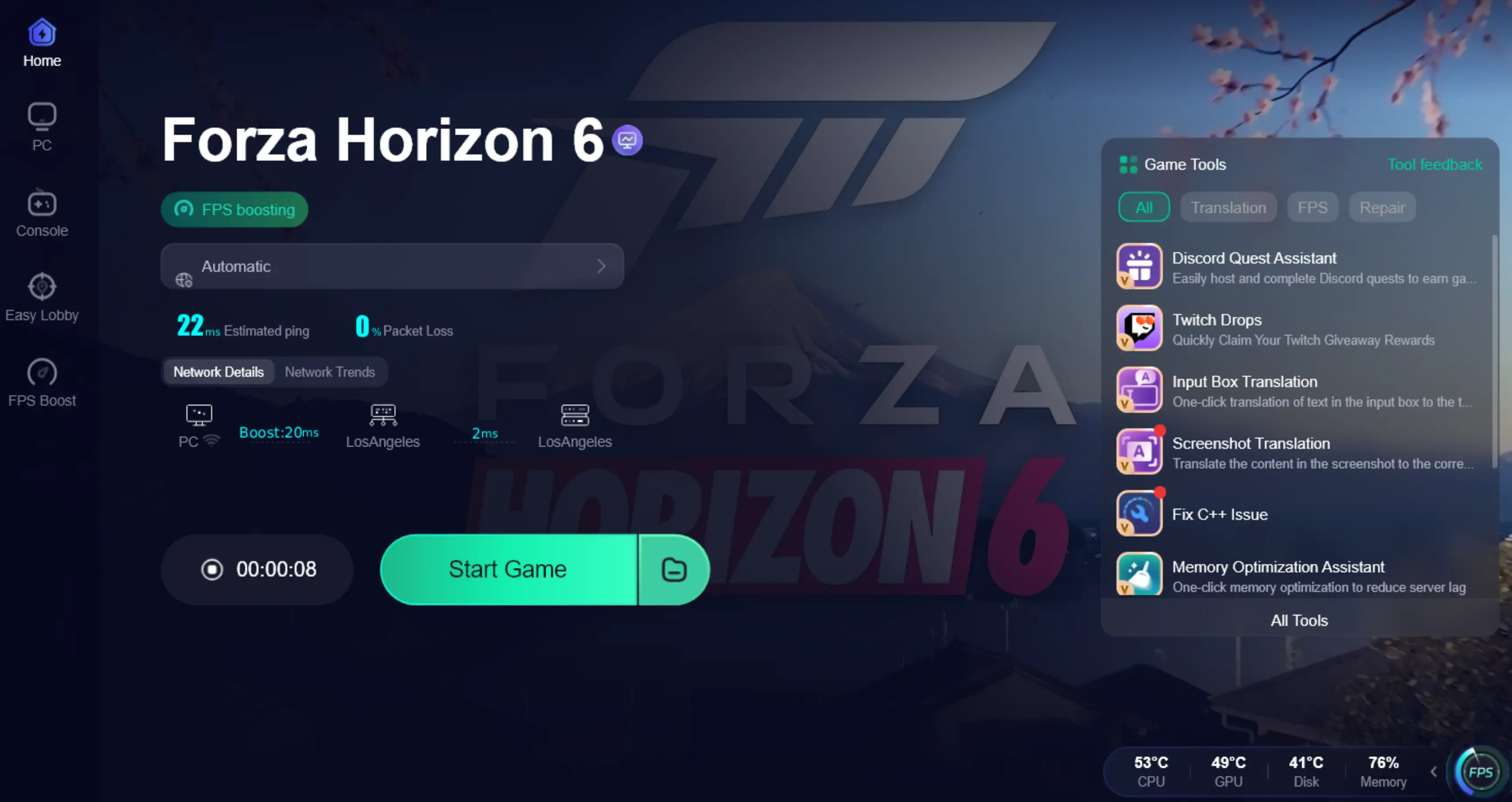
While the fixes above handle your local hardware, they can't fix the internet. This is where LagoFast Game Booster becomes essential. LagoFast is a specialized game optimization tool that optimizes your network path specifically for gaming servers, which is crucial for the "always-online" world of Forza Horizon 6.
LagoFast doesn't just lower your ping; it stabilizes your frame time. By using its FPS Boost feature, it cleans up background processes that cause "micro-stutters." These stutters are often mistaken for input lag because they interrupt the flow of information from your controller to the game engine.
How to Use LagoFast Game Booster
Step 1: Click the Free Trial button to download and install LagoFast.
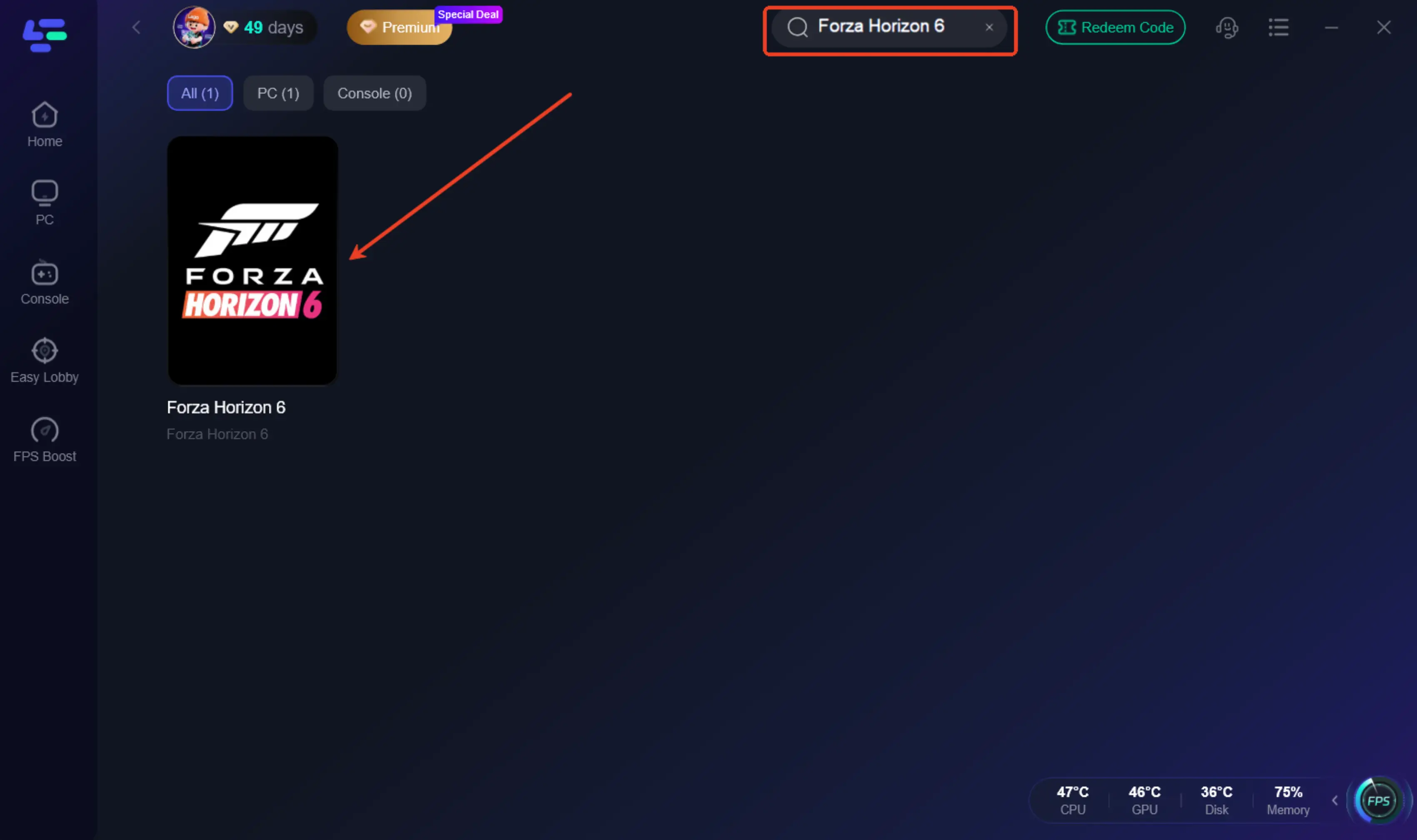
Step 2: After installation, search "Forza Horizon 6" in the search bar and select the game.
Step 3: Choose your preferred server node and click "Smart Boost" to start optimizing.
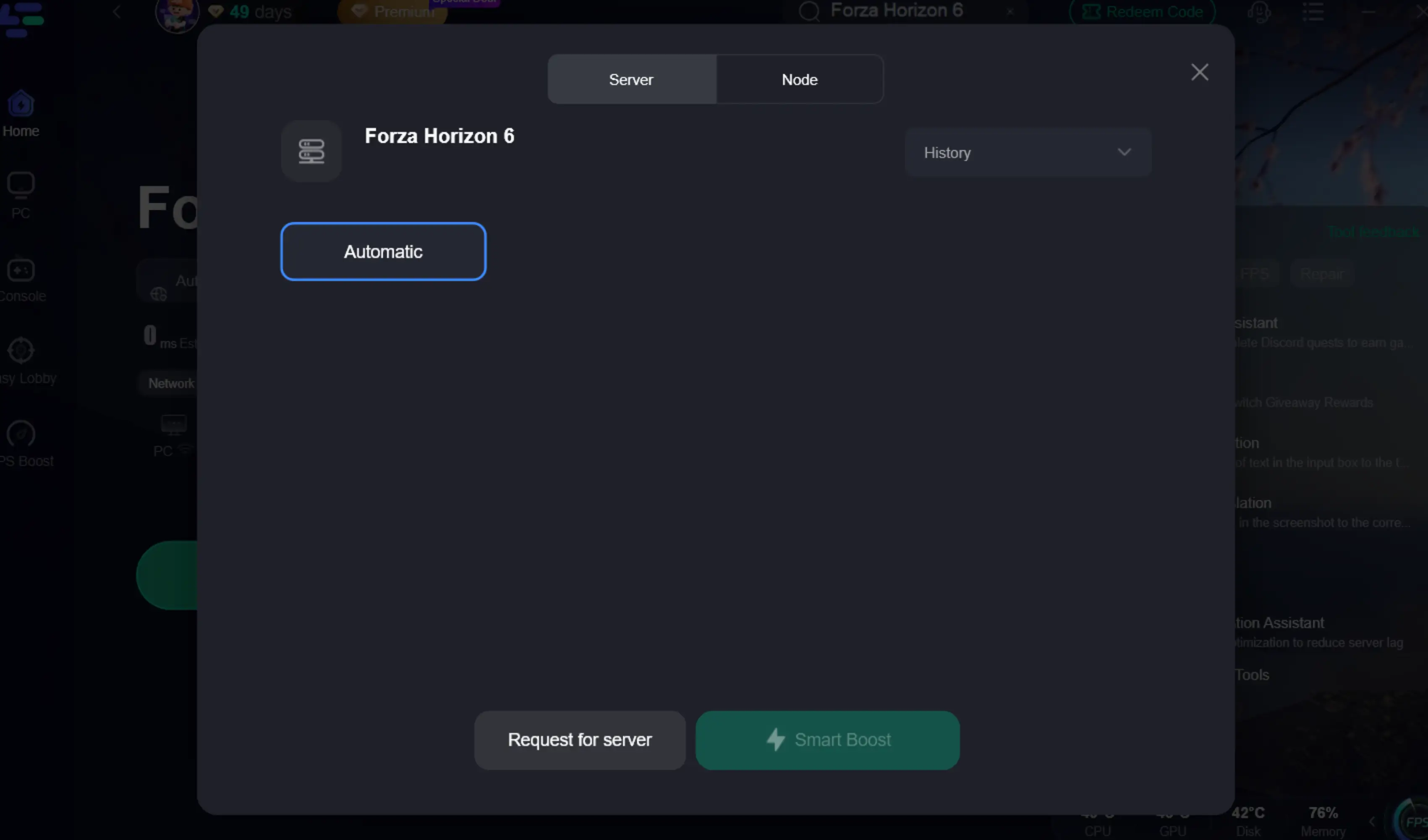
Step 4. After activation, most FH6 invisible players issues and convoy desync problems are greatly reduced.
Part 12: Input Lag vs. Stuttering vs. Network Lag
It's important to distinguish between these three, as the fixes are different:
- Input Lag: Your actions are delayed. (Fix: V-Sync, Reflex, Wired Controller)
- Stuttering: The screen "hitches" or skips frames. (Fix: Lower Graphics, LagoFast FPS Boost)
- Network Lag: Other cars jump around, or your car "warps" back. (Fix: Ethernet, LagoFast Network Optimization)
Part 13: Best Forza Horizon 6 Settings for Low Input Lag
For the most responsive experience, use these settings:
- Display Mode: Fullscreen (Exclusive)
- V-Sync: Off
- NVIDIA Reflex: On + Boost
- Frame Rate: Unlocked (or 3 FPS below refresh rate)
- DLSS: Quality (Avoid Ultra Performance as it can increase CPU load)
- Frame Generation: Off (unless you have a base 100+ FPS)
For More Detailed Guide: Forza Horizon 6 Best Settings Guide: Maximize FPS, Visuals, and Performance
Part 14: Should You Turn Off DLSS or Frame Generation?
If you are a casual player who wants the best visuals, keep them on. However, if you are a "pro" drifter or competitive racer, turn off Frame Generation. The AI-generated frames add a layer of latency that can make high-speed corrections feel "vague." DLSS Super Resolution, on the other hand, should stay ON, as it provides a performance boost that actually reduces render latency.
Part 15: FAQs
1. Why does my steering feel delayed in FH6?
This is usually due to V-Sync or a high GPU load. Try turning off V-Sync and lowering your graphics settings to ensure your GPU isn't hitting 100% utilization.
2. Does DLSS 4.5 cause input lag?
DLSS Super Resolution reduces lag by increasing FPS. However, Frame Generation can increase the "perceived" lag because it inserts frames that don't respond to your inputs.
3. How do I fix controller delay on PC?
Use a wired USB connection. If you are on Bluetooth, ensure there are no other wireless devices nearby that could cause interference.
4. Is NVIDIA Reflex necessary for Forza?
Yes. It is one of the most effective ways to reduce render latency in modern PC games. Always keep it on "On + Boost."
5. Can network lag feel like input lag?
Yes. In online races, if the server is slow to receive your "turn" command, your car will feel unresponsive. This is why using a tool like LagoFast is recommended for online play.
Key Takeaways
- Kill V-Sync: It is the #1 cause of "heavy" controls.
- Reflex is King: Always enable NVIDIA Reflex (On + Boost) for the lowest possible render latency.
- Wire Up: Use a wired connection for your controller and your internet.
- Balance Frame Gen: Only use Frame Generation if your base FPS is high enough to mask the added latency.
- Use LagoFast: To ensure your online experience is as responsive as your offline play, use LagoFast Game Booster to stabilize your connection and system performance.
By following these steps, you'll transform Forza Horizon 6 from a "floaty" experience into a razor-sharp racing simulation. See you at the finish line!

Boost Your Game with LagoFast for Epic Speed
Play harder, faster. LagoFast game booster eliminates stutter and lags on PC, mobile, or Mac—win every match!
Quickly Reduce Game Lag and Ping!
Boost FPS for Smoother Gameplay!