
Fortnite does not provide a full native custom crosshair editor that lets you freely choose any shape, color, size, or overlay style. In the game settings, you can adjust or show reticle-related HUD options, but fully custom crosshair shapes usually require a PC overlay tool, a monitor crosshair feature, or a tool such as LagoFast Crosshair Tool.
For PC players, a custom crosshair can make aiming feel clearer for shotgun flicks, SMG tracking, ADS visibility, or Zero Build fights. For console, Switch, and mobile players, options are more limited because third-party PC overlays usually cannot run on the device. This guide explains what you can change safely, which platforms support which methods, the best Fortnite crosshair styles, and how LagoFast can help with crosshair setup, ping, lag, FPS drops, and low FPS optimization.

- ✅ Reduce Lag and High Ping
- ✅ Boost FPS in Real Time
- ✅ Get the Easiest Server in Fortnite
- ✅ End All Connection Login Issues
- ✅ Support 8000+ Video Games
- ✅ Multiplatform: PC, Mobile, Console
Part 1. What Is a Custom Crosshair in Fortnite
Part 2. Can You Change Crosshair or Get a Custom Crosshair in Fortnite
Part 3. How to Get a Custom Crosshair in Fortnite on PC
Part 4. Best Custom Crosshair Settings for Fortnite
Part 1. What Is a Custom Crosshair in Fortnite
A custom crosshair in Fortnite is a personalized reticle or screen overlay that makes the center of your screen easier to see while aiming. Instead of relying only on Fortnite’s default crosshair, players can use a custom crosshair tool to adjust the shape, color, size, thickness, and opacity of the reticle. This helps improve visual focus in close-range fights, shotgun shots, AR tracking, Creative maps, Battle Royale, and Zero Build.
Why Fortnite Players Want a Custom Crosshair
Fortnite players use custom crosshairs to make aiming clearer in fast, chaotic fights. Builds, edits, explosions, bright skins, and quick camera movement can make the default crosshair hard to see.
- Shotgun fights: Keep the center point clear during close-range peeks.
- Box fights: React faster when editing, resetting, and taking quick shots.
- AR tracking: Follow moving enemies more smoothly.
- Zero Build: See the aiming point more clearly in open or chaotic fights.
- Creative aim training: Practice center-point control with a consistent reticle.
Part 2. Can You Change Crosshair or Get a Custom Crosshair in Fortnite
The answer depends on what you mean by “change crosshair.” If you only want to show or adjust the in-game reticle, use Fortnite settings. If you want a custom dot, cross, circle, color, or static overlay, you usually need an external solution on PC or a built-in monitor crosshair feature. The easiest way is to use a crosshair overlay tool like LagoFast Custom Crosshair to adjust the style, color, size, thickness, and opacity.
PC players have the most options, while console players usually need to rely on monitor crosshair settings, Fortnite HUD settings, or Creative aim maps.
|
Platform |
Can Use Native Reticle Settings? |
Can Use PC Overlay Crosshair? |
Best Practical Option |
|
PC |
Yes |
Yes |
Use Fortnite HUD settings, monitor crosshair, or LagoFast Crosshair Tool. |
|
PS5 / PS4 |
Yes |
No standard PC overlay support |
Use Fortnite settings or monitor crosshair if your display supports it. |
|
Xbox Series / Xbox One |
Yes |
No standard PC overlay support |
Use Fortnite settings or monitor crosshair feature. |
|
Nintendo Switch |
Limited to in-game options |
No |
Use in-game reticle/HUD settings only. |
|
Mobile |
Limited to in-game options |
No PC overlay support |
Use in-game options; avoid unsafe apps or modified game files. |
Part 3. How to Get a Custom Crosshair in Fortnite on PC
The easiest way to get a custom crosshair in Fortnite on PC is to use LagoFast Custom Crosshair. Instead of changing Fortnite files, LagoFast adds a visual crosshair overlay that helps you keep a clearer center point on your screen.
Method 1: Easy Way to Get a Custom Crosshair in Fortnite with LagoFast
LagoFast Custom Crosshair is designed for players who want a quick and simple way to customize their Fortnite crosshair. You can change the reticle style, size, thickness, color, and opacity based on your aim habits and screen visibility needs.
For example, you can use a small dot for shotgun fights, a thin crosshair for AR tracking, or a high-contrast color for Zero Build and bright map environments. Because LagoFast also includes game optimization features, you can improve crosshair visibility while also reducing lag, high ping, packet loss, FPS drops, and stuttering.
How to Use LagoFast Custom Crosshair for Fortnite:
Step 1: Download a Free Trial
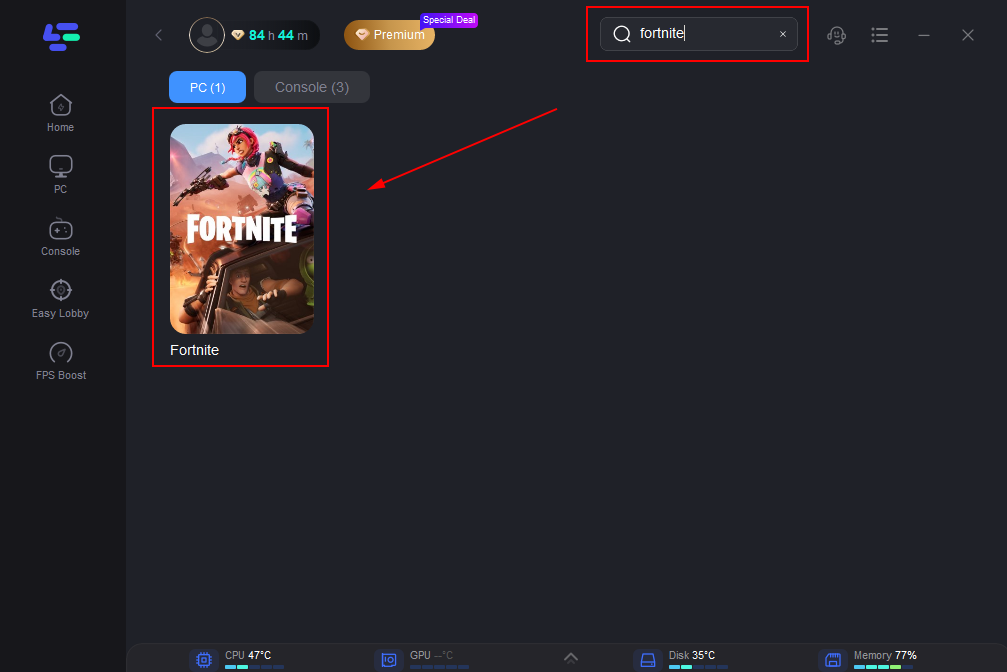
Step 2: Enter Fortnite in the search bar at the top and click on the game when it appears.
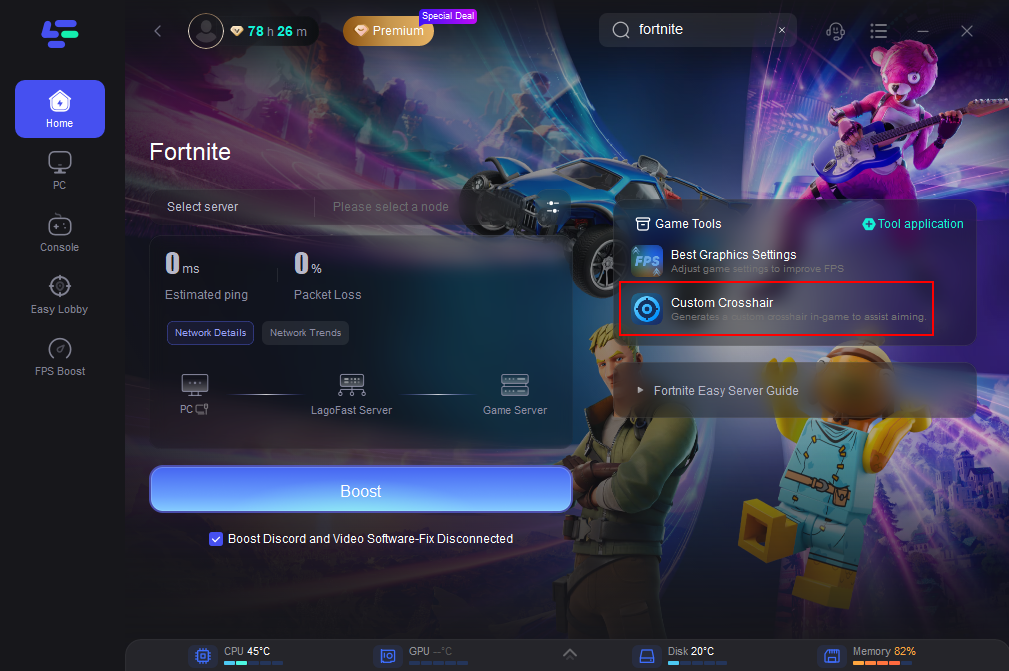
Step 3: Find the Custom Crosshair Tool on the right side of the application.
Step 4: Customize Your Crosshair: This functionality lets you change your crosshair’s look to match your gaming style. You can modify its shape, size, thickness, and color. Once you’re satisfied with your configuration, press the Save Configuration button.
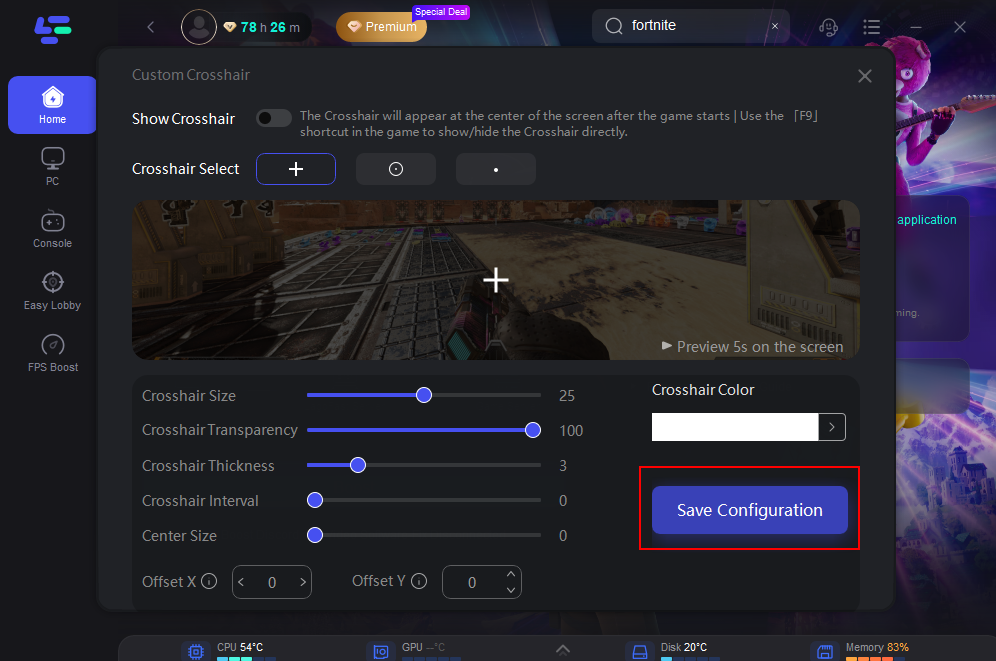
Step 5: Activate Crosshair in Fortnite: Launch Fortnite and press F9 to turn your custom crosshair on or off during gameplay. Test your crosshair in Creative, Battle Royale, or Zero Build, then adjust the settings until it is visible but not distracting.
Improve Fortnite Aim, Ping, and FPS with LagoFast
If you’re experiencing lag or connection issues while playing Fortnite, LagoFast can help improve your gaming experience. Here’s how to use it effectively:
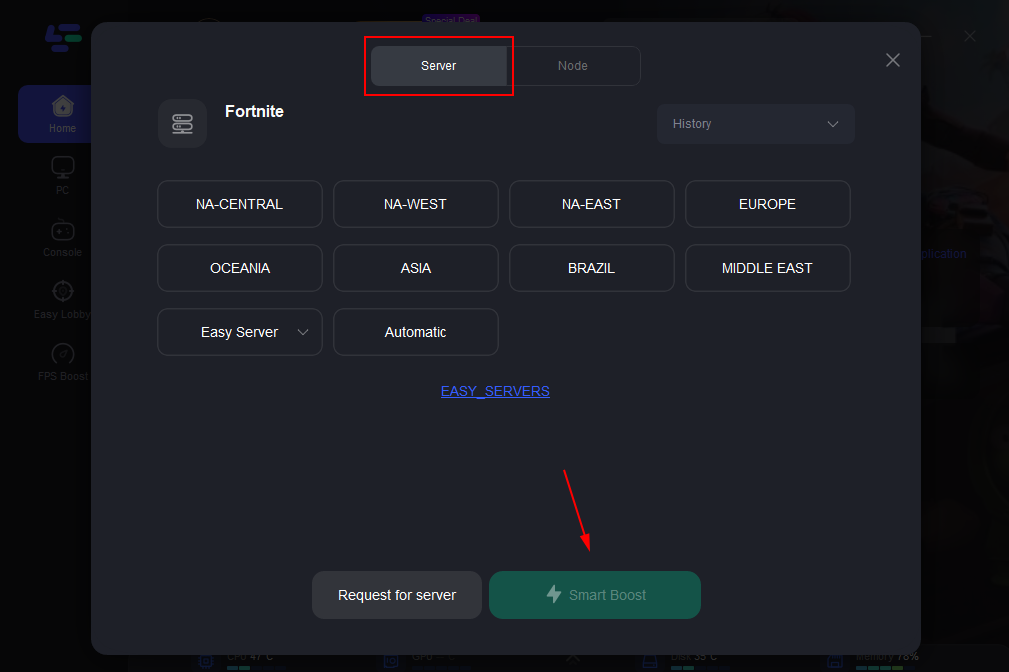
Step 1: Before opening Fortnite, search for it within LagoFast.
Step 2: Choose 'Select Server' to pick a stable server, then use the 'Node' option to select the optimal connection node.
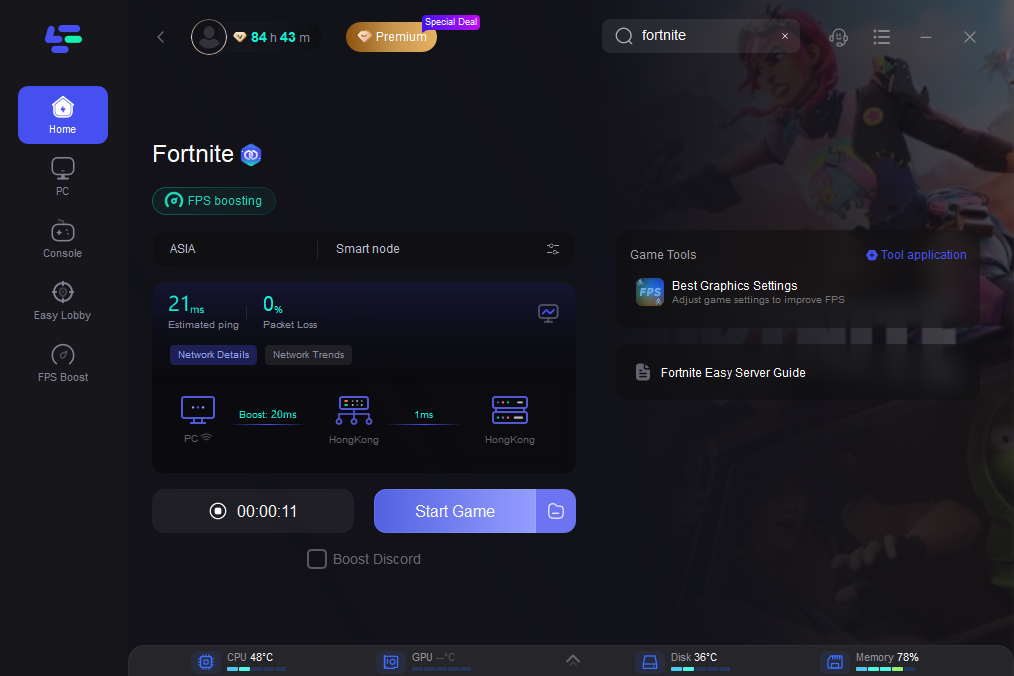
Step 3: Activate Boost to view real-time gaming metrics like ping, packet loss, and network type.
Try it free NOW.
Method 2: Use monitor crosshair settings
Some gaming monitors include a built-in crosshair feature. This can be useful for console players because it does not require PC overlay software. However, monitor crosshairs usually offer fewer styles and may not be as flexible as a dedicated tool.
Method 3: Adjust in-game HUD and reticle visibility
Fortnite does not offer full custom crosshair creation inside the game, but you can still adjust HUD scale and visibility settings to make your interface more comfortable. This is useful for all platforms, although it cannot replace a true custom crosshair overlay.
Method 4: Test your aim in Creative maps
After choosing a crosshair, test it in Creative aim maps before using it in ranked or real matches. A good crosshair should be visible enough to guide your aim but small enough that it does not block the enemy.
Part 4. Best Custom Crosshair Settings for Fortnite
The best Fortnite custom crosshair depends on your screen, resolution, playstyle, and the mode you play most. In general, the best crosshair should be easy to see, centered, and small enough that it does not block your target.
Best Crosshair Styles for Fortnite
A bigger or more complex crosshair is not always better. Fortnite has fast movement, bright environments, builds, effects, and close-range fights. The best crosshair should stay visible without covering the enemy.
|
Crosshair Style |
Best For |
Why It Works |
Possible Downside |
|
Small dot |
Shotgun flicks, precise edits, Zero Build peeks |
Keeps the center clear and helps with quick target focus. |
May be hard to see on bright backgrounds. |
|
Small cross |
General Battle Royale, AR and SMG fights |
Easy to track the center while moving. |
Can feel distracting if too thick. |
|
Circle |
Shotgun spread awareness, close-range fights |
Helps visualize center and spread area. |
May block small targets at distance. |
|
Bright color |
Visibility in snow, dark rooms, chaotic fights |
Stands out from the map and effects. |
Too bright can distract in endgame. |
|
Static crosshair |
Consistent aiming practice |
Does not expand or change during movement. |
May not reflect weapon spread. |
|
Dynamic reticle |
Players who prefer in-game feedback |
Can reflect weapon behavior and spread. |
Less customizable than overlays. |
Best Crosshair Settings by Playstyle
|
Playstyle / Weapon |
Recommended Crosshair |
Setup Tip |
|
Shotgun fights |
Small dot or small circle |
Keep opacity high enough to see during box fights but not so large that it hides the enemy head. |
|
SMG tracking |
Small cross |
Use thin lines so you can track movement without blocking the target. |
|
Assault rifle / mid-range |
Dot or small cross |
Choose a visible color and avoid large circles. |
|
ADS-heavy players |
Subtle dot |
Do not stack a large overlay over the ADS reticle. |
|
Zero Build |
Bright small dot or cross |
Prioritize visibility during movement and cover peeks. |
|
Creative aim practice |
Static dot |
Use the same style consistently to build muscle memory. |
Best crosshair size
A crosshair that is too large can block enemies, especially during close-range shotgun fights. A crosshair that is too small can disappear during fast movement. For most Fortnite players, a small dot, thin cross, or small open crosshair is the safest starting point.
FAQ
Is custom crosshair bannable in Fortnite?
NO. A simple visual overlay or monitor crosshair is different from cheat software. The safest options are Fortnite’s own reticle settings and monitor-level crosshairs. PC overlay tools should be used carefully: choose tools that only display a visual crosshair and do not modify Fortnite files, inject code, read memory, automate aim, or bypass anti-cheat.
Epic Games does not officially support third-party software, so players use custom crosshair tools at their own risk. Avoid tools that claim aim assist, no recoil, macros, enemy detection, or other gameplay advantages.
Is LagoFast Custom Crosshair safe to use?
LagoFast Custom Crosshair is designed as a visual crosshair overlay. It helps players customize crosshair style, size, color, thickness, and opacity. Use it as a visual aid only, and avoid any tool that automates aim, modifies game files, or provides hidden information.
What is the best custom crosshair for Fortnite?
A small dot or thin crosshair with a bright color such as green, cyan, pink, or purple usually works well. The best choice depends on your playstyle, screen resolution, and whether you play Battle Royale, Zero Build, or Creative.
Can I use custom crosshair on Fortnite PS5 or Xbox?
PC-style custom crosshair overlay tools usually work on PC, not directly on PS5, PS4, Xbox, or Nintendo Switch. Console players can use monitor crosshair settings if their display supports them.
Why is my Fortnite custom crosshair not showing?
Make sure the overlay is enabled, run LagoFast before launching Fortnite, check fullscreen or windowed mode, increase opacity, choose a brighter color, and restart both LagoFast and Fortnite.
Conclusion
Customizing your crosshair in Fortnite is a simple but effective way to improve your gameplay. Whether you’re aiming for precision in combat or just want to make the game feel more personal, the CustomCrosshair mod offers all the tools you need. With a few quick steps, you can easily download and install the mod, adjust the settings, and enjoy a more tailored gaming experience.
Boost Your Game with LagoFast for Epic Speed
Play harder, faster. LagoFast game booster eliminates stutter and lags on PC, mobile, or Mac—win every match!
Quickly Reduce Game Lag and Ping!
Boost FPS for Smoother Gameplay!