

Architect: Land of Exiles is a next-generation Unreal Engine 5 MMORPG that has entered the Taiwan, Hong Kong, and Macau market. With its massive open world, deep character progression, and large-scale multiplayer battles, it has quickly attracted MMORPG players looking for a new fantasy experience.
But if you’re trying to figure out how to actually download and play the game smoothly, things are not always straightforward—especially depending on your setup, region, and system environment. This guide breaks down everything you need to know in a simple way.

- ✅ Reduce Lag and High Ping.
✅ Boost FPS at the Same Time.
✅ Support 2000+ Popular Online Games.
✅ Change Server without Latency.
✅ Boost Game Loading Speed.
Part 1: Architect: Land of Exiles Release Date
Part 2: When and How Can You Download Architect: Land of Exiles?
Part 3: How to Download and Play Architect: Land of Exiles Easily — LagoFast
Part 4: Other Download Methods for Architect: Land of Exiles
Part 1: Architect: Land of Exiles Release Date
Architect: Land of Exiles is currently in its regional rollout phase for Taiwan, Hong Kong, and Macau. The game entered Closed Beta Testing (CBT) on June 18, 2026, giving players early access to core systems before the full release.
Since then, the game has continued to expand through ongoing testing phases, although a global release date has not been confirmed yet. The focus remains on regional rollout and early-stage access.
Even in this phase, the game has already gained strong attention thanks to its Unreal Engine 5 visuals and large-scale MMORPG design.
Key Features of Architect: Land of Exiles
- Seamless open-world exploration
- Unreal Engine 5 graphics and lighting
- Deep class progression system
- Large-scale PvE and PvP battles
- Faction-based warfare
- Story-driven quests and world events
- Dungeon raids and boss fights
- Crafting and gear systems
- Cross-platform support (PC and mobile)
The game is heavily system-driven, with much of the gameplay focused on quests, menus, and item systems. A smooth setup and clear understanding of these systems can significantly improve the overall experience.
Part 2: When and How Can You Download Architect: Land of Exiles?
If you are in the Taiwan, Hong Kong, and Macau region, download access is usually available through official app stores or platform channels, depending on the current testing or release phase of the game.
However, availability is not always consistent, especially during early rollout stages. Many players may run into issues such as:
- The game not appearing in app stores
- Regional restrictions during phased releases
- Platform-specific account or access limitations
- Different installation steps between PC and mobile
Because of these limitations, many players start looking for a simpler and more stable way to download and access the game without unnecessary setup steps.
Part 3: How to Download and Play Architect: Land of Exiles Easily — LagoFast
If you want the easiest way to download and play Architect: Land of Exiles, LagoFast is one of the simplest solutions. It helps streamline the setup process and reduce unnecessary steps, making it easier to get into the game quickly.
- Game Download Tool: Helps players quickly download and install Architect: Land of Exiles without complicated setup steps.
- Game Translation Tool: Provides real-time translation for in-game text such as quests, menus, and system descriptions, helping players understand gameplay more clearly in non-supported languages.
- Network Optimization (Ping / Stability): Improves routing to game servers to reduce ping, fix packet loss, and stabilize connections. This helps reduce lag spikes and disconnections during gameplay.
How to use LagoFast to download and smoothly play Architect: Land of Exiles:
Step 1: Click the Free Trial button to download and install LagoFast.
Step 2: Open LagoFast, then click the PC button on the left and search Architect: Land of Exiles in the search bar.
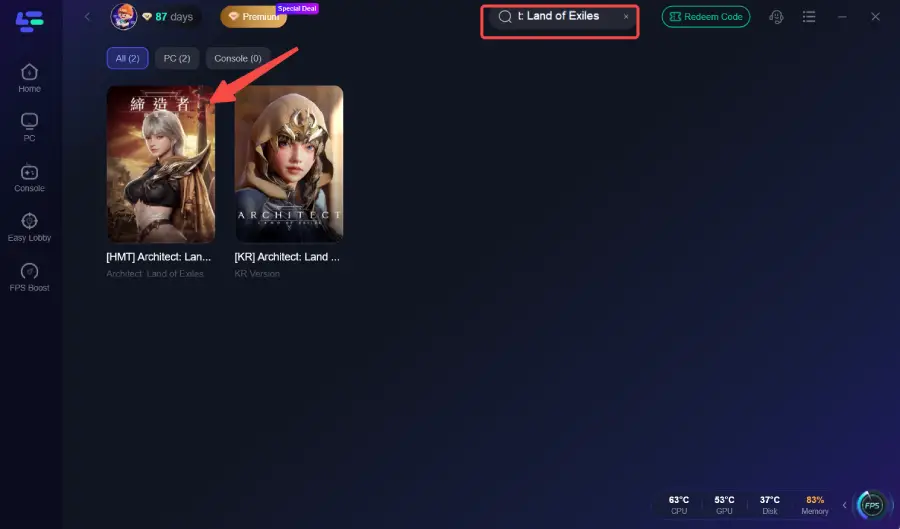
Step 3. Click the Game Download button on the interface to download Architect: Land of Exiles to your PC.
Step 4: Choose your preferred server node and click "Smart Boost" to start optimizing.
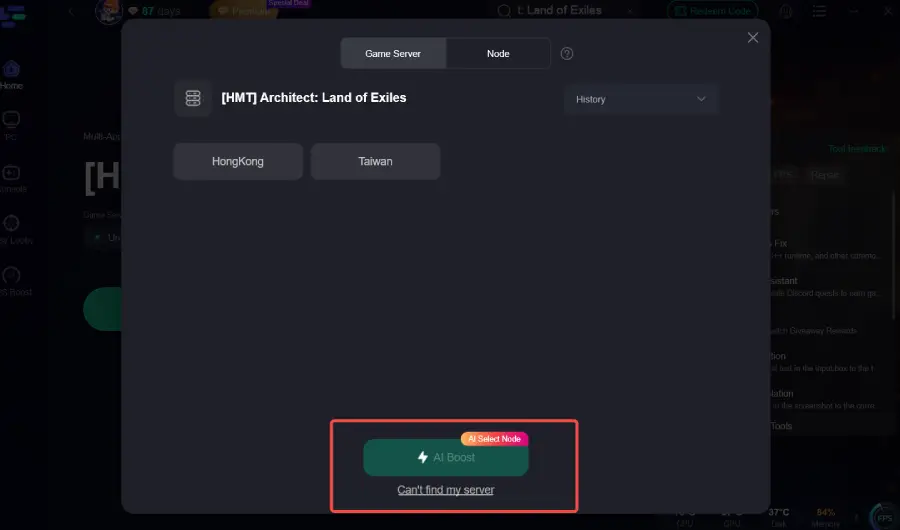
Step 5: Launch your game and enjoy smooth, optimized gameplay with lower ping and packet loss.

Part 4: Other Download Methods for Architect: Land of Exiles
If you prefer a manual setup, you can still download Architect: Land of Exiles through official app stores or platform channels depending on your device and region. However, this method may involve additional steps such as account setup or platform verification.
For PC:
- Visit the official Architect: Land of Exiles website or authorized platform store
- Download the PC client installer
- Follow any required account registration or login steps
- Install the game on your device
- Launch the game after installation and adjust basic settings if needed
For Android:
- Open the Google Play Store
- Search for “Architect: Land of Exiles”
- Install the game if it is available in your region
- If not visible, check platform availability or wait for regional rollout updates
- Log in after installation and wait for server access if required
For iOS:
- Open the App Store
- Search for Architect: Land of Exiles
- Download and install the game
- Complete login or account setup if prompted
- Launch the game once installation is finished
Final Thought
Architect: Land of Exiles is shaping up to be a large-scale MMORPG with deep systems and a strong focus on progression. However, setup and access can still vary depending on region and platform. Whether you choose official installation methods or use tools like LagoFast to simplify the process, the key is getting into the game smoothly so you can focus on gameplay instead of technical steps.

Boost Your Game with LagoFast for Epic Speed
Play harder, faster. LagoFast game booster eliminates stutter and lags on PC, mobile, or Mac—win every match!
Quickly Reduce Game Lag and Ping!
Boost FPS for Smoother Gameplay!