
Quick Answer
If you're encountering a black screen in Forza Horizon 6, try these immediate fixes:
- PC: Update your graphics drivers, clear your shader cache, and try launching the game in windowed mode (Alt+Enter). If it's a post-launch black screen, try Alt-Tabbing in and out.
- Xbox: Perform a full power cycle of your console and ensure your system software is up to date.
- Both: Verify game files/reinstall the game as a last resort.
Introduction
Forza Horizon 6 lets players explore Japan’s landscapes, but some may face a black screen on launch or after startup, preventing the game from loading properly. It may appear as a blank screen, a logo flash, or sound without visuals.
This guide briefly explains the causes of the Forza Horizon 6 black screen issue and offers simple fixes for PC and Xbox to help restore normal gameplay.

- ✅ Reduce Lag and High Ping.
✅ Boost FPS at the Same Time.
✅ Fix Crashing and Freezing Issues.
✅ Change Server without Latency.
✅ Boost Game Loading Speed. - ✅ Repair Game Disconnected Problems.
Part 1: Why is Forza Horizon 6 Stuck on a Black Screen?
Part 2: Fix Forza Horizon 6 Black Screen on Launch & After Startup (PC-Focused)
Part 3: How To Fix Black Screen in Forza Horizon 6 (Advanced Methods)
Part 4: Forza 6 Black Screen Loading Xbox (Quick Fixes)
Part 5: How to Enhance Your Game Experience with LagoFast Game Booster
Part 1: Why Forza Horizon 6 Gets Stuck on a Black Screen
Before applying fixes, it is important to understand why a Forza Horizon 6 black screen issue happens in the first place. This problem usually stems from system conflicts rather than a single bug, which means multiple components may be involved.
Graphics Driver Instability
One of the most common causes of a Forza Horizon 6 black screen after startup is outdated or corrupted GPU drivers. Since the game relies heavily on advanced rendering pipelines, even small driver mismatches can prevent the display from initializing.
Corrupted Shader Cache or Game Files
When shader compilation data becomes damaged, the game may fail to render scenes correctly. This often leads to a Fix Forza Horizon 6 Stuck On Black Screen Error on PC situation, especially after updates or crashes.
Display Mode and Resolution Conflicts
Fullscreen optimizations, HDR mismatches, or incorrect resolution scaling can cause the engine to fail when switching display modes. This is a frequent trigger for a Forza Horizon 6 Black Screen on launch scenario.
Background Software Interference
Applications such as overlays, screen recorders, or performance monitors can interrupt rendering. Discord overlays, Xbox Game Bar, or third-party tools often interfere with graphics initialization.
System Limitations and Stability Issues
Hardware overheating, unstable overclocking, or insufficient VRAM may also lead to black screens. While less common, these factors can contribute to sudden display failure during startup.
Understanding these causes helps narrow down the correct fix path, which is especially useful when troubleshooting complex cases like Fix Forza Horizon 6 Black Screen Issue On PC.
Part 2: Fix Forza Horizon 6 Black Screen on Launch & After Startup (PC-Focused)
PC players have a wider range of potential solutions due to the customizable nature of the platform. These steps address the most common causes of black screens on Windows.
Update or Roll Back Graphics Drivers
This is often the most effective solution. Forza Horizon 6, built on an upgraded ForzaTech engine, demands the latest driver optimizations.
- Clean Driver Installation: Download the latest recommended drivers for your NVIDIA or AMD graphics card directly from their official websites. Use Display Driver Uninstaller (DDU) in Safe Mode to completely remove old drivers before installing the new ones. This prevents conflicts.
- Roll Back Drivers: If the black screen started after a recent driver update, try rolling back to a previous stable version. Sometimes, the very latest drivers can introduce new bugs.
Reset Shader Cache and Verify Files
Corrupted shader caches are a frequent cause of black screens and stuttering.
Clear Shader Cache:
- NVIDIA: Open NVIDIA Control Panel > Manage 3D settings > Shader Cache Size > Set to "Off" or "Driver Default." You can also clear it manually from your graphics driver software.
- AMD: Open AMD Radeon Software > Gaming > Global Graphics > Advanced > Reset Shader Cache.
Verify Game Files:
- Steam: Right-click Forza Horizon 6 in your Library > Properties > Installed Files > Verify integrity of game files.
- Microsoft Store/Xbox App: Open the Xbox App > Right-click FH6 > Manage > Files > Verify and Repair.
Disable Fullscreen Optimizations and Overlays
Windows' fullscreen optimizations and third-party overlays can sometimes interfere with game rendering.
- Disable Fullscreen Optimizations: Navigate to your Forza Horizon 6 installation folder, right-click the ForzaHorizon6.exe file > Properties > Compatibility tab > Check "Disable fullscreen optimizations."
- Disable Overlays: Turn off Discord, Steam, and NVIDIA/AMD in-game overlays. Also, disable the Xbox Game Bar (Windows Key + G, then go to settings and turn off).
Run in Windowed Mode (Alt+Enter Trick)
If the game launches to a black screen but you can hear audio, it might be a display mode issue.
Launch Forza Horizon 6.
Once the black screen appears, press Alt + Enter simultaneously. This often forces the game into windowed mode, which might display correctly.
If it works, you can then go into the in-game graphics settings and adjust your display mode and resolution.
Part 3: How To Fix Black Screen in Forza Horizon 6 (Advanced Methods)
If the basic troubleshooting steps don't resolve the issue, these advanced methods delve deeper into system configurations.
Clear Gaming Services and Microsoft Store Cache
Corrupted system caches can prevent the game from launching correctly.
Reset Gaming Services:
Open Windows Settings > Apps > Apps & features.
Find "Gaming Services," click the three dots > Advanced options > Terminate, then Reset.
Reset Microsoft Store:
Open Windows Settings > Apps > Apps & features.
Find "Microsoft Store," click the three dots > Advanced options > Terminate, then Reset.
Adjust Virtual Memory (Page File)
Insufficient virtual memory can cause games to crash or display black screens, especially with demanding titles like FH6.
- Press Windows Key + R, type sysdm.cpl, and press Enter.
- Go to the Advanced tab > Performance section > Settings.
- In the Performance Options window, go to the Advanced tab > Virtual memory section > Change.
- Uncheck "Automatically manage paging file size for all drives."
- Select your system drive (usually C:) and choose "Custom size."
- Set Initial size to your RAM in MB (e.g., 16GB RAM = 16384 MB). Set Maximum size to 1.5 to 2 times your RAM.
- Click Set, then OK, and restart your PC.
Check for Conflicting Software
Certain software, particularly those that inject into games or monitor system performance, can cause issues.
Temporarily disable or uninstall any overclocking software (MSI Afterburner, RivaTuner Statistics Server), VPNs, or other game-related utilities to see if they are causing the conflict.
Part 4: Forza 6 Black Screen Loading Xbox (Quick Fixes)
While less frequent, Xbox players can also encounter black screens. The solutions are generally simpler due to the console's standardized environment.
- Full Power Cycle: As detailed in the Quick Answer, a full power cycle is often enough to resolve temporary glitches.
- Check for System Updates: Ensure your Xbox console is running the latest system software. Updates often include stability fixes for games.
- Reinstall the Game: If all else fails, uninstalling and reinstalling Forza Horizon 6 can resolve deeply corrupted game files.
Part 5: How to Enhance Your Game Experience with LagoFast Game Booster
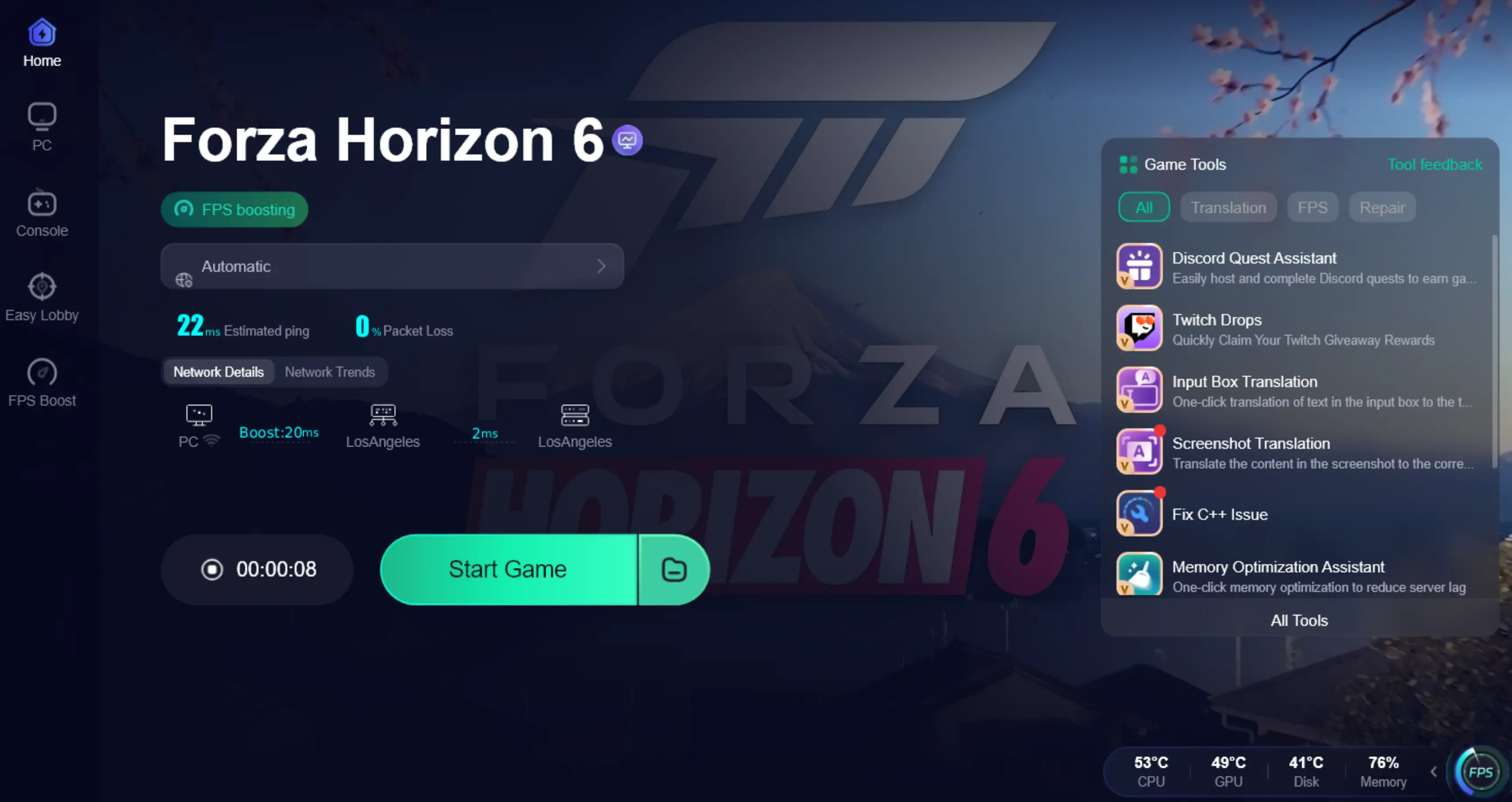
Even after resolving black screen issues, optimizing your network connection is crucial for a smooth and responsive Forza Horizon 6 experience, especially in the online Horizon Life mode. Network instability, high ping, or packet loss can lead to in-game stuttering, disconnects, and even contribute to loading issues if the game struggles to connect to servers. LagoFast Game Booster is a professional tool designed to stabilize your network, reduce latency, and ensure a seamless online experience. It supports both PC and console players, allowing users on different platforms to enjoy a more stable and responsive online experience with fewer lag spikes and interruptions
Use LagoFast to Avoid Forza Horizon 6 Black Screen Issues by Stabilizing Connections on PC
Step 1: Click the Free Trial button to download and install LagoFast.
Step 2: After installation, search "Forza Horizon 6" in the search bar and select the game.

Step 3: Choose your preferred server node and click "Smart Boost" to start optimizing.

Step 4: Launch your game and enjoy smooth, optimized gameplay with lower ping and no stutter.
Part 6: FAQs
Why does Forza Horizon 6 show a black screen after intro logos?
This usually indicates a graphics initialization failure or driver conflict. Updating drivers or switching display mode often resolves it.
Can Windows version cause black screen issues?
Yes. Older Windows builds may lack required system components, leading to launch failures or Forza Horizon 6 Black Screen on launch behavior.
Is deleting shader cache safe?
Yes, it is completely safe. The game automatically rebuilds shader files on the next startup, which often fixes corruption-related issues.
Why is there sound but no display?
This indicates a rendering output failure rather than a crash. Switching to windowed mode or resetting display settings usually resolves it.
Will reinstalling fix black screen problems?
In severe cases, yes. Reinstalling can fix deeply corrupted files that verification tools cannot repair
Conclusion
Encountering a black screen in Forza Horizon 6 is a frustrating roadblock, but with a systematic approach, it's a problem that can be overcome. By meticulously working through the troubleshooting steps—from updating drivers and clearing caches on PC to power cycling your Xbox—you can identify and resolve the underlying cause. Remember that a stable and optimized system is key to enjoying the high-fidelity world of Forza Horizon 6. For PC players, leveraging a tool like LagoFast Game Booster can provide that crucial edge, ensuring your network isn't contributing to launch woes. Don't let a dark screen keep you from the vibrant streets of Japan. Optimize your setup, download LagoFast, and get ready to race!
Boost Your Game with LagoFast for Epic Speed
Play harder, faster. LagoFast game booster eliminates stutter and lags on PC, mobile, or Mac—win every match!
Quickly Reduce Game Lag and Ping!
Boost FPS for Smoother Gameplay!