
If you're an avid Fortnite player, you know how crucial a stable and low ping is for a seamless gaming experience. High ping can lead to lag, making your game sluggish and frustrating, especially during intense battles. Understanding what causes high ping and how to fix it can significantly improve your performance and enjoyment of the game. This diagnostic guide explains why your ping may be high in Fortnite, why Speedtest can look fine while Fortnite still lags, what different symptoms mean, and when a routing optimizer such as LagoFast is worth testing. It does not repeat every step from a full ping-lowering guide; instead, it helps you understand the cause first.
Quick Answer: Why Your Fortnite Ping Is High
Your Fortnite ping is usually high because your connection path to the selected Fortnite server is not optimal. That can happen even if your normal internet speed is good. The most common reasons are:
- You are matched to a server region that is farther away than expected.
- Your ISP route to the Fortnite server is congested or taking a poor path.
- Your Wi-Fi is unstable, causing ping spikes or packet loss.
- Your party leader or matchmaking session is pulling you into a different region.
- Epic is running maintenance, deploying an update, or experiencing partial service issues.
- Your device is dropping FPS, which can feel like network lag even when ping is normal.

- ✅ Reduce Lag and High Ping
- ✅ Boost FPS in Real Time
- ✅ Get the Easiest Server in Fortnite
- ✅ End All Connection Login Issues.
- ✅ Support 8000+ Online Games.
- ✅ Multiplatform: PC, Mobile, Console
Part 1: Understanding Latency or Ping in Fortnite
Part 2: Why is My Ping So High in Fortnite
Part 3: How to Fix Fortnite High Ping
Part 4: Bonus Tips: Why is My Ping So High but My Internet is Good
High Ping Only in Fortnite but the Internet Is Fine
Part 1: Understanding Latency or Ping in Fortnite
Latency, commonly referred to as “ping,” is a measure of how long it takes for data to travel from your device to the game server and back. In Fortnite, a lower ping means smoother gameplay, while a high ping can lead to lag and disrupt your gaming experience. Ping is measured in milliseconds (ms), and an ideal ping for gaming is typically below 50ms. Understanding the factors that contribute to high ping can help you troubleshoot and improve your gaming experience.
Fortnite High Ping Symptoms and What They Usually Mean
|
In-Game Symptom |
What It Feels Like |
Likely Cause |
|
Delayed builds or edits |
Walls place late, edits confirm late, builds feel heavy |
High ping, server distance, or unstable route |
|
Shots not registering |
You hit on your screen but damage does not count |
High ping, packet loss, desync, or server-side delay |
|
Rubber banding |
Character snaps back after moving |
Packet loss, jitter, Wi-Fi instability, or routing issues |
|
Teleporting players |
Enemies or teammates jump position suddenly |
Packet loss, ping spikes, or server-side instability |
|
Ping spikes every few seconds |
Ping jumps from normal to very high repeatedly |
Wi-Fi interference, background downloads, router bufferbloat, ISP congestion |
|
Packet loss icon |
Red/yellow network warning appears |
Unstable network path, Wi-Fi loss, router issue, or ISP route problem |
|
Low FPS but normal ping |
Game feels choppy, not delayed |
Device performance, graphics settings, overheating, or driver issue |
Part 2: Why is My Ping So High in Fortnite?
Experiencing high ping in Fortnite can be frustrating, especially during crucial moments in the game. Several factors can cause high ping, including:
1. You Are Connected to a Farther Server Region
Fortnite matchmaking region has a direct impact on ping. If Auto region selects a server that is not actually the best for your route, or if you join a cross-region party, your ping can rise even when your home internet is stable.
2. Your ISP Route to Fortnite Is Unstable
Your ISP decides how your traffic travels across networks. A route can be longer or more congested than expected because of peering, exchange-point congestion, or regional routing changes. This is one of the most common reasons for Fortnite-only high ping.
3. Wi-Fi Interference or Router Bufferbloat
If ping rises when someone uploads, streams, downloads updates, or uses cloud backup at home, the issue is likely local network congestion rather than Fortnite itself. Wi-Fi interference can also create spikes even when average ping looks acceptable.
4. Packet Loss or Jitter
Packet loss and jitter can make Fortnite feel worse than the ping number suggests. You may see rubber banding, delayed shots, or sudden teleporting even if your ping is not extremely high.
5. Epic Server, Matchmaking, or Party Service Issues
If many players report the same issue after an update, event, or scheduled downtime, the cause may be on Epic’s side. In that case, local fixes and routing tools have limited value until the service stabilizes.
6. FPS Drops Mistaken for Ping Problems
Low FPS can feel like input delay, but it is not the same as high ping. If the game stutters, freezes, or drops frames while your ping is stable, focus on graphics settings, drivers, background tasks, and device performance.
Part 3: How to Fix Fortnite High Ping
Addressing high ping in Fortnite requires a multi-faceted approach. Here are some effective solutions to reduce ping and enhance your gaming experience.
Use LagoFast to Fix High Ping
One popular solution for fixing high ping in Fortnite is using a dedicated gaming booster and VPN LagoFast. It can optimize your internet connection by routing your game data through more efficient paths, reducing latency, and providing a smoother gaming experience.
Benefits of Using LagoFast:
- Best High Ping Reducer: LagoFast includes advanced high ping reduction technology, ensuring the lowest possible ping for a smooth and competitive gaming experience.
- Stable Gaming Connection: LagoFast ensures uninterrupted gameplay with stable connections, and optimal game routes, minimizing latency for multiserver games.
- FPS Optimization: LagoFast enhances gaming performance by automatically optimizing OS settings, CPU, and GPU with a single click, boosting FPS and eliminating ghosting and tearing.
- Easy Server & Victories: Enjoy exclusive features like easy access to low-K/D lobbies in multiplayer games, enhancing matchmaking without affecting ping, ensuring victories in games like Warzone.
- Support for 8000+ Games: LagoFast supports over 2,000 online games, offering tailored routes and servers for peak performance.
- Global Server Network: With servers in 60+ countries and 150+ cities, LagoFast provides seamless gaming experiences worldwide.
Tutorial to use LagoFast to fix high ping:
Step 1: Visit the LagoFast website and click on 'Free Trial' to download the game booster. Install it on your device to get started.
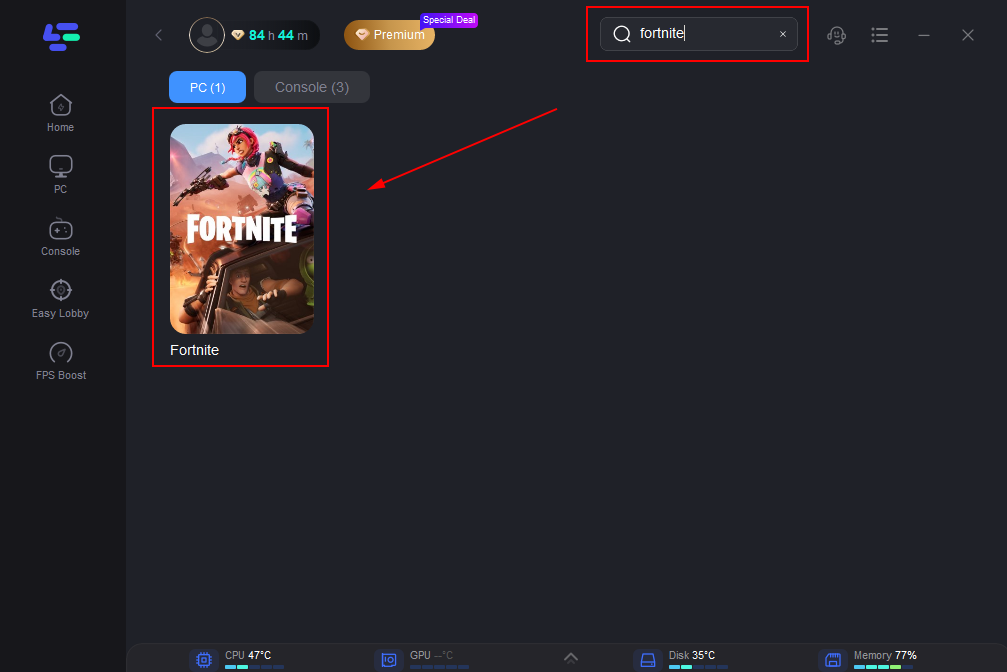
Step 2: Before opening Fortnite, launch LagoFast and use its search feature to find Fortnite. This ensures that the booster will optimize specifically for the game.
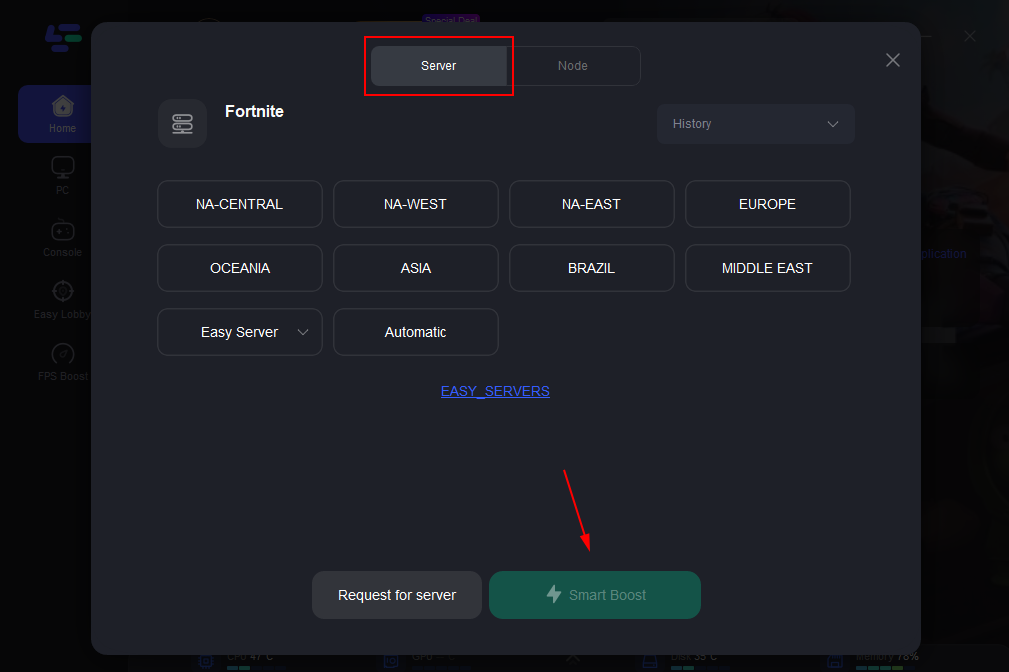
Step 3: Optimize your server connection by selecting 'Select Server' in LagoFast. Choose a stable server from the list, then fine-tune by selecting the most effective 'Node' available on the right side of the application.
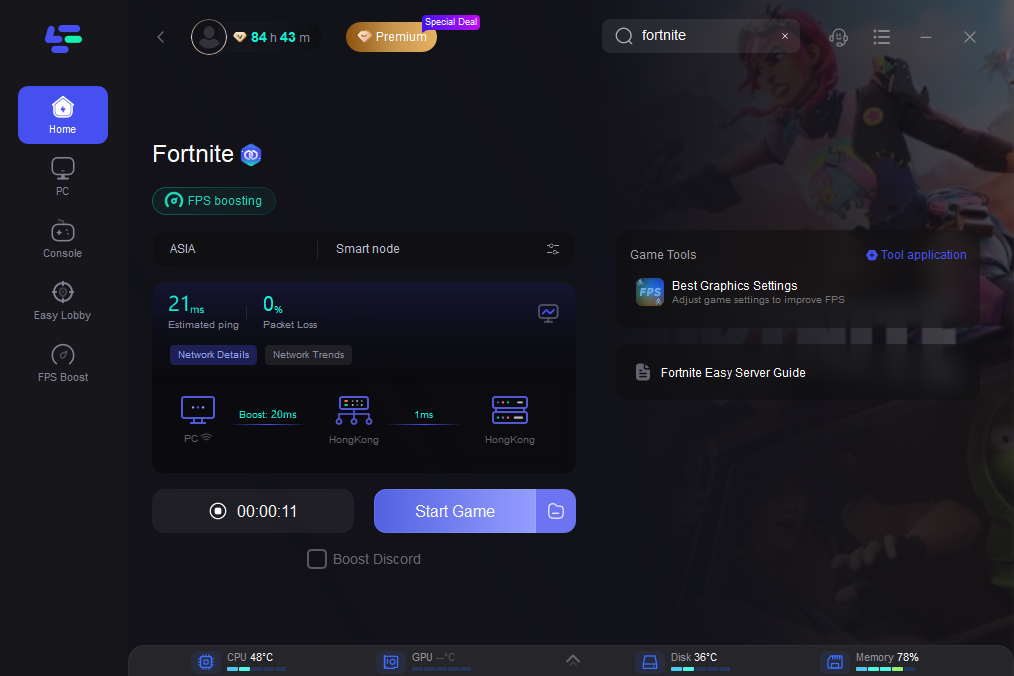
Step 4: Click on the 'Smart Boost' button to activate LagoFast’s optimization features. You’ll be able to view real-time stats on game ping, packet loss, and network type, which are crucial for monitoring the quality of your connection.
Other Solutions to Avoid High Ping in Fortnite:
Use an Ethernet Cable Connection:
Wireless connections can easily get interrupted and have signal degradation which results in lag. Connecting to your modem or router with an ethernet cable eliminates this possibility and provides you with the fastest connection possible.
Close Background Applications:
Ensure no other applications are consuming bandwidth while you are playing Fortnite.
Upgrade Router Firmware:
Firmware is software that provides low-level control of your router. This can improve performance similar to a graphics driver.
Optimize Network Settings:
Adjust your router settings for optimal gaming performance, such as enabling Quality of Service to prioritize gaming traffic.
Update Hardware:
Upgrading your router or network adapter to a more modern, high-performance model can improve your connection.
Select the Right Server:
When playing Fortnite, choose the server closest to your location to reduce latency.
Regularly Restart Your Network:
Restarting your modem and router can resolve temporary network issues and improve performance.
Adjust your router WiFi band:
Routers nowadays usually have two bands: 2.4 GHz and 5 GHz.
- 2.4 GHz is a common band for most household devices so if you have a lot of these connected to your WiFi network it can cause congestion and result in lag.
- Your 5 GHz band is used less but doesn't travel as far so if your router is not in a good position to connect to your computer it can result in poorer performance too.
Be sure to try both bands to see which works best for you. Changing this setting varies from router to router so be sure to check with your manufacturer on how to do this.
Try disabling Cosmetic Streaming in Fortnite:
- Go to the Epic Games launcher library.
- Click on the 3 dots under the Fortnite title
- Select Options.
- Check the Pre-download Streamed Assets
- Click Apply.
Bonus Tips: Why is My Ping So High but My Internet is Good
If you have a fast and stable internet connection but still experience high ping in Fortnite, consider the following possibilities:
- ISP Throttling: Some ISPs throttle gaming traffic during peak hours to manage network congestion.
- Network Interference: Wireless connections are susceptible to interference from other electronic devices.
- Incorrect Server Selection: Ensure you are connected to the Fortnite server closest to your geographical location.
- Game Updates: Updates or patches being applied to the game can temporarily cause higher ping.
High Ping Only in Fortnite but the Internet Is Fine
A low-latency Speedtest does not guarantee low ping in Fortnite. Speedtest usually connects to a nearby test server, while Fortnite connects to game servers in a specific matchmaking region. These routes can be completely different.
That is why some players can stream videos, browse normally, or get good download speed, but still see 80 ms, 120 ms, or constant spikes in Fortnite. The issue may be your route to Fortnite servers, not your overall internet connection.
FAQ
Why is my ping high only in Fortnite
Because Fortnite uses specific game servers and routing paths. Your normal internet speed can be fine while your route to Fortnite is congested, distant, or unstable.
Why is my Fortnite ping high but Speedtest is low
Speedtest usually connects to a nearby test server. Fortnite connects to a game region, so the destination and route are different.
Can a wrong matchmaking region cause high ping
Yes. If Auto or your party session sends you to a farther region, your ping can increase significantly.
Can LagoFast fix high ping in Fortnite
LagoFast can help when high ping is caused by unstable routing, distant servers, or packet loss. It cannot fix official downtime or hardware-only FPS problems.
Why does Fortnite lag after an update
Major updates can increase server load, cause matchmaking instability, trigger cache rebuilding, or expose new performance issues until Epic releases fixes.
Conclusion
Addressing high ping in Fortnite requires a combination of optimizing your network setup, using specialized tools like LagoFast, and understanding the potential external factors affecting your connection. With these strategies, you can minimize latency and improve your overall gameplay.

Boost Your Game with LagoFast for Epic Speed
Play harder, faster. LagoFast game booster eliminates stutter and lags on PC, mobile, or Mac—win every match!
Quickly Reduce Game Lag and Ping!
Boost FPS for Smoother Gameplay!