

Arabic version: أفضل 6 مزودي خدمات استضافة سيرفرات بالورلد
Palworld is a multiplayer, open-world, crafting, and survival game that features monster hunting. Most players want to get a Palworld dedicated server for their playgroups but don't know if Is it better to get a server via a provider or build one themself, our comprehensive guide reviews top providers, highlights their pros and cons, and answers frequently asked questions about Palworld server hosting.
Part 1. Can I create a Palworld Dedicated Server
YES.
In this game, multiplayer comes in two flavors: regular and dedicated servers. Regular is what you're familiar with from other games - you create a world, open it, and up to 4 friends can join using a code. The owner can play both online and offline, but friends can only play online (they don't get their copy).
Dedicated servers, on the other hand, support up to 32 players but sacrifice the owner's ability to play privately or offline. The catch is, that you either set up port forwarding on your router or pay an external service to host it for you. However, some servers are not stable, and most players choose to rent hosts to host their Palworld game. If you want to play Palworld on a private dedicated server more stable with the help of Server Hosting, you can continue reading the rest.
How to set up a dedicated server in Palworld:
- Purchase Palworld on Steam
- Launch the game once to create all the necessary files in its installation folder
- Close the game
- Search for "Palworld Dedicated Server" in the Steam library
Hot Read: How to Create & Set up a Dedicated Server Palworld >
Part 2. What are Palworld Server Hosting Providers & Factors to Consider
Palworld Server Hosting Providers Overview
Palworld Server Hosting Providers deliver dedicated resources specifically designed for Palworld game servers. In contrast to typical web hosting that prioritizes websites, these providers specialize in enhancing the gaming experience. They prioritize features such as minimized lag, high uptime, advanced configurations, mod support, and seamless backups.
Factors to Consider in Hosting Service
- Location: Optimal server location is crucial for minimizing latency. Choose a server close to your main player base.
- Scalability: Ensure your provider offers seamless scalability options as your Palworld community expands.
- Support: Effective customer support is vital, especially for those new to server management.
- Price: Balance cost and necessary features; the cheapest option may not guarantee the best service quality and performance.
- Backup & Security: Regular backups and strong security measures are essential for protecting your game data.
Part 3. Top 6 Best Palworld Server Hosting Providers - Recommendation
Local Private Server – An Easier Way to Host with Friends
Not every Palworld group needs a cloud-hosted dedicated server. If you're mainly playing with friends or a small community, setting up your own local private server can be a much simpler and more affordable option.
To make this easier, LagoFast now offers the Local Private Server tool, allowing players to create a dedicated-like multiplayer experience without the usual networking setup.
Why Use the Local Private Server Tool?
- One-Click Server Setup: Forget installing a separate server package, configuring port forwarding, or setting up a public IP. Simply create a room with one click and start inviting friends.
- Support Up to 16 Players: Instead of Palworld's standard 4-player private world, the Local Private Server supports up to 16 players, making it ideal for friend groups, guilds, or community events without renting a cloud server.
- Low-Latency Remote Play: Friends can connect through LagoFast's networking technology, creating a LAN-like experience even from different locations. This helps reduce latency and provides a smoother multiplayer experience.
- Keep Everything on Your Own PC: All save files and server data remain on the host's computer, giving you full control over your world without relying on official servers or third-party hosting services.
How to Use it
Click the Free Trial button to download and install LagoFast.
After installation, search "Palworld " in the search bar and select the game.
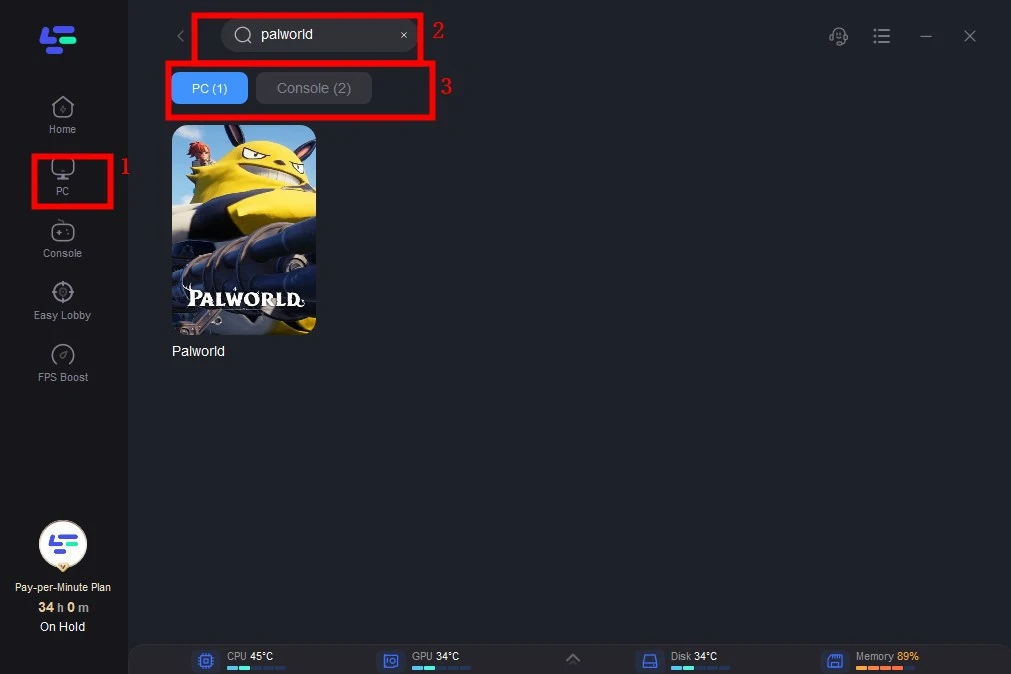
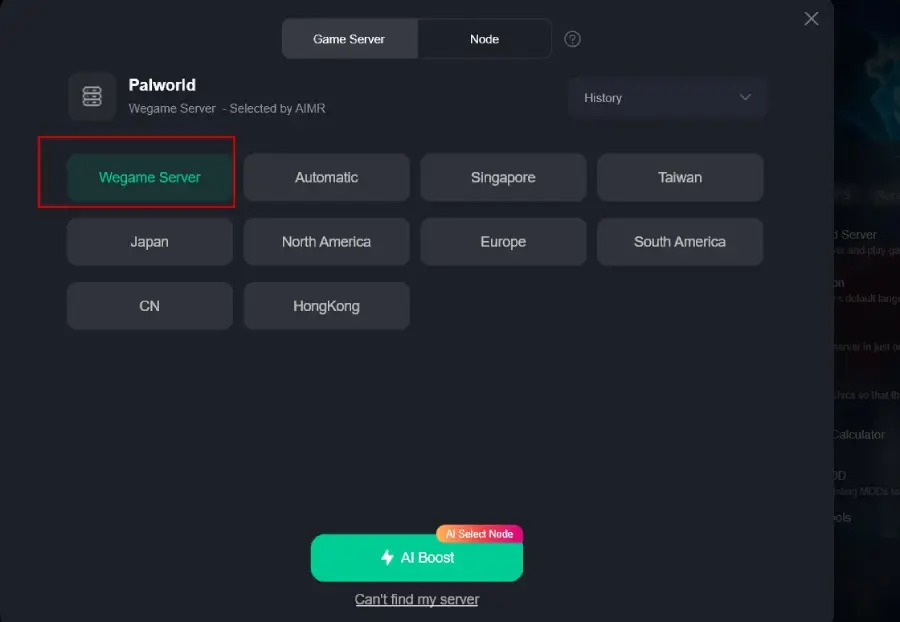
Select the Wegame server. Click Boost.
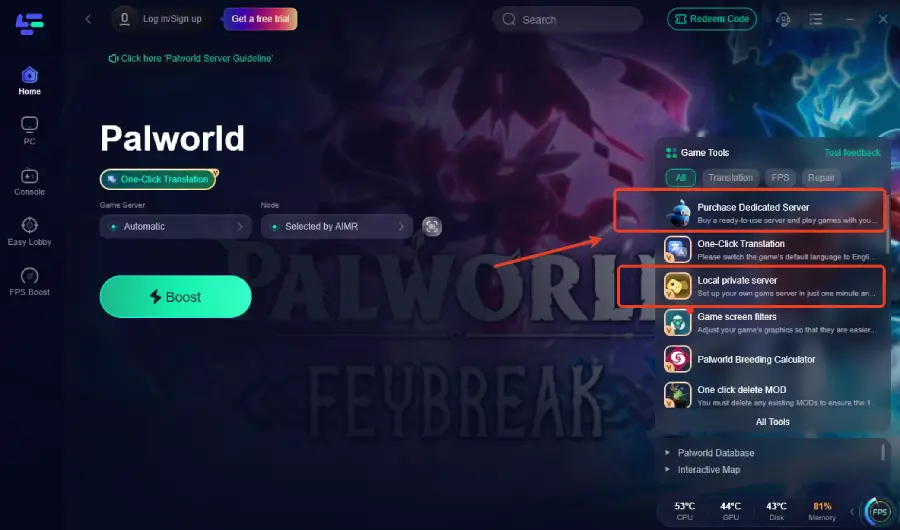
Once the acceleration is complete, click Local Private Server from the bottom-right Tools panel.
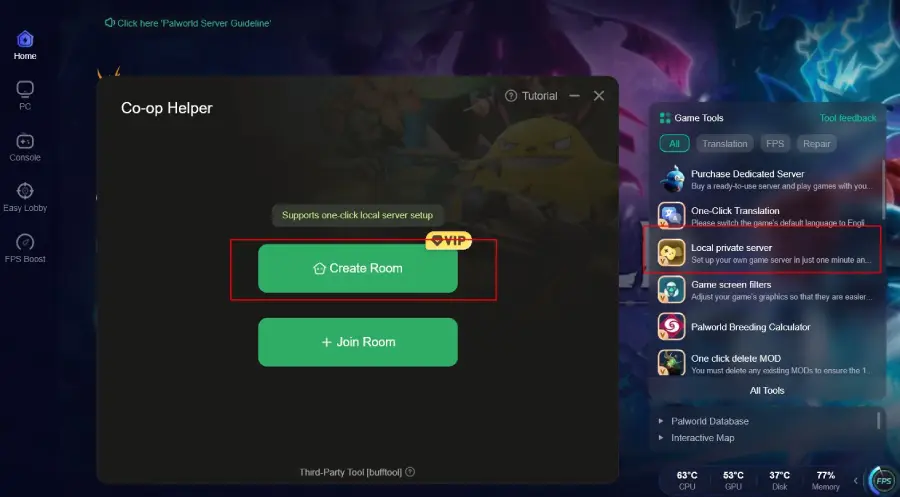
1. LagoFast – Flexible Palworld Server Solutions
Whether you want to host the game yourself or use a professionally managed server, LagoFast now provides two different hosting options to suit different play styles.
Local Private Server
This option is ideal if you'd like to be the host and invite friends to play together without renting a cloud server.
Pros:
- One-click server setup
- No port forwarding or public IP required
- Supports up to 16 players
- All saves stored locally
- Lower cost than renting a dedicated server
Dedicated Cloud Server Hosting
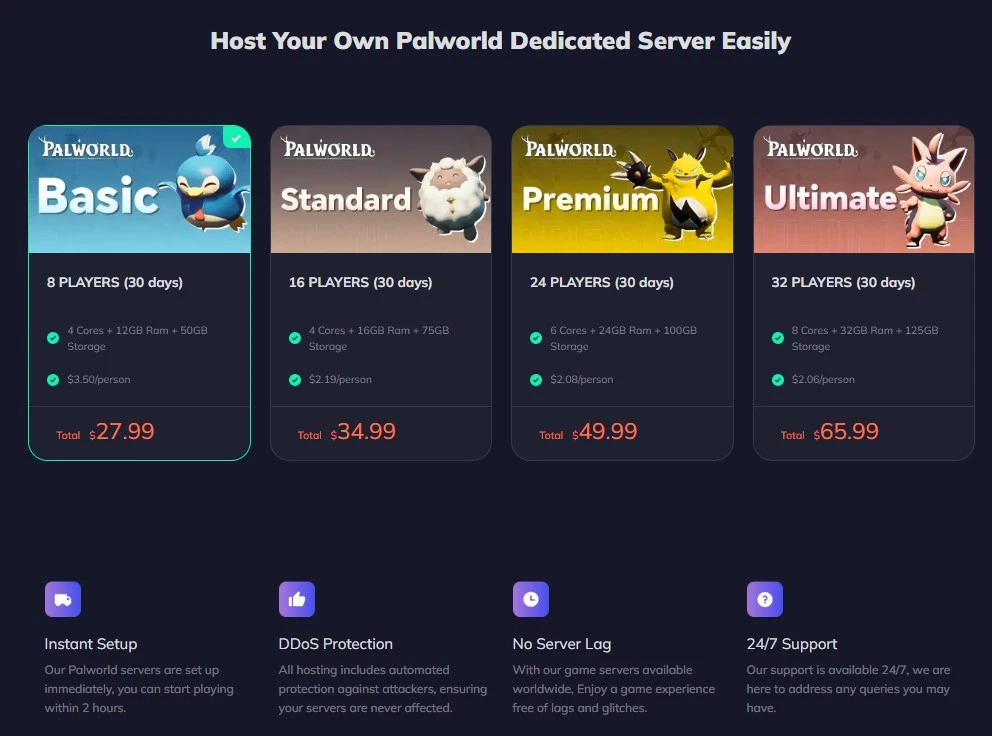
If you don't want to keep your own PC online or prefer a server that's available around the clock, you can purchase a dedicated cloud server directly through LagoFast.
Pros:
- Simple and easy to use
- Super quick setup
- Advanced DDoS protection
- Powerful hardware for stable performance
- Worldwide server locations
- Automatic cloud backups
- 24/7 support via Discord, Ticket, and Email
- Flexible server configurations
- Competitive pricing
Cons:
- Limited custom support compared to some other providers.
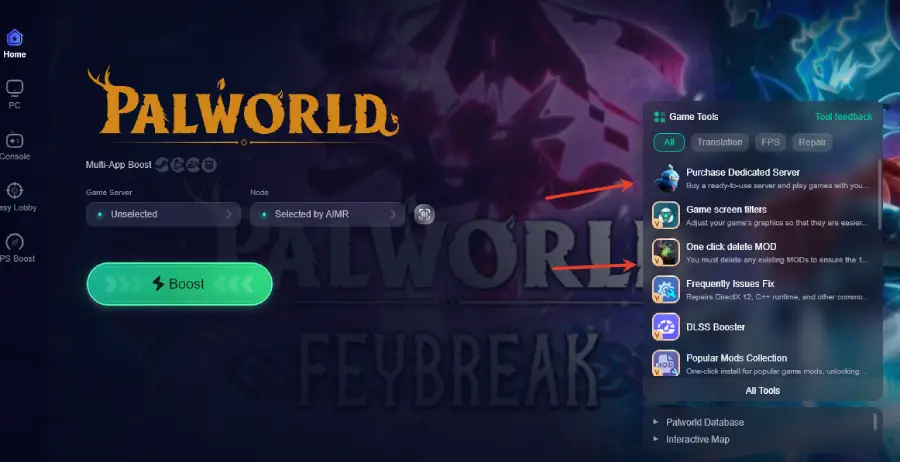
At the same time, you can now purchase Palworld dedicated servers directly through the LagoFast app. Simply search for Palworld, select the server hosting option, and complete your purchase without leaving the app.
LagoFast also includes additional tools to enhance your Palworld experience. For example, the One-click Delete MOD feature lets you quickly remove unwanted mods without manually searching through game files.
Click the Free Trial button to download and install LagoFast.
After installation, search "Palworld " in the search bar and select the game.
Click the Purchase Dedicated Server on the right side of the screen.
Choose Your Preferred Hosting Option
If you want to host the game yourself on your own PC, click Local Private Server to create a room and invite your friends in just a few clicks.
If you'd rather use a professionally hosted server that stays online without relying on your own computer, click Purchase Dedicated Server to rent a cloud server directly through the app.
2. G-Portal - Offers Palworld server hosting

- Pros:
High-performance servers for optimal gameplay.
User-friendly interface for easy server management.
- Cons:
Pricing may be slightly higher compared to some competitors.
3. CloudNord - Offers easy setup with 24/7 support

- Pros:
Robust security features to protect your Palworld environment.
Flexible pricing plans catering to various budget ranges.
- Cons:
Limited server locations may impact latency for some users.
4. GameTeam - Offers Palworld dedicated server hosting starting at $20.77/month

- Pros:
Reliable customer support is available 24/7.
Customizable server settings for advanced users.
- Cons:
Pricing plans may be on the higher side for smaller communities.
5. Shockbyte - Palworld dedicated server hosting

- Pros:
Affordable pricing with various plans to suit different needs.
Automatic backups for added data protection.
- Cons:
Limited mod support compared to some other providers.
6. SurvivalServers - A Palworld server hosting service

- Pros:
Scalable resources to accommodate growing Palworld communities.
High-speed SSD storage for faster data access.
- Cons:
Additional fees may apply for premium customer support.
Palworld Guide: Breeding Combos & How to Breed Fusion Pals >
Part4. Palworld Server Hosting Frequently Asked Questions
Q1: What are the minimum system requirements for hosting a Palworld server
A: The minimum system requirements typically include a dual-core processor, 8GB of RAM, and sufficient storage space. However, it's advisable to check with your chosen hosting provider for specific requirements.
Q2: How do I install mods on my Palworld server hosted by these providers
A: Mod installation processes may vary. Most hosting providers offer user-friendly interfaces or support tickets to help with mod installations. Check the provider's documentation for step-by-step instructions.
Q3: Can I upgrade my server resources as my Palworld community grows
A: Yes, many hosting providers, including G-Portal, CloudNord, GameTeam, Shockbyte, Supercraft, and SurvivalServers, offer scalable resources. You can upgrade your server plan as needed.
Q4: Are there restrictions on the number of players for Palworld servers hosted by these providers
A: Each provider has different player limits based on their plans. Ensure you choose a plan that accommodates your expected number of players, keeping in mind potential growth.
Q5: Do these hosting providers offer DDoS protection for Palworld servers
A: Yes, most reputable Palworld hosting providers, such as G-Portal, CloudNord, GameTeam, Shockbyte, Supercraft, and SurvivalServers, offer DDoS protection to safeguard your server from potential attacks.
Q6: How to change server settings in Palworld
- Click the server they want to manage
- Make sure the server is off
- Go to file manager
- Open default power world settings
- Copy the settings
- Go to Pal saved.config Linux server
- Search for a file called Pal World settings
- Paste in the settings by doing control V
Final Thoughts
In conclusion, selecting the best Palworld server hosting provider is crucial for a smooth gaming experience. Evaluate the strengths and weaknesses of LagoFast, G-Portal, CloudNord, GameTeam, Shockbyte, and SurvivalServers, and choose the one that aligns with your specific requirements. Easily Host Your Own Palworld Dedicated Server Now!

Boost Your Game with LagoFast for Epic Speed
Play harder, faster. LagoFast game booster eliminates stutter and lags on PC, mobile, or Mac—win every match!
Quickly Reduce Game Lag and Ping!
Boost FPS for Smoother Gameplay!