
Neverness to Everness (NTE) is gaining attention as a stylish open-world RPG, but one of the most common questions players ask is about its multiplayer features. Many want to know if they can explore the world with friends, tackle difficult bosses together, or simply enjoy co-op gameplay. This guide breaks down everything about Neverness to Everness co-op and multiplayer, including modes, rules, cross-platform support, and system requirements.
Quick Answer
Yes — Neverness to Everness is a multiplayer game that supports up to 4-player online co-op.

- ✅ Reduce Lag and High Ping.
✅ Boost FPS at the Same Time.
✅ Support 8000+ Popular Online Games.
✅ Change Server without Latency.
✅ Boost Game Loading Speed. - ✅ Fix Connection Issues.
Part 1: Is Neverness to Everness Multiplayer?
Part 2: Neverness to Everness Co-op Features & Details
Part 3: NTE Multiplayer Rules, Party Size & Limitations
Part 4: Does NTE Support Cross-Platform Play & Cross-Save?
Part 5: What Are the System Requirements for NTE on Mobile and PC
Part 6: How to Play Neverness to Everness Co-op (Multiplayer Guide)
Part 7: Boost NTE Multiplayer Performance with LagoFast
Part 8: Neverness to Everness Multiplayer FAQs
Part 1: Is Neverness to Everness Multiplayer?
One of the most searched questions is: “Is Neverness to Everness multiplayer?” or “Is Neverness to Everness going to be multiplayer?”
The answer is yes, but with a twist. NTE is primarily designed as a single-player open-world RPG, meaning the core story and exploration experience can be enjoyed solo. However, the game integrates multiplayer elements in the form of co-op gameplay.
This hybrid approach is similar to other modern RPGs, where solo progression and multiplayer challenges coexist. So while NTE isn’t a full MMO, it absolutely includes meaningful multiplayer content.
If you’re wondering “Does NTE have multiplayer/co-op,” the answer is clearly yes, and it’s an important part of the endgame and social gameplay experience.
Related Article: Neverness to Everness Release Date Details
Part 2: Neverness to Everness Co-op Features & Details
Now let’s break down Neverness to Everness co-op features and details to understand what you can actually do with friends.
Cooperative Missions
These are specially designed challenges meant for team play. Compared to solo missions, they usually offer better rewards and encourage coordination between players.
World Boss Battles
World bosses are powerful enemies that are much easier to defeat in a group. Players need to coordinate abilities, positioning, and timing to win.
Dungeon Co-op
Some high-difficulty dungeons support multiplayer parties. These are often the most rewarding but also the most demanding content in the game.
Open World Exploration
You can invite friends into your world and explore together. This includes roaming the map, fighting enemies, and discovering content side by side.
Overall, Neverness to Everness coop gameplay is designed to enhance the experience without replacing solo play. It adds flexibility depending on how you want to play.
You May Also Like: How to Play Neverness to Everness Globally in Any Language
Part 3: NTE Multiplayer Rules, Party Size & Limitations
While co-op is a major feature, there are specific rules players should understand before jumping in.
Party Size Limit
The maximum party size is 4 players. This keeps gameplay balanced and ensures performance stability.
Individual Loot System
Each player receives their own loot from chests and rewards. This avoids competition and makes co-op more friendly.
Communication Features
The game includes real-time voice chat and emotes, making coordination easier during intense battles.
Matchmaking System
There is a smart matchmaking system that pairs players based on level and progression, helping maintain fairness.
Story Restrictions
Some main story content may be restricted during co-op sessions. This ensures narrative consistency and prevents progression issues.
These rules show that multiplayer is carefully structured rather than completely open-ended.
Related Guides: How to Download and Play Neverness to Everness (NTE) CN
Part 4: Does NTE Support Cross-Platform Play & Cross-Save?
Another key question players ask is whether NTE supports cross-platform play.
The answer is yes. Neverness to Everness allows cross-platform multiplayer across PC, Android, and iOS. This means you can team up with friends regardless of the device they are using.
In addition, cross-save functionality is supported. By logging into the same account, players can continue their progress seamlessly across different platforms.
This flexibility makes the game more accessible and ensures you’re not locked into a single device.
Part 5: What Are the System Requirements for NTE on Mobile and PC
Before jumping into co-op or multiplayer, it’s important to make sure your device can actually handle the game. Since Neverness to Everness features a detailed open world and heavy combat effects, performance becomes even more important in multiplayer scenarios.
Below are the latest estimated system requirements based on current test builds and available information.
PC Requirements
Minimum Specs
- OS: Windows 10 (64-bit)
- CPU: Intel Core i5-8400 / AMD Ryzen 5 1600
- RAM: 8 GB
- GPU: NVIDIA GTX 1060 6GB / AMD RX 580
- Storage: 90 GB (NVMe SSD recommended)
Recommended Specs
- OS: Windows 10 / Windows 11 (64-bit)
- CPU: Intel Core i7-9700 / AMD Ryzen 7 3700X
- RAM: 16 GB
- GPU: NVIDIA RTX 2060 / AMD RX 5700 XT
- Storage: 90 GB NVMe SSD
For stable Neverness to Everness multiplayer sessions, especially in 4-player co-op with lots of visual effects, the recommended specs are strongly advised.
Android Requirements
Minimum Specs
- SoC: Snapdragon 855 / Kirin 990 or equivalent
- RAM: 8 GB
- OS: Android 10 or above
- Storage: 10–15 GB free space
Recommended Specs
- SoC: Snapdragon 8 Gen 1 / Dimensity 9000 or better
- RAM: 12–16 GB
- OS: Android 12 or above
- Storage: 15 GB or more
Mid-range devices may run the game, but performance in co-op modes could drop during boss fights or crowded scenes.
iOS Requirements
Minimum Specs
- Device: iPhone 12 Pro Max / iPad Air (3rd gen) or newer
- OS: iOS 15 or later
- Storage: 10–15 GB free space
Recommended Specs
- Device: iPhone 14 / iPad Pro (M1) or newer
- OS: iOS 16 or later
- Storage: 15 GB or more
Newer Apple devices provide better stability and smoother frame rates, which is especially noticeable in multiplayer gameplay.
Storage Size
- PC: Around 40 GB (SSD strongly recommended for performance)
- Android: Around 10–15 GB
- iOS: Around 10–15 GB
Keep in mind that these are initial download sizes. Future updates, patches, and new content may increase total storage requirements.
Part 6: How to Play Neverness to Everness Co-op (Multiplayer Guide)
Once your system is ready, starting co-op is straightforward.
-
Invite Friends
You can directly invite players from your friend list.
-
Matchmaking
Use the built-in system to find random teammates for missions or dungeons.
-
In-Game Party System
Some NPCs allow you to create or join parties, especially for specific activities.
Transitioning from solo to co-op is seamless, making it easy to jump into multiplayer whenever you want.
Part 7: Boost NTE Multiplayer Performance with LagoFast
As multiplayer becomes more intense, performance issues can start to appear. This is especially true in 4-player co-op scenarios where multiple abilities, enemies, and effects are active at once.
Lag, high ping, FPS drops, and even crashes can ruin the experience. This is where tools like LagoFast Game Booster come in.
LagoFast helps optimize network routes and stabilize connections, reducing latency during online sessions. This is particularly useful in Neverness to Everness multiplayer, where real-time coordination matters.
It can also improve FPS stability by optimizing system performance, which is important when running demanding co-op dungeons or world boss fights.
Another advantage is its cross-device support. LagoFast works on both PC and mobile, making it ideal for players who switch between platforms or rely on mobile gaming.
By using a game booster, you can ensure smoother Neverness to Everness coop gameplay, especially in high-pressure multiplayer situations.
How to Use LagoFast for Neverness to Everness (NTE) on PC
Step 1: Click the Free Trial button to download and install LagoFast.
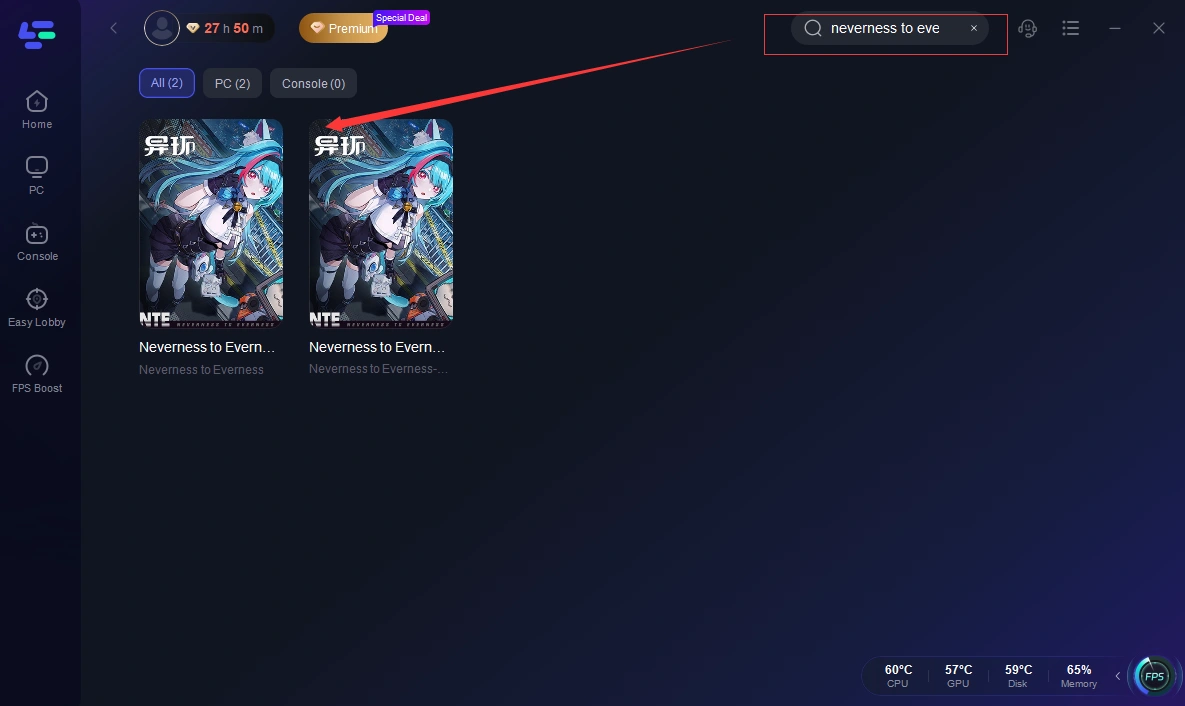
Step 2: After installation, search "Neverness to Everness (NTE)" in the search bar and select the game.
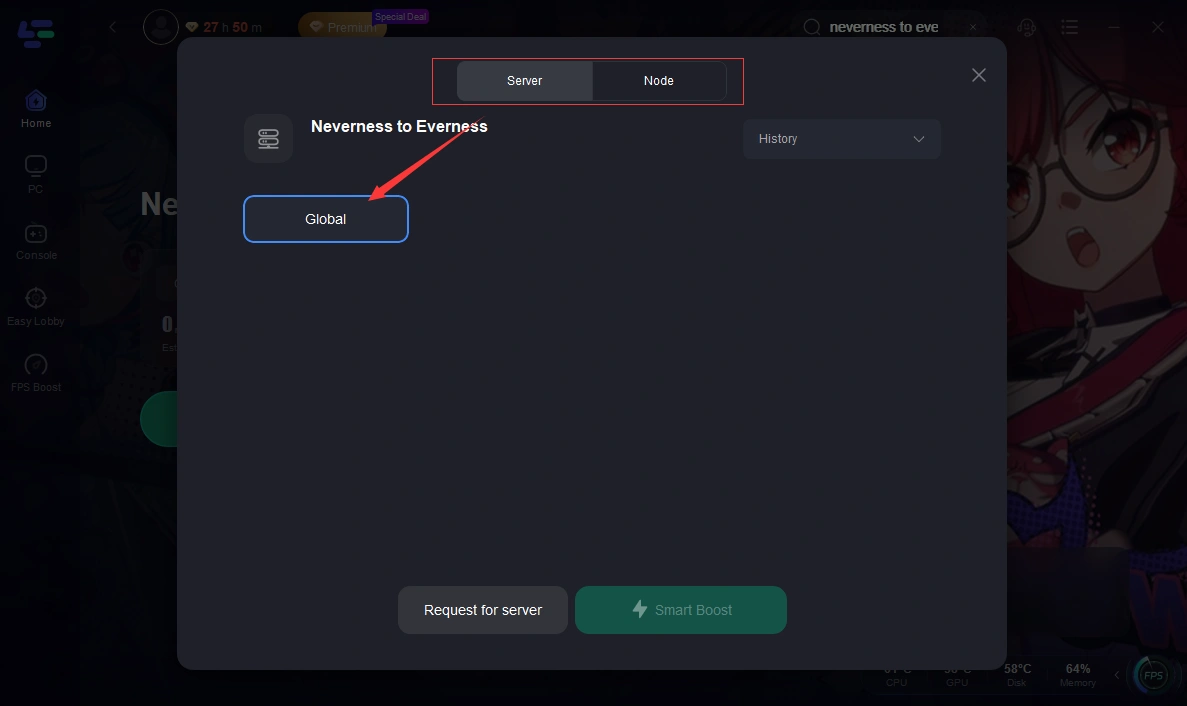
Step 3: Choose your preferred server node and click "Smart Boost" to start optimizing.
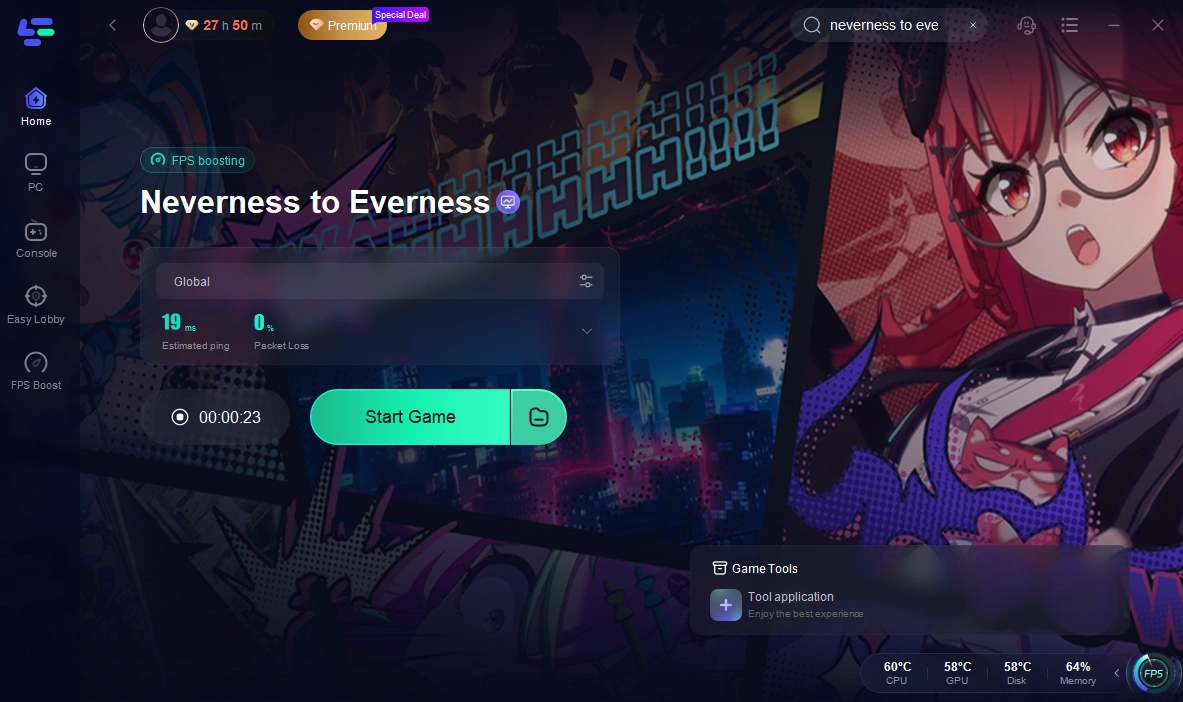
Step 4: Launch your game and enjoy smooth, optimized gameplay with lower ping and packet loss.
How to Use LagoFast for Neverness to Everness (NTE) on Mobile
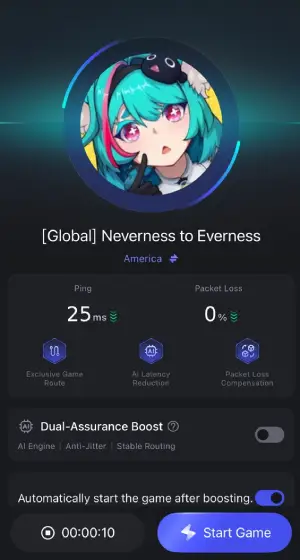
Step 1: Click download and install LagoFast Mobile.

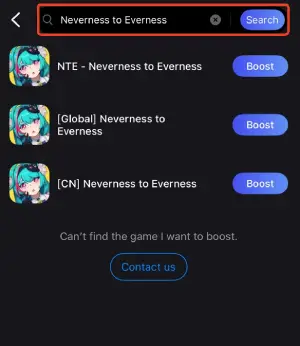
Step 2: Open LagoFast, then search for Neverness to Everness (NTE) in LagoFast Mobile.
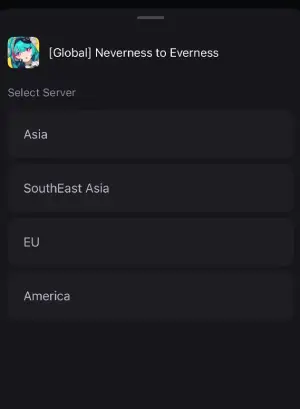
Step 3: Click boost and select your corresponding server region to connect.
Step 4: Once optimized performance is confirmed, click "Start Game" to launch the game.
Part 8: Neverness to Everness Multiplayer FAQs
How to download NTE?
You can download Neverness to Everness from official app stores on mobile or through its official PC client once available. Pre-registration may be required depending on the region.
What platforms are supported?
NTE is available on PC, Android, and iOS, with full cross-platform multiplayer support.
Neverness to Everness (NTE) Platforms: PC, Console & Mobile
How to complete Anomaly Commissions in NTE?
Anomaly Commissions are special missions that often require strategy and coordination. Completing them efficiently usually involves team synergy, making co-op highly beneficial.
Does NTE support cross-platform play and cross-save?
Yes, the game supports both cross-platform multiplayer and cross-save, allowing seamless progression across devices.
Does NTE have multiplayer/co-op for all content?
Not all content is available in co-op. Some story missions are restricted to solo play, while most challenging content supports multiplayer.
Is Neverness to Everness going to be multiplayer-focused?
The game balances solo and multiplayer experiences. It is not purely multiplayer-focused but includes strong co-op elements.
Conclusion
Neverness to Everness offers a well-balanced mix of solo and multiplayer gameplay. While it is primarily an open-world RPG designed for individual exploration, its co-op system adds depth and replayability through missions, dungeons, and boss fights.
With support for up to four players, cross-platform play, and flexible matchmaking, NTE makes it easy to enjoy the game with friends. Whether you prefer solo adventures or cooperative challenges, the game provides options for both playstyles.
For the best experience, especially in multiplayer scenarios, ensuring good performance and stable connectivity is key. With the right setup, Neverness to Everness co-op can be one of the most enjoyable parts of the game.
Boost Your Game with LagoFast for Epic Speed
Play harder, faster. LagoFast game booster eliminates stutter and lags on PC, mobile, or Mac—win every match!
Quickly Reduce Game Lag and Ping!
Boost FPS for Smoother Gameplay!