

Neverness to Everness (NTE) CN is attracting attention from players who want early access to its latest content and gameplay experience before any global release. However, getting into the CN version is not always straightforward due to region limits, account requirements, and different platform restrictions. Many players also run into issues like login failures or unstable connections once they manage to install the game. This guide breaks down the current CN release status and shows you, step by step, how to download and play NTE CN more smoothly, along with ways to improve overall gameplay stability.

- ✅ Reduce Lag and High Ping.
✅ Boost FPS at the Same Time.
✅ Support 8000+ Popular Online Games.
✅ Change Server without Latency.
✅ Boost Game Loading Speed.
Part 1: Neverness to Everness (NTE) CN Release Date & Current Status
Part 2: How to Download and Play Neverness to Everness (NTE) CN
Part 3: Enhance Your Neverness to Everness (NTE) CN Gaming Experience with LagoFast
Part 4: Neverness to Everness (NTE) CN FAQs
Part 1: Neverness to Everness (NTE) CN Release Date & Current Status

If you’re searching for download and play Neverness to Everness (NTE) CN, the first thing to understand is its current release situation and how it may differ between regions.
Neverness to Everness (NTE), also known as 《异环》 in Mainland China, is officially scheduled to begin its full-platform open beta in Mainland China on April 23, 2026, featuring the Simplified Chinese version. The game is then set to launch in Hong Kong, Macau, Taiwan, Japan, South Korea, Europe, North America, and other global regions on April 29, 2026.
For players who want to get ready early, pre-download officially opened at 9:00 AM on April 21, 2026, allowing users to install the game client before launch day and enter the game faster once servers go live.
At launch, Neverness to Everness (NTE) is expected to be available on PC, mobile devices, and PlayStation 5 (PS5). Availability may vary slightly depending on platform region settings and store rollout timing.
Part 2: How to Download and Play Neverness to Everness (NTE) CN
Downloading Neverness to Everness (NTE) CN is not as straightforward as global releases. The process is usually different depending on whether you are on PC or mobile, and it becomes even more complicated if you are accessing it from outside China.
PC Download & Play Steps
On PC, players usually need to:
- Visit the official Neverness to Everness (NTE) CN website
- Click the PC download button and install the official launcher
- Log in with a CN-compatible account
- Download the full game client through the launcher
- Launch the game directly from the official platform
Once installed, future updates are usually handled through the same launcher.

Mobile Download & Play Steps
On mobile devices, Neverness to Everness (NTE) CN can be downloaded through the Google Play Store or Apple App Store once the mobile version becomes available in your region.
To get started:
- Open Google Play or the Apple App Store
- Search for Neverness to Everness (NTE)
- Download and install the game
- Launch the app and sign in with a supported account
- Complete any required updates before entering the game
Mobile availability may vary by region, so some players outside supported areas may not see the game listed immediately after release.
How to Download Neverness to Everness (NTE) CN Outside China
For players outside China, downloading Neverness to Everness (NTE) CN can be more difficult than a normal global release. Common issues include the game not appearing in local stores, region-based download restrictions, slow installation speeds, or login problems during launch periods.
Even when the game is available, accessing CN servers directly may lead to unstable downloads or connection delays.
A simpler option is to use LagoFast. LagoFast includes a built-in Game Download Tool that helps players outside China access supported game clients more easily.
How to Use LagoFast Download Neverness to Everness (NTE) CN on PC
Step 1. Download and install LagoFast.
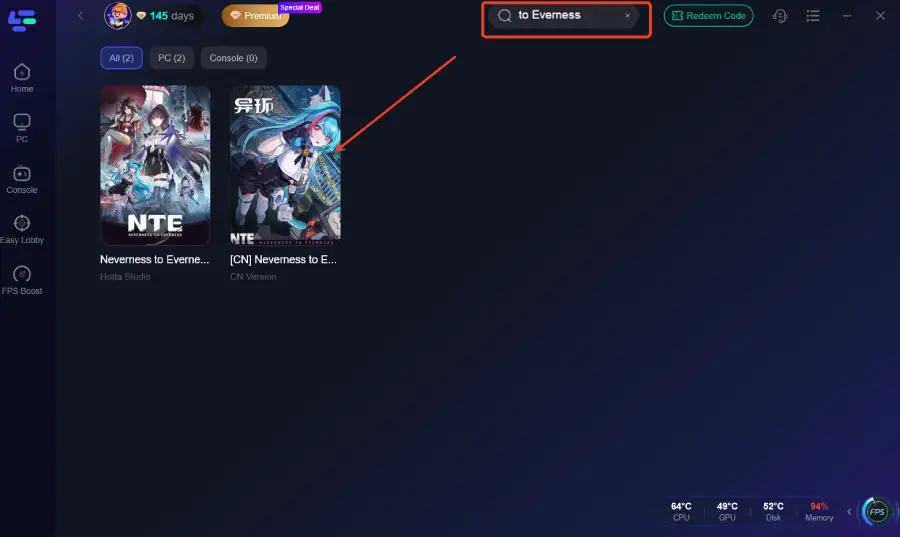
Step 2: Open LagoFast, and use the search bar to find Neverness to Everness (NTE) CN.
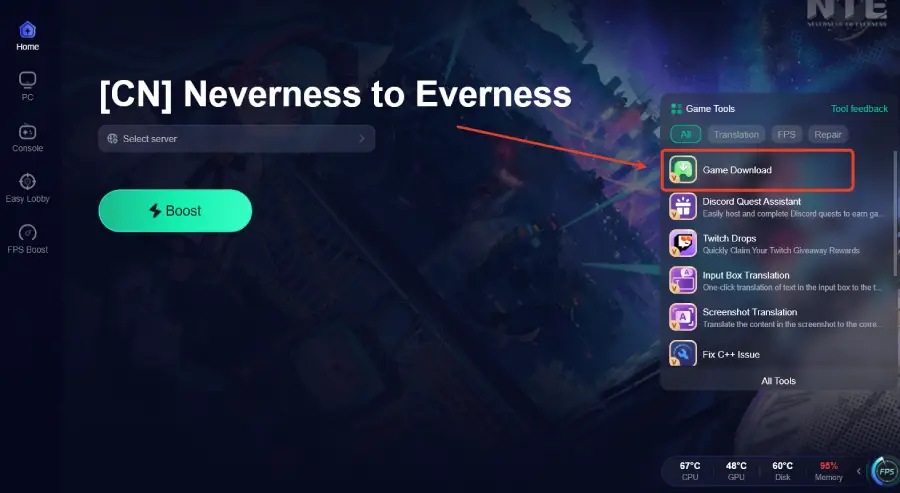
Step 3. Select the Game Download on the right side—this will start the download immediately.
How to Use LagoFast Download Neverness to Everness (NTE) CN On Mobile
Step 1: Click download and install LagoFast Mobile

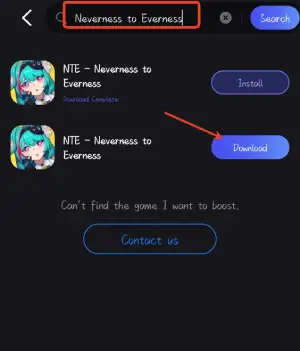
Step 2: Launch LagoFast Mobile, use the search bar to find Neverness to Everness (NTE) CN, and click the download button to begin.
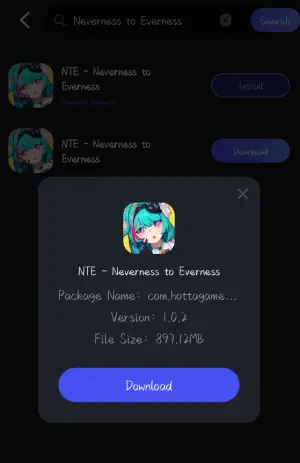
Step 3: After downloading, tap “Install” to safely and quickly install Neverness to Everness (NTE) CN.
Part 3: Enhance Your Neverness to Everness (NTE) CN Gaming Experience with LagoFast
Even after successfully downloading and launching Neverness to Everness (NTE) CN, many players still experience lag or unstable connections, especially when playing from outside China.
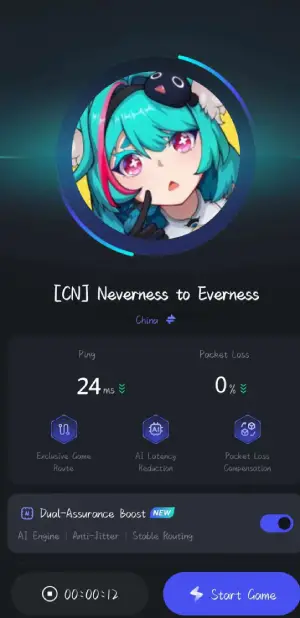
LagoFast is a game-focused network optimization tool that helps improve connection stability and reduce latency. It lowers ping, reduces packet loss, and stabilizes routing, helping prevent lag spikes, disconnects, and login issues for a smoother NTE CN gameplay experience.
How to Use LagoFast for Neverness to Everness (NTE) CN on PC
Step 1: Click the Free Trial button to download and install LagoFast.
Step 2: After installation, search "Neverness to Everness (NTE) CN" in the search bar and select the game.
Step 3: Choose your preferred server node and click "Smart Boost" to start optimizing.
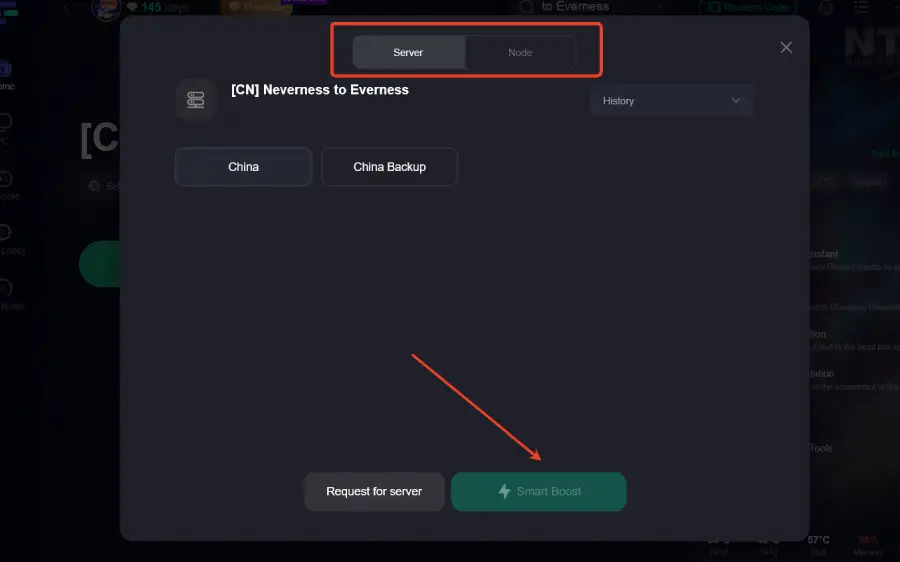
Step 4: Launch your game and enjoy smooth, optimized gameplay with lower ping and packet loss.
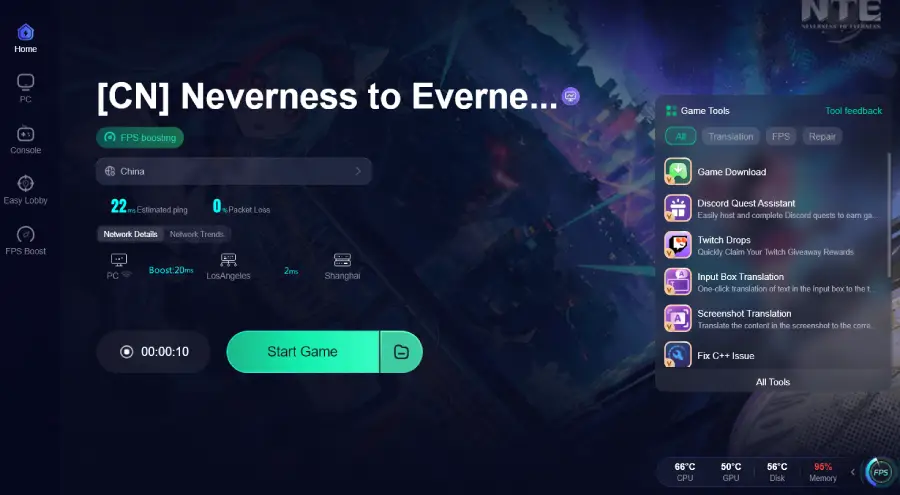
How to Use LagoFast for Neverness to Everness (NTE) CN on Mobile
Step 1: Click download and install LagoFast Mobile.
Step 2: Open LagoFast, then search for Neverness to Everness (NTE) CN in LagoFast Mobile.
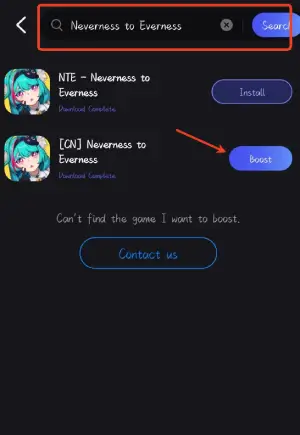
Step 3: Click boost and select your corresponding server region to connect.
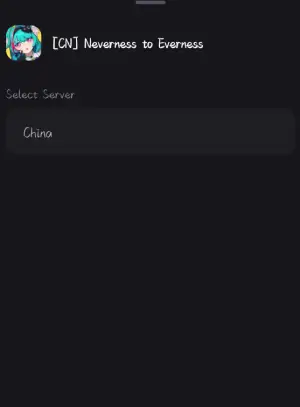
Step 4: Once optimized performance is confirmed, click "Start Game" to launch the game.
Part 4: Neverness to Everness (NTE) CN FAQs
1. Is Neverness to Everness (NTE) CN available worldwide?
No. The CN version is primarily region-locked and intended for China-based platforms and users.
2. Do I need a Chinese account to play NTE CN?
In most cases, yes. A CN-compatible account is required to log in and access the official servers for Neverness to Everness (NTE) CN.
3. Why do I experience lag or connection issues in NTE CN?
This is often caused by long-distance routing to CN servers, leading to higher ping, packet loss, or unstable connections rather than device performance issues.
4. Is it possible to play NTE CN smoothly outside China?
Yes, but performance may vary. Players outside China often face higher latency and unstable connections due to server distance, which can affect gameplay responsiveness and stability.
Conclusion
Getting into Neverness to Everness (NTE) CN isn’t just about downloading the game—it also involves dealing with region limits, account requirements, and connection stability. Once you understand the release timeline and follow the right steps for PC or mobile, access becomes much clearer. For players outside China, optimizing the connection is often just as important as installation itself. Staying prepared with the right tools and setup will help you get a smoother and more stable experience when the game goes live.

Boost Your Game with LagoFast for Epic Speed
Play harder, faster. LagoFast game booster eliminates stutter and lags on PC, mobile, or Mac—win every match!
Quickly Reduce Game Lag and Ping!
Boost FPS for Smoother Gameplay!