
Before downloading Neverness to Everness (NTE), there’s one question most players ask first: can my device actually run it smoothly? With its large open-world design and high-quality visuals, NTE isn’t the kind of game you want to guess on—performance matters from the start.
This guide gives you a clear breakdown of the official system requirements for PC, Android, and iOS so you can quickly check compatibility and know what kind of performance to expect.

- ✅ Reduce Lag and High Ping.
✅ Boost FPS at the Same Time.
✅ Support 8000+ Popular Online Games.
✅ Change Server without Latency.
✅ Boost Game Loading Speed.
Part 1: Can Your Device Run Neverness to Everness (NTE)?
Part 2: Neverness to Everness (NTE) System Requirements PC
Part 3: Neverness to Everness (NTE) System Requirements Mobile
Part 4: How to Ensure a Smooth Gaming Experience in Neverness to Everness (NTE)
Part 5: Neverness to Everness (NTE) FAQs
Part 1: Can Your Device Run Neverness to Everness (NTE)?
Neverness to Everness (NTE) features high-quality visuals and dense open-world environments, which naturally require stronger hardware compared to typical mobile or PC games.
If your device already struggles with modern 3D titles, you may need to lower graphics settings to maintain stable performance.
That said, the game is still accessible on a wide range of devices as long as you meet the minimum requirements listed below.

Part 2: Neverness to Everness (NTE) System Requirements PC
Here are the official PC requirements for Neverness to Everness (NTE):
Minimum Requirements
- CPU: Intel Core i7-10700 / AMD Ryzen 7 3700X
- RAM: 16 GB
- GPU: NVIDIA GTX 1660 / AMD RX 5600 XT / Intel Arc A580
- Storage: 60 GB SSD
- OS: Windows 10 / Windows 11
Recommended Requirements
- CPU: Intel Core i7-12700 / AMD Ryzen 5 5800X
- RAM: 32 GB
- GPU: NVIDIA RTX 3060 / AMD RX 6600 XT / Intel Arc B580
- Storage: 60 GB SSD
- OS: Windows 10 / Windows 11
Key takeaway: If you're still using an HDD or only have 16GB RAM, you’ll notice it right away—long loading screens, texture delays, and occasional stutters in open-world areas are almost unavoidable.
Part 3: Neverness to Everness (NTE) System Requirements Mobile
Mobile performance in Neverness to Everness (NTE) depends heavily on your chipset and overall device generation. To avoid lag or unstable FPS, your phone needs to meet at least the minimum requirements below.
Android Requirements
|
Component |
Minimum |
Recommended |
|
OS |
Android 10+ |
Android 10+ |
|
Chipset |
Snapdragon 855 / Dimensity 1000+ |
Snapdragon 8 Gen 2 / Dimensity 9200+ |
|
RAM |
8 GB or more |
8 GB or more |
|
Storage |
20 GB or more |
20 GB or more |
iOS Requirements
|
Component |
Minimum |
Recommended |
|
OS |
iOS 15+ |
iOS 15+ |
|
Device |
iPhone 12 Pro (A14 Bionic) |
iPhone 14 Pro (A16 Bionic) |
|
RAM |
6 GB or more |
6 GB or more |
|
Storage |
20 GB or more |
20 GB or more |
Older devices may still run the game, but if your phone is 2–3 years old or more, expect noticeable FPS drops during combat or large-scale scenes.
Part 4: How to Ensure a Smooth Gaming Experience in Neverness to Everness (NTE)
Even if your device meets all system requirements, Neverness to Everness (NTE) can still feel unstable during online play if the network connection isn’t stable.
LagoFast is a game-focused network optimization tool designed to improve connection stability and reduce latency in online games.
It helps improve your overall gameplay experience by:
- Reducing ping spikes during combat or open-world exploration
- Stabilizing unstable network routing to game servers
- Improving login success rate and connection consistency
- Reducing lag, stutter, and sudden disconnects
How to Use LagoFast for Neverness to Everness (NTE) on PC
Step 1: Click the Free Trial button to download and install LagoFast.
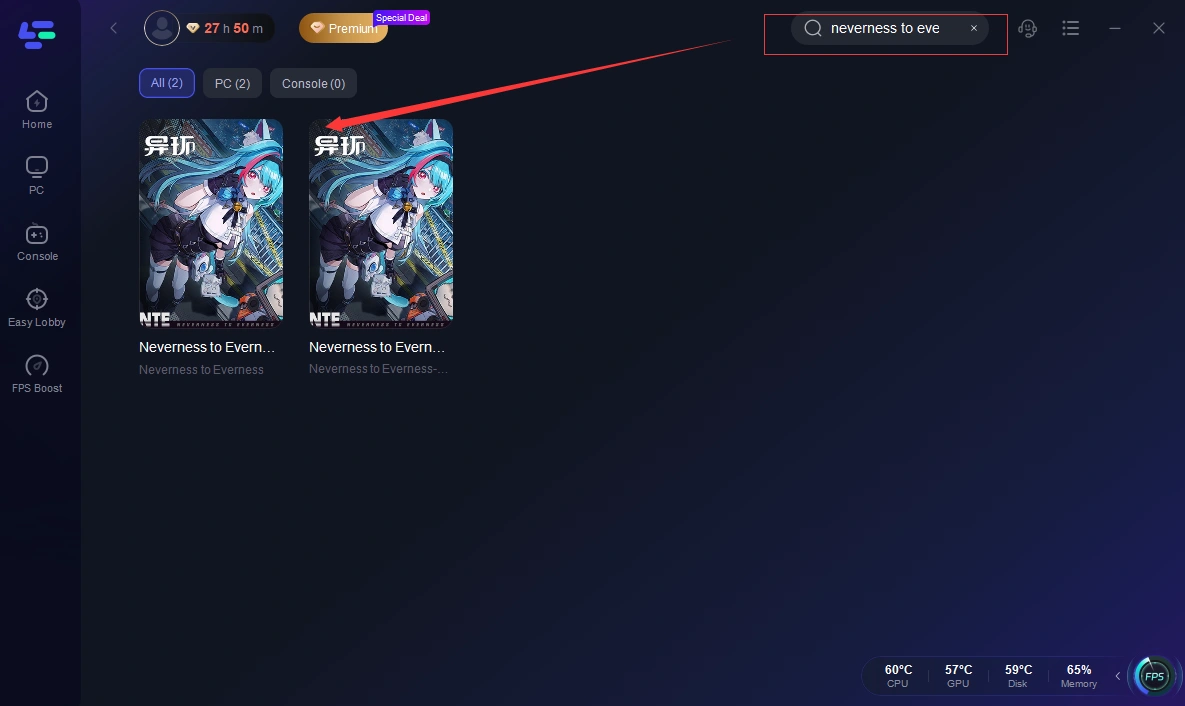
Step 2: After installation, search "Neverness to Everness (NTE)" in the search bar and select the game.
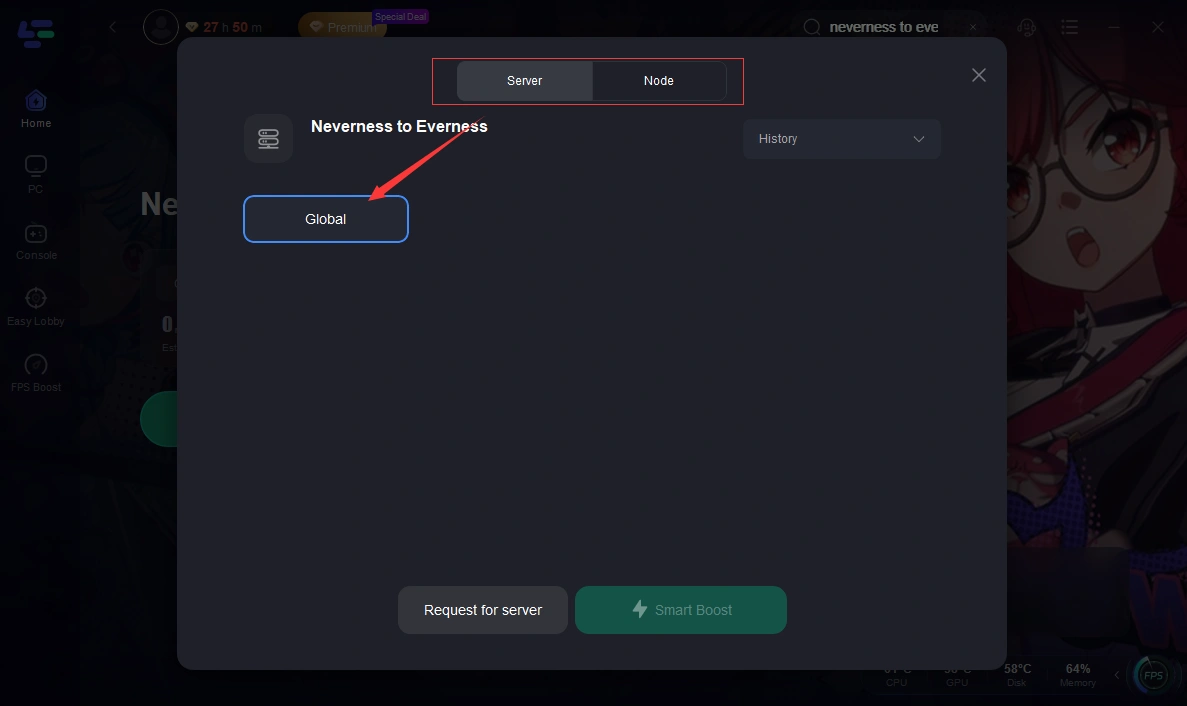
Step 3: Choose your preferred server node and click "Smart Boost" to start optimizing.
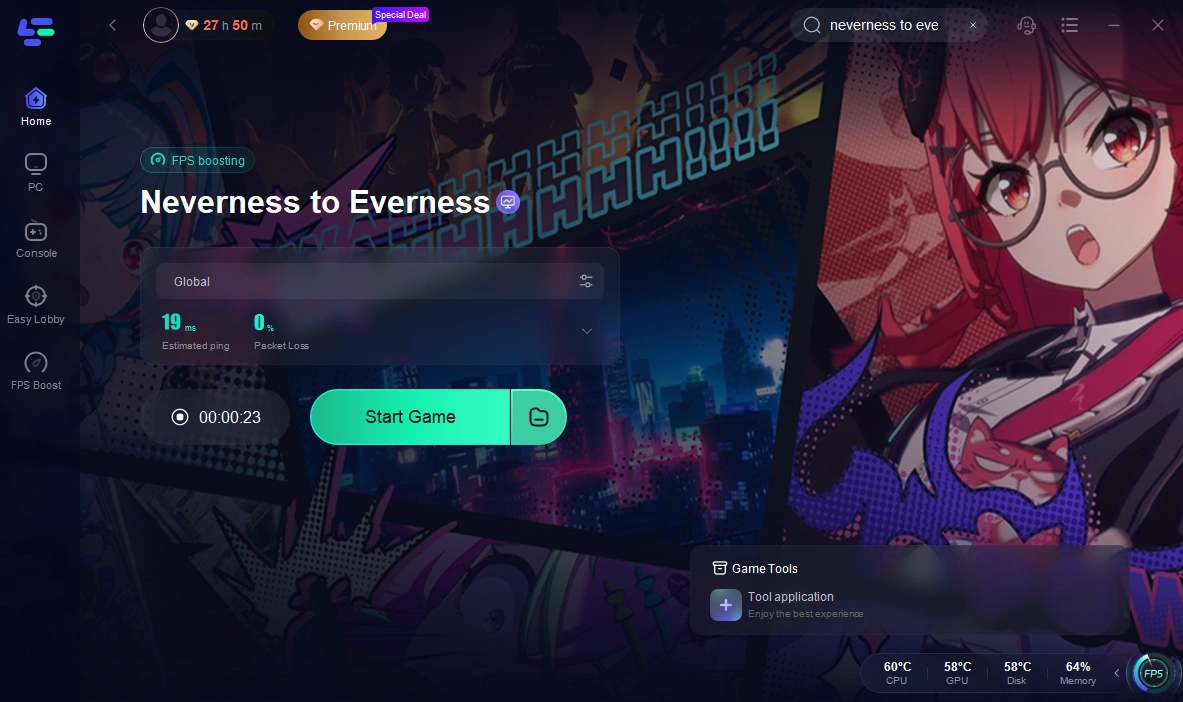
Step 4: Launch your game and enjoy smooth, optimized gameplay with lower ping and packet loss.
How to Use LagoFast for Neverness to Everness (NTE) on Mobile
Step 1: Click download and install LagoFast Mobile.

Step 2: Open LagoFast, then search for Neverness to Everness (NTE) in LagoFast Mobile.
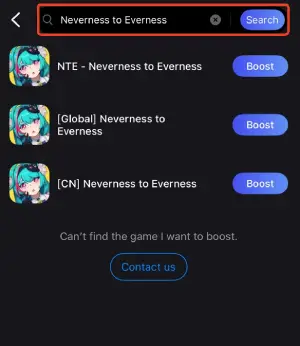
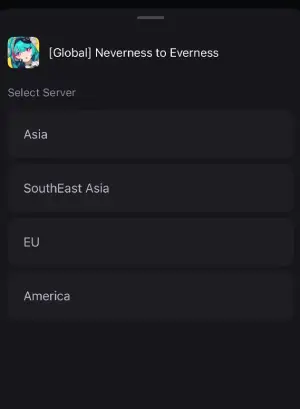
Step 3: Click boost and select your corresponding server region to connect.
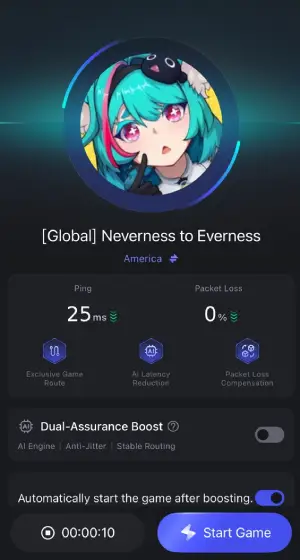
Step 4: Once optimized performance is confirmed, click "Start Game" to launch the game.
Part 5: Neverness to Everness (NTE) FAQs
1. Can low-end devices run NTE?
Yes, but only if your device meets the minimum requirements. Even then, you’ll likely need to lower graphics settings and accept lower FPS for smoother play.
2. Is SSD required for PC?
Not strictly required, but strongly recommended. Using an SSD significantly improves loading speed and reduces in-game stutter.
3. Can I play NTE on older phones?
Technically yes, but performance may be unstable. Older devices often struggle with large maps, effects, and long sessions.
4. Why does the game lag even on good devices?
In most cases, it’s not your hardware. Network instability or server distance is usually the main cause of lag or delay.
5. How much storage does NTE need?
Around 60GB on PC and about 20GB on mobile. Make sure you leave extra space for updates.
Conclusion
Before playing Neverness to Everness (NTE), make sure your device meets the official requirements, as this directly affects performance and stability. Even if you are close to the minimum specs, lowering settings may still be necessary for smoother gameplay. If issues persist, network conditions can also play an important role, making both hardware and connection quality equally important for the overall experience.
Boost Your Game with LagoFast for Epic Speed
Play harder, faster. LagoFast game booster eliminates stutter and lags on PC, mobile, or Mac—win every match!
Quickly Reduce Game Lag and Ping!
Boost FPS for Smoother Gameplay!