
Nothing is more frustrating than launching Mistfall Hunter, only to find yourself stuck in a login queue that refuses to move. Whether you're frozen at Position 3, 14, 649, or even 1006, or you've been waiting for over 20 minutes without any progress, you're not alone. While long queues are common during busy periods, they don't always mean the game is working normally. In this guide, we'll explain why the Mistfall Hunter login queue gets stuck, how to tell whether it's a server issue or a local connection problem, and the best ways to get into the game faster.

- ✅ Reduce Lag and High Ping.
- ✅ Higher FPS and better performance.
- ✅ Support for 8000+ games.
- ✅ Stable connection and region switching.
- ✅ Mistfall Hunter Translation Tool
Part 1: Why Is the Mistfall Hunter Login Queue Not Moving?
Part 2: How to Tell Whether the Mistfall Hunter Queue Is Actually Stuck
Part 3: Check Mistfall Hunter Server Status and Maintenance
Part 4: Fix Mistfall Hunter Queue Stuck by Optimizing the Server Connection
Part 5: Restart Mistfall Hunter and Steam Completely
Part 6: Refresh Steam Login Authentication
Part 7: Restart Your Router or Change Networks
Part 8: Change DNS to Fix Login Queue Connection Problems
Part 9: Allow Mistfall Hunter Through Firewall and Antivirus
Part 10: Verify Mistfall Hunter Game Files
Part 11: Should You Restart When the Mistfall Hunter Queue Is Stuck?
Part 12: Mistfall Hunter Queue Stuck vs Other Login Problems
Part 13: Frequently Asked Questions About the Mistfall Hunter Login Queue
Part 1: Why Is the Mistfall Hunter Login Queue Not Moving?
If your Mistfall Hunter login queue is stuck or your queue position hasn't changed for several minutes, it doesn't always mean something is wrong with your game. In most cases, the issue is related to server traffic, login services, or temporary network problems. Here are the most common reasons your queue isn't moving.
Launch-Day Server Overload
The most common reason is simple: too many players are trying to log in at the same time.
During beta tests, major updates, or new server openings, Mistfall Hunter can reach its player capacity quickly. Once that happens, new players are placed into a login queue until space becomes available. If players already in-game aren't logging out, your queue position may stay the same for several minutes before updating.
In this situation, the queue is usually working as intended—it just isn't moving very quickly.
The Queue Position Is Not Refreshing
Sometimes the login queue may still be progressing even if your displayed position does not change immediately.
The queue position shown on screen may update with a delay, making it appear that you are stuck at Position 2, 3, or another number. If the number eventually changes after a few minutes, the queue is likely still working normally.
If your queue number eventually drops after several minutes, it's usually best to stay in line rather than restart the game.
Unstable Connection to the Login Server
A slow or unstable connection can interrupt communication between your PC and the game's login server.
When this happens, you may notice that the queue stops updating, the loading screen freezes, or you're returned to the title screen after waiting for a while. In many cases, the problem isn't your internet speed but an unstable network route to the game server.
Restarting your network or improving your connection may help prevent these interruptions.
Steam Authentication Problems
If you're playing through Steam, the login process also depends on Steam's authentication services.
Temporary Steam outages, login delays, or synchronization issues can prevent Mistfall Hunter from completing the login process, even if the game servers are online. If other Steam games are also having connection problems, Steam may be the source of the issue rather than Mistfall Hunter itself.
Checking Steam's service status before troubleshooting can save you time.
Regional Server Congestion
Not every Mistfall Hunter server experiences the same level of traffic.
Popular regions often fill up much faster during peak hours, leading to longer queues and slower login times. If your preferred server is particularly busy, you may spend considerably longer waiting than players in less crowded regions.
If multiple regional servers are available, choosing one with lighter traffic can sometimes reduce your wait time, provided your latency remains acceptable.
Part 2: How to Tell Whether the Mistfall Hunter Queue Is Actually Stuck
A long login queue doesn't always mean something is wrong. During peak hours, it's normal to wait several minutes before your position updates. However, if you notice the signs below, your Mistfall Hunter queue may actually be frozen.
The Queue Number Does Not Change for a Long Time
If your queue position hasn't changed for 15–20 minutes, it's worth checking whether the issue is affecting everyone or just you.
A frozen queue often looks like this:
- Your position never updates.
- The loading screen shows no progress.
- Other players report that their queue is moving.
- If the entire community is waiting, it's likely a server issue. Otherwise, the problem may be on your end.
You Are Stuck at Position 2, 3, or Another Number
Players may get stuck at different queue positions, from low numbers like Position 2 or Position 3 to much higher positions in the hundreds or thousands.
The exact number does not usually indicate a specific error. What matters is whether the queue position continues updating over time.
The number itself isn't the problem. If it stays the same for a long time while other players continue entering the game, your queue may no longer be updating properly.
The Queue Resets After Reaching the Front
If you finally reach the front of the queue but are sent back to the beginning, the login process likely failed before it could complete.
This is commonly caused by:
- A lost connection to the login server
- A Steam login session expiring
- A temporary authentication error
Other Players Can Enter While Your Queue Does Not Move
One of the easiest ways to identify a local issue is by comparing your experience with other players.
If your friends or other players are logging in successfully while you're still stuck in the same position, the problem is more likely related to your network or login session rather than the game servers.
Part 3: Check Mistfall Hunter Server Status and Maintenance
Before trying any fixes, make sure the problem isn't on the server side. If the login servers are down or undergoing maintenance, no local troubleshooting will get you into the game faster.
Check the following sources for updates:
- Official Discord for server announcements
- Steam News for maintenance notices and hotfixes
- Official social media for outage updates
- Community reports to see whether other players are experiencing the same issue
If the servers are offline or under maintenance, your best option is to wait until the developers restore service.
Part 4: Fix Mistfall Hunter Queue Stuck by Optimizing the Server Connection
If the servers are online but your Mistfall Hunter login queue still isn't moving, the problem may be related to an unstable connection. Optimizing your network route can help reduce login interruptions and improve communication with the game server.
LagoFast to Reduce Packet Loss and Unstable Routing
If your queue keeps freezing, disconnecting, or resetting while the servers are online, LagoFast can help improve your connection to the game server.
While it can't bypass an official login queue, it can help by:
- Reducing high ping and network latency
- Fixing packet loss and connection instability
- Optimizing network routing to the login server
- Maintaining a more stable connection during peak hours
A more stable connection won't shorten the server queue itself, but it can help prevent network-related interruptions that may cause your login process to fail.
Steps to Fix Mistfall Hunter with LagoFast:
Click the Free Trial button to download and install LagoFast Free Trial.
Search: Type "Mistfall Hunter" in the search bar.
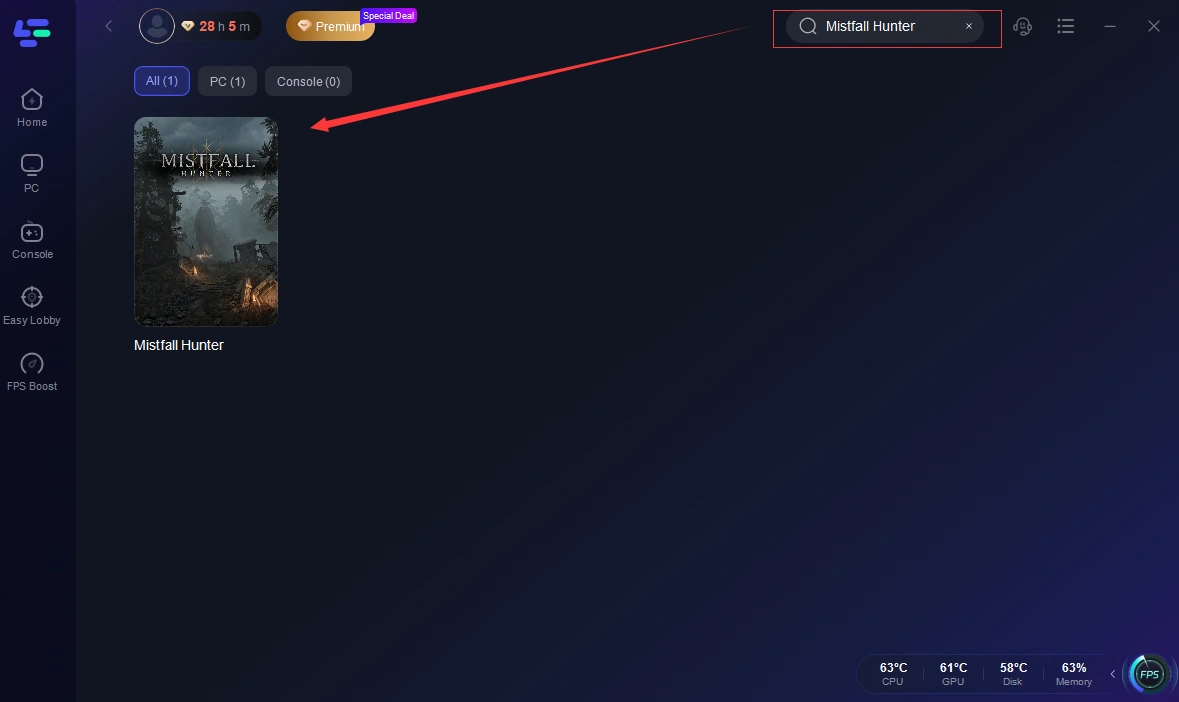
Boost: Click the Boost button. LagoFast will automatically select the best node based on your location.
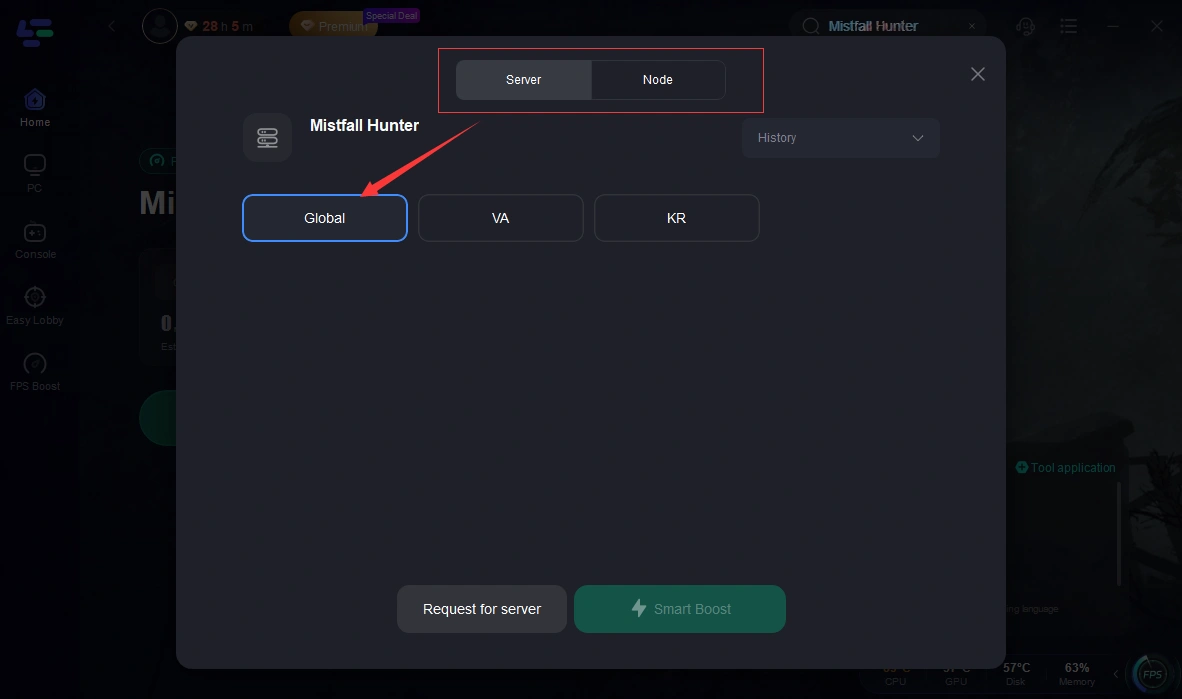
Launch: Start the game through the LagoFast interface.
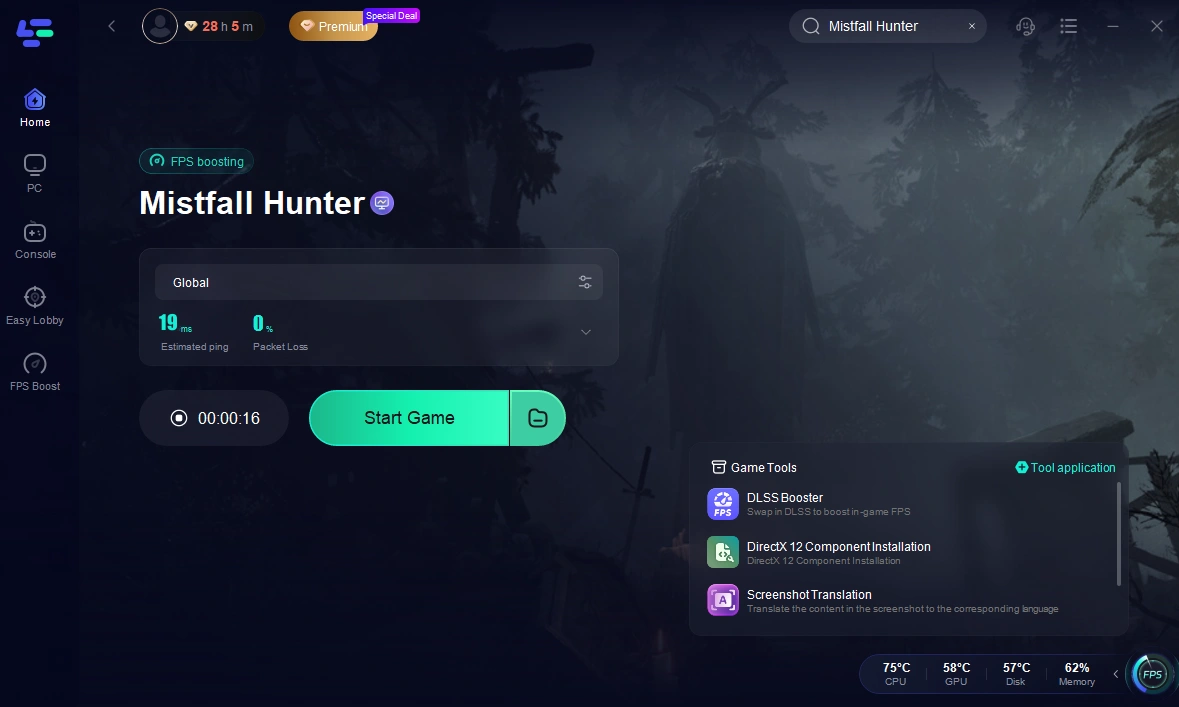
Select a Node Close to the Mistfall Hunter Server
Choose an optimization node that's closest to your selected game server. A shorter and more direct network route can provide a more stable connection and reduce the chance of login interruptions.
Test Another Available Regional Route
If one route isn't performing well, switch to another available node.
During peak hours, different network paths may experience different levels of congestion, so trying an alternative route can sometimes provide a more stable connection.
Relaunch Mistfall Hunter After Network Optimization
After optimizing your network connection, restart the game to establish a fresh session with the login server.
Steps:
- Close Mistfall Hunter completely.
- Wait 30–60 seconds before reopening the game.
- Log in to your account again.
- Rejoin the server queue and check whether your position updates normally.
If the queue is still frozen after reconnecting, continue with the troubleshooting methods below.
Part 5: Restart Mistfall Hunter and Steam Completely
A temporary login session can sometimes become stuck, especially after connection errors or long queue times. Restarting both Mistfall Hunter and Steam gives the game a fresh login session.
Steps:
- Exit Mistfall Hunter completely.
- Close Steam from the system tray.
- Wait 30–60 seconds.
- Launch Steam and start the game again.
Tip: Avoid restarting repeatedly, as you'll usually lose your current queue position.
Part 6: Refresh Steam Login Authentication
If the queue freezes immediately after launching the game, your Steam login session may not have synced correctly.
Try refreshing your Steam authentication by:
- Signing out of Steam.
- Signing back into your account.
- Confirming Steam is online.
- Launching Mistfall Hunter again.
This only takes a minute and can resolve temporary login verification issues.
Part 7: Restart Your Router or Change Networks
An unstable network can interrupt communication with the login server, causing the queue to stop updating.
Try these quick fixes:
- Restart your router or modem.
- Switch from Wi-Fi to a wired Ethernet connection.
- Disconnect any VPN or proxy service.
- Try another network, such as a mobile hotspot, if available.
A more stable connection can reduce login interruptions and timeout errors.
Part 8: Change DNS to Fix Login Queue Connection Problems
Slow DNS resolution can occasionally affect how quickly your PC connects to online services.
If you're still having trouble, try switching to a public DNS provider, such as:
- Google DNS: 8.8.8.8 / 8.8.4.4
- Cloudflare DNS: 1.1.1.1 / 1.0.0.1
After changing your DNS, restart your network and launch Mistfall Hunter again.
Part 9: Allow Mistfall Hunter Through Firewall and Antivirus
Windows Firewall or antivirus software can sometimes block the game's network traffic, preventing it from communicating with the login server.
Make sure both Mistfall Hunter and Steam are allowed through your security software.
Check that:
- Mistfall Hunter is listed as an allowed app.
- Steam has network access.
- No antivirus is blocking the game in the background.
If you recently installed new security software, this is worth checking.
Part 10: Verify Mistfall Hunter Game Files
Damaged or missing game files can occasionally cause login issues or unexpected errors.
To verify your game files in Steam:
- Open Steam.
- Go to Library.
- Right-click Mistfall Hunter and select Properties.
- Open Installed Files.
- Click Verify integrity of game files.
Steam will automatically scan and replace any corrupted or missing files before your next launch.
Part 11: Should You Restart When the Mistfall Hunter Queue Is Stuck?
Not always. Restarting too soon can send you back to the end of the queue, while waiting too long may waste even more time if your login session has already frozen. Use the signs below to decide whether it's worth staying in the queue or restarting the game.
When You Should Continue Waiting
Stay in the queue if you notice any of the following:
- Your queue position drops occasionally, even if it's slow.
- Other players are also reporting long login queues.
- The servers have just opened or received a major update.
- The developers have confirmed heavy server traffic.
In these situations, the queue is usually working as expected, and restarting will likely place you at the back of the line.
When the Queue Is Likely Frozen
Restarting may be the better option if:
- Your queue position hasn't changed for 20 minutes or longer.
- Other players are logging in while your position never updates.
- Your queue resets every time you reach the front.
- You repeatedly disconnect or receive login errors while waiting.
If these issues continue after restarting, move on to the network troubleshooting steps earlier in this guide.
Part 12: Mistfall Hunter Queue Stuck vs Other Login Problems
Not every login issue has the same cause. Use the table below to quickly identify what's happening and which fix is most likely to help.
|
Issue |
Common Symptoms |
Recommended Fix |
|
Login Queue Not Moving |
Queue stays at the same position for a long time |
Wait if the servers are busy, or optimize your network connection |
|
Steam Login Failed |
Unable to sign in through Steam or authentication errors |
Restart Steam and refresh your login session |
|
Unable to Connect to Server |
Can't reach the game server after launching |
Check the server status and your internet connection |
|
Connection Timed Out |
Disconnected while logging in or loading |
Restart your network and reduce packet loss |
|
Matchmaking Queue Not Finding a Match |
Logged in successfully but can't find a game |
Wait for matchmaking or try another server if available |
Login Queue Not Moving
This issue happens before you enter the game. Your queue position stays the same for an extended period, often because the servers are full or your connection to the login server is unstable.
Steam Login Failed
If Steam can't verify your account, Mistfall Hunter won't be able to complete the login process. Restarting Steam or signing in again usually resolves temporary authentication issues.
Unable to Connect to Server
This error typically appears when your game can't establish a connection with the Mistfall Hunter servers. It may be caused by server maintenance, an outage, or a local network problem.
Connection Timed Out
A timeout usually means the connection was interrupted while communicating with the server. Restarting your router, switching to a more stable network, or optimizing your connection may help.
Matchmaking Queue Not Finding a Match
Unlike a login queue, matchmaking starts after you've already entered the game. If matchmaking takes unusually long, the issue is usually related to player population, matchmaking settings, or server activity rather than the login system.
Part 13: Frequently Asked Questions About the Mistfall Hunter Login Queue
How long should I wait in the Mistfall Hunter login queue?
Queue times depend on server traffic. If your queue position is still updating occasionally, it's usually best to wait rather than restart the game.
Why does my queue position move backwards?
This may happen if your login session is refreshed or a temporary server issue occurs. If it happens repeatedly, try restarting the game after checking the server status.
Is the login queue the same for every server?
Not always. Queue times may vary depending on the server or region, especially during peak hours or large-scale play sessions.
Why do I keep disconnecting while waiting in the queue?
This can be caused by an unstable network connection, packet loss, or temporary server issues. Checking your connection and the game's server status is a good place to start.
Will I lose my queue position if I restart the game?
In most cases, yes. Restarting the game usually ends your current login session, so you'll likely need to join the queue again.
Final Thoughts
Getting stuck in the Mistfall Hunter login queue is usually caused by heavy server traffic rather than a problem with your account. Before restarting the game, check the server status and make sure your connection is stable. If the issue persists, work through the fixes in this guide to rule out network or login-related problems and get back into the game as quickly as possible.

Boost Your Game with LagoFast for Epic Speed
Play harder, faster. LagoFast game booster eliminates stutter and lags on PC, mobile, or Mac—win every match!
Quickly Reduce Game Lag and Ping!
Boost FPS for Smoother Gameplay!