
Quick Answer
High ping is usually caused by network congestion, long distance to game servers, unstable Wi-Fi, or local system inefficiencies. The most effective fixes include switching to a wired Ethernet connection, closing background bandwidth usage, updating network drivers, and optionally using a game routing optimizer (game booster) to improve latency paths.
This guide breaks down the problem step by step, from root causes to advanced optimization techniques.

- ✅Less ping and crashes.
- ✅ Higher FPS and better performance.
- ✅ Support for 8000+ games.
- ✅ Stable connection and region switching.
- ✅ Mistfall Hunter Translation Tool
Part 1: Understanding High Ping in Mistfall Hunter: The Digital Latency Battle
Part 2: Why Your Ping Spikes in Mistfall Hunter: Common Culprits
Part 3: Essential Network Optimizations for Lower Ping
Part 4: System-Side Tweaks to Combat Lag and Stutter
Part 5: Firewall and Antivirus Settings: Preventing Unseen Obstacles
Part 6: How to Enhance Your Game Experience with LagoFast Game Booster
Part 1: Understanding High Ping in Mistfall Hunter (Latency Mechanics Explained)
Before fixing the issue, it is important to understand what is actually happening behind the scenes.
Ping vs Latency in Online Gameplay
Ping is the measurable round-trip time it takes for data packets to travel between your device and the game server. Latency is the broader term describing overall delay in network communication.
In Mistfall Hunter, this directly impacts:
- Hit registration accuracy
- Movement synchronization
- Ability timing
- Server-client consistency
When ping exceeds 100ms, most players begin to notice clear responsiveness issues.
Why High Ping Feels So Disruptive
High latency creates a mismatch between what you see and what the server registers. This leads to:
- Delayed damage feedback
- “Teleporting” or rubberbanding characters
- Desynced combat interactions
- Input delay during critical fights
These effects are especially punishing in extraction-based combat systems where precision matters.
Transition: Now that the mechanics are clear, we can examine what causes these issues in the first place.
Related Article: Mistfall Hunter Best Classes Tier List: Solo, PvP, and Beginners
Part 2: Causes of High Ping in Mistfall Hunter (Why Lag Spikes Happen)
High ping rarely comes from a single issue. Instead, it is usually a combination of multiple network and system factors.
Server Distance and Geographic Latency
Game servers are often located in specific regions. If you are physically far away, your data must travel longer distances, increasing latency by default.
Network Congestion and ISP Traffic Load
During peak hours, internet traffic becomes congested, similar to a digital traffic jam. This can lead to:
- Sudden ping spikes
- Packet delays
- Inconsistent connection stability
Wi-Fi Instability and Signal Interference
Wireless connections are highly sensitive to:
- Physical obstacles like walls
- Signal interference from other devices
- Distance from the router
This often results in packet loss and unstable latency.
Outdated Drivers or Misconfigured Network Settings
Old or corrupted network drivers can reduce efficiency in data transmission, increasing response time.
Background Applications Consuming Bandwidth
Common culprits include:
- Cloud syncing tools
- Streaming services
- Large downloads or updates
- Multiple active devices on the same network
Transition: After identifying the causes, the next step is optimizing your network environment.
Related Article: Mistfall Hunter FPS Drops & Stuttering Fix: Best PC Settings
Part 3: Network Optimization for Mistfall Hunter (Core Fixes for Lower Ping)
This section covers the most important steps to reduce latency effectively.
Switch to a Wired Ethernet Connection
A wired connection is significantly more stable than Wi-Fi and provides:
- Lower latency
- Reduced packet loss
- Consistent performance
This is one of the most impactful improvements available.
Restart Router and Modem Regularly
Network devices can accumulate errors or cache issues over time. Restarting helps reset connections and refresh routing paths.
Stop Background Bandwidth Usage
Before launching the game, close:
- Streaming platforms
- Large file downloads
- Cloud backup services
This ensures maximum bandwidth is available for gaming traffic.
Enable QoS (Quality of Service)
QoS settings allow your router to prioritize gaming traffic, ensuring that game packets are transmitted first even under network load.
Flush DNS and Reset Network Stack
Resetting network configuration can resolve hidden routing issues:
- Clear DNS cache
- Reset IP configuration
- Reset Winsock settings
Use Faster DNS Servers
Switching to DNS providers like Cloudflare or Google DNS can improve connection resolution speed and reduce unnecessary delay.
Transition: Once the network is optimized, system-level performance must also be addressed.
Part 4: System Optimization for Mistfall Hunter (Reducing Stutter and Input Lag)
Even with a stable network, poor system performance can create the feeling of lag.
Update GPU and Network Drivers
Outdated drivers can cause:
- Frame instability
- Input delay
- Poor network handling
Always use the latest official drivers.
Set Windows to High Performance Mode
This prevents CPU throttling and ensures maximum system responsiveness during gameplay.
Close Background Processes
Use Task Manager to shut down unnecessary applications consuming CPU, RAM, or disk resources.
Adjust In-Game Graphics Settings
Although not directly related to ping, unstable FPS can feel like network lag. Reduce:
- Shadows
- Post-processing effects
- Anti-aliasing
Optional: Disable Fullscreen Optimizations
In some systems, disabling this Windows feature can reduce input delay and improve responsiveness.
Transition: Even with perfect local optimization, routing issues may still remain.
Part 5: Firewall and Antivirus Optimization in Mistfall Hunter (Avoiding Hidden Interference)
Security software may unintentionally affect game performance.
Add Game to Firewall Exceptions
Ensure the game executable is allowed through both private and public network profiles.
Exclude Game Folder in Antivirus
Real-time scanning can introduce delays by inspecting game data during execution.
Enable Gaming Mode in Security Software
Many modern antivirus programs include a gaming mode that reduces background scanning activity.
Temporary Testing (Advanced Troubleshooting)
Temporarily disabling security software can help identify whether it is causing latency issues, but it should never be left off permanently.
Transition: If all local fixes are applied but issues persist, routing optimization tools become important.
Part 6: Improving Network Routing for Mistfall Hunter (Game Booster Optimization)
When standard optimization is not enough, routing-based solutions can further reduce ping.
How Game Boosters Work
Tools such as LagoFast function by:
- Selecting optimized network paths
- Avoiding congested ISP routes
- Reducing packet loss
- Stabilizing server connections
This effectively creates a faster route between your device and game servers.
How to Use LagoFast
Start the application and follow these steps:
Step 1: Click the "Free Trial" button to download LagoFast on your device.
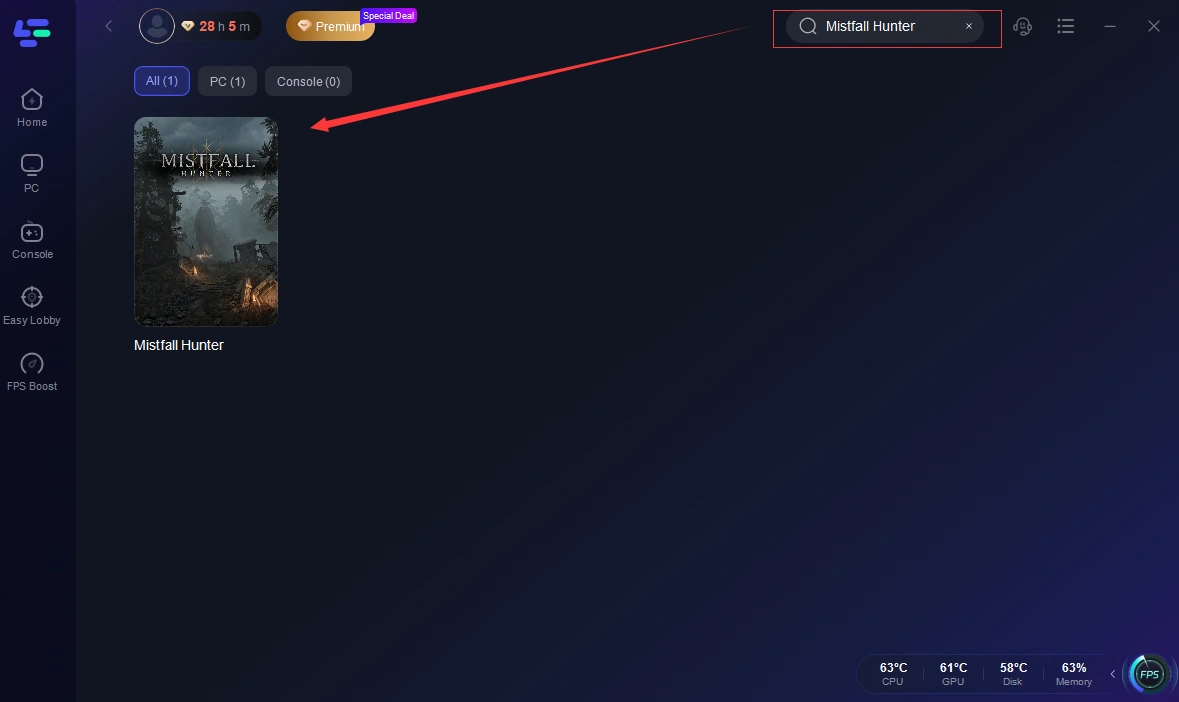
Step 2: Open LagoFast, click the PC button on the left, and search for Mistfall Hunter in the search bar. Select the game when it appears.
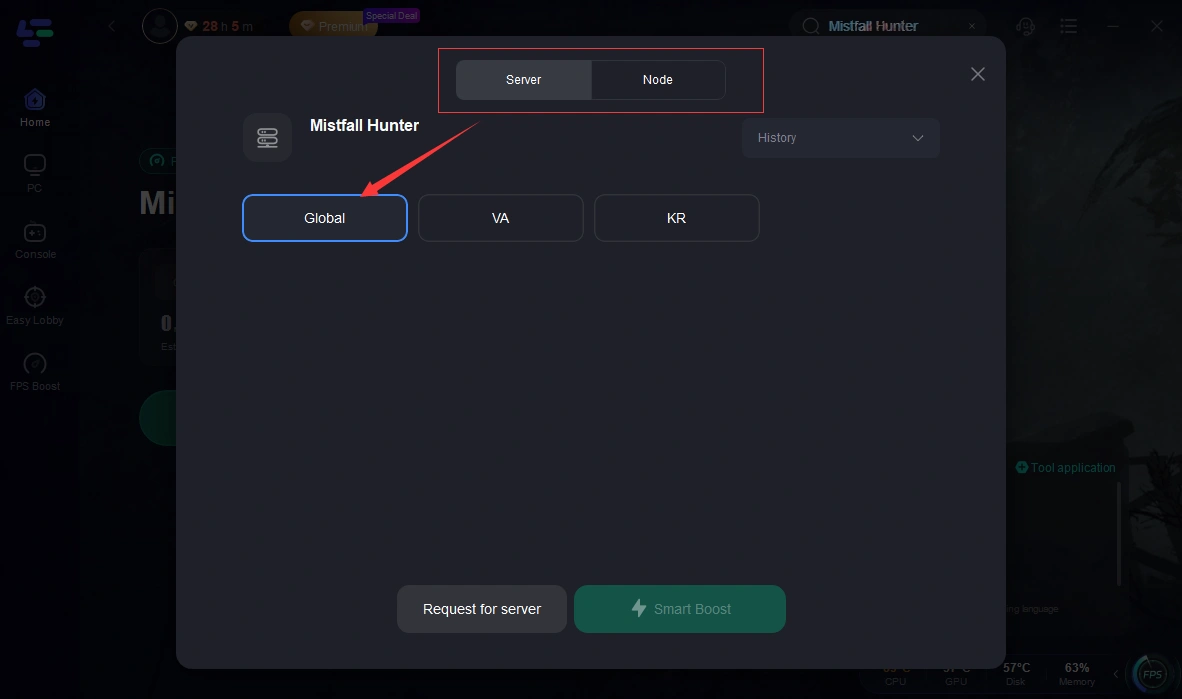
Step 3: Click on “Server” to change to a better server that ensures the gaming experience, then click on “Smart Boost”.
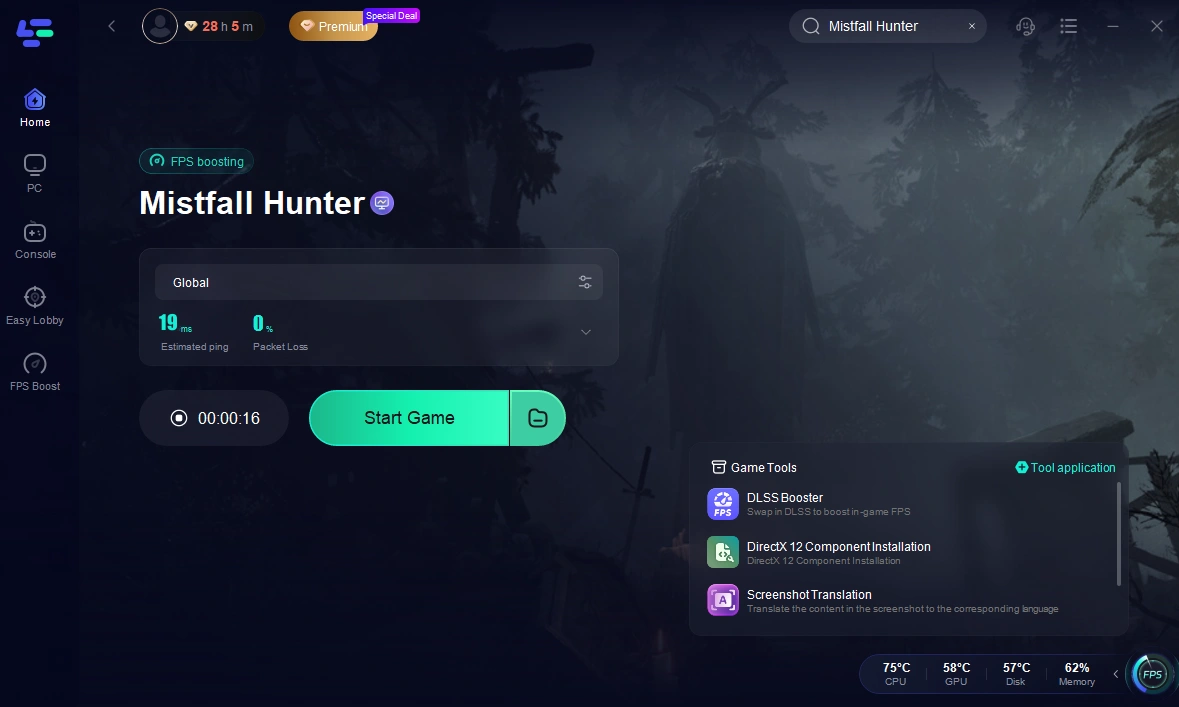
Step 4: Check the specific game ping, packet loss, and multiple path connection on the right side. Finally, click the “Start Game” to play the game.
When It Is Most Useful
Game boosters are especially effective when:
- Playing across regions
- Experiencing peak-hour congestion
- Facing unstable ISP routing
Transition: After applying all optimization layers, we summarize key takeaways.
Part 7: FAQ for Mistfall Hunter (Common High Ping Questions)
What is a good ping for gaming?
- Under 20ms: Excellent
- 20–50ms: Very stable
- 50–100ms: Acceptable
- Above 100ms: Noticeable lag
Does internet speed affect ping?
Not directly. Bandwidth affects download speed, while ping measures response time and routing efficiency.
Why is only this game lagging?
Possible reasons include:
- Server region mismatch
- Routing inefficiencies
- Server load issues
Is Wi-Fi bad for gaming?
Not necessarily, but it is less stable than Ethernet and more prone to interference.
Conclusion: Complete Optimization Strategy for Mistfall Hunter (Eliminating High Ping & Lag)
To fully resolve high ping issues in Mistfall Hunter, optimization must be done across three layers:
First, stabilize the network by using Ethernet, optimizing DNS, and enabling QoS.
Second, improve system performance by updating drivers, closing background processes, and adjusting system power settings.
Third, refine routing paths using game optimization tools when necessary.
When all three layers are combined, latency becomes significantly more stable, resulting in smoother gameplay, faster response times, and a much more consistent competitive experience.
Boost Your Game with LagoFast for Epic Speed
Play harder, faster. LagoFast game booster eliminates stutter and lags on PC, mobile, or Mac—win every match!
Quickly Reduce Game Lag and Ping!
Boost FPS for Smoother Gameplay!