

League of Legends Classic is now available on the PBE, with the full release scheduled for July 29, 2026 (Patch 26.15). As more players jump into the nostalgic Season 3-inspired mode, some are already reporting League of Legends Classic ping spikes, sudden lag, unstable latency, or delays even when their ping appears normal.
If your ping suddenly jumps from 30 ms to 180 ms, abilities feel delayed, or your champion stutters during teamfights, this guide explains the most common causes and the fastest ways to improve your connection.

Tip: League Classic is available through the existing League of Legends client. You don't need to download a separate client to play.
Quick Guide:
What Causes League of Legends Classic Ping Spikes?
Fix League of Legends Classic Ping Spikes & Jitter Fast
Other Fixes to Try to Solve High Ping in League Classic
How to Monitor Ping and Packet Loss in League Classic
Why Is League Classic Lagging Even with Normal Ping?
FAQ About LOL Classic Ping Spikes
What Causes League Classic Ping Spikes?
If your ping suddenly jumps during a match instead of staying stable, the issue isn't always caused by slow internet. In most cases, ping spikes happen because the connection between your PC and Riot's game servers becomes unstable. This can lead to delayed abilities, rubberbanding, or sudden lag even if your average ping looks normal.
Common causes include:
- Riot server congestion during new patches, maintenance, or peak playing hours.
- Unstable ISP routing, where your internet provider sends traffic through longer or congested network paths instead of the fastest route.
- Wi-Fi interference, which can introduce latency fluctuations and League Classic jitter during gameplay.
- Background network traffic from Windows Update, Steam, cloud sync, or other applications competing for bandwidth.
Fortunately, most League Classic ping spike issues can be reduced by optimizing your network connection and eliminating common sources of instability.
Fix League of Legends Classic Ping Spikes & Jitter Fast
If your ping only spikes in League Classic while your internet works fine for everything else, the issue may not be your connection speed. Unstable routing between your ISP and Riot's servers is a common cause of sudden lag and latency spikes in online games.
LagoFast helps optimize the connection route between your device and League Classic servers, reducing ping spikes, packet loss, and unstable latency caused by inefficient network routing.
Key benefits of LagoFast:
- Reduce ping spikes and unstable latency
- Optimize routing to League Classic servers
- Reduce packet loss during matches
- One-click optimization before entering a game
How to Enhance Your Game Experience with LagoFast
Now, reduce League Classic high ping, ping spikes, and sudden lag in just a few steps:
Step 1. Download and install LagoFast, then sign in or start your free trial.
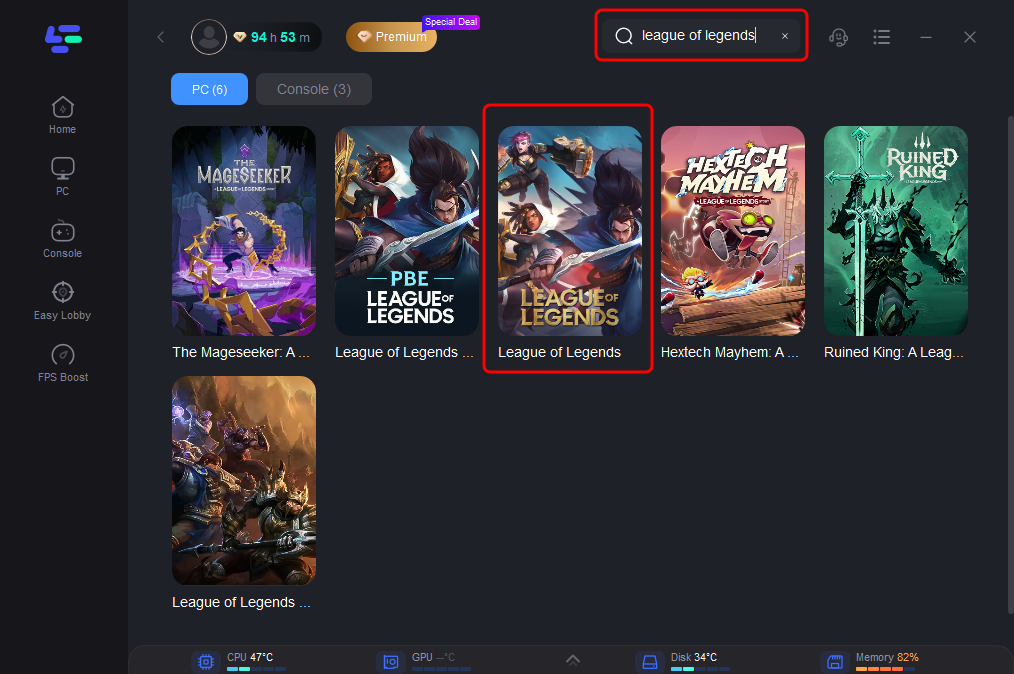
Step 2. Open LagoFast, search for League of Legends, and select the game.
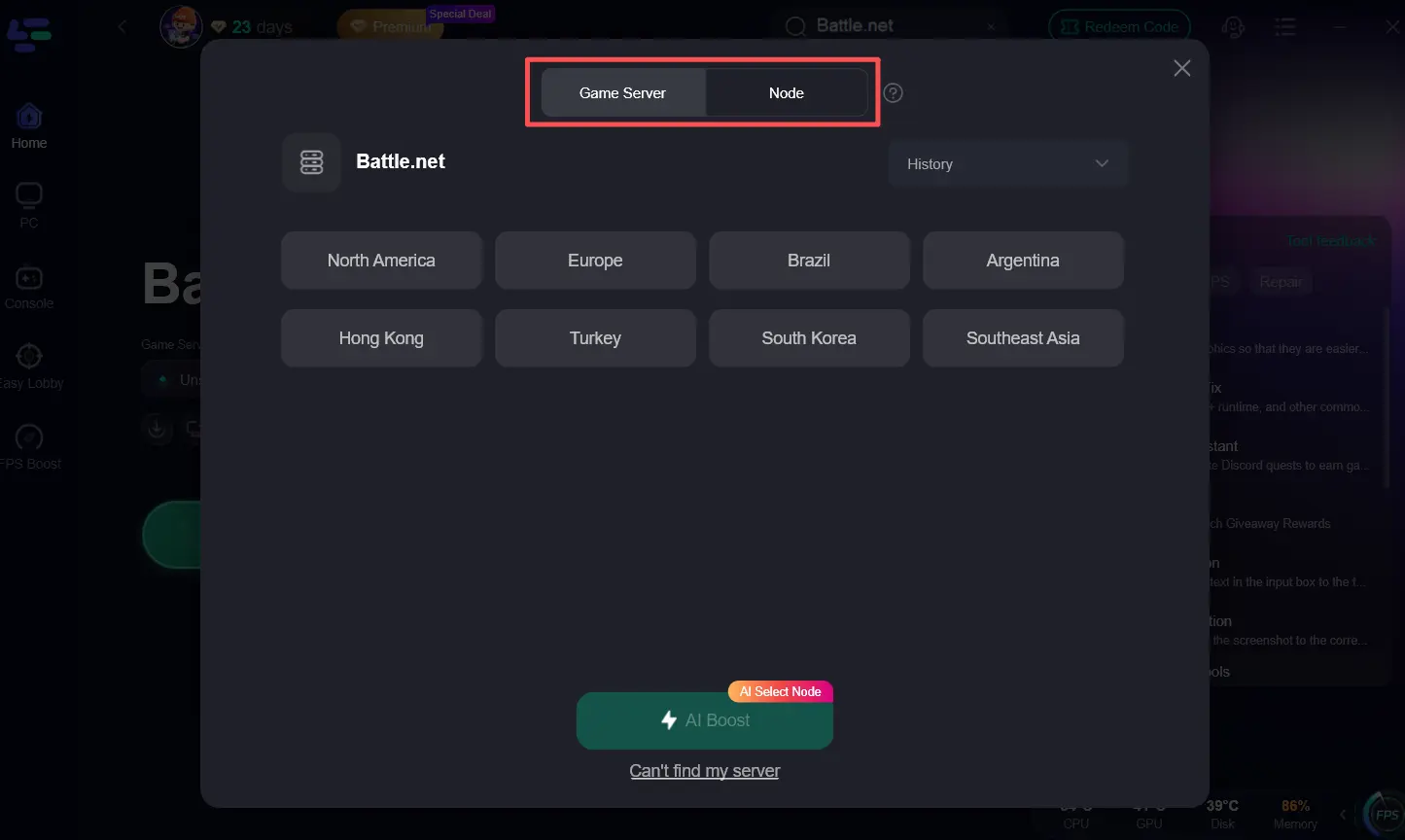
Step 3. Choose your League server or use AI Boost to automatically select the best server and routing node for the lowest latency.
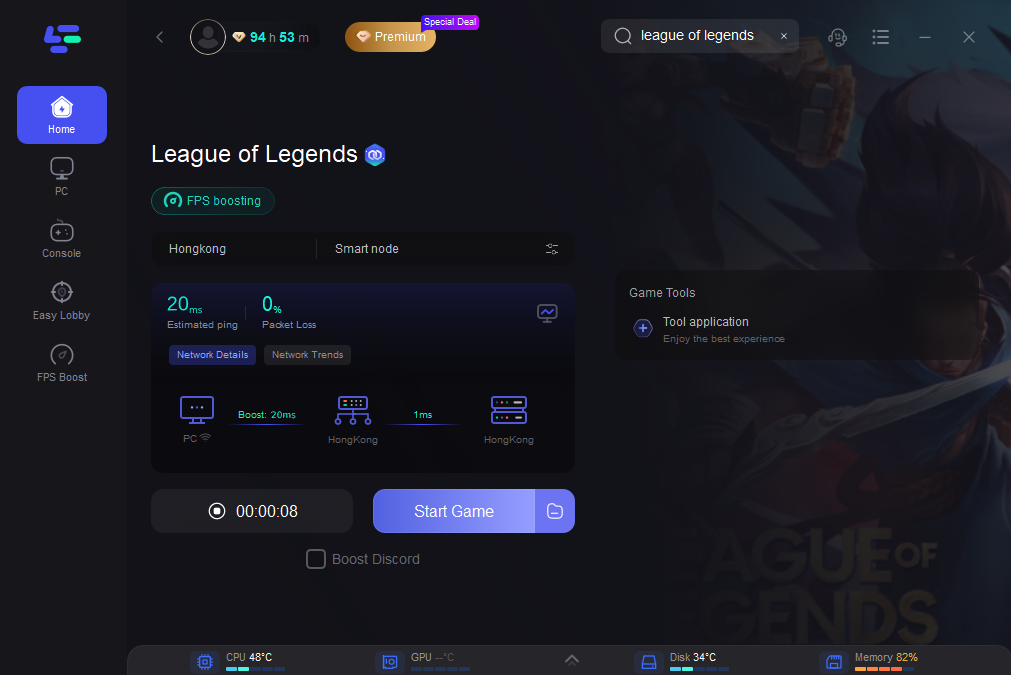
Step 4. Click Start Game to optimize your connection. You can monitor your ping, packet loss, and network status in real time while the boost is active.
You're now ready to launch League of Legends Classic with a more stable connection and fewer ping spikes. If you're also experiencing FPS drops or stuttering during matches, LagoFast's FPS Boost can help improve game performance for a smoother experience.
Other Fixes to Try to Solve High Ping in League Classic
Besides optimizing your connection, there are several other troubleshooting methods worth trying to further improve network stability and reduce high ping in League Classic.
Fix 1. Check the League Server Status
Before changing your PC or network settings, check whether Riot's servers are experiencing maintenance or outages. Ping spikes and sudden lag can occur during new patch releases, server maintenance, or periods of heavy player traffic.
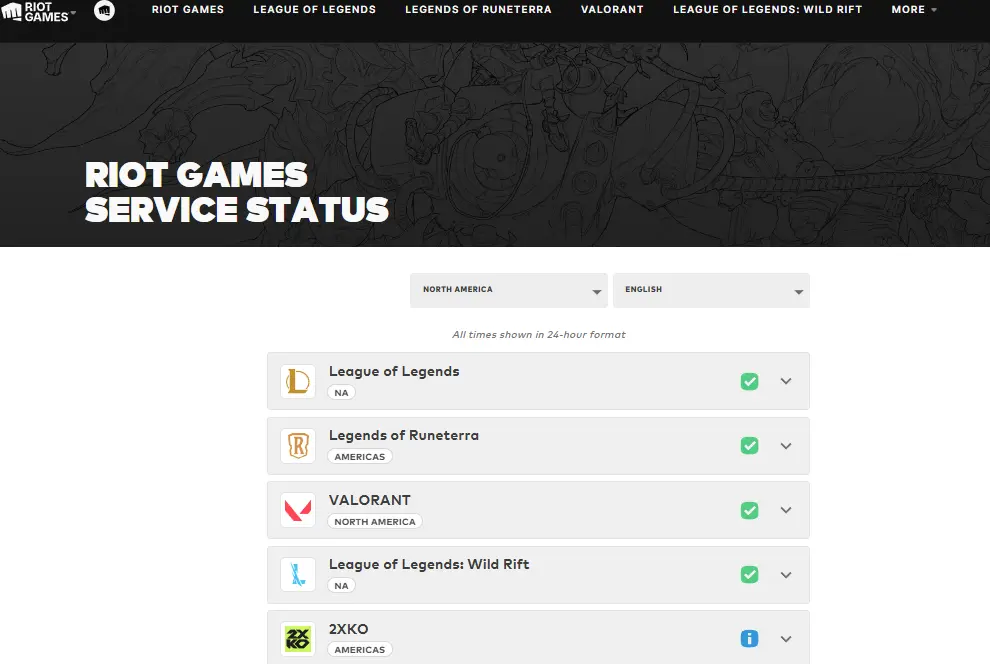 Visit the Riot Server Status page. Check for maintenance notices or ongoing service issues. If a server issue is confirmed, wait until the service is restored before troubleshooting your own network. You can learn more from League of Legends Classic Server Status, Login Error, Lag, and Connection Fixes.
Fix 2. Switch to a Wired Ethernet Connection
Wi-Fi interference is one of the most common causes of unstable ping. A wired Ethernet connection provides a more stable signal and reduces latency fluctuations during competitive matches.
Steps to solve League of Legends ping spikes every few seconds:
- Connect your PC directly to your router with an Ethernet cable.
- Disable Wi-Fi if both connections are active.
- Restart League Classic and compare your ping.
Fix 3. Stop Background Downloads
Applications downloading or syncing files in the background can consume bandwidth and cause sudden lag during gameplay. Before launching League Classic, pause or close applications such as:
- Windows Update
- Steam or Epic Games downloads
- OneDrive or cloud storage sync
- Discord updates
- Browser downloads or streaming services
Reducing unnecessary network traffic helps keep your connection more stable.
Fix 4. Restart Riot Client and Router
Temporary routing or connection errors can sometimes cause unstable latency. You can exit Riot Client completely. Restart your router and wait about one minute. After that, Launch Riot Client again and reconnect to League Classic. A fresh connection can resolve temporary networking issues without changing any settings.
Fix 5. Change DNS (Optional)
Changing your DNS won't directly lower your ping, but it may improve connection stability if your ISP's default DNS server is slow or unreliable. Public DNS services such as Google DNS (8.8.8.8) or Cloudflare DNS (1.1.1.1) are commonly used alternatives.
If the issue is caused by ISP routing rather than DNS resolution, however, changing DNS alone may not eliminate ping spikes.
How to Monitor Ping and Packet Loss in League Classic
Monitoring your network statistics is the fastest way to determine whether the issue is caused by high ping, packet loss, or unstable latency. Instead of relying on how the game feels, check your connection in real time while playing.
|
Metric |
What It Means |
Recommended Value |
|
Ping |
Time it takes data to travel between your PC and Riot's server |
Below 50 ms |
|
Packet Loss |
Percentage of game data that fails to reach the server |
0% |
|
Ping Stability |
Whether your latency remains consistent throughout the match |
Stable with minimal fluctuation |
You can show ping in League of Legends in several ways:
- The built-in League of Legends Ping/FPS display (Ctrl + F)
- Run a Windows Command Prompt ping test using the ping command
- Use LagoFast's real-time overlay to monitor ping, packet loss, and network status while playing League Classic.
Why Is League Classic Lagging Even with Normal Ping?
Many players report that their ping stays at 20–40 ms, yet League Classic still feels sluggish. This usually means the issue isn't your average ping but another form of network or system latency.
|
Issue |
What You Notice |
Possible Cause |
|
Jitter |
Ping constantly jumps between low and high values |
Unstable Wi-Fi or ISP routing |
|
Packet Loss |
Rubberbanding, missing abilities, delayed movement |
Lost network packets between your PC and Riot's server |
|
Input Delay |
Clicking or casting abilities feels delayed |
Background processes, system latency, or hardware response |
|
Server-side Latency |
Everyone in the match experiences lag at the same time |
Riot server congestion or maintenance |
For example:
- Your ping may stay at 30 ms, but packet loss can still cause your champion to teleport or abilities to register late.
- Jitter can make your latency jump from 30 ms to 150 ms for a split second, resulting in sudden lag during teamfights.
- Input delay is different from network lag. Even with a stable connection, heavy CPU usage or background software can make the game feel unresponsive.
- If many players experience the same issue simultaneously, the cause is more likely to be server-side latency than your own internet connection. Recent League community reports also show cases where players experienced noticeable input delay despite consistently low ping, indicating that stable latency alone doesn't always guarantee responsive gameplay.
FAQ About LOL Classic Ping Spikes
Why is my League Classic ping suddenly so high?
Sudden high ping is usually caused by Riot server congestion, unstable ISP routing, Wi-Fi interference, or background network traffic. Check Riot's server status first, then monitor your ping and packet loss to identify the cause.
Why is League of Legends high ping but internet is fine?
Your internet speed may be normal, but the route between your ISP and Riot's servers can still be unstable. Packet loss or inefficient routing can increase in-game latency without affecting normal web browsing.
Can Riot server maintenance cause ping spikes?
Yes. During maintenance, patch releases, or heavy server traffic, Riot servers may experience temporary latency increases or ping spikes. It's best to wait until the service returns to normal before troubleshooting your network.
Why do ping spikes only happen in League of Legends?
League Classic constantly exchanges real-time data with Riot's servers, making it more sensitive to routing issues, packet loss, and network jitter than many other online activities.
Can a Game Booster reduce ping spikes?
If your ping spikes are caused by unstable routing rather than server outages or hardware problems, a game booster can help. LagoFast optimizes your connection route and provides real-time ping and packet loss monitoring for a more stable gaming experience.
Conclusion
Several factors, including Riot server congestion, unstable ISP routing, Wi-Fi interference, or background network traffic, can cause ping spikes in League of Legends Classic. By identifying the actual cause, checking your connection, and applying the right fixes, you can significantly improve your gameplay experience.
If you're looking for a faster way to reduce high ping, unstable latency, and sudden lag, LagoFast provides optimized game routing and real-time network monitoring to help keep your connection stable before and during every League Classic match.

Boost Your Game with LagoFast for Epic Speed
Play harder, faster. LagoFast game booster eliminates stutter and lags on PC, mobile, or Mac—win every match!
Quickly Reduce Game Lag and Ping!
Boost FPS for Smoother Gameplay!