

Quick Answer: How to Fix Honor of Kings: World Lag & High Ping Issues on Both PC & Mobile?
Tencent’s stunning open-world action RPG, Honor of Kings: World, demands a flawless, real-time connection to enjoy its dynamic combo systems and massive co-op raids fully. If your game is stuttering, try these quick fixes:
- Switch to a Wired Network: Ditch unstable Wi-Fi for an Ethernet connection on PC, or utilize a 5GHz Wi-Fi/stable 5G data connection on mobile.
- Use an Dedicated Game Booster: The most effortless way to eradicate high latency is using LagoFast Game Booster. It instantly optimizes your connection routes, slashes high ping, stabilizes cross-platform multiplayer, and locks in a fluid frame rate with its one-click FPS boost feature.
- Optimize DNS & Clear Cache: Flush your DNS on PC or wipe your device's system cache to clear data bottlenecks.
- Terminate Network Hogging Apps: Close background downloads, cloud syncs, and streaming services.
The long-awaited release of Honor of Kings: World has taken the gaming landscape by storm, inviting players to dive into an expansive, stunningly detailed open world. However, when you are attempting to execute a frame-perfect parry or coordinate a massive multiplayer dungeon raid, a sudden latency spike can ruin the entire experience. High ping and stuttering are the ultimate boss killers. This guide breaks down why these issues happen and provides concrete, highly effective solutions to ensure your connection remains as sharp as your combat skills.

- ✅ Reduce Lag and High Ping.
- ✅ Boost FPS at the Same Time.
- ✅ Support 2000+ Popular Games.
- ✅ Fix Game Black Screen Issues.
- ✅ Honor of Kings: World Translation Tool
Part 1: Honor of Kings: World Lag vs. High Ping Comparison
Part 2: How to Fix Honor of Kings: World Lag & High Ping? – Manual Solutions
Part 3: Why Manual Solutions Don’t Always Work?
Part 4: Quickly Fix Honor of Kings: World Lag & High Ping on PC via LagoFast
Part 5: Quickly Fix Honor of Kings: World Lag & High Ping on Mobile via LagoFast Mobile
Part 1: Honor of Kings: World Lag vs. High Ping Comparison
While many players treat "lag" and "high ping" as interchangeable terms, they point to entirely distinct technical bottlenecks. Recognizing which one is sabotaging your game helps you apply the proper solution.
|
Network Issue |
Core Symptom |
Primary Cause |
Typical Fix |
|
High Ping (Network Latency) |
Rubberbanding, delayed damage registration, commands taking a second to activate. |
High physical distance to game servers, poor ISP routing, congested network nodes. |
Network optimization, changing DNS, using a specialized game booster like LagoFast. |
|
Lag (FPS Drops & Hardware Stuttering) |
Low frame rates, visual freezing, choppy animations, device heating up. |
Overburdened GPU/CPU, insufficient RAM, outdated graphics drivers, poor game optimization. |
Lowering in-game graphics, updating drivers, enabling performance modes, using an FPS booster. |
Part 2: How to Fix Honor of Kings: World Lag & High Ping? – Manual Solutions
If you want to manually optimize your setup before jumping back into the overworld, here are six localized, actionable troubleshooting steps split between PC and mobile environments.
Top 3 Manual Solutions for PC Players
Fix 1: Flush DNS and Renew IP Address
Over time, your computer’s local DNS cache accumulates outdated or corrupted routing paths, which leads to artificial delays when connecting to live game servers.
Step 1. Press the Windows Key + R, type cmd, and press Ctrl + Shift + Enter to open the Command Prompt as an administrator.
Step 2. Type ipconfig /flushdns and hit Enter.
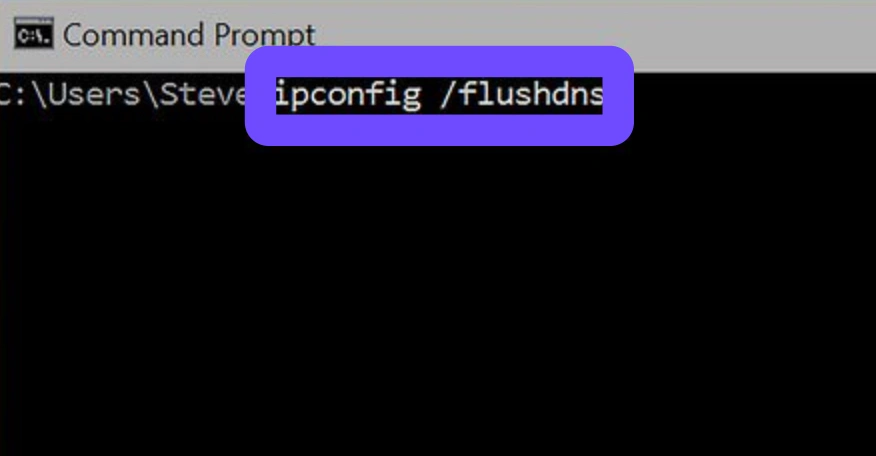
Step 3. Type ipconfig /registerdns and hit Enter.
Step 4. Type ipconfig /release followed by ipconfig /renew to force your router to hand your PC a clean network lease.
Step 5. Restart your computer and launch the game.
Fix 2: Modify Windows Network Adapter Settings
Forcing your PC to prioritize performance over energy conservation prevents your network interface card from entering low-power throttling states mid-match.
Step 1. Right-click the Windows Start menu and select Device Manager.
Step 2. Expand the Network adapters category, right-click your primary internet controller (Ethernet or Wireless), and select Properties.
Step 3. Navigate to the Power Management tab.
Step 4. Uncheck the box that reads "Allow the computer to turn off this device to save power".
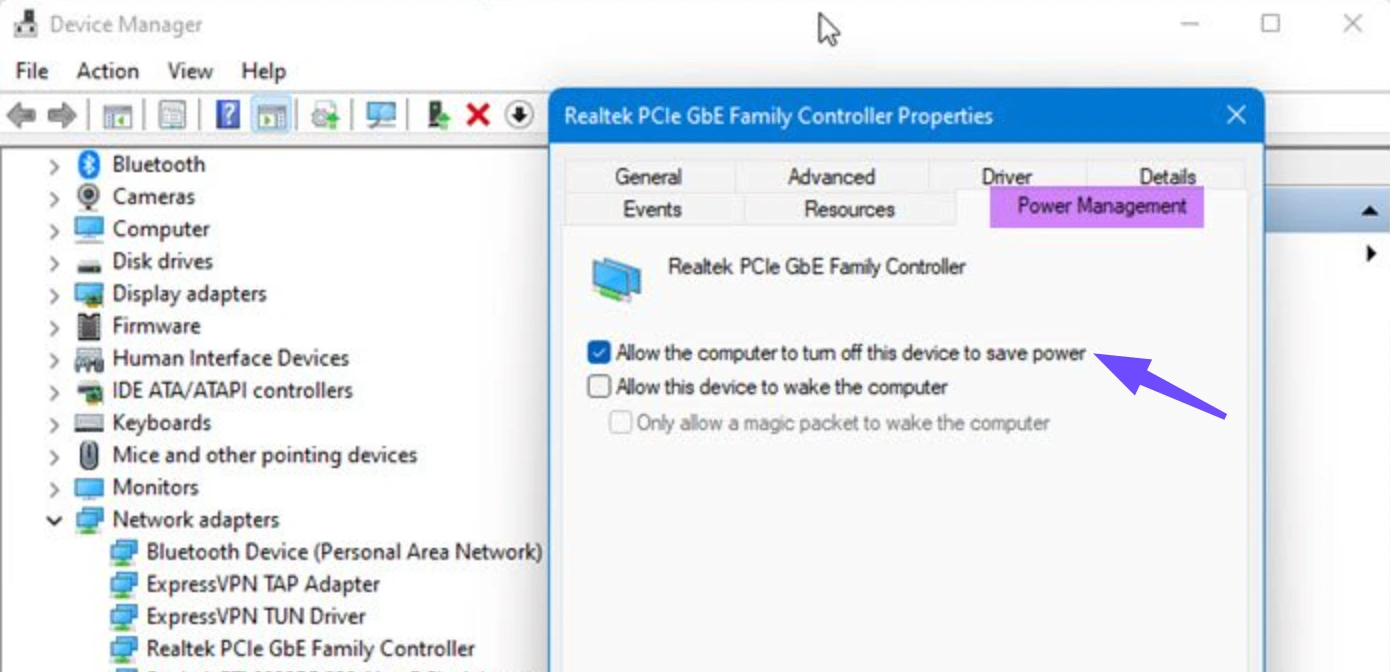
Step 5. Move to the Advanced tab, locate Energy Efficient Ethernet (or Green Ethernet), and toggle it to Disabled. Click OK to save changes.
Fix 3: Configure In-Game Graphics Settings & Update Drivers
Honor of Kings: World leverages Unreal Engine 5, meaning hardware-induced visual lag will feel exactly like connection lag if your system is choking on the rendering pipeline.
Step 1. Open your graphics control suite (NVIDIA GeForce Experience or AMD Software) and install the latest game-ready driver patch.
Step 2. Boot up the game and enter the Settings menu.
Step 3. Lower heavy graphical parameters like Shadow Quality, Global Illumination, and Motion Blur down to Medium or Low.
Step 4. Turn on performance upscalers such as DLSS, FSR, or XeSS depending on your graphics card architecture to lift the burden off your hardware.
Top 3 Manual Solutions for Mobile Players (Android & iOS)
Fix 1: Change to a High-Speed Public DNS Server
Your mobile carrier's default DNS servers are often sluggish and poorly routed, causing your ping to skyrocket during intense combat.
- For Android: Go to Settings, select Network & Internet, select Private DNS. Select the Private DNS provider hostname and enter dns. google (Google) or 1dot1dot1dot1.cloudflare-dns.com (Cloudflare).
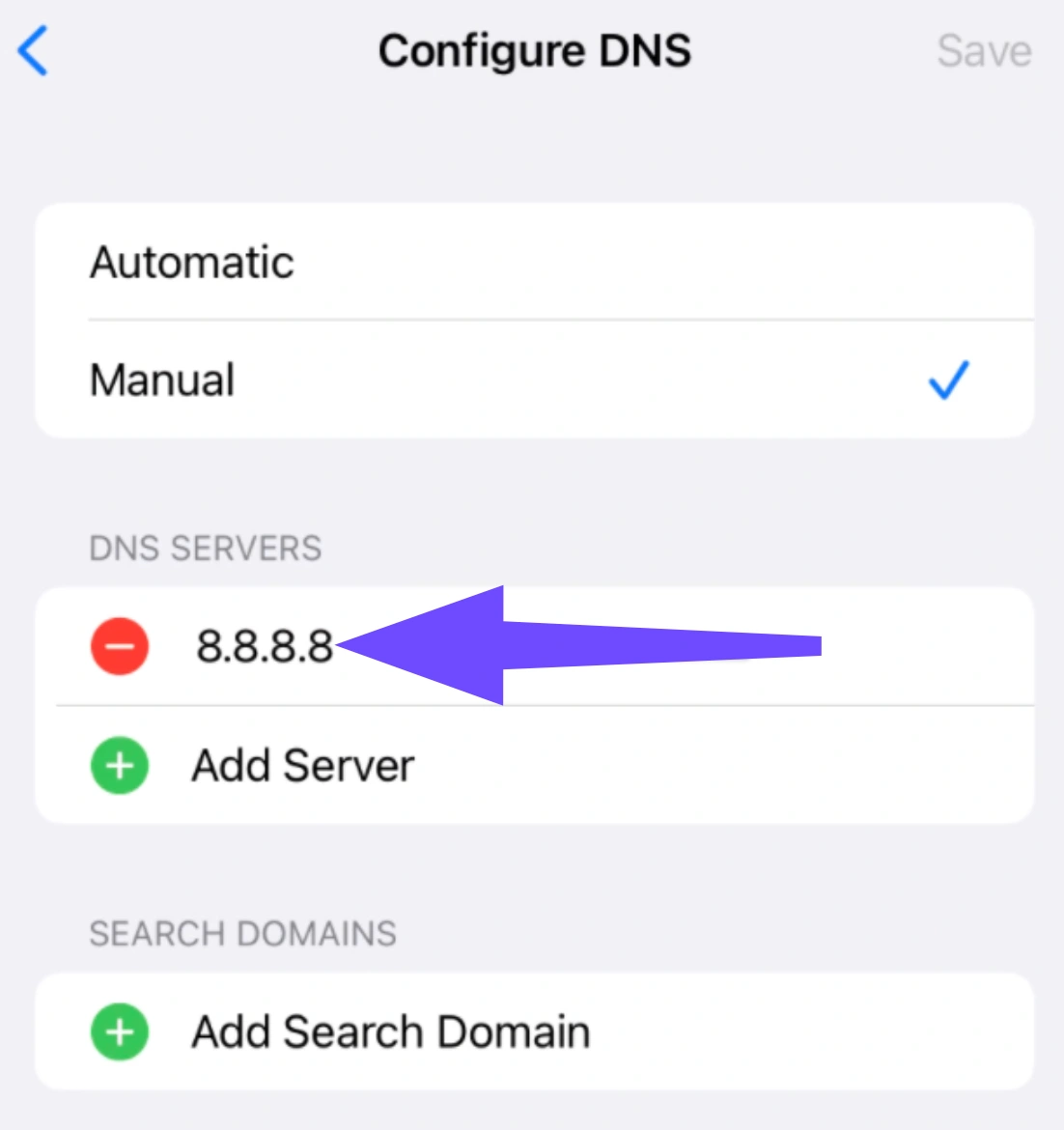
- For iOS: Open Settings and select Wi-Fi. Tap the small info icon next to your active network, scroll down to Configure DNS, switch it to Manual, clear the old listings, and add 8.8.8.8 or 1.1.1.1.
Fix 2: Erase Game Cache and Restrict Background Syncing
Background applications constantly pull micro-data packets for notifications, starving your mobile game client of necessary bandwidth.
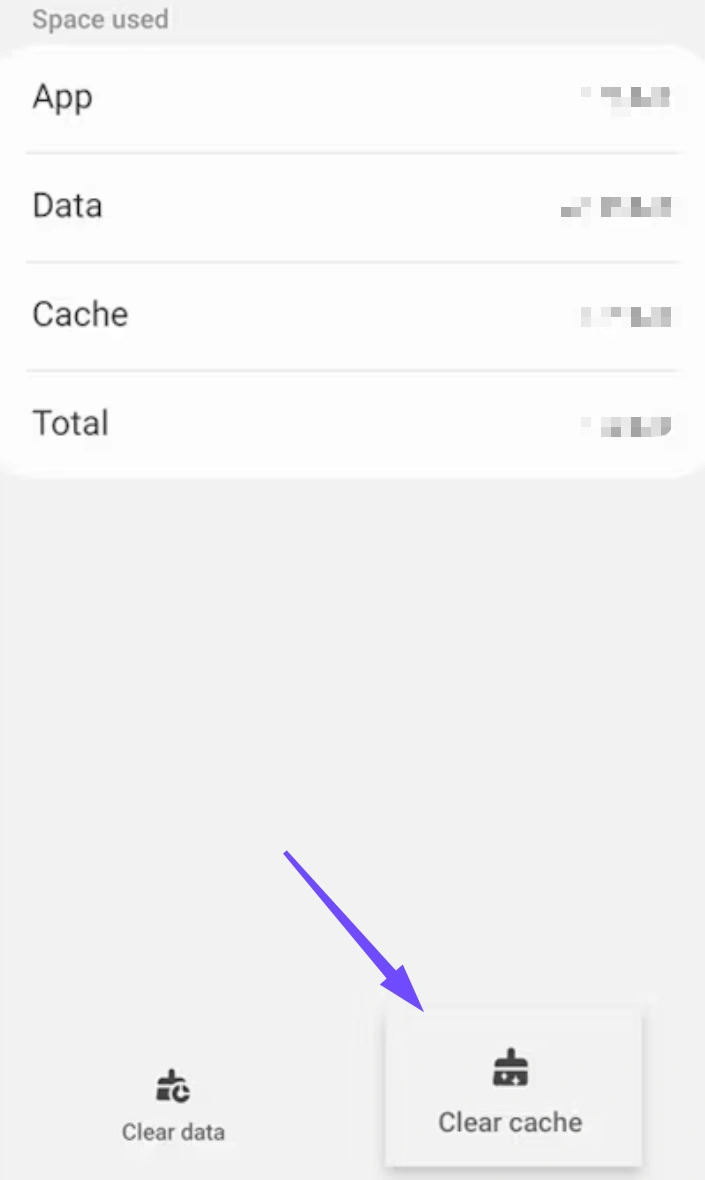
- For Android: Long-press the Honor of Kings: World app icon, select App Info, tap Storage & Cache, and hit Clear Cache (do not clear data unless you want to re-download assets).
-
For iOS/Android Background Fix: Turn off system background processes. On iOS, go to Settings, select General, select Background App Refresh, and toggle it off or limit it strictly to Wi-Fi.
Fix 3: Force Enable High-Performance & Gaming Modes
Modern smartphones naturally throttle hardware performance to manage heat dissipation, which manifests as severe frame drops during boss battles.
Step 1. Remove heavy protective phone cases before loading up long play sessions to improve physical heat dissipation.
Step 2. Dive into your phone's settings menu, look for Battery, and change the profile from Balanced/Power Saving over to High Performance Mode.
Step 3. Use built-in system software overlays (like Samsung's Game Booster or Apple's Focus modes) to allocate maximum RAM availability strictly to the game
Part 3: Why Manual Solutions Don’t Always Work?

While manual troubleshooting steps are excellent habits for general system maintenance, they rarely resolve core networking issues.
Manual adjustments cannot alter how your Internet Service Provider physically handles your traffic. If your ISP routes your data across inefficient, crowded regional nodes before it hits the Honor of Kings: World data centers, flushing your DNS or lowering your graphics configuration won't fix your high ping. Furthermore, standard home networks lack the internal intelligence to prioritize complex gaming data packets over everyday household web traffic, leaving you vulnerable to sudden lag spikes whenever someone else on your network streams media.
Part 4: Quickly Fix Honor of Kings: World Lag & High Ping on PC via LagoFast
To bypass the limitations of manual fixes, a specialized tool like LagoFast Game Booster offers an automated, comprehensive solution. Designed specifically for gaming traffic, LagoFast acts as a dedicated express lane for your data.
Key Technical Features of LagoFast for PC:
- Smart Routing & Multipath Connections: LagoFast analyzes live global network traffic and dynamically locks your connection onto the absolute shortest, least congested path to the game servers.
- Real-Time Ping Reduction: By eliminating unnecessary internal network hops, it stabilizes your latency and drops high ping instantly.
- One-Click FPS Boost: Beyond network optimization, LagoFast features a built-in hardware optimizer that clears hidden background processes, adjusts Windows settings, and allocates maximum GPU/CPU power to boost frame rates.
- Built-In Translation Tool: Essential for cross-regional versions, LagoFast includes a convenient localized translation feature, allowing you to easily navigate menus, read lore, and strategize with teammates without language barriers.
Simple Steps to Use LagoFast on PC:
Step 1: Click the Free Trial button below to download LagoFast
Step 2: After installation, search for the game "Honor of Kings: World" in the search bar
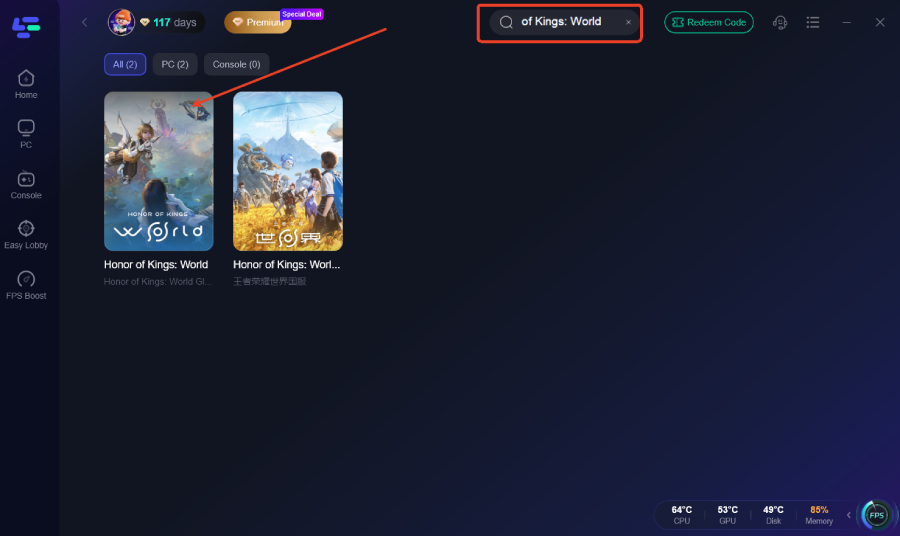
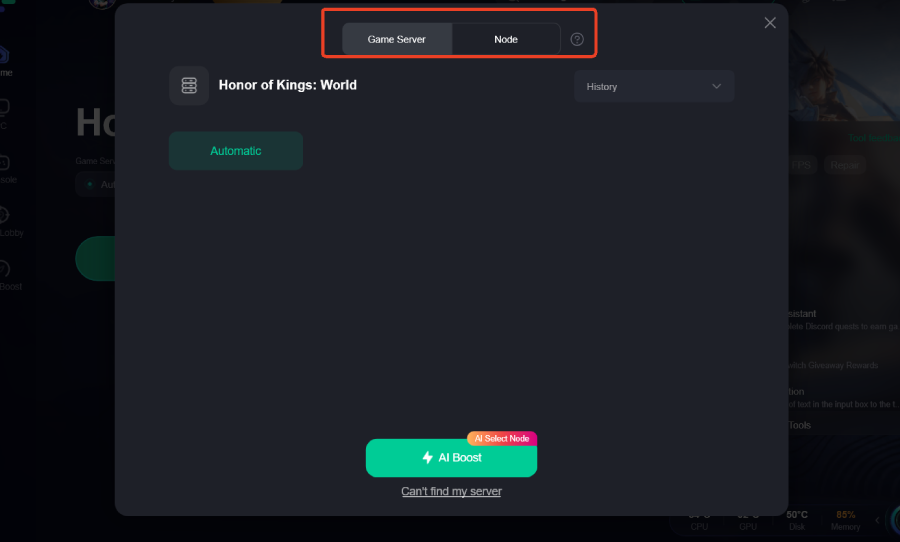
Step 3: Click on “Server” to change to a better server that ensures the gaming experience, then click on “Smart Boost”.
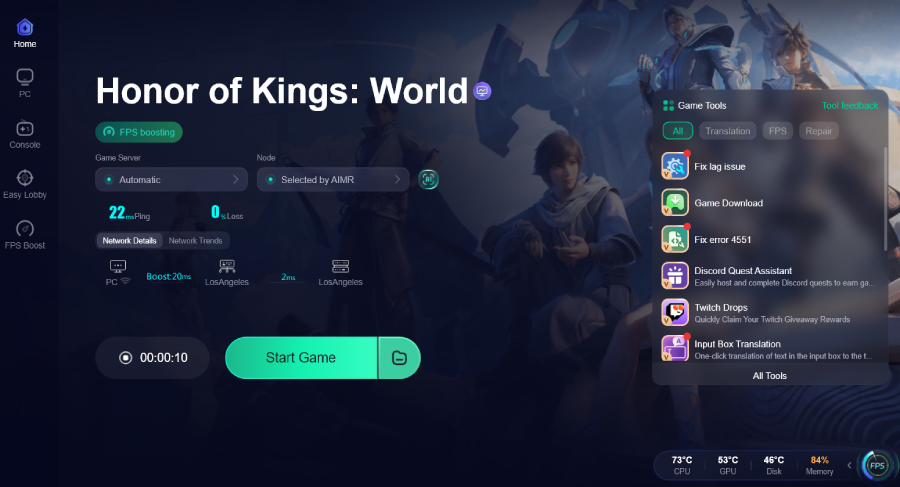
Step 4: Check the specific game ping, packet loss, and multiple path connection on the right side. Finally, click the “Start Game” to play the game.
Part 5: Quickly Fix Honor of Kings: World Lag & High Ping on Mobile via LagoFast Mobile
If you prefer playing on the move, you can achieve the same enterprise-grade connection stability using the LagoFast Mobile App. Mobile gaming inherently deals with fluctuating signals, but LagoFast keeps your connection locked down.
Why Choose LagoFast Mobile?
- Cellular/Wi-Fi Dual-Channel Acceleration: LagoFast Mobile leverages both your Wi-Fi and mobile data simultaneously. If one connection dips or drops packets, the other instantly carries the load, preventing mid-game disconnections.
- Targeted Mobile Server Optimization: It addresses mobile-specific routing issues, significantly lowering ping even when playing on cellular networks.
- Battery and Thermal Friendly: The app runs efficiently in the background, minimizing extra battery drain and heat generation.
Step-by-Step LagoFast Mobile Guide for Android & iOS:
Step 1: Visit the official LagoFast website and download the mobile APK file

Step 2: Open LagoFast and Search Honor of Kings
Step 3: Select a server or node with low latency to boost your connection.
Step 4: Tap Start Game within LagoFast to launch Honor of Kings.
Part 6: FAQs
Why is my ping so high in Honor of Kings: World when my internet speed is fast?
Internet speed measures how much data your connection can move at once, not how fast it travels. High ping is caused by the physical distance to the game servers or inefficient routing by your ISP, which bandwidth alone cannot fix.
Will reducing my graphics settings lower my network ping?
No. Lowering graphics parameters fixes hardware-related frame drops (visual lag). It will not improve your network ping, which relies entirely on your connection path to the server.
Is a wired Ethernet connection always better than Wi-Fi for PC?
Yes, absolutely. Wi-Fi signals are prone to environmental interference, wall obstructions, and channel congestion, leading to packet loss. Ethernet provides a stable, direct line for data traffic.
Does LagoFast Mobile work on both iOS and Android?
Yes. LagoFast Mobile is fully optimized for both Android and iOS devices, providing customized dual-channel network acceleration across both operating systems.
What is a good ping range for playing Honor of Kings: World smoothly?
- Under 50ms: Excellent; perfect for high-level competitive play.
- 50ms – 100ms: Quite good; fully playable for casual and co-op content.
- Over 100ms: Suboptimal; you will likely notice input delay and occasional rubberbanding.
Can background apps on my phone cause high ping?
Yes. Social media apps, cloud sync utilities, and automatic downloads run quiet background data syncs that consume your limited mobile bandwidth, causing sudden in-game latency spikes.
Conclusion
In conclusion, fixing Honor of Kings: World lag and high ping requires a combination of smart manual tweaks and reliable tools. While optimizing your network, device, and settings can help, they often fall short against deeper routing issues. That’s where LagoFast stands out, delivering consistent low latency and smoother gameplay across PC and mobile. By combining both approaches, you can eliminate interruptions, reduce ping, and fully enjoy seamless combat and immersive open-world adventures without frustration.

Boost Your Game with LagoFast for Epic Speed
Play harder, faster. LagoFast game booster eliminates stutter and lags on PC, mobile, or Mac—win every match!
Quickly Reduce Game Lag and Ping!
Boost FPS for Smoother Gameplay!