
Latency, also known as ping, is the time it takes for a data packet to travel from your device to the gaming server and back. In other words, it's the delay between when you perform an action in the game and when the game server registers that action. Latency is measured in milliseconds, and a lower value is generally better. High latency can result in lag or delay, causing your actions to appear sluggish or unresponsive.
Latency is affected by several factors, including your internet connection speed, the distance between your device and the server, the number of hops the data packet has to travel, and the quality of the network infrastructure. The farther away the server is from you, the higher the latency will be. Additionally, network congestion and server overload can also increase latency.

- ✅ Reduce Lag and High Ping
- ✅ Boost FPS at the Same Time
- ✅ Support 8000+ Popular Online Games
- ✅ Fix Jitter & Latency in Games
Jitter is the variation in latency or the inconsistency in the delay between data packets. In other words, it's the difference in latency between successive data packets. Jitter is measured in milliseconds, and a lower value is better. Jitter can cause inconsistent gameplay, leading to jerky movements, delayed responses, and distorted audio.
Jitter is caused by network congestion, packet loss, and other network issues. Network congestion occurs when there are too many data packets on the network, causing delays and packet loss. Packet loss occurs when data packets are lost in transit and must be retransmitted, resulting in higher latency and jitter.
Part 1: What Is LagoFast And How Does It Help
Part 2: How To Reduce Jittering and Latency
Part 3: What Is The Difference Between Jitter and Latency
What Is LagoFast And How Does It Help
If you're experiencing high latency and jitter while gaming, LagoFast can help you overcome these issues for a better gaming experience. LagoFast is a network optimization service that uses advanced technology to reduce latency and jitter, resulting in smoother gameplay and faster response times.
LagoFast uses a combination of network acceleration, congestion control, and packet optimization to reduce latency and jitter. It optimizes your network traffic to reduce the number of hops your data packets need to travel, resulting in faster response times. LagoFast also uses congestion control to manage network traffic and reduce the risk of packet loss and jitter.
LagoFast specializes in solving the problems of game lag and high ping for global players. The product is based on an LFP data transfer protocol that was developed in-house to provide smart matching to the most optimal nodes. By optimizing the game routes, LagoFast ensures that the data packets take the shortest path possible, resulting in lower latency and a reduction in jitter.
One of the most significant advantages of LagoFast is that it can help players in different parts of the world play together seamlessly. When players from different parts of the world try to play a game together, latency and jitter issues can arise due to the distance between the players and the game server. LagoFast can optimize the game routes to ensure that data packets take the shortest path possible, reducing the latency between players and the game server. This means that players from different parts of the world can play together without experiencing lag or high ping.
Another advantage of LagoFast is that it can help reduce the load on game servers. When game servers are overloaded, they can become sluggish, resulting in higher latency and jitter for players. By optimizing the game routes, LagoFast can reduce the load on game servers, resulting in a smoother gaming experience for players.
LagoFast is also user-friendly, with a simple interface that allows players to optimize their game routes quickly. Once the LagoFast client is installed, players can select their game and server location, and LagoFast will automatically optimize the game routes. Players can also choose to optimize their routes manually, selecting the nodes they want to use. This level of customization allows players to fine-tune their gaming experience to their specific needs.
Another feature of LagoFast is its compatibility with multiple games and platforms. LagoFast is compatible with popular games such as League of Legends, Overwatch, and World of Warcraft, as well as various gaming platforms, including PC and consoles. This compatibility makes LagoFast a versatile product that can benefit a wide range of gamers.
How To Reduce Jittering and Latency With LagoFast
Here is how you can make your gaming experience smoother with LagoFast.
Step 1: Download and install LagoFast on your computer.
Step 2: Log in to LagoFast using your account information.
Step 3: Search the game you are playing, let’s take Fortnite for example.
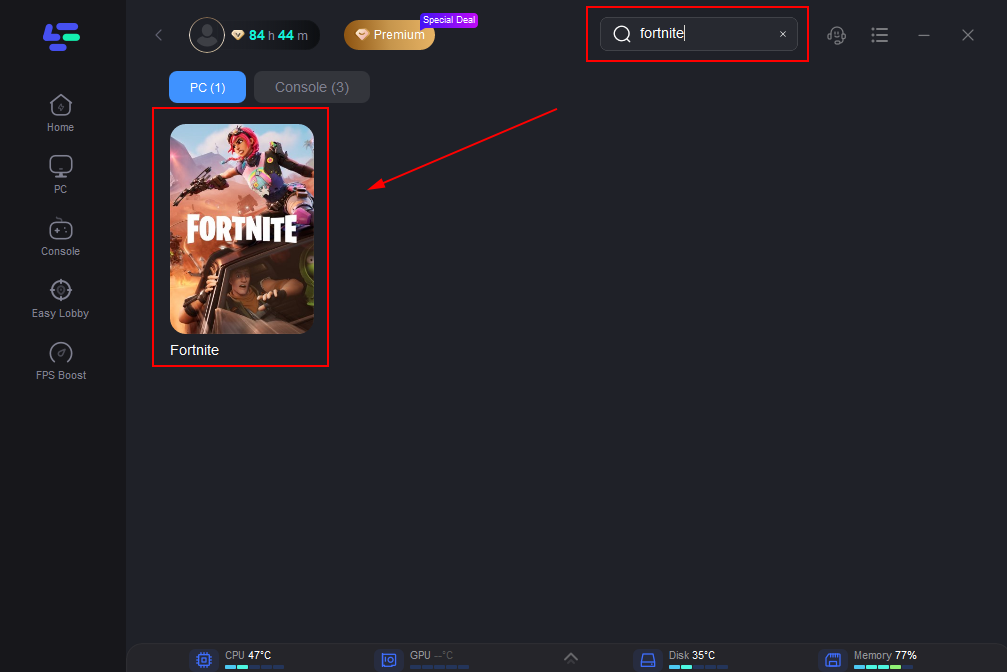
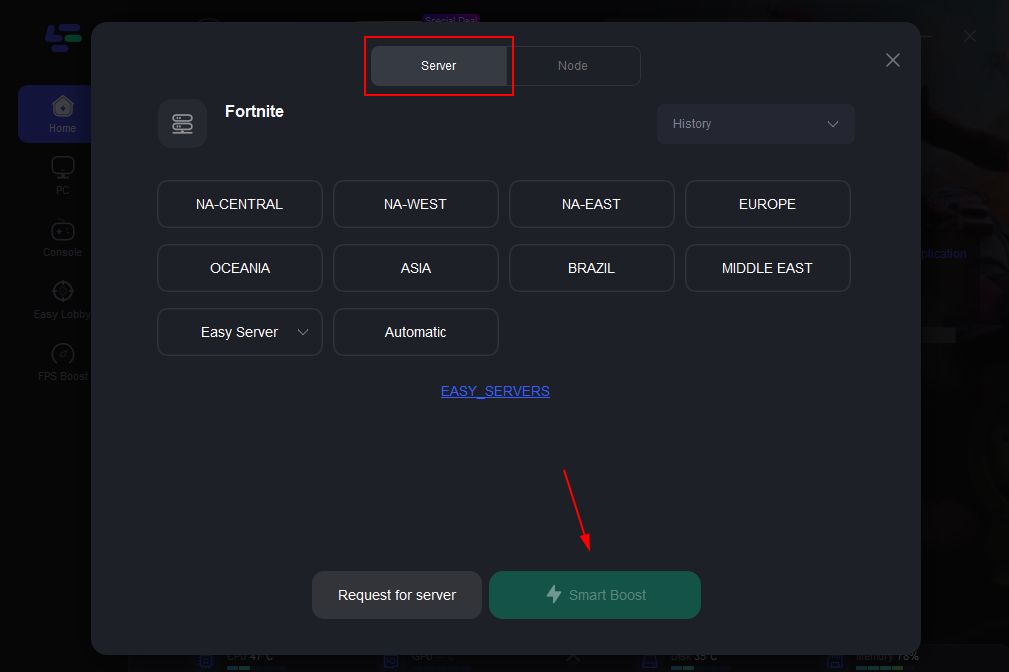
Step 4: Choose the Automatic server location in which LagoFast will decide the best server for you and click on ‘Smart Boost’
Step 5: Once you're connected, launch Fortnite and start playing as usual.
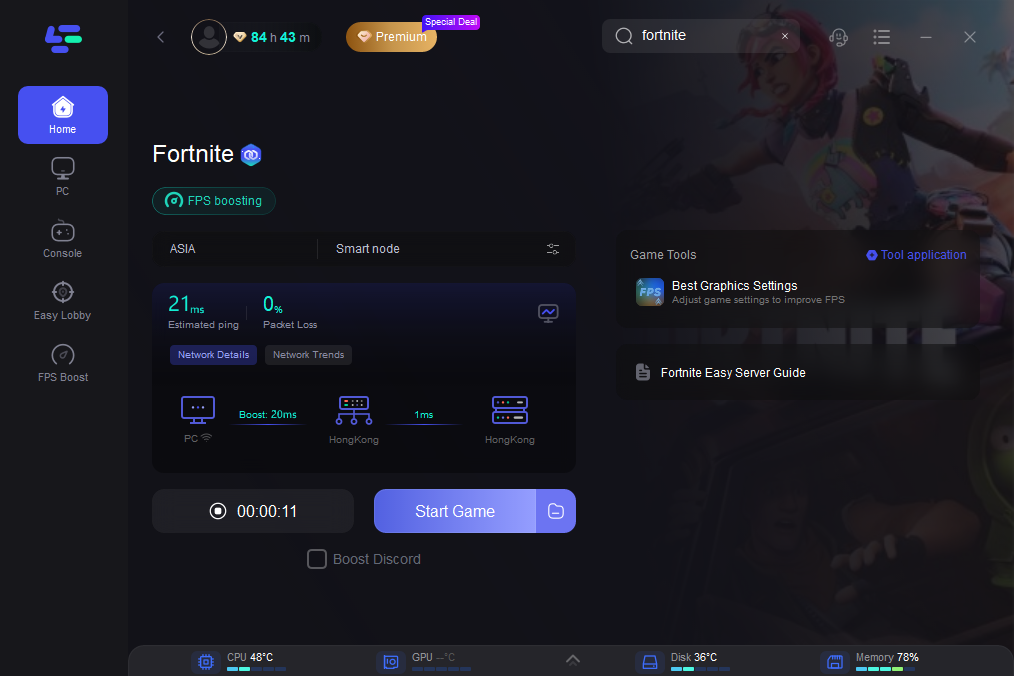
You'll notice a significant improvement in your gameplay, with less lag and a smoother overall experience. That's all! LagoFast is a powerful tool that can enhance your gaming sessions. Give it a try and see how it can help you improve your gameplay.
What Are The Differences Between Jitter and Latency
While latency and jitter are related, they are not the same thing. Latency is the delay between sending and receiving data packets, while jitter is the variation in that delay. Latency can be high and consistent, while jitter can be low but inconsistent. Latency affects the responsiveness of your gaming, while jitter affects the consistency of your gaming experience.
Network jitter and latency can both impact the quality of your gaming experience. High latency can result in lag or delay, while high jitter can cause inconsistent gameplay. Both issues can make it difficult to react quickly and accurately in the game, leading to a frustrating gaming experience.
To determine your latency and jitter levels, you can use a jitter and latency test or a network diagnostic tool. A ping test measures the latency between your device and the gaming server by sending a data packet and measuring the time it takes for the packet to travel to the server and back. A network diagnostic tool can provide more detailed information on your network's performance, including packet loss, jitter, and network congestion.
Conclusion
Latency and jitter are two important concepts that can affect the quality of your gaming experience. LagoFast is an excellent solution for gamers looking to reduce latency and jitter for a smoother and more responsive gaming experience. By optimizing your network traffic and managing network congestion, LagoFast helps to reduce the number of hops that your data packets need to travel, resulting in faster response times and reduced lag.
With LagoFast, you can enjoy faster, more reliable gaming, and eliminate the frustration of inconsistent gameplay. If you're a serious gamer looking to enhance your gaming experience, LagoFast is definitely worth considering. Hopefully, this article will clarify network jitter vs latency for you.
- ✅ Reduce Lag and High Ping
- ✅ Boost FPS at the Same Time
- ✅ Support 8000+ Popular Online Games
- ✅ Fix Jitter & Latency in Games

Boost Your Game with LagoFast for Epic Speed
Play harder, faster. LagoFast game booster eliminates stutter and lags on PC, mobile, or Mac—win every match!
Quickly Reduce Game Lag and Ping!
Boost FPS for Smoother Gameplay!