
Quick Answer: How to Stop Forza Horizon 6 Stuttering Fast
Don't have time for a deep dive? Here is the "emergency" checklist to stabilize your performance:
- Update Drivers: Install the latest NVIDIA or AMD GPU drivers.
- Use an SSD: Prefer NVMe—HDDs can’t keep up with asset streaming.
- Check FPS Limit: Make sure it’s not stuck at 10–20 FPS; set to Uncapped or match your monitor.
- Optimize Settings: Lower heavy options like shadows and reflections.
- Close Background Apps: Disable overlays and shut down apps like Chrome.
- Quick Fix: Use LagoFast to boost FPS and stabilize performance in one click.
Forza Horizon 6 has finally arrived, taking players to stunning, neon-lit Japan, but even high-end PCs aren’t free from stuttering issues. From minor hiccups at high speeds to major frame drops in crowded city areas, these performance problems can seriously disrupt gameplay. If you’re dealing with FH6 stuttering, you’re not alone. This guide breaks down the causes and shows you how to fix them for a smoother racing experience.

- ✅ Reduce Lag and High Ping.
✅ Boost FPS at the Same Time.
✅ Support 2000+ Popular Online Games.
✅ Change Server without Latency.
✅ Boost Game Loading Speed.
Part 1: Forza Horizon 6 Stuttering Overview: Why Does It Happen?
Part 2: Why is my FPS so high but stuttering in Forza Horizon 6?
Part 3: How to Fix Forza Horizon 6 Stuttering on PC? - Detailed Steps
Part 4: Fixing Forza Horizon 6 Frame Drops and Performance Dips
Part 5: LagoFast: The All-In-One Solution for FH6 Stuttering
Part 1: Forza Horizon 6 Stuttering Overview: Why Does It Happen?
It’s the most frustrating paradox in gaming: your FPS counter shows 100+, but the game feels like a slideshow. This is the difference between Low FPS and Stuttering.
In the breathtaking landscapes of FH6’s Japan map, stuttering is usually tied to Frame Timing. Even if your GPU produces 100 frames in one second, if 80 of those frames appear in the first half-second and only 20 in the second half, the game will "stutter."
Common Causes in FH6:
- Shader Compilation: The game compiles shaders in the background. Until this is finished, you’ll experience "Shader Stutter."
- VRAM Overload: Setting textures to "Extreme" on an 8GB card will cause the game to swap data to your system RAM, causing massive spikes.
- Background Bloat: Browsers or recording software competing for CPU cycles can interrupt the game's "heartbeat," leading to micro-stutters.
Related Article: Will Forza Horizon 6 Be Crossplay & Cross-Platform
Part 2: Why is my FPS so high but stuttering in Forza Horizon 6?
This is often called "Micro-Stuttering." You might see a stable 80-120 FPS, yet the movement feels "choppy." This happens because the delivery of frames to your monitor is inconsistent.
- CPU Bottlenecks: If one CPU core hits 100% while others are idle, the GPU has to wait for instructions. This creates a "hitch."
- Unstable Polling Rates: High-end gaming mice with 8000Hz polling rates can actually cause FH6 to stutter because the CPU is overwhelmed by input data.
- G-Sync/FreeSync Misconfiguration: If your FPS is higher than your monitor's refresh rate without VRR (Variable Refresh Rate) enabled, you’ll get frame tearing that looks like stuttering.
Related Article: FH6 Slow Download? Make Forza Horizon 6 Download Faster on PC & Xbox
Part 3: How to Fix Forza Horizon 6 Stuttering on PC? - Detailed Steps
Follow these steps in order to isolate and eliminate the lag.
Step A: The "Realtime" Priority Trick
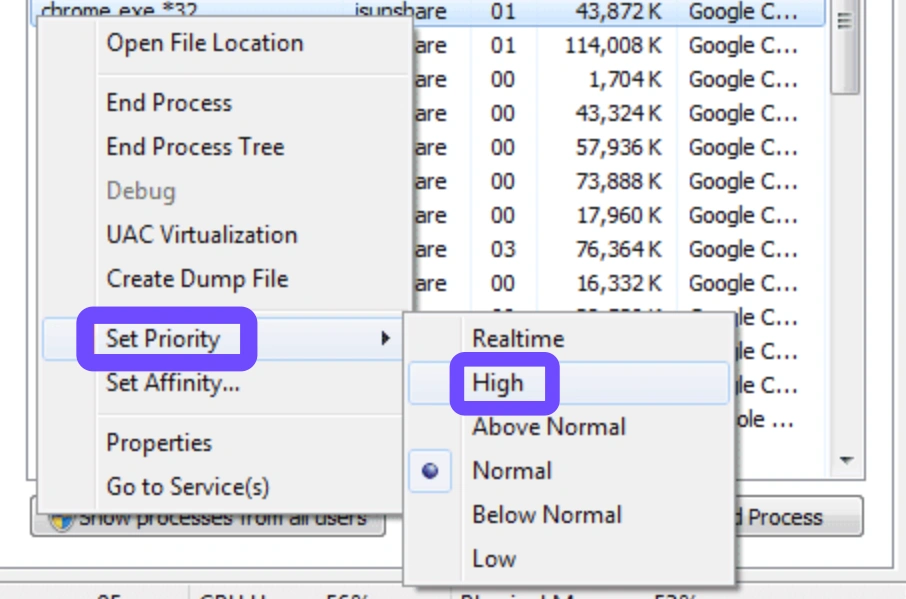
Forza games are notorious for being deprioritized by Windows.
Step 1. Launch Forza Horizon 6.
Step 2. Press Ctrl + Shift + Esc to open Task Manager.
Step 3. Go to the Details tab, find ForzaHorizon6.exe.
Step 4. Right-click, select Set Priority, and change it to High (Avoid "Realtime" as it can crash your OS).
Step B: Optimize In-Game Graphics
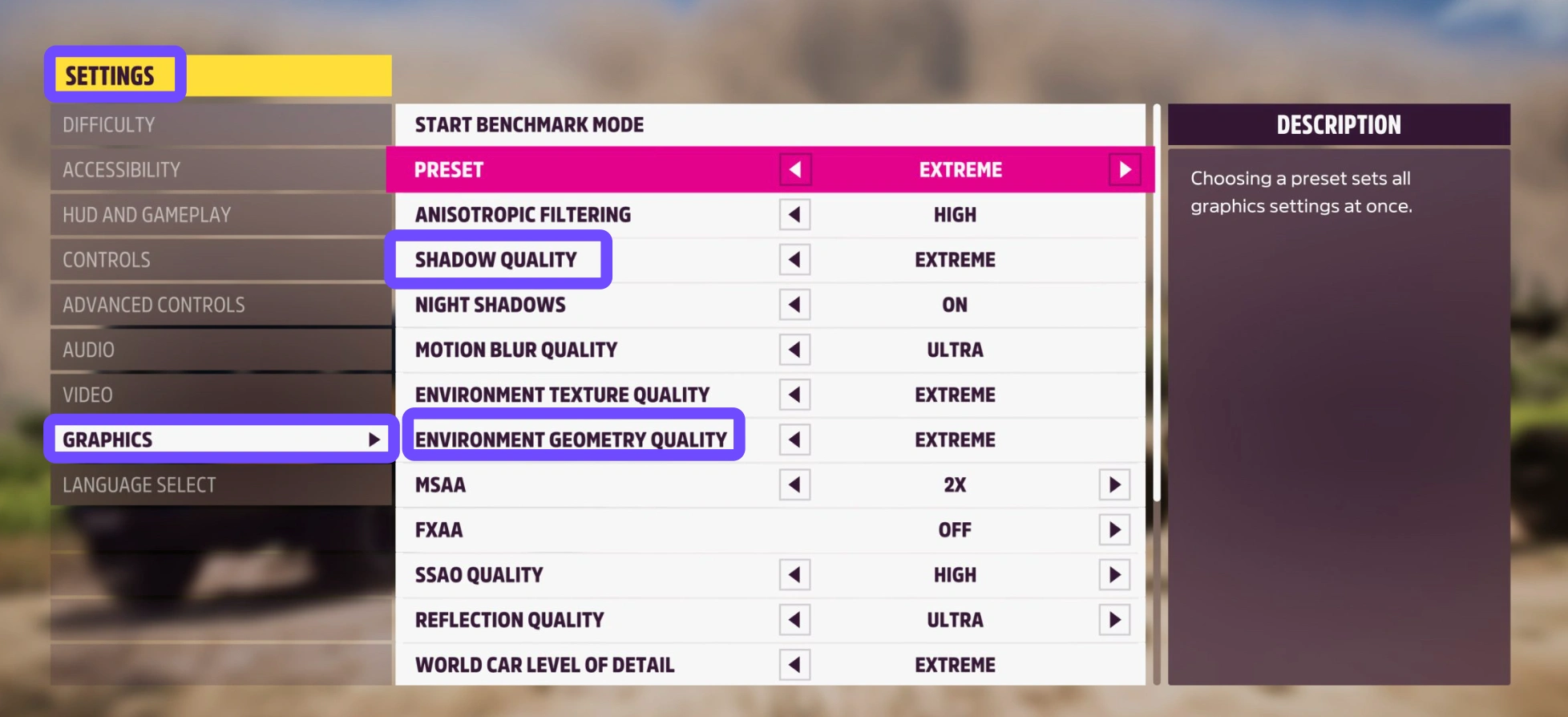
Certain settings in FH6 are "FPS Killers" that contribute more to stutter than visual beauty:
- Environment Geometry: Drop from Extreme to Ultra.
- Shadow Quality: This is heavy on the CPU. Lowering this often fixes stuttering in crowded Tokyo streets.
- Ray Tracing: If you aren't in "Photo Mode," turn this off. It eats VRAM and causes frame drops during high-speed racing.
Step C: Force Shader Pre-Loading
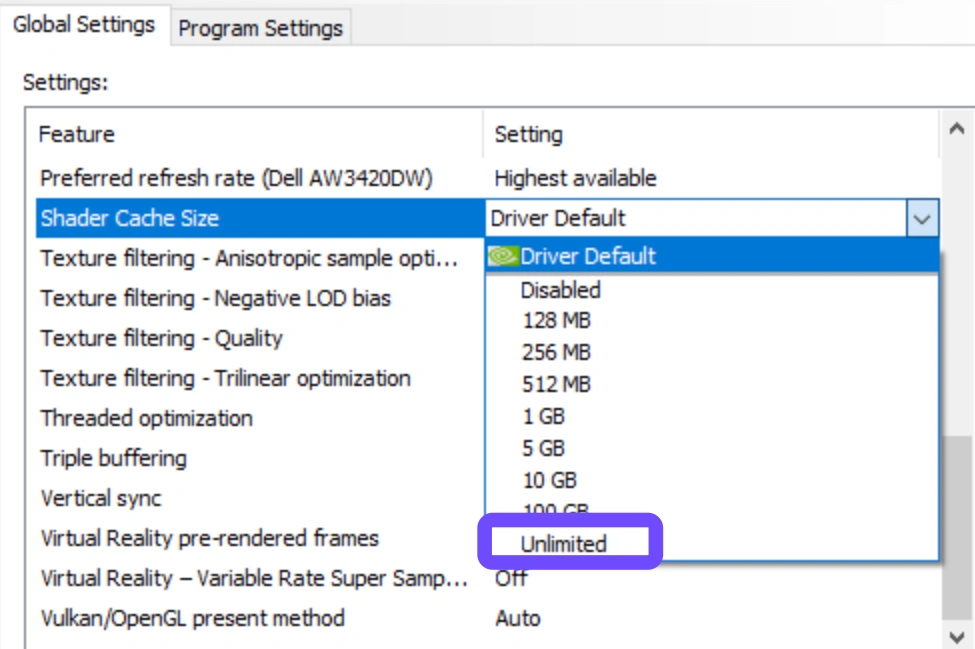
If the game stutters every time you enter a new area, it’s a shader issue. Go to your GPU control panel (NVIDIA/AMD) and set the Shader Cache Size to 10GB or "Unlimited." This prevents the game from deleting and re-compiling shaders constantly.
Related Article: Is Forza Horizon 6 Coming to Game Pass?
Part 4: Fixing Forza Horizon 6 Frame Drops and Performance Dips
"Frame drops" are different; this is when your FPS permanently sags in certain areas, like the neon-lit Shinjuku district at night.
- V-Sync Off, G-Sync On: Turn off V-Sync in the game menu. Use your monitor's hardware G-Sync or FreeSync instead.
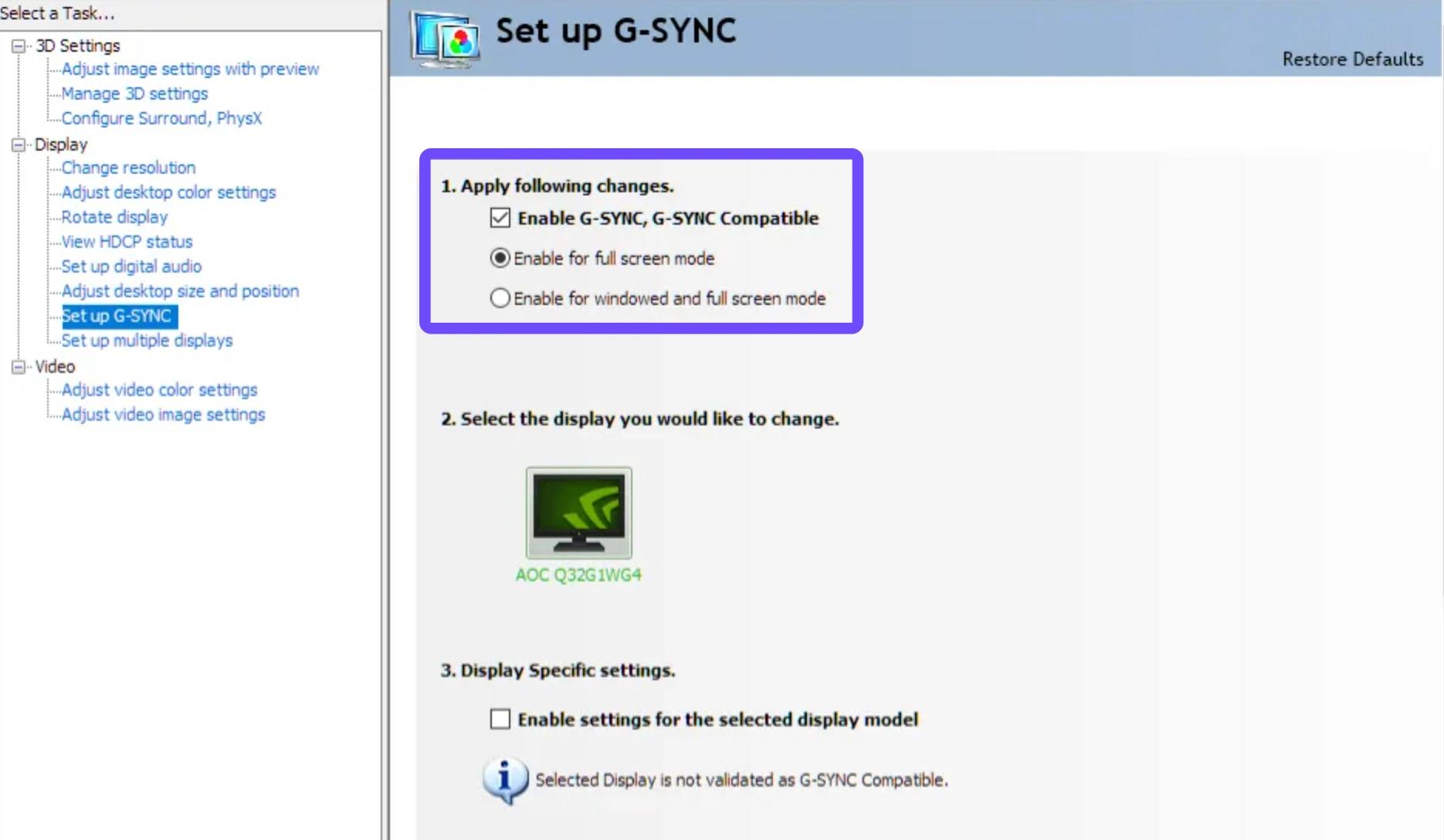
-
Disable Overlays: Turn off the Discord overlay, Steam overlay, and especially the Xbox Game Bar. These are silent performance thieves.
- Power Plan: Ensure your Windows Power Plan is set to "Ultimate Performance" or "High Performance." "Balanced" mode can cause the CPU to downclock mid-race to save power.
Related Article: Where is Forza Horizon 6 Located?
Part 5: LagoFast: The All-In-One Solution for FH6 Stuttering
If you don't want to spend hours digging through Windows registries and BIOS settings, LagoFast is the definitive "Easy Button" for Forza Horizon 6. It's a dedicated game booster engineered for high-fidelity titles like FH6. Whether you are dealing with high FPS stuttering or low FPS lag, LagoFast's engine optimizes your system's resource allocation on the fly. Its key features include:
- FPS Boost 2.0: Automatically shuts down unnecessary background processes and reassigns CPU/GPU priority to the game.
- Cross-Device Boost: Optimized performance whether you are on PC, Xbox, or PS5.
- Ping Reducer: Uses a global network of dedicated gaming routes to ensure your connection to the Horizon Festival servers is lag-free.
- Quick Fix: No manual tweaking required, just select Forza Horizon 6 and hit "Boost."
Tutorial to Use LagoFast to Fix FH6 Stuttering and Low FPS:
Step 1: Click the Free Trial button to download and install LagoFast.
Step 2: After installation, search "Forza Horizon 6" in the search bar and select the game.

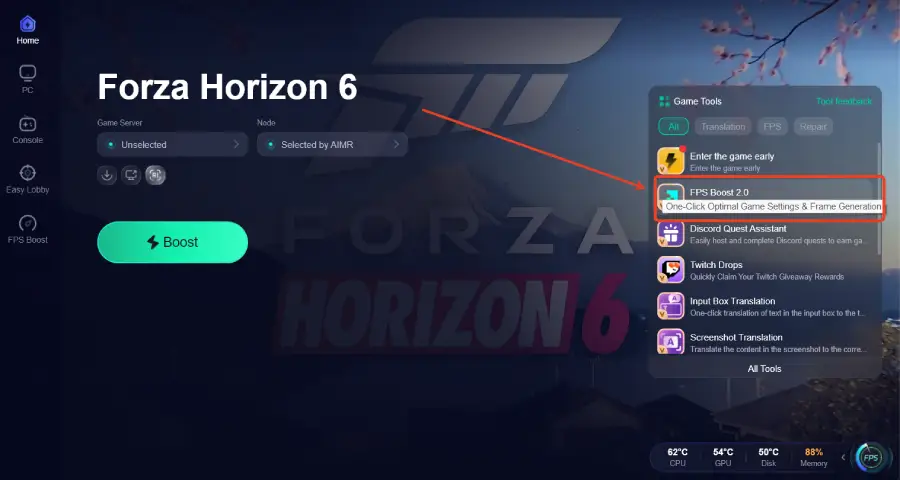
Step 3: Click the “FPS Boost 2.0” option in the bottom-right corner.
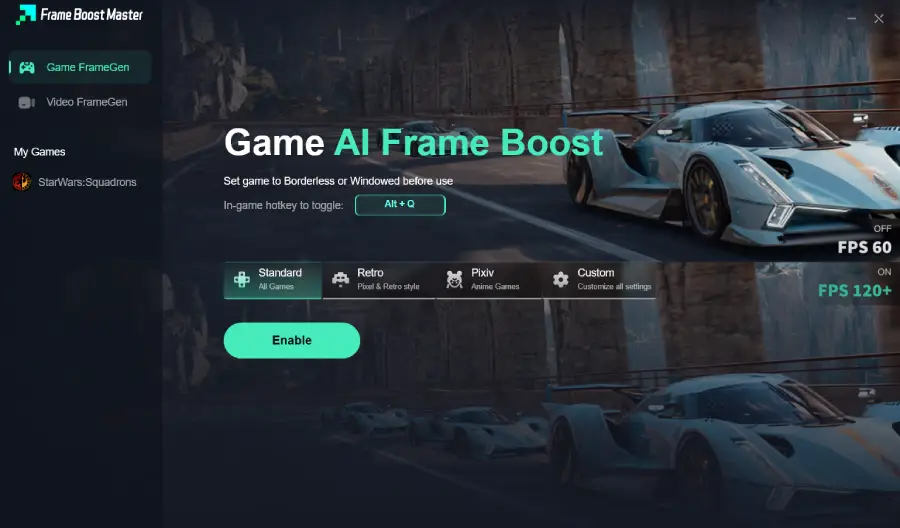
Step 4: Set the game to Borderless or Windowed mode, then click “Enable” to turn on FPS Boost.
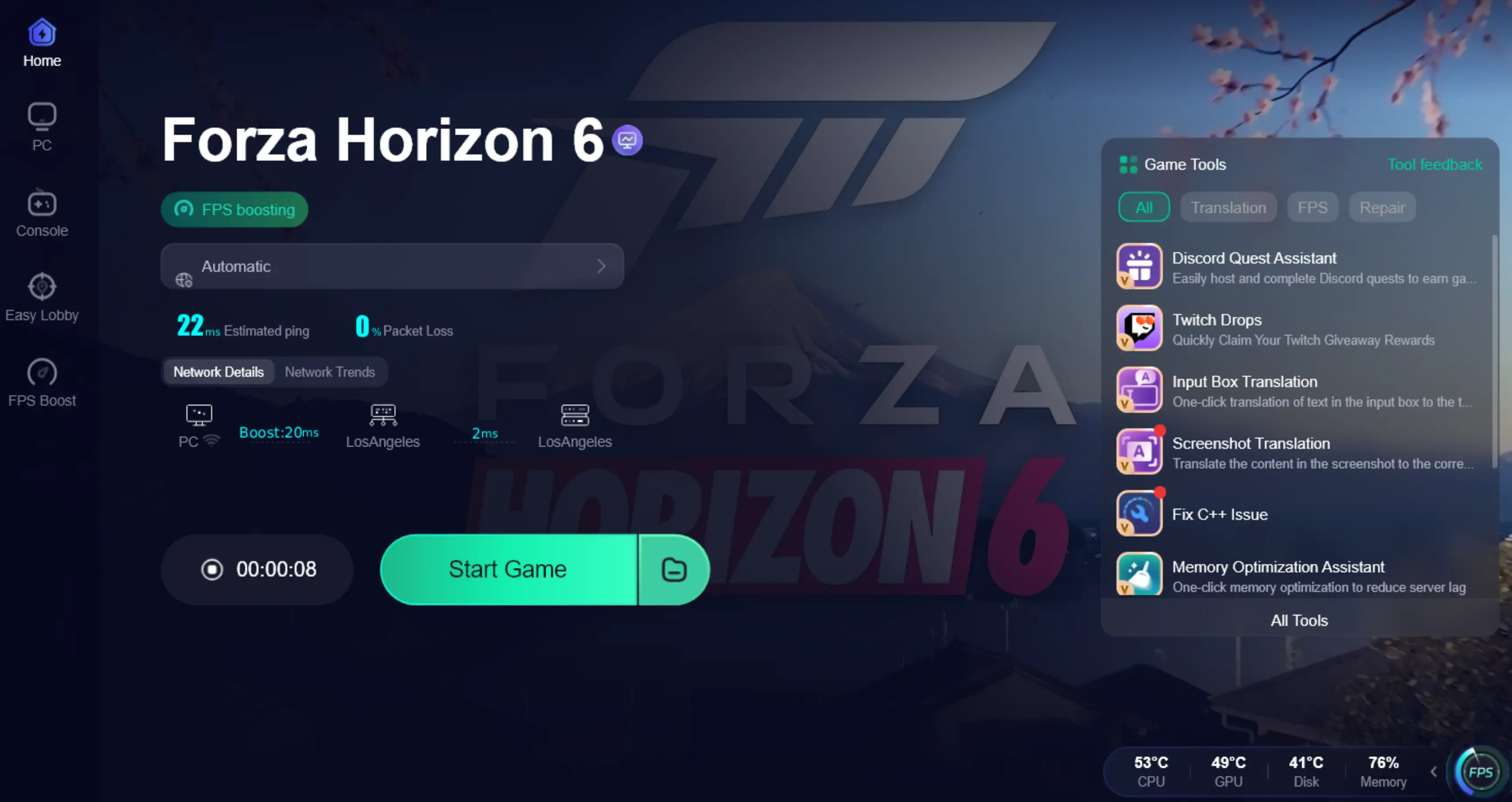
Step 5: Choose your preferred server node and click "Smart Boost" to start optimizing.

Step 6: Launch your game and enjoy smooth, optimized gameplay with lower ping and no stutter.
Related Article: Forza Horizon 6 System Requirements: Can Your PC Run FH6?
Part 6: FAQs
Is stuttering a GPU or CPU issue?
It can be both. "Frame drops" (low FPS) are usually GPU-related, while "stuttering" (erratic timing) is often a CPU or RAM bottleneck where the processor can't keep up with the GPU's speed.
Can faulty RAM cause stuttering in Forza Horizon 6?
Yes. If your RAM is unstable or running at a low frequency (XMP not enabled), it creates a bottleneck during asset streaming, leading to severe hitching when driving at high speeds.
Why does FH6 lag even on an RTX 40/50 series card?
This is usually due to "optimization overhead." Even the best cards can't overcome a slow HDD or a CPU that is being throttled by Windows power-saving settings.
Should I use "Game Mode" in Windows 11/12?
Generally, yes. Windows 11/12 Game Mode helps prioritize the game process, but for a deeper optimization, a specialized tool like LagoFast is more effective.
Does FH6 support DLSS 3/4 Frame Generation?
Yes, and while Frame Gen increases FPS, it can sometimes introduce "input lag" if your base frame rate is too low. Ensure you have a solid 60 FPS base before enabling it.
Why do I get stuttering specifically during night races?
Night races introduce complex lighting and shadows from thousands of neon signs in the Japan map. If your VRAM is maxed out, these extra assets will cause your system to stutter.
Related Article: Forza Horizon 6 Preload Guide: Timing, Size & How to Download Early
Key Takeaways
|
Issue |
Likely Cause |
Recommended Fix |
|
Micro-Stutter |
Background Apps / Polling Rate |
Use LagoFast / Disable Overlays |
|
Heavy FPS Drops |
GPU Overload / Thermal Throttling |
Lower Shadows & Reflection Settings |
|
Input Lag |
V-Sync / Borderless Window |
Use Fullscreen / Turn off V-Sync |
|
Loading Stutter |
HDD Bottleneck |
Move FH6 to an NVMe SSD |
Boost Your Game with LagoFast for Epic Speed
Play harder, faster. LagoFast game booster eliminates stutter and lags on PC, mobile, or Mac—win every match!
Quickly Reduce Game Lag and Ping!
Boost FPS for Smoother Gameplay!