
The engines are revving, the neon lights of Tokyo are flickering in the distance, and the most anticipated racing game of 2026 is finally here. Forza Horizon 6 takes the festival to Japan, offering a sprawling map that is reportedly five times larger than anything we saw in Mexico. However, for many drivers, the first hurdle isn't a hairpin turn. It’s the download bar.
If you are staring at a screen wondering why is Forza Horizon 6 taking so long to download, you aren't alone. With a game this massive, "slow download speeds on Forza Horizon 6" is becoming a trending topic. In this guide, we’ll break down the file sizes, explain the bottlenecks, and show you exactly how to make Forza Horizon 6 download faster so you can hit the streets of Osaka in record time.

- ✅ Reduce Lag and High Ping.
✅ Boost FPS at the Same Time.
✅ Support 2000+ Popular Online Games.
✅ Change Server without Latency.
✅ Boost Game Loading Speed.
Part 1: How Many GB is Forza Horizon 6 & How Long Does It Take to Download?
Part 2: Common Reasons for FH6 Slow Download Speeds
Part 3: How to Fix Slow Download Speeds on Forza Horizon 6?
Part 4: The Secret Weapon: How to Make Forza Horizon 6 Download Faster with LagoFast
Part 5: Can You Really Go 400 MPH in Forza Horizon 6?
Part 1: How Many GB is Forza Horizon 6 & How Long Does It Take to Download?
Before we look at the fixes, we have to look at the scale of the game. Modern AAA titles are becoming gargantuan, and FH6 is no exception.
How Long Does It Take to Download FH6 on PC?
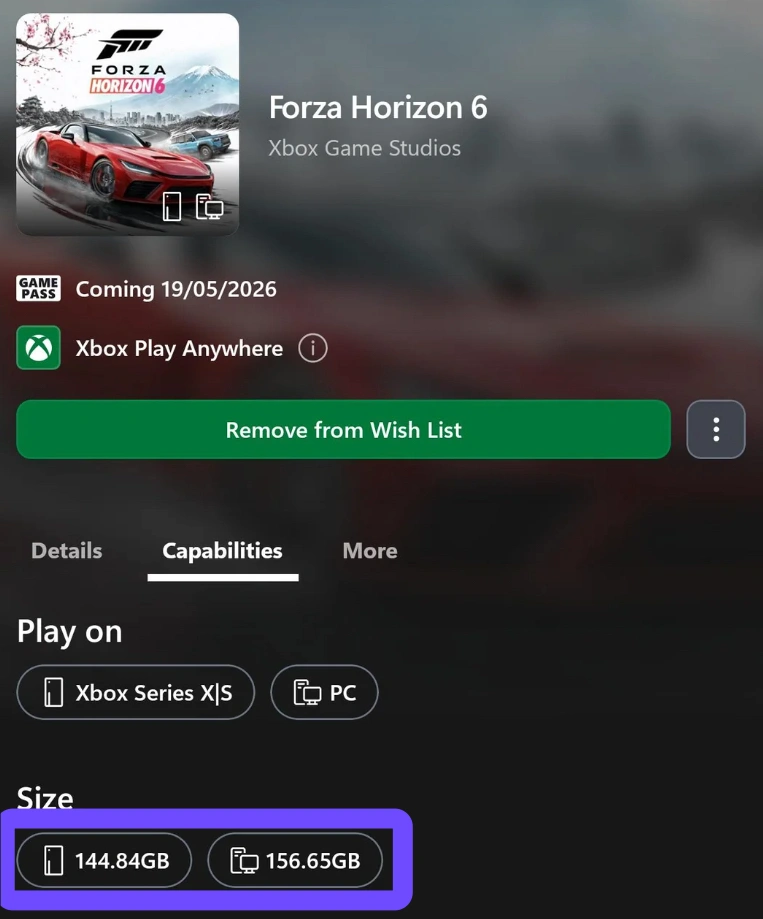
On Windows PC, the Forza Horizon 6 file size is approximately 157GB. Because PC textures and high-end graphical assets (like the new DLSS 4 support) require more data, the PC version is the heaviest. On a standard 100 Mbps connection, a 157GB download can take over 3.5 hours under perfect conditions. If you're seeing an FH6 slow download on your PC, it’s often due to disk write speeds or server congestion.
How Long Does It Take to Download FH6 on Xbox?
For console players, the Xbox Series X|S version clocks in at roughly 145GB. While slightly smaller than the PC counterpart, it still consumes a massive portion of the internal SSD. If you’re asking why Forza Horizon 6 is taking so long to download on Xbox, it’s frequently because the console limits background download bandwidth while other games are running.
Related Article: Is Forza Horizon 6 Coming to Game Pass?
Part 2: Common Reasons for FH6 Slow Download Speeds
If your progress bar hasn't budged in an hour, it usually boils down to three main factors:
- Massive Game Package: 157GB is a lot of data. Even with "fast" internet, the sheer volume of assets, from the 550+ car models to the seasonal field recordings of Japan, takes time to process.
- Server Overload: On launch day (May 19, 2026), millions of players are hitting the Microsoft servers simultaneously. This "digital traffic jam" can cause Forza Horizon 6 downloading slow even if your home internet is fine.
- Network Throttling: Many ISPs (Internet Service Providers) throttle high-bandwidth activities like large game downloads during peak hours to prevent local network crashes.
Related Article: Where is Forza Horizon 6 Located?
Part 3: How to Fix Slow Download Speeds on Forza Horizon 6?
Whether you are on a high-end rig or an Xbox Series X, these steps will help you speed up FH6 download progress significantly.
For Xbox Players:
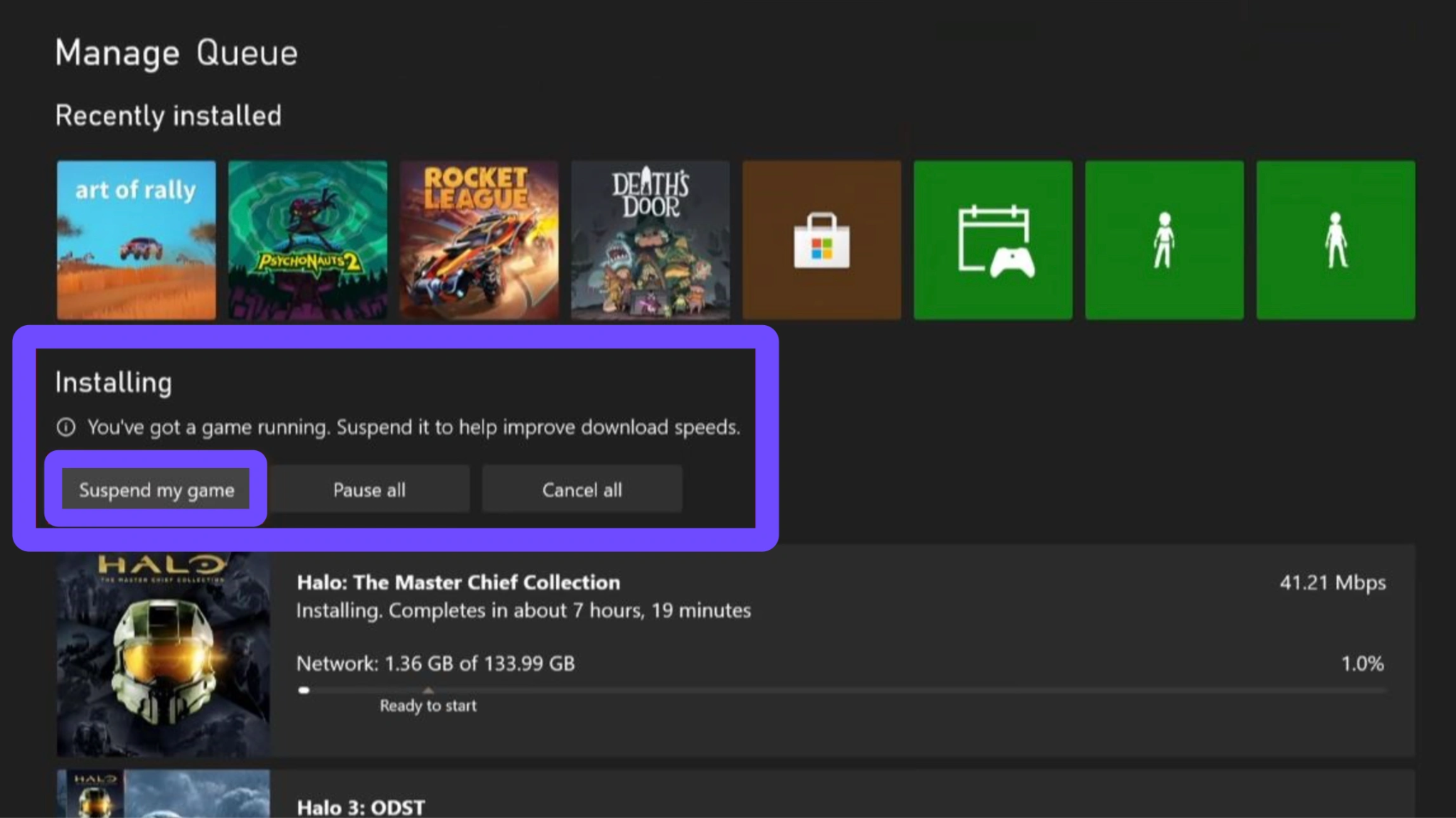
- Suspend Current Games: Xbox has a feature that throttles downloads to ensure your current game doesn't lag. Go to "My Games & Apps", select "Manage", select "Queue" and select "Suspend my game" to give the full bandwidth to Forza Horizon 6.
- Change DNS Settings: Sometimes the default ISP DNS is slow. Switching to Google DNS (8.8.8.8 and 8.8.4.4) can often bypass routing issues.
- Avoid the "Instant-On" Trap: While "Instant-On" allows background downloads, a full restart of the console can often clear the cache and reset the connection to a faster server node.
For PC Players:
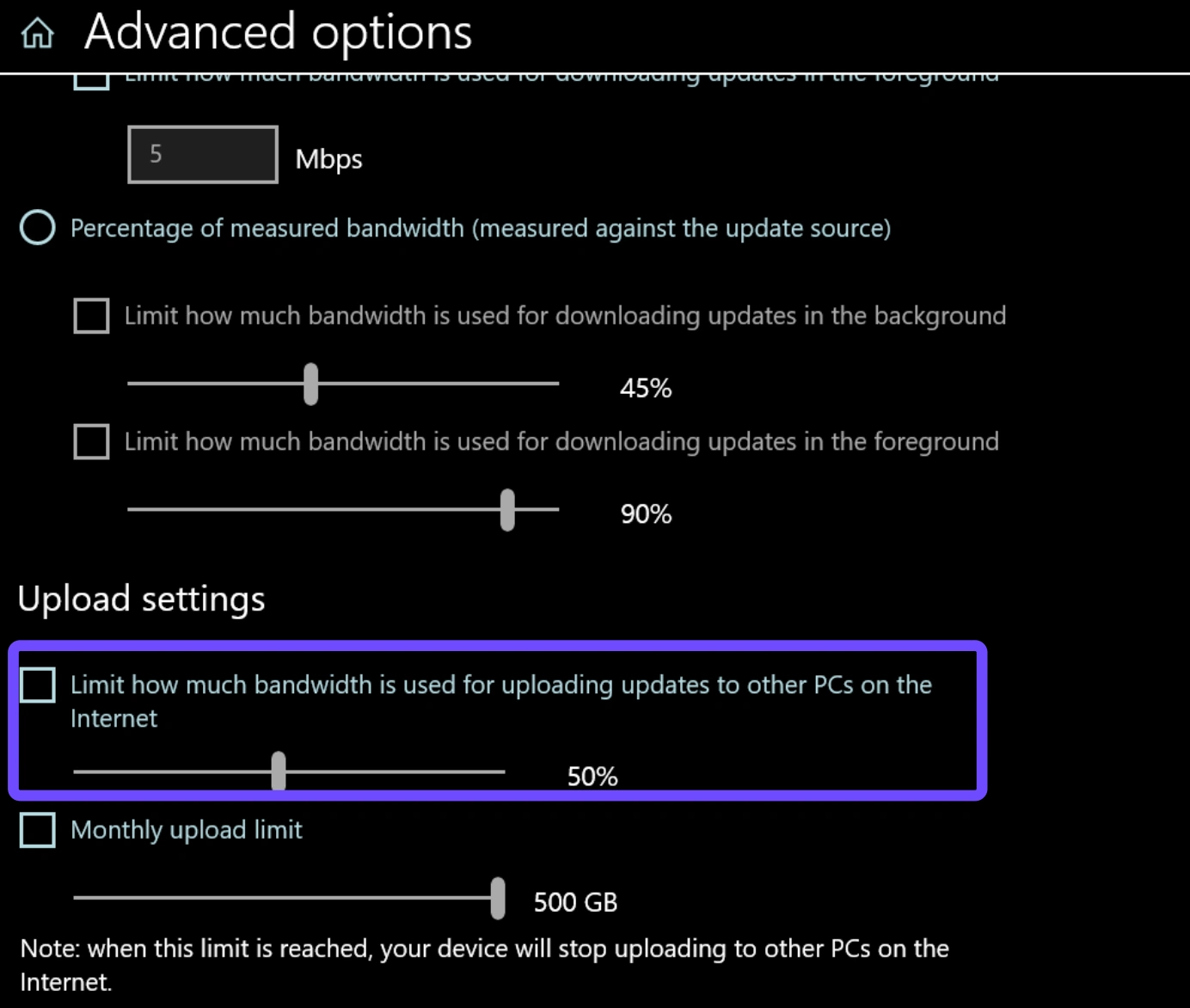
- Check Windows Delivery Optimization: Navigate to Settings, select Windows Update, select Advanced Options, select Delivery Optimization. Ensure that your "Limit how much bandwidth is used" boxes are unchecked, allowing Windows to use your full connection speed.
- SSD vs. HDD: If you are downloading to an older HDD, the "download" might actually be paused because the disk cannot write the data as fast as the internet is providing it. Always install FH6 on an NVMe SSD for the best results.
- Wired Over Wireless: It sounds basic, but an Ethernet cable can be up to 50% faster and much more stable than Wi-Fi for a 150GB+ file.
Related Article: Forza Horizon 6 System Requirements: Can Your PC Run FH6?
Part 4: The Secret Weapon: How to Make Forza Horizon 6 Download Faster with LagoFast
If you have tried the basic fixes and it’s still taking so long to download FH6, it’s time to use a professional tool. This is where LagoFast comes in. Unlike a standard VPN that might actually slow you down due to encryption overhead, LagoFast is a specialized game booster designed for performance. Here is how it helps:
- Multipath Connection: LagoFast uses unique technology to find the most efficient route to the game servers. If the standard Microsoft server in your region is congested, LagoFast redirects your traffic through a less crowded, high-speed node.
- Zero Throttling: It hides the nature of your traffic from your ISP, preventing them from seeing that you're downloading a massive game and keeping them from "throttling" your speed.
- Global Server Coverage: With nodes in over 60 countries, LagoFast can connect you to the server closest to the FH6 data source, significantly reducing the "why is my download stuck" frustration.
By using LagoFast, you aren't just fixing the download; you're preparing for the game itself. It reduces in-game ping and eliminates packet loss, essential for when you're trying to hit that legendary 400 mph in Forza Horizon 6 during a highway run in Tokyo.
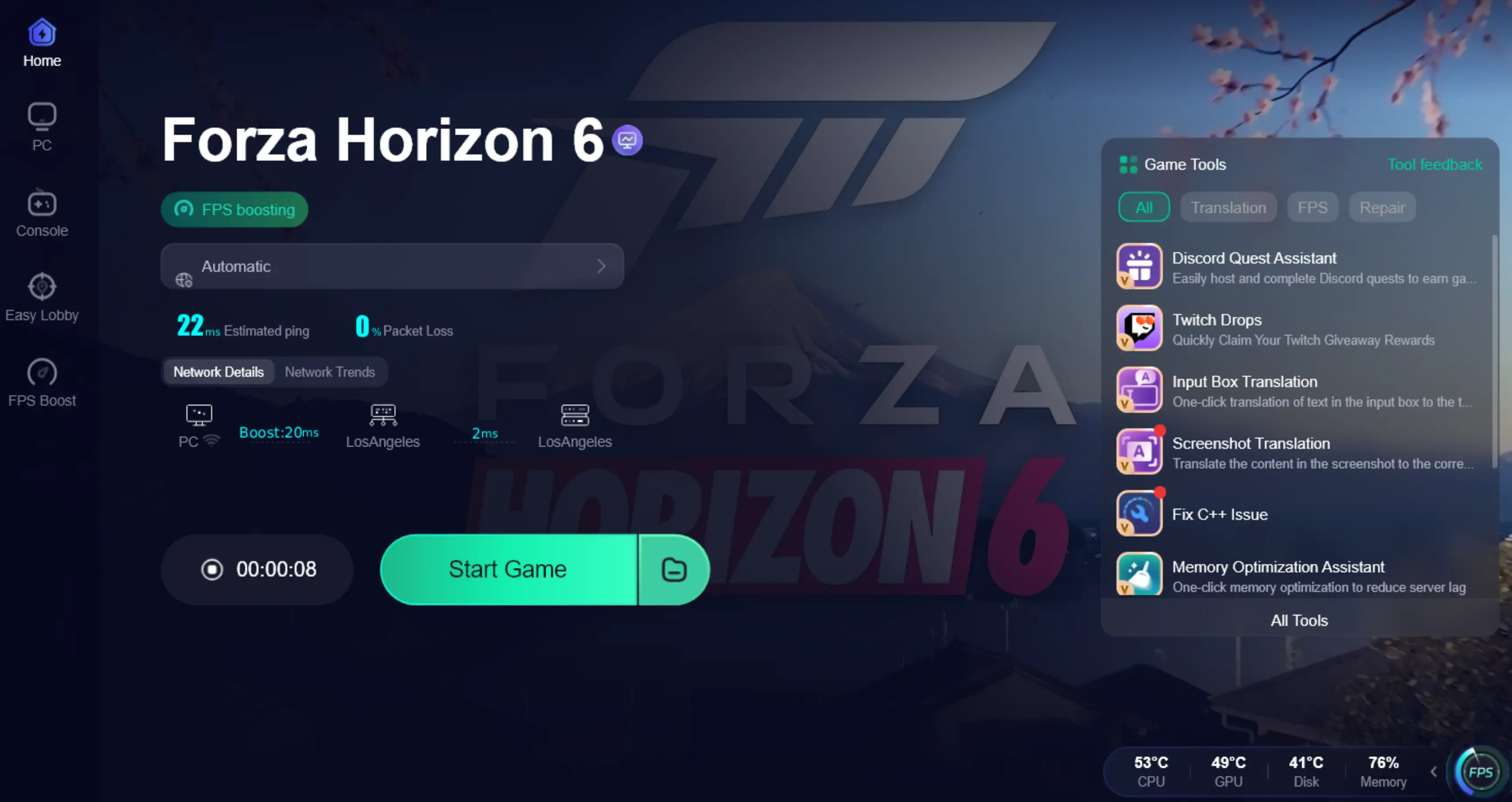
Tutorial to Use LagoFast to Optimize Forza Horizon 6 Download Speed:
Step 1: Click the Free Trial button to download and install LagoFast.
Step 2: After installation, search "Forza Horizon 6" in the search bar and select the game.

Step 3: Choose your preferred server node and click "Smart Boost" to start optimizing.

Step 4: Launch your game and enjoy smooth, optimized gameplay with lower ping and no stutter.
Related Article: Forza Horizon 6 Preload Guide: Timing, Size & How to Download Early
Part 5: Can You Really Go 400 MPH in Forza Horizon 6?
While everyone is waiting for the download to finish, the community is buzzing about the top speeds. Early gameplay leaks have shown that with the right X-Class tunes and engine swaps (like the rumored V10 Twin Turbo builds), players are pushing the limits like never before.
The long, straight expressways of Japan provide the perfect testing ground. However, hitting those speeds requires a perfectly stable connection. If you experience a "micro-stutter" while traveling at 400 mph, you'll end up in a guardrail. Using a booster like LagoFast ensures your network is as fast as your car.
Summary Checklist to Speed Up FH6 Download
- Verify the size: 157GB (PC) / 145GB (Xbox).
- Clear Space: Ensure you have at least 170GB free to allow for decompression.
- Wired Connection: Use Ethernet whenever possible.
- Use LagoFast: Activate the "Game Boost" or "Download Boost" feature to bypass server congestion and ISP throttling.
- Off-Peak Hours: If all else fails, try downloading late at night when local neighborhood traffic is low.
Don't let a slow progress bar keep you out of the driver's seat. While Forza Horizon 6 is a massive download, following these steps and using LagoFast will ensure you're one of the first to cross the starting line in Japan. See you at the Festival!
Boost Your Game with LagoFast for Epic Speed
Play harder, faster. LagoFast game booster eliminates stutter and lags on PC, mobile, or Mac—win every match!
Quickly Reduce Game Lag and Ping!
Boost FPS for Smoother Gameplay!