
Quick Answer: Forza Horizon 6 Preload Timing & Benefits
Forza Horizon 6 preloading is officially live now for Xbox and PC players. Steam users can also begin the Forza Horizon 6 pre download on Steam ahead of launch day.
- Premium Edition Early Access: May 15, 2026
- Standard Edition Global Launch: May 19, 2026
- Preload Availability: Available now on Xbox Series X|S, Microsoft Store, Xbox App, and Steam
The Horizon Festival is officially heading to Japan. With the release of Forza Horizon 6 scheduled for May 19, 2026, the excitement among the community is at an all-time high. Featuring the series’ largest map to date, spanning the neon-lit streets of Tokyo to the serene mountain passes of Mount Fuji, this is the most ambitious entry in Playground Games’ history. However, a map this detailed comes with a massive file size. If you want to be behind the wheel the second the servers go live, you cannot afford to wait for a 150GB+ download on launch day. This is where preloading can help you. In this guide, we’ll cover everything from the exact Forza Horizon 6 preload timing to storage requirements and how to fix common download issues using tools like LagoFast.

- ✅ Reduce Lag and High Ping.
✅ Boost FPS at the Same Time.
✅ Support 2000+ Popular Online Games.
✅ Change Server without Latency.
✅ Boost Game Loading Speed.
Part 1: Why Preload Matters for Forza Horizon 6?
Part 2: Forza Horizon 6 Preload Timing?
Part 3: How to Preload Forza Horizon 6?
Part 4: How to Improve Forza Horizon 6 Download & Ping Experience?
Part 5: Common Preload Issues & Fixes
Part 6: Pro Tips Before Preloading FH6
Part 1: Why Preload Matters for Forza Horizon 6?
Forza Horizon 6 isn't just another racing game; it’s a technical powerhouse. With over 550 cars at launch and a heavily detailed Japanese environment, the installation package is massive.
Without preloading, you might face:
- Server Congestion: Millions of players will try to download the game on May 19. This often leads to throttled speeds or server crashes.
- Missed Playtime: If your internet speed is average, a 150GB download could take 10+ hours. Preloading ensures you don't spend your first day staring at a progress bar.
- Day One Patches: By preloading the base game, you’ll only need to download a small "Day One" update on launch morning, getting you into the "Touge Battles" much faster.
Related Article: Forza Horizon 6 Download Size: How Many GB on PC & Xbox
Part 2: Forza Horizon 6 Preload Timing
|
Edition |
Platform |
Preload Availability |
Playable Date |
|
Premium Edition |
Xbox & PC |
Live Now |
May 15, 2026 |
|
Standard / Game Pass |
Xbox & PC |
Live Now |
May 19, 2026 |
|
Deluxe Edition |
Xbox & PC |
Live Now |
May 19, 2026 |
Additional Notes:
- Forza Horizon 6 Steam preload is officially live now alongside Xbox and Microsoft Store preloads.
- Players who preload only need to download the smaller Day One update at launch
- SSD installation is strongly recommended for faster asset streaming and loading performance
Part 3: How to Preload Forza Horizon 6?
How Much Storage Does Forza Horizon 6 Need?
Before you hit download, make sure your SSD has enough breathing room. Forza Horizon 6 requires significantly more space than its predecessors due to high-resolution textures for 4K Japan environments.
- Xbox Series X|S: around 145 GB
- PC (Windows/Steam): around 157 GB
How to Preload on Xbox Series X|S
Step 1. Go to the Xbox Store.
Step 2. Search for Forza Horizon 6.
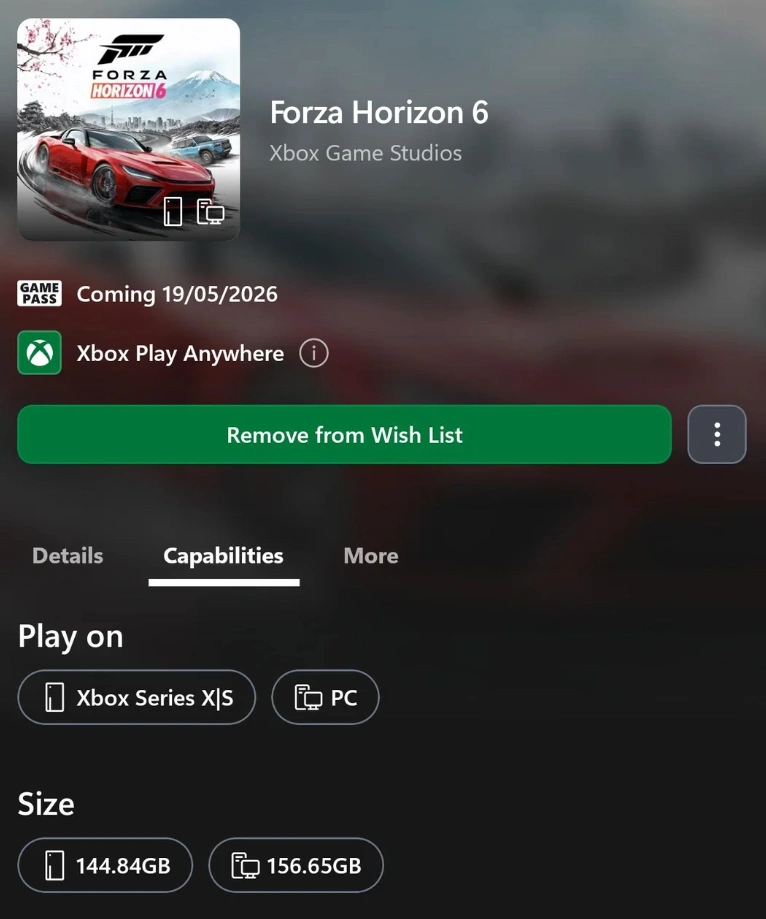
Step 3. Select the edition you own (or the Game Pass version).
Step 4. Click Manage and click Install All.
If you have the mobile app, you can also trigger the download remotely by searching for the game in the Xbox App and selecting "Download to Console."
How to Preload on PC (Xbox App / Microsoft Store)
Step 1. Open the Xbox App on Windows.
Step 2. Navigate to the Forza Horizon 6 page.
Step 3. Click the Pre-Install button.
Step 4. Choose your installation drive (ensure it is an SSD for the best performance).
How to Complete the Forza Horizon 6 Steam Preload
To start the Forza Horizon 6 pre download on Steam, open your Steam Library and locate the game in your collection.
Step 1. Open your Steam Library.
Step 2. Find Forza Horizon 6 (it will appear if you have pre-purchased it).
Step 3. Click the Preload button to begin downloading the game files.
Part 4: How to Improve Forza Horizon 6 Download & Ping Experience?
Downloading 150GB is no small feat, and once the game starts, you don't want high ping ruining your "The Eliminator" matches or online convoys. This is where LagoFast becomes an essential tool for FH6 players.
Boost Your Download Speeds:
Microsoft and Steam servers often struggle during major launches. LagoFast features a dedicated Download Boost mode that optimizes your connection to the content delivery networks (CDNs), allowing you to reach your maximum bandwidth and finish the preload in record time.
Lower Your Ping in Japan:
Since Forza Horizon 6 is set in Japan, many players are excited to race with friends globally. However, cross-region play often leads to lag and rubber-banding.
- Multipath Connection: LagoFast uses unique technology to find the fastest route to the game servers.
- Fix Lag & Stuttering: By stabilizing your connection, LagoFast reduces the "Micro-stuttering" often seen in FH online races.
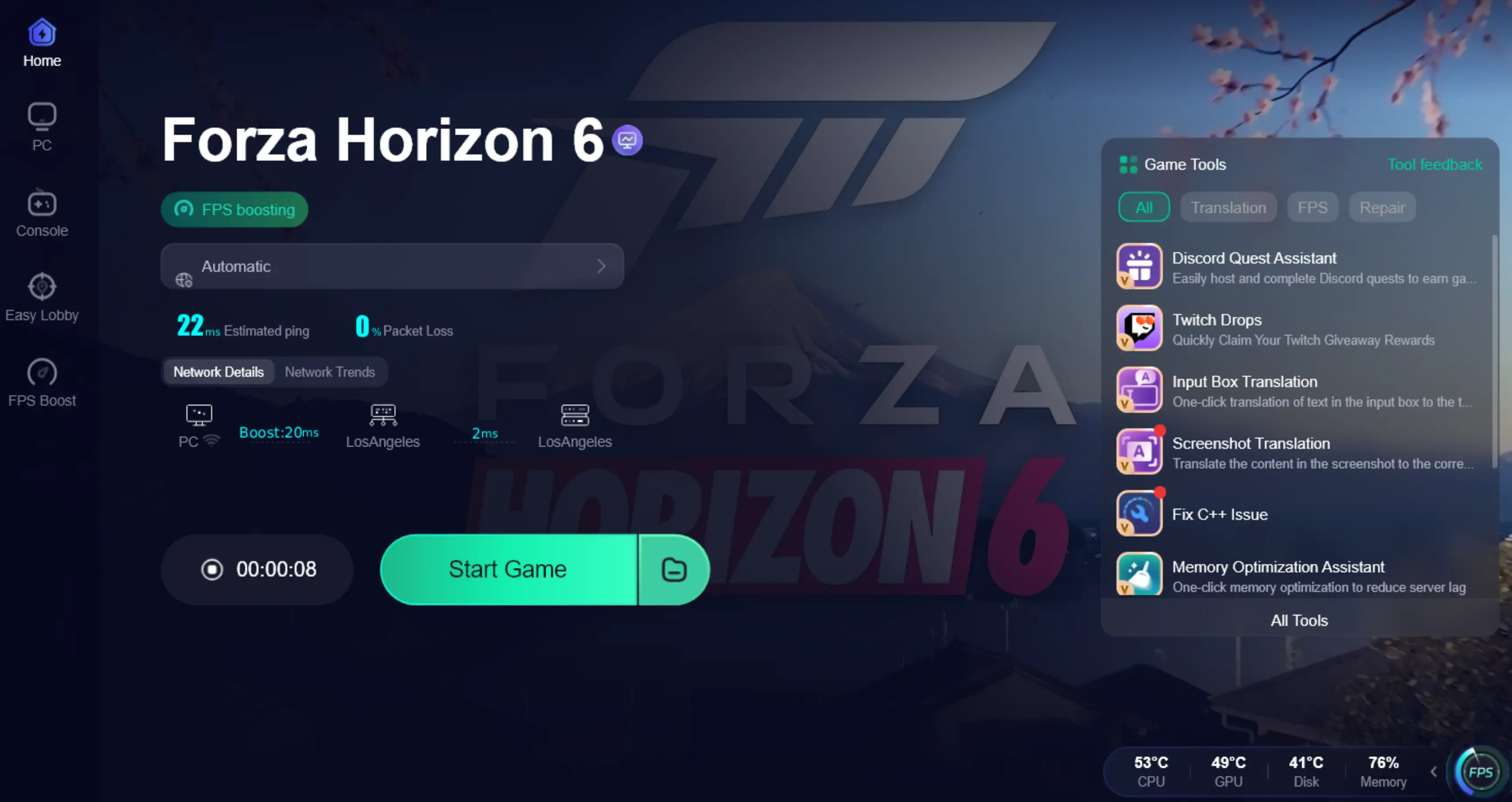
- One-Click Optimization: Simply search "Forza Horizon 6" in LagoFast, select your region, and click "Boost."
Tutorial to Use LagoFast to Optimize Forza Horizon 6 Download Speed:
Step 1: Click the Free Trial button to download and install LagoFast.
Step 2: After installation, search "Forza Horizon 6" in the search bar and select the game.

Step 3: Choose your preferred server node and click "Smart Boost" to start optimizing.

Step 4: Launch your game and enjoy smooth, optimized gameplay with lower ping and no stutter.
Part 5: Common Preload Issues & Fixes
If your preload is stuck at 0% or keeps failing, try these verified fixes:
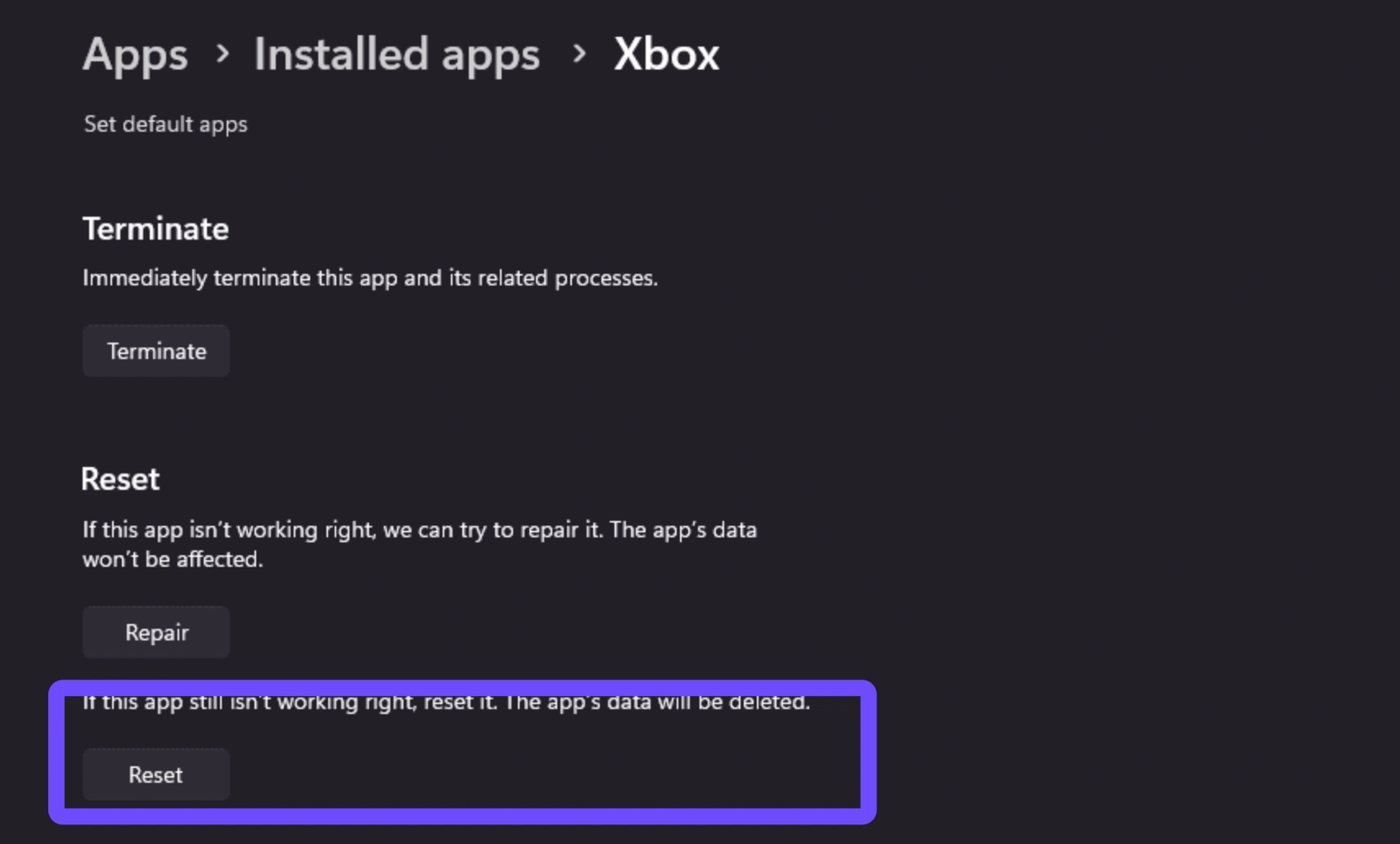
- The "0% Stuck" Error: This is common on the Xbox App for PC. Try resetting the app by going to Settings, Apps, Xbox App, Advanced Options, Reset.
- Insufficient Space: Remember that the game needs a bit of "buffer" space to unpack files. If the game is 157GB, try to have at least 180GB free.
- Windows Update: Ensure your Windows 10/11 is updated to the latest version, as the Forza engine often requires specific DirectX updates found in system patches.
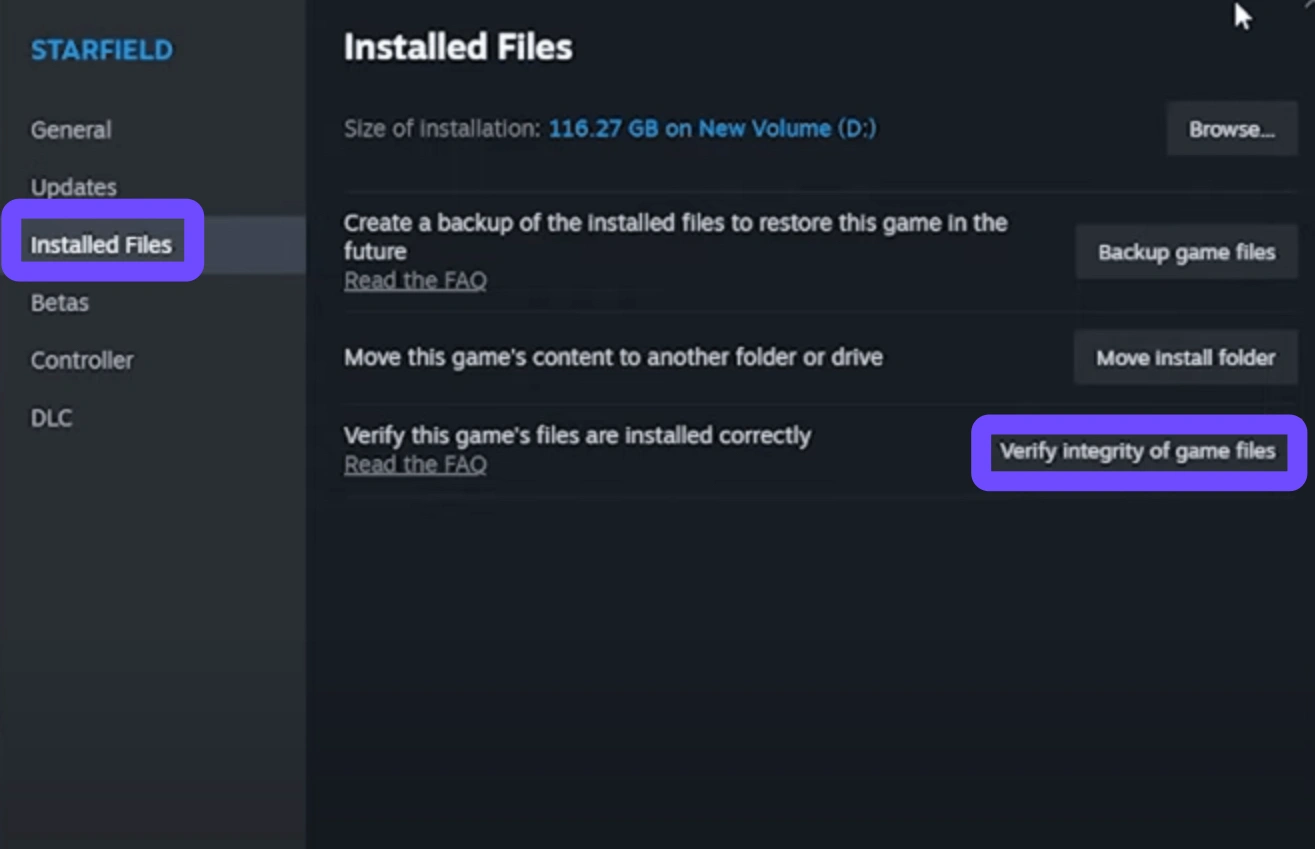
- Corrupted Files: If the download finishes but the game won't launch, use the "Verify Integrity of Game Files" option on Steam or "Repair" in the Xbox App.
Part 6: Pro Tips Before Preloading FH6
- Move to SSD: Do not install Forza Horizon 6 on an HDD. The asset streaming for a map as large as Tokyo will cause massive stuttering on mechanical drives.
- Check Your Drivers: Both NVIDIA and AMD usually release "Game Ready" drivers a few days before May 15. Update them before you launch the game for the first time.
- Regional Unlocks: Some players use the "New Zealand trick" on Xbox to play a few hours early. Note that this only works for the final unlock, not for starting the preload earlier.
Part 7: FAQS
Can I preload Forza Horizon 6 with Xbox Game Pass?
Yes! If you have an active Game Pass subscription, you can pre-install the Standard Edition right now through the Xbox App or Console Store.
What happens if I don't preload?
You can still download the game on launch day (May 19), but you will likely face slower speeds due to high server traffic.
Is the preload size the same as the final game size?
Usually, yes. However, there is often a 5–10GB "Day One" patch that will download the moment the game goes live.
Will Forza Horizon 6 be on PlayStation 5?
Yes, but not at launch. While the Xbox and PC versions launch on May 19, 2026, the PS5 version is scheduled for later in the year. Preloading for PS5 is not yet available.
Why is my preload speed so slow?
Your ISP might be throttling large downloads, or the Microsoft servers are under heavy load. Using LagoFast can help bypass these bottlenecks.
Can I preload the Premium Add-Ons separately?
Yes, the Car Pass, VIP Membership, and Welcome Pack are usually small files that can be downloaded alongside the main game.
Conclusion
Forza Horizon 6 is set to be a landmark title for racing fans. By handling your Forza Horizon 6 preload now, you are removing the only barrier between you and the mountain passes of Japan. Ensure you have the required 146GB of space, optimize your connection with a tool like LagoFast to avoid download throttles, and get ready for May 15th. We'll see you at the Horizon Festival!

Boost Your Game with LagoFast for Epic Speed
Play harder, faster. LagoFast game booster eliminates stutter and lags on PC, mobile, or Mac—win every match!
Quickly Reduce Game Lag and Ping!
Boost FPS for Smoother Gameplay!