

Quick Answer
If Forza Horizon 6 is stuck on "Finding Horizon Life" or searching forever, the most effective fix is to reset your IP Helper service and flush your DNS. Often, this infinite loading is caused by a Teredo qualification error or a desync between your PC and the Xbox Live servers. For a permanent solution that bypasses complex router configurations, using a dedicated tool like LagoFast Game Booster can stabilize your connection and force a successful handshake with Horizon Life servers.
Forza Horizon 6 delivers its best experience when moving seamlessly from solo driving into a shared online world, but many PC players encounter an issue where “Finding a Horizon Life session” never finishes loading or results in an “Online session failed” message. This blocks access to convoys, The Trial, and seasonal events.
This guide focuses on the technical causes behind the infinite Horizon Life loading problem and provides clear, practical fixes to help you restore connectivity and return to racing without constant router troubleshooting.

- ✅ Reduce Lag and High Ping.
✅ Boost FPS at the Same Time.
✅ Fix Crashing and Freezing Issues.
✅ Change Server without Latency.
✅ Boost Game Loading Speed. - ✅ Repair Game Disconnected Problems.
Part 1: Why is Forza Horizon 6 Stuck on Finding Horizon Life?
Part 2: FH6 Horizon Life Not Working: Common Symptoms and Causes
Part 3: Forza Horizon 6 Stuck on Finding Horizon Life vs. Matchmaking Failed
Part 4: Step-by-Step Fixes for FH6 Unable to Connect to Online
Part 5: How to Enhance Your Game Experience with LagoFast Game Booster
Part 6: Frequently Asked Questions (FAQs)
Part 1: Why is Forza Horizon 6 Stuck on Finding Horizon Life?
When you see "FH6 stuck on finding Horizon life," your game is essentially stuck in a loop trying to verify your network's compatibility with Xbox Live's peer-to-peer architecture. Forza Horizon 6 uses a specific tunneling protocol called Teredo to allow players behind different types of firewalls to communicate. If your PC cannot "qualify" for Teredo, the game will search for a session forever because it can't establish a secure tunnel to other players.
Another reason for "Forza Horizon 6 finding Horizon life forever" is server-side congestion or a local DNS mismatch. If your ISP's DNS is slow to resolve the Xbox Live server addresses, the game client might time out internally while the UI continues to show the "Searching" animation. This leads to the frustrating "online loading forever" scenario where the game feels broken even though your internet speed is fine.

Part 2: FH6 Horizon Life Not Working: Common Symptoms and Causes
Players report various ways this issue manifests. Some see the "Searching for Horizon Life" bar at the top, while others experience "FH6 stuck on loading online" during the initial game startup.
- Infinite Loading: The "Finding Horizon Life" message stays on screen for 10+ minutes without an error message.
- Silent Failure: The message disappears, but you remain in "Horizon Solo" without any notification.
- Connectivity Blocked: Windows Settings show that "Server Connectivity" is blocked, preventing any online interaction.
- Session Desync: You join a session, but the world is empty, and you eventually get disconnected.
The root cause is usually a combination of Strict NAT types, disabled Windows services (like IP Helper), or third-party antivirus software blocking the specific UDP ports (usually 3544) required for Horizon Life.
Part 3: Forza Horizon 6 Stuck on Finding Horizon Life vs. Matchmaking Failed
It is easy to confuse these two errors, but they happen at different stages of the online process. Understanding the difference helps you apply the right fix.
|
Feature |
Stuck on Finding Horizon Life |
FH6 Matchmaking Failed |
|
When it happens |
When trying to enter the open world (Freeroam). |
When trying to join a specific race or event. |
|
Visual Cue |
Spinning circle/text at the bottom or top of the screen. |
A pop-up error message with an error code. |
|
Primary Cause |
Teredo/NAT handshake failure. |
Server timeout or convoy leader disconnection. |
|
Player State |
Stuck in "Horizon Solo" or loading screen. |
Usually in the world, but kicked from the event queue. |
|
Solution Focus |
Windows Networking and Teredo services. |
Server stability and regional ping optimization. |
Part 4: Step-by-Step Fixes for FH6 Unable to Connect to Online
If you are tired of "searching for Horizon life forever," follow these technical steps to clear the path.
Fix 1: Reset Teredo via Command Prompt
This is the most common fix for "Forza Horizon 6 server connectivity blocked."
- Type cmd in the Windows search bar, right-click, and Run as Administrator.
- Type netsh interface teredo set state disabled and press Enter.
- Restart your PC.
- Open CMD as admin again and type netsh interface teredo set state type=default.
- This forces Windows to re-initialize the tunneling protocol.
Fix 2: Enable IP Helper and Xbox Services
Forza Horizon 6 relies on specific background services to maintain a "Horizon Life" connection.
- Press Win + R, type services.msc, and press Enter.
- Locate IP Helper, right-click it, and select Properties. Set Startup type to Automatic and click Start.
- Scroll down to the bottom and ensure all Xbox related services (Live Auth Manager, Live Networking Service) are also running and set to Automatic.
Fix 3: Flush DNS and Reset Winsock
If your "online never connects," your network stack might be corrupted.
In an Admin CMD window, type the following commands one by one:
- ipconfig /flushdns
- netsh winsock reset
- netsh int ip reset
Restart your computer. This clears out old connection data that might be causing the "infinite Horizon life loading."
Part 5: How to Enhance Your Horizon Life Game Experience with LagoFast
Manual fixes are great, but they don't address the core problem: the distance and route quality between your PC and the Forza servers. Even with an "Open NAT," you can still get "FH6 matchmaking failed" if your route is unstable. LagoFast is the ultimate shortcut for players who want to skip the "Finding Horizon Life" loop entirely.
LagoFast uses a proprietary protocol and a global network of high-speed nodes to ensure your connection to Horizon Life is prioritized. It doesn't just "fix" your NAT; it optimizes the entire data path, reducing the chance of "online session failed" errors and ensuring you can join convoys instantly.
How to Use LagoFast Game Booster for Forza Horizon 6 on PC
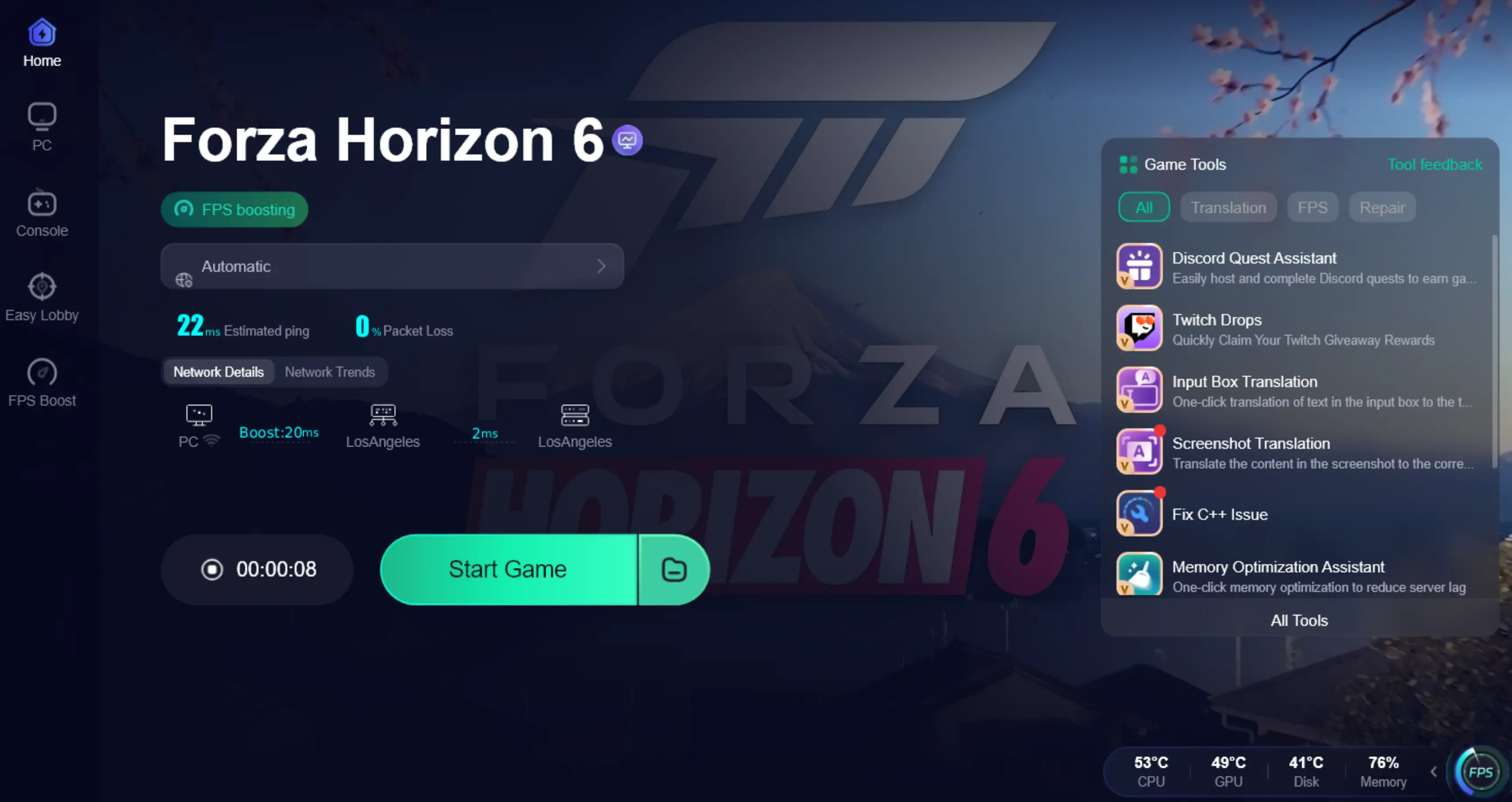
Step 1: Click the Free Trial button to download and install LagoFast.
Step 2: After installation, search "Forza Horizon 6" in the search bar and select the game.

Step 3: Choose your preferred server node and click "Smart Boost" to start optimizing.

Step 4. After activation, most FH6 invisible players issues and convoy desync problems are greatly reduced.
Part 6: FAQs
Q1: Why does it say "Finding Horizon Life" for 20 minutes?
This usually means the game is waiting for a response from the Teredo server that will never come. The UI doesn't always have a timeout, so it just spins forever.
Q2: Can I play Forza Horizon 6 online without Teredo?
On PC, Teredo is mandatory for the peer-to-peer aspects of Horizon Life. Without it, you are limited to "Horizon Solo."
Q3: Does "Matchmaking Failed" mean the servers are down?
Not always. It often means your connection to the specific session host was lost. If you can still see other players in Freeroam, the servers are likely fine.
Q4: Will a VPN fix the "stuck on finding Horizon life" issue?
A standard VPN might actually make it worse by adding more latency and blocking Teredo. A dedicated game booster like LagoFast is a much better choice as it is designed for game traffic.
Q5: Why do I keep getting "Online session failed" after joining?
This is usually a sign of high packet loss or "jitter." Your connection is active, but it's not stable enough to keep you synced with other players.
Key Takeaways
- Teredo is the Key: Most "infinite loading" issues are tied to Teredo qualification.
- Check Services: Ensure IP Helper and Xbox services are always running.
- Differentiate Errors: "Stuck on Finding" is a handshake issue; "Matchmaking Failed" is a session stability issue.
- Stability Matters: Use LagoFast to bypass ISP routing issues and ensure a stable, high-speed connection to Horizon Life.
- Don't Settle for Solo: Horizon 6 is meant to be played with others; don't let a "Strict NAT" keep you in the garage.
Conclusion
Being stuck on "Finding Horizon Life" is a frustrating barrier in an otherwise incredible game. Whether it's a Teredo glitch or a service that failed to start, the fixes are usually within your reach. By following the steps to reset your network stack and ensuring your Windows services are active, you can overcome most "FH6 unable to connect to online" errors. For those who want to avoid the technical deep dive and ensure a "秒进车队" (instant convoy) experience, LagoFast Game Booster provides the most reliable and efficient solution to keep your Horizon Life active and stable.
Boost Your Game with LagoFast for Epic Speed
Play harder, faster. LagoFast game booster eliminates stutter and lags on PC, mobile, or Mac—win every match!
Quickly Reduce Game Lag and Ping!
Boost FPS for Smoother Gameplay!