

Quick Fix: How to Solve FH6 Convoy Not Working
If you’re struggling with Forza Horizon 6 convoy issues, the following are the fastest ways to get back on the road:
- Use a Game Booster: Tools like LagoFast provide a one-click fix to stabilize your connection, bypass NAT restrictions, and prevent "invisible player" bugs.
- Reset Horizon Life: Switch to Horizon Solo in the Online menu, then switch back to Horizon Life to force a server refresh.
- Rejoin via Overlay: If in-game invites fail, use the Xbox Social Overlay (Win+G) to "Join Game" directly from your friend’s profile.
Nothing kills the hype like a 1,000-horsepower hypercar and an empty road. If you're shouting “FH6 convoy issue again!” at invisible friends and "Failed to join" pop-ups, you aren't alone. This guide skips the fluff to fix Forza Horizon 6 convoy not working bugs and keep your group connected.

- ✅ Reduce Lag and High Ping.
✅ Boost FPS at the Same Time.
✅ Fix Crashing and Freezing Issues.
✅ Change Server without Latency.
✅ Boost Game Loading Speed. - ✅ Repair Game Disconnected Problems.
Part 1: Common Ways FH6 Convoys Break (Which one are you?)
Part 2: How to Fix FH6 Convoy Not Working (PC & Xbox)? - 5 Manual Ways
Part 3: The Ultimate Fix: Stable Convoys with LagoFast
Part 4: "Why Is Convoy So Broken?" – A Community Rant
Part 5: Bonus Tips - Optimized Game Settings to Fix Forza Horizon 6 Convoy Not Working
Part 1: Common Ways FH6 Convoys Break (Which one are you?)
The FH6 community is currently flooded with players experiencing a variety of technical hiccups. Most players aren't just dealing with one issue; it’s a rotation of multiplayer headaches. Do any of these sound familiar?
- The Ghost Convoy: You’ve joined the same convoy, the icons are on the map, but players are invisible. You’re driving through each other like ghosts.
- The "Invite Does Nothing" Glitch: You spam the invite button, your friend clicks "Accept," and... nothing. No loading screen, no joining message, just the same lonely highway.
- Stuck on Joining Convoy: The spinning circle of death. You’re stuck in a permanent state of "joining" until the game eventually gives up and throws a "Failed to join session FH6" error.
- The 5-Minute Kick: You finally get everyone together, you start a race, and halfway through, the "Convoy Disconnected" banner ruins the vibe.
Why does this happen?
Usually, it’s a desync issue. FH6 uses a complex "phasing" system to handle its massive open world. If your connection has even a millisecond of jitter or if your NAT type is strict, the game struggles to place you and your friends in the same "instance."
Part 2: How to Fix FH6 Convoy Not Working (PC & Xbox)? - 5 Manual Ways
Before you throw your controller, try these community-vetted fixes to get your convoy back on track.
Check Your Teredo Status (PC Players)
Forza heavily relies on Teredo for Xbox Live connectivity on Windows. If Teredo is "Unable to qualify," you’ll find that FH6 convoy invite not working.
Step 1. Go to Settings, select Gaming, select Xbox Networking.
Step 2. Check if it says "Connected" or "Blocked."
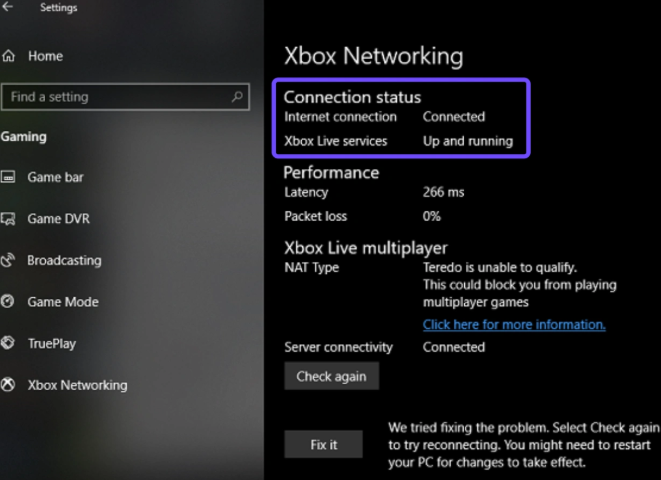
Step 3. If it's blocked, click "Fix it" and restart. This is often why you see the FH6 can’t join friends teredo error.
The "Horizon Life" Reset
Sometimes the game’s phasing gets stuck. If you can’t see your friends:
Step 1. Open the Pause Menu.
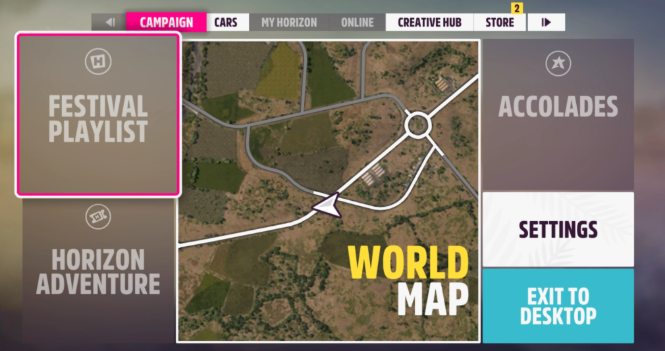
Step 2. Go to the Online tab.
Step 3. Click "Enter Horizon Solo."
Step 4. Wait for the world to populate with AI traffic.
Step 5. Go back to the menu and click "Go Online" or "Horizon Life."
This forces the game to find a new server instance, which can often resolve the Forza Horizon 6 convoy disappeared bug.
Clear the Standby Cache
If you’ve been playing for hours and suddenly FH6 convoy desync FH6, your cache might be full.
- On Xbox: Hold the power button for 10 seconds to do a full hard reset.
- On PC: Restart your game and ensure no heavy background downloads (Steam updates, Chrome tabs) are eating your bandwidth.
Group Up via Xbox Overlay (Win + G)
Instead of using the in-game "Convoy" menu, which is notoriously buggy, try using the Xbox Social Overlay:
Step 1. Press Windows Key + G.
Step 2. Find your friend in the social list.
Step 3. Right-click and select "Invite to Game" or "Join Game."
Often, the platform-level invite is more stable than the in-game FH6 engine.
Address the NAT Type Nightmare
If you see "FH6 convoy not working NAT strict," your router is essentially acting as a firewall against your friends. While you could spend three hours in your router’s settings trying to port forward UDP 3544, there is a much faster way to ensure a stable "Open NAT" environment.
Part 3: The Ultimate Fix: Stable Convoys with LagoFast
Let’s be real: Most of us don't want to be amateur network engineers. You just want to open the game and play. You want to know that when you join a car meet, your friends won't disappear the second you turn a corner.
This is where LagoFast comes in. It's a dedicated game booster designed specifically to solve the "Forza invisible players" and "infinite matching" problems.
How LagoFast Fixes FH6 Multiplayer:
- Stable Convoy Connection: LagoFast optimizes the route between your PC and the Forza servers. No more FH6 convoy desync, just a locked-in connection.
- Fix "Invisible Friends": By stabilizing your ping and jitter, LagoFast ensures you stay in the same "phase" as your friends. Say goodbye to the frustration of Forza Horizon 6 players being invisible.
- One-Click NAT Fix: Stop messing with Teredo and router ports. LagoFast helps you achieve a stable connection environment that acts like an Open NAT, bypassing the "Failed to join session" errors.
- No More 10-Minute Drops: Tired of being kicked every time you enter a race? LagoFast prevents the FH6 convoy keeps disconnecting loop by maintaining a persistent, high-speed path to the game’s lobby servers.
Comparison: Manual Troubleshooting vs. LagoFast
|
Problem |
Manual "Fix" |
The LagoFast Way |
|
NAT Strict/Teredo |
Hours of Port Forwarding |
Auto-optimized route |
|
Invisible Friends |
Constant "Solo/Online" toggling |
Stable Phasing & Sync |
|
Infinite Matching |
Restarting the game/PC |
Global High-Speed Nodes |
|
Convoy Disconnects |
Praying to the servers |
Multipath Connection Tech |
Tutorial to Stable FH6 Convoys with LagoFast:
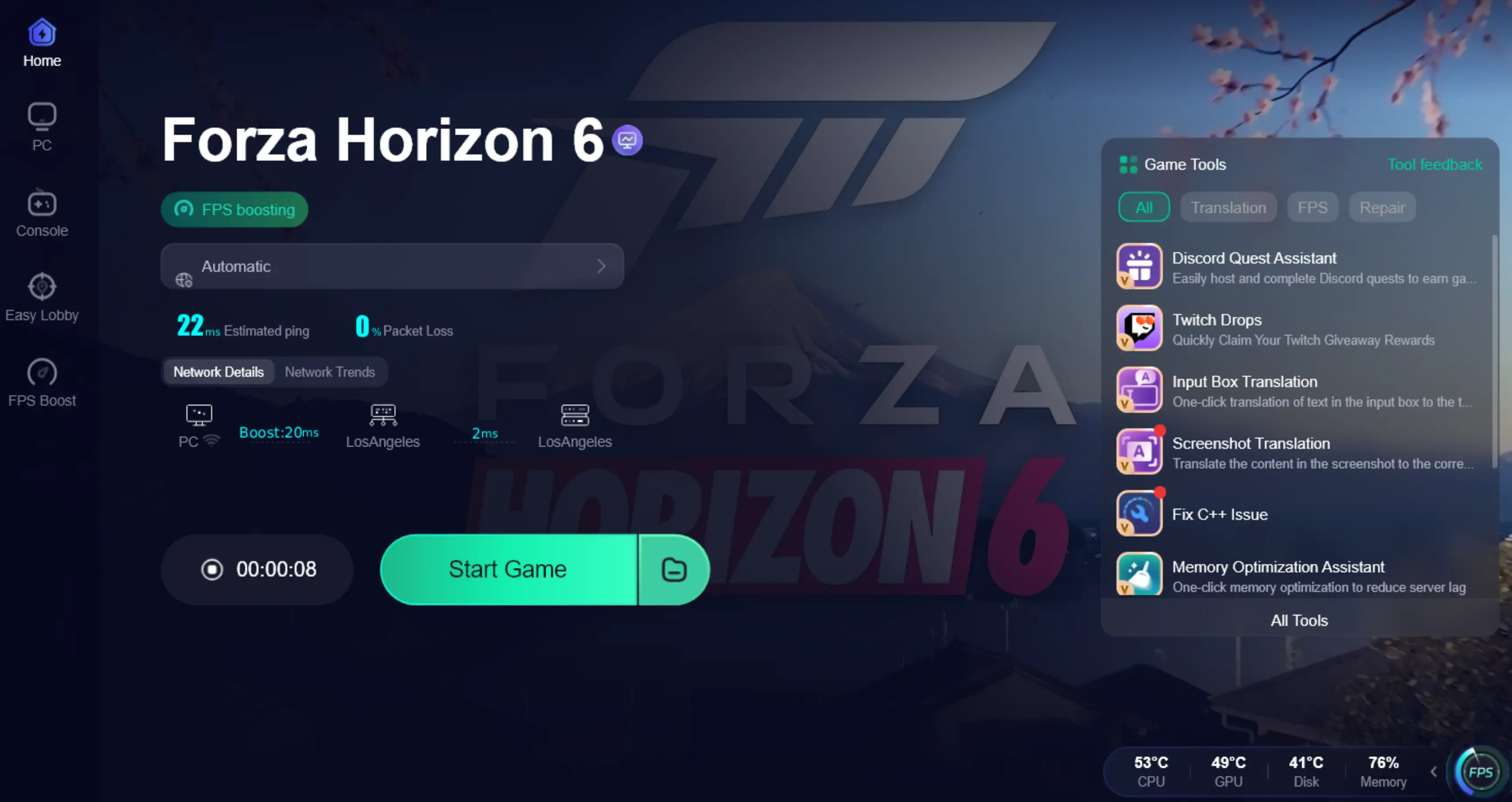
Step 1: Click the Free Trial button to download and install LagoFast.
Step 2: After installation, search "Forza Horizon 6" in the search bar and select the game.

Step 3: Choose your preferred server node and click "Smart Boost" to start optimizing.

Step 4. After activation, most FH6 invisible players issues and convoy desync problems are greatly reduced.
Part 4: Why Is Convoy So Broken?" – A Community Rant
If you head over to Reddit, the sentiment is the same: "Anyone else unable to join convoys?" is the most common thread in the sub.
The reality is that Forza Horizon 6's world is massive. The game is constantly trying to match you with dozens of players near you while keeping your "private" convoy synced. If your internet has "jitter" (small fluctuations in speed), the game gives up and puts you in a separate bubble.
When you use a tool like LagoFast, you’re essentially giving your game a "VIP lane" on the internet. Instead of your data bouncing around public servers, it takes the fastest, most direct route possible. This means seconds to join a convoy and hours of uninterrupted racing.
Part 5: Bonus Tips: Optimized Game Settings to Fix Forza Horizon 6 Convoy Not Working
Sometimes, the issue isn't just your internet, it's how the game handles data. Adjusting these internal settings can reduce the strain on your connection and keep your convoy synced.
- Disable Crossplay (Optional): If you are on PC and your friends are too, try disabling Crossplay in the Xbox privacy settings. This limits the "handshaking" the game has to do between different platforms, which is a frequent cause of FH6 convoy invite not working.
- Lower Graphics for Stability: High graphics settings can sometimes lead to CPU spikes that cause network desync. If you notice forza horizon 6 players invisible, try lowering your "World Detail" and "Geometry" settings to ensure your system can process player locations in real-time.
- Check "Online Privacy" Settings: Ensure your Xbox/Microsoft account has "You can join multiplayer games" and "You can create and join clubs" set to Allow. If these are restricted, you’ll be stuck on joining convoy indefinitely.
Part 6: FAQs
Why can I see my friend on the map but not on the road?
This is a classic FH6 convoy desync. You are in the same group but different "server phases." Usually, this happens due to high jitter or a strict NAT type. LagoFast or the "Solo to Life" reset usually fixes this.
Does FH6 convoy work between PC and Xbox?
Yes, FH6 supports crossplay. However, cross-platform convoys are more prone to the "failed to join session" error. If it fails, try using the Xbox App on PC to join your friend rather than the in-game menu.
Why does my convoy disappear after I finish a race?
When a race ends, the game tries to put everyone back into the same freeroam instance. If one player's connection is slow, the game "phases" them elsewhere.
What does "Teredo is unable to qualify" mean?
Teredo is the protocol Windows uses for Xbox Live. If it can't qualify, you can't talk to the Forza servers properly, leading to FH6 convoy invite not working. Use the "Fix it" button in Xbox Networking settings.
How do I fix "Matchmaking cancelled because your convoy changed"?
This usually happens if a player leaves or joins while the game is loading a race. Ensure everyone is "Readied Up" before the leader starts the event.
Is there a way to force an Open NAT in FH6?
You can manually port forward your router (Port 3544), but the easiest way is to use a booster like LagoFast, which handles the network optimization for you to ensure a stable Horizon Life connection.
Key Takeaways
- Identify the Bug: Distinguish between a "Failed to Join" error (usually NAT/Teredo) and "Invisible Players" (usually server desync).
- Leader Matters: Always have the player with the most stable fiber connection act as the Convoy Leader to reduce group desync.
- Automation is Key: Using a dedicated booster like LagoFast is the most reliable way to maintain an Open NAT without manual router configuration.
- Platform Specifics: PC players must ensure Teredo is "Qualified," while Xbox players should avoid "Instant-On" mode to prevent network cache glitches.

Boost Your Game with LagoFast for Epic Speed
Play harder, faster. LagoFast game booster eliminates stutter and lags on PC, mobile, or Mac—win every match!
Quickly Reduce Game Lag and Ping!
Boost FPS for Smoother Gameplay!