
Quick Answer
If you can't see friends in Forza Horizon 6 despite being in the same convoy, the most common fixes are: restarting the IP Helper service, ensuring your NAT type is Open, and using a dedicated game booster like LagoFast to stabilize your connection to Horizon Life servers. Often, "invisible players" are caused by server desync or Teredo qualification issues on Windows.
There is nothing more frustrating than finally getting the squad together for a cross-country sprint in Mexico or Japan, only to realize you’re racing against ghosts. You see your friend's icon on the mini-map, but their car is nowhere to be found. Or worse, you’re in the same convoy, but as soon as the race ends, everyone else just... vanishes. This "invisible player" glitch has plagued the Horizon series for years, and Forza Horizon 6 is no exception. Whether it’s a "Teredo unable to qualify" error or a simple server desync, these connectivity hurdles kill the vibe of an open-world racer. This guide breaks down exactly why your friends are disappearing and how to ensure your Horizon Life session stays populated and stable.

- ✅ Reduce Lag and High Ping.
✅ Boost FPS at the Same Time.
✅ Fix Crashing and Freezing Issues.
✅ Change Server without Latency.
✅ Boost Game Loading Speed. - ✅ Repair Game Disconnected Problems.
Part 1: Why are Forza Horizon 6 Friends Invisible?
Part 2: FH6 Same Convoy But Can't See Each Other: The "Phasing" Problem
Part 3: Forza Horizon 6 Not Seeing Convoy Members vs. Can't Join Friends
Part 4: Top Fixes for FH6 Players Disappearing and Invisible Players
Part 5: How to Enhance Your Game Experience with LagoFast Game Booster
Part 1: Why Forza Horizon 6 Friends Invisible Issues Happen
When players experience FH6 can't see friends or Forza Horizon 6 friends invisible, the issue is rarely graphical. Instead, it comes from network synchronization failures between your device and game servers.
Server Desync and Instance Separation
Forza Horizon 6 uses dynamic server “instances” to manage large open-world lobbies. When synchronization fails, players may still appear on the map but not in the physical world, leading to FH6 friend disappeared moments during gameplay.
This creates confusion where:
- You see your friend’s icon
- But their car never appears
- Or they suddenly vanish mid-drive
Teredo and Windows Connectivity Issues
A major cause of FH6 invisible players is Teredo malfunction on Windows systems. If Teredo cannot qualify, multiplayer traffic cannot properly pass through Xbox network services.
NAT Type Restrictions
If your NAT type is Strict or Moderate, the game may isolate you into separate sessions. This is one of the most common reasons for Forza Horizon 6 not seeing convoy members even when invites are accepted.
Part 2: FH6 Same Convoy But Can't See Each Other: The "Phasing" Problem
A very common complaint is FH6 same convoy but can't see each other, where players appear connected but exist in different “phased” worlds.
What is Phasing in FH6?
Phasing occurs when the server shifts players between instances to reduce lag. However, unstable connections can cause unintended separation.
This leads to situations like:
- Same convoy, different world FH6
- Friend disappears after loading FH6
- Cars vanish when approaching
High Latency and Jitter Effects
Even if your internet speed is high, unstable ping or jitter causes synchronization delays. This is why FH6 players disappearing often happens during crowded sessions or peak hours.
Part 3: FH6 Not Seeing Convoy Members vs Can't Join Friends
Although similar, FH6 not seeing convoy members and the inability to join friends come from different technical causes.
|
Feature |
Can't See Friends (Invisible Players) |
Can't Join Friends (Connection Error) |
|---|---|---|
|
Symptom |
Icon visible, car missing |
Invite fails or session error |
|
Convoy Status |
Already in convoy |
Cannot enter convoy |
|
Game State |
Horizon Life active but isolated |
Stuck in Horizon Solo |
|
Main Cause |
Server desync, Teredo, jitter |
NAT strict, firewall, server block |
|
Fix Priority |
Stability & services reset |
Port forwarding & NAT fix |
This distinction is important because many players confuse FH6 invisible players with join failure issues.
Part 4: Fixes for FH6 Players Disappearing & Invisible Players
If you are dealing with FH6 players disappearing, FH6 invisible players, or Forza Horizon 6 friends invisible, follow these structured fixes.
Check Your NAT Type and Teredo Status
Windows handles Xbox multiplayer through the Gaming Services app. If Teredo is "Unable to Qualify," you will never have a stable multiplayer experience.
1. Go to Settings > Gaming > Xbox Networking (or search for "Xbox Networking" in the start menu).
2. Check the "NAT Type" and "Server Connectivity."
3. If it says "Blocked" or "Strict," click the "Fix it" button and then "Check again."
Restart IP Helper and Gaming Services
The IP Helper service is the backbone of Forza's online connectivity. Sometimes it gets stuck after a Windows update or a long gaming session.
1. Press Win + R, type services.msc, and hit Enter.
2. Find IP Helper, right-click it, and select Restart.
3. Do the same for Xbox Accessory Management Service and Gaming Services.
Clear DNS Cache and Reset Network
A cluttered DNS cache can lead to "fh6 players disappearing" because your PC is trying to connect to an old or congested server node.
1. Open Command Prompt as Administrator.
2. Type ipconfig /flushdns and press Enter.
3. Type netsh int ip reset and press Enter.
4. Restart your PC and try joining your convoy again.
Part 5: Improve Stability with LagoFast Game Booster
Manual fixes help, but they do not fully solve the server routing instability that causes FH6 players disappearing or FH6 invisible players during gameplay.
What LagoFast Does for FH6 Connectivity
LagoFast Game Booster is designed to stabilize routing between your device and Forza Horizon servers. It reduces:
- Packet loss
- High ping spikes
- Route congestion
This helps prevent issues like:
- FH6 same convoy but can't see each other
- friend disappears after loading FH6
- can see icon on map but no car FH6
Unlike standard VPN tools, LagoFast focuses specifically on gaming traffic optimization.
How LagoFast Improves FH6 Multiplayer
LagoFast provides:
- Stable server routing paths
- Reduced jitter during convoy races
- Faster session synchronization
- Better Horizon Life consistency
This directly improves visibility in multiplayer sessions, reducing FH6 can't see friends problems significantly.
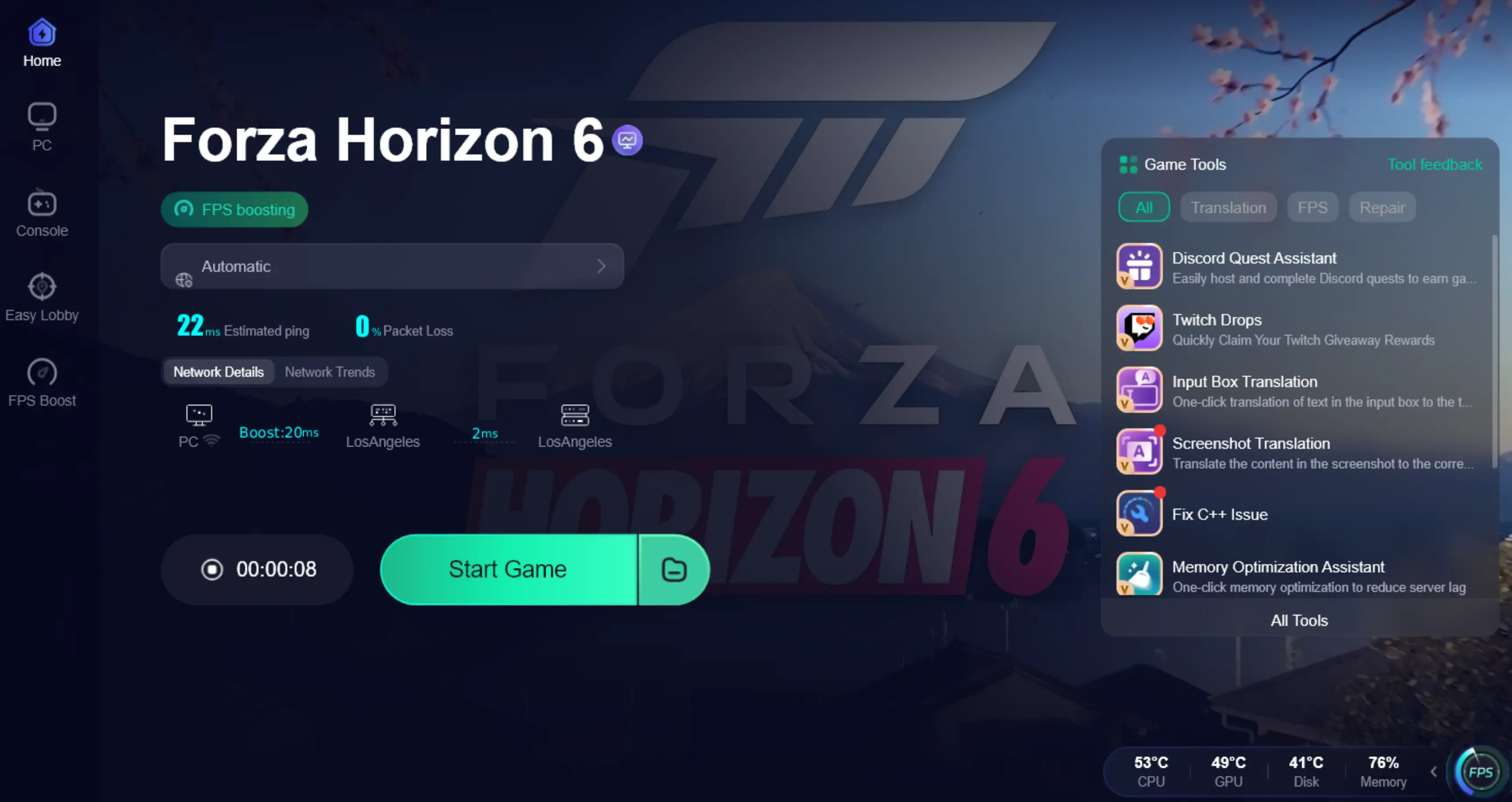
How to Use LagoFast for FH6 Friend Play on PC
Step 1: Click the Free Trial button to download and install LagoFast.
Step 2: After installation, search "Forza Horizon 6" in the search bar and select the game.

Step 3: Choose your preferred server node and click "Smart Boost" to start optimizing.

Step 4. After activation, most FH6 invisible players issues and convoy desync problems are greatly reduced.
Part 6: FAQs About FH6 Invisible Players
Q1: Why can I see my friend's icon on the map but not their car?
This is a classic desync issue. Your PC knows where the friend is (map data), but the server hasn't successfully "streamed" their car model into your world instance due to NAT or latency issues.
Q2: Does my friend also need to fix their settings if I can't see them?
Yes. Connectivity in Forza is a two-way street. If your friend has a "Strict NAT," they might be invisible to you even if your settings are perfect.
Q3: Why do players disappear as soon as I drive close to them?
This is often due to "phasing." The game tries to put you in a more stable instance when you get close to other players, but if the handshake fails, they simply vanish.
Q4: Can a slow internet speed cause invisible players?
Not necessarily. Forza doesn't require high bandwidth, but it does require low "jitter" and no packet loss. A stable 10Mbps connection is better than an unstable 1000Mbps connection for FH6.
Q5: Will disabling my firewall fix the "can't see friends" bug?
It might, but it's not recommended for security. Instead, ensure that Forza Horizon 6 and "Gaming Services" are allowed through your firewall.
Part 7: Key Takeaways for Fixing FH6 Connection Issues
To summarize the most important solutions:
- NAT Type is critical: Always aim for Open NAT
- Teredo must be functional: Required for Xbox networking
- Stability matters more than speed: Prevent jitter and packet loss
- Service resets help: IP Helper and Gaming Services fixes many issues
- LagoFast improves routing stability: Reduces FH6 invisible players and convoy desync
Conclusion
Forza Horizon 6 is most enjoyable when convoys stay connected and the world feels fully populated. However, FH6 can't see friends, Forza Horizon 6 friends invisible, and FH6 players disappearing issues are usually caused by network instability rather than game bugs alone.
By optimizing NAT settings, fixing Windows services, and using tools like LagoFast for stable routing, most FH6 invisible players and convoy synchronization issues can be significantly reduced, ensuring smoother Horizon Life sessions with your friends.

Boost Your Game with LagoFast for Epic Speed
Play harder, faster. LagoFast game booster eliminates stutter and lags on PC, mobile, or Mac—win every match!
Quickly Reduce Game Lag and Ping!
Boost FPS for Smoother Gameplay!