

Quick Answer: How to Fix FH6 Can’t Join Friends
To fix Forza Horizon 6 can't join friends or convoy failures, first ensure your NAT Type is Open and Teredo is qualified in your network settings. If issues persist, the most effective solution is to use a dedicated gaming optimizer like LagoFast. It stabilizes your connection, forces an Open NAT, and resolves the "infinite joining" loop with one click, ensuring you and your friends stay visible in the same session.
The thrill of racing through Forza Horizon 6 is best experienced with friends, but nothing kills the vibe faster than the "failed to join session" error. If your FH6 convoy is broken or you’re stuck on "joining friend" forever, you aren't alone. This guide provides the ultimate fixes for a seamless multiplayer experience.

- ✅ Reduce Lag and High Ping.
✅ Boost FPS at the Same Time.
✅ Fix Crashing and Freezing Issues.
✅ Change Server without Latency.
✅ Boost Game Loading Speed. - ✅ Repair Game Disconnected Problems.
Part 1: Why Can’t I Join Friends in Forza Horizon 6?
Part 2: Technical Deep Dive: Can’t Join Friends vs. Can’t See Friends
Part 3: How to Fix Forza Horizon 6 Can't Join Friends: The Manual Methods
Part 4: The All-In-One Solution: Ensure a Stable Connection with LagoFast
Part 5: Community Voices: "Why is convoy so broken?"
Part 1: Why Can’t I Join Friends in Forza Horizon 6?
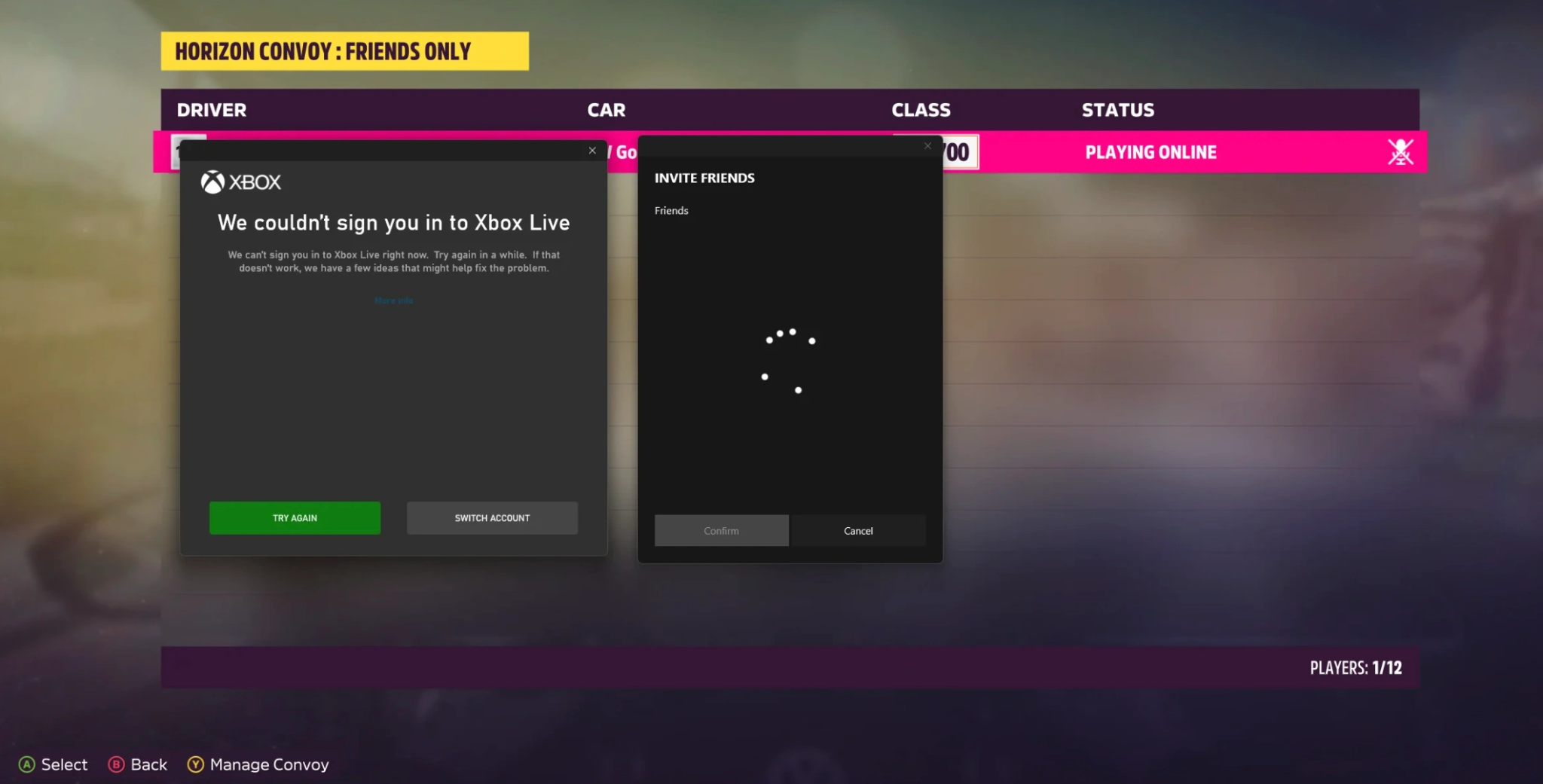
The Forza series has always been ambitious with its "Horizon Life" shared-world system. However, this complexity often leads to connectivity bottlenecks. When you encounter the FH6 unable to join friends error, it usually boils down to three main culprits:
- Server Desync: The game servers may fail to handshake between you and your friend's specific regional node.
- NAT Type Restrictions: If your NAT is "Strict" or "Moderate," the game’s P2P (Peer-to-Peer) networking will block you from entering convoys.
- Teredo Protocol Issues: On PC, Xbox networking relies on Teredo. If this is disabled or "Unable to qualify," you effectively become a ghost in the Forza world.
- Version Mismatch: Occasionally, a small hotfix might be downloaded by one friend but not the other, preventing any joint sessions.
Part 2: Technical Deep Dive: Can’t Join Friends vs. Can’t See Friends
It is crucial to distinguish between these two frustrating scenarios, as the solutions can differ.
|
Feature |
Forza Horizon 6 Can't See Friends |
Forza Horizon 6 Can't Join Friends |
|
Symptoms |
You are in the same convoy, but their car is invisible or ghosted. |
You receive "Failed to join session" or "Convoy invite failed" alerts. |
|
Primary Cause |
Desync. Your game clients are not communicating position data correctly. |
Connection Block. The network handshake is being rejected by a firewall or NAT. |
|
Player Experience |
"My friend is a dot on the map, but not on my screen." |
"I click accept, but nothing happens" or "Infinite joining." |
|
Typical Fix |
Refreshing the Horizon Life session, re-entering a festival site, or using a gaming Booster. |
Troubleshooting NAT, Teredo, or using a gaming Booster. |
Part 3: How to Fix Forza Horizon 6 Can't Join Friends: The Manual Methods
Method 1: Check and Fix Teredo State (PC Users)
For many players, FH6 convoy invite failed messages are directly linked to Teredo.
Step 1. Open the Command Prompt (Admin).
Step 2. Type: netsh interface Teredo show state.
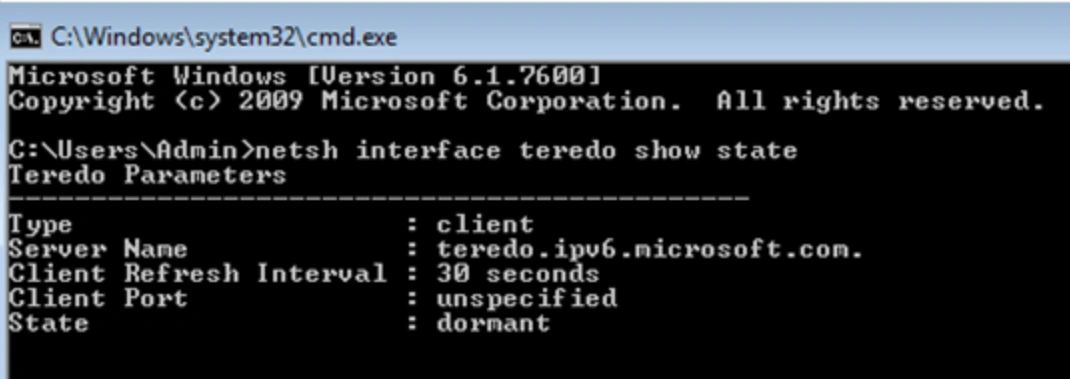
Step 3. If it says "disabled" or "failed," you need to reset it.
Step 4. Type: netsh interface Teredo set state type=default.
This is the most common "under the hood" fix for Xbox Live services on Windows.
Method 2: The "Convoy Leader" Shuffle
Sometimes, the FH6 failed to connect to the session error is specific to who is hosting. If Player A can't join Player B, try having Player B join Player A. Often, the player with the most stable internet or the closest proximity to the data center should act as the Convoy Leader to minimize FH6 convoy desync.
Method 3: Resetting the Gaming Services App
If you are stuck on joining a friend or experiencing FH6 infinite joining, your Windows Gaming Services might be hung.
Step 1. Go to Windows Settings, select Apps, and click Gaming Services.
Step 2. Select "Advanced Options" and click Repair, then Reset.
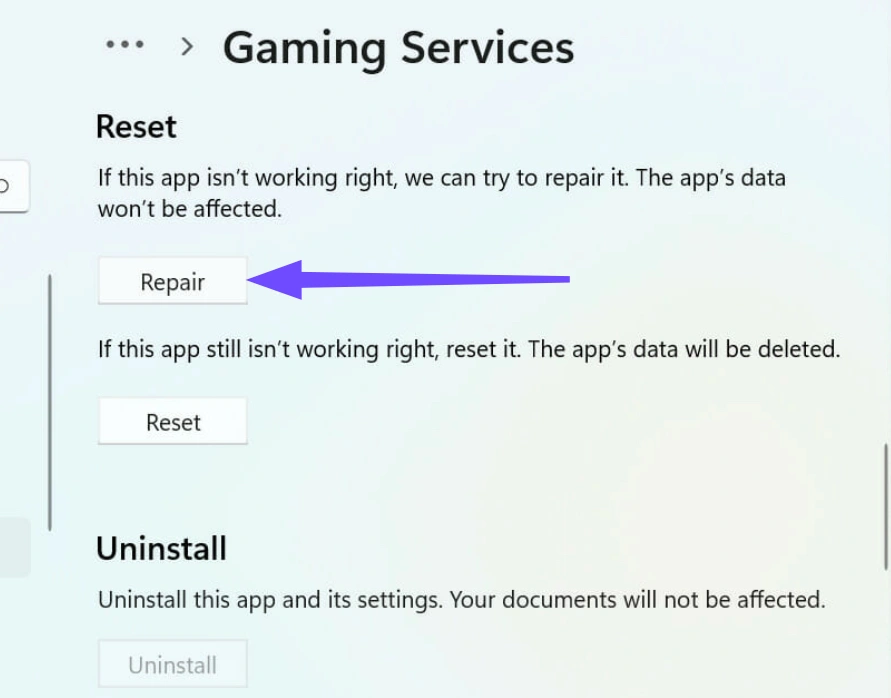
Step 3. Restart your PC and try sending the FH6 convoy invite again.
Method 4: Whitelisting FH6 in Windows Firewall
The FH6 unable to accept invite bug often stems from your PC's security being too good. Ensure that ForzaHorizon6.exe has both Public and Private permissions in your Firewall settings. If the game cannot "call out" to the Xbox servers, the convoy will never form.
Part 4: The All-In-One Solution: Ensure a Stable Connection with LagoFast
Most players don't want to spend their evening typing commands into a terminal or rebooting their routers. You want to open the game and play. This is where LagoFast becomes an essential part of your racing kit.
Why is LagoFast the go-to for FH6 players?
While traditional VPNs might hide your IP, they often increase lag. LagoFast is a dedicated game booster designed to solve the exact issues that plague Forza Horizon 6.
- Stable Convoy Connection: LagoFast uses smart multi-path technology to find the fastest global server routes. This eliminates the FH6 convoy keeps disconnecting issue by ensuring you have a dedicated path to the game’s multiplayer lobby.
- Fix NAT Type Issues: If you're tired of seeing "NAT Type: Strict," LagoFast helps bridge that gap, effectively giving you an Open NAT environment without you having to touch your router's complicated port-forwarding settings.
- No More Invisible Friends: By reducing packet loss and jitter, LagoFast prevents the dreaded FH6 players invisible bug. It keeps everyone synced in real-time, so you can actually see your friends during a drift run or a drag race.
- One-Click Fix: It includes a specialized "Game Crash Fix" and network repair tool. If your FH6 convoy is broken, LagoFast can reset the necessary network protocols automatically.
The Goal: Stop worrying about UDP 3544 or Teredo and start enjoying stable convoys and instant convoy entries. With LagoFast, you get a seamless Horizon Life experience, no more infinite matching, just racing.
Tutorial to Ensure a Stable Connection with LagoFast:
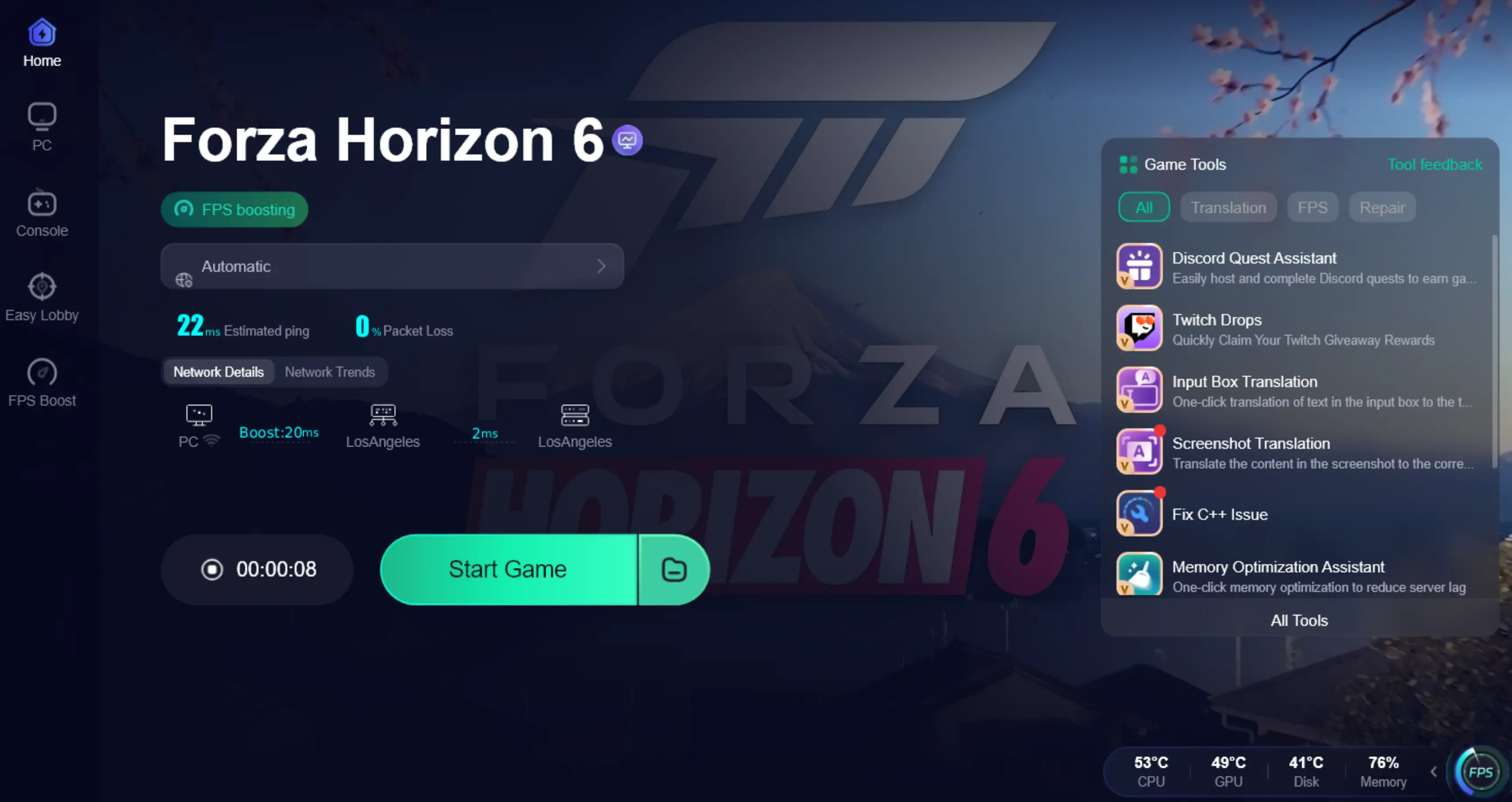
Step 1: Click the Free Trial button to download and install LagoFast.
Step 2: After installation, search "Forza Horizon 6" in the search bar and select the game.

Step 3: Choose your preferred server node and click "Smart Boost" to start optimizing.

Step 4. After activation, most FH6 invisible players issues and convoy desync problems are greatly reduced.
Part 5: Community Voices: "Why is convoy so broken?"
If you head over to Reddit or the Forza forums, the sentiment is clear. Users are constantly asking, "Anyone else unable to join convoys?" or complaining that "Convoys are still broken after the update."
- One user on Reddit noted: "I can't join my friend at all. We both have high-speed fiber, yet the convoy invite does nothing. It just says 'Joining Session' for ten minutes until it times out."
- Another player shared: "The FH6 convoy issue is back again. We can see each other for five minutes, then everyone else just disappears. It’s like playing a ghost game."
These "Community Voices" highlight that FH6 convoy keeps failing is not just a hardware issue; it’s a network synchronization problem that requires a specialized tool to stabilize.
Part 6: FAQs
Why does it say "Failed to join session" when I accept an invite?
This is usually a handshake error. It happens when the game cannot establish a P2P connection between you and the host, often due to a Moderate or Strict NAT type.
How do I fix the FH6 "infinite joining" bug?
The "stuck on joining friend" loop is often a Teredo error. Try restarting your game and checking your Xbox Networking settings in Windows. Using a booster like LagoFast can also force a refresh of this connection.
Why do my friends keep disappearing in a FH6 convoy?
This is called "desync." The server has lost track of where you are relative to your friends. A high-quality, low-jitter connection is required to keep all players synced in the shared world.
Does Forza Horizon 6 require an Open NAT?
While you can play with a Moderate NAT, an Open NAT is highly recommended for convoys. It ensures you can connect to any other player regardless of their network settings.
Can I play FH6 multiplayer without fixing Teredo?
On PC, No. Teredo is the backbone of Xbox Live multiplayer connectivity. If Teredo is blocked, you will be limited to offline solo play.
Why is my FH6 convoy invite failed even on Xbox?
On consoles, this is often due to the "Instant-On" power mode. It can cause network glitches. Try a "Full Shutdown" of your Xbox and restart your router to clear the cache.
Key Takeaways
- Identify the issue: Determine if you are suffering from a total connection block (Can't Join) or a sync issue (Can't See).
- Check the basics: Ensure Teredo is active and your NAT Type is as open as possible.
- Don't struggle with manual fixes: If the "convoy is broken" for you and your friends, save time by using LagoFast to automate the optimization.
- Stay updated: Always ensure all members of the convoy are running the latest version of Forza Horizon 6.
Stop letting technical glitches ruin your trip through the festival. With the right fixes, you can spend less time in the menus and more time on the road!

Boost Your Game with LagoFast for Epic Speed
Play harder, faster. LagoFast game booster eliminates stutter and lags on PC, mobile, or Mac—win every match!
Quickly Reduce Game Lag and Ping!
Boost FPS for Smoother Gameplay!