

If AION 2 is down, stuck in a server queue, or showing a connection error, first check whether the problem affects everyone or only you. Server maintenance, outages, heavy traffic, and network problems can cause similar symptoms. This guide helps you quickly check AION 2 server status and find the right fix.

- ✅ Reduce AION 2 Lag and High Ping.
✅ Boost FPS at the Same Time.
✅ Check Damage with AION 2 DPS Tracker.
✅ Change Servers without Latency.
✅ Fix Disconnects & Connection Errors.
Part 1: How to Check AION 2 Server Status
Part 2: Why Are AION 2 Servers Down or Busy?
Part 3: How to Fix AION 2 Server Connection & Queue Issues
Part 4: Which Server Should You Choose to Avoid Server Issues?
Part 5: Reduce AION 2 Connection Problems with LagoFast
Part 6: FAQs About AION 2 Server Queue & Downtime
Part 1: How to Check AION 2 Server Status
Before troubleshooting your connection, check whether the issue is on NCSoft's side or your local setup. If many players are reporting the same error, it is likely a server-side outage or scheduled maintenance; if only you cannot connect, the problem is usually local.
Where to Check Official Status Updates:
- Official Website: Visit the AION 2 Official Site for maintenance notices and server updates.
- Official Community: Check official social channels (X/Twitter and Discord) for real-time status alerts and player reports.
Quick Diagnostics Guide
|
What You See |
What It Usually Means |
What to Do |
|
Maintenance notice |
Server offline |
Wait for maintenance to end |
|
Many players can't log in |
Possible outage |
Check official updates |
|
Queue/waiting screen |
Server is busy |
Wait or try later |
|
Unable to connect |
Server or network issue |
Check status, then troubleshoot |
|
High ping/packet loss |
Connection issue |
Check your network |
|
Only you can't connect |
Local or routing issue |
Try connection fixes |
Part 2: Why Are AION 2 Servers Down or Busy?
AION 2 server problems usually come from four situations:
- Maintenance: Servers may temporarily close for updates, fixes, or emergency maintenance.
- Heavy traffic: Launches, updates, and events can create long login queues or temporary connection failures.
- Server issues: Unexpected login or game-server problems may prevent many players from connecting.
- Your connection: If the servers are online but only you cannot connect, packet loss, Wi-Fi, firewall settings, or poor routing may be responsible.
Remember: a long server queue means the server is busy, not necessarily down.
Part 3: How to Fix AION 2 Server Connection & Queue Issues
If AION 2 is officially under maintenance, you need to wait for the servers to return. If the servers are online but you still cannot connect, try these fixes:
Fix 1: Restart AION 2 and Your Launcher
Fully close AION 2 and Steam/PURPLE, then restart the launcher. This can refresh a failed login or server session.
Fix 2: Restart Your Network
Restart your router and use Ethernet instead of Wi-Fi if possible. You can also test a mobile hotspot to see whether your home network is causing the problem.
Fix 3: Check Firewall and Game Files
Allow AION 2 and Steam/PURPLE through your firewall, then repair or verify the game files if connection problems continue.
Fix 4: Clear the PURPLE Cache
If you use PURPLE, clear its cached data and restart the launcher. Old session data can sometimes interfere with server connections.
Fix 5: Wait or Try Again Later During a Queue
If you see a queue number or waiting screen, the server is online but busy. Stay in the queue or try again outside peak hours rather than repeatedly restarting the game.
Part 4: Which Server Should You Choose to Avoid Server Issues?
With the global launch across NA, EU, SA, and Asia (Japan/Global), as well as the existing Korean (KR) and Taiwan (TW) servers from late 2025, picking the right server is critical for optimal ping and community fit
Quick Comparison Table:
|
Category |
Korean / Taiwan Servers (2025) |
Global Regional Servers (2026) |
|
Regions |
Korea (KR) & Taiwan (TW) |
NA East/West, EU, SA, Asia (JP) |
|
Launch Waves |
Launched Nov 19, 2025 |
Early Access (Sept 30, 2026) / Free Launch (Oct 5, 2026) |
|
Registration |
Requires phone/real-name setup or specialized tools |
Seamless signup via Steam or PURPLE |
|
Latency |
Best for East/SEA players using boost tools |
Lowest base latency (Geographically local) |
|
Community |
Hardcore KR/TW regional player bases |
Global, multi-language (10 languages supported) |
Key Factors When Choosing Your Server
- Geographic Proximity & Ping: Select the global regional server (NA, EU, SA, or Asia) closest to your physical location to minimize flight-combat lag and packet loss.
- Early Access vs. Launch Wave: Early Access Servers (Sept 30) are ideal for competitive guilds and market pioneers. Launch Wave Servers (Oct 5) offer a fresh start for casual players.
- Guild & Legion Coordination: Dungeon queues are cross-server within a region, but open-world Abyss PvP and guild systems require being on the exact same server.
Part 5: Reduce AION 2 Connection Problems with LagoFast
Even the best server choice can’t completely eliminate lag, high ping, or language barriers. LagoFast addresses these challenges:
- Lower Ping for Overseas Players: Optimized routing reduces latency and stabilizes gameplay across regions like Asia, North America, Europe, and Oceania.
- Real-Time Translation: Automatically translates quests, menus, and dialogues, allowing players to enjoy Korean or Taiwan servers in their native language.
- FPS & Performance Boost: Smart optimization improves CPU/GPU usage, memory handling, and minimizes lag spikes.
Tutorial: How to Use LagoFast to Play Aion 2 Smoothly in Any Language on PC:
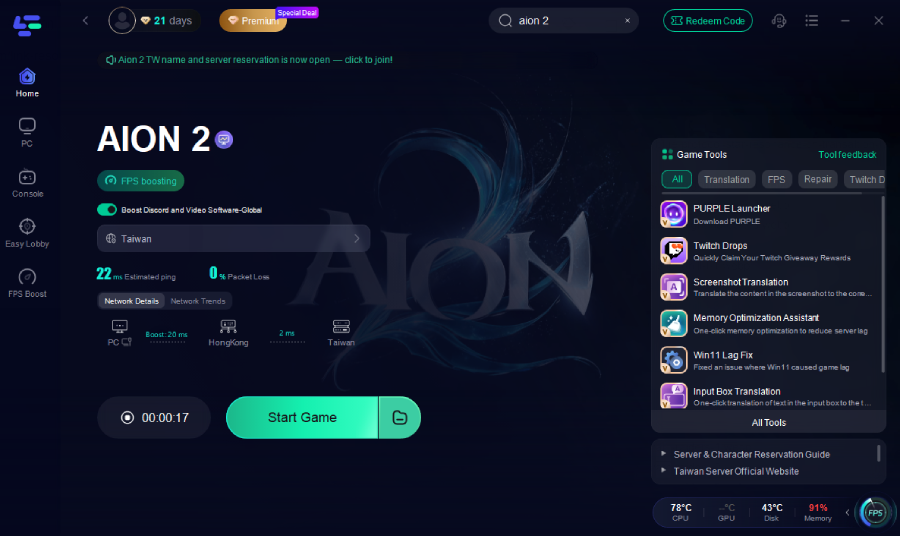
Step 1: Download and install LagoFast.
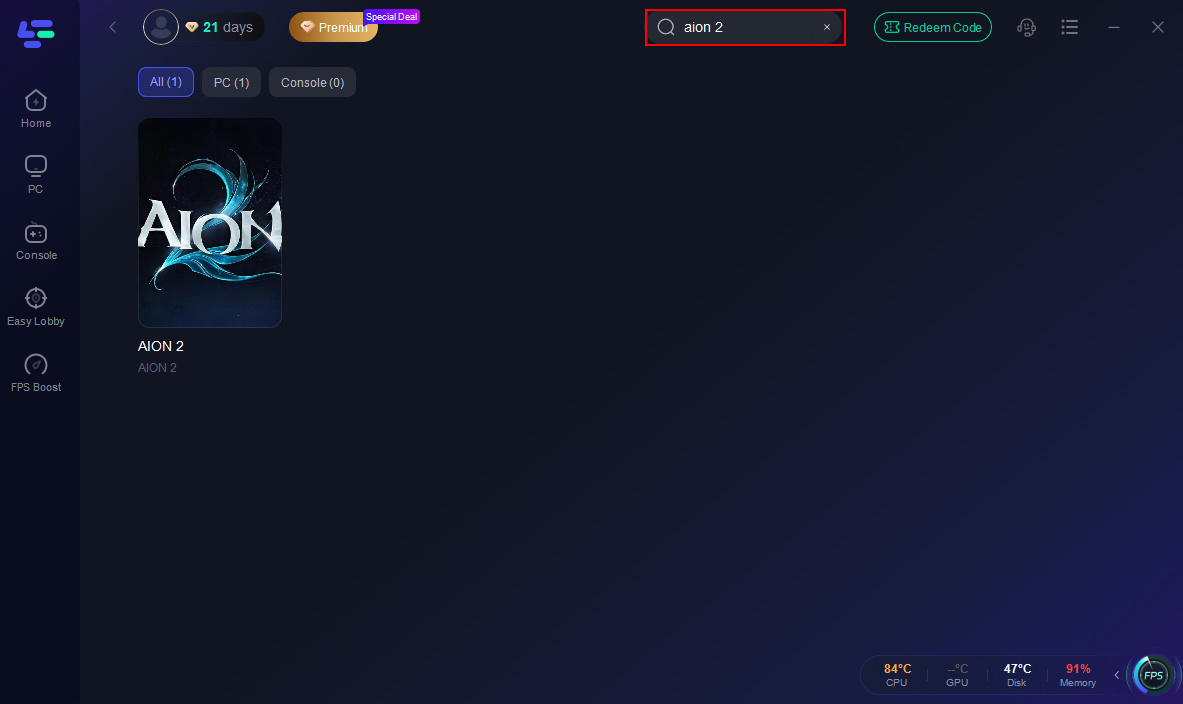
Step 2: Open LagoFast, search for “Aion 2”, and select the first result.
Step 3: Select the best server to ensure a stable and fast connection.
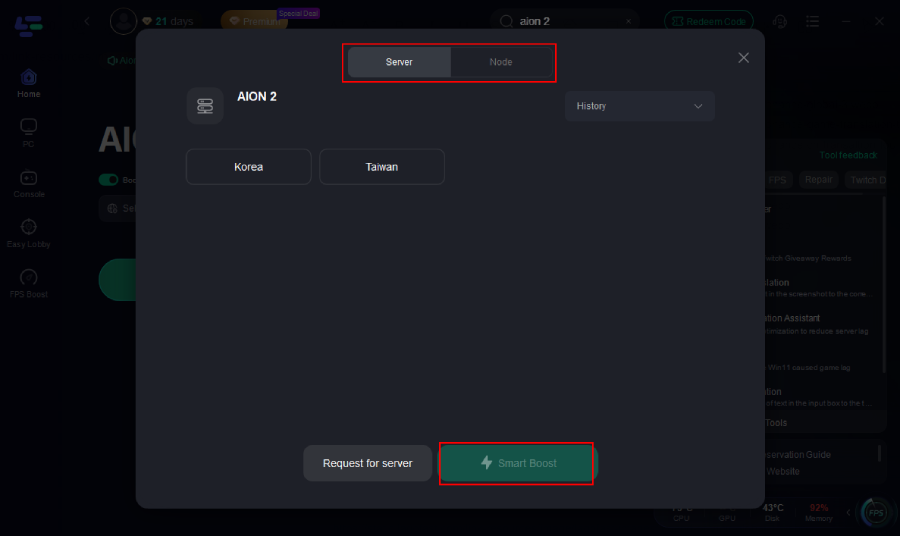
Step 4: Turn on Smart Boost to track your ping and packet loss in real time.
Bonus: Free Taiwan Server Accounts with LagoFast:
LagoFast also offers free Taiwan experience accounts, eliminating registration hassles like verification errors or region restrictions. Players can instantly log in and start playing, with one-click translation and performance boosts included. This tool is ideal for new players or those facing technical issues during peak server hours.
Tutorial: How to get your free Aion 2 Taiwan account:
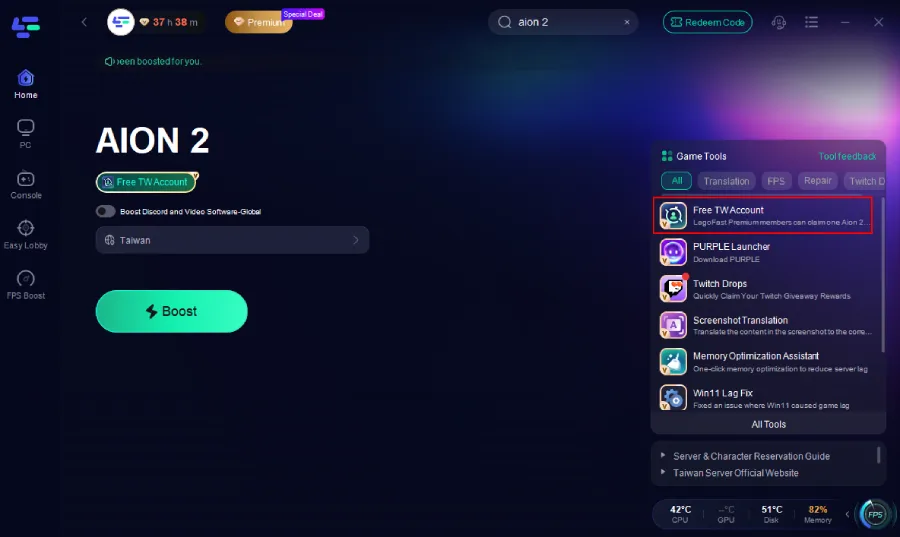
Step 1: In the LagoFast client, open the Free TW Account Tool on the right side.
Step 2: Click Claim Account.
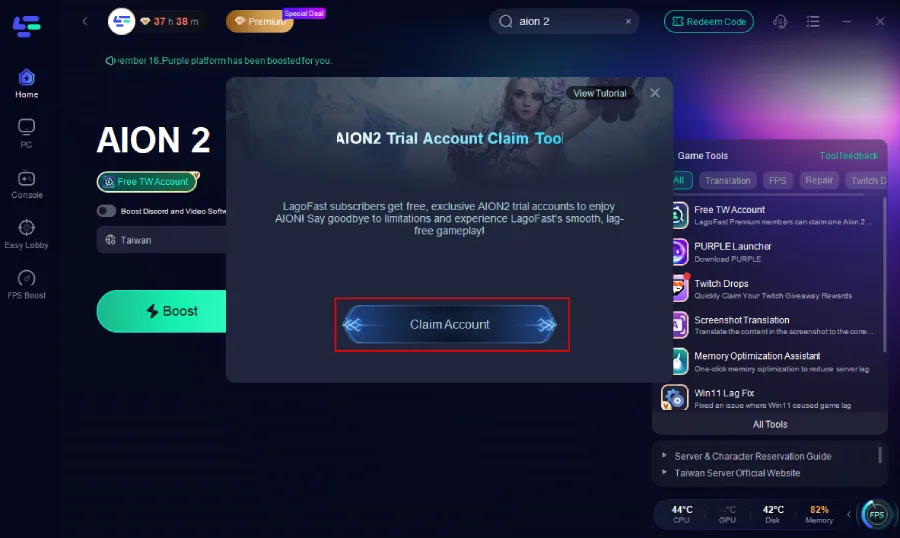
Step 3: A login email and password will be automatically generated. Copy the credentials and log in directly through Purple. A full tutorial is also available inside the tool for extra assistance.
Part 6: FAQs About AION 2 Server Queue & Downtime
Q: How long does scheduled server maintenance take?
A: Weekly maintenance usually takes 2 to 4 hours, while major content updates can take 6+ hours. Check the AION 2 Official Site for status updates.
Q: Why do I get disconnected while waiting in queue?
A: Unexpected traffic spikes or session timeouts cause this. Exit the game completely, wait 2–3 minutes, and restart the launcher to get a fresh connection token.
Q: Is there a way to bypass or skip the server queue?
A: No. However, players with 5-day Advance Access from Founder's Packs can enter the game early starting September 30, avoiding the general launch-day rush on October 5.
Q: What should I do if my queue number is stuck?
A: If your position doesn't change for over 10 minutes, your server authentication likely dropped. Close the game client, verify your connection, and rejoin the queue.
Q: Why do I get high ping or errors when servers show "Online"?
A: "Online" status means the server is running, but bad ISP routing can still cause packet loss. Restart your router, switch to a wired Ethernet connection, or use LagoFast to optimize your route.
Conclusion
If AION 2 appears to be down, check the official server status first. Maintenance and server outages require you to wait, while queues usually mean the servers are simply busy. If the servers are online but you still experience timeouts, disconnects, high ping, or packet loss, check your local connection or use LagoFast to optimize the route to the AION 2 server.

Boost Your Game with LagoFast for Epic Speed
Play harder, faster. LagoFast game booster eliminates stutter and lags on PC, mobile, or Mac—win every match!
Quickly Reduce Game Lag and Ping!
Boost FPS for Smoother Gameplay!