

If you are looking for an AION 2 DPS meter, you probably want more than a simple damage number. You want to know whether your rotation is working, whether your build is improving, and whether your contribution in dungeons, raids, or conquest fights is actually enough.
This guide explains what an AION 2 DPS meter does, why players use DPS trackers, what to watch out for when using free or community-made tools, and how LagoFast AION 2 Real-time DPS Tracker can help you review real-time damage performance while also improving your PC game connection.

- ✅Check Real-time DPS during AION 2 fights
- ✅ Review total damage and damage contribution
- ✅ Compare performance across builds or gear changes
Contents
- What Is an AION 2 DPS Meter?
- Why Do AION 2 Players Need a DPS Meter?
- Free, Open-Source, and Community AION 2 DPS Meter Tools
- How to Choose a Reliable AION 2 DPS Meter
- How LagoFast AION 2 DPS Tracker Helps
- How to Use LagoFast AION 2 DPS Tracker on PC
- Mobile Note
- FAQs
What Is an AION 2 DPS Meter?
An AION 2 DPS meter, also called a DPS tracker or damage meter, is a tool that helps players read combat performance through numbers. Instead of guessing whether your skills are effective, a DPS meter can show data such as real-time DPS, total damage, skill contribution, and sometimes party or team damage comparison.
For AION 2 players, this kind of tool is especially useful because combat performance is affected by many factors: skill rotation, cooldown timing, gear, class setup, boss movement, party coordination, and connection stability. A DPS meter helps turn those moving parts into readable performance data.
In simple terms, an AION 2 DPS meter helps answer questions like:
- How much damage am I dealing in real time?
- Which skills contribute the most to my total damage?
- Did my new build or gear upgrade actually improve my DPS?
- Am I losing damage during movement-heavy boss mechanics?
- Is my party’s damage low, or is my own rotation the problem?
Related guide: How to Check Party DPS in AION 2
Why Do AION 2 Players Need a DPS Meter?
AION 2 DPS is not only about chasing a bigger number. In real combat, DPS data helps players understand what is happening during a fight and why a run succeeds or fails. This is why many players search for an AION 2 DPS meter before entering harder dungeons, raids, conquest battles, or other group content.
1. Review Your Real Damage Output
Without a DPS tracker, it is easy to rely on feeling. You may think your rotation is smooth, but the actual damage numbers may show long downtime, weak skill priority, or poor burst timing. A DPS meter helps you see your real damage output instead of guessing.
2. Test Builds, Gear, and Skill Rotations
When you change gear, adjust stats, or try a new skill setup, the result is not always obvious in one fight. A DPS meter lets you compare before-and-after performance, making it easier to decide whether a build change is truly helping your damage.
3. Understand Party Contribution
In dungeon, raid, or conquest content, a failed fight does not always mean one player made a mistake. Sometimes the group lacks total damage. Sometimes one player loses too much uptime during mechanics. Sometimes the problem is not DPS at all, but positioning, deaths, or coordination.
DPS data gives players a clearer way to review contribution and identify where the group needs improvement. It should be used as a performance review tool, not as a reason to blame teammates.
4. Find the Real Reason Behind Low DPS
Low DPS can come from many causes:
- Skills used in the wrong order
- Important cooldowns delayed for too long
- Too much time spent moving without attacking
- Poor uptime during boss mechanics
- Gear or stat choices that do not match the build
- High ping, packet loss, or unstable connection affecting combat response
A DPS meter cannot fix all of these problems by itself, but it can help you see where to start.
Related Article: Aion 2 DPS Tracker Not Working: How to Fix DPS Meter Not Showing or Tracking Damage
Free, Open-Source, and Community AION 2 DPS Meter Tools
When players search for an AION 2 DPS meter, they may find different types of tools online, including standalone DPS meters, community-made trackers, GitHub or open-source projects, OCR-based damage trackers, and paid tools shared through third-party websites.
Free or open-source tools can be useful for players who want to test damage output, compare builds, or review combat logs. However, a free tool is not automatically stable, accurate, or safe to use. Some community tools may still be experimental, may have bugs, may stop receiving updates, or may not clearly explain how the data is collected and calculated.
This does not mean every community DPS meter is bad. It simply means players should be careful before installing any tool from an unclear source. A DPS meter reads or displays combat-related data, so the developer, update history, download source, and user feedback matter.
How to Choose a Reliable AION 2 DPS Meter
Since there are already many DPS meter tools appearing around AION 2, players should not choose one only because it is free or appears first in search results. A useful DPS meter should be clear, stable, and transparent enough for players to understand what it can and cannot do.
Before Using Any AION 2 DPS Meter, Check These Points
- Clear source: Is the developer, project page, or official download source easy to identify?
- Update history: Does the tool receive updates when the game changes?
- User feedback: Are players reporting bugs, wrong data, crashes, or suspicious behavior?
- Data limitations: Does the tool explain whether its numbers may be incomplete or delayed?
- Stability: Does it keep working during dungeons, raids, and long fights?
- Transparency: Does it avoid unrealistic claims such as guaranteed accuracy or guaranteed account safety?
- Download safety: Is the download link from a clear and official source, not a reposted or modified copy?
A good DPS meter should help you understand your performance. It should not ask you to take unnecessary risks, install unclear files, or believe in guaranteed results.
How LagoFast AION 2 DPS Tracker Helps
LagoFast provides an AION 2 Real-time DPS Tracker for players who want to review combat performance while playing on PC. It is designed to help players read DPS changes, check damage performance, and better understand how their build, rotation, and combat decisions affect output.
Compared with searching through many separate tools, LagoFast keeps DPS tracking inside a PC-first game booster environment. This makes it easier for players to combine damage review with connection optimization, especially when high ping, lag, packet loss, or unstable routing affects combat response.
What You Can Use LagoFast DPS Tracker For
- Check real-time DPS during AION 2 fights
- Review total damage and damage contribution
- Compare performance across builds or gear changes
- Understand whether your rotation is improving
- Review party or dungeon performance more clearly
- Reduce the impact of high ping, lag, and unstable PC game connections
Note: What LagoFast AION 2 DPS Tracker Is Designed For
LagoFast AION 2 DPS Tracker is designed to help players review real-time damage performance, understand DPS changes, and evaluate combat results more clearly. Its purpose is to provide readable performance data for builds, rotations, dungeon runs, and party contribution review.
It is not designed to change game rules, modify combat outcomes, replace skill practice, or replace team coordination. DPS data should be used as a learning and review tool.
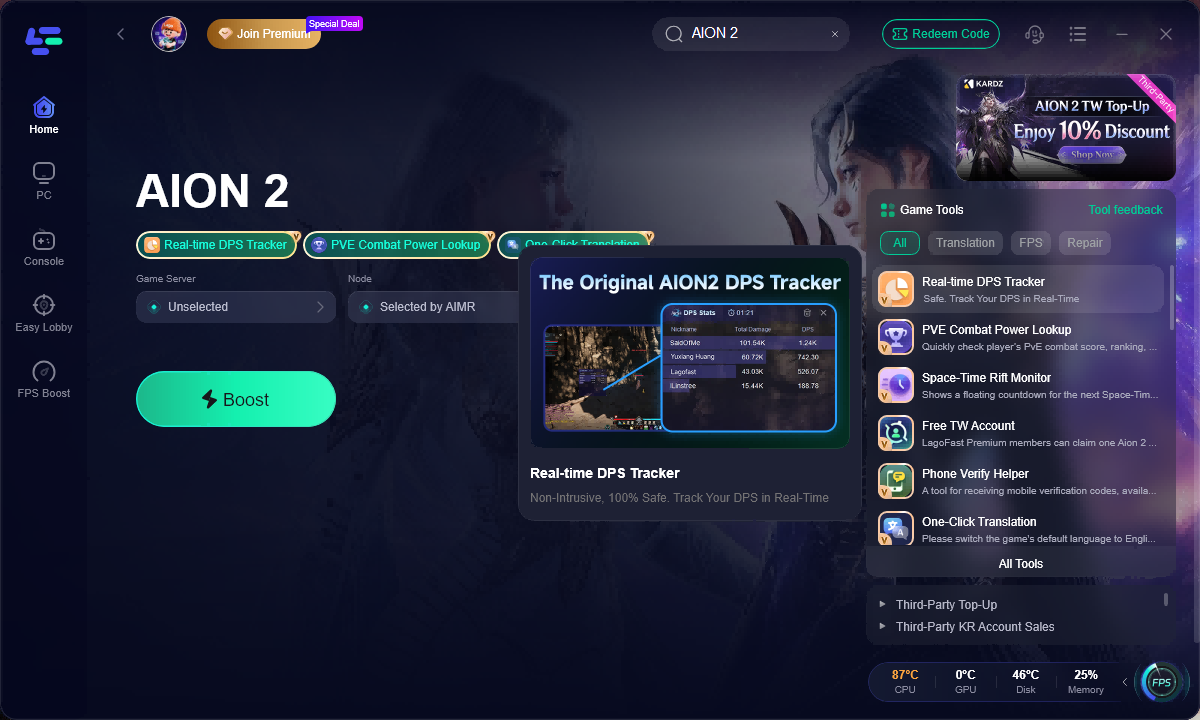
How to Use LagoFast AION 2 DPS Tracker on PC
Follow these steps to use LagoFast Real-time DPS Tracker for AION 2 on PC.
Step 1: Click the Free Trial button to download and install LagoFast.
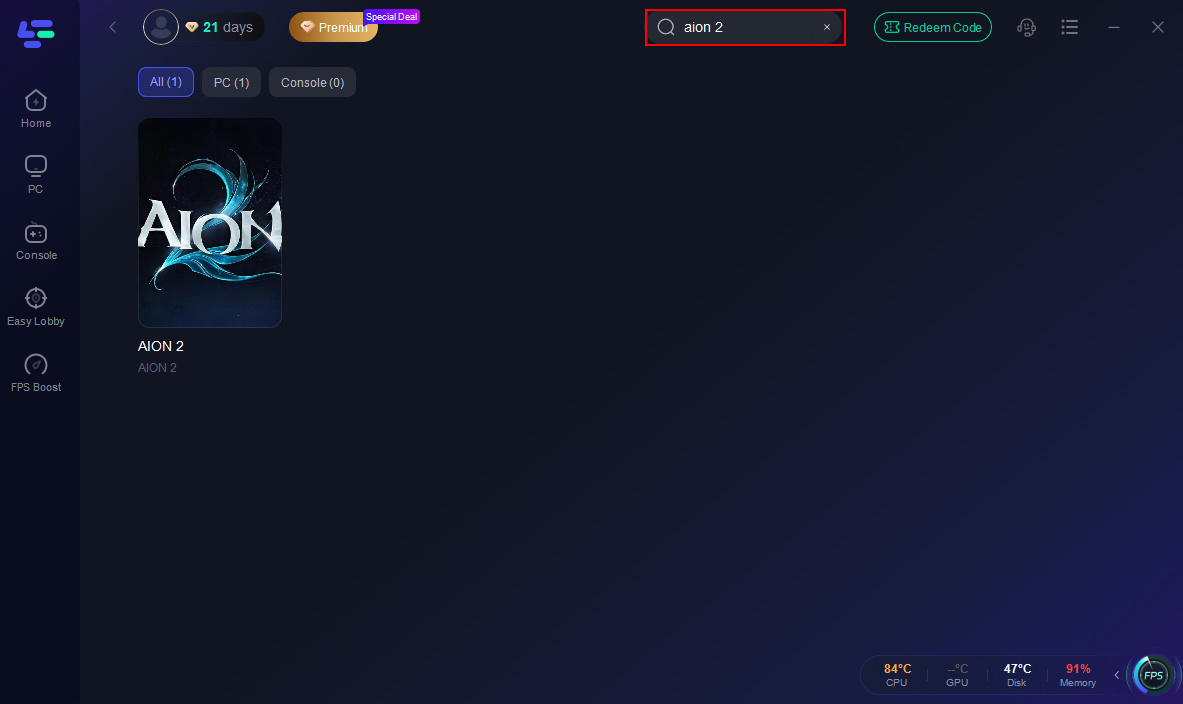
Step 2: Open LagoFast and use the search bar to find Aion 2.
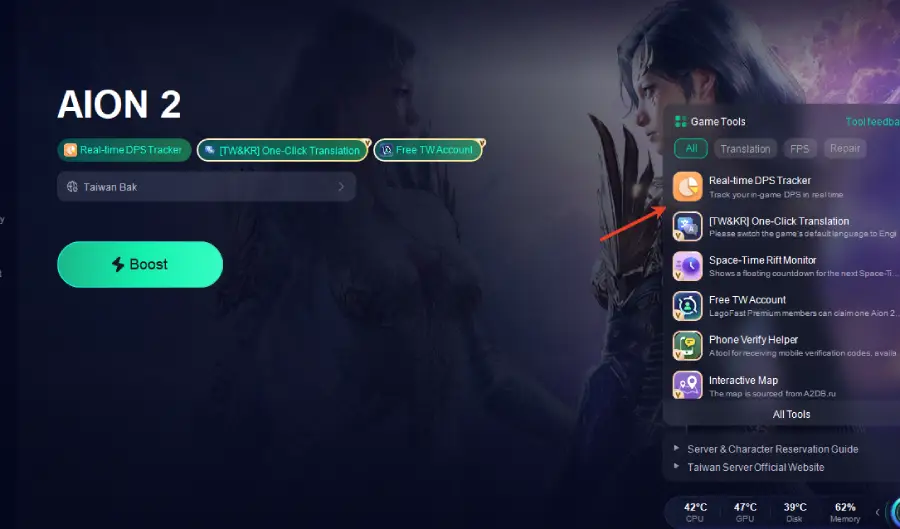
Step 3: Select the Real-time DPS Tracker tool from the list.
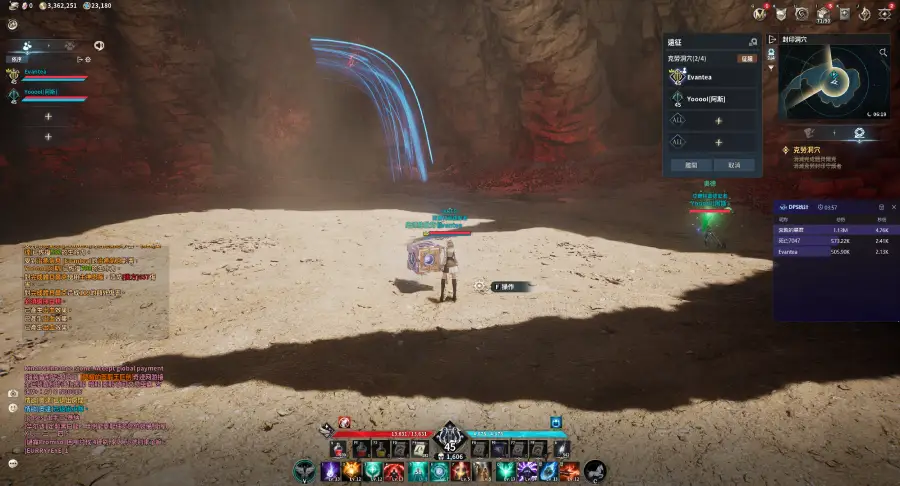
Step 4: Enable Real-time DPS Display and configure any display settings, such as showing your DPS, healing, and teammates’ data.
Step 5: Select the best server route based on your location.
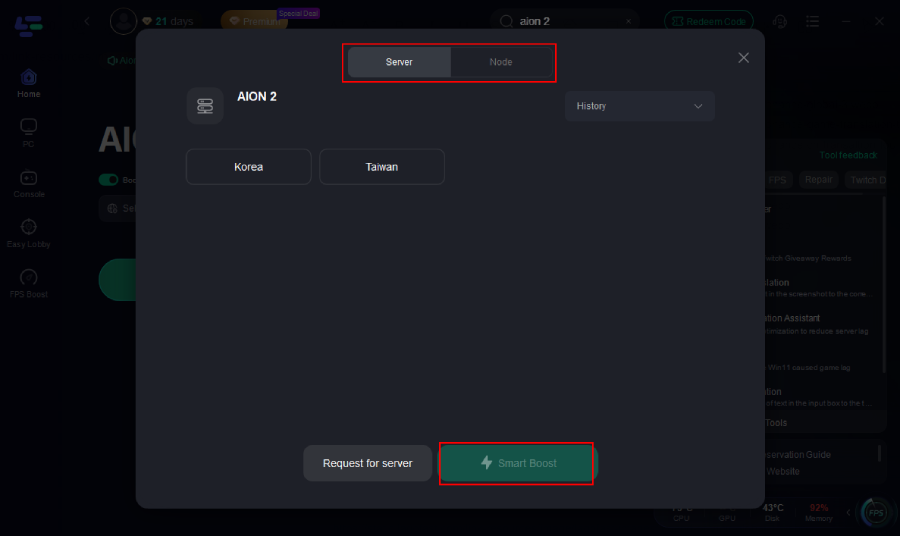
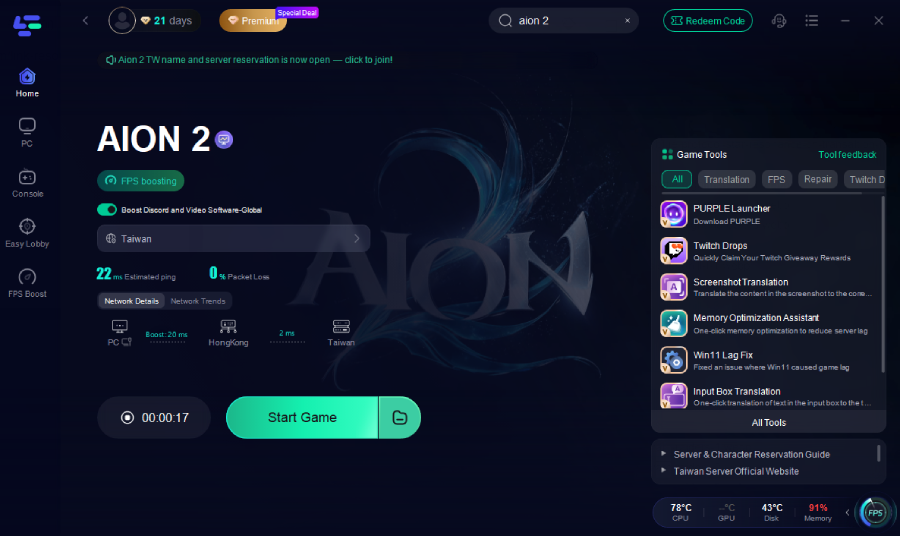
Step 6: Launch Aion 2 through LagoFast and enjoy smooth gameplay.
Mobile DPS Rankings in Aion 2
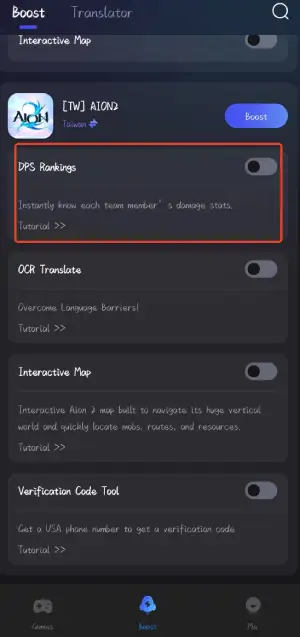
For Aion 2 Mobile, LagoFast now offers the DPS Rankings tool, allowing players to instantly view real-time damage data for each team member during combat. Since DPS on mobile is harder to judge due to touch controls, smaller screens, and performance fluctuations, DPS Ranking gives a clear snapshot of who is dealing damage and how your own output compares. With accurate tracking of skills, pets, and summon damage, mobile players can quickly spot rotation issues, adjust skill timing, and improve overall performance—without relying on guesswork.
Tutorial: How to Use LagoFast Real-time DPS Tracker On Mobile
1. Visit LagoFast Mobile official website and download APK file.

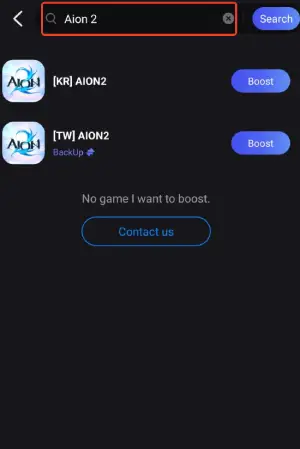
2. After installation, search for "Aion 2" in LagoFast's search bar.
3. Enable the DPS Rankings Tool to instantly view real-time damage data for each team member during combat.
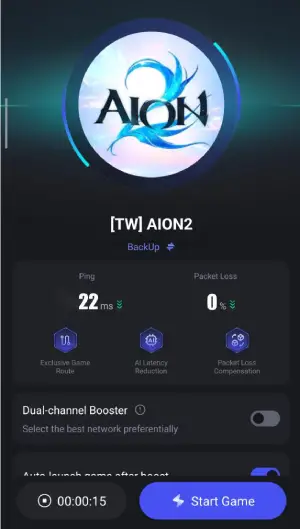
4. Click boost and select a suitable server node to connect to.
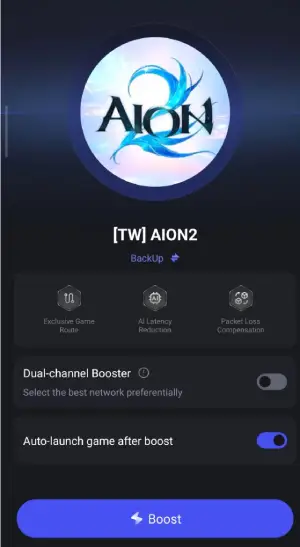
5. Once optimized performance is confirmed, click "Start Game" to launch the game.
AION 2 DPS Meter FAQs
What is the best AION 2 DPS meter?
The best AION 2 DPS meter depends on what you need. Some players want a simple real-time DPS display, while others need party damage review, build testing, or dungeon performance analysis. A good DPS meter should be easy to use, updated regularly, clear about its limitations, and downloaded from a trustworthy source.
Why do AION 2 players use DPS meters?
Players use DPS meters to understand real damage output, test builds, improve skill rotations, compare gear changes, and review performance in dungeons, raids, conquest battles, and party content.
Are there free AION 2 DPS meter tools?
Yes, players may find free, open-source, community-made, or GitHub-style DPS meter projects online. However, free tools can vary in stability, accuracy, maintenance, and transparency. Always check the developer source, update history, and user feedback before using any third-party DPS meter.
Is it safe to use an AION 2 DPS meter?
Safety depends on the tool, its source, and how it works. Avoid unclear download links, modified copies, unknown developers, and tools that make unrealistic promises. Use DPS meters as performance review tools and always follow the game’s rules and official requirements.
Can a DPS meter improve my DPS?
A DPS meter does not improve your DPS automatically. It helps you see performance data so you can make better decisions about rotation, build, gear, uptime, and positioning. The improvement still comes from practice, analysis, and better combat execution.
Does LagoFast have an AION 2 DPS Tracker?
Yes. LagoFast provides an AION 2 Real-time DPS Tracker designed to help players review damage performance while playing on PC. LagoFast also helps optimize PC game connections by reducing high ping, lag, packet loss, and unstable routing where possible.
What should I do if my AION 2 DPS meter is not working?
Check whether the tracker is updated, whether the overlay is enabled, whether the game is running in a compatible display mode, and whether the tool supports the current game version. You can also read LagoFast’s troubleshooting guide for AION 2 DPS tracker issues.
Conclusion
An AION 2 DPS meter is valuable because it helps players replace guesswork with readable combat data. Whether you are testing a build, reviewing dungeon performance, comparing party contribution, or trying to understand why your damage feels low, DPS tracking can give you a clearer starting point.
At the same time, players should be careful when choosing free, open-source, or community DPS meters. Developer transparency, update history, user feedback, and download source all matter.
LagoFast AION 2 DPS Tracker is designed for players who want a PC-first way to review real-time DPS and combat performance while also improving their game connection. Use the data to learn, adjust, and play more consistently.

Boost Your Game with LagoFast for Epic Speed
Play harder, faster. LagoFast game booster eliminates stutter and lags on PC, mobile, or Mac—win every match!
Quickly Reduce Game Lag and Ping!
Boost FPS for Smoother Gameplay!