

Quick Answer: What is an Aion 2 DPS tracker for dungeon Runs & Should You Use It?
An Aion 2 dungeon DPS tracker is a performance-monitoring tool that calculates damage per second (DPS) for both individual players and the entire group. You should absolutely use one. It transforms blind guesswork into concrete data, showing you who is pulling their weight, where your skill combos are dropping, and how to optimize your overall clear speeds.
Stepping into small-scale PvE instances requires tight coordination, sharp skill execution, and optimized damage output. If your party keeps wiping on boss mechanics or clearing rooms at a sluggish pace, you need to figure out why. Tracking combat data is the most reliable way to pinpoint performance bottlenecks and elevate your gameplay.

- ✅Less ping and crashes.
- ✅ Higher FPS and better PC performance.
- ✅ Support for 8000+ games.
- ✅ Stable connection and region switching.
Part 1: What Is an Aion 2 DPS Tracker for Dungeon Runs?
Part 2: Why Dungeon Players Need a DPS Tracker in Aion 2
Part 3: What Can You Track During Dungeon Runs?
Part 4: How to Use a DPS Tracker in Aion 2 Dungeons?
Part 5: Best Dungeon Scenarios to Use a DPS Tracker
Part 6: How a DPS Tracker Helps Improve Dungeon Performance
Part 7: Common Dungeon DPS Problems in Aion 2
Part 8: Aion 2 Dungeon DPS Tracker vs General DPS Meter
Part 9: Can You Use the Same DPS Tracker for Raids?
Part 10: How LagoFast Helps with Aion 2 Dungeon Performance
Part 1: What Is an Aion 2 DPS Tracker for Dungeon Runs?
An Aion 2 dps tracker for dungeon instances is a combat log analyzer designed for 5-man or 6-man group content. Unlike broad combat logs that scroll too fast to read, a specialized Aion 2 dungeon dps meter hooks into combat data to display real-time mathematical breakdowns of your offensive and defensive performance. It acts as a dashboard for your combat efficiency, showing you exactly how many points of damage your party generates every single second.
Part 2: Why Dungeon Players Need a DPS Tracker in Aion 2
Many players assume combat metrics are only meant for showing off big numbers, but their real value lies in diagnosing problems. In small-group PVE, a single underperforming player can cause a total party wipe during a boss encounter.
Using an Aion 2 party dps tracker takes the emotional guesswork out of group troubleshooting. Instead of guessing why a boss's health bar isn't dropping fast enough, the data tells you the exact truth. It helps you identify whether a failed run was caused by a mechanical failure, low base damage, or poorly timed bursts during critical mechanics.
Part 3: What Can You Track During Dungeon Runs?
A robust tactical monitor tracks a wide variety of combat elements to give you a complete picture of your run.
Party DPS
Your overall Aion 2 party damage tracker reveals the combined damage output of all your attackers. This metric is crucial for meeting soft and hard enrage timers on high-tier bosses.
Personal DPS
This shows your individual damage per second. It provides a baseline metric to help you evaluate your personal contribution to the group and measure your growth as a damage dealer.
Boss Fight Damage
A dedicated Aion 2 boss dps tracker filters out trivial trash mobs and focuses exclusively on major boss encounters. This ensures your data isn’t artificially inflated by area-of-effect (AoE) damage on weak minions.
Skill Damage Breakdown
This function isolates every individual spell, chain skill, and basic attack you use. It displays the exact percentage of total damage each ability contributed, alongside critical hit rates.
Burst Damage
This metric tracks your spike potential during brief windows of vulnerability, such as when a boss is stunned, staggered, or exposed after a major mechanic.
Damage Taken and Deaths
An effective Aion 2 dungeon performance tracker records more than just your offensive output. Tracking the damage you receive helps you identify if players are accidentally stepping into avoidable boss mechanics or taking unnecessary environmental hits.
Clear Time
This measures the exact time elapsed from the moment you pull the first pack of monsters to the downfall of the final boss, giving you an undeniable metric for your overall efficiency.
Part 4: How to Use a DPS Tracker in Aion 2 Dungeons?
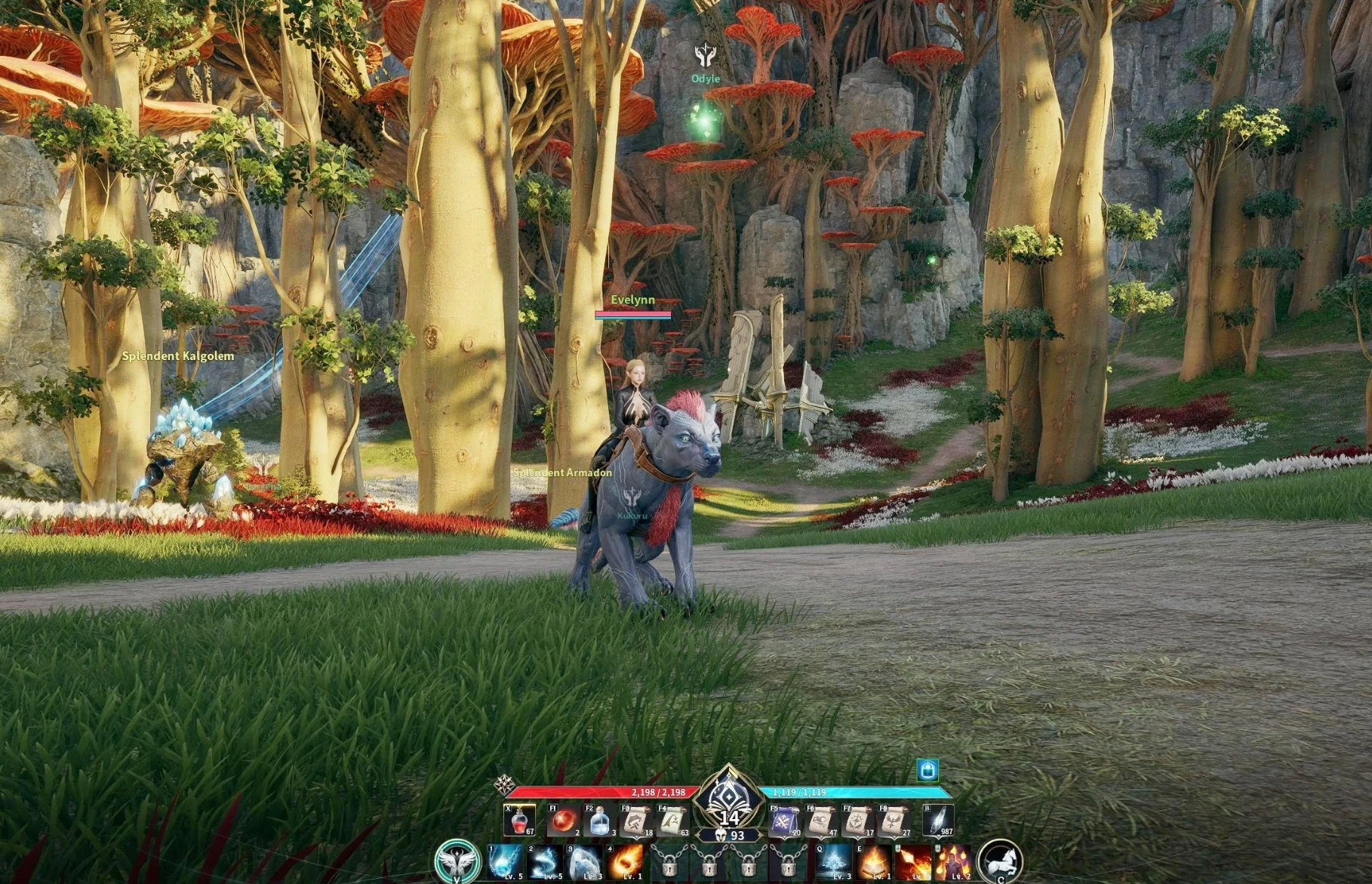
To get the most out of your combat metrics, integrate them directly into your gameplay loop using these five steps.
Step 1: Start Tracking Before the Dungeon Begins
Activate your interface before your group crosses the instance threshold. This allows the system to properly initialize and log your data from the very first pull.
Step 2: Check DPS During Boss Fights
Keep a close eye on your active damage readouts during major boss encounters. Watch your live metrics to see if your output plummets when you are forced to move away or dodge incoming red markers on the floor.
Step 3: Compare Damage After Each Pull
Once a pack of mobs or a boss is defeated, take a quick look at your Aion 2 party damage statistics. See how your output stacks up against players running the exact same class to spot any immediate performance gaps.
Step 4: Review Skill Damage Breakdown
After completing your run, open up your advanced analytics panel. Inspect your skill distribution to make sure your primary, hard-hitting abilities are accounting for the majority of your total damage output.
Step 5: Adjust Rotation Before the Next Run
Use your findings to fine-tune your approach. If a high-damage Stigma skill underperformed because it missed its window, adjust your positioning and timing to deploy it better on your next attempt.
Part 5: Best Dungeon Scenarios to Use a DPS Tracker
Different instances call for different analytical focuses. You can adapt your tool across multiple scenarios.
- Daily Dungeons: Use it to keep your casual runs fast and efficient, ensuring your daily grinds don’t take up more time than necessary.
- Party Dungeons: Perfect for analyzing standard 5-to-6-player group dynamics and evaluating how well your offensive buffs synergize with your teammates.
- Boss Farming Runs: Focus your attention on single-target combat metrics to squeeze out every drop of efficiency against specific high-yield targets.
- Gear Farming Dungeons: Use the data to verify if your newly acquired weapons and armor pieces are actually translating into higher practical damage numbers.
- Speedrun Attempts: Essential for tracking split times, optimizing trash pull strategies, and maintaining peak damage velocity throughout the entire zone.
Part 6: How a DPS Tracker Helps Improve Dungeon Performance
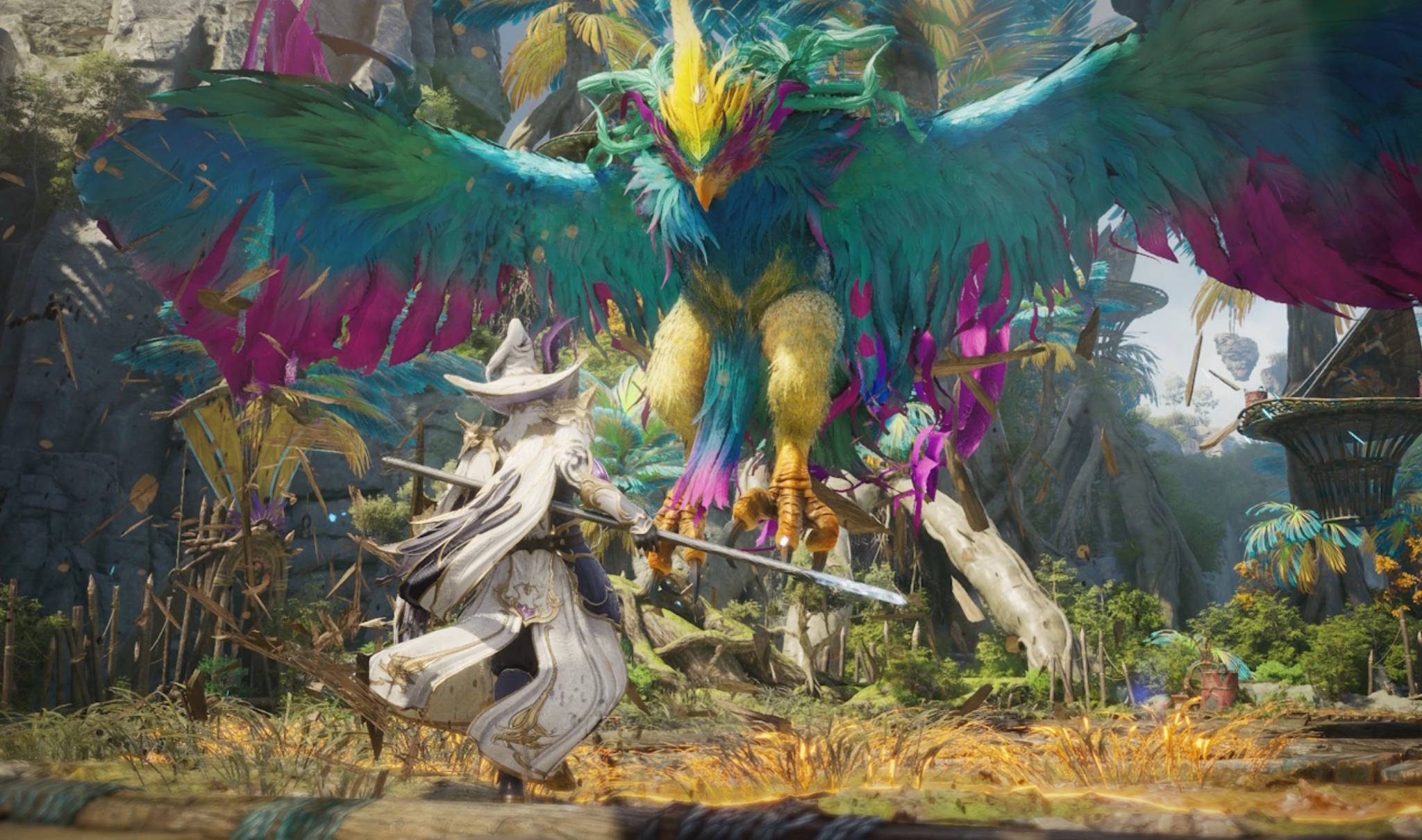
Consistently logging your combat sessions provides several distinct advantages that directly translate to smoother, faster clears.
Find Low DPS Problems
If an instance run feels incredibly slow, checking your performance graphs will quickly show you why. It removes all ambiguity, highlighting exactly which player or build choice is lagging behind the group's needs.
Improve Skill Rotation
Learning Aion 2 how to improve dungeon dps starts with mastering your skill priority. If your breakdown reveals that your main combo links are dropping or getting interrupted, you can adjust your inputs to maintain a smoother, uninterrupted flow.
Check If Gear Upgrades Actually Help
Do not rely entirely on raw item stats or gear scores. By evaluating your actual combat metrics before and after equipping a new weapon, you can confirm whether that expensive upgrade genuinely improved your live performance.
Compare Burst and Sustained Damage
Some classes excel at melting targets in five seconds, while others shine over the course of a five-minute fight. Analyzing both metrics ensures you know exactly when to unleash your biggest cooldowns for maximum impact.
Reduce Failed Boss Attempts
When a boss hits its enrage timer and wipes your squad, checking your combat log helps you determine exactly how much extra group damage is required to clear the phase safely on your next attempt.
Part 7: Common Dungeon DPS Problems in Aion 2
When reviewing your combat logs, look out for these widespread performance killers.
Poor Rotation Timing
Using your skills randomly as soon as they come off cooldown drastically lowers your potential. You need to follow a strict Aion 2 dungeon rotation to ensure your heavy-hitting abilities land while your self-buffs are active.
Low Buff Uptime
Failing to maintain your offensive stances, element infusions, or group status buffs severely cripples your damage output. Always monitor your uptime percentages to keep these modifiers active.
Delayed Burst Skills
Holding onto your longest cooldowns out of fear of wasting them often means you use them far less frequently than you should over the course of a full instance run.
Too Much Movement During Boss Mechanics
If you spend all your time running in circles to avoid area-of-effect attacks, your damage will tank. Aim to use minimal, precise movements to stay safe while keeping your attacks flying.
Wrong AoE or Single-Target Skill Usage
Wasting high-cooldown single-target spells on large packs of weak minions—or using spread attacks on a solitary boss, destroys your overall resource efficiency.
Gear or Stat Mismatch
If your combat data shows an incredibly low critical hit rate despite executing a perfect rotation, your character is likely suffering from poorly optimized gear stats or sub-optimal socketing selections.
Part 8: Aion 2 Dungeon DPS Tracker vs General DPS Meter
|
Feature Focus |
Dungeon-Specific Tracker |
General DPS Meter |
|
Primary Team Scale |
Optimized for 5–6 player party modules |
Built for massive multi-alliance groups |
|
Mob Filtering |
Separates trash packs from main bosses |
Groups all area damage into one large pool |
|
Performance Context |
Tracks positioning, avoidable damage, and deaths |
Focuses almost exclusively on raw offensive numbers |
|
UI Footprint |
Minimalist overlay to maintain high screen visibility |
Large screen presence with extensive multi-window lists |
Part 9: Can You Use the Same DPS Tracker for Raids?
Yes, you can, but you will need to adjust your configuration. Large-scale faction warfare and massive multi-group raids process significantly more combat events simultaneously. To prevent your screen from becoming cluttered with twenty different performance bars, switch your display mode to aggregate data by full parties rather than individual players.
Part 10: How LagoFast Helps with Aion 2 Dungeon Performance
Raw player skill and optimized rotations mean nothing if network latency drops your inputs. When your connection stutters, your character stops attacking, your skill animations freeze, and your hard-earned placement on the party charts plummets instantly.
LagoFast provides a comprehensive solution by pairing real-time team performance visibility with an advanced game booster toolkit. By stabilizing your connection to game servers, LagoFast guarantees that every ability registers the exact millisecond you press it.
Key Optimization Features:
- Real-Time Team Performance View: Monitor crucial connectivity stats alongside your gameplay to ensure network stability during critical boss transitions.
- Smart Multipath Technology: LagoFast scans global server routes in real time, automatically shifting your traffic to the fastest path to eliminate sudden ping spikes and packet loss.
- One-Click Game Crash Fix Tool: Resolve unexpected stability issues, memory leaks, and client freezes instantly using integrated system repair features.
- Advanced FPS Boosting: Optimize your local hardware resources with a simple toggle, reclaiming lost frame rates and removing input delay during visually demanding boss encounters.
Step-by-Step Tutorial to Use LagoFast to Track Party Member Damage and Optimize Gaming Experience:
Step 1: Click the Free Trial button to download and install LagoFast.
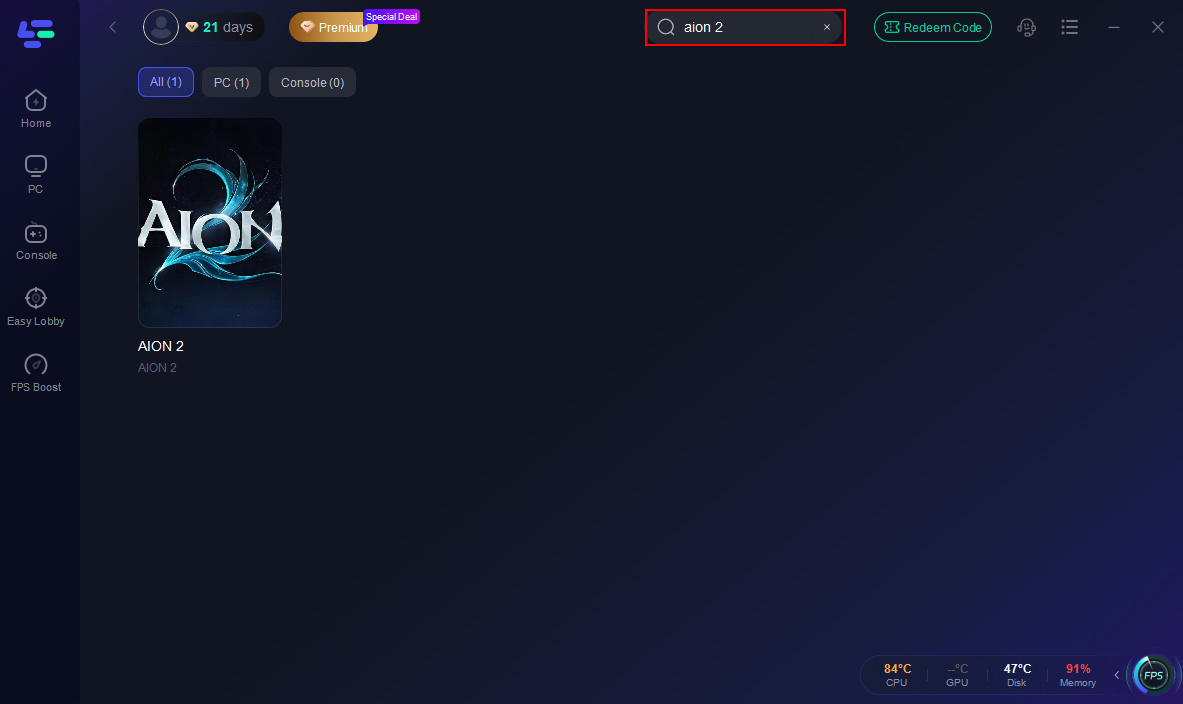
Step 2: Open LagoFast, then click the PC button on the left, search for Aion 2 in the search bar, and click it after it appears.
Step 3. Click the Real-time DPS Tracker in the Game tool Section.
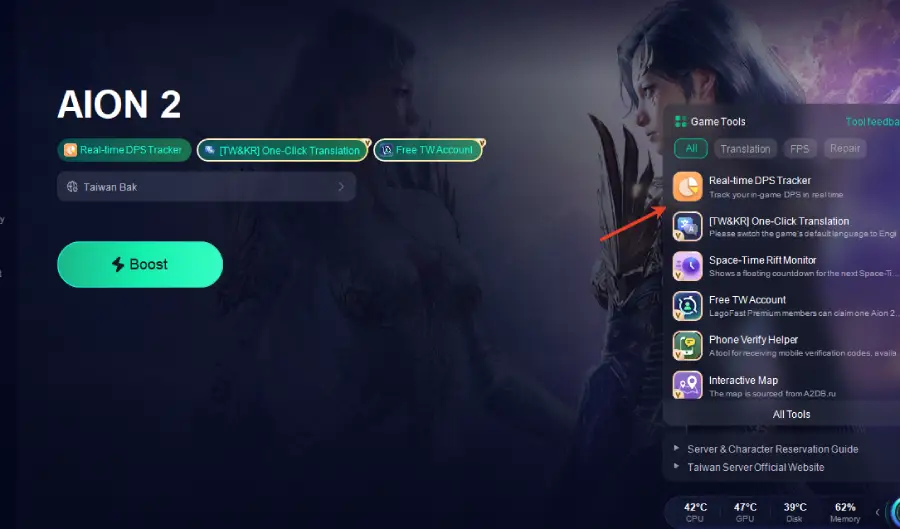
Step 4. Before launching the game, toggle the launch button of Team DPS Tracking Tool to "On."
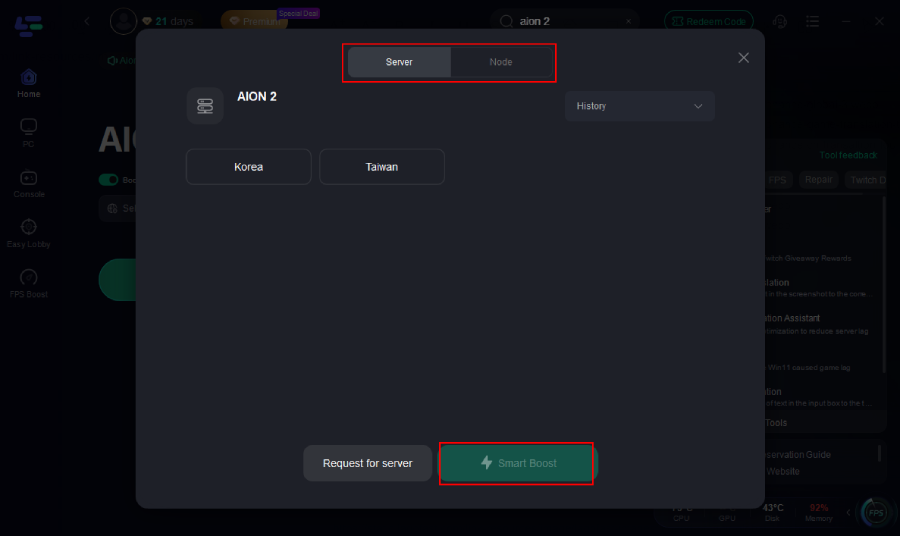
Step 5: Go back to the main interface and click on Server to change to a better server that ensures a better gaming experience, then click on Boost to fix Aion 2 lag and stuttering.
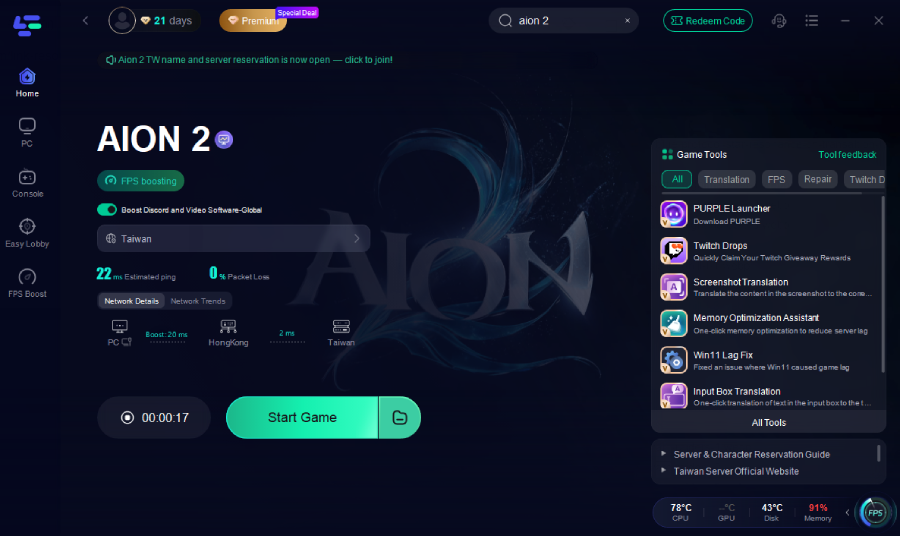
Step 6: Check the specific game ping, packet loss, and multiple path connections on the right side. Finally, click “Start Game” to play the game.
Part 11: FAQs
Does Aion 2 have an official built-in DPS tracker?
Aion 2 focuses heavily on clean, immersive visual presentation, meaning detailed text-based combat readouts and party breakdowns generally require external companion tools or specialized hardware overlays to view.
Will running a damage meter lower my in-game frame rate?
Standard performance monitors that analyze local combat logs require minimal system resources. Using a well-optimized tool like LagoFast ensures your network tracking and hardware optimization run smoothly without causing stuttering.
Why does my damage look lower on bosses compared to trash mobs?
Trash packs allow you to inflate your numbers using Area-of-Effect (AoE) abilities that hit multiple targets simultaneously. Boss fights isolate your single-target damage, reflecting your true mechanical execution.
How can I tell if my low performance is caused by lag or poor rotation?
Review your skill cast history. If the time gaps between your individual abilities are long or uneven despite you pressing the keys rapidly, network latency or packet loss is likely delaying your inputs.
Can a tracker help me become a better dungeon healer or tank?
Yes. Modern performance tools track crucial metrics beyond raw offensive output, including healing per second (HPS), defensive buff uptime, shield efficiency, and total damage taken by the party.
How does network lag affect my actual tracked numbers?
High ping introduces a noticeable delay between your keypresses and the actual skill execution in-game. Over the course of a long five-minute boss battle, these tiny delays add up, resulting in fewer total skill casts and a major drop in your overall damage per second.
Conclusion
Mastering your performance in Aion 2 requires a balance of proper skill execution, optimized gear configurations, and a rock-solid network connection. By using an analytical tool to study your combat metrics, you can easily fix rotation errors and maximize your dungeon rewards. Pair your data analysis with LagoFast to eliminate lag, stabilize your frame rate, and ensure your character performs at its absolute peak.

Boost Your Game with LagoFast for Epic Speed
Play harder, faster. LagoFast game booster eliminates stutter and lags on PC, mobile, or Mac—win every match!
Quickly Reduce Game Lag and Ping!
Boost FPS for Smoother Gameplay!