

Quick Answer: How to Check Party & Team DPS in Aion 2?
To track your entire group's damage contribution in Aion 2, standard in-game metrics fall short. The most reliable method to check real-time group damage, monitor individual contributions, and optimize combat rotations across the whole party is by using a third-party application like LagoFast. LagoFast includes an integrated, real-time Team DPS Tracking tool designed specifically for cooperative PVE content. It allows you to view detailed damage breakdowns, contrast total group damage against individual real-time DPS, and easily spot low-contribution or inactive team members during intense encounters.
As players plunge into the gorgeous, aerial-focused battlefields of Aion 2, mastering PVE content requires more than just high-tier gear. Success relies heavily on coordinated team execution. In group-based combat, knowing your own performance is only half the battle; true optimization demands clear insight into your entire team's damage contribution.

- ✅Less ping and crashes.
- ✅ Higher FPS and better PC performance.
- ✅ Support for 8000+ games.
- ✅ Stable connection and region switching.
Part 1: Does Aion 2 Have Party Damage Stats?
Part 2: Why Official Damage Stats Are Not Enough for Party Play
Part 3: How to Track Your Own DPS? Step-by-Step Guide
Part 4: How to Track Party Member Damage via LagoFast
Part 5: How to Use DPS Stats for Dungeon Runs?
Part 6: How to Improve Your DPS After Reading the Data?
Part 1: Does Aion 2 Have Party Damage Stats?
The short answer is no, at least not in the way high-level players require. The official, default interface provided by NCSoft in Aion 2 does not offer a comprehensive, built-in party damage meter.
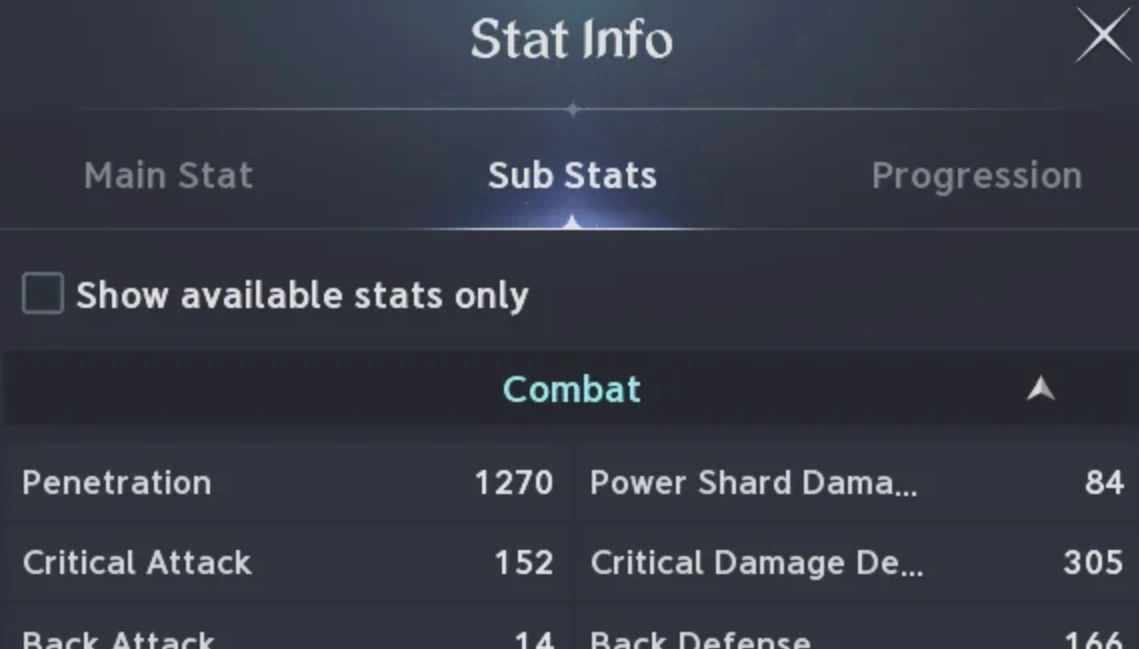
While the basic in-game user interface allows you to view isolated performance metrics or generic post-battle summaries, it lacks an interactive, multi-user system that reveals what everyone else in the group is doing simultaneously. The standard Aion 2 official DPS meter features no party stats, meaning you are essentially flying blind regarding your allies' active output. If you want to view a side-by-side comparison of how your group members are performing mid-combat, the default game client simply will not provide it.
Part 2: Why Official Damage Stats Are Not Enough for Party Play
For casual exploration, a personal damage counter might suffice. However, as soon as you step into structured group instances, relying solely on your individual metrics becomes a major bottleneck.
- The Team Coordination Blind Spot: Without an active aion 2 group damage meter, it is impossible to verify if your teammates are executing their skill sequences correctly or if certain builds are failing to pull their weight.
- Identifying Underperformance: You cannot effectively find low dps party members in aion 2 if you can only look at your own numbers. High-tier PVE content has strict enrage timers; a single slacking player can cause the entire group to wipe.
- Diagnosing Group Failures: When a boss encounter fails, an individual tracker cannot tell you why. Was it a lack of raw team damage, or did specific players completely stop attacking during complex mechanics?
Part 3: How to Track Your Own DPS? Step-by-Step Guide
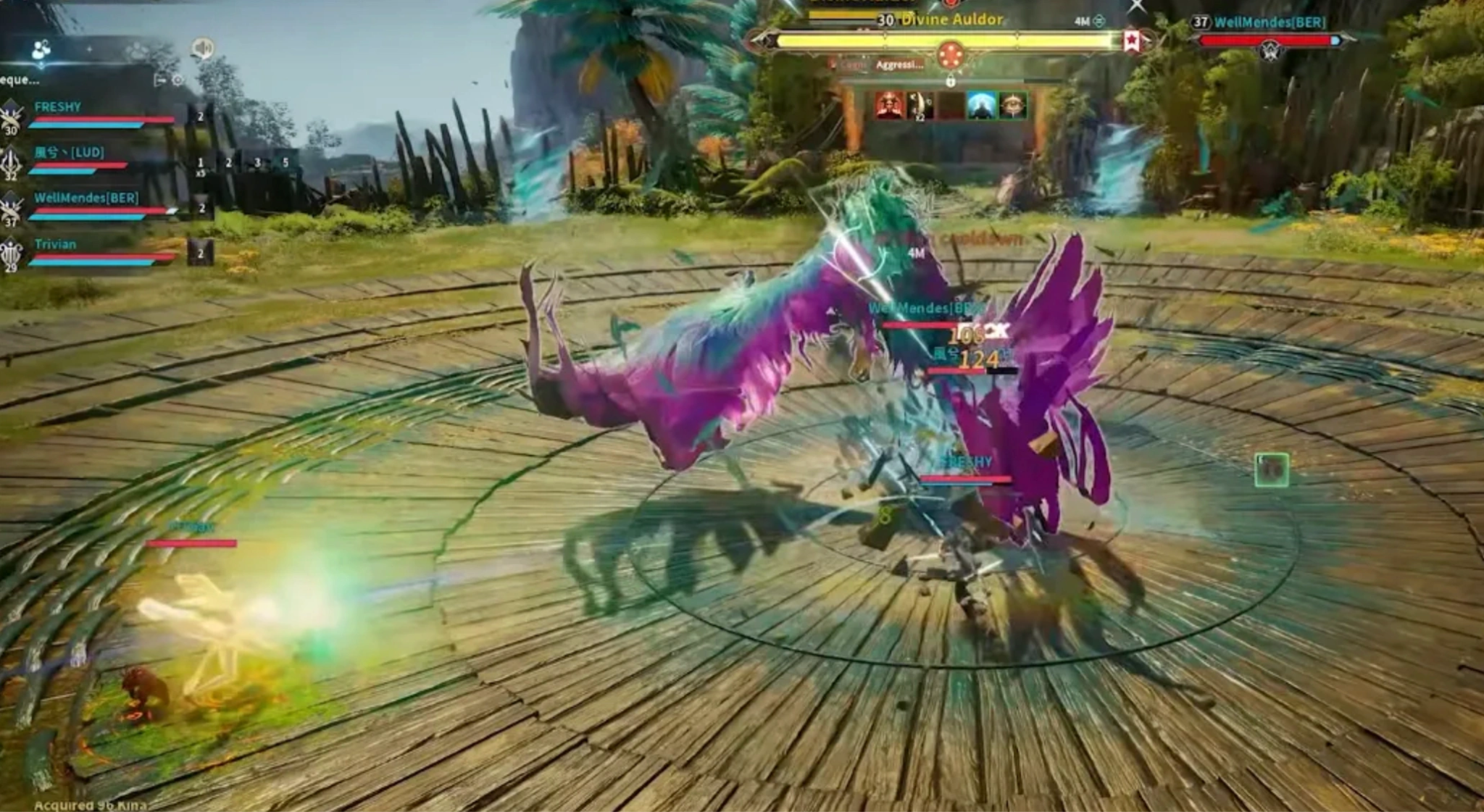
To accurately gauge your mechanical skill and analyze your combat efficiency on an individual level, follow these standard steps to monitor your personal performance within the game:
Step 1. Enable Personal Combat Logging
Navigate to your in-game settings menu and ensure that combat logging or personal performance metrics are toggled on. This allows the game to record your individual skill hits, critical strikes, and status condition ticks.
Step 2. Test Rotations on Training Dummies
Before entering high-stakes group content, visit a local faction training ground. Spend a few uninterrupted minutes executing your primary combat sequences against a static target to establish your personal baseline damage per second.
Step 3. Review Post-Instance Combat Data
After completing an encounter, check the localized personal summaries. Take note of your overall damage output, highest-hitting abilities, and critical strike percentages to evaluate how well you maintained your uptime during movement-heavy phases.
Part 4: How to Track Party Member Damage via LagoFast
Because the standard game interface leaves you completely in the dark regarding your allies, serious players utilize LagoFast to bridge the gap. Beyond its renowned network optimization features that eliminate packet loss and jitter, LagoFast features a dedicated, highly advanced Aion 2 Team Damage Tracker.
This tool functions seamlessly alongside your game client to capture and organize real-time combat telemetry for your entire group, transforming raw numbers into actionable tactical insights.
Key Features of LagoFast’s Team DPS Tracking Tool
- Real-Time Group Overlay: View a highly readable, real-time overlay directly on your screen that ranks all party members by their active damage contribution.
- Detailed Contribution Breakdown: Break down precise metrics to check damage contribution in Aion 2 down to specific skill choices, buff windows, and critical strike frequencies.
- Comprehensive Damage vs. DPS Contrast: Effortlessly compare total damage and real-time DPS to see who is maintaining consistent pressure versus who is only bursting occasionally.
- Inactivity & Slacking Alerts: Easily identify inactive / low-contribution players or spot Aion 2 inactive party member damage drops during intense movement phases.
Beyond DPS Tracking Tool, LagoFast is a game booster fixing the lag and other issues in the game and ensures smooth gaming performance.
Step-by-Step Tutorial to Use LagoFast to Track Party Member Damage:
Step 1: Click the Free Trial button to download and install LagoFast.
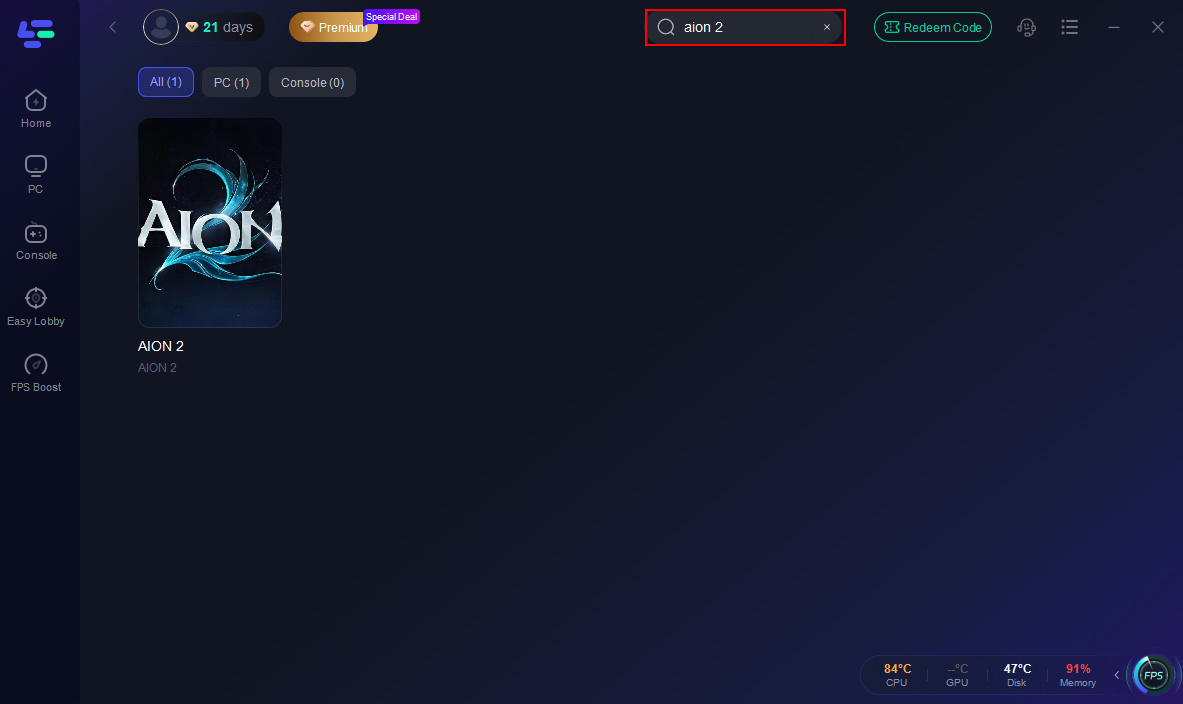
Step 2: Open LagoFast, then click the PC button on the left, search for Aion 2 in the search bar, and click it after it appears.
Step 3. Click the Real-time DPS Tracker in the Game tool Section.
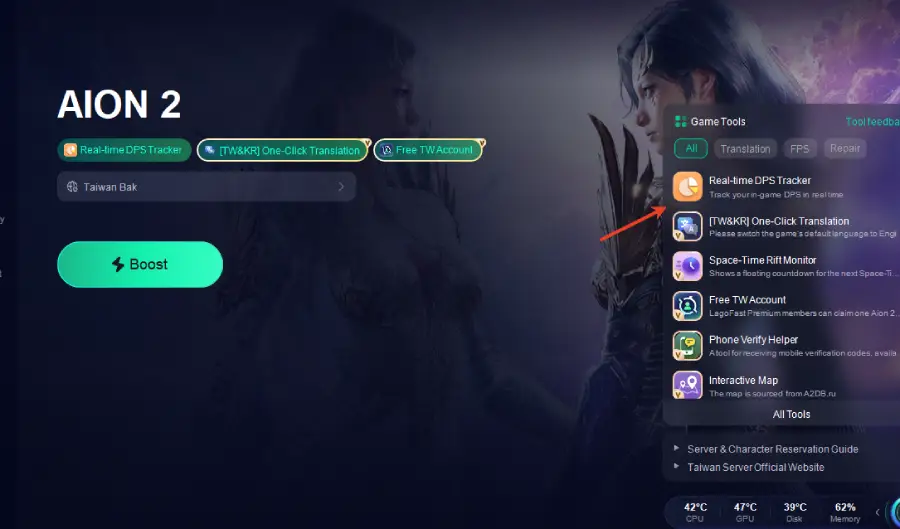
Step 4. Before launching the game, toggle the launch button of Team DPS Tracking Tool to "On."
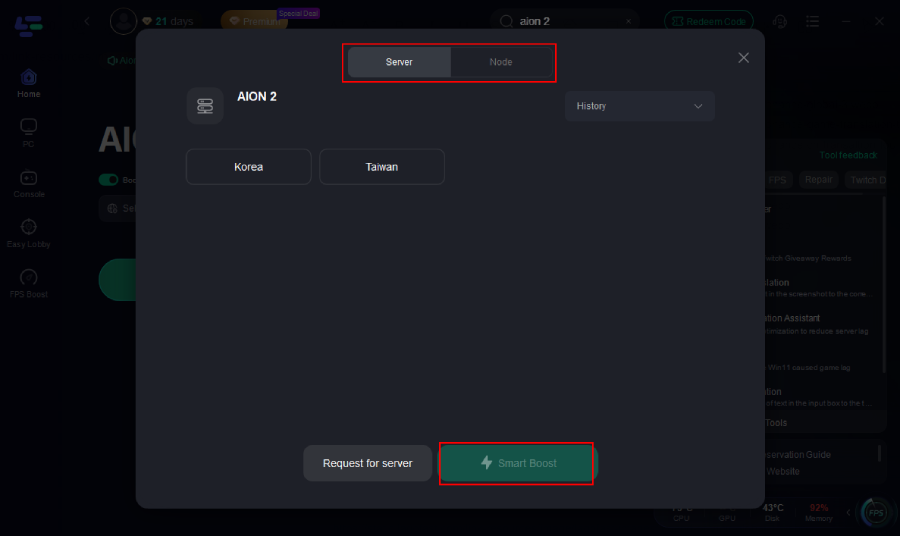
Step 5: Go back to the main interface and click on Server to change to a better server that ensures a better gaming experience, then click on Boost to fix Aion 2 lag and stuttering.
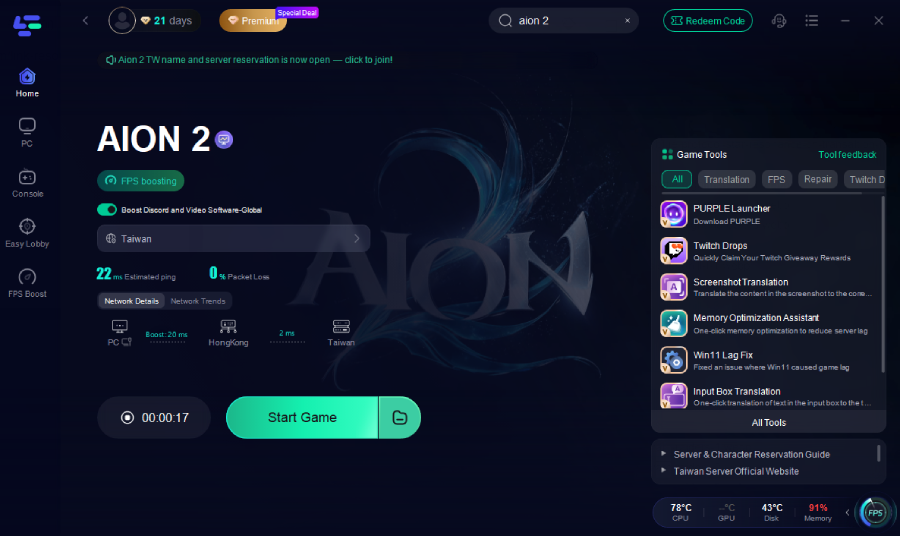
Step 6: Check the specific game ping, packet loss, and multiple path connections on the right side. Finally, click “Start Game” to play the game.
Part 5: How to Use DPS Stats for Dungeon Runs?
In Aion 2, dungeons generally refer to smaller-scale PVE content, such as 4-player or 6-player instances, daily challenges, and standard level-up scenarios. While these zones are less punishing than massive end-game activities, tracking your metrics here is critical for smooth, efficient farming.
Using an Aion 2 dungeon damage tracker during these runs allows your group to establish clear pacing. You can monitor how fast trash packs are melting, verify if your secondary damage dealers are contributing adequately, and figure out how to see who is doing damage during multi-target pulls. It turns repetitive daily dungeon runs into an optimized science, helping your squad clear instances faster and maximize hourly loot drops.
Part 6: How to Improve Your DPS After Reading the Data?
Once you have gathered your performance data from an instance, the real work begins. Raw numbers are only useful if you translate them into tangible gameplay adjustments.
Analyze Your Build and Skill Rotations
Look closely at your skill breakdown. If your total damage is low despite having high-tier gear, your skill priority sequence is likely out of order. Ensure you are chaining your combo paths correctly and maximizing the uptime of your self-buffs.
Compare Damage Before and After Gear Upgrades
Whenever you invest in a new weapon, socket new manastones, or upgrade your armor pieces, run the exact same instance again. Use your historical tracker data to compare damage after a gear upgrade, ensuring your financial investments are yielding real, practical returns in combat.
Adjust Positioning Around Aerial Mechanics
Aion 2 relies heavily on verticality and aerial movement. Look at your real-time DPS graph to see if your output plummets during flight phases. If it does, practice maintaining your combat positioning and executing your skills smoothly while airborne to eliminate those massive gaps in your damage timeline.
Part 7: FAQs
Can I see my party's damage natively in Aion 2?
No. The stock Aion 2 user interface only displays localized personal summaries or basic individual damage readouts. It does not contain an integrated, multi-user aion 2 party dps tracker to compare everyone's real-time performance simultaneously.
How do I see my party's damage in Aion 2 using external tools?
By running LagoFast in the background while you play. Its built-in combat analytics module hooks into the game’s local performance data stream to populate an on-screen group overlay, showing exactly how much damage each party member is producing.
Is using a third-party tracker safe from bans?
Yes, using LagoFast's built-in network and optimization overlay tools is completely safe. It functions as a diagnostic tool and performance enhancer that interprets data locally without modifying core game files or injecting malicious memory cheats into the game client.
How do I find low DPS party members in Aion 2 raids?
When utilizing an Aion 2 DPS tracker for raid scenarios, the real-time overlay lists all group members in descending order of total damage output. Anyone falling significantly below the tank's damage or lagging far behind similarly geared players will stand out immediately.
What is the difference between total damage and real-time DPS?
Total damage measures the absolute cumulative amount of health points you stripped from a target over an entire fight. Real-time DPS measures your immediate damage velocity per second. Comparing both helps you identify players who look good on paper but completely stop attacking during complex boss mechanics.
How can I tell if a party member is completely inactive?
By looking at the live tracker feed. If a teammate's real-time DPS drops to absolute zero or their total damage value freezes entirely during a boss fight, it indicates they are failing to hit their buttons, dealing with severe lag, or deliberately slacking through the encounter.
Conclusion
Succeeding in the challenging world of Aion 2 requires deep, empirical insight into how your team functions under pressure. Because the default client lacks an exhaustive party damage meter, utilizing LagoFast’s Team DPS Tracking tool is the absolute best way to monitor group contribution, refine your skills, and ensure every single party member is pulling their weight. Turn your data into victories, optimize your rotations, and conquer Atreia's toughest instances with absolute confidence.

Boost Your Game with LagoFast for Epic Speed
Play harder, faster. LagoFast game booster eliminates stutter and lags on PC, mobile, or Mac—win every match!
Quickly Reduce Game Lag and Ping!
Boost FPS for Smoother Gameplay!