

If you can't log in to AION 2 through PURPLE, first check where the problem happens. If PURPLE keeps rejecting your login or asking for verification, the issue is more likely related to your NC account, login session, or launcher. If PURPLE works but AION 2 won't connect, check the game servers and your network connection instead.
For KR/TW players, account region, verification, and cross-region connections can cause additional login problems.
This article stitches together real player reports from Reddit, plus the full breakdown from the Purple integration notice, and gives you the fastest working fixes, including the simple method most players ended up using. Let’s break down what’s happening.

- ✅ Reduce AION 2 Lag and High Ping.
✅ Boost FPS at the Same Time.
✅ Check Damage with AION 2 DPS Tracker.
✅ Change Server without Latency.
✅ Fix Disconnects & Connection Errors.
Part 1: Why Can't You Log In to AION 2 on PURPLE?
Part 2: Fix AION 2 PURPLE Login Failure with LagoFast
Part 3: Other Ways to Fix AION 2 PURPLE Launcher Login Issues
Part 4: Additional AION 2 PURPLE Login Fixes for KR/TW Players
Part 5: Steam vs PURPLE Login for AION 2
Part 6: AION 2 PURPLE Launcher Login FAQs
Part 1: Why Can't You Log In to AION 2 on PURPLE?
AION 2 players have reported several different PURPLE login problems. Some get stuck in a login or verification loop, while others can open PURPLE normally but cannot get past the AION 2 login screen.
Here are the most common situations:
|
What Players Are Seeing |
Possible Cause |
|
PURPLE keeps returning to the login screen |
Expired session or account authentication issue |
|
Verification keeps repeating |
NC account or login verification issue |
|
PURPLE opens but gets stuck loading |
Launcher cache or update problem |
|
AION 2 does not appear in PURPLE |
Account, region, or client issue |
|
PURPLE works but AION 2 won't log in |
AION 2 login server or network issue |
|
Login times out or shows a connection error |
Server overload, packet loss, or unstable routing |
PURPLE / PLAYNC Authentication Problems
Some players report being sent back to the PURPLE login screen or asked to verify repeatedly. This usually points to an account authentication or login-session issue.
Wrong Account or Region
AION 2 may be missing or unavailable in PURPLE when the account or client region does not match. This is especially relevant to KR/TW accounts.
Outdated or Corrupted PURPLE Launcher
If PURPLE gets stuck loading, signs you out, or stops displaying AION 2 correctly, the launcher may be outdated, or its cache may be corrupted.
AION 2 Login Server Problems
Players have reported repeated login attempts, Failed to Login, and being kicked back to PURPLE during heavy server traffic. Server congestion, maintenance, or an outage may be responsible.
Network, Firewall, or Routing Problems
Some players have encountered “Unable to connect to login server” even when PURPLE itself works. Packet loss, firewall interference, or unstable routing to the AION 2 servers may cause the connection to fail.
Part 2: How to Fix PURPLE Login Failure with One Click
If you want a faster fix before troubleshooting PURPLE manually, LagoFast provides a dedicated Fix PURPLE login failure tool for AION 2. It can help repair PURPLE login failures, login loops, timeout errors, and launcher-to-game authentication problems.
What LagoFast Can Help With
- Fix PURPLE Login Failure with One Click.
- Reduce Login Timeouts & Connection Errors.
- Optimize Routes to AION 2 Servers.
- Reduce Packet Loss & Unstable Connections.
- Reduce High Ping & Disconnects After Login.
Quickly Fix AION 2 PURPLE Login Failure with LagoFast
Step 1. Download and install LagoFast. Open LagoFast and sign in to your account.
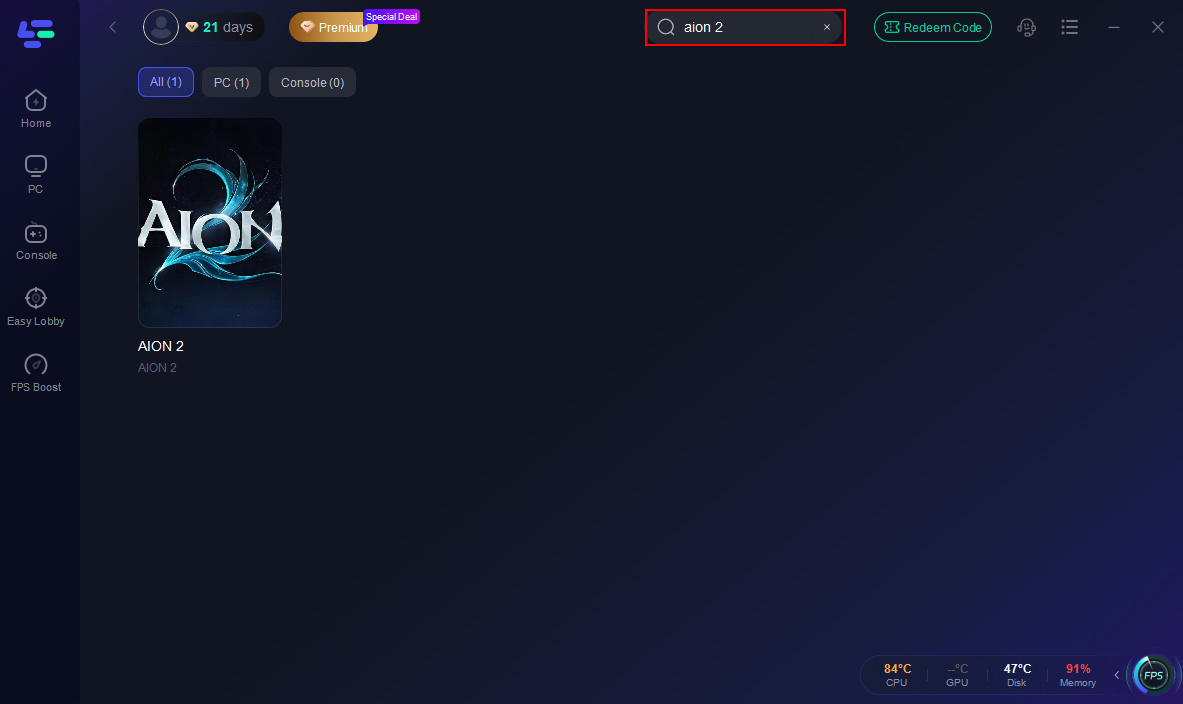
Step 2. Search for “AION 2.” Select AION 2 to enter its game page.
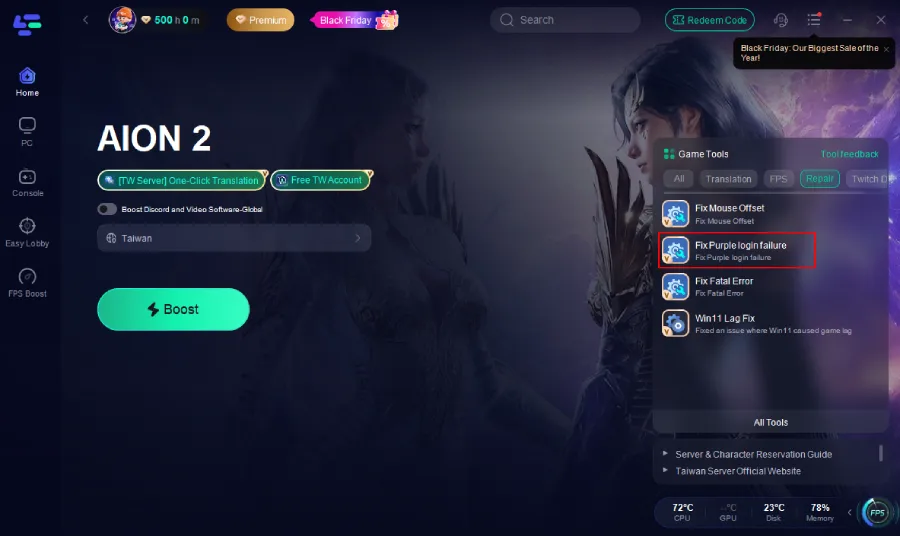
Step 3. Under Game Tools, select Fix Purple login failure.
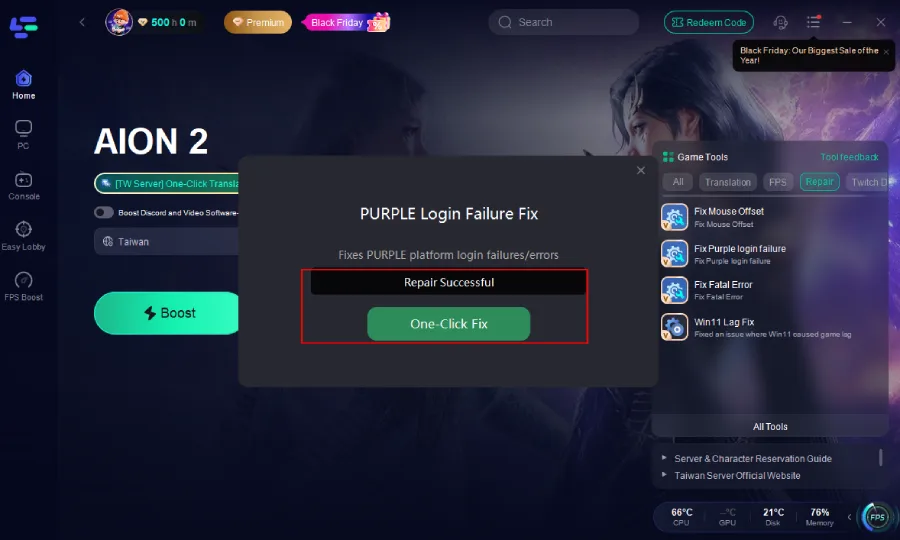
Step 4. Click One-Click Fix. Apply the repair and then reopen PURPLE to try logging in to AION 2 again.
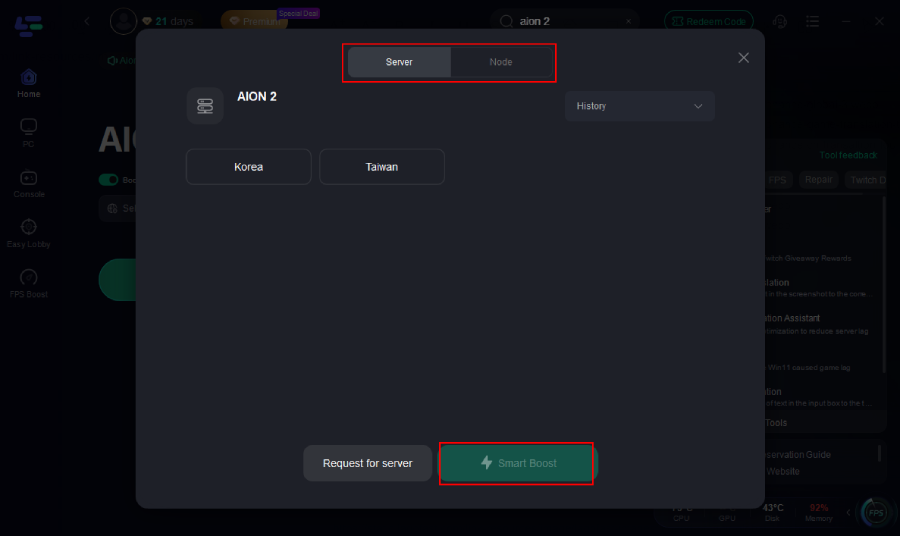
Step 5. Select your game server and click Boost to optimize the route when login timeouts, packet loss, or unstable routing are involved.
Tip: Playing KR/TW AION 2? If you can log in but have trouble understanding Korean or Traditional Chinese, LagoFast also provides One-Click Translation for quests, menus, skills, and other in-game text.
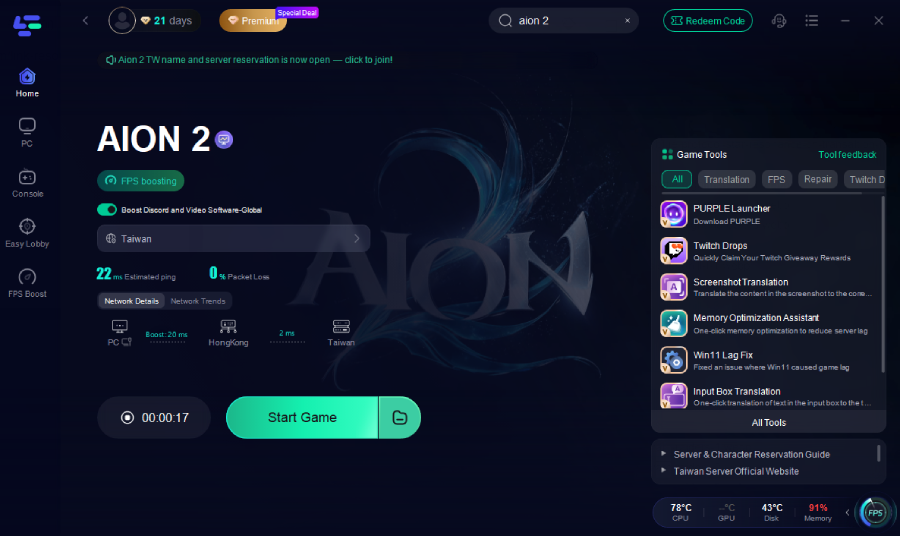
How to Fix AION 2 PURPLE Fatal Error
If PURPLE login succeeds but AION 2 crashes immediately after you click Start Game, this is a different problem from a login failure. Players may see a Fatal Error even after verifying game files or updating their GPU drivers.
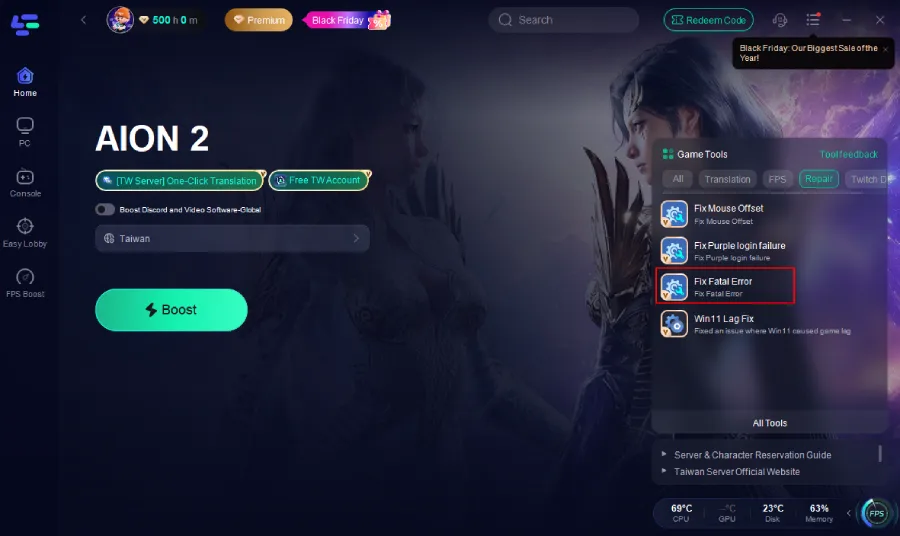
LagoFast also provides a dedicated Fix Fatal Error tool:
Step 1. On the AION 2 page, open Game Tools and select Fix Fatal Error.
Step 2. Click One-Click Fix.
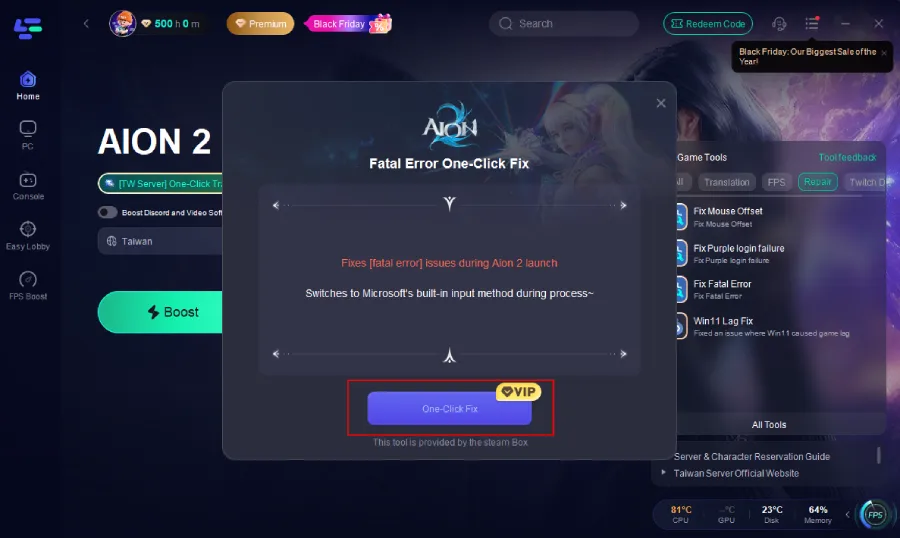
Step 3. Reopen PURPLE and launch AION 2 again
Part 3: Other Ways to Fix AION 2 PURPLE Launcher Login Issues
Start with the simplest fixes. You usually do not need to reinstall AION 2 or PURPLE immediately.
Fix 1: Check AION 2 Server Status
If PURPLE works but AION 2 suddenly shows Failed to Login or cannot connect, check for maintenance, outages, or heavy server traffic first. If many players are reporting the same issue, wait for the servers to recover before changing your PC settings.
Fix 2: Restart PURPLE and Log In Again
Fully exit PURPLE, including any remaining PURPLE processes in Task Manager, then reopen it and sign in again. This refreshes the login session and can fix temporary authentication errors.
Fix 3: Fix the PURPLE Login or Verification Loop
Some AION 2 players stuck in a locked-out or verification loop have reported success after switching their PURPLE account to Phone Login.
- Open PURPLE > Profile > Manage Account > Manage Login.
- Change the login method to Phone Login.
- Verify your phone number.
- Sign out and log back in with your phone number.
- Complete verification and retry AION 2.
Note: This is a community-reported workaround, not a guaranteed fix.
Fix 4: Update or Clear the PURPLE Cache
If PURPLE gets stuck loading, repeatedly signs you out, or fails to display AION 2 correctly, update the launcher first. You can also go to PURPLE Settings > General > Reset Cache, clear the cached data, and restart PURPLE.
Fix 5: Check Your Network Connection
Restart your router and use Ethernet if possible. You can also briefly test another network or mobile hotspot—if AION 2 logs in there, your original network or ISP route may be causing the problem.
Fix 6: Allow PURPLE and AION 2 Through Firewall
Open Windows Security > Firewall & network protection > Allow an app through firewall and make sure both PURPLE and AION 2 are allowed. Also check whether third-party antivirus software is blocking either program.
Fix 7: Flush or Change DNS
Open Command Prompt as administrator and run: ipconfig /flushdns
Restart PURPLE and try again. If login still fails, you can test a reliable public DNS such as Google DNS or Cloudflare DNS.
Fix 8: Repair AION 2 Game Files
If PURPLE logs in successfully but AION 2 fails after launching, use PURPLE's File Scan/Repair option to check for missing or corrupted game files.
Fix 9: Reinstall PURPLE
If the launcher itself still fails after updating and clearing its cache, reinstall PURPLE as the final launcher-side fix. Reinstalling will not solve an AION 2 server outage, account restriction, or network-routing problem.
Part 4: Additional AION 2 PURPLE Login Fixes for KR/TW Players
If you play AION 2 on the Korea or Taiwan servers, PURPLE login problems can also come from account region, verification, or cross-region connections.
Fix 1: Use the Correct KR/TW Account Region
Make sure your PURPLE account matches the service you want to access. For AION 2 TW, an incorrect account region can prevent the game from appearing or being accessible.
If you don't have a Taiwan account, LagoFast provides a Free TW Account Tool. Open AION 2 in LagoFast, select Free TW Account Tool > Claim Account, then copy the provided email and password to log in through PURPLE.
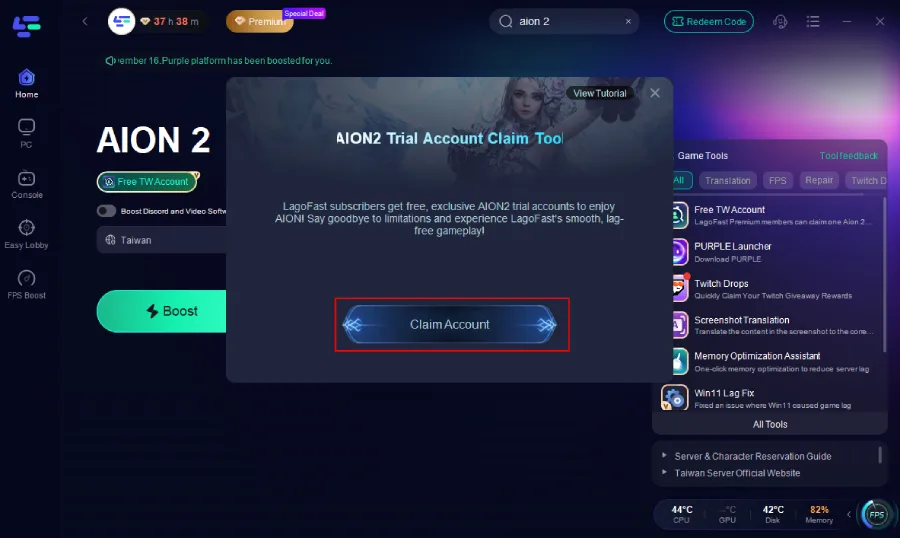
Fix 2: Complete Required Account Verification
If PURPLE keeps asking for SMS or phone verification, complete the required account verification first. If you are stuck in a verification loop, try switching your PURPLE login method to Phone Login, then sign in again.
Fix 3: Fix AION 2 Missing from PURPLE
If PURPLE works but AION 2 does not appear, check your account region before reinstalling the launcher. For TW players, try signing in with a Taiwan-region account through Global in PURPLE.
Fix 4: Fix Cross-Region PURPLE Login Problems with LagoFast
If PURPLE works but AION 2 shows “Unable to connect to login server,” your cross-region connection may be unstable. In LagoFast, select the AION 2 TW/KR server and click Boost to optimize the connection route and reduce login timeouts, packet loss, and unstable routing.
Part 5: Steam vs PURPLE Login for AION 2
AION 2 is available on PC through both Steam and PURPLE, so PURPLE is no longer the only PC launcher. KR/TW players primarily use PURPLE, while players in the newer supported regions can choose between Steam and PURPLE.
Do You Need PURPLE to Play AION 2?
Not always. If you play through Steam, you can launch AION 2 from Steam instead of the standalone PURPLE launcher. If you use PURPLE, the PURPLE-specific login fixes in this guide apply.
PURPLE Login Issues vs Steam Login Issues
|
Problem |
Check |
|
Can't sign in to PURPLE |
PURPLE / NC authentication |
|
PURPLE login loop |
Session / verification |
|
Steam won't launch AION 2 |
Steam / client |
|
Launcher works but AION 2 won't connect |
AION 2 login server / network |
|
Game starts but disconnects |
Game-server connection |
Can You Switch Between Steam and PURPLE?
Steam and PURPLE use different launch and authentication paths, and platform-specific purchases may also have restrictions. Check the latest account-linking rules before switching platforms or purchasing content.
For more details, see our AION 2 Steam vs PURPLE and AION 2 Steam Account Linking guides.
Part 6: AION 2 PURPLE Launcher Login FAQs
Q1: Why is AION 2 not showing in PURPLE?
Check your account and region settings first. KR/TW players have reported AION 2 appearing correctly after using an account registered for the intended region.
Q2: Why can I see AION 2 only when “See available games” is unchecked?
This can indicate that PURPLE does not consider the current account eligible for that AION 2 service. For KR/TW, check that your account was created with the correct region before reinstalling the launcher.
Q3: Can a network problem cause AION 2 PURPLE login failure?
Yes. Players have reported being able to sign into the PLAYNC website while PURPLE still returned “Try Again Later”, and some reported restoring access after changing the PURPLE connection route.
Q4: Can I play AION 2 TW through the Global region?
Yes. Players report that Global login + a Taiwan-region account can still access AION 2 TW.
Q5: Why does my old Taiwan account no longer show Taiwan?
Some players report that Taiwan no longer appears after PURPLE's regional changes. Check your account region first; using a Taiwan-region account through Global may restore access.
Conclusion
If you can't log in to AION 2 through PURPLE, first identify where the problem occurs: PURPLE → Account → AION 2 Login Server → Network. Try the general fixes first, while KR/TW players should also check account region, verification, and cross-region connections.
For a faster solution, LagoFast provides Fix Purple login failure and connection optimization tools to help resolve login failures, timeouts, and unstable routes to AION 2 servers.

Boost Your Game with LagoFast for Epic Speed
Play harder, faster. LagoFast game booster eliminates stutter and lags on PC, mobile, or Mac—win every match!
Quickly Reduce Game Lag and Ping!
Boost FPS for Smoother Gameplay!