
Quick Answer: Steam vs PURPLE for AION 2
For most players in officially supported regions (North America, South America, Europe, and Japan), Steam is generally the recommended platform due to its widespread use, integrated community features, and convenient payment options. However, if AION 2 is unavailable in your region on Steam, or if you plan to purchase a Founder’s Pack and anticipate upgrading to a higher tier later, PURPLE becomes the superior choice. PURPLE offers an alternative entry point for some region-locked players and is currently the only platform that allows Founder’s Pack upgrades. Regardless of your choice, both platforms connect to the same game servers, ensuring you play with the entire global community.

- ✅ Reduce Lag and High Ping.
✅ Boost FPS at the Same Time.
✅ Support 3000+ Popular Online Games.
✅ Change Server without Latency.
✅ Boost Game Loading Speed.
Part 1: AION 2 Steam vs PURPLE: Quick Comparison
Part 2: Is AION 2 Available on Both Steam and PURPLE?
Part 3: Does AION 2 on Steam Require an NC Account?
Part 4: Does the Steam Version Launch Through PURPLE?
Part 5: Do Steam and PURPLE Share Characters and Progress?
Part 6: How Early Access Works on Steam and PURPLE
Part 7: AION 2 Founder’s Pack on Steam vs PURPLE
Part 8: AION 2 Payments on Steam vs PURPLE
Part 9: Steam vs PURPLE Download and Update Experience
Part 10: Can You Use PURPLE If AION 2 Is Unavailable on Steam?
Part 11: Which Platform Should You Choose for AION 2?
Part 12: How to Enhance Your Game Experience with LagoFast Game Booster
Part 13: AION 2 Steam vs PURPLE FAQ
AION 2 Steam vs PURPLE: Quick Comparison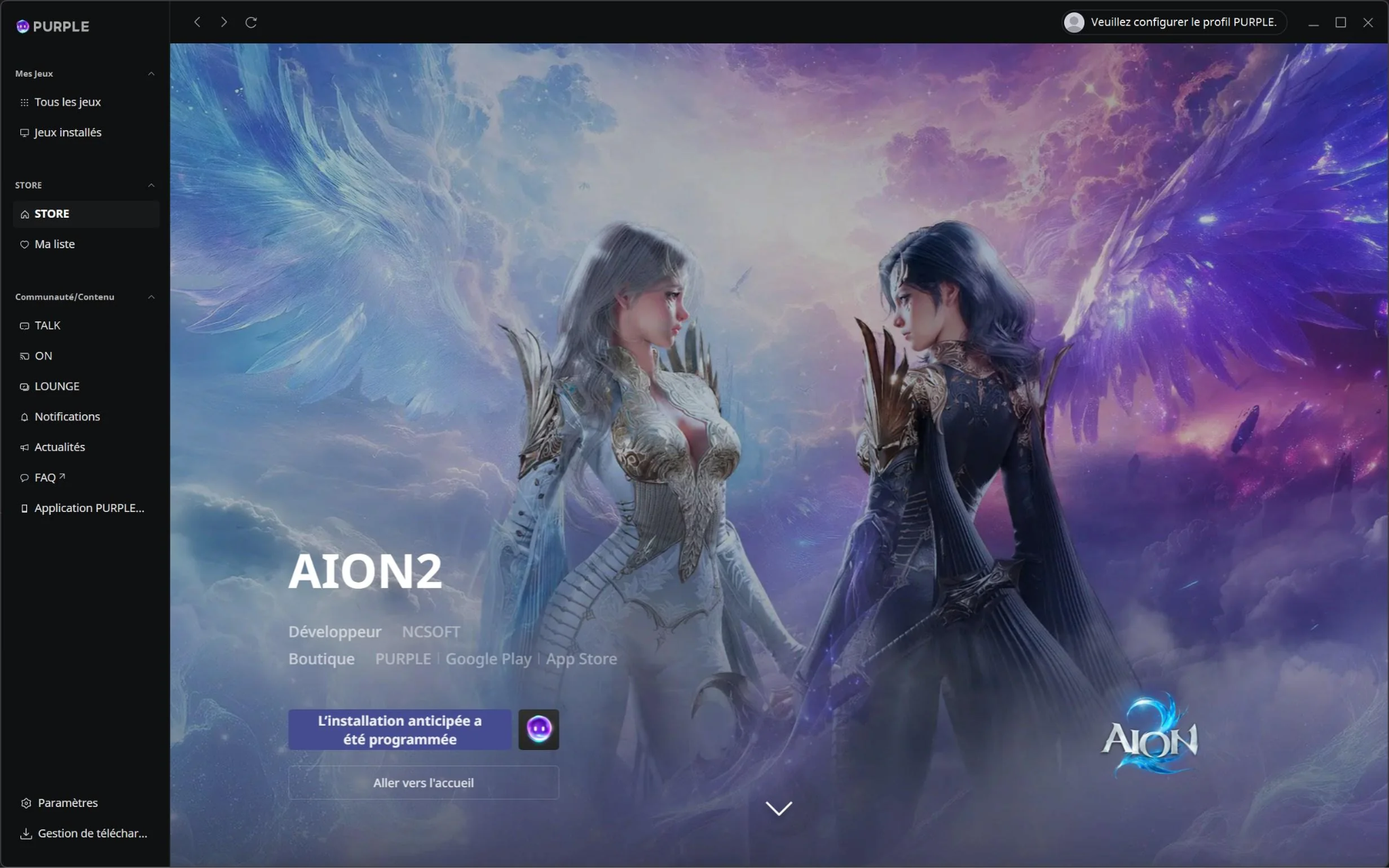
Choosing the right platform for AION 2 involves weighing convenience, regional access, and future flexibility. Here’s a quick overview:
Best Platform for Most Players
For the majority of players in regions where AION 2 is fully available on Steam, Steam offers a more familiar and integrated experience. It provides easy access to your existing friends list, Steam Wallet, and a robust community hub. The download and update process is typically seamless, and game time tracking is automatic.
Best Option for Existing PURPLE Players
If you already have an active NCSoft PURPLE account from other games like Lineage or the original AION, or if you prefer NCSoft’s native launcher, then PURPLE is a natural fit. It offers direct access to NCSoft’s ecosystem and may provide a more consistent experience if you play other NCSoft titles.
Best Option If AION 2 Is Unavailable on Steam
For players in regions where AION 2 is unavailable on Steam due to regional restrictions, PURPLE can serve as a viable alternative entry point. While not a guaranteed bypass for all service restrictions, PURPLE often operates under different regional policies, potentially allowing access where Steam does not. This is particularly relevant for European players facing unexpected Steam region locks.
Steam vs PURPLE Comparison Table
|
Feature |
Steam |
PURPLE |
|
Game Access |
Via Steam Store & Client |
Via PURPLE Launcher |
|
NC Account Required |
Linked automatically (seamless) |
Direct PLAYNC login required |
|
Founder's Pack Upgrade |
Not supported (tier is binding) |
Supported (pay the difference) |
|
Payment Methods |
Steam Wallet (Global & Local) |
NCSoft Direct (Credit Card/Xsolla) |
|
Regional Pricing |
Dynamic (Valve's system) |
Fixed (NCSoft's regional tiers) |
|
Community Features |
Steam Friends, Hub, Achievements |
PURPLE-specific social tools |
|
Launcher Requirement |
Standalone (No PURPLE needed) |
Standalone (No Steam needed) |
|
Early Access Date |
September 30, 2026 |
September 30, 2026 |
|
Cross-Play |
Yes (Same servers as PURPLE) |
Yes (Same servers as Steam) |
|
Cross-Progression |
Linked via NC Account |
Linked via NC Account |
Is AION 2 Available on Both Steam and PURPLE?
Yes, NCSOFT has confirmed that the global version of AION 2 will be available on both Steam and their proprietary PURPLE launcher. This dual-platform release offers players flexibility in how they access the game.
AION 2 Global on Steam
AION 2 has an official Steam store page, where players can wishlist the game. The Steam version is expected to launch globally in September 2026. Steam offers the convenience of an integrated platform, allowing players to manage their game library, connect with friends, and utilize Steam’s payment systems.
AION 2 Global on PURPLE
NCSOFT’s PURPLE launcher is another official platform for AION 2. PURPLE is NCSoft’s native PC client, designed to provide a direct connection to their games and services. Players can access AION 2 through PURPLE, which may be particularly beneficial for those who already use PURPLE for other NCSoft titles or are in regions where Steam access might be restricted.
Do Steam and PURPLE Players Use the Same Servers?
Yes, NCSOFT has confirmed that players from both Steam and PURPLE will connect to the same game servers. This means that regardless of which platform you choose, you will be playing with the entire global community. This is a significant advantage, as it avoids fragmenting the player base and ensures a healthy population across all regions.
Do the Two Platforms Launch at the Same Time?
While both platforms are expected to launch the global version of AION 2 in September 2026, the exact timing of the early access period (starting September 30, 2026) and the full free-to-play launch in early October will be synchronized across both Steam and PURPLE. This ensures that players who purchase Founder’s Packs on either platform receive their early access benefits simultaneously.
Does AION 2 on Steam Require an NC Account?
The relationship between Steam and NC accounts for AION 2 is a common point of confusion for players. Here’s how it generally works:
Steam Account and PLAYNC Account Requirements
Currently, the AION 2 Steam version does not require players to pre-register a separate NC account. When you launch AION 2 through Steam, it will likely use a seamless integration that links your Steam account to a backend NCSoft profile without requiring a separate login. This is a common practice for games launched on Steam by other publishers.
How Steam Account Linking May Work
Typically, when you launch an NCSoft game via Steam for the first time, a prompt will appear asking you to link your Steam account to an existing PLAYNC account or create a new one. This process usually happens once. After the initial link, you can launch the game directly from Steam without needing to log into a separate NC account each time.
Can You Use an Existing PURPLE Account?
If you already have a PLAYNC account associated with PURPLE, you might be able to link your Steam account to that existing NC account. This would allow you to consolidate your game progress and purchases under a single NCSoft identity. However, specific details on this linking process for AION 2 have not been fully clarified by NCSoft.
What Happens If You Link the Wrong NC Account?
Linking the wrong NC account can lead to complications, especially regarding game progress and purchases. If such an issue arises, you would typically need to contact NCSoft support to unlink and relink accounts, which can be a time-consuming process. It’s always best to be careful during the initial linking phase.
Does the Steam Version Launch Through PURPLE?
This is a critical question for many players, especially those concerned about having multiple launchers running or dealing with potential conflicts.
Is PURPLE Required After Installing AION 2 on Steam?
No, if you purchase and install AION 2 through Steam, you will not be required to install or launch the game through the PURPLE launcher. The Steam version is designed to be a standalone client that launches directly from Steam. This means you won't need to have PURPLE running in the background or installed on your system if you choose the Steam version.
Steam Client vs PURPLE Launcher
Each platform acts as its own client and launcher. If you buy on Steam, you launch from Steam. If you buy on PURPLE, you launch from PURPLE. The two platforms operate independently in terms of game client management, downloads, and updates. However, as mentioned, they both connect to the same game servers.
What Has Not Yet Been Officially Confirmed
While the general principle is that Steam versions do not require a separate launcher, NCSoft has not explicitly detailed every technical aspect of the AION 2 Steam integration. It is always advisable to check official announcements closer to launch for any specific requirements or changes.
Do Steam and PURPLE Share Characters and Progress?
While Steam and PURPLE players share the same game servers, the question of shared characters and progress is distinct and depends on how NCSoft implements account linking.
Shared Servers vs Shared Account Access
As confirmed, all players will be on the same game servers. This means you will encounter players regardless of their chosen platform. However, shared servers do not automatically imply shared account access or cross-progression.
Can You Use the Same Character on Both Platforms?
Typically, if your Steam account is linked to the same underlying PLAYNC account that you use for PURPLE, you should be able to access the same characters and progress from either platform. This is a common feature in games that offer dual-platform access. However, this functionality needs to be explicitly supported by the publisher.
Can You Switch Platforms After the Full Launch?
If cross-progression is supported (i.e., your characters and progress are tied to your NC account, not just the platform), you should be able to switch between Steam and PURPLE after the full launch. For example, if you start playing on Steam and later decide you prefer the PURPLE client, you could theoretically download the game via PURPLE, log in with your linked NC account, and continue playing with your existing characters.
Cross-Progression and Cross-Platform Access Explained
- Cross-Progression: Your game progress (characters, items, achievements) is saved to a central account (in this case, your PLAYNC account) and can be accessed from any linked platform.
- Cross-Platform Access: The ability to play the game on different platforms (PC via Steam, PC via PURPLE) using the same game account.
While AION 2 supports cross-platform access to the same servers, explicit confirmation of full cross-progression (using the exact same character on both Steam and PURPLE interchangeably) is still pending from NCSoft.
How Early Access Works on Steam and PURPLE
The 5-day early access period for AION 2 begins on September 30, 2026, and is a key benefit of purchasing a Founder’s Pack. How this access is granted and managed differs slightly between Steam and PURPLE.
Early Access Is Tied to the Purchase Platform
If you purchase a Founder’s Pack on Steam, your early access is granted through your Steam account. Similarly, if you buy it on PURPLE, your early access is tied to your PURPLE account. This means you must launch the game through the platform where you made the purchase to utilize your early access.
Can a Steam Founder’s Pack Be Used on PURPLE?
No. Founder’s Packs are platform-locked. A pack bought on Steam is playable only through Steam, and a pack bought on PURPLE only through PURPLE. This applies to the 5-day advance access itself. You cannot use a Steam-purchased Founder’s Pack to gain early access via the PURPLE launcher, and vice-versa.
Can a PURPLE Founder’s Pack Be Used on Steam?
No, for the same reason as above. The entitlements from a Founder’s Pack are specific to the platform of purchase. This means if you want to play AION 2 through Steam during early access, you must buy your Founder’s Pack on Steam.
What Happens After the Five-Day Early Access Period?
After the 5-day early access period concludes, the game will transition to its full free-to-play launch in early October. At this point, all players (including those who did not purchase a Founder’s Pack) will be able to download and play the game. The platform-locked nature of the Founder’s Pack early access remains, but the game itself becomes generally accessible.
AION 2 Founder’s Pack on Steam vs PURPLE
The Founder’s Packs offer various rewards and early access, but there are critical differences in how they are handled on Steam versus PURPLE.
Founder’s Pack Prices and Regional Pricing
The prices for the Standard ($24.99), Deluxe ($49.99), and Ultimate ($99.99) Founder’s Packs are consistent across both platforms in USD. However, regional pricing on Steam will vary based on local currencies and exchange rates. PURPLE may also offer regional pricing, but this is less transparent than Steam’s system.
Payment Methods
- Steam: Utilizes the Steam Wallet, which supports a wide array of payment methods, including credit cards, PayPal, and various local payment options. This offers significant convenience for many players.
- PURPLE: Typically relies on NCSoft’s own payment processing, which may include credit cards, specific regional payment gateways, or other methods. Players should check PURPLE’s supported payment options for their region.
Refund Policies
Both platforms adhere to their respective refund policies. Founder’s Packs are generally refundable up to the official game launch. After launch, refunds are typically eligible within 14 days, provided you have played less than 2 hours and have not claimed any bundled items. It is crucial to review Steam’s and PURPLE’s refund policies before purchasing.
Founder’s Pack Rewards
The contents of the Founder’s Packs (early access, supply chests, cosmetics) are identical regardless of whether you purchase them on Steam or PURPLE. However, as noted, these rewards are tied to the platform of purchase.
Which Platform Should You Use to Buy Early Access?
If you anticipate wanting to upgrade your Founder’s Pack to a higher tier later, you must purchase it on PURPLE. PURPLE is currently the only platform that offers upgrade products (e.g., Standard to Deluxe for $25). Steam buyers have no announced upgrade path, making their initial tier choice binding.
AION 2 Payments on Steam vs PURPLE
Understanding the payment ecosystem for AION 2 is crucial, especially for in-game purchases and subscriptions.
Steam Wallet and Steam Payment Methods
If you play AION 2 on Steam, all in-game purchases, including future memberships, Battle Passes, and premium currency (Quna), will likely be processed through the Steam Wallet. This means you can use any payment method supported by Steam, and your purchases will be tied to your Steam account.
PURPLE Payment Methods
For players on PURPLE, all purchases will go through NCSoft’s own payment system. This typically involves direct credit card payments, regional payment services, or other methods supported by NCSoft. These purchases will be tied to your PLAYNC account.
Membership and Battle Pass Purchases
Both membership subscriptions and Battle Passes (Daeva Passes) will be separate purchases from the Founder’s Packs. If you play on Steam, you’ll buy these through Steam. If you play on PURPLE, you’ll buy them through PURPLE. The entitlements are platform-specific.
Premium Currency and Regional Pricing
Premium currency (Quna) will also be purchased separately. Regional pricing for Quna and other in-game items may vary between Steam and PURPLE, as well as across different geographical regions.
Are Purchases Shared Between Platforms?
No. Purchases made on Steam (e.g., Quna, Battle Pass) are generally not transferable or usable on the PURPLE client, and vice-versa. The purchasing ecosystems are segregated. This means if you buy a Founder’s Pack on Steam, any subsequent in-game purchases should also be made through Steam to ensure they are applied to your game account.
Steam vs PURPLE Download and Update Experience
The technical aspects of downloading and updating AION 2 also present some differences between Steam and PURPLE.
Download Speed and Preload
Both platforms offer robust download infrastructure. Steam is known for its global content delivery network, often providing fast download speeds. PURPLE, as NCSoft’s dedicated launcher, is also optimized for their games. Preload options (downloading the game before launch) are typically available on both platforms.
Automatic Updates
Both Steam and PURPLE offer automatic game updates, ensuring your client is always up-to-date. Steam integrates updates seamlessly into its client, while PURPLE manages updates for NCSoft games directly.
File Verification and Repair
Both platforms provide tools to verify game files and repair corrupted installations, which can be helpful for troubleshooting issues without needing to re-download the entire game.
Game Time Tracking and Achievements
Steam automatically tracks your playtime and offers a comprehensive achievement system. PURPLE may have its own playtime tracking and achievement system, but it will be separate from Steam’s. If Steam achievements are important to you, playing on Steam is the clear choice.
Friends List and Community Features
Steam boasts a massive social network with an integrated friends list, chat, and community hubs. PURPLE has its own social features, but they are typically limited to other PURPLE users and NCSoft games. For broader social interaction, Steam is generally preferred.
Can You Use PURPLE If AION 2 Is Unavailable on Steam?
This is a critical question for European players and others facing Steam region locks. PURPLE can sometimes offer an alternative, but it’s not a guaranteed bypass for all restrictions.
When PURPLE May Provide an Alternative Entry Point
PURPLE may provide a viable entry point if the restriction is at the Steam store or Steam package level. This means if Steam simply isn’t displaying the game or preventing its purchase, but NCSoft’s global service does support your region, PURPLE might allow you to download and play. This is because PURPLE operates independently of Steam’s regional content distribution.
When PURPLE Will Not Bypass a Service Restriction
PURPLE will not bypass a service restriction if the game itself is IP-blocked by NCSoft in your region, or if your PLAYNC account country does not match a supported service territory. If NCSoft has explicitly decided not to offer AION 2 in your country, neither Steam nor PURPLE will allow you to play.
PLAYNC Account Country Requirements
PURPLE relies on your registered PLAYNC account country. If your account is registered in a country not supported by the AION 2 global service, you may still face restrictions, even if you can download the PURPLE client. Creating a new PLAYNC account with a supported region might be necessary, but this can have its own complications.
How to Check AION 2 Global Availability on PURPLE
To check if AION 2 is available via PURPLE in your region, look for these indicators:
- The PURPLE client can be downloaded and installed in your region.
- You can successfully register a PLAYNC account.
- AION 2 is displayed in your PLAYNC account library.
- The AION 2 global version allows entry from your region.
- Founder’s Packs are normally sold in your region.
- You can complete payment for purchases.
- You are able to log in to the game servers after launch.
If any of these steps fail, PURPLE may not be a viable alternative for you.
Which Platform Should You Choose for AION 2?
Your choice of platform for AION 2 ultimately depends on your individual circumstances and priorities.
Choose Steam If You Want Steam Wallet and Community Features
If you value the convenience of the Steam Wallet, the integrated friends list, and the broader Steam community, and AION 2 is available in your region on Steam, then it is the most straightforward choice.
Choose PURPLE If Steam Is Unavailable in Your Region
If you are in a region where AION 2 is blocked on Steam, PURPLE offers a potential alternative. However, be aware that PURPLE itself may have regional restrictions, and it’s not a guaranteed solution for all service blocks.
Choose the Platform Used for Your Founder’s Pack
If you have already purchased a Founder’s Pack, you must use the platform where you bought it to access your early access and rewards. Remember, Founder’s Packs are platform-locked.
Choose the Same Platform as Your Existing Account and Purchases
If you have an existing PLAYNC account with other NCSoft games or purchases, using PURPLE might offer better integration. Conversely, if most of your gaming is on Steam, sticking with Steam for AION 2 makes sense.
How to Enhance Your Game Experience with LagoFast Game Booster
Whether you choose Steam or PURPLE, optimizing your connection is crucial for a smooth AION 2 experience. LagoFast(LagoFast Game Booster - Get No Lag and Lower Ping) Game Booster is a powerful tool that can significantly reduce ping, stabilize connections, and even help overcome regional barriers.
Why LagoFast is Essential for AION 2:
- Global Acceleration: LagoFast optimizes your network route to AION 2 servers, regardless of your location. This is vital for reducing ping, minimizing skill delay, and preventing frustrating rubberbanding, especially for players connecting to distant servers (e.g., SEA/OCE players to Japan servers).
- Region Lock Bypass (Exclusive Steam Account): For paid LagoFast subscribers, the service offers access to exclusive Steam accounts that are pre-configured for regions where AION 2 is available. This allows players in otherwise restricted areas to bypass Steam region locks and access the game without complex manual workarounds.
- One-Click Translation: If you find yourself playing on a server with a different primary language (e.g., the Japan server), LagoFast provides a one-click translation tool. This feature translates in-game text, helping you navigate menus, understand quests, and communicate more effectively.
- Launcher Issue Fixes: LagoFast includes one-click fixes for common issues like "PURPLE Login Fail" or "Fatal Error" messages, ensuring a smoother launch experience for players using the PURPLE client.
Detailed Steps to Use LagoFast Game Booster:
Click the Free Trial button to download and install LagoFast Free Trial.
Register and Subscribe: Open the LagoFast application and either create a new account or sign in. Ensure you have an active subscription to access all premium features, including the exclusive Steam account access.
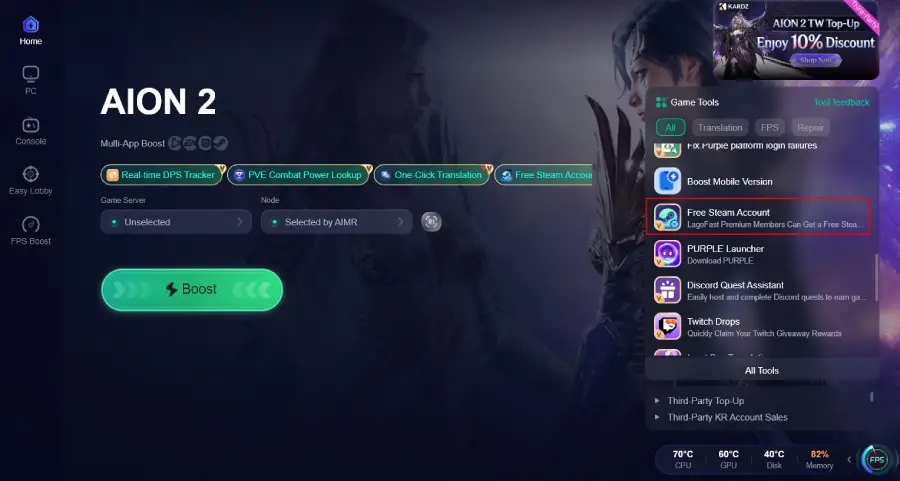
Access Region Lock Bypass (if needed): If AION 2 is region-locked on your personal Steam account, utilize LagoFast’s built-in tool to access a pre-configured Steam account that can play the game.
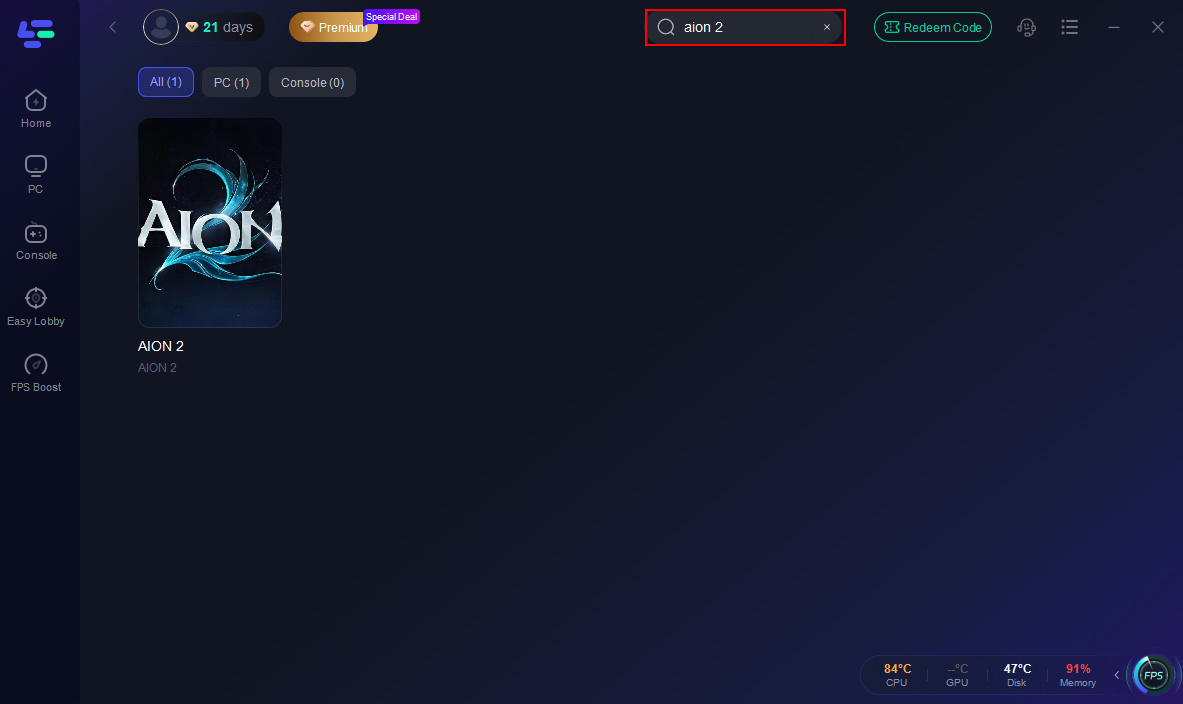
Search for AION 2: In the LagoFast interface, use the search bar to find "AION 2" from the list of supported games.
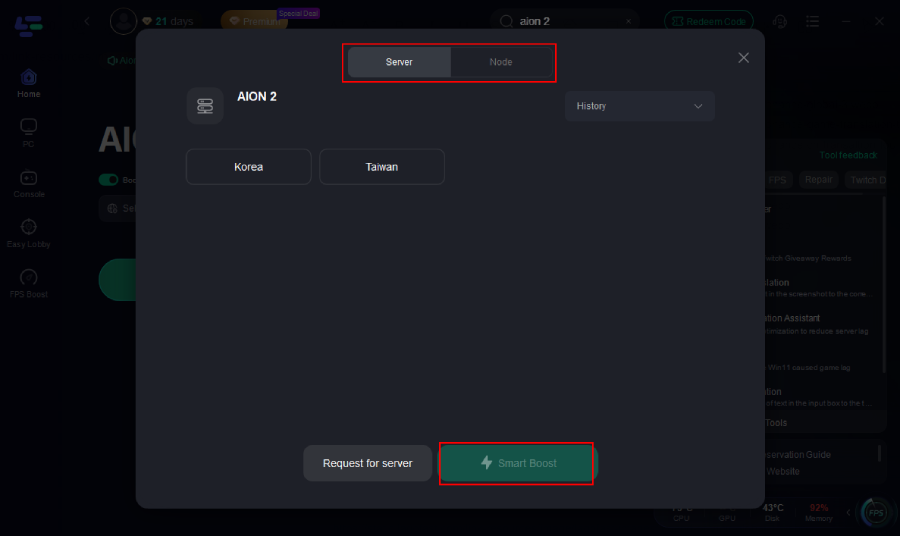
Select Your Server Region: Choose the AION 2 server region you intend to play on (e.g., North America, Europe, Japan). LagoFast will automatically detect and recommend the best route.
Activate Translation (if needed): If playing on a foreign-language server, activate the one-click translation tool within LagoFast.
Start Boosting: Click the "Boost" button. LagoFast will optimize your network connection, routing your game traffic through the most efficient path.
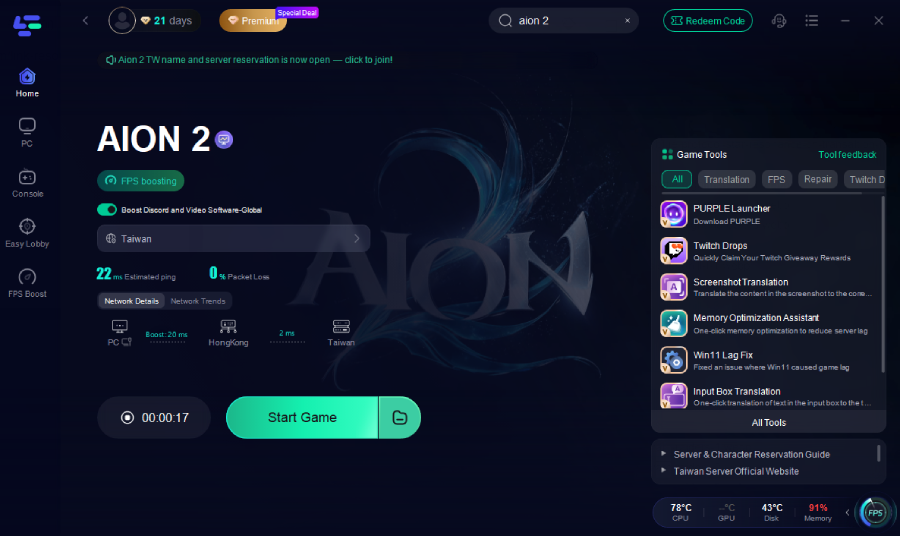
Launch Your Game: Launch AION 2 via Steam (using the provided account if necessary) or PURPLE. You should experience significantly reduced ping, stable gameplay, and seamless access.
Related Article: AION 2 Playtest guide
AION 2 Steam vs PURPLE FAQ
Can I transfer my AION 2 Founder’s Pack from Steam to PURPLE?
No, Founder’s Packs are platform-locked. A pack bought on Steam is only usable on Steam, and a pack bought on PURPLE is only usable on PURPLE.
Are there any exclusive in-game items for playing on Steam or PURPLE?
NCSoft has not announced any platform-exclusive in-game items or cosmetics. The Founder’s Pack contents are identical across both platforms, though tied to the platform of purchase.
If I buy AION 2 on Steam, do I still need to install PURPLE?
No, if you purchase and install AION 2 through Steam, you will not need to install or launch the game through the PURPLE launcher. The Steam version is a standalone client.
Can I upgrade my Founder’s Pack on Steam?
Currently, no upgrade path has been announced for Steam purchases. Founder’s Pack upgrades are only available on PURPLE, allowing players to pay the difference to a higher tier.
What if AION 2 is not available in my country on Steam?
If AION 2 is region-locked on Steam, you may be able to access it via the PURPLE launcher, provided NCSoft’s global service supports your region. Additionally, LagoFast Game Booster offers a solution by providing access to exclusive Steam accounts for region-locked players.
Will my ping be better on Steam or PURPLE?
The platform itself (Steam or PURPLE) does not directly affect your ping, as both connect to the same game servers. Your ping is determined by your geographical distance to the server and your internet routing. However, LagoFast Game Booster can optimize your connection regardless of the platform.
Key Takeaway
Choosing between Steam and PURPLE for AION 2 depends on your regional access, desire for Founder’s Pack upgrades, and preference for platform features. While Steam offers broad convenience, PURPLE provides an alternative for region-locked players and the only path for Founder’s Pack upgrades. For an optimized, lag-free, and accessible experience, especially for those facing regional restrictions, LagoFast Game Booster is an invaluable tool that can bridge the gap between platforms and ensure you can fully immerse yourself in Atreia.

Boost Your Game with LagoFast for Epic Speed
Play harder, faster. LagoFast game booster eliminates stutter and lags on PC, mobile, or Mac—win every match!
Quickly Reduce Game Lag and Ping!
Boost FPS for Smoother Gameplay!