
In the vast open-world of Wuthering Waves, exploration lies at the heart of the gameplay. With its sprawling landscapes, hidden treasures, and dynamic challenges, navigating efficiently is key to unlocking the game’s full potential. This guide delves into the critical role of interactive maps in enhancing your gaming experience, highlights the best Wuthering Waves interactive map tool available, and introduces LagoFast Game Booster—a comprehensive solution to optimize your gameplay further.

- ✅ Reduce Lag and High Ping.
- ✅ Boost FPS at the Same Time.
- ✅ Change Server Without Latency.
- ✅ One-Click Translation Tool.
- ✅ End All Connection Issues.
- ✅ Multiplatform: PC, Mobile, Console
Part 1. Why You Need an Interactive Map in Wuthering Waves?
Part 2. Best Wuthering Waves Interactive Map Tool
Part 3. Enhance Your Wuthering Waves Gaming Experience with LagoFast
Part 1. Why You Need an Interactive Map in Wuthering Waves?
Wuthering Waves’ open-world design demands precision and strategy. From tracking loot to locating bosses and hidden quests, an interactive map serves as your compass in this immersive universe. Here’s why it’s indispensable:
- Effortless Exploration: The game’s 2.3 update (released on April 29, 2025) introduced new regions like Avinurim, where gravity-defying mechanics and complex puzzles await. An interactive map helps you navigate these areas efficiently, avoiding aimless wandering and saving time. Whether scaling cliffs or traversing mist-shrouded forests, real-time map data ensures you stay on track.
- Resource Management: Collecting key materials—essential for character progression—requires pinpoint accuracy. Interactive maps mark spawn points for rare resources, ensuring you maximize your collection without missing a single drop. No more wasted hours searching for elusive items; the map directs you straight to high-yield zones.
- Boss Tracking: Elite enemies like the Sighing Ancient Dragon and Avernus Guardians have specific spawn patterns and respawn timers. A map with real-time boss alerts lets you plan battles strategically, preparing gear and squad compositions in advance to avoid unnecessary defeats.
- Quest Efficiency: Hidden quests often rely on environmental triggers or obscure objectives. Interactive maps highlight mission start points, ensuring you never miss story-driven rewards or lore fragments. From deciphering ancient runes to solving puzzles, the map acts as your silent guide.

Part 2. Best Wuthering Waves Interactive Map Tool
While several tools exist, LagoFast Game Booster stands out as the best Wuthering Waves interactive map tool for mobile players. Here’s why it’s the top choice:
- Real-Time Tracking & Overlay: LagoFast’s interactive map integrates seamlessly with the game, allowing you to mark loot, bosses, and hidden quests mid-battle. The overlay feature stays active during gameplay, providing instant access to critical information without pausing or switching apps. This is especially useful in dynamic combat scenarios where split-second decisions can mean victory or defeat.
- Multi-Language Support: This map tool supports multiple languages, you can switch according to your language. This feature eliminates language barriers for global players, making exploration and combat more intuitive.
- Effortless Toggle Functionality: The map can be toggled on or off with a single hotkey or controller button, allowing you to focus on combat without distraction. Whether you need to check your position during a boss fight or quickly reference hidden quest locations, the map adapts to your playstyle instantly.
- Performance Optimization: Unlike heavy third-party map tools that drain battery and cause lag, LagoFast is lightweight and efficient. It runs without compromising gameplay performance, keeping your device cool and responsive.
How to Get Wuthering Waves Interactive Map on Mobile with LagoFast:
Step 1: Search “LagoFast Mobile booster” in the App Store or Google Play., or scan the following QR codes.

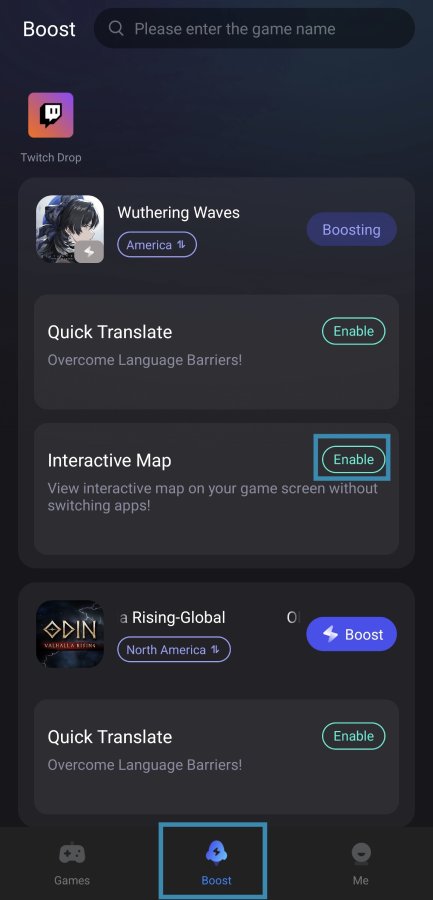
Step 2: In the LagoFast app, navigate to the Boost tab. Find Wuthering Waves and toggle the Enable button next to Interactive Map.
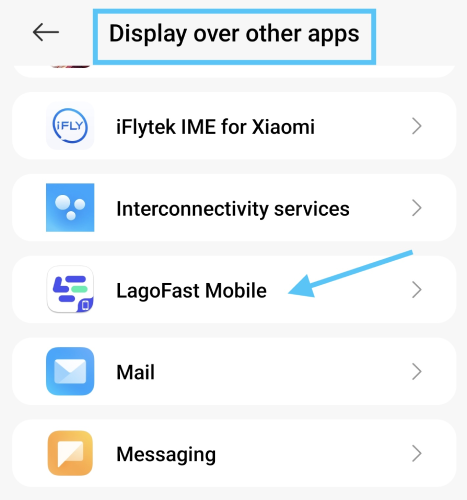
- First-time users: Grant LagoFast screen overlay permissions when prompted.
Step 3. Access the Map In-Game
- Rotate your device to landscape mode for optimal viewing. Then tap the Map icon to open the interactive map.
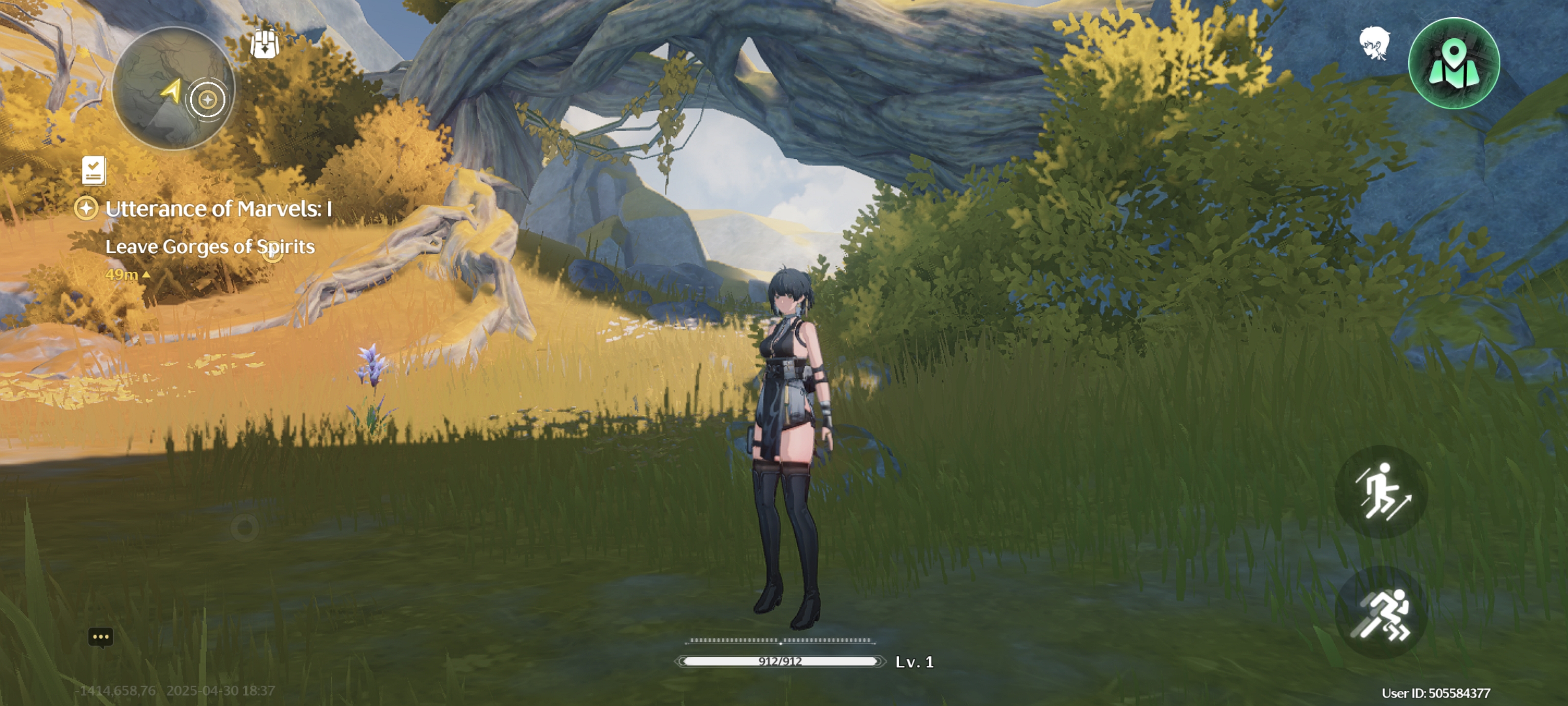
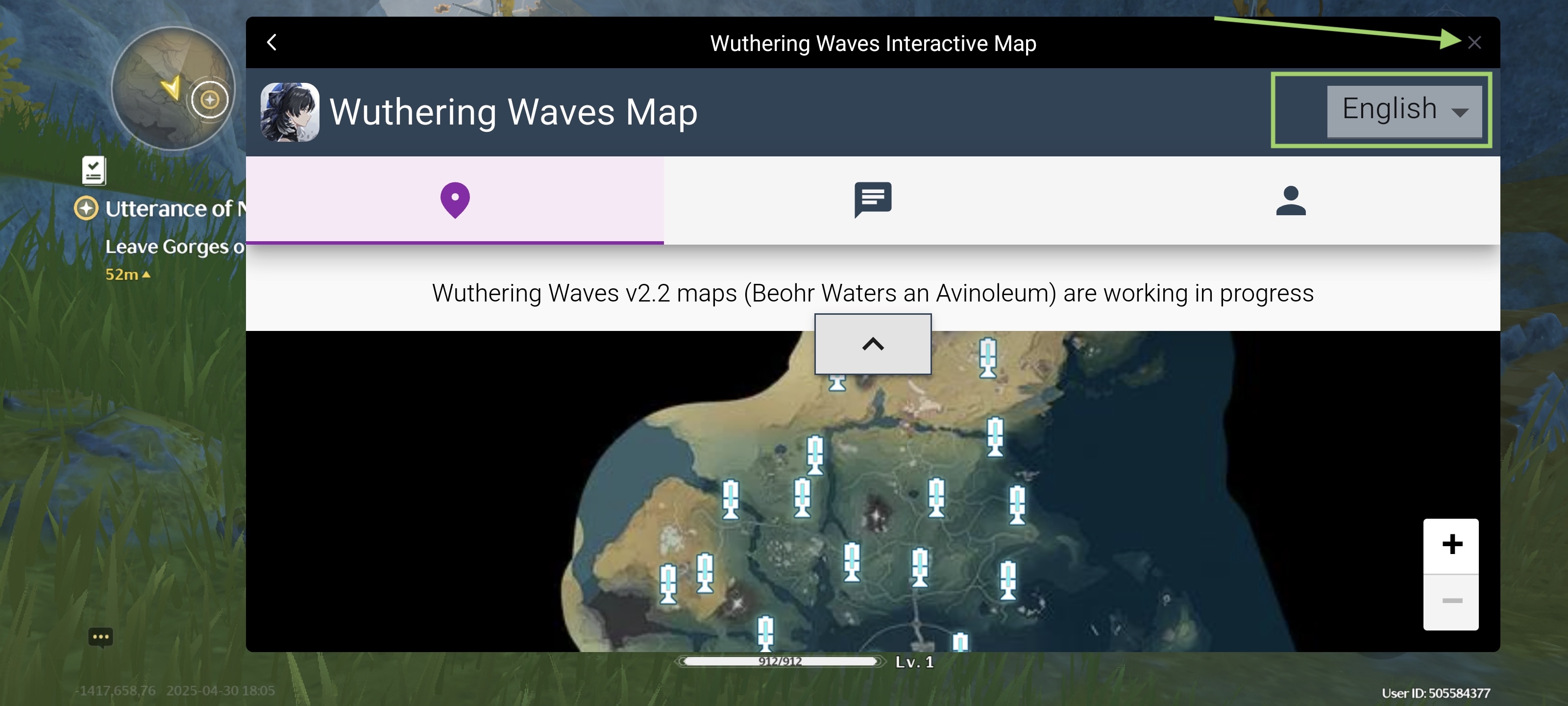
- Use it to locate loot, bosses, and hidden quests in real time—even mid-battle! You can switch the language here. And tap the "x" to close the map overlay.
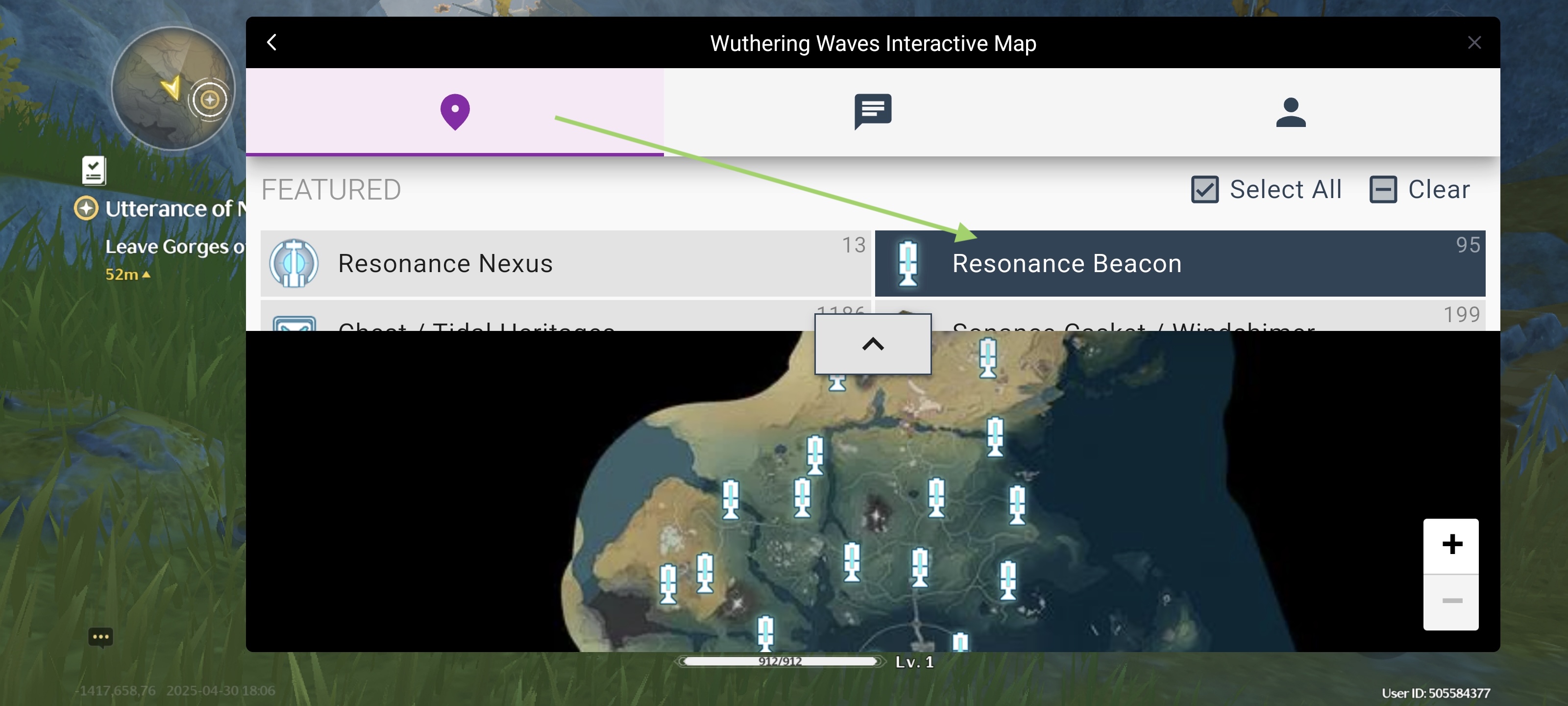
- Here you can select the specific loot you wanna track.
Part 3. Enhance Your Wuthering Waves Gaming Experience with LagoFast
LagoFast Game Booster doesn't just offer an interactive map—it’s an all-in-one tool designed to elevate every aspect of your Wuthering Waves journey.
- Lag Reduction & Ping Fix: Advanced network optimization algorithms stabilize your connection, eliminating lag and high ping issues. This is crucial for fast-paced combat, where input delay can lead to missed combos or failed dodges.
- One-Click Server Switching: Access global servers with a single click, reducing matchmaking times and connecting you with players worldwide. Whether you prefer low-latency regional servers or exploring international communities, LagoFast makes it seamless.
- Real-Time In-Game Translation: Support for Russian, Arabic, Turkish, Portuguese, Thai, Vietnamese, and Indonesian ensures you understand every quest description, dialogue, and item tooltip. The translation tool works in real-time, breaking down language barriers for non-English speakers.
- Cross-Platform Compatibility: Whether you play on mobile or PC, LagoFast’s translation and map features sync across devices, providing a unified experience. No need to adjust to different interfaces—your settings and preferences carry over seamlessly.
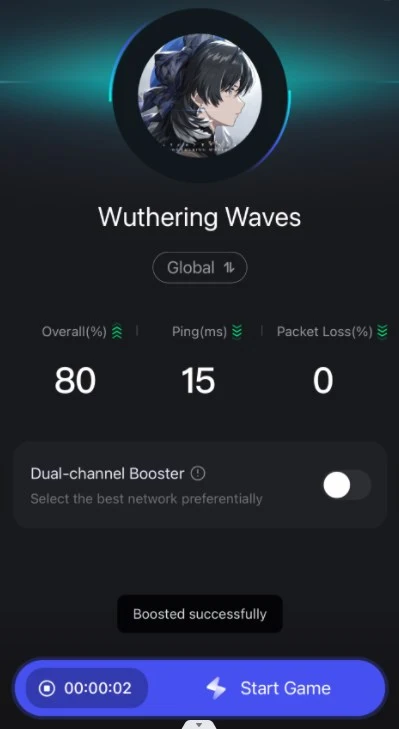
How to Boost Wuthering Waves on Mobile with LagoFast:
Step 1: Search “LagoFast Mobile booster” in the App Store or Google Play., or scan the following QR codes.
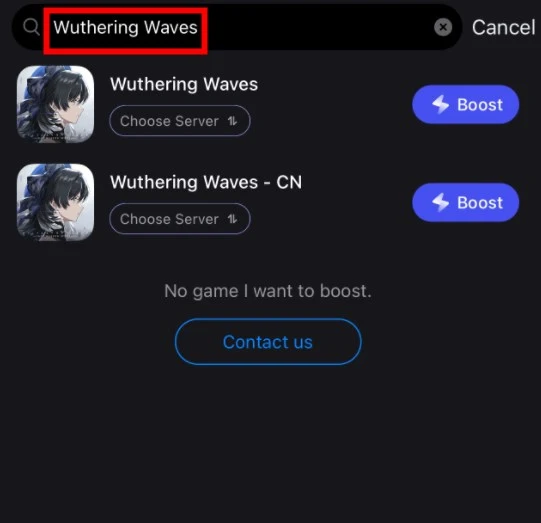
Step 2: Select and click the Wuthering Waves in the interface.
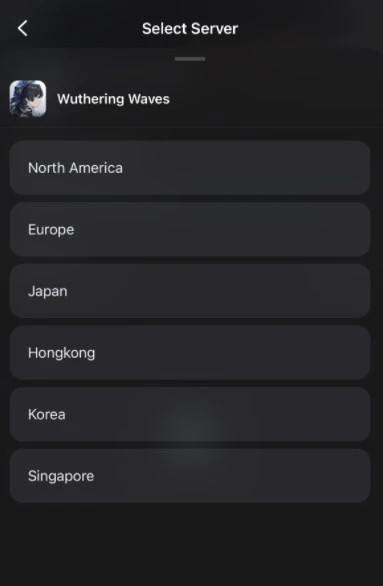
Step 3: Enter the Severs selection interface where you can change to Chinese Server, then click the “Boost” button to enhance the gaming experience.
Step 4: Finally, go back to Wuthering Waves and start playing it without any lag.
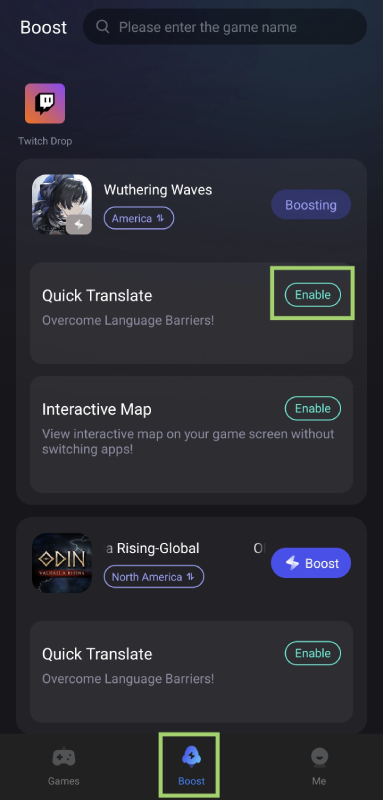
How to Get Wuthering Waves Text Translation on Mobile:
Step 1: Go to Boost tab, find Wuthering Waves and tap the enable button to activate the translation tool.
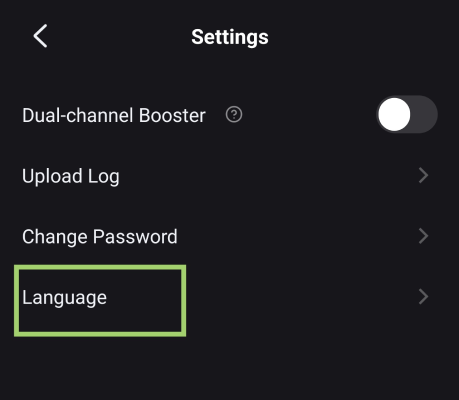
Step 2. Customize Translation Language
- Select your preferred language (e.g., English, Spanish) in the LagoFast app. The tool will translate the language in-game to the language you used on LagoFast.
- You can adjust the language of LagoFast in LagoFast > Me > Settings > Language.
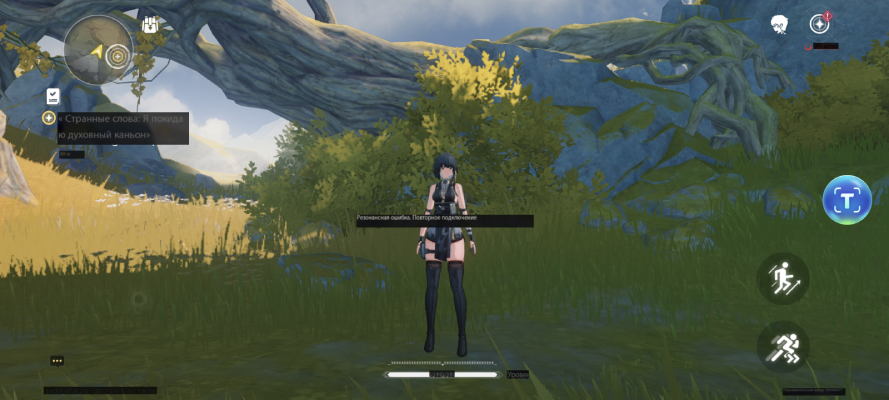
Step 3. Translate in Game
- Tap the translation tool icon in-game when you need to translate the language. It will grab the text and show the translation version on your screen
How to Boost Wuthering Waves on PC with LagoFast:
Step 1: Click the Free Trial button to download and install LagoFast.
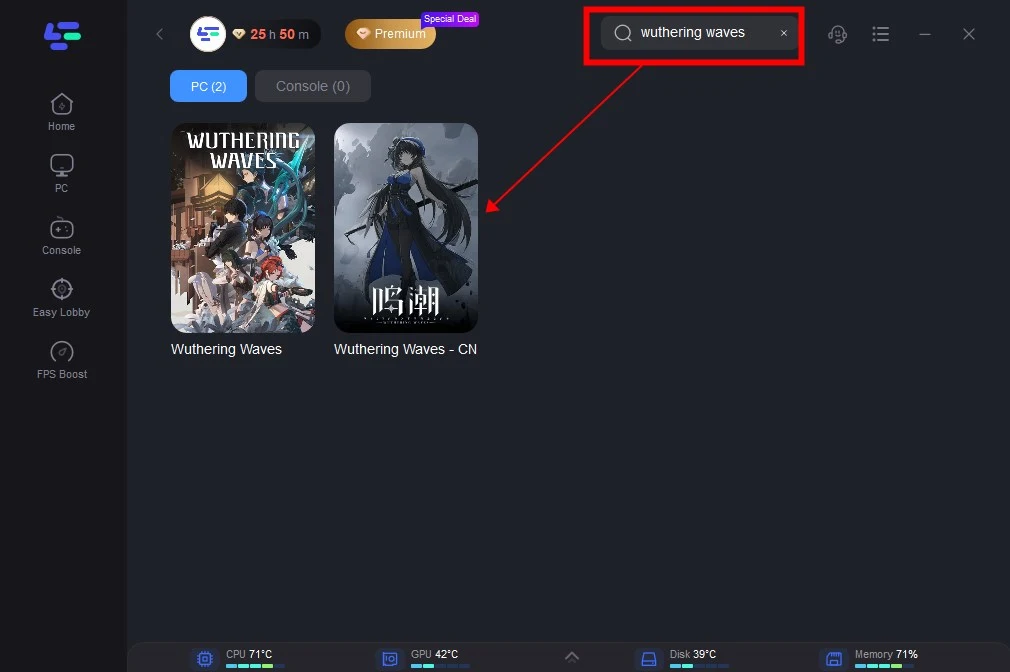
Step 2: Open LagoFast then click the PC button on the left and search Wuthering Waves in the search bar, click it after appearing.
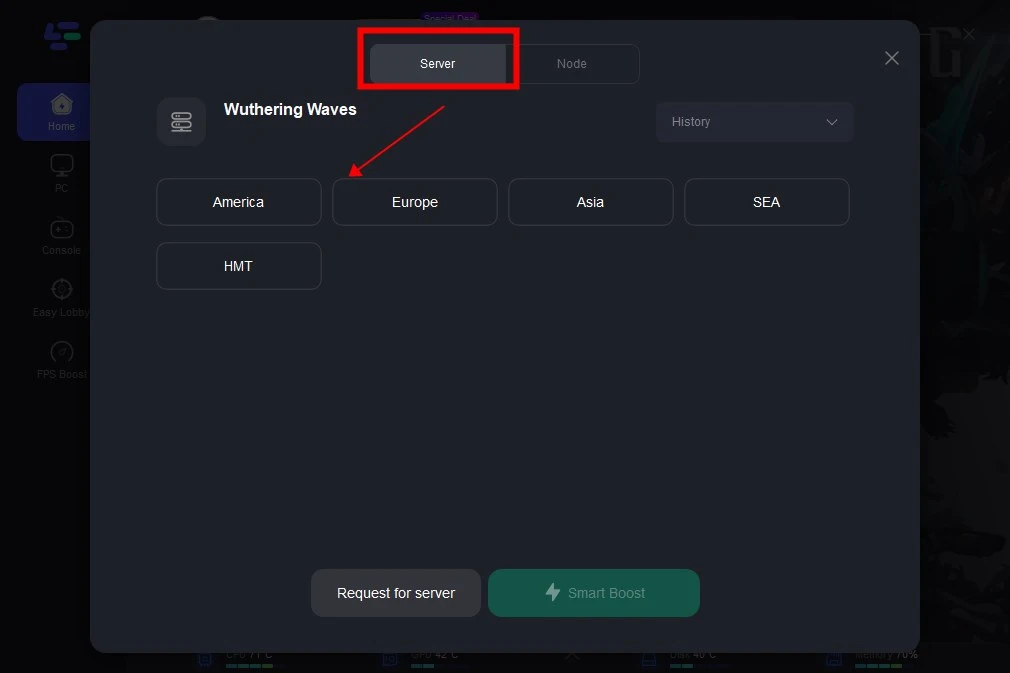
Step 3: Click on “Server” to change to a better server that ensures the gaming experience, then click on “Smart Boost”.
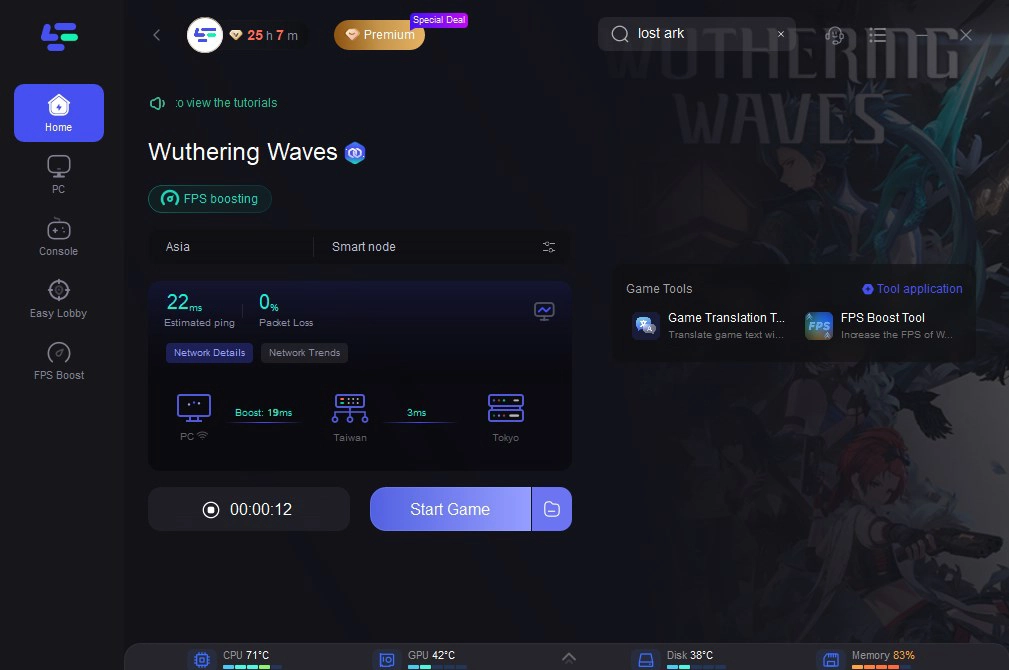
Step 4: Check the specific game ping, packet loss, and multiple path connection on the right side. Finally, click the “Start Game” to play the game.
How to Get Wuthering Waves Text Translation on PC:
Step 1. Activate smart boost and click the Game Translation Tool on the right.
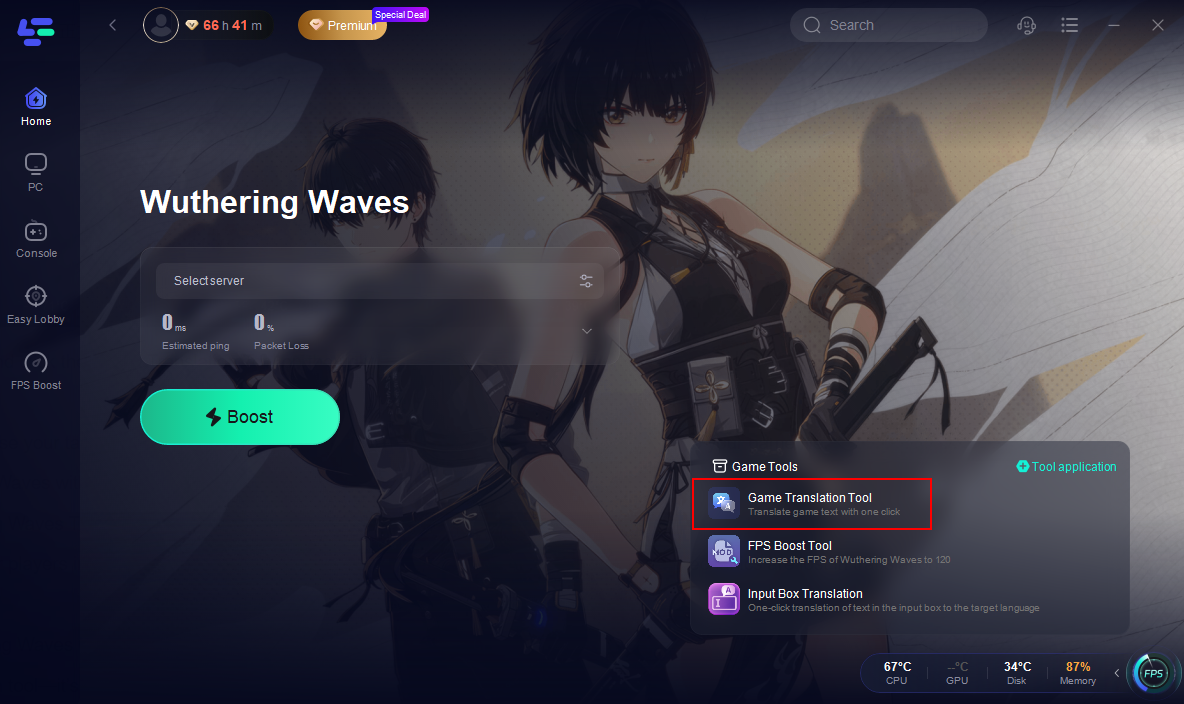
Step 2. Click confirm. LagoFast will automatically install the translated text into your game file.
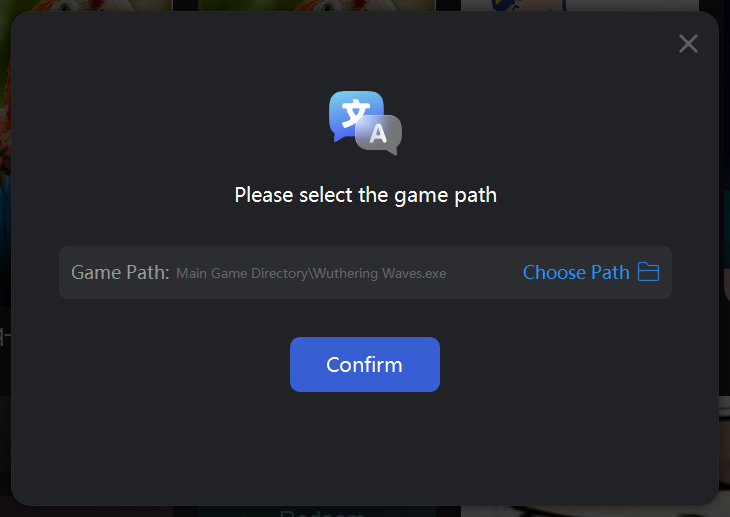
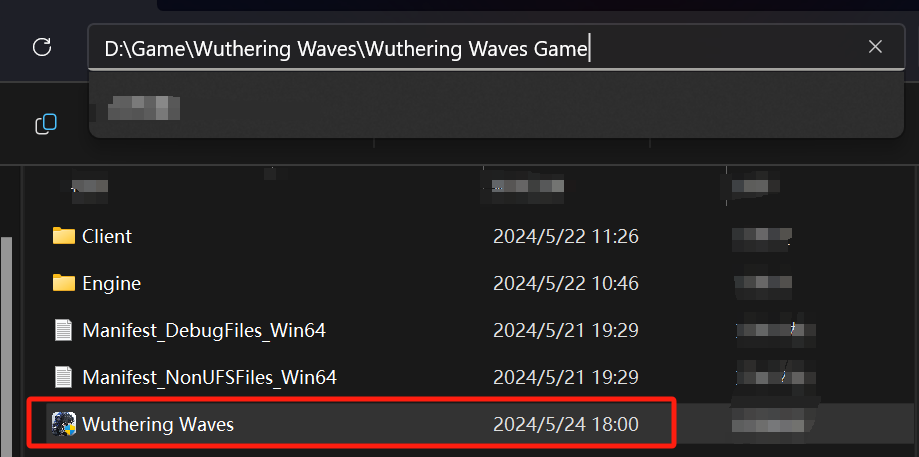
Step 3. Choose your target language.
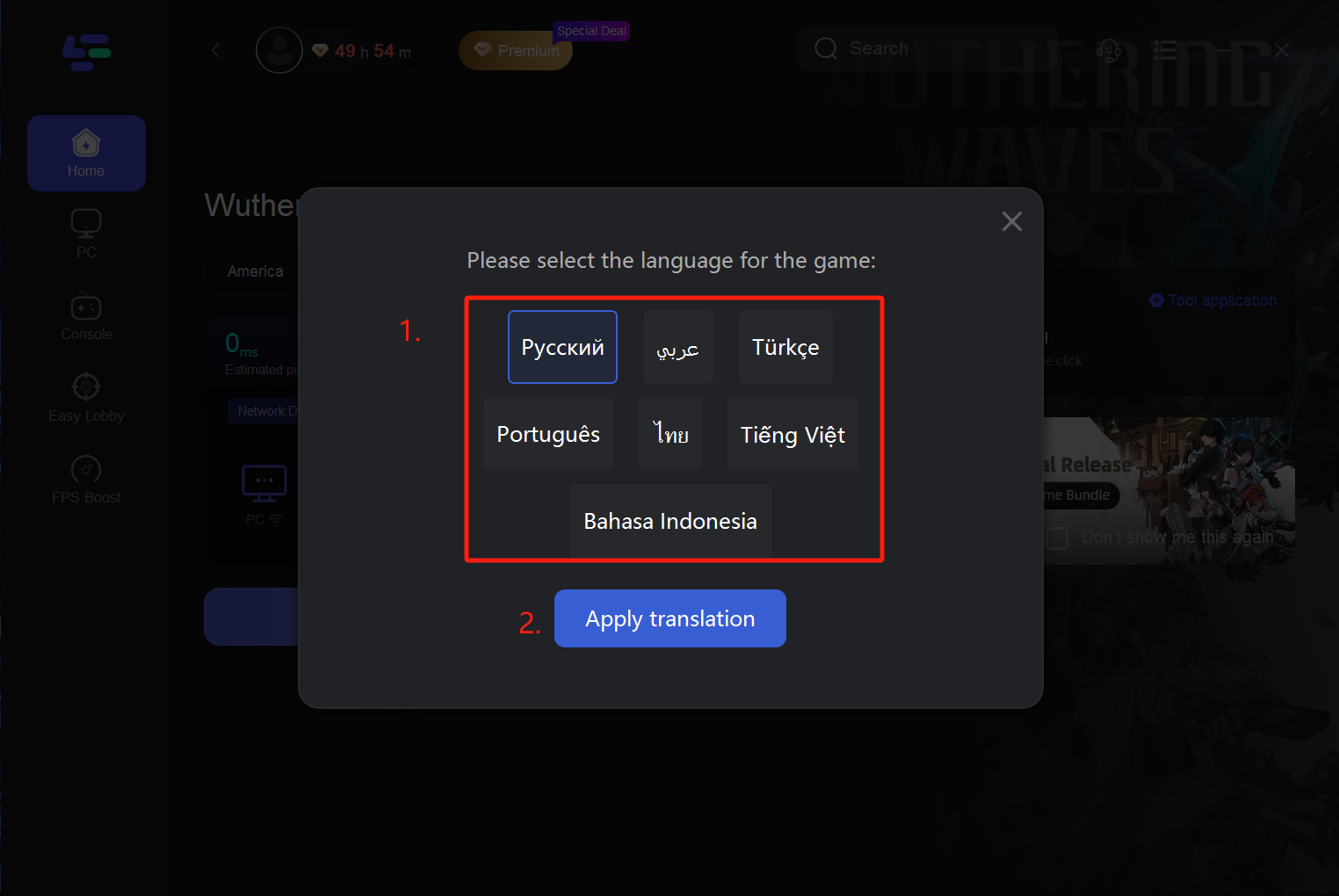
Step 4. After choosing a language, the tool will begin to translate the contents of the game. you can play Wuthering Waves without language barriers.
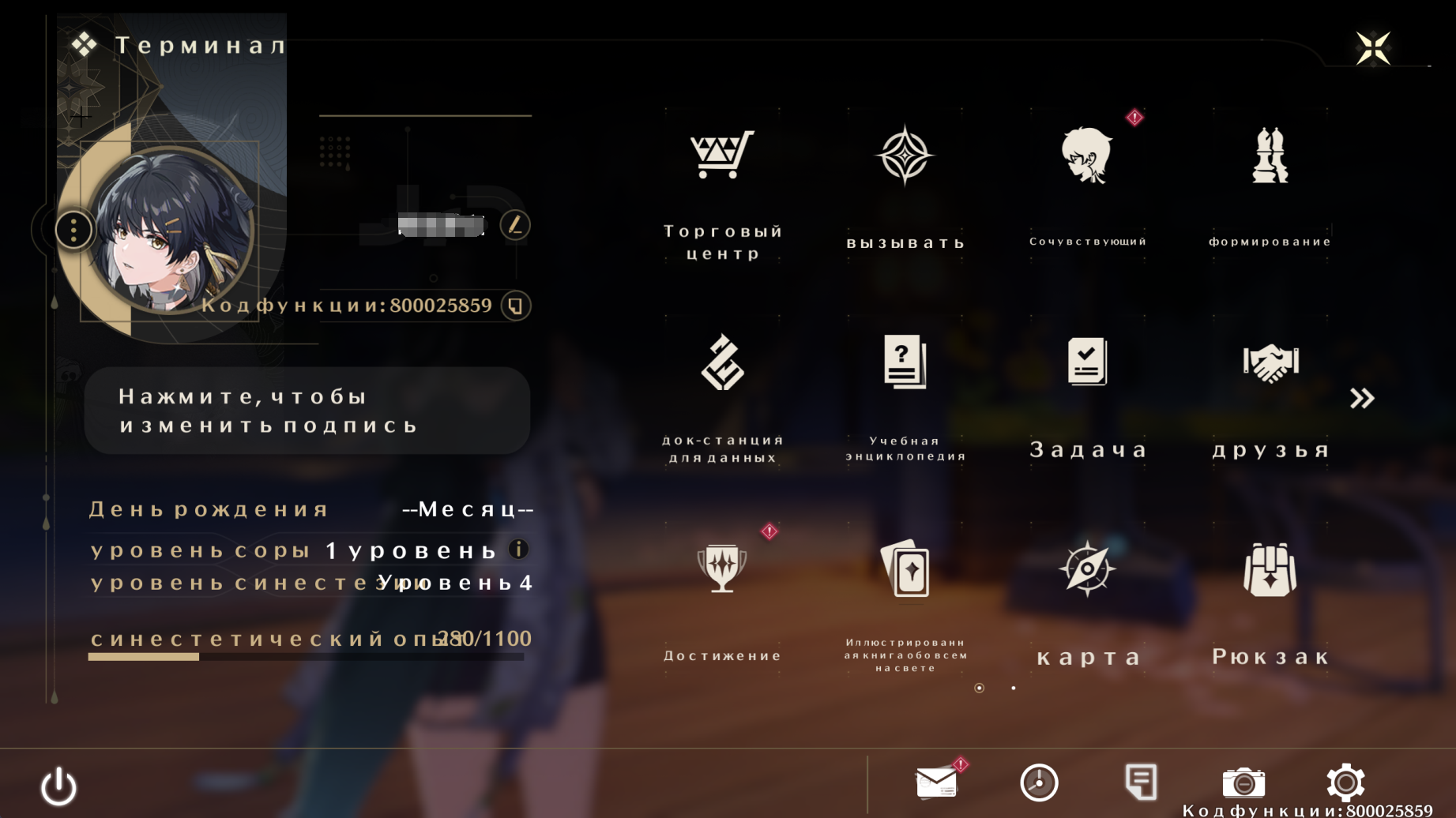
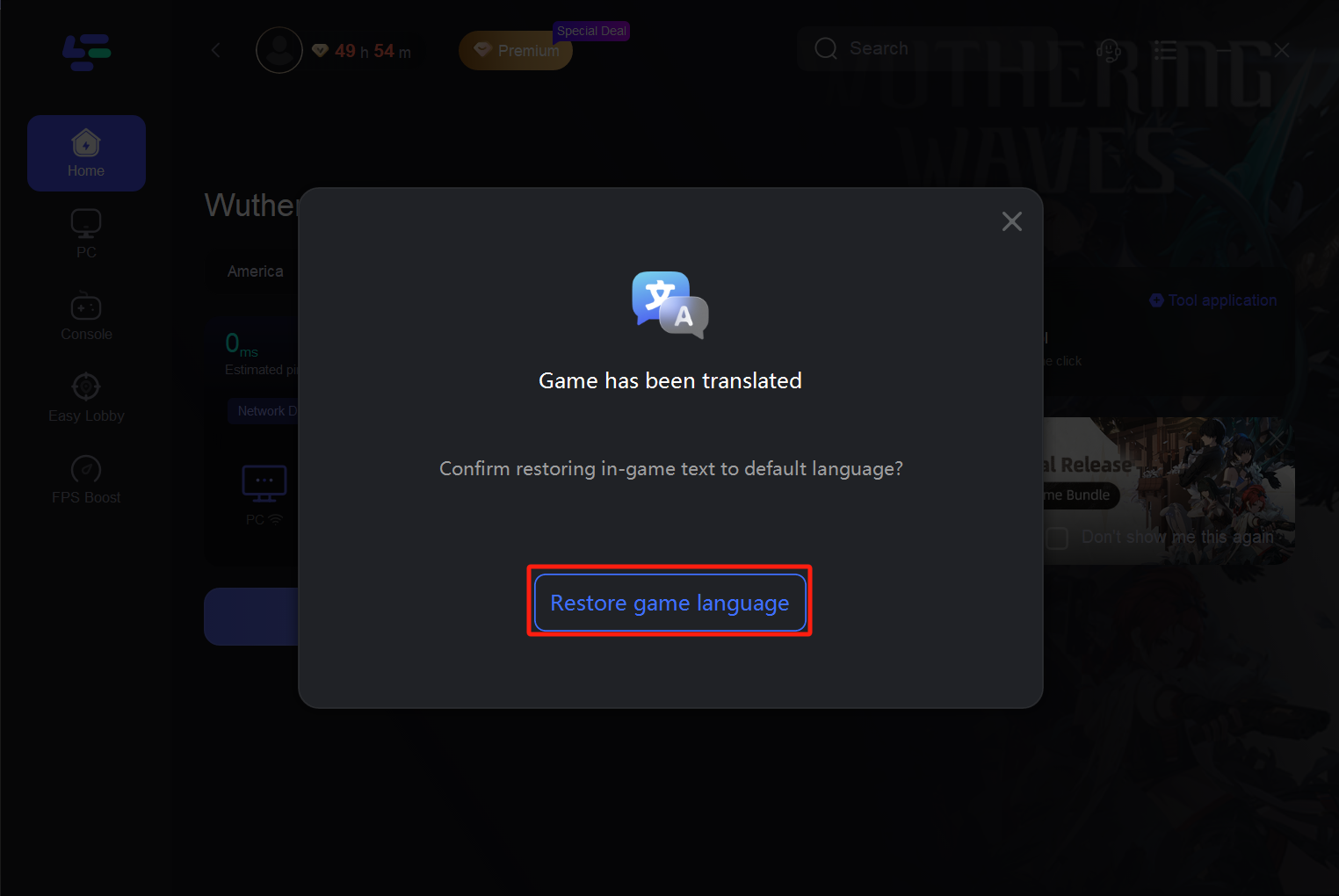
Resetting of the translation
If you want to return to the original language of the game, restart the LagoFast and click the "Restore" button. This will return the language settings to the default values.
Conclusion
In Wuthering Waves, knowledge of the world around you is key to mastering its challenges, and an interactive map is your most powerful tool for exploration. LagoFast Game Booster combines precision navigation with technical optimization, offering everything you need to dominate the open world.

Boost Your Game with LagoFast for Epic Speed
Play harder, faster. LagoFast game booster eliminates stutter and lags on PC, mobile, or Mac—win every match!
Quickly Reduce Game Lag and Ping!
Boost FPS for Smoother Gameplay!