
Wuthering Waves has become even more active with recent updates and collaboration content, bringing many returning Rovers and new anime fans back into the game. For PC players, one common problem remains the same: not every player can comfortably follow quests, event objectives, menus, and story dialogue in the official language options.
If you are searching for Wuthering Waves Russian language support, Turkish language support, Vietnamese language support, Arabic language support, or other language options, this guide will help you check the official supported languages first, then show you how to translate Wuthering Waves in-game text on PC with LagoFast.
Quick answer: Wuthering Waves supports several official interface and subtitle languages, but many languages players search for may not appear in the official settings. If your preferred language is not available in the game, you can use the LagoFast Translation Tool on PC to translate supported in-game text and better understand quests, menus, and story content.
Contents
- Which Languages Does Wuthering Waves Support?
- Does Wuthering Waves Support Russian, Turkish, Vietnamese, or Arabic?
- Best Wuthering Waves Translation Tool for PC
- How to Translate Wuthering Waves on PC with LagoFast
- How to Restore the Original Language
- Should You Use Unofficial Translation Files?
Which Languages Does Wuthering Waves Support Officially?
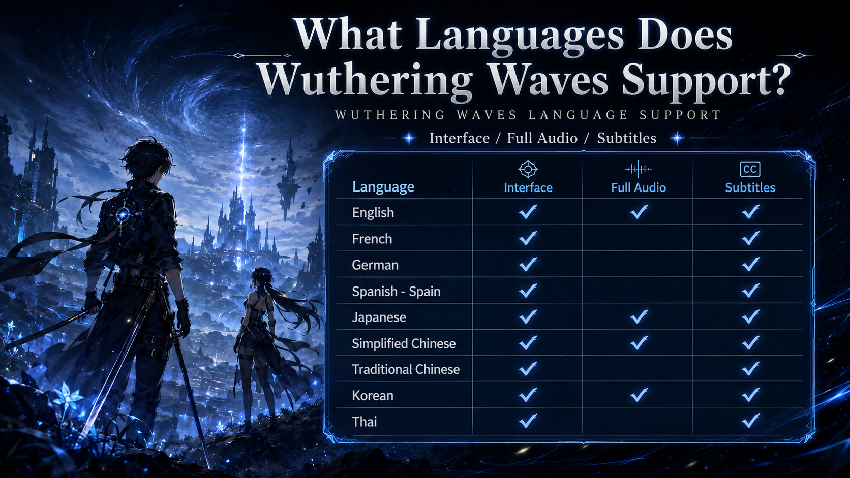
Before using any translation tool, you should first check the official Wuthering Waves language settings in your PC client. The supported language list may change with future updates, but at the time of this update, the Steam language table lists the following official language options for Wuthering Waves:
| Language | Interface | Full Audio | Subtitles |
|---|---|---|---|
| English | Supported | Supported | Supported |
| French | Supported | Not listed | Supported |
| German | Supported | Not listed | Supported |
| Spanish - Spain | Supported | Not listed | Supported |
| Japanese | Supported | Supported | Supported |
| Simplified Chinese | Supported | Supported | Supported |
| Traditional Chinese | Supported | Not listed | Supported |
| Korean | Supported | Supported | Supported |
| Thai | Supported | Not listed | Supported |
These official options are enough for many players, but they do not cover every language requested by the global Wuthering Waves community. That is why many PC players search for extra Wuthering Waves language options, especially when they want to understand limited-time events, new story quests, or character dialogue more clearly.
Does Wuthering Waves Support Russian, Turkish, Vietnamese, Arabic, or Indonesian?
Many players search for language-specific questions such as:
- Does Wuthering Waves have Russian language support?
- Does Wuthering Waves support Turkish?
- Is Vietnamese available in Wuthering Waves?
- Can I play Wuthering Waves in Arabic?
- Is Indonesian available as a Wuthering Waves language option?
If your target language does not appear in the official Wuthering Waves settings, you can still use a PC translation solution to help understand in-game text. This is especially useful for players who want to follow story dialogue, event tasks, item descriptions, map instructions, and menu options without constantly switching to an external translator.
For players looking for Wuthering Waves Russian language, Turkish language support, Vietnamese language support, Arabic language support, or similar localization options, LagoFast can be used as a PC-side translation tool for supported Wuthering Waves text.
Best Wuthering Waves Translation Tool for PC: LagoFast
LagoFast Translation Tool is designed to help players enjoy games in their preferred language. For Wuthering Waves PC players, it can help translate supported in-game text so you can better understand quests, dialogue, menus, event objectives, and important instructions.
Instead of turning this guide into a general game booster article, the focus here is simple: how to translate Wuthering Waves on PC when the official language list does not include the language you need.
Why PC Players Use LagoFast for Wuthering Waves Translation
- Better story understanding: Follow main quests, side quests, and event dialogue more easily.
- Useful for returning players: If you come back during a major update, translation can help you catch up faster.
- Helpful for new players: New Rovers can understand menus, tutorials, and character-related text with less confusion.
- PC-first workflow: The guide below focuses only on the Windows PC version of LagoFast and Wuthering Waves.
- Restore option: If you want to go back to the original game language, use the restore option inside LagoFast.
How to Use LagoFast’s Translation Tool on PC:
Step 1. Click Free Trial to download LagoFast.
Step 2. Search Wuthering Waves in LagoFast and click it.
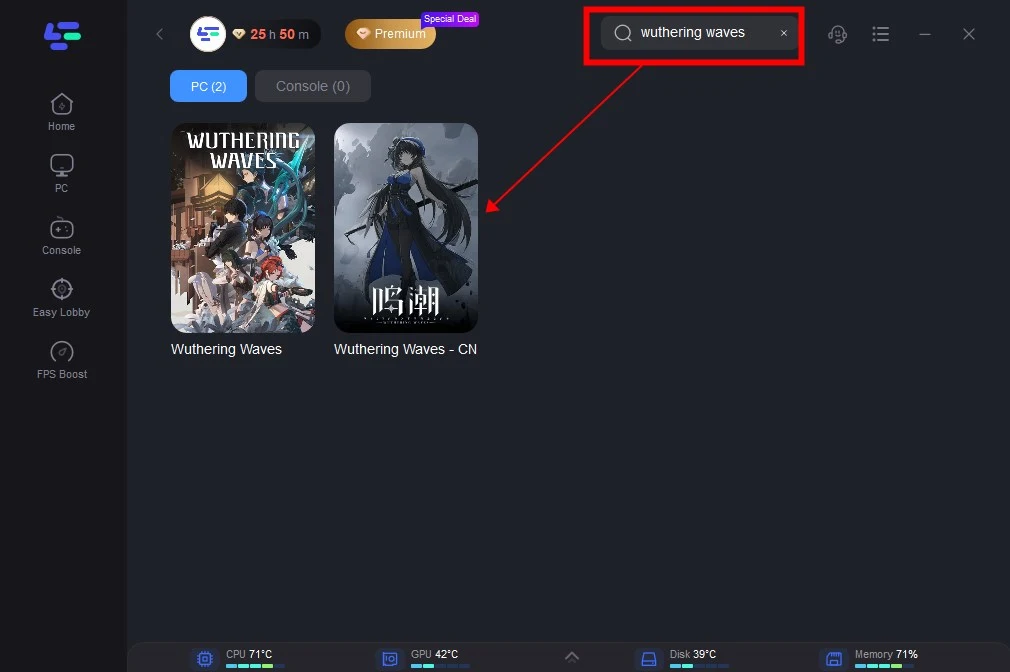
Step 3. Activate smart boost and click the Game Translation Tool on the right.
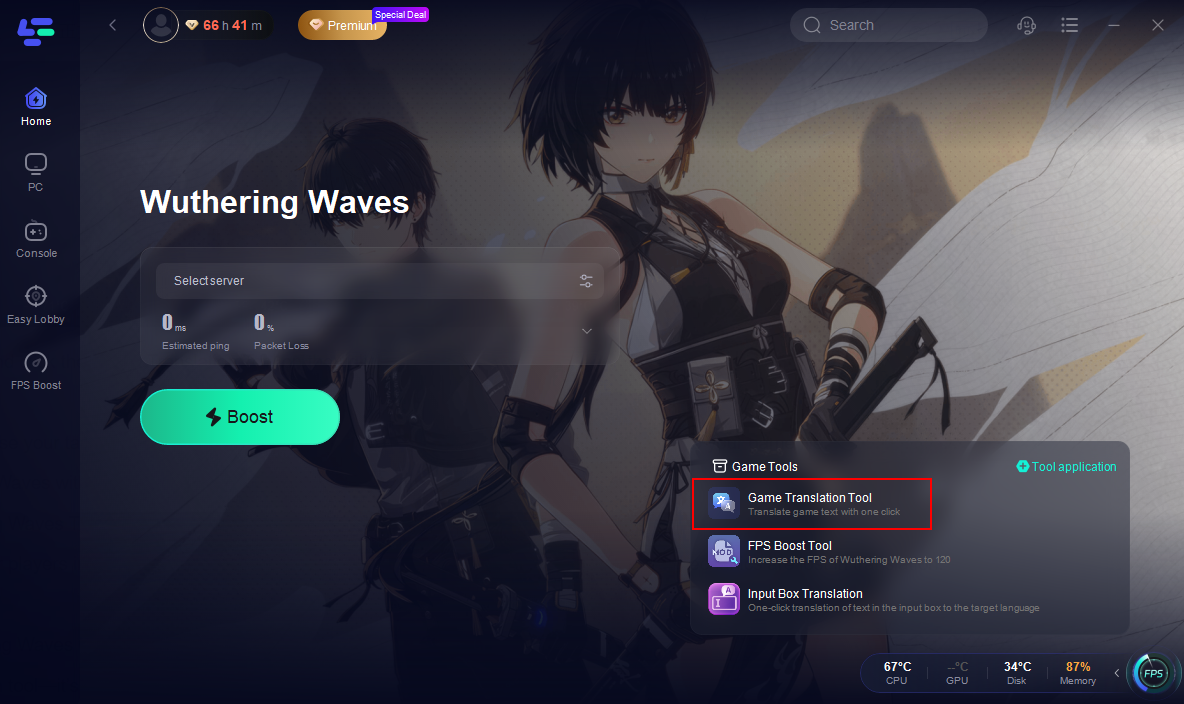
Step 4. Click confirm. LagoFast will automatically install the translated text into your game file.
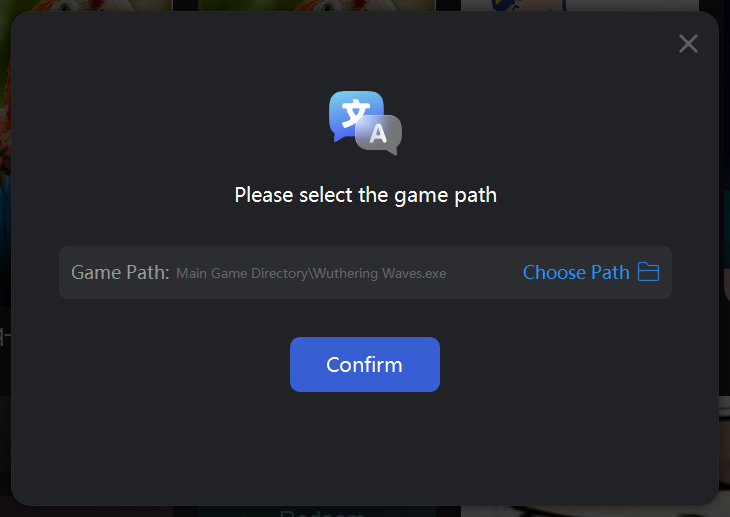
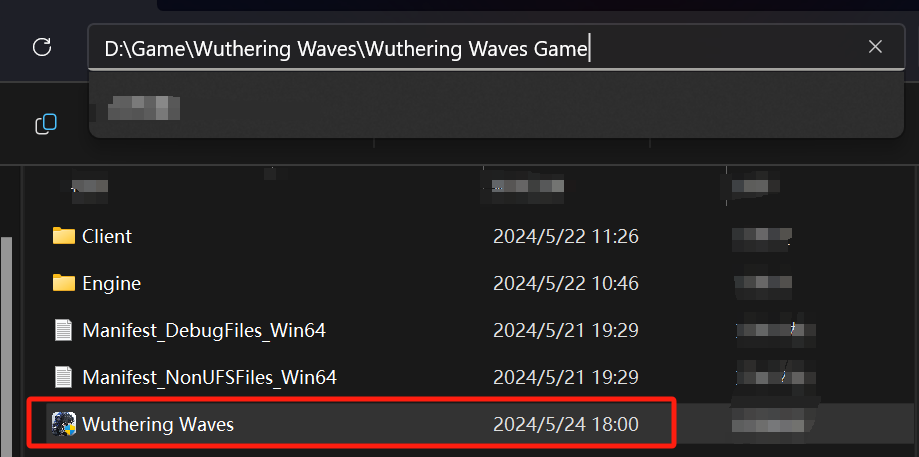
Step 5. Choose your target language.
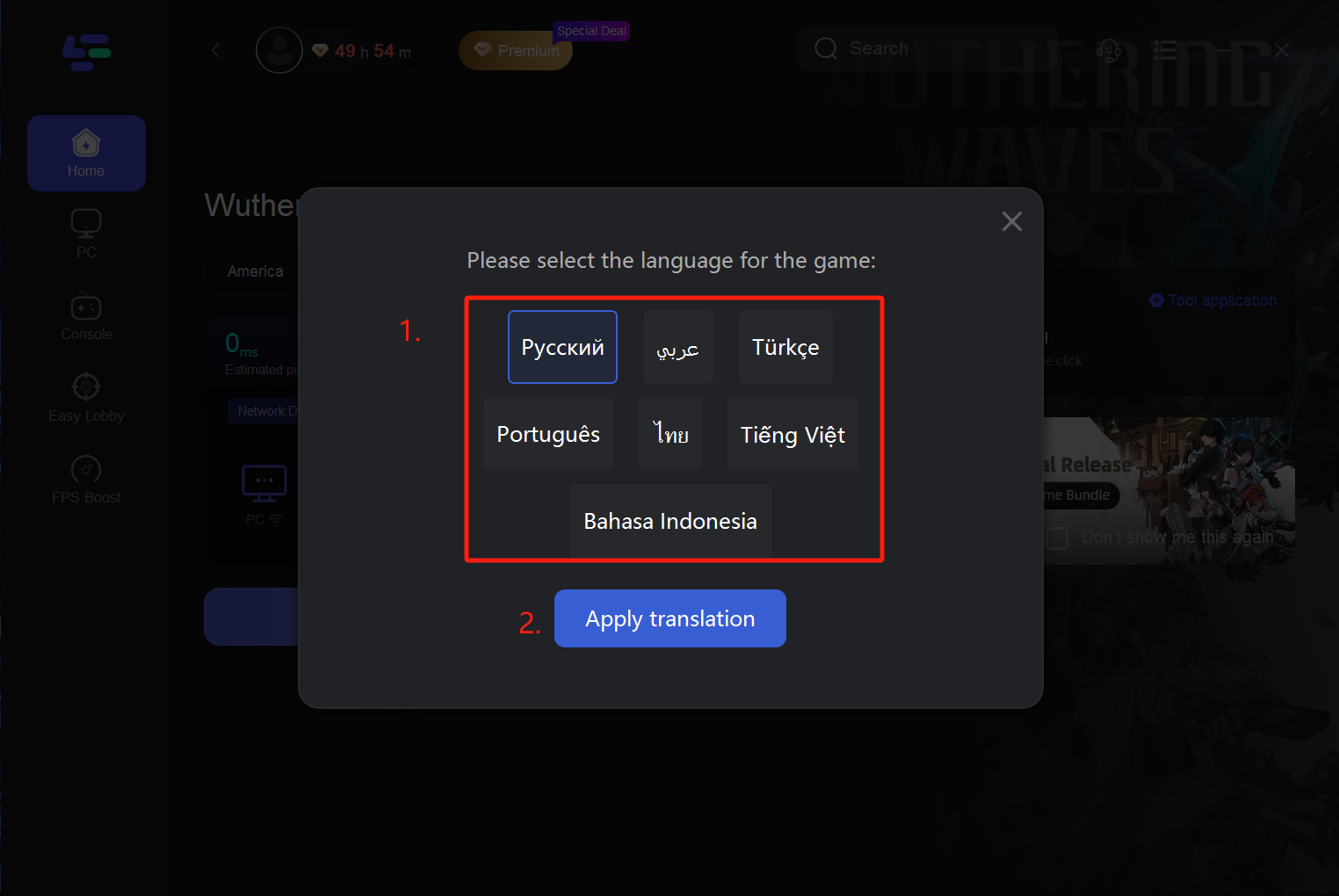
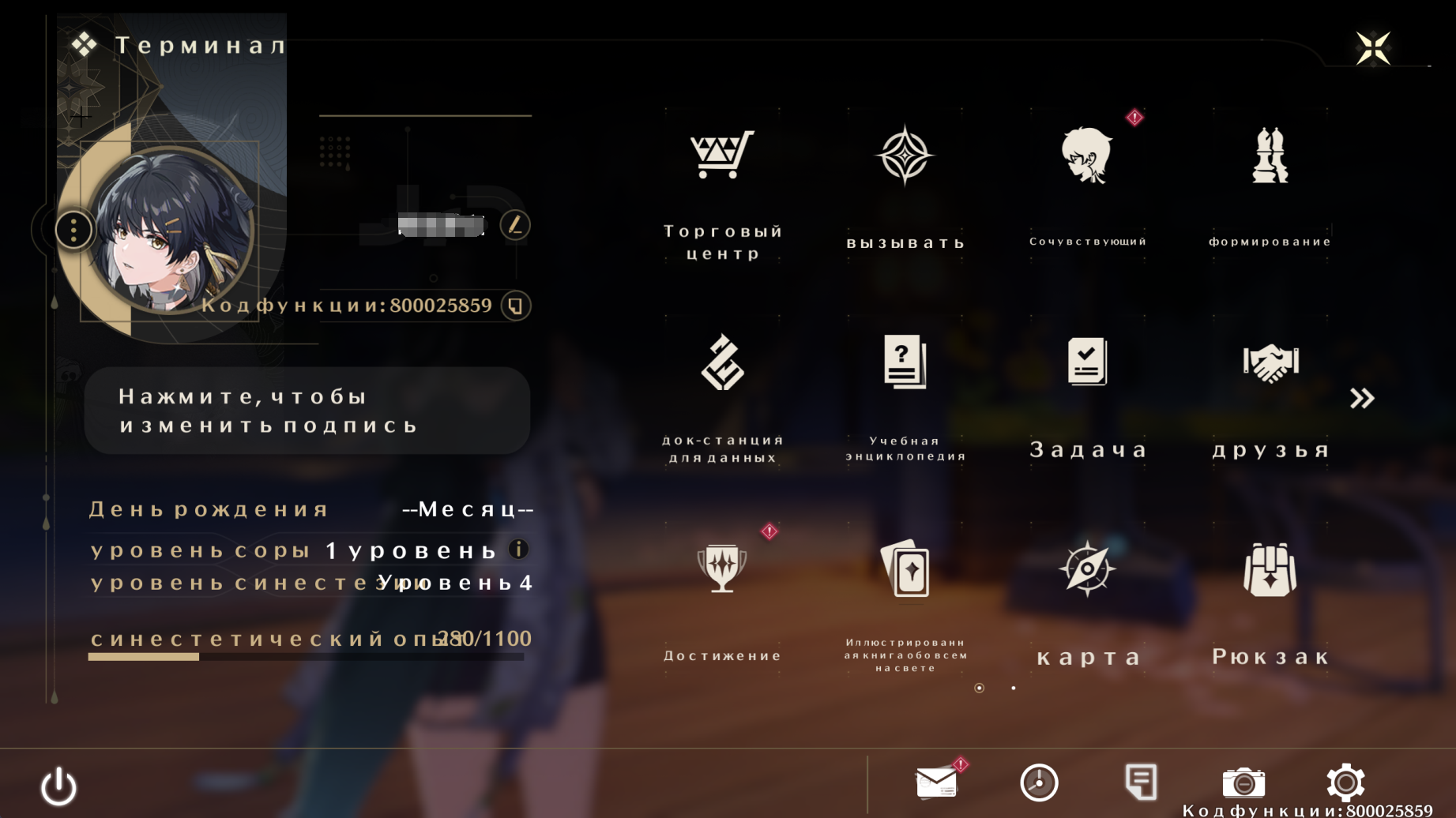
Step 6. After choosing a language, the tool will begin to translate the contents of the game. you can play Wuthering Waves without language barriers.
How to Restore the Original Wuthering Waves Language
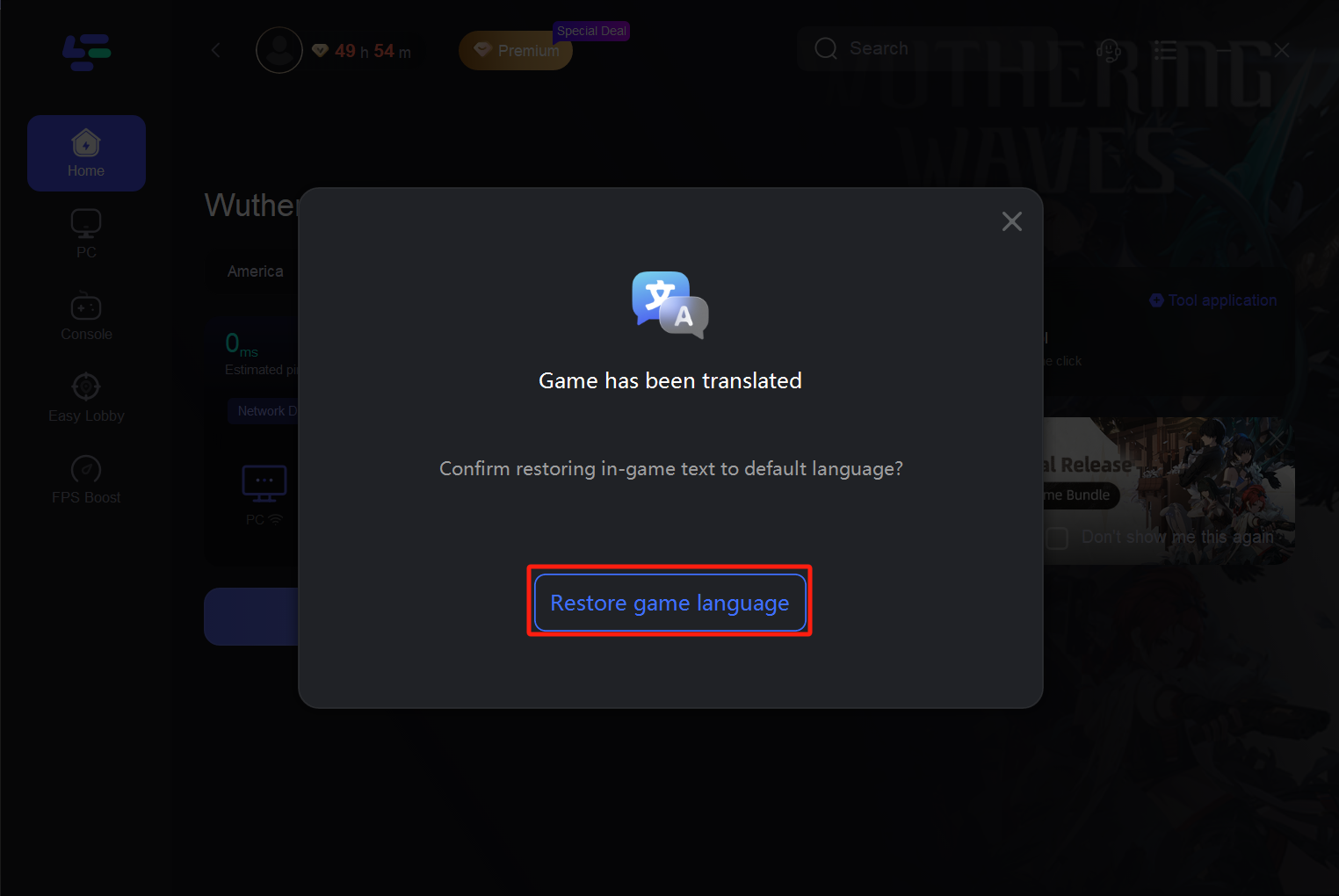
If you want to return to the original Wuthering Waves language settings, open LagoFast again and use the Restore option in the translation tool. This helps you switch back without manually looking for translation files or changing game folders by yourself.
We recommend using the restore option whenever you want to change languages, troubleshoot display issues, or return to the default game text after testing a translation.
Should You Use Unofficial Wuthering Waves Translation Files?
Be careful with random translation files, unofficial patches, or download links shared in community posts. They may be outdated, incomplete, or unsafe for your game client. This guide does not recommend downloading unknown files or manually replacing game files from unverified sources.
For a safer PC workflow, use a known tool and keep the process inside the supported product interface. If you only want to check whether your language is officially available, always start with the in-game language settings first.
What If Translation Works but the Game Still Feels Unstable?
Translation helps you understand Wuthering Waves text, but it does not solve every gameplay issue. If you are also dealing with login failures, unstable sessions, or server errors, read our guide to Wuthering Waves connection issues.
If the translated text works but combat still feels delayed, you may also want to check your Wuthering Waves high ping situation separately.
Conclusion
Wuthering Waves has official language options, but many PC players still search for Russian, Turkish, Vietnamese, Arabic, Indonesian, and other language support. If your preferred language is not available in the game settings, the LagoFast Translation Tool can help you translate supported Wuthering Waves in-game text on PC.
For returning players catching up with new updates or new Rovers trying to understand the story for the first time, a PC translation tool can make quests, menus, and event content easier to follow.
FAQ: Wuthering Waves Translation Tool and Language Support
How do I check whether Wuthering Waves supports my language?
The safest way is to open Wuthering Waves and check the in-game language settings first. Official language support can vary by interface, subtitles, and voice-over. If your preferred language is listed there, use the official option first before trying any translation tool.
What should I do if Wuthering Waves does not support my language?
If your language is not available in the official settings, a translation tool can help you understand key in-game text instead of switching back and forth between the game and an external translator. This is especially useful for players looking for Wuthering Waves Russian language support, Turkish language support, Vietnamese language support, Arabic language support, Indonesian language support, or other language options that may not appear in the official list.
What parts of Wuthering Waves are worth translating first?
Start with text that affects gameplay decisions: quest objectives, event tasks, menu options, item descriptions, skill descriptions, and important story dialogue. These areas usually matter more than every small line of flavor text, especially if you are returning after a major update and need to catch up quickly.
Do I need to download unofficial language patches for Wuthering Waves?
We do not recommend downloading random translation files, unofficial localization patches, or unknown replacement files from community links. They may be outdated, incomplete, or unsafe for your game client. If you only need help understanding in-game text, use a supported translation workflow instead of manually replacing files from unverified sources.
Why is translation useful for returning players after new updates?
Major Wuthering Waves updates often add new events, quests, characters, items, and story content. If you are returning after a break, translation can make it easier to understand what has changed, where to go next, and how to follow new event instructions without missing important details.
Boost Your Game with LagoFast for Epic Speed
Play harder, faster. LagoFast game booster eliminates stutter and lags on PC, mobile, or Mac—win every match!
Quickly Reduce Game Lag and Ping!
Boost FPS for Smoother Gameplay!