
Wuthering Waves, the open-world action RPG from Kuro Games, has taken the gaming community by storm since its 2024 release, blending fast-paced combat with a rich narrative set in a post-apocalyptic world. As the game expands its global player base, language accessibility becomes crucial. While Wuthering Waves offers built-in language support for core gameplay, players often seek deeper localization for full immersion. This guide explores the game’s native language options and introduces the Wuthering Wave game translation tool by LagoFast Game Booster—a powerful solution to bridge linguistic gaps and enhance your gaming experience.

- ✅ Reduce Lag and High Ping.
- ✅ Boost FPS at the Same Time.
- ✅ Change Server Without Latency.
- ✅ One-Click Translation Tool.
- ✅ End All Connection Issues.
- ✅ Multiplatform: PC, Mobile, Console
Part 1: Which Languages Does Wuthering Waves Support?
Part 2: How to Get Wuthering Waves Translation? Best Translation Tool
Part 3: Enhance Your Wuthering Waves Gaming Experience with LagoFast
Part 1: Which Languages Does Wuthering Waves Support?
As of May 2025, Wuthering Waves natively supports four spoken languages and seven text languages, catering to a broad international audience. Here’s a breakdown:
Voice-Over Languages (Full Audio Support):
- Mandarin Chinese
- English
- Japanese
- Korean
Text Languages (Subtitles and Menus):
- Simplified Chinese
- Traditional Chinese
- English
- French
- German
- Japanese
- Korean
- Spanish
Players can switch languages via the in-game settings menu . However, these options are limited. For example, Arabic, Russian, and Southeast Asian languages like Thai and Vietnamese are absent from the official list, leaving non-native speakers at a disadvantage. This is where third-party tools like LagoFast’s Wuthering Wave game translation tool become invaluable.
Part 2: How to Get Wuthering Waves Translation? Best Translation Tool
LagoFast Game Booster offers a one-click translation solution designed specifically for Wuthering Waves, addressing the game’s language limitations. Here’s what you need to know:
Supported Languages:
LagoFast translates in-game text into Russian, Arabic, Turkish, Portuguese, Thai, Vietnamese, and Indonesian . This fills gaps in official support, ensuring players worldwide can understand quests, dialogue, and menus.
Seamless Integration:
The tool embeds translated text directly into the game’s file path, avoiding issues like lag, slow loading, or visual glitches. It works on both PC and mobile devices, with a user-friendly interface that requires no technical expertise .
Safety and Ease of Use:
The LagoFast translation tool is a stable and secure tool that aims to provide players with better localized language services. This function does not involve the player's accountant other private information. And players can restore original language files with a single click, minimizing potential account bans.
How to Use LagoFast’s Translation Tool on PC:
Step 1. Click Free Trial to download LagoFast.
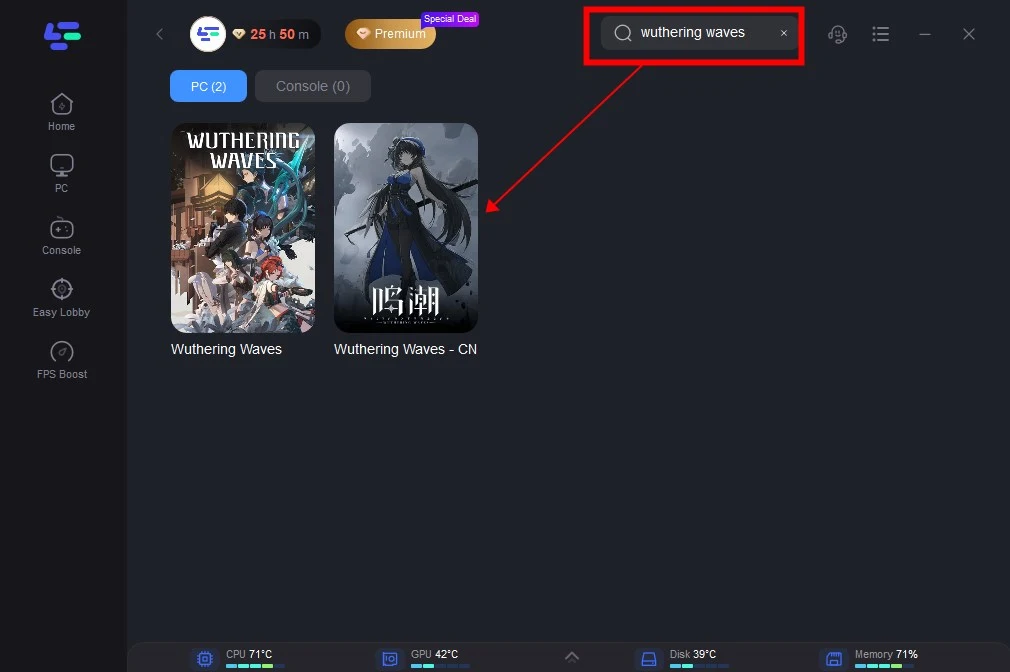
Step 2. Search Wuthering Waves in LagoFast and click it.
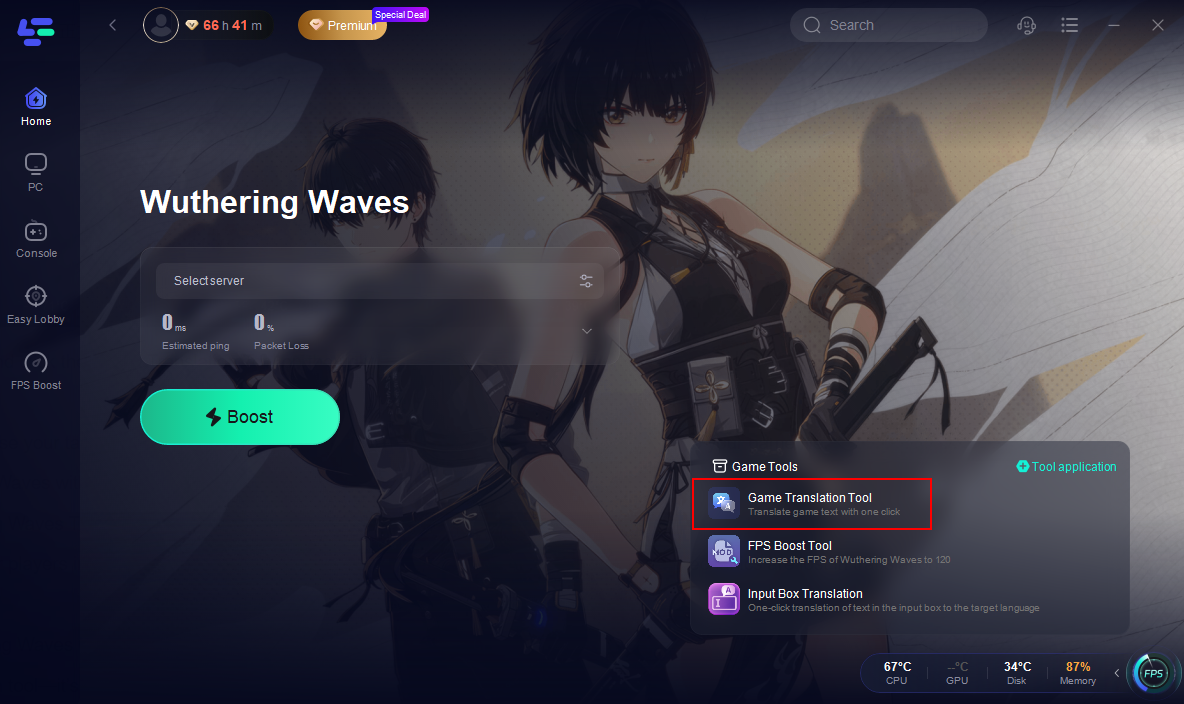
Step 3. Activate smart boost and click the Game Translation Tool on the right.
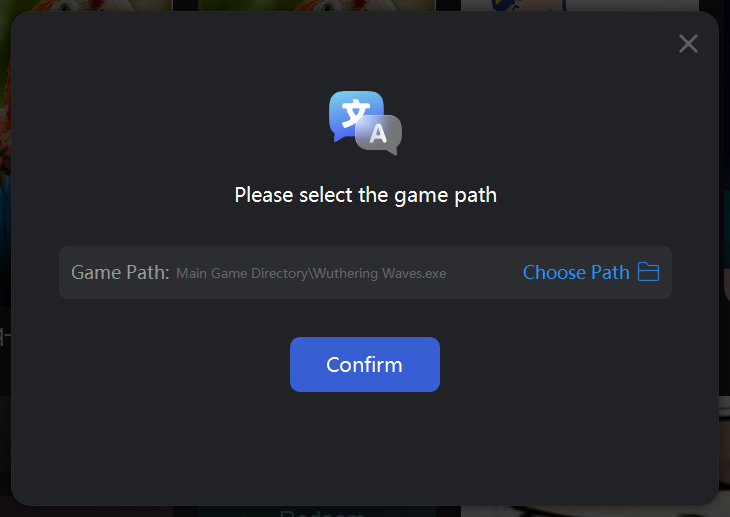
Step 4. Click confirm. LagoFast will automatically install the translated text into your game file.
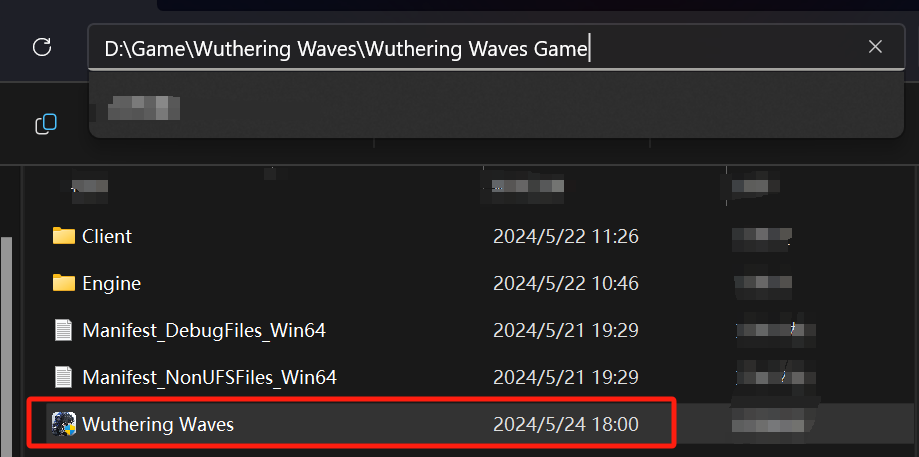
Step 5. Choose your target language.
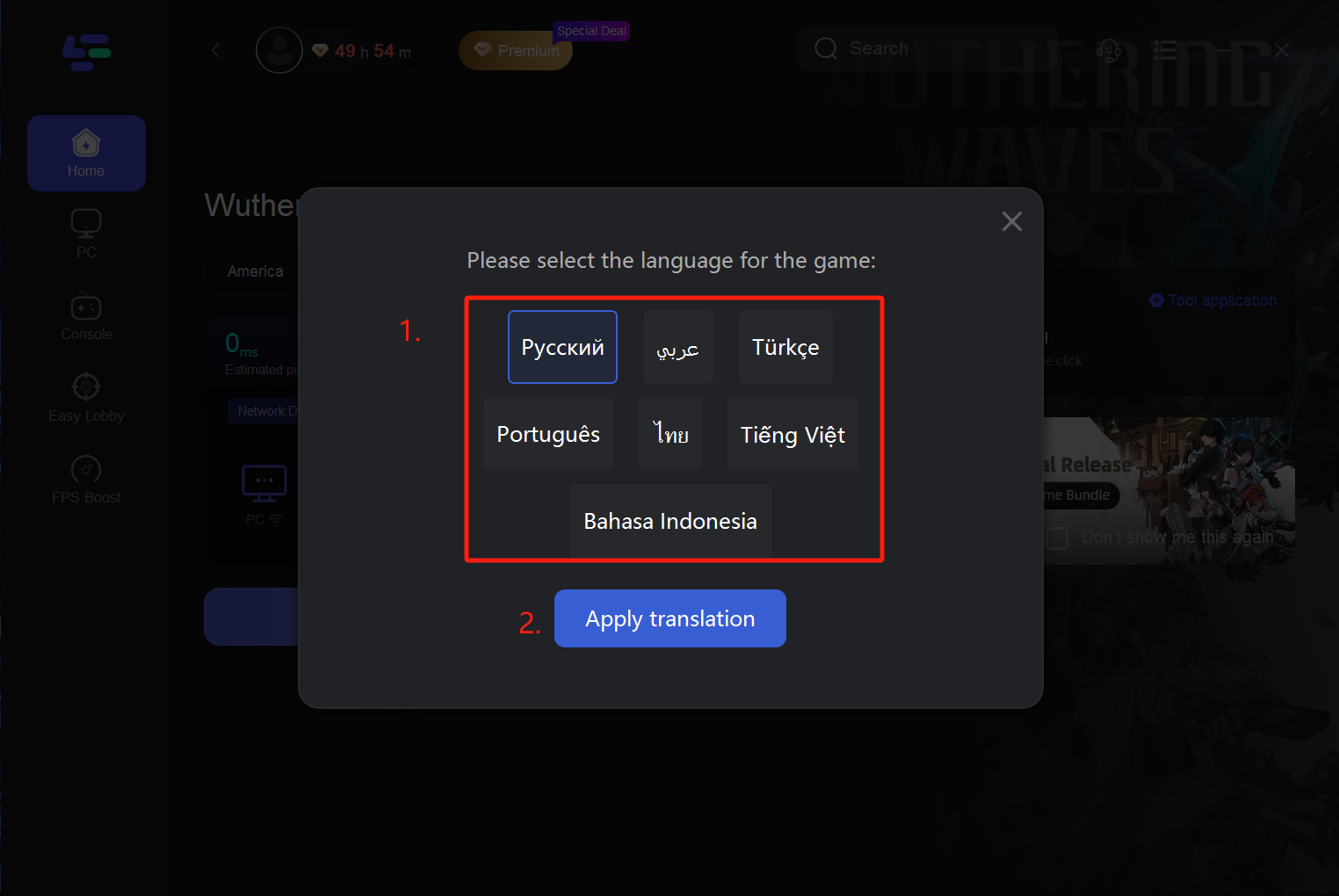
Step 6. After choosing a language, the tool will begin to translate the contents of the game. you can play Wuthering Waves without language barriers.
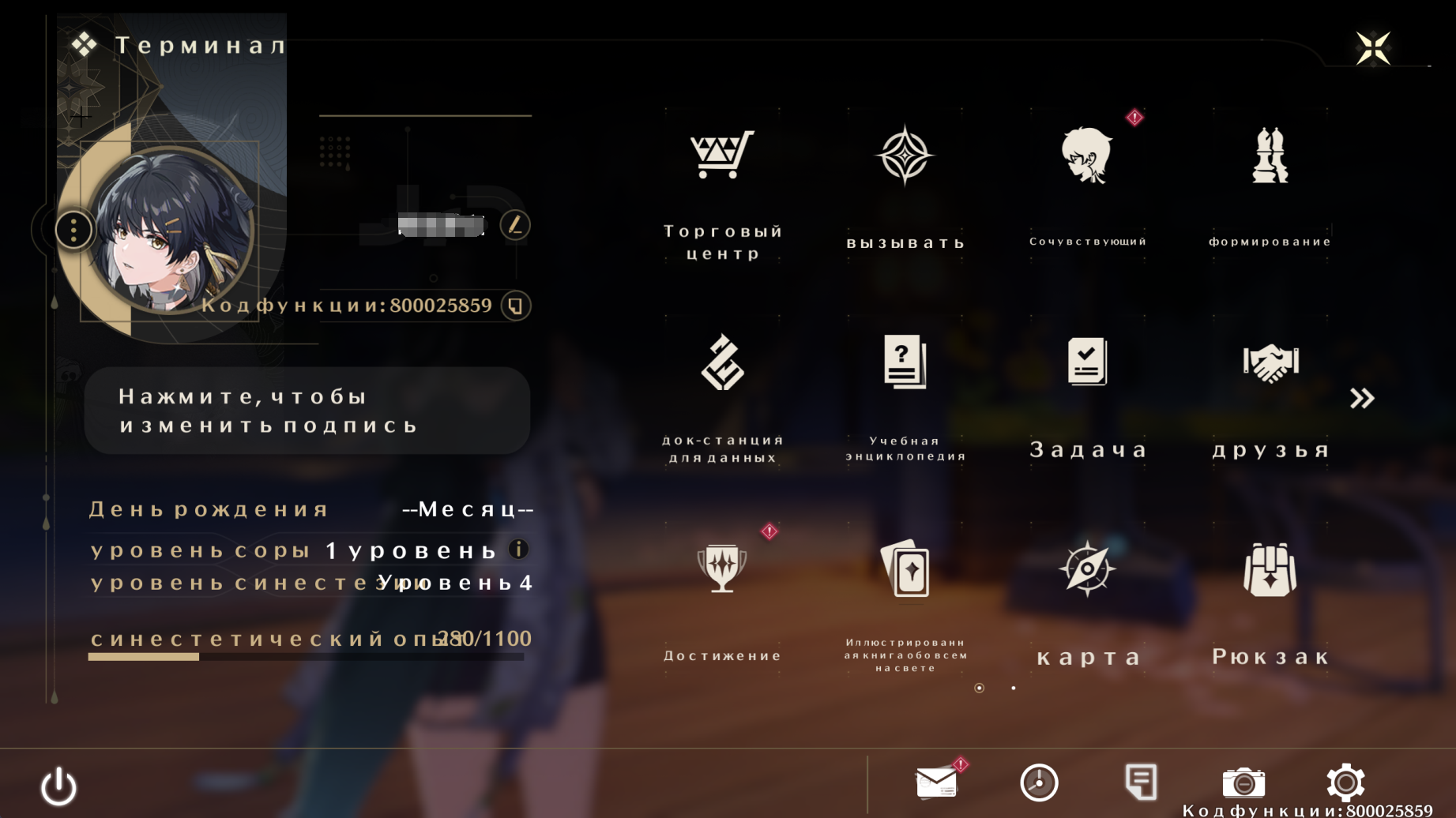
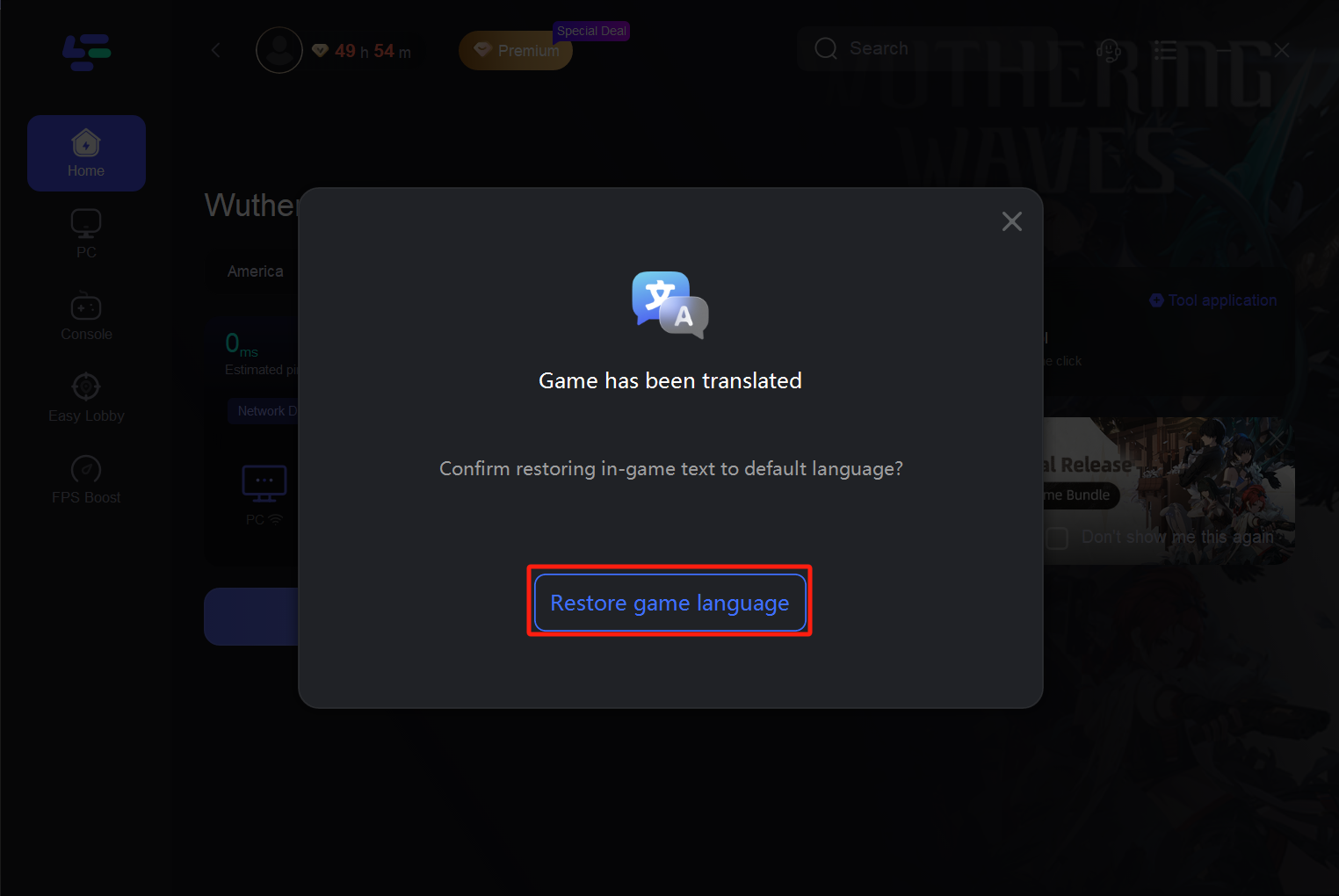
Resetting of the translation
If you want to return to the original language of the game, restart the LagoFast and click the "Restore" button. This will return the language settings to the default values.
How to Get the Best Wuthering Waves Translation Tool on Mobile:
Step 1: Search “LagoFast Mobile booster” in the App Store or Google Play., or scan the following QR codes.

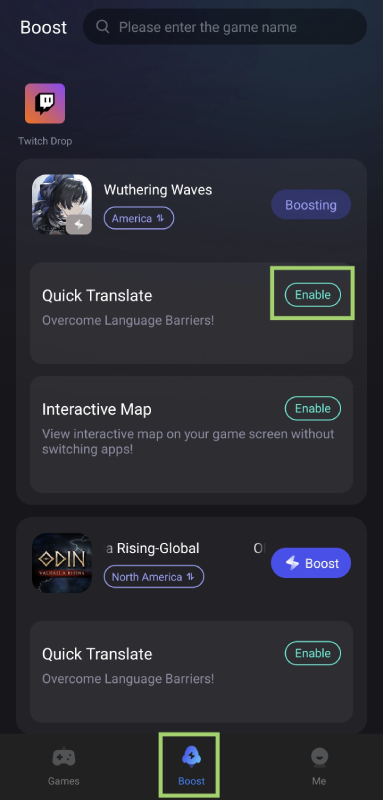
Step 2: Go to Boost tab, find Wuthering Waves and tap the enable button to activate the translation tool.
Step 3. Customize Translation Language
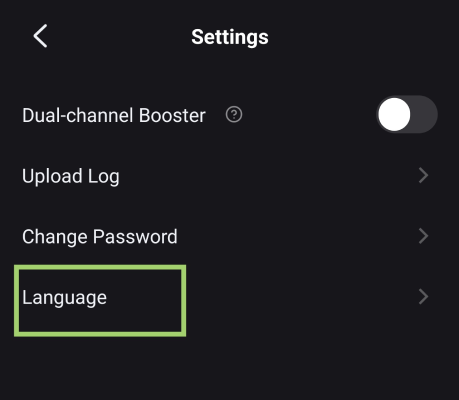
- Select your preferred language (e.g., English, Spanish) in the LagoFast app. The tool will translate the language in-game to the language you used on LagoFast.
- You can adjust the language of LagoFast in LagoFast > Me > Settings > Language.
Step 4. Translate in Game
- Tap the translation tool icon in-game when you need to translate the language. It will grab the text and show the translation version on your screen
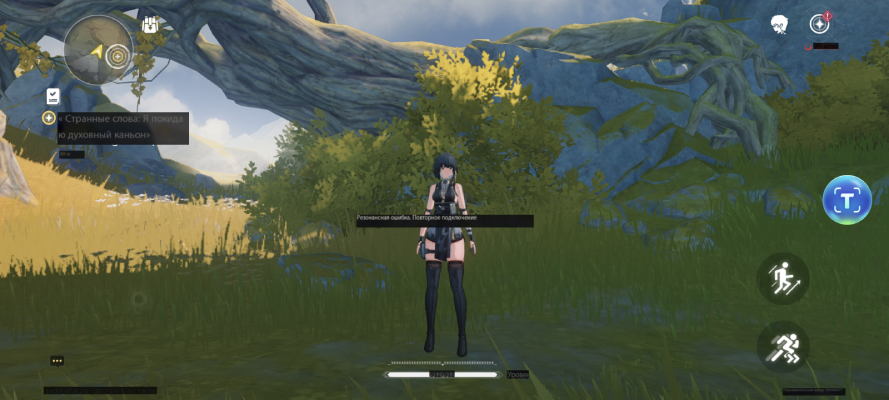
This tool is a game-changer for players in regions where official localization is lacking, ensuring no story beats or mechanics are lost in translation.
Part 3: Enhance Your Wuthering Waves Gaming Experience with LagoFast
LagoFast isn’t just a translation tool—it’s a comprehensive gaming utility. Here’s how it elevates your gameplay:
Network Optimization:
LagoFast reduces lag and high ping using multipath connection technology, ensuring smooth combat and exploration. It supports 2000+ games and optimizes FPS for both PC and mobile .
Interactive Map:
The tool integrates a real-time Wuthering Waves Interactive Map, allowing players to track loot, bosses, and hidden quests mid-battle. This feature is crucial for 100% completion, especially in vast regions like Huanglong and Rinascita .
Server Switching:
Players can bypass geo-restrictions and connect to servers worldwide, joining communities in China, Europe, or North America with minimal latency .
Multiplatform Support:
Whether you play on PC, PS5, or mobile, LagoFast offers tailored optimizations. For example, PS5 users benefit from enhanced controller support and reduced input delay .
How to Use LagoFast to Boost Wuthering Waves on PC:
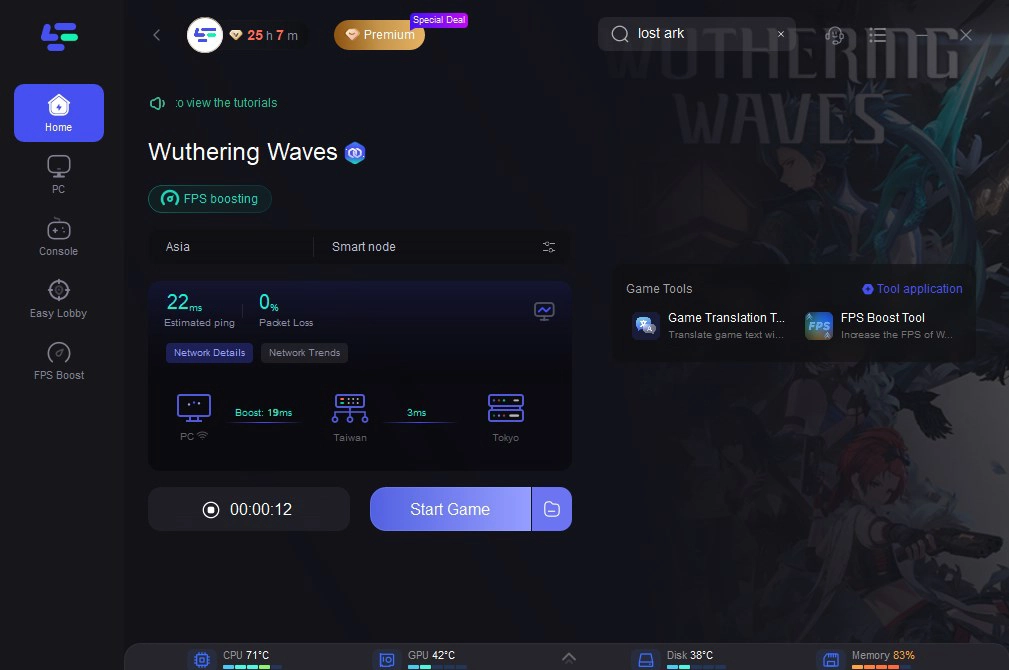
Step 1: Open LagoFast then click the PC button on the left and search Wuthering Waves in the search bar, click it after appearing.
Step 2: Click on “Server” to change to a better server that ensures the gaming experience, then click on “Smart Boost”.
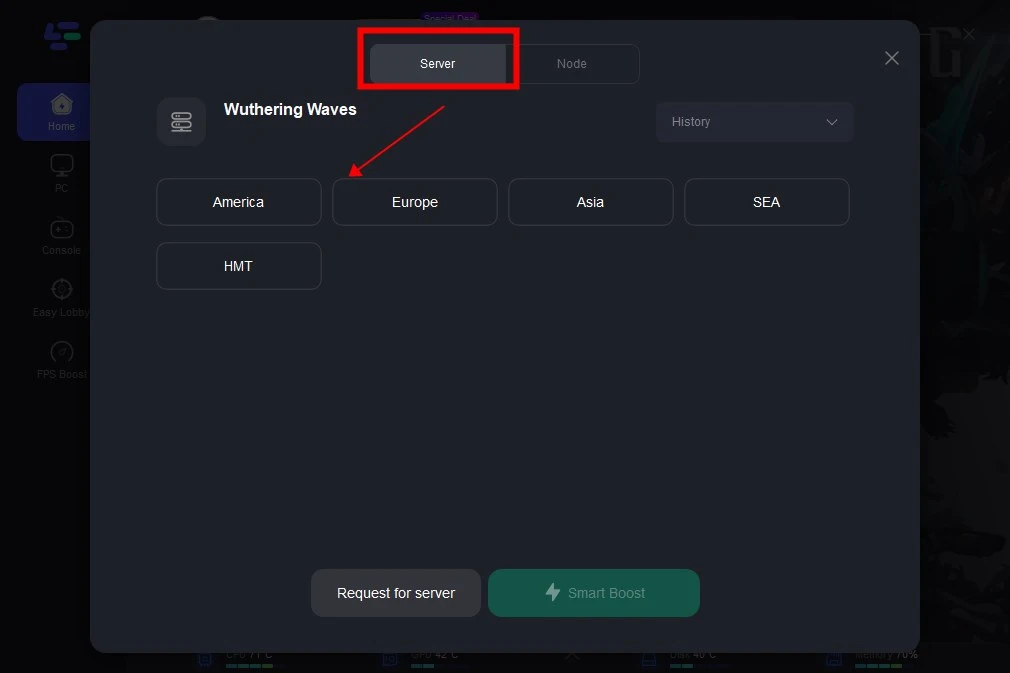
Step 3: Check the specific game ping, packet loss, and multiple path connection on the right side. Finally, click the “Start Game” to play the game.
How to Use LagoFast to Boost Wuthering Waves on Mobile:
Step 1: Search “LagoFast Mobile booster” in the App Store or Google Play., or scan the following QR codes.
Step 2: Select and click the Wuthering Waves in the interface.
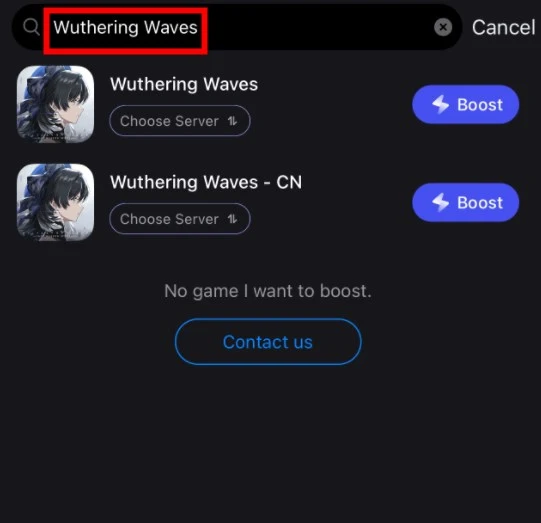
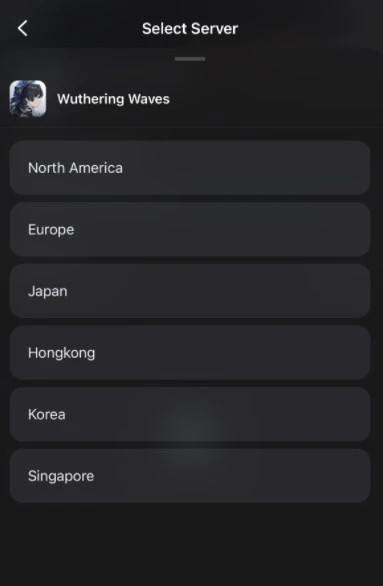
Step 3: Enter the Severs selection interface where you can change to Chinese Server, then click the “Boost” button to enhance the gaming experience.
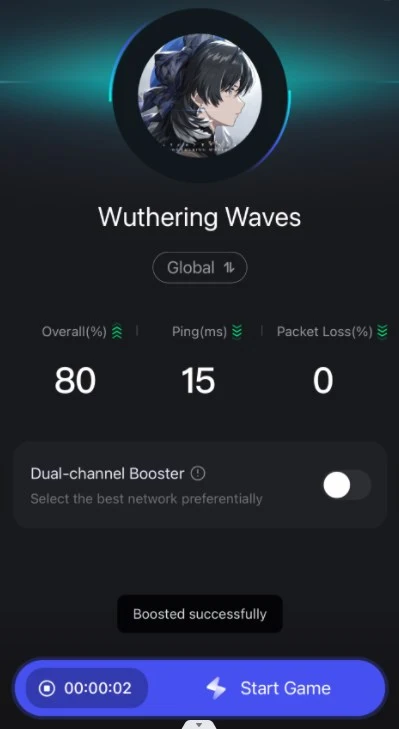
Step 4: Finally, go back to Wuthering Waves and start playing it without any lag.
How to Get Wuthering Waves Interactive Map on Mobile with LagoFast:
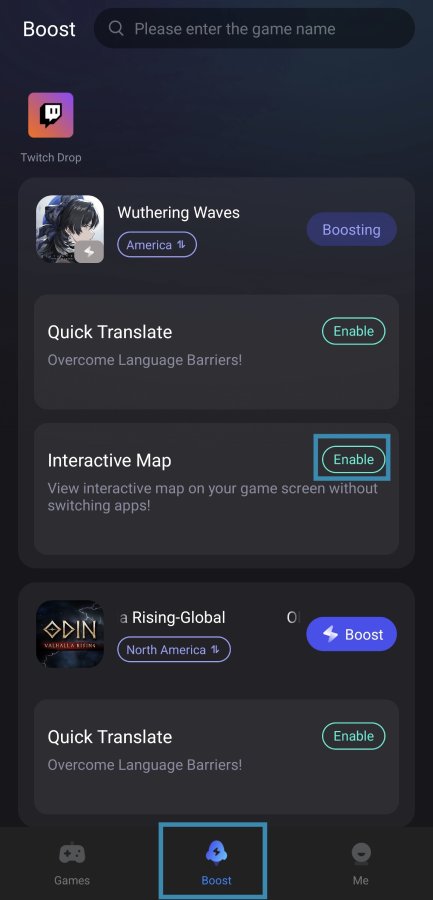
Step 1. In the LagoFast app, navigate to the Boost tab. Find Wuthering Waves and toggle the Enable button next to Interactive Map.
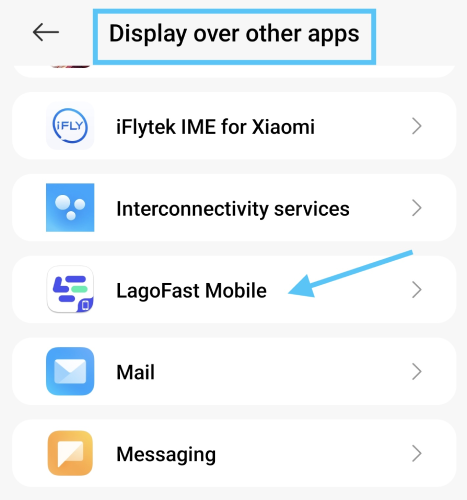
- First-time users: Grant LagoFast screen overlay permissions when prompted.
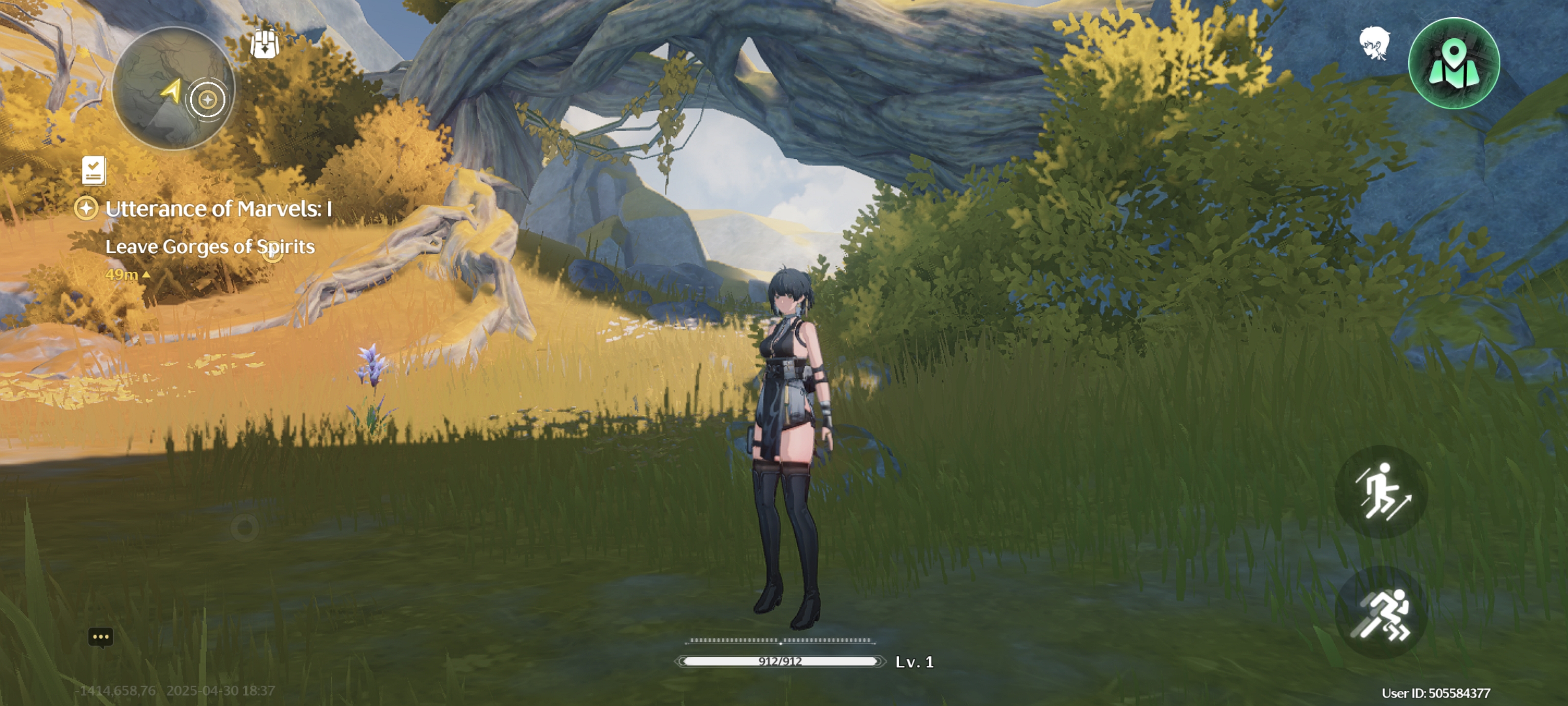
Step 2. Access the Map In-Game
- Rotate your device to landscape mode for optimal viewing. Then tap the Map icon to open the interactive map.
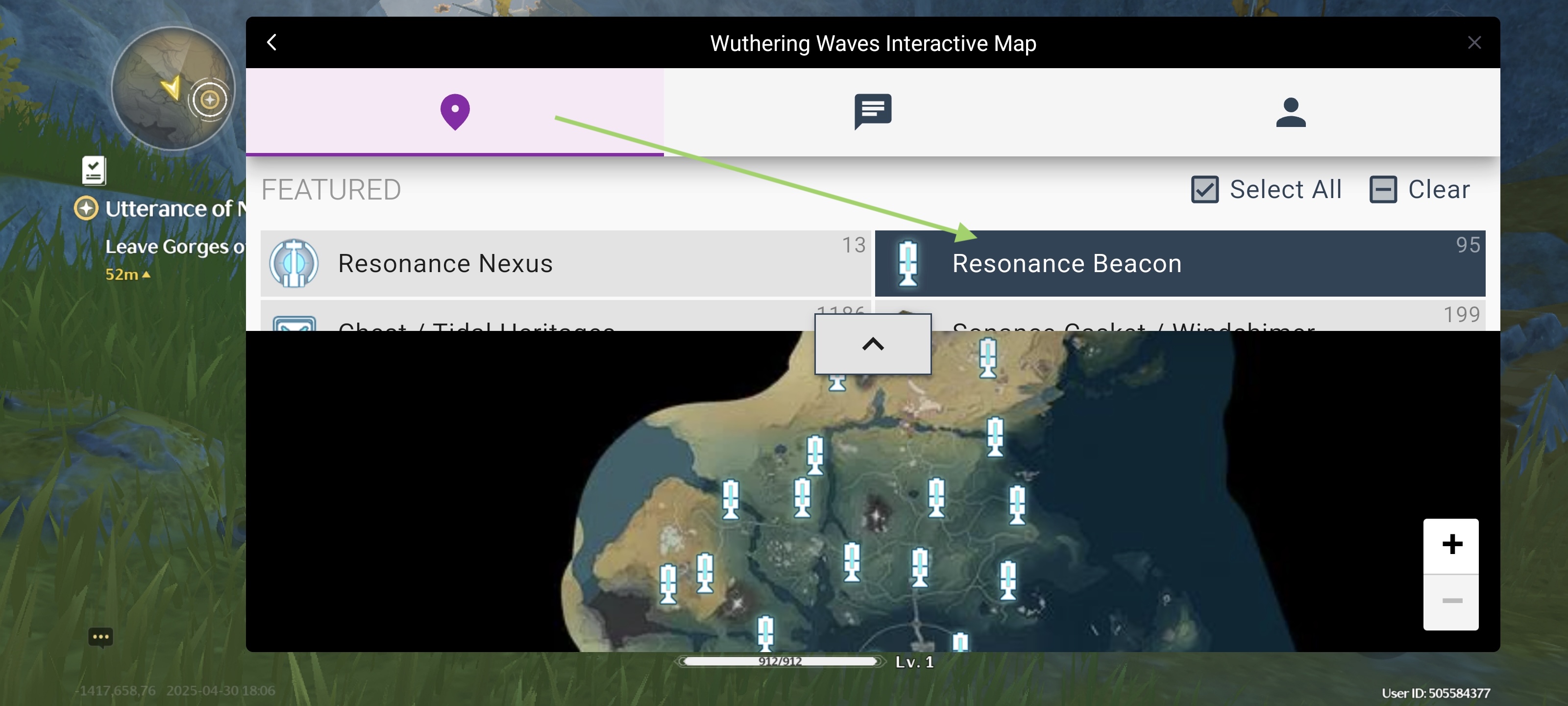
- Use it to locate loot, bosses, and hidden quests in real time—even mid-battle! You can switch the language here. And tap the "x" to close the map overlay.
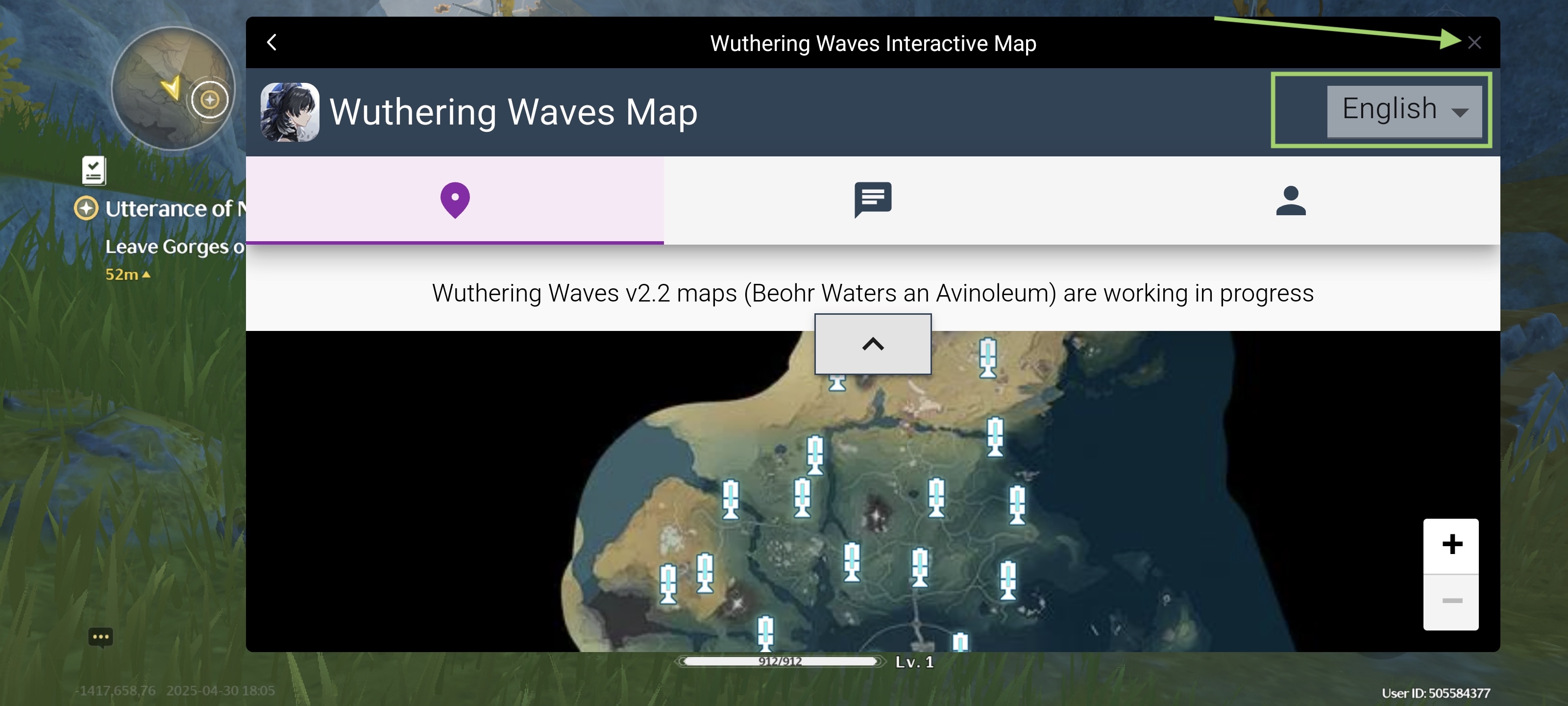
- Here you can select the specific loot you wanna track.
Get LagoFast Right Now!
Conclusion
Wuthering Waves’ global appeal hinges on accessibility, and LagoFast’s Wuthering Wave game translation tool is a vital resource for non-English speakers. By supporting languages like Russian, Arabic, and Thai, it breaks down barriers, while features like lag reduction and interactive maps enhance gameplay depth. As Kuro Games continues to update the game with new regions and content , tools like LagoFast ensure players worldwide can fully engage with the story and mechanics. For a seamless, immersive experience, download LagoFast today and unlock the full potential of Wuthering Waves.

Boost Your Game with LagoFast for Epic Speed
Play harder, faster. LagoFast game booster eliminates stutter and lags on PC, mobile, or Mac—win every match!
Quickly Reduce Game Lag and Ping!
Boost FPS for Smoother Gameplay!