

True 0 ping in Fortnite is rarely realistic in normal online matches because your input still needs to travel from your device to a Fortnite server and back. Unless you are extremely close to the server or testing in a local environment, some delay is unavoidable. Instead of chasing “0 ping,” most players should focus on stable low ping, low packet loss, and fewer ping spikes. A steady 20–40 ms connection often feels better than a connection that briefly shows a low number but jumps during fights.
This guide explains whether 0 ping is possible, how to test your real Fortnite ping, what ping ranges mean, and how LagoFast may help when the issue comes from routing instability, cross-region play, or ISP path problems.

- ✅ Reduce Lag and High Ping.
✅ Boost FPS at the Same Time.
✅ Support 8000+ Online Games.
✅ Get Bot Lobby in Fortnite Easily.
Part 1: What Does High Ping Mean in Fortnite?
When talking about ping rate, many people associate it with latency. Actually, a high ping value directly indicates slow access speed, like not completing a level in a game due to lag. However, they are not the same.
- Ping is a signal sent from one computer to another on the same network, and latency is the time (in milliseconds) it takes for the ping to return. Latency measures the total round-trip time of the signal, while ping is just one method to measure it.
- Latency refers to the quality of a network connection, not its speed, which consists of bandwidth (amount of data transferred) and wait time (time to transfer the data). High latency can cause lag, leading to delays between player actions and game responses, affecting performance and causing interruptions or crashes. Delays can also be due to computer issues like insufficient CPU, GPU power, or low RAM or VRAM.
Part 2: Is 0 Ping Possible in Fortnite?
In normal online matchmaking, 0 ping is more of a marketing phrase than a realistic target. Ping measures round-trip latency between your device and the server. Even with a fast fiber connection, data still needs to travel through your router, ISP, network exchange points, and Fortnite's data center path.
Several factors decide whether you can get a very low ping:
- Physical distance from the Fortnite server: The farther the server is, the higher your baseline latency becomes.
- Matchmaking region: Choosing a region far from your location may increase ping even if the lobby is easier or more populated.
- ISP routing: Your internet provider may send traffic through a longer or congested path.
- Wi-Fi vs Ethernet: Wi-Fi can add instability, interference, and ping spikes.
- Data center congestion: During updates, events, or peak hours, routes may become less stable.
- In-game ping display: The number shown in Fortnite may differ from a general Speedtest result because Fortnite uses different servers and routes.

In that case, is 0 ping the best? Is 0 ping possible in Fortnite? In the gaming world, anything below 20 ms is considered exceptional and "low", with a value between 50 ms and 100 ms being average to good, and a value of 150 ms or higher being less desirable and referred to as "high ping". Given that the data transfer is not instantaneous, 0 ping is very difficult to achieve. A ping value close to 0 ping doesn't really affect the game experience. You can use a gaming ping reducer, like LagoFast, in Fortnite to help get close to 0 ping.
Part 3: How to Get 0 Ping & Lower Ping in Fortnite on PC
Although there are many ways to reduce ping, they have something wrong with them. If you wonder how to get 0 ping in Fortnite, here is the best Fortnite ping reducer you can take into account LagoFast. With an 8-year history, LagoFast works on checking and resolving those inevitable issues about Fortnite. Just after clicking the button, ping rate will decrease quickly, and Fortnite lag will disappear. It offers a self-developed game data transmission protocol. This self-developed advantage means it can increase the players’ network speed without other network interference. The following features are also the reasons why this product is recommendable.
The features of LagoFast are as follows:
- Fast routes with global coverage.
- Real-time Monitoring to check Network Type, Ping, and Packet loss.
- Protect players’ privacy absolutely
- Simple to use, just one click
- Boost for 4000+ popular online games
Follow the following steps if you want to reduce the ping rate in Fortnite.
Step 1: Download LagoFast Free Trial.
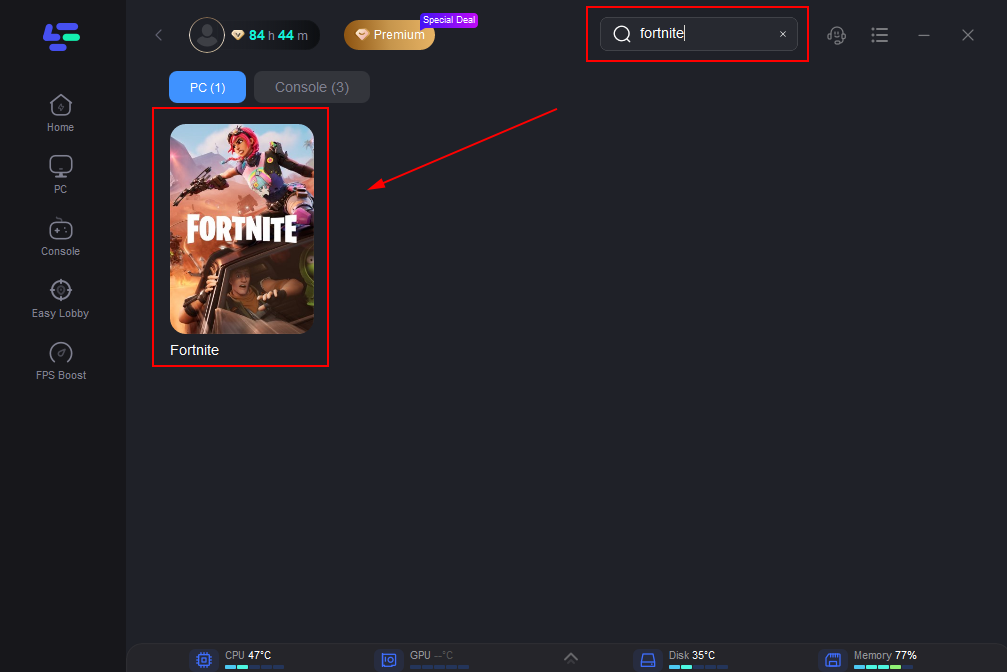
Step 2: Type ‘Fortnite’ in the Search library and click Fortnite button.
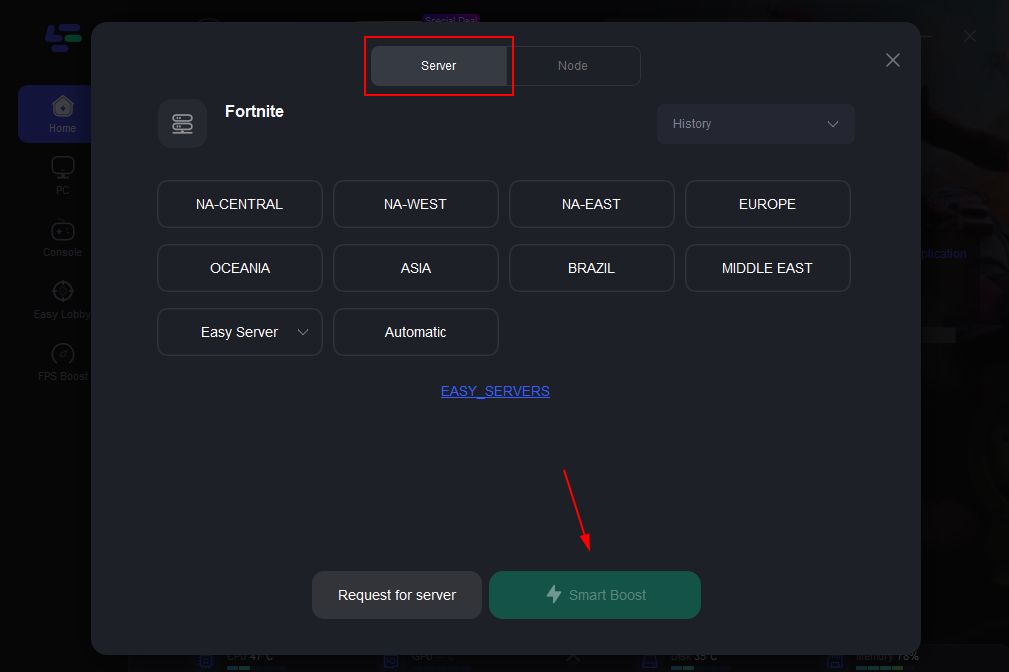
Step 3: Choose the server you need. Maybe the easier than before or less latency.
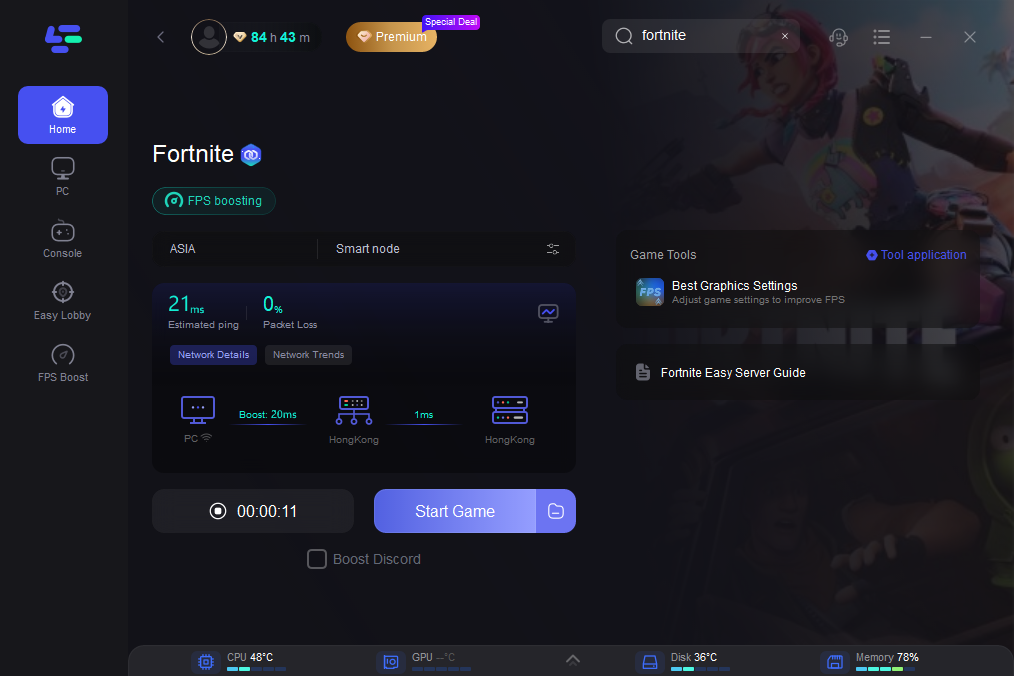
Step 4: Then you can see ping rate and status of packet loss after boosting Fortnite.
Part 3: 0 Ping vs Low Ping vs Stable Ping
0 ping is rarely realistic in Fortnite, while low ping means faster response and stable ping means fewer spikes or packet loss. For most players, stable low ping matters more than chasing a perfect 0 ping number.
|
Ping Range |
In-Game Feeling |
Is It Realistic? |
What to Do |
|
0-10 ms |
Extremely responsive. Builds, edits, and shots feel immediate. |
Rare unless you are very close to the server. |
Do not over-optimize. Keep the connection stable and avoid packet loss. |
|
10-30 ms |
Excellent for competitive Fortnite. |
Realistic for players near a Fortnite server with good routing. |
Use Ethernet, keep background downloads off, and monitor spikes. |
|
30-60 ms |
Good and playable for most players. |
Common for many regions. |
Optimize region selection and reduce Wi-Fi interference. |
|
60-100 ms |
Playable but edits, peeks, and shotgun fights may feel delayed. |
Common when the server is farther away. |
Check matchmaking region, ISP routing, and test a route optimizer if needed. |
|
100 ms+ |
Noticeable delay, rubber banding, and late hit registration may occur. |
Usually means distant server, routing issue, or unstable connection. |
Test Fortnite server ping, use Ethernet, stop background traffic, and try routing optimization. |
Part 4: How to Check Your Real Fortnite Ping
Do not rely only on a general internet speed test. Speedtest may connect to a nearby test server, while Fortnite connects to Epic's game data centers. Epic provides Fortnite data center ping addresses that you can test from your device.
Turn on Net Debug Stats in Fortnite
Before testing outside the game, enable network details inside Fortnite: open the menu in the Fortnite lobby, go to Settings, open the Game UI tab, turn Net Debug Stats on, and apply the change. Your network details will appear in the top-left corner during play.
Test Fortnite Data Center Ping on Windows
On Windows 11, click Start, type cmd, press Enter, and run a 50-packet ping test. Example:
ping ping-nae.ds.on.epicgames.com -n 50
This sends 50 packets and shows your average latency. You can repeat the test for different Fortnite regions to see which data center is closest or most stable for you.
|
Fortnite Region |
Ping Address |
|
North America East |
ping-nae.ds.on.epicgames.com |
|
North America Central |
ping-nac.ds.on.epicgames.com |
|
North America West |
ping-naw.ds.on.epicgames.com |
|
Europe |
ping-eu.ds.on.epicgames.com |
|
Oceania |
ping-oce.ds.on.epicgames.com |
|
Brazil |
ping-br.ds.on.epicgames.com |
|
Asia |
ping-asia.ds.on.epicgames.com |
|
Middle East |
ping-me.ds.on.epicgames.com |
When reading the result, look beyond the average ping. Check whether packets were lost and whether minimum and maximum latency are far apart. A connection with 35 ms average but frequent spikes to 150 ms may feel worse than a steady 50 ms connection.
Bonus Tips: What Not to Do When Chasing 0 Ping
- Do not install unknown “0 ping” tools that modify Fortnite files or promise impossible results.
- Do not assume a VPN will always lower ping. Many VPNs add extra routing and may increase latency.
- Do not choose a faraway region only because someone says it has easier lobbies; it may make ping much worse.
- Do not confuse FPS drops with ping. Low FPS is a device performance issue, while ping is a network latency issue.
- Do not keep changing many settings at once. Test one change at a time so you know what actually worked.
FAQ
Can you actually get 0 ping in Fortnite?
For normal online matches, true 0 ping is extremely unlikely. Very low ping is possible if you live close to a Fortnite server and have excellent routing, but most players should aim for stable low ping instead.
What ping is good for Fortnite?
Under 30 ms is excellent, 30-60 ms is good, 60-100 ms is playable but can feel delayed, and 100 ms or higher can affect builds, edits, and hit registration. Stability and packet loss matter as much as the number itself.
Why is my Fortnite ping high even though my internet speed is fast?
Download speed and ping are different. Fortnite ping depends on server distance, matchmaking region, Wi-Fi stability, ISP routing, packet loss, and route congestion. A fast speed test does not guarantee low Fortnite ping.
Does LagoFast guarantee 0 ping?
No. LagoFast can help test optimized routes and reduce routing-related lag, but it cannot eliminate physical distance or fix official server outages. It should be evaluated with before-and-after ping and packet loss data.
Should I use a VPN to get lower ping in Fortnite?
A normal VPN is mainly designed for privacy or IP location changes, not game latency. It may lower ping in rare routing cases, but it can also increase latency. A game-specific route optimizer is usually more relevant for ping reduction.
Conclusion
The promise of 0 ping is attractive, but stable low ping is the realistic goal for Fortnite players. Start by checking Fortnite server status, confirming your matchmaking region, turning on Net Debug Stats, and testing Epic data center ping addresses. Then use Ethernet, close background traffic, and investigate ISP routing. If your issue appears to be unstable routing, cross-region distance, or packet loss, LagoFast can be tested as a route optimization option. The right claim is not “LagoFast gets 0 ping easily,” but “LagoFast may help reduce and stabilize Fortnite ping when routing is the problem.”

Boost Your Game with LagoFast for Epic Speed
Play harder, faster. LagoFast game booster eliminates stutter and lags on PC, mobile, or Mac—win every match!
Quickly Reduce Game Lag and Ping!
Boost FPS for Smoother Gameplay!