
This article explains the real technical causes behind CS2 high ping Dubai server issues and provides practical ways to regain stable, low-latency gameplay even when regional infrastructure is unstable.
For years, the United Arab Emirates was considered one of the best regions for competitive Counter-Strike. Thanks to nearby data centers, players regularly enjoyed 5–15ms latency, creating an almost LAN-like environment. However, many players are now facing a very high ping on Dubai/UAE server, often exceeding 100ms or even hitting a high ping - 153 constant ping (UAE / Turkey).
If you are wondering why this change happened so suddenly and why typical fixes are not working, this guide will walk you through everything—from root causes to real solutions.

- ✅ Reduce Lag and High Ping.
✅ Boost FPS at the Same Time.
✅ Support 8000+ Online Games
✅ Change Server Without Latency.
✅ Multiplatform: PC, Console, Mobile.
✅End Connection & Crashing Issue
✅ Support Easy Lobby in all Cod Series
Part 1: What Happened to the CS2 Dubai Server?
Part 2: Players’ Voice: The Reddit and Discord Frustration
Part 3: Impact on Gameplay: Regional Latency Comparison
Part 4: Why Common High-Ping Fixes Are Not Working
Part 5: The Solution: Recovering Stability with LagoFast
Part 1: What Happened to the CS2 Dubai Server?
To understand why CS2 high ping Dubai server problems appeared, it’s important to look at what changed behind the scenes.
In March 2026, major disruptions affected the Middle East’s internet backbone. Physical damage to key infrastructure—including subsea cables across the Gulf—caused instability and outages in regional data routing. As a result, Valve’s Steam Datagram Relay (SDR) nodes in Dubai were significantly impacted.
The IP range 185.25.183.0/24, which handled a large portion of UAE-based Counter-Strike 2 traffic, became unreliable or unavailable. Since Valve relies on physical relay nodes rather than fully flexible cloud deployment, the system could not instantly replace the Dubai Point of Presence (PoP).
As a consequence, players who were previously connected locally began getting rerouted to distant servers such as Mumbai, Singapore, or even Europe. This explains why many users report high ping suddenly in Dubai server Counter-Strike 2 scenarios, despite having fast fiber connections.
This transition marks the core reason behind the sudden spike in latency.
Part 2: Players’ Voice: The Reddit and Discord Frustration
Once the issue started, the community quickly noticed something was wrong. Across Reddit threads and Discord channels, players began sharing nearly identical experiences.
Many reported that their ping jumped overnight from single digits to over 100ms. Others noticed inconsistent routing, where the game claimed they were connected to UAE servers, yet latency suggested otherwise.
Some typical complaints include:
- "Wtf is this bs. I play on UAE sev with 5-8 ping... all of a sudden this has happened. The server I play on is in the United Arab Emirates, but for some reason, I’m getting connected on EU and the UAE ping is very high."
- "I live in Oman and UAE, Mumbai, and Singapore all give me the same ping around 100-110. I don't understand why this is happening ONLY with CS2. ExitLag helps, but it adds so much packet loss it becomes unplayable."
These experiences highlight an important fact: the issue is not caused by user hardware or home networks. Instead, it stems from how traffic is being routed across regions.
This growing frustration also explains why many players are asking: Why is CS2 Dubai server ping high when everything else works perfectly?
Part 3: Impact on Gameplay: Regional Latency Comparison
The jump from local servers to international routing has fundamentally changed the "meta" for Middle Eastern players. Here is a breakdown of the latency shift experienced by players across different cities in the region.
Latency Comparison: Before vs. After Dubai Server Issues:
|
Region |
Previous Ping (Local Hub) |
Current Ping (Rerouted to Mumbai/EU) |
Impact on Gameplay |
|
Dubai, UAE |
5ms - 12ms |
75ms - 110ms |
Severe delay; AWP quickscopes miss frequently. |
|
Abu Dhabi, UAE |
8ms - 15ms |
85ms - 120ms |
Noticeable "rubber-banding" and jitter. |
|
Muscat, Oman |
20ms - 30ms |
110ms - 140ms |
Unplayable for competitive FACEIT queues. |
|
Doha, Qatar |
15ms - 25ms |
95ms - 130ms |
Sub-tick synchronization is completely broken. |
|
Riyadh, KSA |
25ms - 40ms |
130ms - 160ms |
Constant packet loss and high interp. |
This increase affects gameplay in several critical ways:
- Delayed hit registration, especially noticeable with AWP shots
- Increased peeker’s advantage inconsistencies
- Rubber-banding and desync issues
- Sub-tick timing instability
In competitive environments like FACEIT, these problems can make matches feel unplayable. Even if the ping is consistent, the increased distance to servers fundamentally changes reaction timing.
This is why many players now prefer stable higher latency over unstable regional connections.
Part 4: Why Common High-Ping Fixes Are Not Working
After encountering these issues, most players try standard troubleshooting methods. However, in this situation, those solutions rarely work.
Let’s break down why:
Flushing DNS (ipconfig /flushdns):
This only affects domain resolution, not physical routing paths.
Restarting the router:
While it resets local connections, it cannot influence international network congestion.
Verifying game files:
This fixes corrupted files, not network latency.
Reinstalling the game:
Sometimes creates a temporary improvement due to reconnection, but does not solve the underlying issue.
The core problem lies in network routing and congestion. ISPs in the UAE rely on international submarine cables to route traffic. When these routes become congested or partially damaged, traffic is forced through inefficient paths.
Additionally, standard routing protocols prioritize default paths rather than optimal ones. This means your data may travel a longer or more congested route even when faster alternatives exist.
This explains why players experience high ping suddenly in Dubai server Counter-Strike 2 scenarios without any change on their side.
Part 5: The Solution: Recovering Stability with LagoFast
When the local Dubai servers are unstable, the only way to play competitively is to find a "bridge." LagoFast acts as that bridge. Instead of letting your ISP decide how your data reaches the server, LagoFast uses a dedicated global network of high-speed nodes to bypass congestion.
How LagoFast Fixes the Dubai Problem:
- Multipath Connection: LagoFast can bond connections or find the fastest path between Etisalat and du's international gateways. If the cable to Mumbai is congested, it can instantly reroute your traffic through a smoother path to Singapore or Europe.
- Server Switching: If the Dubai server is giving you 150ms, LagoFast allows you to force a connection to EU or Singapore with optimized routing. Often, a stabilized 80ms to Germany feels better than a jittery, packet-loss-ridden 100ms to a broken local server.
- Real-Time Optimization: It reduces the "jitter" (the variance in ping). In CS2, a stable 60ms is infinitely better than a ping that jumps between 30ms and 90ms.
Performance Comparison: With vs. Without LagoFast
|
Target Server |
Standard Ping (No Optimization) |
Ping with LagoFast |
Stability (Packet Loss) |
|
UAE (Current State) |
110ms (Jittery) |
45ms - 55ms |
0% Loss |
|
Singapore |
140ms |
70ms - 85ms |
Stable |
|
EU West (Germany) |
135ms |
90ms - 105ms |
Optimized for FACEIT |
|
India (Mumbai) |
95ms |
35ms - 48ms |
High Precision |
Interestingly, a stable 80ms connection often feels better than a fluctuating 100ms connection due to reduced jitter and packet loss.
Tutorial to Use LagoFast to Fix the CS2 High Ping Issue:
Step 1: Click the Free Trial button to download and install LagoFast Free Trial.
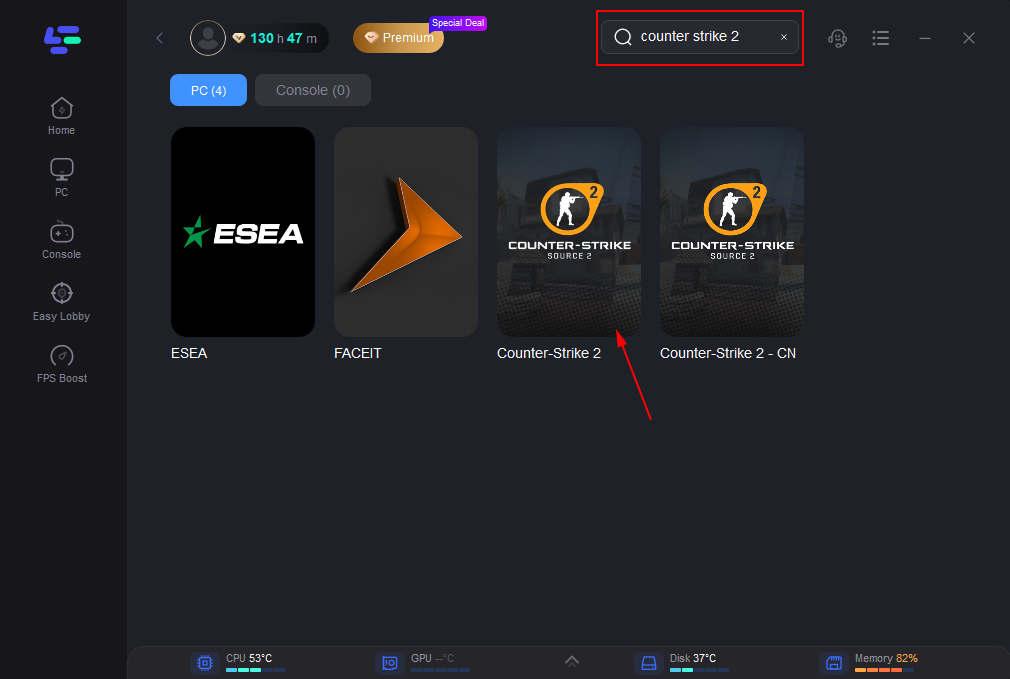
Step 2: Search for CSGO in the top search bar then click the result.
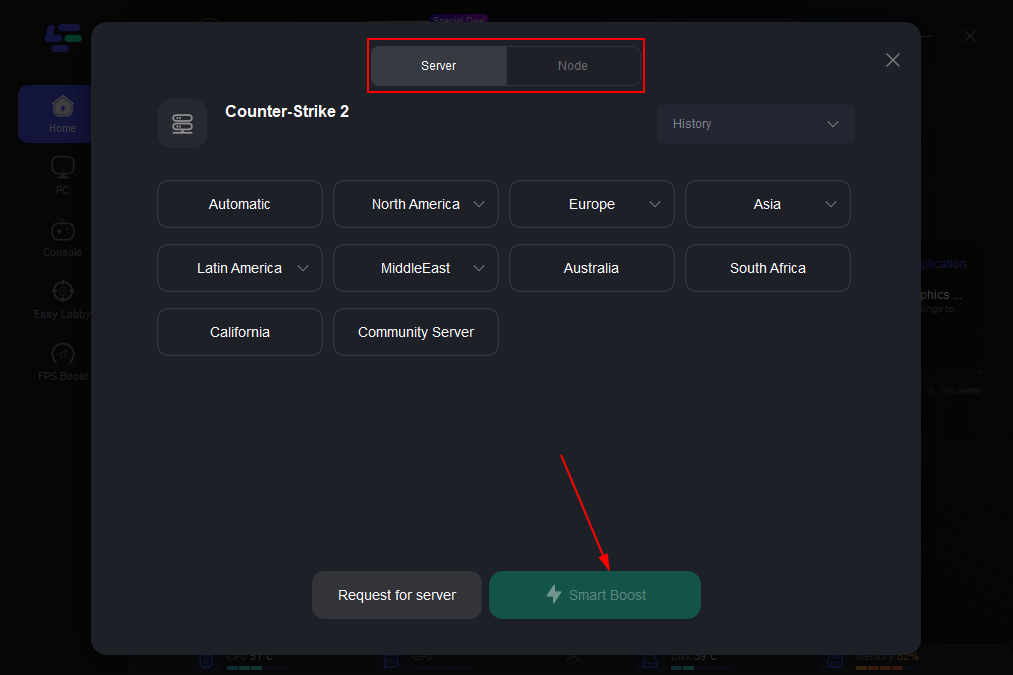
Step 3: Click on “Server” to change to a better server that ensures smooth gameplay, then click on “Smart Boost”.
Step 4: Check the specific game ping, packet loss, and multiple path connection on the right side. Finally, click the “Start Game” to play the game.
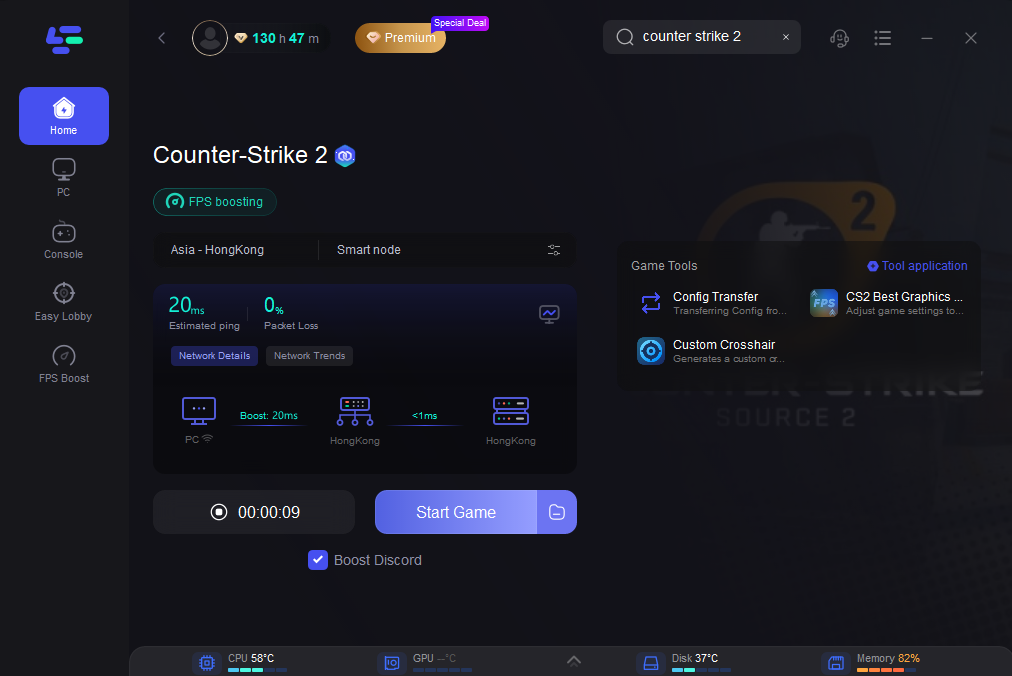
By controlling routing paths, you can effectively bypass problematic infrastructure.
Part 6: FAQs
Why am I getting a constant 153 ping?
A high ping - 153 constant ping (UAE / Turkey) usually indicates that your traffic is being routed inefficiently, often traveling long distances before reaching the server. This is known as backhauling.
Why is my ping fine in other games?
Different games use different server infrastructures. CS2 relies heavily on Valve’s SDR network, which is currently affected in the UAE region.
Can I still play competitively?
Yes, but you may need to switch to alternative servers, such as EU or Singapore for better stability.
Is using a network optimizer safe?
Yes. Tools like LagoFast only optimize network routing and do not interfere with game files, making them safe to use.
Conclusion
The CS2 high ping Dubai server issue is not a simple bug or user-side problem. It is the result of real-world infrastructure disruption affecting how data travels across regions.
While waiting for full restoration of UAE servers, players must adapt by optimizing their routing and choosing more stable server paths. Whether you are dealing with very high ping on the Dubai/UAE server or trying to understand why the CS2 Dubai server ping is high, the solution lies in controlling your connection path rather than relying on default ISP routing.
By making these adjustments, you can regain consistency, reduce latency spikes, and stay competitive—even under less-than-ideal network conditions.

Boost Your Game with LagoFast for Epic Speed
Play harder, faster. LagoFast game booster eliminates stutter and lags on PC, mobile, or Mac—win every match!
Quickly Reduce Game Lag and Ping!
Boost FPS for Smoother Gameplay!