

Quick Answer
Yes, 50 ping is generally considered good for Fortnite and provides smooth gameplay for most players. While competitive players often aim for ping below 30ms, a stable 50ms connection is more than enough for building, editing, and combat. To achieve lower and more stable ping, use a wired connection, select the nearest server region, and reduce background network activity.
Fortnite is one of the most popular online multiplayer games, featuring Battle Royale, Zero Build, Save the World, and a wide range of creator-made experiences. Because Fortnite relies heavily on real-time online interactions, network performance can have a major impact on gameplay. Many players wonder whether 50 ping is good for Fortnite and how to reduce latency for a smoother gaming experience.

- ✅ Reduce Lag and High Ping
- ✅ Boost FPS in Real Time
- ✅ Get the Easiest Server in Fortnite
- ✅ End All Connection Login Issues.
- ✅ Support 8000+ Online Games.
- ✅ Multiplatform: PC, Mobile, Console
Part 1: Best Way to Get 50 Ping in Fortnite and Improve Connection Stability
Part 2: Is 50 Ping Good for Fortnite? Understanding How Ping Affects Gameplay
Part 3: Other Ways to Improve Ping and Reduce Lag in Fortnite
Best Way to Get 50 Ping in Fortnite and Improve Connection Stability
Many Fortnite players aim for 50 ping because it provides smooth and responsive gameplay. If your latency is consistently higher, optimizing your network setup can help improve performance and connection stability.
You can use LagoFast to help reduce Fortnite ping and improve overall network performance when latency becomes a problem. LagoFast is a gaming-focused network optimization tool designed to reduce ping, fix packet loss, stabilize connections, and improve routing efficiency. By intelligently optimizing network paths, it helps minimize lag spikes, reduce connection issues, and deliver a smoother Fortnite experience.
Key Features:
- Reduce ping and improve connection stability
- Fix packet loss and minimize lag spikes
- Optimize routing paths for faster and more reliable connections
- FPS Boost 2.0: One-click game optimization and frame generation support
- Best Graphics Settings: Automatically adjust game settings to improve FPS
- Frequently Issues Fix: One-click repair for DirectX 12, Visual C++ Runtime, and other common game environment issues
- Real-time monitoring of ping, packet loss, and network performance
- Support thousands of popular online games with easy setup and server selection
- Support for more than a thousand famous games, including Overwatch 2, and NBA 2K23.
To resolve Fortnite connection issues, adhere to these steps to use LagoFast.
Step 1: Download and install LagoFast.
Step 2: Input "Fortnite" in the search box and then click the result.
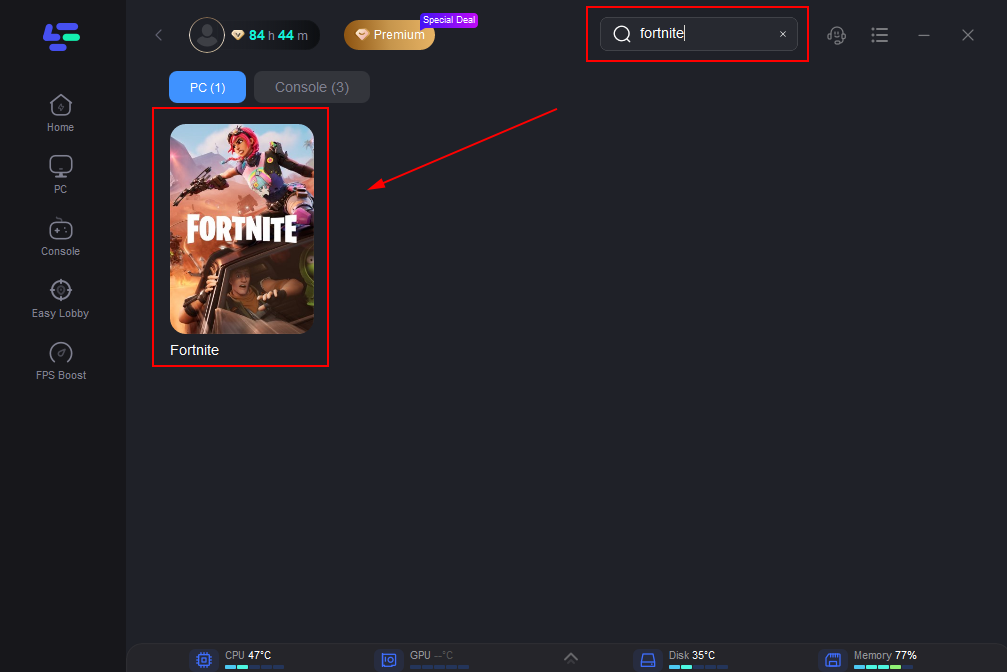
Step 3: Choose the server that matches Fortnite.
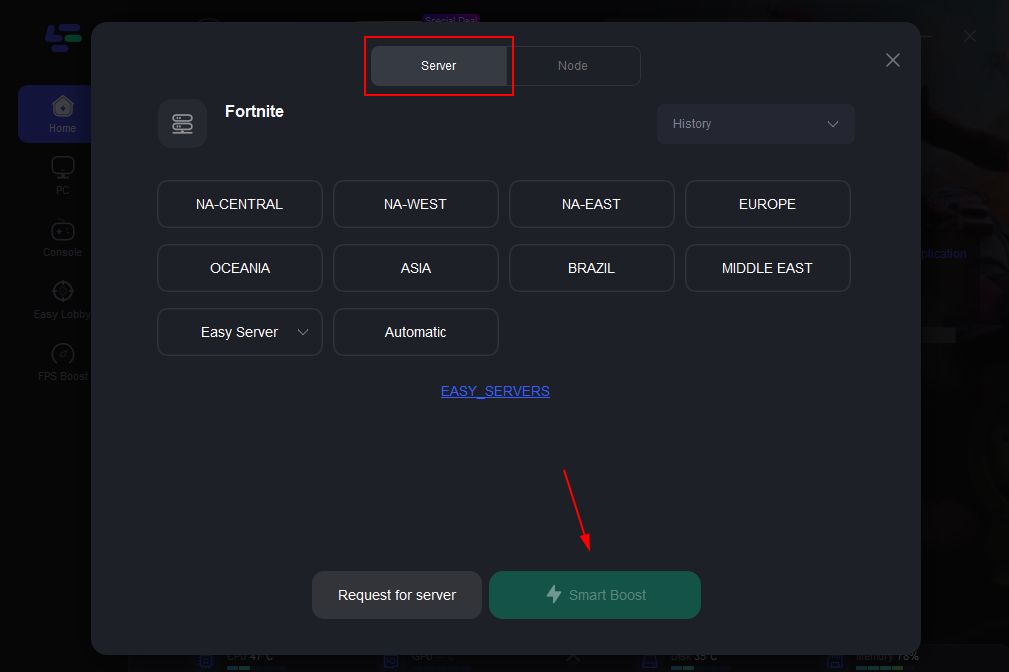
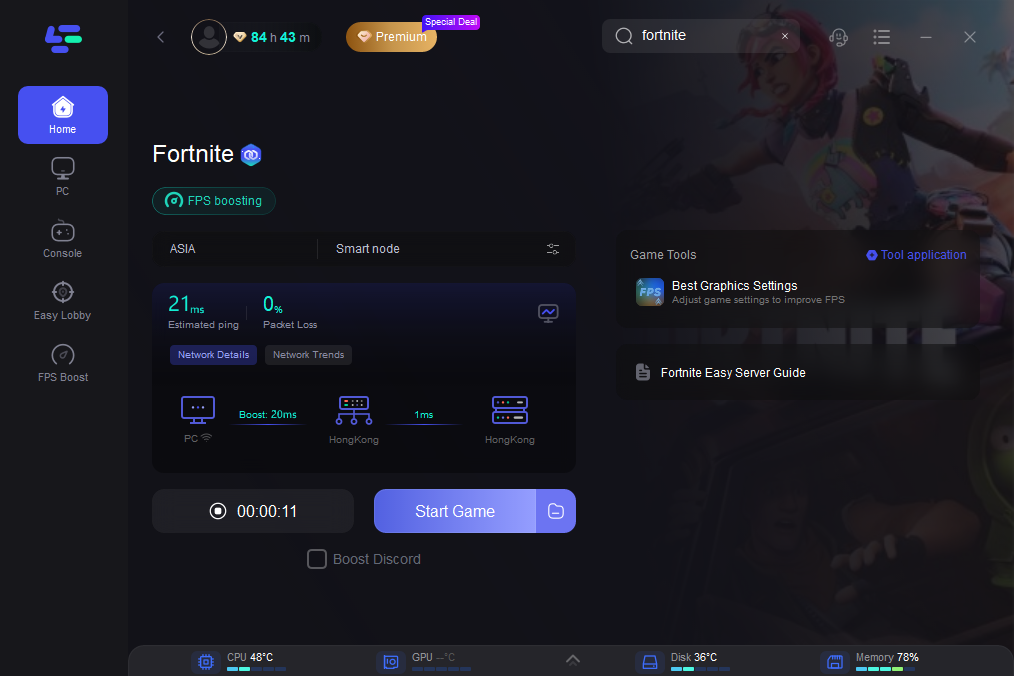
Step 4: Click to begin.
The real-time displays of packet loss and ping rates can be seen on the panel.
Is 50 Ping Good for Fortnite? Understanding How Ping Affects Gameplay
Yes, 50 ping is generally considered good for Fortnite and is suitable for smooth gameplay. At this latency level, most players can build, edit, and engage in combat without noticeable delays. While competitive players often prefer ping below 30ms, a stable 50ms connection is still more than enough for an enjoyable and responsive gaming experience.
Here's a general guideline for Fortnite ping:
- Below 20ms — Excellent, ideal for competitive play
- 20–50ms — Very good, smooth gameplay with minimal delay
- 50–100ms — Good, playable for most players with only minor latency
- 100–150ms — Fair, delays may become noticeable during fast-paced fights
- Above 150ms — Poor, high latency can negatively affect building, editing, and shooting accuracy
Keep in mind that connection stability is just as important as low ping. A consistent 50ms connection will usually provide a better experience than a lower ping that frequently spikes. To achieve lower and more stable ping, use a wired connection, select the nearest matchmaking region, reduce background network activity, and optimize your network routing when necessary.
Other Ways to Improve Ping and Reduce Lag in Fortnite
If you're experiencing high ping in Fortnite, try the following methods to improve connection quality and reduce latency:
Select the Closest Matchmaking Region
Open Settings > Game > Matchmaking Region and choose the server with the lowest ping. Connecting to the nearest server region can significantly reduce latency and improve responsiveness.
Use a Wired Connection
A wired Ethernet connection is generally more stable than Wi-Fi and can help reduce packet loss, ping spikes, and unexpected connection interruptions during matches.
Close Background Downloads and Applications
Applications such as Windows Update, cloud sync services, game launcher downloads, and streaming software can consume bandwidth and increase latency. Closing unnecessary programs before launching Fortnite can help maintain a more stable connection.
Restart Your Router and Modem
Restarting your router and modem can refresh your network connection and resolve temporary network congestion. For best results, turn off both devices for about 60 seconds before reconnecting them.
Check Fortnite Server Status
Sometimes high ping is caused by server-side issues rather than your own network. If you're experiencing sudden latency spikes, check Fortnite's server status to see if there are any ongoing outages or maintenance periods.
Update Network Drivers
Outdated network drivers can sometimes contribute to higher latency and connection instability. Keeping your network adapter drivers up to date can help improve overall network performance and compatibility.
Conclusion
A stable 50 ping is generally considered good for Fortnite and can provide a smooth and responsive gaming experience for most players. While lower latency is always beneficial, connection stability is equally important. By choosing the right server region, using a wired connection, and optimizing your network setup, you can enjoy more consistent performance and fewer interruptions in Fortnite.

Boost Your Game with LagoFast for Epic Speed
Play harder, faster. LagoFast game booster eliminates stutter and lags on PC, mobile, or Mac—win every match!
Quickly Reduce Game Lag and Ping!
Boost FPS for Smoother Gameplay!