SMITE 2 Game Booster: Enhancing Performance and Immersion
SMITE 2 Overview

SMITE 2, developed by Titan Forge Games and published by Hi-Rez Studios, is a free-to-play online MOBA and ARTS game, serving as a sequel to SMITE. Announced on January 12, 2024, it is slated for release on PC, Xbox X/S, and PlayStation 5. Players select from a wide array of gods, immortals, and creatures from ancient mythology for 5v5 arena combat, each with unique abilities and playstyles. The gameplay revolves around sieging the opposing team’s base and defeating their Titan. In SMITE 2, players embody gods, utilizing their divine powers to secure victory in 5v5 team battles. Diverging from traditional MOBA views, SMITE 2 employs a third-person perspective, enhancing immersion. Movement and combat are executed using WASD keys, offering dynamic engagement on diverse battlegrounds. Additionally, SMITE 2 boasts cross-platform play and progression, ensuring seamless gaming experiences across various devices. With Unreal Engine 5 powering immersive visuals, enhanced combat mechanics, and innovative gameplay features, SMITE 2 sets a new standard for action MOBAs.
SMITE 2 Alpha Test Details & How to Sign-up
Titan Forge Games has just unveiled the first closed alpha test for Smite 2, scheduled for the weekend of May 2nd to May 5th, 2024. This eagerly awaited event promises to showcase “14 playable gods and the revamped Conquest game mode,” offering players a sneak peek into the sequel’s offerings. While the specific lineup of playable gods remains under wraps, enthusiasts can anticipate further revelations during a dedicated livestream on May 1st. Be sure to tune in to the Smite Twitch channel at 3 PM Eastern Time to catch all the latest updates. In addition, Titan Forge Games has confirmed plans for subsequent alpha weekend tests leading up to the closed beta, slated for a “late this summer” debut. These upcoming tests mean that SMITE 2 will be fully released soon. You can try these tests in advance and provide your feedback to Forge Games, your suggestions might be adopted and used in the full release of this game, contributing to the development of SMITE 2.
If you don’t know how to sign up for the Alpha Test, follow the detailed tutorial below.
Tutorial for PC Users:
Step 1. Navigate to the Smite 2 Steam page.
Step 2. Locate the Request Access button next to the Join the Smite 2 Playtest section and click on it.
Step 3. Keep an eye on your Steam notifications for confirmation of your selection to play.
Tutorial for Console Users:
Step 1. Visit the official Smite 2 website.
Step 2. Click on the Register For Alpha option located in the top left corner.
Step 3. Choose your platform and provide your email address.
Step 4. Keep an eye on your email for a notification regarding your selection.
Unlock the Best Gaming Experience: SMITE 2 Game Booster
Dive into the world of SMITE 2 with LagoFast, the ultimate game booster that’s changing the gaming scene. LagoFast turbocharges your SMITE 2 experience with lightning-fast connectivity, minimizing lag and boosting responsiveness, even in intense battles. Unlike other boosters, LagoFast doesn’t just tackle lag – it also handles high ping and low FPS issues, ensuring smooth gameplay. With just one click, it optimizes system settings and boosts FPS on PCs, consoles, and mobile devices. Its simple lobby feature helps you secure victories effortlessly. Enhancing your SMITE 2 experience has never been simpler with LagoFast’s all-in-one capability and user-friendly interface. It quickly resolves lag from various sources, saving you time and getting you back into the game fast. Plus, LagoFast offers more features and a lower price compared to other boosters. Let’s explore its key features and follow the tutorial to get started.
All-In-One Gaming Solution:
LagoFast is your one-stop solution for common gaming woes like lag, high ping, connection issues and login glitches. Unlike other boosters, it’s versatile in optimizing your gaming experience.
Maximized FPS:
With just a click, LagoFast fine-tunes your PC’s settings, CPU, and GPU to maximize FPS and eliminate in-game nuisances like ghosting and tearing.
Effortless Lobbies, Victorious Matches:
Enjoy exclusive easy lobbies with LagoFast, banishing the headache of mismatched opponents in multiplayer games. Say hello to smoother lobbies and more wins.
Performance Boost Across Devices:
LagoFast amps up performance across PCs, consoles, and mobile devices, syncing seamlessly with different operating systems for a consistently stable gaming experience.
Real-Time Gaming Excellence:
Thanks to its smart selection of low-latency game routes, LagoFast ensures uninterrupted gameplay, even if one route falters, minimizing disruptions from network issues.
Extensive Server Coverage:
With servers sprawled across 60+ countries and 150 cities, LagoFast guarantees a seamless gaming experience, swiftly connecting you to the nearest server no matter where you are.
Tutorial to use LagoFast for smooth gaming experience in SMITE 2:
Step 1: Click the Free Trial button to download and install LagoFast.
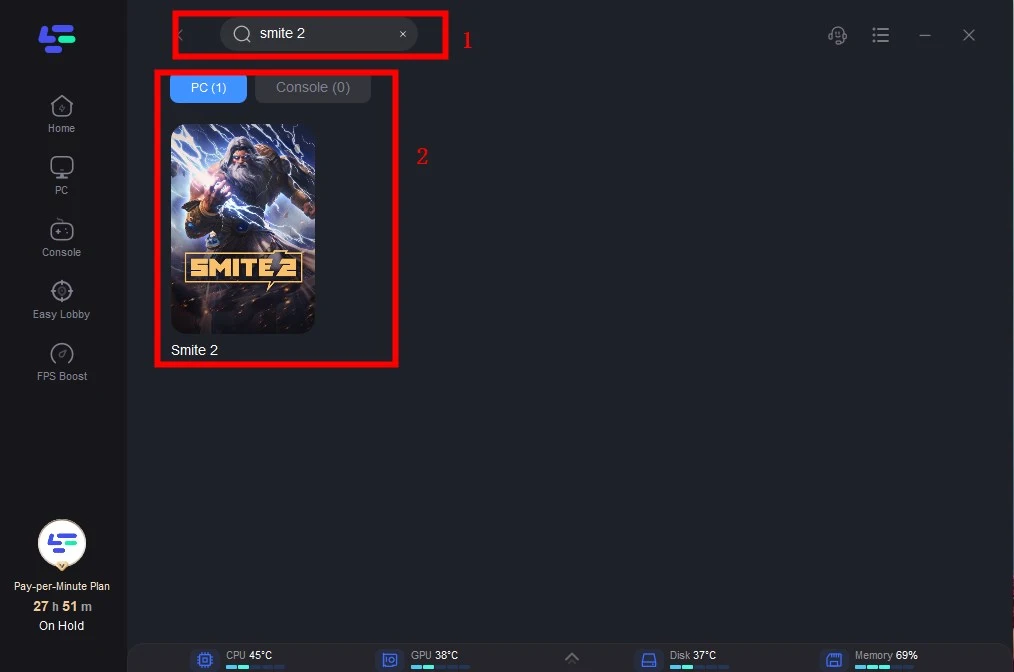
Step 2: Open LagoFast then click the PC button on the left and search Smite 2 in the search bar, click it after presenting.
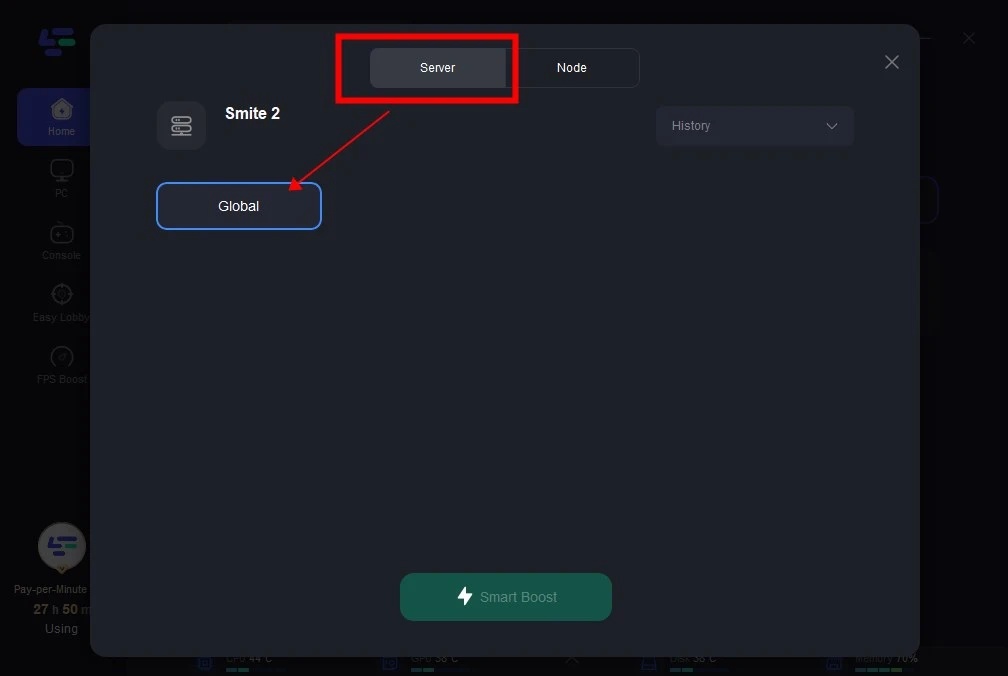
Step 3: Click on “Server” to change to a better server that ensures smooth gaming, then click on “Smart Boost”.
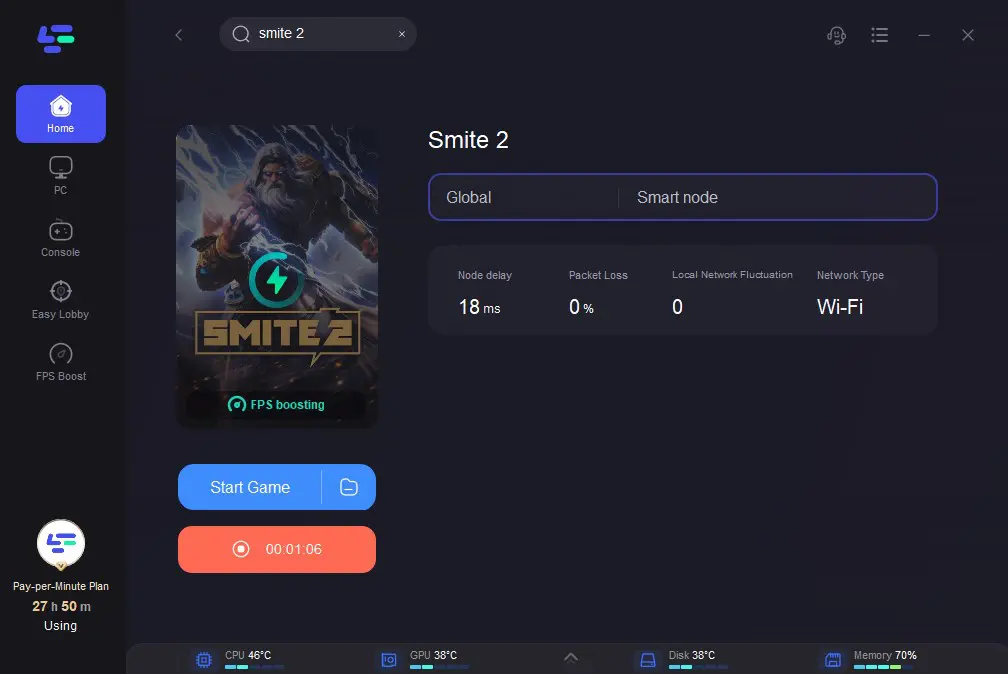
Step 4: Check the specific game ping, packet loss, and multiple path connection on the right side. Finally, click the “Start Game” to play Smite 2.