Best Call of Duty: Black Ops 7 Game Booster
Call of Duty: Black Ops 7 has taken the gaming community by storm since its release. Whether you’re grinding ranked multiplayer, exploring Zombies mode, or diving into large-scale Warzone-style battles, performance and connection quality are key to victory. Competitive shooters like BO7 demand precision, fast reaction time, and a perfectly stable connection.
However, even top-tier hardware can’t overcome lag spikes, high ping, or inconsistent frame rates. Many players struggle with these technical issues that can ruin an otherwise flawless match. This is where a dedicated game optimization tool like LagoFast Game Booster comes in. Designed specifically for gamers, LagoFast focuses on reducing latency, improving FPS, and stabilizing your entire gaming environment — giving you smoother gameplay and a competitive edge.

- ✅ Reduce Lag and Boost FPS
- ✅ Ensure Stable Server Connection.
- ✅ Change Server without Latency.
- ✅ Fix Crashing and Stuck Errors.
- ✅ 0% Packet Loss Rate
- ✅ Boost Game Downloading Speed.
Game Overview: A Deep Dive into Black Ops 7
1. Setting and Narrative
The year is 2035, and the world stands on the brink of chaos. Following the events of previous installments, the globe is ravaged by violent conflict and psychological warfare. You step into the boots of an elite operative under the command of David Mason, leading a Black Ops team to confront an enemy that weaponizes fear and specializes in manipulating the human psyche. This narrative propels players into a high-stakes conspiracy stretching from neon-lit urban landscapes to personal nightmares.
2. Core Game Modes
- Innovative Co-Op Campaign: For the first time, the signature Black Ops campaign is designed from the ground up for both solo and cooperative play. Squad up with friends or go solo on missions that redefine the experience with high-risk objectives across diverse environments.
- Multiplayer Mayhem: Black Ops 7 launches with a robust multiplayer suite featuring 16 brand-new 6v6 maps and two massive 20v20 maps. The maps mark a return to Treyarch's iconic symmetrical, three-lane design, promoting clear flow and fast-paced action.
- Round-Based Zombies: The beloved Zombies mode returns, plunging players into the heart of the Dark Aether. This time, the crew is trapped in a vast, ever-shifting hellscape where survival is just the beginning of a terrifying new chapter.
3. New Gameplay and Features
- Omni movement System: Outmaneuver your enemies with a next-level movement system that grants unprecedented freedom of motion, allowing for more fluid and strategic combat.
- The Overclock System: This major addition allows for deep customization of score streaks and equipment, offering players more strategic choice than ever before.
- Revamped Matchmaking: In a direct response to community feedback, Black Ops 7 features a transparent matchmaking playlist that prioritizes connection quality over strict Skill-Based Matchmaking (SBMM). This change aims to create less stressful and more varied lobbies, reminiscent of classic Call of Duty titles.
4. Release Information
Call of Duty: Black Ops 7 is scheduled for release on November 14, 2025. It will be available on PlayStation 5, PlayStation 4, Xbox Series X|S, Xbox One, and PC via Steam, Battle.net, and the Xbox PC app. In a major move, the game will be available on Xbox Game Pass for Ultimate and PC subscribers from day one.
How LagoFast Game Booster Enhances Your BO7 Gameplay
LagoFast Game Booster is not just another background app. It’s a specialized optimization tool for competitive online gaming that focuses on real-time network acceleration, secure performance boosting, and visual optimization. Here’s how it helps you get the most out of Call of Duty: Black Ops 7.
1. Reduce Ping & Stabilize Connection
High ping is every gamer’s worst enemy in Call of Duty. It leads to delayed hit registration, rubber-banding, and desynchronized movement. LagoFast tackles these issues through intelligent routing and real-time ping detection.
Key benefits:
- Real-time ping monitoring lets you see latency levels before and during gameplay.
- Smart server selection automatically connects you to the optimal route, reducing network hops and distance.
- Stability assurance ensures lower packet loss and jitter for consistent, lag-free sessions.
The result is smoother movement, faster reaction time, and fairer engagements in every match.
Tutorial to use LagoFast to Get the Best Black Ops 7 Experience on PC:
Step 1: Click the Free Trial button to download and install LagoFast.
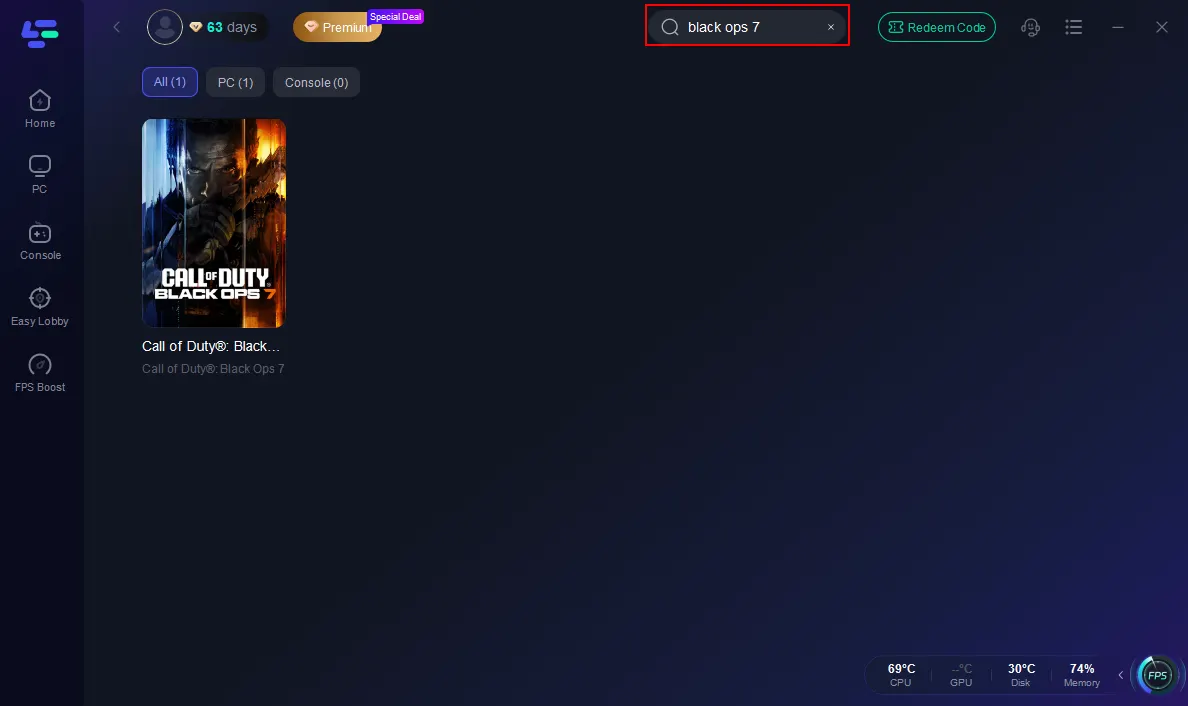
Step 2: Open LagoFast, then click the PC button on the left and search Black Ops 7 in the search bar, and click it after it appears.
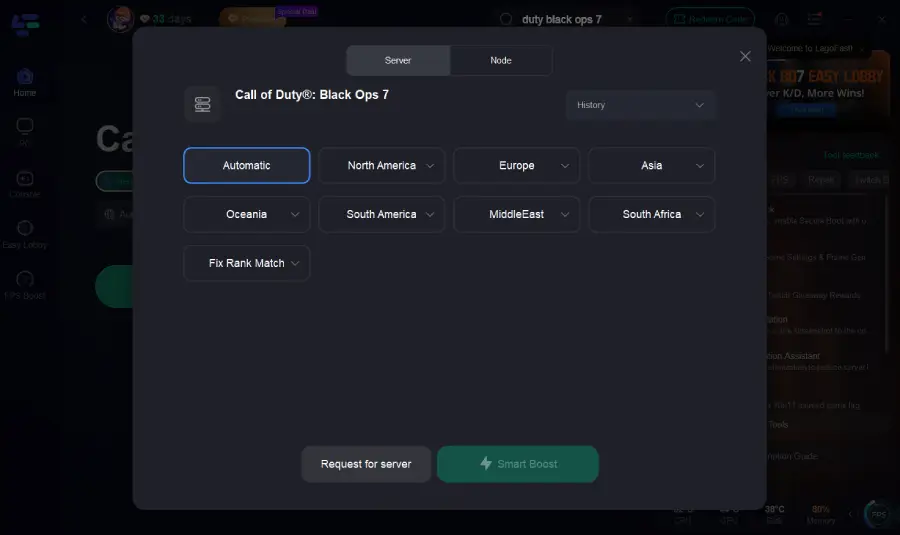
Step 3: Click on “Server” to change to a better server that ensures the Black Ops 7 gaming experience, then click on “Smart Boost”.
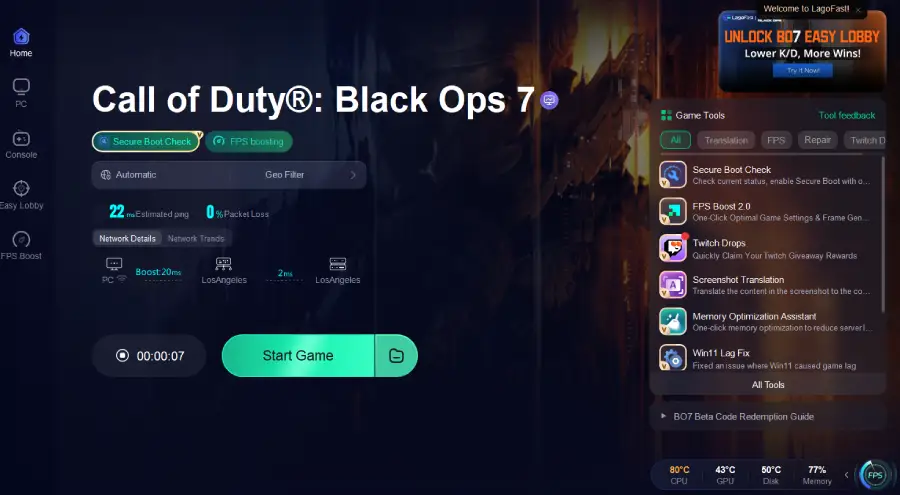
Step 4: Check the specific game ping, packet loss, and multiple path connections on the right side. Finally, click the “Start Game” to play the game.
For console players, LagoFast also offers an effortless solution. If you’re playing Call of Duty: Black Ops 7 on PlayStation, Xbox, or Switch, the LagoFast Box delivers the same low-ping, stable connection experience without needing any software setup — just plug it in, connect your console, and enjoy optimized performance instantly.
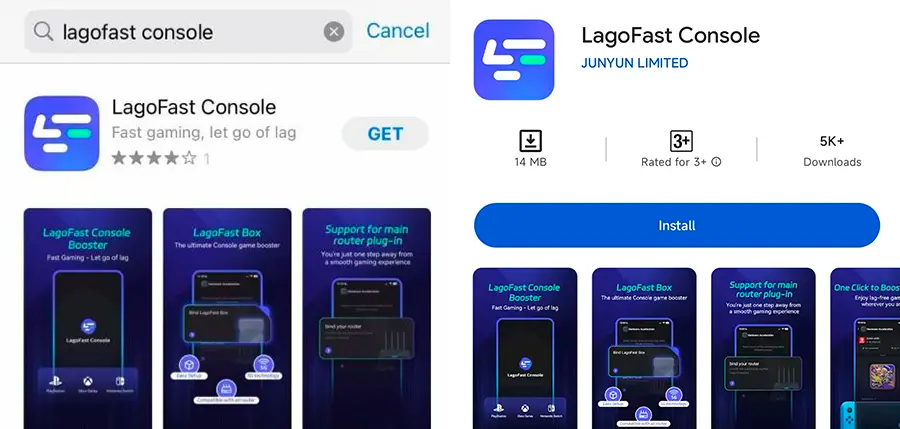
Step 1: Download the LagoFast Console App on your phone to control the LagoFast Box.
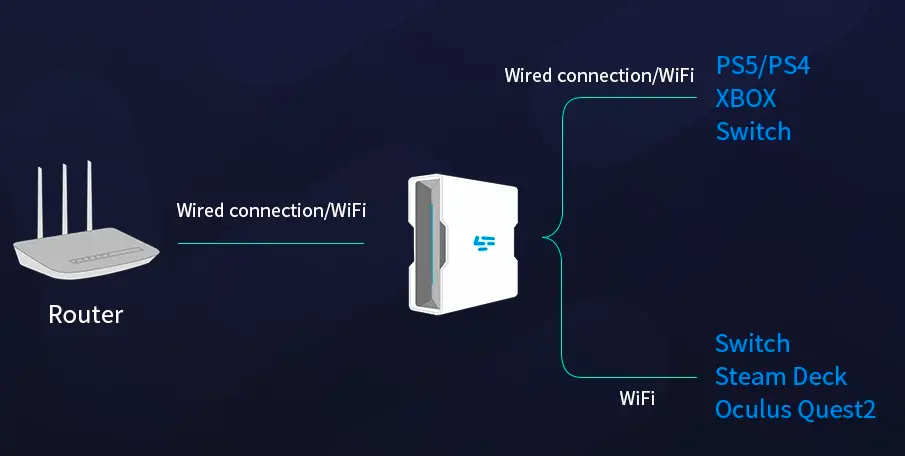
Step 2: Establish a connection between your LagoFast Box, router, and console, choosing between a wired or wireless connection.
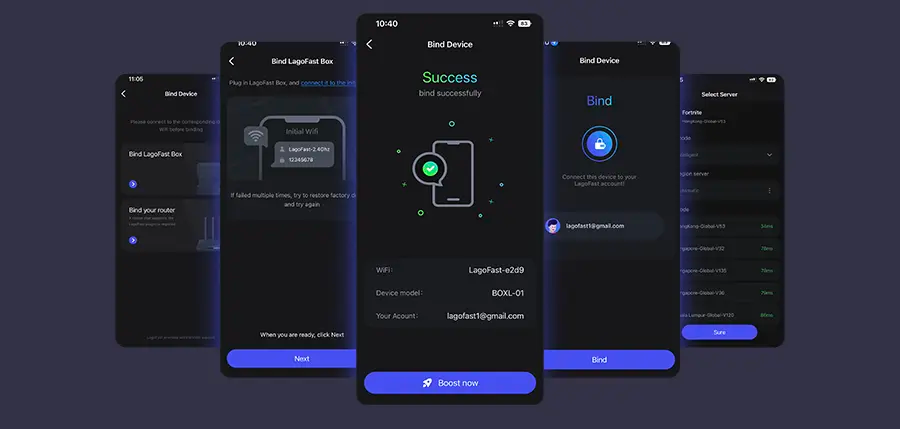
Step 3: Launch the LagoFast Console App and boost FC 26. Once you have completed the binding process with the LagoFast Box, proceed to boost this game within the LagoFast Console App.
2. Easy Lobby & Better Matchmaking
LagoFast’s “Easy Lobby” feature helps players get smoother and often more balanced matchmaking sessions. This means fewer network issues, faster queue times, and more consistent game performance. By intelligently managing server routes and regions, it improves connection quality while increasing the chance of entering lower-competition lobbies.
Here’s what you can expect:
- Connection to less congested servers or regions with lower player density for more relaxed matches.
- Faster matchmaking and reduced waiting time through optimized routing and improved NAT type.
- Smarter region switching that can lead to easier or fairer lobbies while maintaining stable ping and performance.
This feature is particularly useful for players who want to complete challenges, practice new weapons, or simply enjoy a more stress-free gaming experience.
Tutorial to use LagoFast to get bot lobbies in Black Ops 7 without lag on PC:
Step 1: Choose the "Easy Lobby" feature on the left.
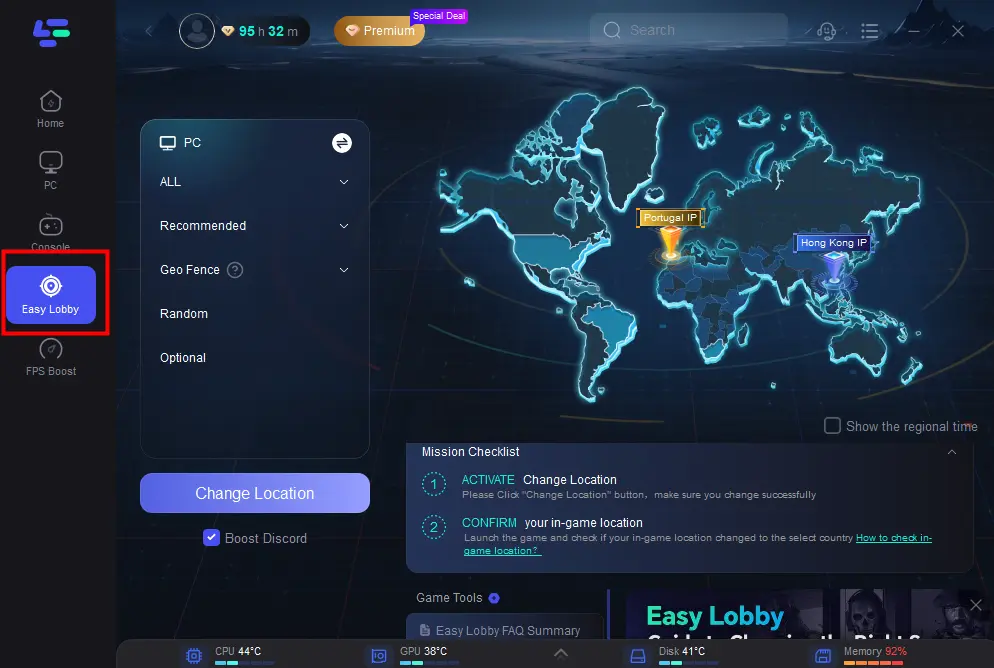
Step 2: Choose the server you like to match, like India IP > Click on the Change Location button to begin.
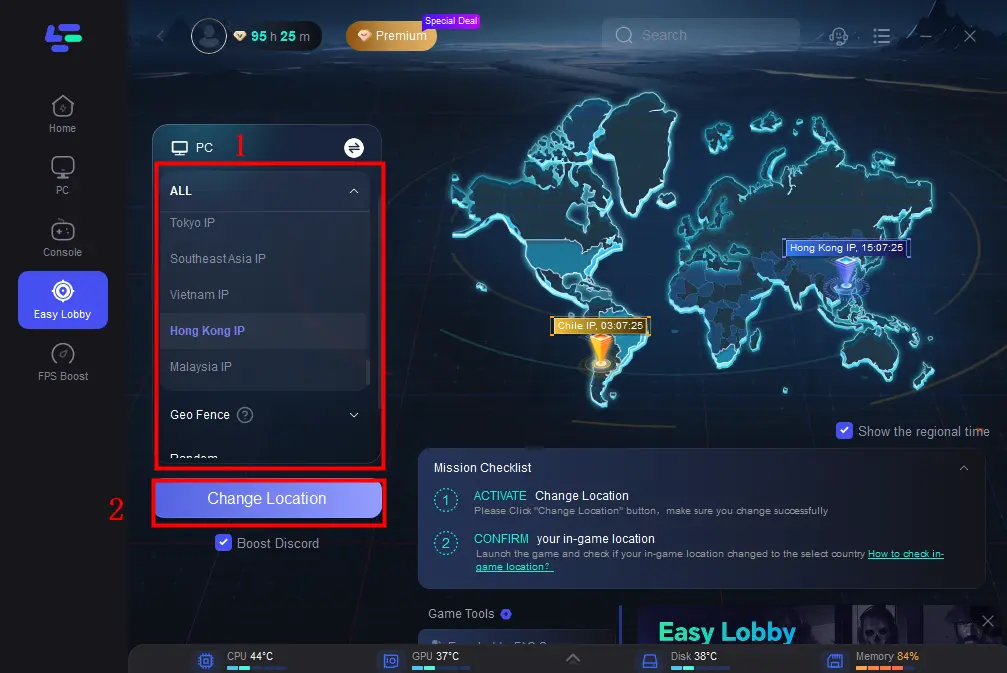
Step 3: You can also choose to upgrade to PS or Xbox, which gives you access to different features.
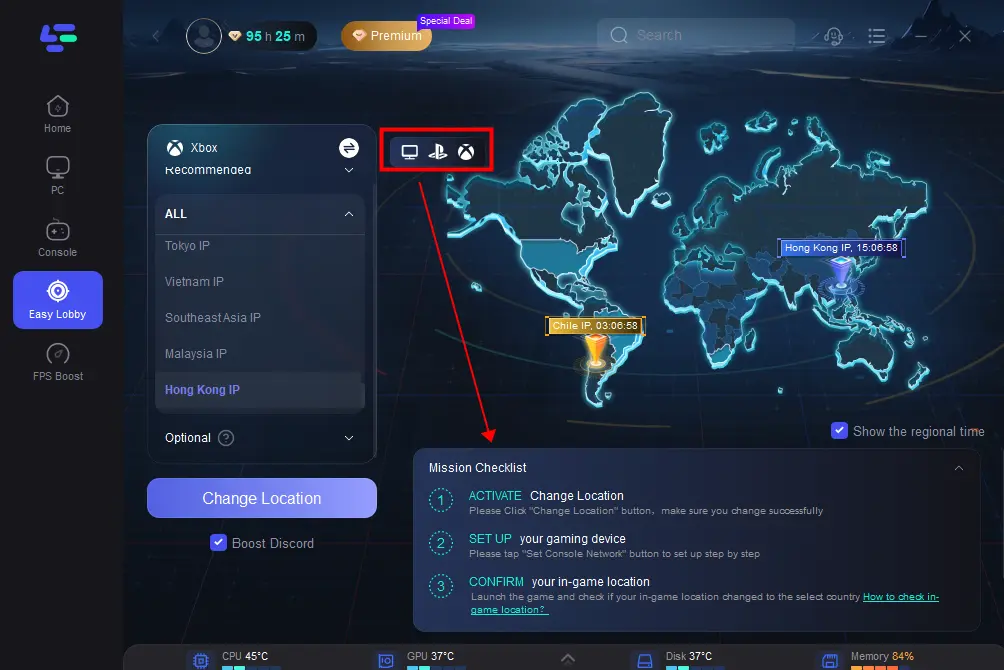
Faster way to get bot lobbies for Console Players (if you don't have a computer)
LagoFast doesn't require any complex setup, based on our unique web-based location switcher (Easylobby Webapp), and 30-second setup to get into bot lobbies in CoD BO7.
Follow the following settings to quickly get an easier lobby on Console:
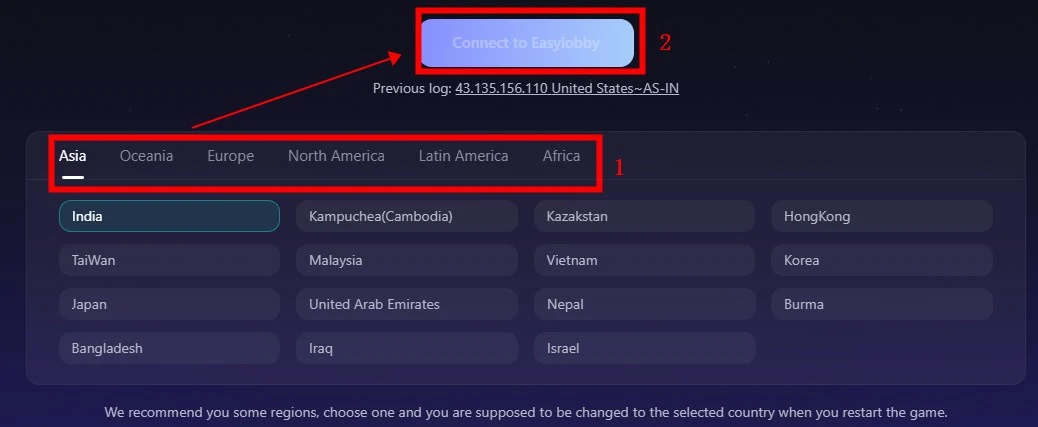
Step 1: Go to the LagoFast EasyLobby Console website and log in to your account > Confirm that your current device (PC or telephone) and the Console you want Easylobby on are on the same network.
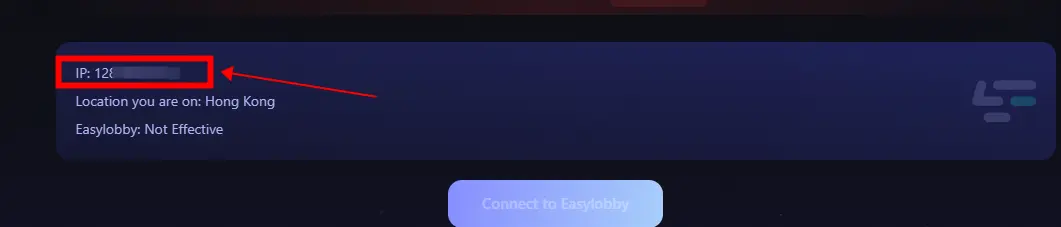
Step 2: Follow our tutorial to change the DNS of your Console.
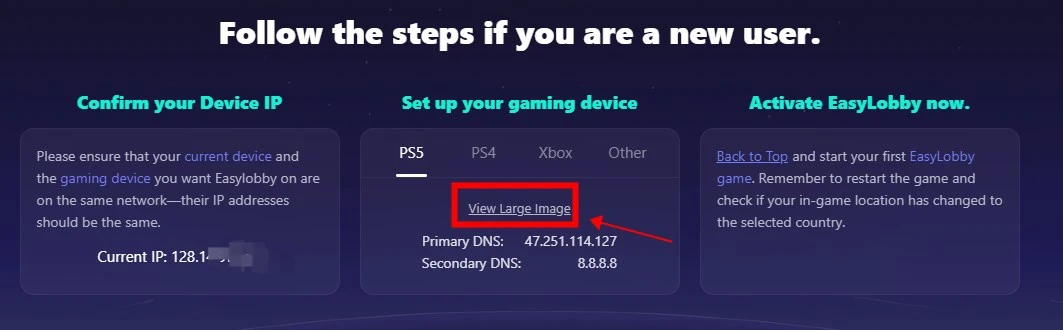
Step 3: Choose the IP, and click the button “Connect to Easylobby” to activate Easy Lobby.
3. Secure Boot and Safe Connection
In Call of Duty: Black Ops 7 (BO7), security isn't just a bonus—it’s a requirement. The game enforces system standards like Secure Boot and TPM 2.0 to ensure only trusted software loads at startup. If these aren’t enabled, the game may refuse to launch.
LagoFast Game Booster supports this setup by keeping your system compliant and your connection optimized, without altering game files or hiding your IP (a behaviour that typical VPNs might trigger and risk anti-cheat detection).
Here’s how it works:
- Secure Boot verifies your system boots using only approved, signed software—blocking rootkits or cheats at the firmware level.
- LagoFast’s optimisation focuses on your network route and system clean-state, so you maintain compliance and stability.
- Because it doesn’t tamper with the game client itself or mask your identity, it reduces chances of anti-cheat conflicts or account risk.
In short: enabling Secure Boot gives BO7 the trusted environment it demands, and LagoFast ensures you meet those demands and get improved connection stability and performance.
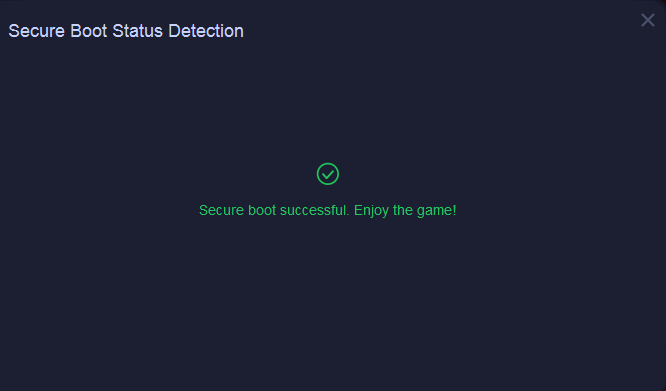
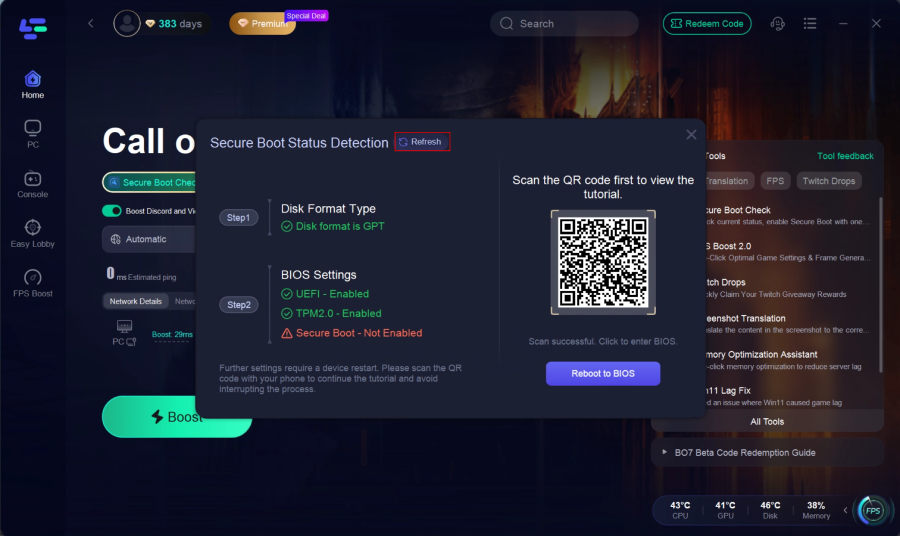
Step 1: Run the Secure Boot check tool.
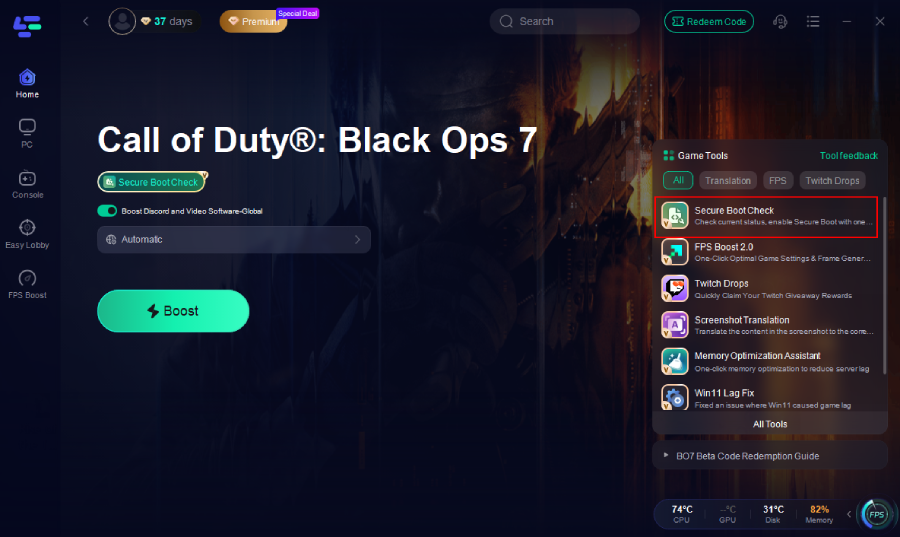
If Secure Boot is already enabled on your PC, the tool will display "Successful".
If not, it will notify you and provide a tutorial. Click “Quick Settings” to proceed.
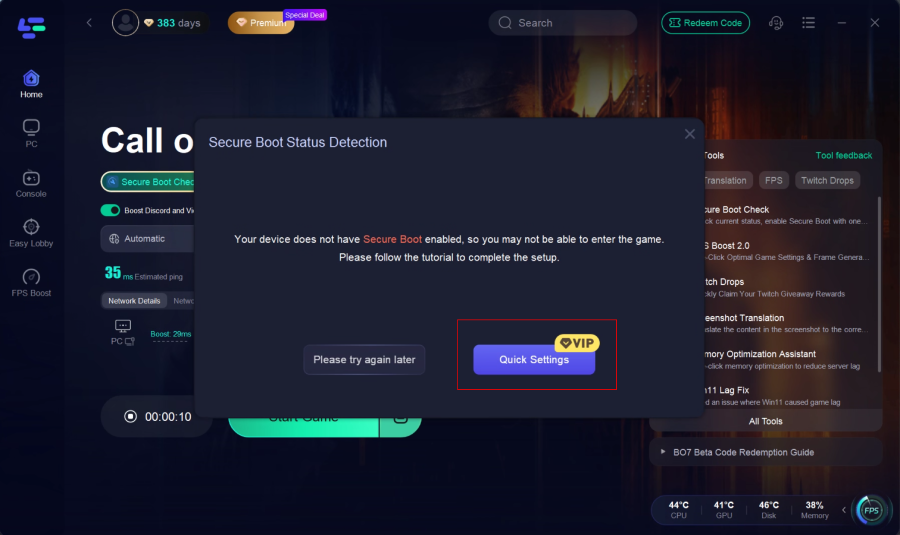
Step 2: BIOS Settings (Secure Boot)
- Check BIOS settings: the tool will display the current status of UEFI, TPM 2.0, and Secure Boot.
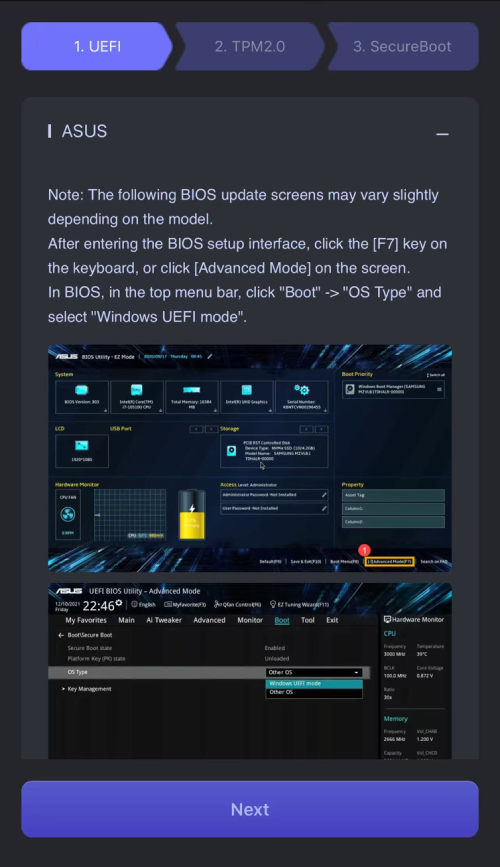
- If Secure Boot is not enabled, scan the QR code to view the model-specific tutorial, then click Reboot to BIOS and follow the instructions to enable it.
- After finishing, return to the tool and click Refresh to recheck the status.
This is the fastest option for gamers who don’t want to risk BIOS misconfigurations.
4. FPS Boost 2.0 – Generate More Frames, Play More Smoothly
Even with a perfect network, unstable frame rates can still ruin your gameplay experience. That’s why LagoFast introduces FPS Boost 2.0, an upgraded performance optimization system that uses frame generation and hardware-level tuning to deliver smoother, more responsive visuals in Call of Duty: Black Ops 7.
How FPS Boost 2.0 Works:
- AI-assisted frame generation predicts and inserts intermediate frames between real frames, creating smoother motion and more natural transitions during intense combat.
- Dynamic resource allocation intelligently balances CPU, GPU, and RAM usage, ensuring system stability even under heavy load.
- Background process control automatically pauses unnecessary apps and services to free up system resources in real time.
With FPS Boost 2.0, LagoFast doesn’t just unlock more frames — it transforms your gameplay into a smoother, clearer, and more competitive experience, so you can stay focused on every shot, every sprint, and every win.
Here's how to use it:
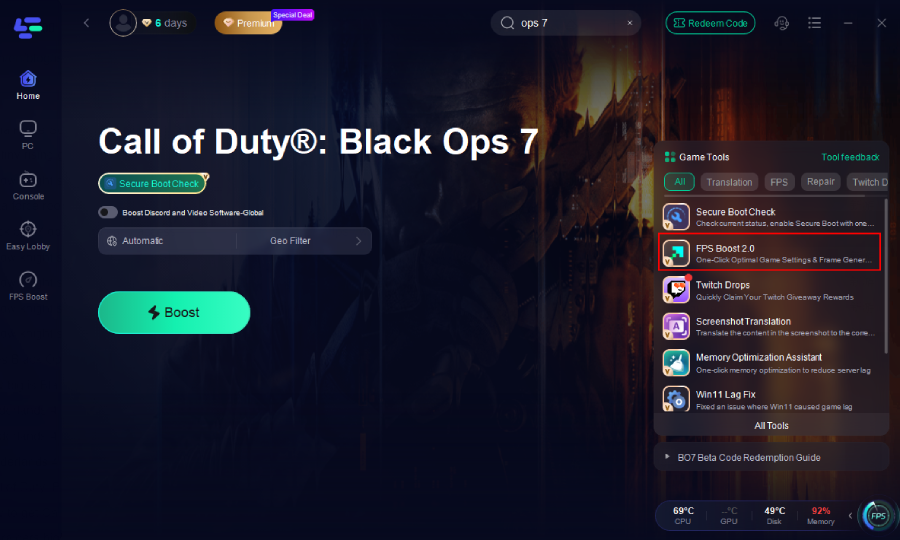
Step 1. Click the FPS Boost 2.0 tool on the right.
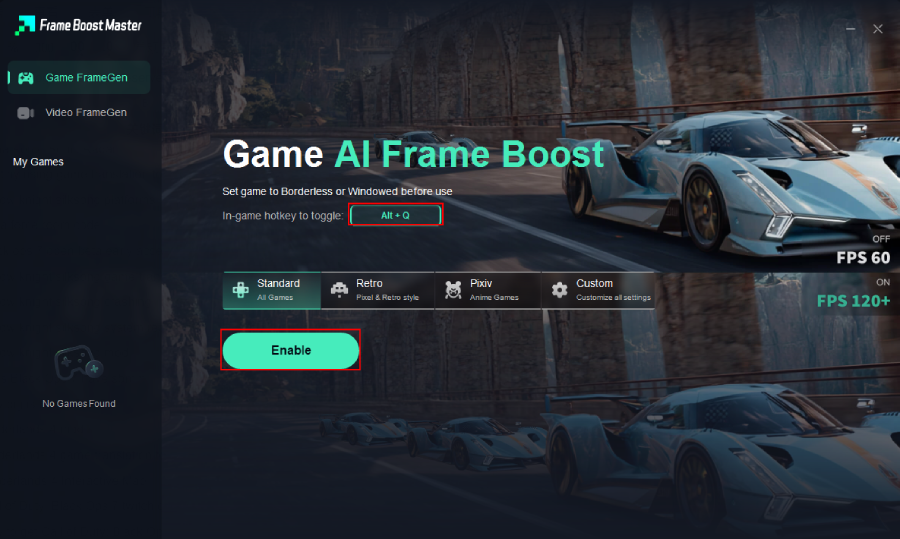
Step 2. Set up the hotkey, then click Enable.
5. Graphics Optimisation
In addition to FPS improvement, LagoFast offers visual optimisation settings to enhance in-game clarity. By fine-tuning driver performance and rendering parameters, it helps you maintain crisp, clean visuals without overloading your hardware.
Benefits include:
- Reduced screen tearing, ghosting, and micro-stutter.
- Balanced visuals for both quality and performance.
- Sharper textures and more consistent image quality across maps.
Together, these enhancements ensure your game not only plays better but looks better — even during fast-paced firefights.
Related Article: Best PC Graphics Settings in BO7
Why These Features Matter for BO7
Call of Duty: Black Ops 7 is one of the most competitive shooters on the market, demanding both mechanical skill and technical optimisation. The smallest performance edge can decide the outcome of a match.
When ping spikes above 80 ms or frames drop mid-gunfight, even top-tier players can lose their rhythm. By combining network acceleration, FPS tuning, and secure optimisation, LagoFast gives players a noticeable improvement in responsiveness and reliability.
Smooth gameplay means more accurate aiming, faster reactions, and fewer disconnects — ultimately turning every match into a fairer fight.
Summary
If you want to experience Call of Duty: Black Ops 7 at its best, focus not only on your hardware or internet speed but on overall system stability. LagoFast Game Booster helps by:
- Reducing ping and ensuring stable connectivity.
- Enabling easier and more consistent lobbies.
- Providing secure boot and safe connection protocols.
- Enhancing FPS and graphics performance.
Together, these features give you a faster, smoother, and more reliable way to play — no more lag spikes, frame drops, or frustrating delays.






Call of Duty: Black Ops 7 FAQs
 How to Solve Black Ops 7 Connection Failed Issue
 Is Black Ops 6 Cross Platform
 Call of Duty Black Ops 7 Gun List
 Best VPN for Call of Duty: Black Ops 7 – How to Play Safely, Get Bot Lobbies, and Improve Gameplay
 Best Settings for Call of Duty: Black Ops 7 – PC & Console Optimization Guide
 Call of Duty: Black Ops 7 DirectX Error – Causes and Fixes