

The 30-day deadline can make every quest feel like a commitment. Should you spend time on a side quest, learn a new skill, or save those segments for something more important? Good time management in The Blood of Dawnwalker is less about rushing and more about knowing what deserves your limited time. This guide explains the system and how to build your route with The Blood of Dawnwalker Time Planner.
Part 1: How Does the 30-Day Time System Work?
Understanding The Blood of Dawnwalker time segments is the first step to planning efficiently.
The 30-day limit is not a real-time countdown. Time only moves forward when you complete certain quests or perform specific actions with a time cost. The game shows these costs before you commit, using an hourglass icon.
- 30 Days & 30 Nights: Each day and night contains 8 time segments, giving you 16 segments across a full day-night cycle.
- What Costs Time: Certain quest steps, story choices, skill-related actions, and other marked activities can consume one or more segments.
- What Doesn't Cost Time: Free exploration, traveling around Vale Sangora, and normal combat don't automatically advance the clock.
Think of the system as a time budget, not a timer constantly counting down.
Part 2: The Blood of Dawnwalker Quest and Skill Time Costs
There isn't one fixed cost for every quest. Different actions can consume different numbers of segments, so always check the hourglass indicator before committing.
|
Activity |
Time Cost |
|
Exploring / traveling |
No time cost |
|
Normal open-world combat |
No time cost |
|
Quest steps |
Varies |
|
Story choices |
Varies |
|
Skill-related activities |
May consume time |
|
Actions with an hourglass icon |
Check the displayed cost |
This is why planning matters: a few expensive decisions can consume much more of your 30-day budget than simply exploring the world.
Part 3: What Is Actually Worth Spending Time On?
Time-sensitive quests should usually come first, especially when the game warns that delaying them may change or close an opportunity. Main objectives and build-defining skills are also worth budgeting for, while optional upgrades that don't support your current playstyle can usually wait. Most importantly, avoid spending segments just because you feel pressured to keep the clock moving.
|
Priority |
What to Spend Time On |
|
High |
Time-sensitive quests with their own deadlines |
|
High |
Main objectives and important character outcomes |
|
High |
Skills that directly support your current build |
|
Medium |
Side quests with rewards or stories you care about |
|
Low |
Skills you probably won't use |
|
Avoid When Possible |
Waiting just to switch Day/Night |
Part 4: How to Plan Your 30 Days Without Wasting Time
You don't need to rush through Vale Sangora. Instead, focus on getting more value from each segment you spend.
- Explore before spending time. Since roaming is free, scout locations and gather information before committing to objectives.
- Check the hourglass. Always look at the time cost before starting or finishing a marked action.
- Prioritize time-sensitive quests. Handle important objectives that may disappear or have consequences if delayed.
- Plan Day and Night separately. Coen has different opportunities during the day and night, so don't treat them as one interchangeable pool.
- Compare cost with value. Think twice before spending several segments on something that isn't important to your current playthrough.
- Don't spend time just to switch Day/Night. If an objective is only available in the other phase, check whether you have useful free activities or exploration to complete first instead of immediately burning time just to advance the cycle.
Recent walkthroughs are already approaching the game this way, using quest order and timing to maximize important interactions rather than simply rushing the main story.
Part 5: Plan Your Playthrough with LagoFast Time Planner
Tracking every quest and time segment manually can get complicated. LagoFast's The Blood of Dawnwalker Time Planner lets you build your 30-day route in advance, so you can see where your time goes before committing valuable segments in-game.
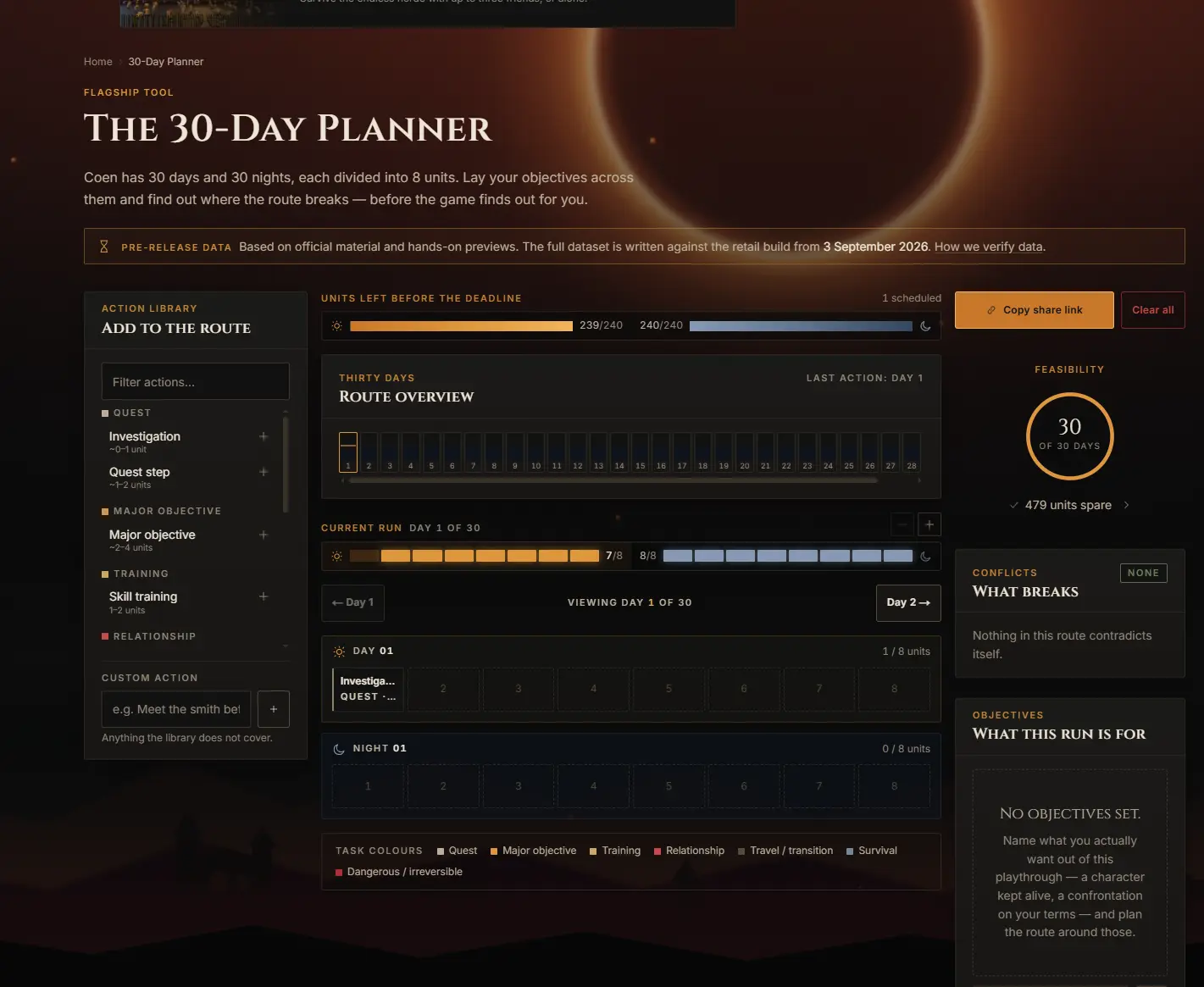
Key Features of LagoFast Time Planner
- Action Library: Pre-loaded database of quests, objectives, Shrine upgrades, and custom entries.
- Day & Night Timelines: Dual 8-unit tracks for granular scheduling.
- Route Overview: Displays full 30-day progress alongside a remaining-segment counter.
- Conflict Detection: Flags segment overruns, dead ends, and scheduling clashes automatically.
- Route Sharing: Generates shareable links for custom paths and speedrun routes.
How to Use LagoFast Time Planner for The Blood of Dawnwalker
Step 1: Download and install LagoFast.
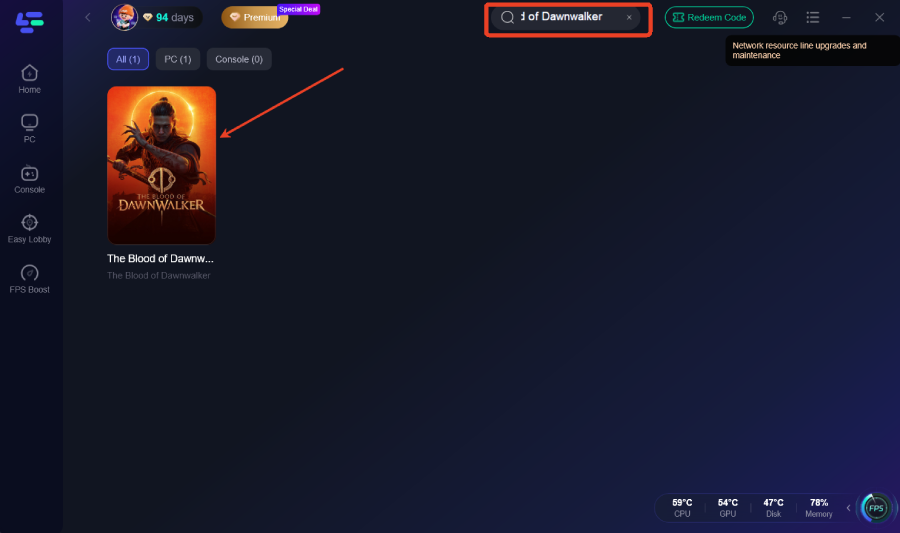
Step 2: Search for The Blood of Dawnwalker.
Step 3: On the game page, go to Game Tools and find Time Planner.
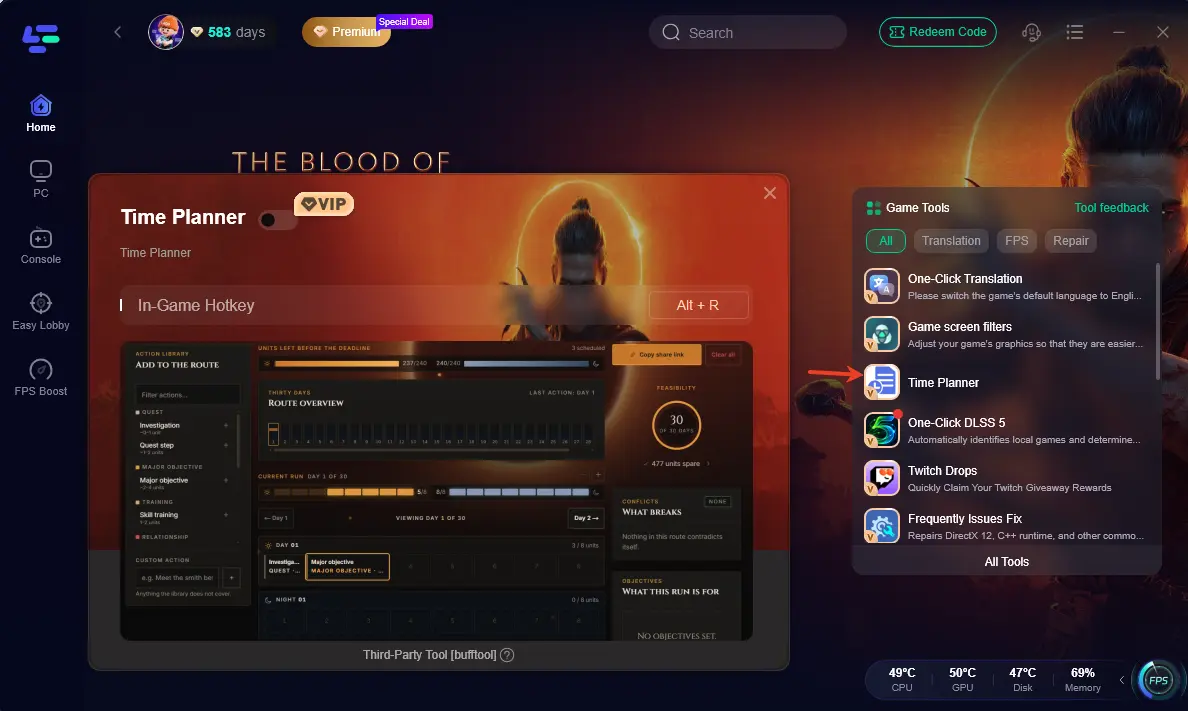
Step 4: Enable Time Planner and tap Boost before you start the game.
Step 5: Launch the game. Press Alt + R in-game to toggle the overlay interface.
Step 6: Drag quests into your timeline and adjust your route based on live conflict alerts and segment counters.
Part 6: FAQs About The Blood of Dawnwalker Time Planner
Clear up common misconceptions regarding time costs and completionism.
Q1: How many time units are available in total?
You have 480 segments across 30 days and nights for actions, story choices, and Shrine upgrades.
Q2: Does free movement advance the clock?
No. Running, riding, looting, combat, and menus cost zero segments.
Q3: What actions spend time segments?
Any marked action showing an Hourglass Icon, including quest steps and skill purchases.
Q4: Can you complete every quest and story path in one playthrough?
Not every outcome is meant to fit into the same route. The 30-day system and branching choices encourage you to prioritize the quests, characters, and outcomes that matter most to your playthrough.
Q5: Can I remove the 30-day time limit entirely?
Yes, external mods can freeze the timer. Read our full guide on removing the 30-day time limit in The Blood of Dawnwalker for instructions.
Conclusion
Shift your focus from real-time speed to strategic resource allocation. The 30-day limit in The Blood of Dawnwalker is a resource puzzle, not a speed test. Free exploration means you never need to rush. By focusing on segment costs and utilizing LagoFast’s The Blood of Dawnwalker Time Planner, you can manage Day/Night cycles, eliminate quest conflicts, and complete your ideal story path.

Boost Your Game with LagoFast for Epic Speed
Play harder, faster. LagoFast game booster eliminates stutter and lags on PC, mobile, or Mac—win every match!
Quickly Reduce Game Lag and Ping!
Boost FPS for Smoother Gameplay!