

The Blood of Dawnwalker's 30-day limit can feel stressful when every quest might mean missing another, or getting closer to failing Coen's mission to save his family. While there is no official option to disable the timer, PC mods can give you more breathing room. This guide explains how the time system works, the best mods to extend or remove the limit, how LagoFast can help, and what happens when time runs out.
Part 1: How Does the 30-Day Limit Work in The Blood of Dawnwalker?
Part 2: Can You Turn Off the 30-Day Timer?
Part 3: Best Mods to Remove or Extend the 30-Day Limit
Part 4: Find The Blood of Dawnwalker Mods with LagoFast
Part 5: What Happens When the 30 Days Run Out?
Part 6: FAQs About The Blood of Dawnwalker Time Limit
Part 1: How Does the 30-Day Limit Work in The Blood of Dawnwalker?

The 30-day limit isn't a real-time countdown. Instead, the game treats time as a resource that you spend on specific actions.
- Real-Time vs. Action-Based Time: Exploring Vale Sangora, fighting enemies, or simply wandering around won't push the clock forward. Time advances when you complete certain quests or activities, with an hourglass icon showing the time cost before you commit.
- The Time Budget System: Each day and each night is divided into 8 time segments, giving you 16 segments across a full day-night cycle. Different activities can consume one or more segments, so choosing how to spend them is part of the game.
In short, you don't need to rush while exploring—but you do need to choose carefully which time-consuming activities are worth pursuing.
Part 2: Can You Turn Off the 30-Day Timer?
There is no official in-game option to disable or freeze the timer. The 30-day deadline is a core part of the game's narrative and is designed to make your choices matter.
On PC, however, community mods can extend the deadline, reduce how much time activities consume, or effectively remove the limit altogether.
Part 3: Top Mods to Manage the Story Timer (30 vs 90 vs Unlimited)
If the original deadline feels too restrictive, several PC mods already give you more control over the time system.
Better Story Timer
Better Story Timer makes the system more forgiving by reducing how much time quests consume or giving each day more time segments. It is a good option if you want more freedom without completely removing the timer.
Another version of the mod lets players extend the main story deadline from 30 to 90 days and remove time costs from perks and skills.
Infinite Time - No Day Limit
Want to forget about the deadline entirely? Infinite Time - No Day Limit changes the main quest deadline to 99,999 days, effectively removing the time pressure.
Which should you choose?
- 30 Days: Original experience
- 90 Days / More Segments: More freedom while keeping the timer
- Unlimited: Play at your own pace without worrying about the deadline
Part 4: Enhance Your Dawnwalker Gameplay with LagoFast
For players looking to freeze or eliminate the countdown in Dawnwalker completely, we have great news: the Remove 30-Day Time Limit Mod is currently under active development and testing within the LagoFast Mod Tool library. It will be available for one-click installation very soon!
While the time-freeze feature is in its final testing stage, you don't have to wait to start customizing your game. You can immediately boost your gameplay experience using LagoFast’s currently supported The Blood of Dawnwalker mods.
How to Install The Blood of Dawnwalker Mods with LagoFast
Step 1. Click Free Trial to download and launch LagoFast on your PC.
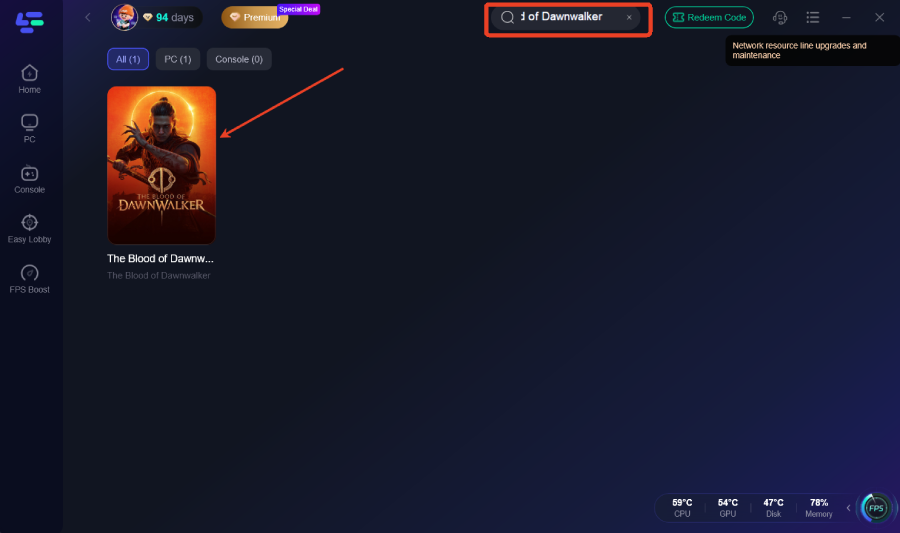
Step 2. Enter The Blood of Dawnwalker in the search bar and open the game page.
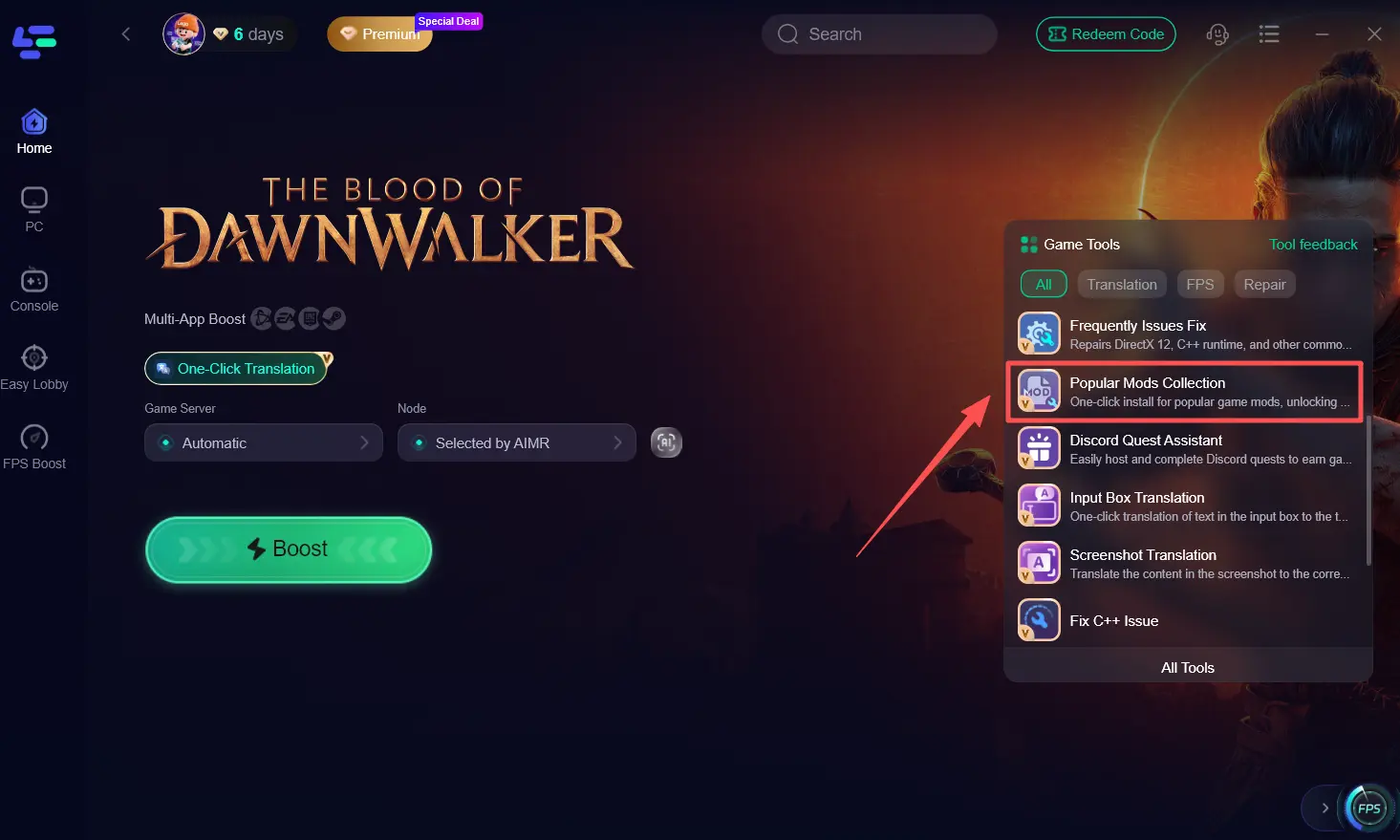
Step 3. Go to Game Tools > Popular Mods Collection.
Step 4. Browse the available mods and select the ones you want to use.
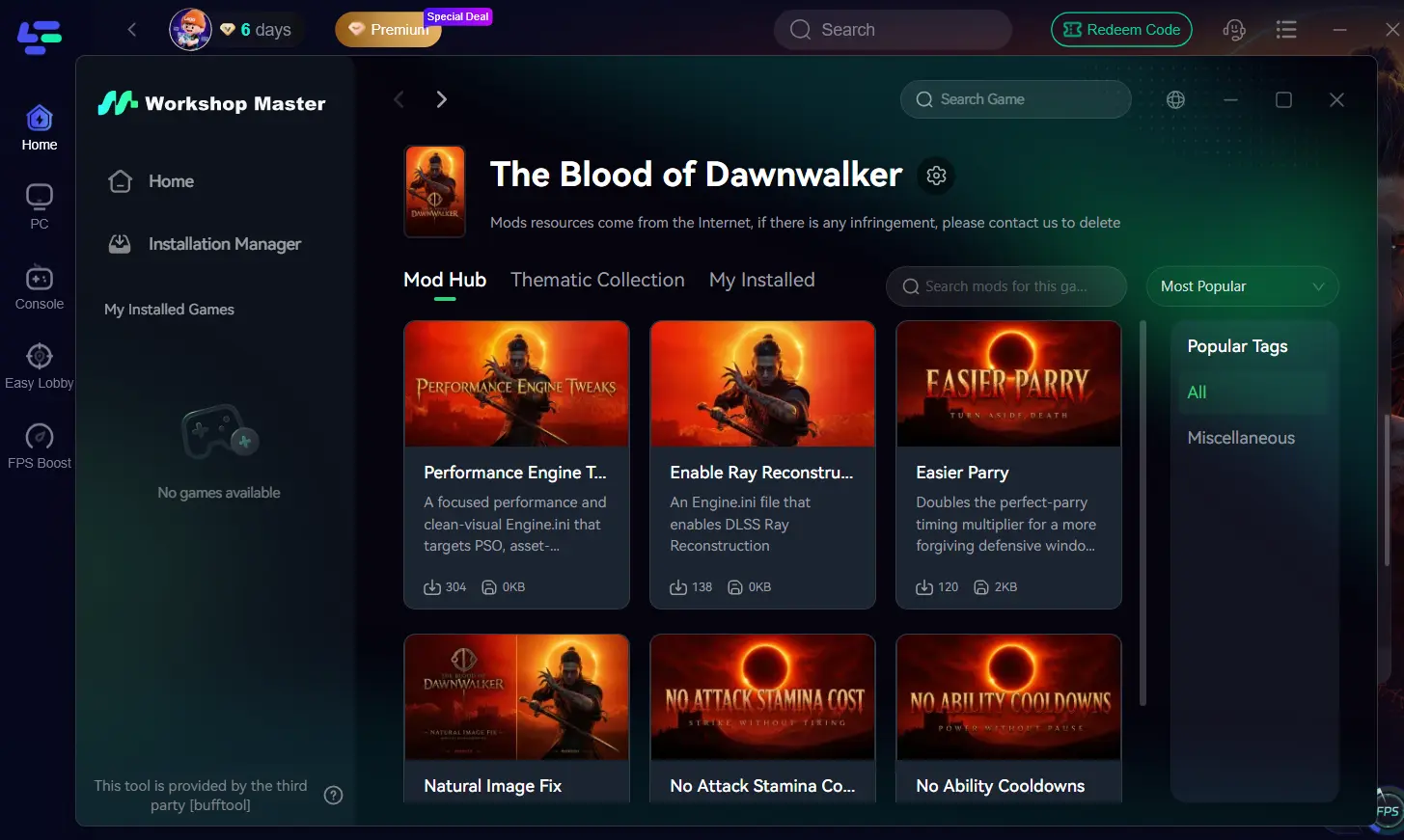
Step 5. Apply your selected mods, then launch The Blood of Dawnwalker.
The biggest advantage of using LagoFast Mod Master is simplicity. Instead of manually searching through forums, managing complex directory structures, or troubleshooting conflicting files, LagoFast consolidates top-tier mods into a single dashboard.
Part 5: What Happens When the 30 Days Run Out?

Reaching the end of the 30-day window can feel intimidating, but hitting the deadline does not result in a traditional game-over screen. Instead, the game dynamically shifts its story dynamic to reflect your failure to meet the primary deadline.
- Story Consequence: Once the 30-day timer reaches zero, Brencis executes Coen’s family. This permanently fails the family rescue questline, locking you out of saving them and sealing off related story achievements and endings for that playthrough.
- Game Is NOT Over: Reaching the time limit does not cause an immediate fail state or force a reload. The main narrative seamlessly shifts into a full "Revenge Mode," removing the time budget entirely and allowing you to hunt down your enemies and explore the rest of the world at your own pace.
Part 6: FAQs About The Blood of Dawnwalker Time Limit
Is there enough time to complete all content in one playthrough?
No. The game is designed for multiple playthroughs with branching paths; completing all side content requires time-extension mods.
Does wandering around or exploring consume time?
No. Free exploration, movement, and standard combat do not deduct time units.
Can you remove or bypass the 30-day limit on PS5 or Xbox?
No. Console platforms do not support third-party mods or file edits, making timer modification exclusive to PC.
How will I know when the "Remove Time Limit Mod" goes live on LagoFast?
Keep your LagoFast client updated and check the Mod Tool tab; a notification will prompt you as soon as the mod goes live.
Conclusion
The 30-day limit is less restrictive than it first appears, but not everyone enjoys planning an RPG around a deadline. PC mods already let you extend or effectively remove the timer, while LagoFast provides an easier way to discover and install supported Dawnwalker mods. Its Remove 30-Day Time Limit option is also coming soon.

Boost Your Game with LagoFast for Epic Speed
Play harder, faster. LagoFast game booster eliminates stutter and lags on PC, mobile, or Mac—win every match!
Quickly Reduce Game Lag and Ping!
Boost FPS for Smoother Gameplay!