

If your inventory is constantly full after overnight farming, you're probably dealing with more than just too much loot. Duplicate gear, crafting materials, and unopened chest rewards can quickly take over your backpack, making it harder to manage new drops efficiently. In this guide, we'll show you how to clear inventory bottlenecks and keep your AFK farming running smoothly.

- ✅ Reduce Lag and High Ping.
✅ Boost FPS at the Same Time.
✅ Support 8000+ Popular Online Games.
✅ Change Server without Latency.
✅ Boost Game Loading Speed.
Part 1: Why Your Inventory Gets Full in TBH Task Bar Hero
Part 2: What Happens When Your Backpack Is Full?
Part 3: Step 1: Use Auto Store to Keep Your Backpack Clear
Part 4: Step 2: Use Auto Merge to Reduce Low-Level Items
Part 5: Step 3: Use Alchemy or Dismantle for Low-Value Gear
Part 6: How to Keep High-Rarity Gear Safe
Part 7: Best AFK Farming Setup Before Sleeping
Part 8: Recommended Automation Priority
Part 1: Why Your Inventory Gets Full in TBH Task Bar Hero
Gear Drops, Materials, and Chest Rewards
One of the main reasons inventories fill up so quickly in TBH Task Bar Hero is the sheer amount of loot you collect while farming.
After a few hours, it's common to accumulate:
- Low-rarity equipment
- Duplicate gear
- Crafting materials
- Alchemy resources
- Chest rewards
At first, these items don't take up much space. But as they continue to stack up, your backpack can fill faster than you might expect.
Why AFK Farming Makes Inventory Problems Worse
The longer you leave the game running, the more noticeable the problem becomes.
During an AFK session:
- New gear continues to drop
- Materials keep accumulating
- Chest rewards continue to build up
- Duplicate items become more common
Without regular storage, merging, or cleanup, it's easy to come back after several hours and find your inventory nearly full.

Part 2: What Happens When Your Backpack Is Full?
Does Inventory Full Stop Chest Opening?
A full inventory can make chest management much less efficient.
When your backpack becomes crowded, chest rewards may start to pile up instead of being processed normally. This is especially common during long AFK farming sessions when gear, materials, and chest drops are generated continuously.
While the exact impact can vary, keeping available inventory space is one of the easiest ways to avoid reward bottlenecks.
Can You Lose Gear or Materials While AFK?
Not necessarily, but a full inventory can make rewards harder to manage.
When inventory and storage space become limited, players may notice:
- Unopened chest rewards
- Delayed item processing
- Inventory congestion
- Storage reaching capacity
In many cases, the issue is not that rewards have disappeared, but that they haven't been processed or displayed as expected. Regular inventory cleanup can help reduce these problems during extended AFK sessions.
Part 3: Step 1: Use Auto Store to Keep Your Backpack Clear
How Auto Storage Helps While AFK
One of the biggest inventory problems in TBH Task Bar Hero is that equipment and materials are sent directly to your backpack by default.
During long AFK sessions, gear, crafting materials, and chest rewards can pile up quickly. Once inventory space becomes limited, chest openings may be affected and reward processing can become less efficient.
To help prevent this, LagoFast's Auto AFK Assistant includes an Auto Store feature that automatically moves equipment and materials into storage while you farm, helping keep inventory space available for new drops.
How to Use LagoFast Auto AFK Assistant
Step 1: Download and install LagoFast.
Step 2: Search for "TBH Task Bar Hero" and select the game.
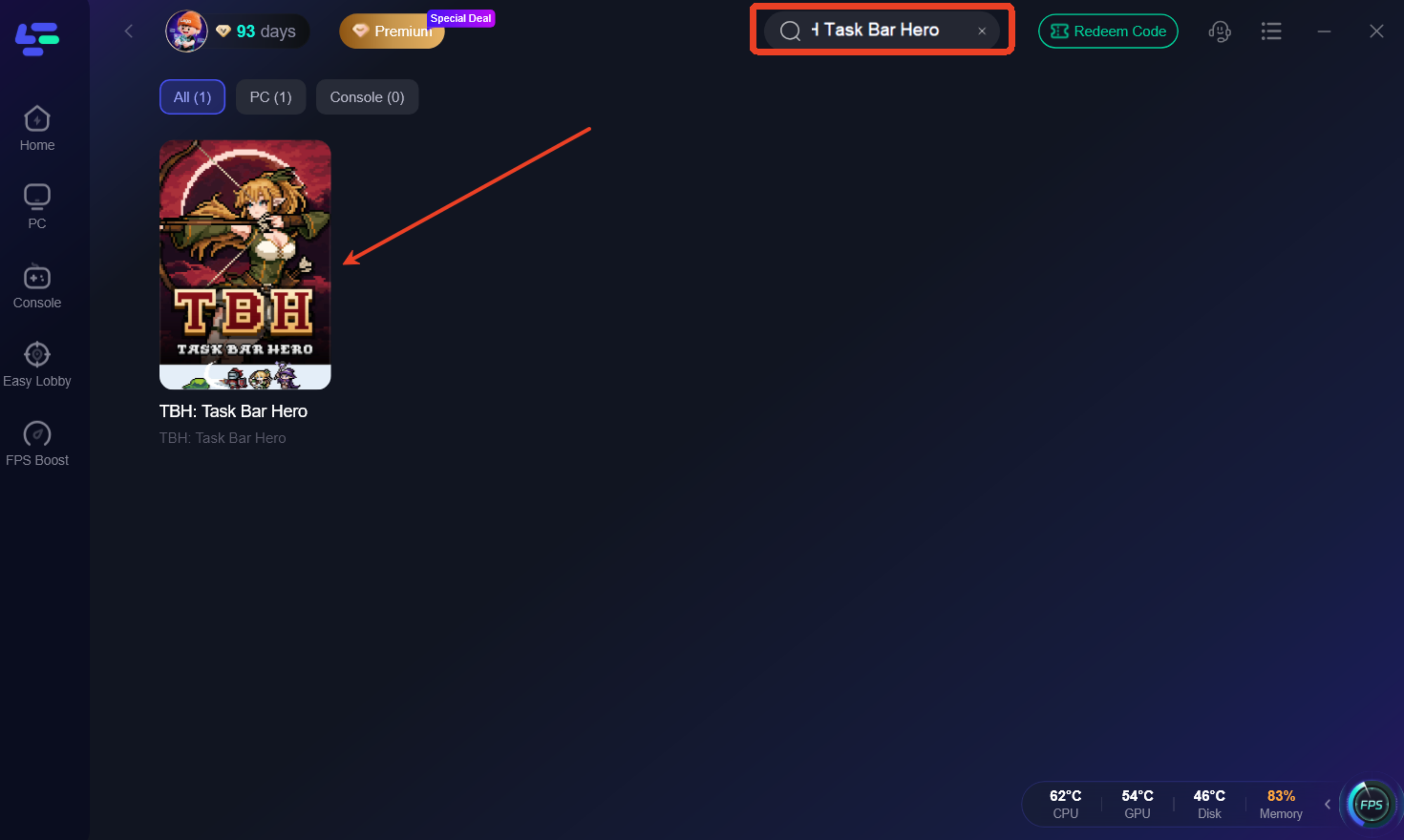
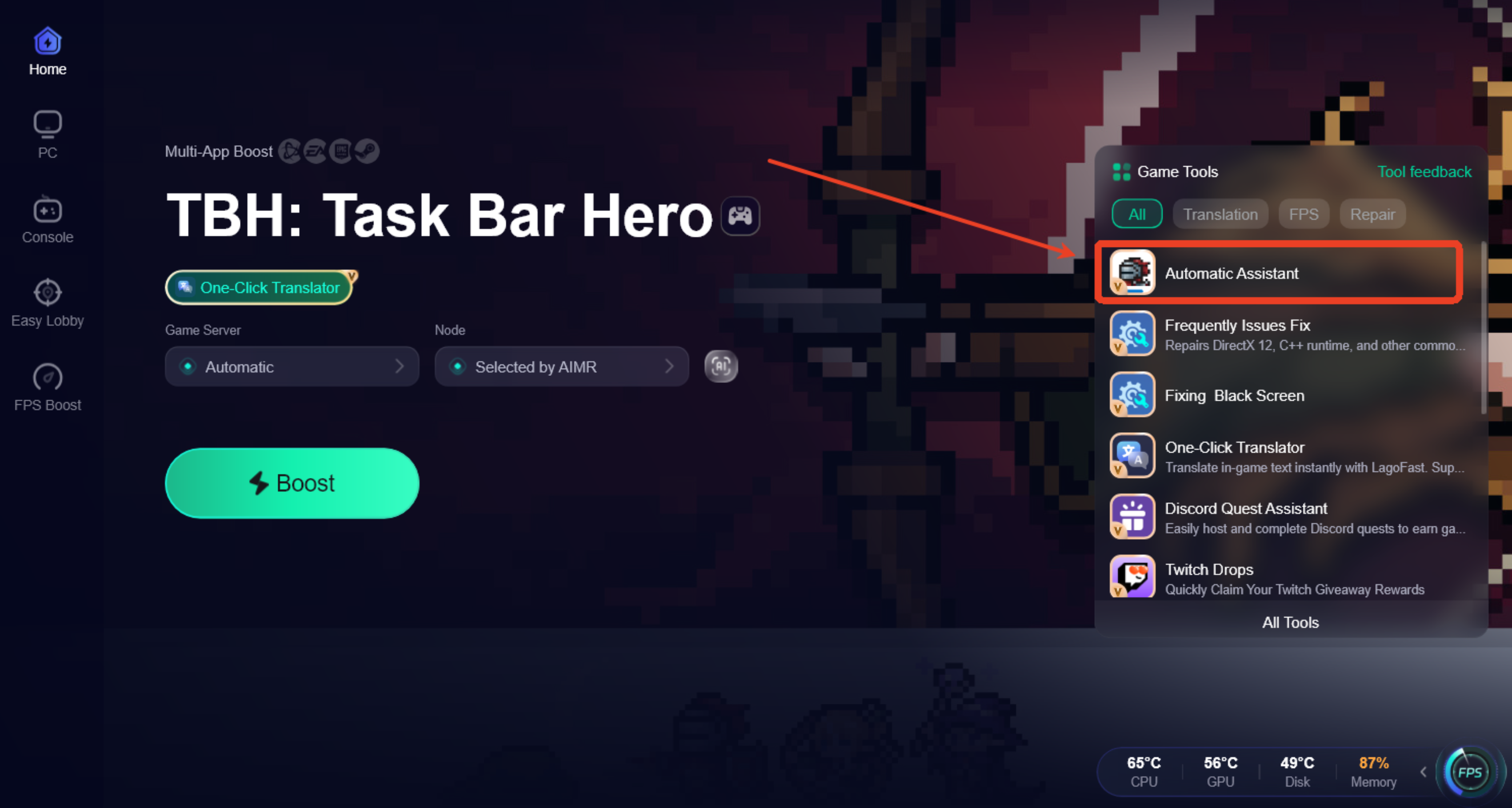
Step 3: Open the Automatic Assistant tool from the bottom-right toolbar.
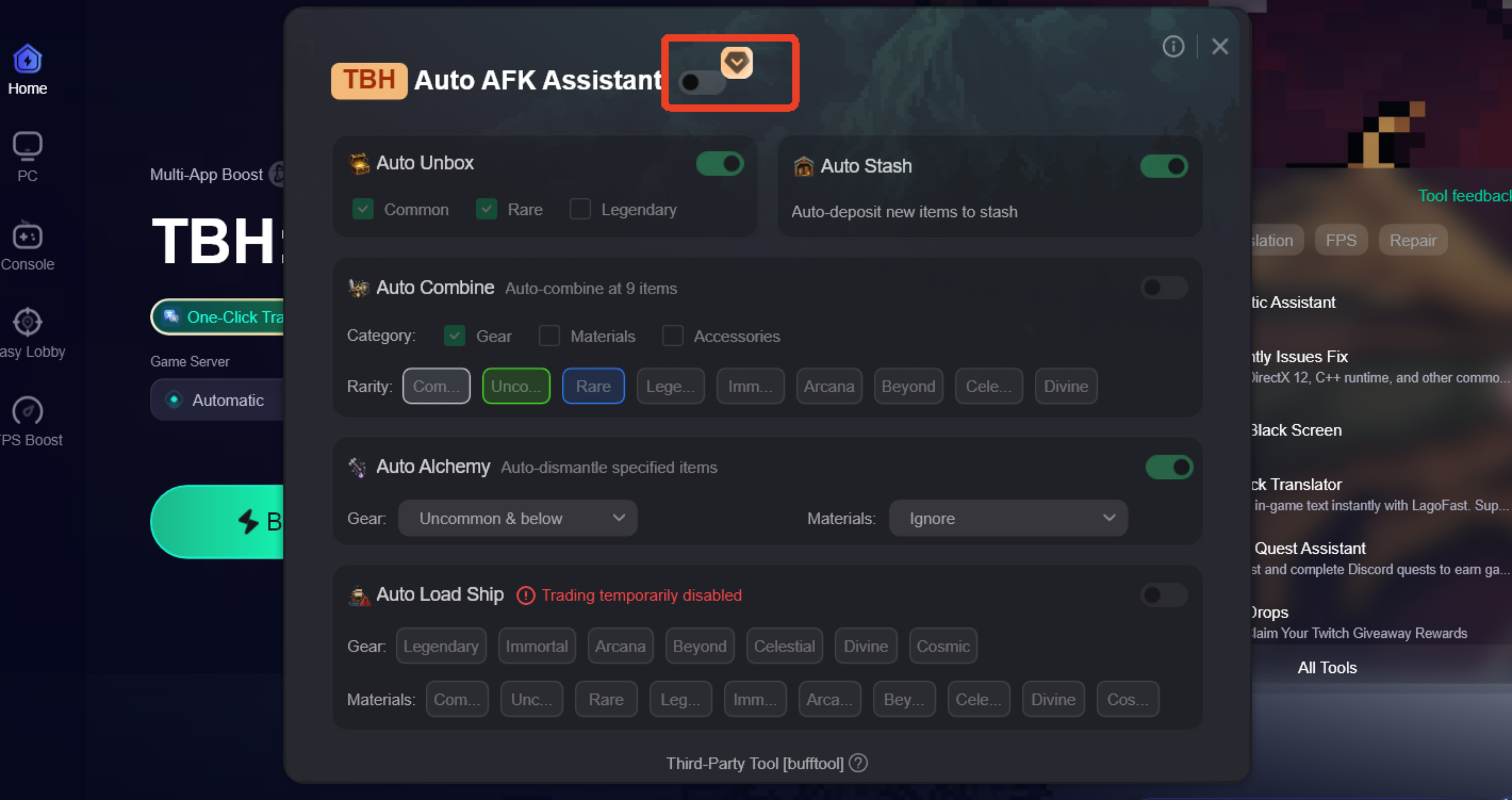
Step 4: Enable Auto AFK Assistant and customize features such as Auto Chest Opening, Auto Crafting & Alchemy, Auto Storage, and Auto Trading.
Best Items to Move to Storage Automatically
Items commonly worth storing include:
- Crafting materials
- Alchemy resources
- Upgrade materials
- Duplicate equipment
- Items reserved for future upgrades
Moving these items into storage helps free up backpack space for new drops and chest rewards.
Best Auto Storage Setup for Overnight Farming
For players who regularly farm overnight, Taskbar Hero Inventory Full Fix Tool and Taskbar Hero Auto Chest and Storage Helper can automatically transfer dropped gear and materials into storage before the backpack becomes full.
A simple setup before going AFK includes:
- Clearing unnecessary inventory items
- Leaving free slots for new drops
- Checking available storage space
- Enabling automatic storage for materials and duplicate gear
This helps keep rewards flowing and reduces the chance of inventory-related interruptions during long farming sessions.
Part 4: Step 2: Use Auto Merge to Reduce Low-Level Items
Why Auto Merge Is Useful for Long AFK Sessions
After a few hours of AFK farming, most inventories end up filled with duplicate gear, lower-tier materials, and upgrade fodder.
While each item only takes up a small amount of space, they quickly add up over time. Auto merge helps by automatically combining eligible items into higher-tier materials or equipment, reducing inventory clutter without requiring constant manual management.
For long farming sessions, this can make a noticeable difference in how quickly your inventory fills up.
Best Materials and Gear to Merge Automatically
Items commonly worth merging include:
- Duplicate equipment
- Lower-tier crafting materials
- Upgrade fodder
- Frequently dropped common resources
- Materials used for higher-tier crafting
Merging these items regularly can free up inventory space while helping you build resources for future upgrades.
When You Should Avoid Auto Merging
Not every item should be merged automatically.
It's usually a good idea to exclude:
- Rare equipment
- Legendary items
- Gear with valuable stats or bonuses
- Items needed for specific builds or future upgrades
Before enabling auto merge, take a few minutes to review your settings and make sure valuable items are protected. The goal is to reduce inventory clutter, not accidentally consume gear you may want to keep later.
Part 5: Step 3: Use Alchemy or Dismantle for Low-Value Gear
Even after using storage and auto merge, you'll usually end up with some gear and materials that simply aren't worth keeping.
That's where dismantling and alchemy become useful. Instead of letting low-value items pile up, you can convert them into resources that are more useful for future progression.
Best Items to Dismantle Automatically
Items commonly worth dismantling include:
- Low-rarity gear
- Unwanted duplicate equipment
- Lower-level items you no longer use
- Excess gear that isn't needed for upgrades
Removing these items regularly helps free up space while generating additional resources.
Best Items to Convert Through Alchemy
Alchemy is often a good option for:
- Excess materials
- Lower-tier resources
- Common crafting components
- Materials that can be upgraded into higher-tier versions
This helps turn accumulated resources into something more useful instead of letting them sit in storage.
How Gear Cleanup Prevents Storage Overflow
Many players focus on backpack space but forget that storage can eventually fill up as well.
Regularly merging, dismantling, and processing excess materials helps keep both your inventory and storage under control. The less clutter you keep, the easier it is to manage long AFK farming sessions without running into space-related issues.
Part 6: How to Keep High-Rarity Gear Safe
Automation can save a lot of time, but it's important to make sure valuable items aren't included in your cleanup rules.
Set Rarity Filters Before Auto Cleanup
Before enabling auto merge, alchemy, or dismantling, set up protection rules for valuable gear.
Items most players choose to protect include:
- Rare equipment
- Epic equipment
- Legendary equipment
- Important upgrade materials
This helps ensure high-value items aren't processed automatically.
Avoid Dismantling Rare, Epic, or Build-Specific Gear
Not every valuable item is defined by rarity alone.
Before enabling automatic cleanup, review any gear you actively use or plan to use later. Build-specific equipment, unique stat rolls, and progression items are often worth keeping even if they don't seem important at first glance.
Check New Drops Before Expanding Automation Rules
When adjusting automation settings, start with conservative rules and expand them gradually.
After a farming session, review the items being merged, stored, or dismantled to make sure everything is working as expected. Making small adjustments over time is usually safer than enabling aggressive cleanup rules immediately.
Part 7: Best AFK Farming Setup Before Sleeping
If you're planning to leave TBH Task Bar Hero running overnight, a few minutes of preparation can save you from waking up to a full inventory, unopened chests, and piles of unprocessed loot.
Auto Open Chests
Chest rewards can build up quickly during long farming sessions. Since chest opening has limitations and some chest types may require additional handling, keeping chest processing active helps prevent reward backlogs.
Auto Store Valuable Drops
Equipment and materials are normally sent to your backpack first. Automatically moving selected items into storage helps keep inventory space available for new drops throughout the night.
Auto Merge Low-Level Materials
Lower-tier materials and duplicate items can accumulate surprisingly fast. Merging them automatically helps reduce clutter and frees up inventory space without requiring manual cleanup.
Auto Dismantle Junk Gear
Low-rarity gear often makes up the majority of overnight drops. Automatically dismantling unwanted equipment can convert excess gear into useful resources while preventing inventory overload.
Safety Rules Before Overnight Farming
Before going AFK, it's worth taking a quick look at your setup:
- Protect rare, epic, and legendary gear.
- Leave enough free inventory space for new drops.
- Make sure storage still has available capacity.
- Review your automation rules to avoid processing valuable items.
A balanced setup helps keep chests opening, materials processing, and loot flowing throughout long AFK farming sessions without constant inventory management.
Part 8: Recommended Automation Priority
When setting up automation, it's usually best to start with the actions that free up inventory space first, then move on to item processing.
Auto Store First
Storage should be your first priority. Moving materials and gear out of your backpack creates room for new drops and helps prevent inventory-related bottlenecks during long farming sessions.
Auto Merge Second
Once storage is handling excess items, auto merge can reduce duplicate gear and lower-tier materials before they start piling up.
Alchemy and Dismantle Last
Alchemy and dismantling are best used after storage and merging have already reduced clutter. This gives you more control over which items are converted into materials and lowers the chance of processing something you may want to keep.
By following this order—store first, merge second, and dismantle last—you can keep your inventory organized while reducing the risk of accidentally consuming valuable gear or resources.
Part 9: FAQ
Why does my inventory keep getting full in Task Bar Hero?
Gear, materials, and chest rewards build up quickly during long farming sessions. Without regular cleanup, inventory space can fill up fast.
Does a full backpack stop chests from opening?
Limited inventory space can make chest rewards harder to process. If rewards seem delayed, check your inventory and storage first.
Should I auto store or auto merge first?
Auto storage is usually the better first step because it creates inventory space immediately. Auto merge can then help reduce duplicate items.
What items should I dismantle automatically?
Low-rarity gear and excess duplicate equipment are generally the safest items to dismantle.
Can auto cleanup delete valuable gear?
It can if your automation rules are too aggressive. Always protect valuable items with appropriate filters.
What is the best AFK inventory setup in TBH?
A common setup is auto chest opening, auto storage, auto merge, and auto dismantle. This helps keep inventory space available during long AFK farming sessions.
Final Thoughts
Inventory problems in TBH Task Bar Hero usually aren't caused by a lack of loot—they're caused by having too much of it. By using storage, merging duplicate gear, and regularly cleaning up materials, you can keep your backpack under control and make long AFK farming sessions much more efficient.

Boost Your Game with LagoFast for Epic Speed
Play harder, faster. LagoFast game booster eliminates stutter and lags on PC, mobile, or Mac—win every match!
Quickly Reduce Game Lag and Ping!
Boost FPS for Smoother Gameplay!