

Quick Answer: How to Change Honor of Kings: World Server?
To switch your gameplay region and play Honor of Kings: World on a different server with zero lag, standard in-game settings often fall short due to regional geo-restrictions and ISP routing limits. The most reliable method is using a dedicated gaming booster like LagoFast.
- Step 1. Download and launch LagoFast on your PC or mobile device.
- Step 2. Search for Honor of Kings: World.
- Step 3. Select your target geographic server location and the fastest available node.
- Step 4. Launch the game; your connection is now routed through an optimized local network pathway
The global gaming community is buzzing with anticipation for Honor of Kings: World, the massive open-world action RPG set in the beloved Honor of Kings universe. Because the game features intense, real-time combat and cooperative multiplayer elements, your proximity to the game's servers dictates your success. High latency can turn a flawless combo into a frustrating defeat. Whether you are trying to team up with friends overseas or escape crowded local lobbies, understanding the server landscape is crucial. In this comprehensive guide, we will break down the official regional nodes and show you exactly how to bypass regional restrictions to enjoy a fluid, low-latency experience.

- ✅ Reduce Lag and High Ping.
- ✅ Boost FPS at the Same Time.
- ✅ Support 2000+ Popular Games.
- ✅ Fix Game Black Screen Issues.
- ✅ Honor of Kings: World Translation Tool
Part 1: Honor of Kings: World Server Locations: PC & Mobile
Part 2: How to Change Honor of Kings: World Server on PC – LagoFast
Part 3: How to Change Honor of Kings: World Server on Mobile – LagoFast Mobile
Part 4: Ping Comparison: Before vs. After Using LagoFast
Part 5: Honor of Kings: World System Requirements on PC
Part 6: Honor of Kings: World System Requirements on Mobile
Part 1: Honor of Kings: World Server Locations: PC & Mobile
Because Honor of Kings: World supports cross-platform progression and co-op play, servers are divided globally to manage player traffic. Connecting to a region close to your actual physical location or routing through data pathways tailored to that specific region is necessary for maintaining a smooth combat flow.
|
Target Server Region |
Primary Platform Focus |
Main Regional Hubs Included |
Ideal For |
|
China Mainland |
PC, Android & iOS |
Beijing, Shanghai, Chengdu |
Players testing the newest early-access patches and events. |
|
Asia-Pacific |
PC & Mobile |
Tokyo, Seoul, Singapore |
Global Alpha Test in Southeast Asia, Korea, Japan, and Oceania. |
|
North America |
PC & Mobile |
Oregon, Virginia |
Global Alpha Test in the United States, Canada, and Mexico. |
|
Europe |
PC & Mobile |
Frankfurt, London |
Global Alpha Test in Western, Eastern, and Northern Europe. |
Part 2: How to Change Honor of Kings: World Server on PC Quickly with LagoFast
Playing an open-world AAA game on PC requires a stable network line. When you attempt to access an international game data hub normally, your ISP often sends your data package through crowded, roundabout pathways. This creates a bottleneck that results in massive input delays during boss mechanics.
By utilizing the LagoFast game booster on PC, you bypass standard public ISP lines. The software utilizes a proprietary data transfer protocol that dynamically tracks down the shortest physical route to the game’s actual hosting machines.
Beyond that, LagoFast also offers additional features such as FPS boosting, crash fixes, and integrated translation tools to enhance your gaming experience.
Step-by-Step LagoFast Guide for PC:
Step 1: Click the Free Trial button below to download LagoFast
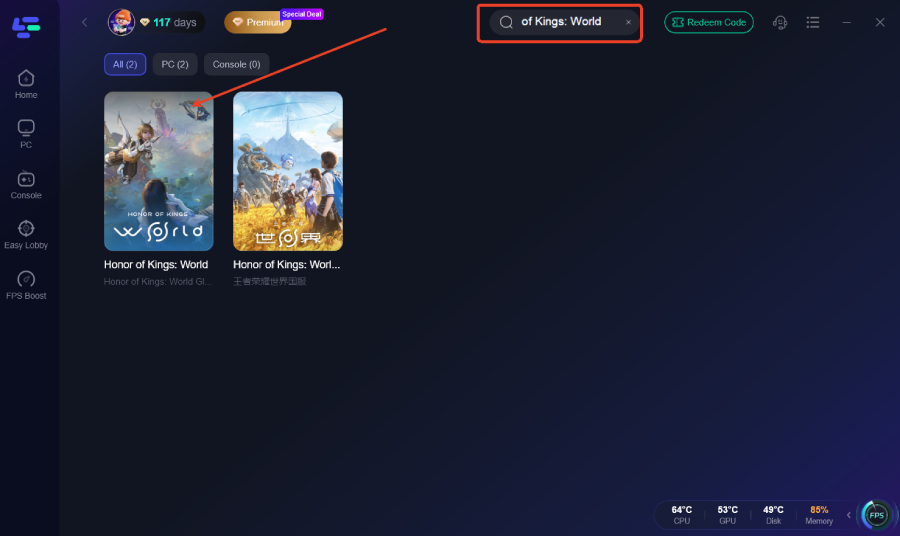
Step 2: After installation, search for the game "Honor of Kings: World" in the search bar
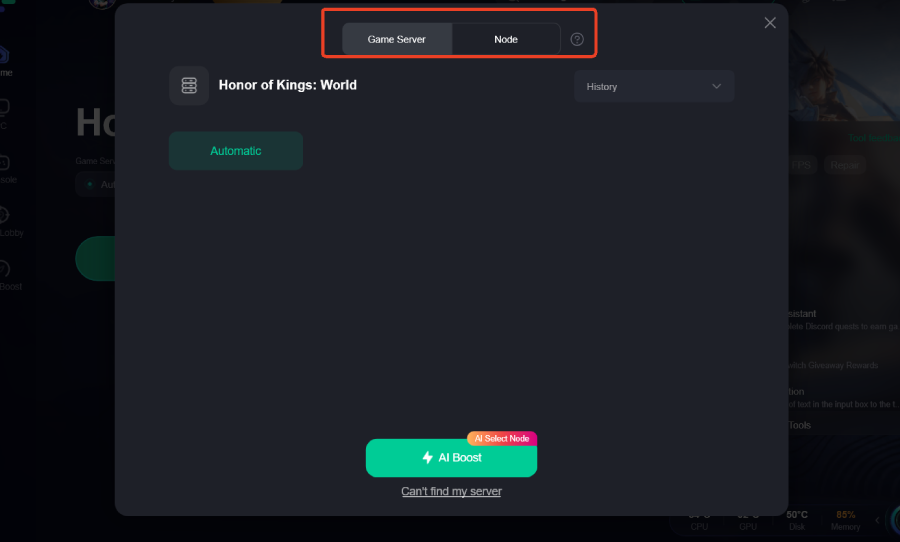
Step 3: Click on “Server” to change to a better server that ensures the gaming experience, then click on “Smart Boost”.
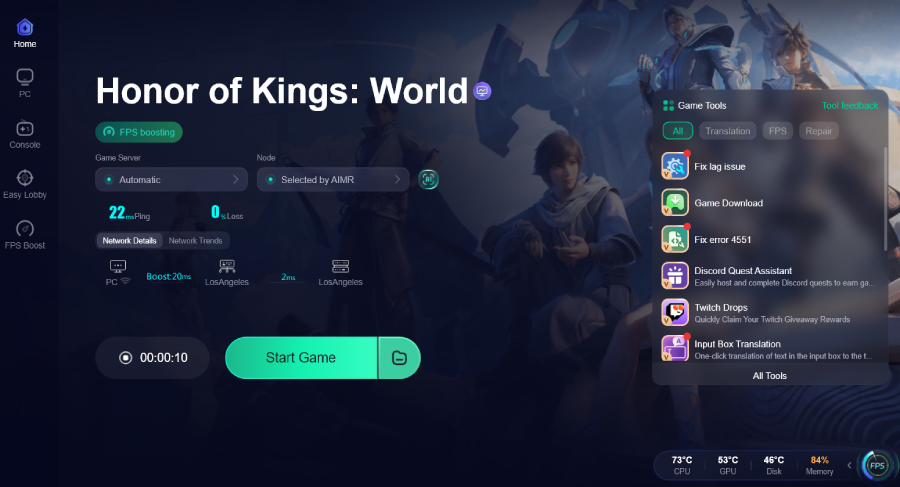
Step 4: Check the specific game ping, packet loss, and multiple path connection on the right side. Finally, click the “Start Game” to play the game.
Part 3: How to Change Honor of Kings: World Server on Mobile Quickly with LagoFast Mobile
If you prefer exploring the overworld on your phone or tablet, you face a different problem: cellular network instability and weak Wi-Fi handshakes. Handheld devices regularly drop data packets due to local signal interference, which ruins real-time combat performance.
The LagoFast Mobile App fixes this by deploying a specialized dual-channel acceleration feature. It combines your Wi-Fi and mobile data streams into a single connection, filling in any gaps when one signal dips.
Step-by-Step LagoFast Mobile Guide for Android & iOS:
Step 1: Visit the official LagoFast website and download the mobile APK file

Step 2: Open LagoFast and Search Honor of Kings
Step 3: Select a server or node with low latency to boost your connection.
Step 4: Tap Start Game within LagoFast to launch Honor of Kings.
Part 4: Ping Comparison: Before vs. After Using LagoFast
To showcase exactly how much difference dedicated routing makes, here is a detailed performance look before and after running the optimization tool across different international regions:
|
Testing Region |
Base Ping (Standard ISP Routing) |
Ping with LagoFast PC |
Ping with LagoFast Mobile |
Packet Loss Reduction |
|
NA to China Server |
240–280 ms |
120–140 ms |
135–155 ms |
From 12% down to 0.1% |
|
EU to Asia Server |
190–230 ms |
95–110 ms |
105–125 ms |
From 8% down to 0.0% |
|
SEA to China Server |
110–145 ms |
35–48 ms |
42–55 ms |
From 5% down to 0.2% |
|
Domestic Regional (Local) |
45–65 ms |
12–18 ms |
15–22 ms |
From 2% down to 0.0% |
Part 5: Honor of Kings: World System Requirements on PC

Because the title runs on a fully upgraded Unreal Engine 5 framework, it demands decent hardware capability to render its lush environments and complex combat particle effects. Ensure your desktop setup matches these hardware bars to avoid hardware-based stuttering that mimics internet lag.
Minimum Specifications:
- OS: Windows 10/11 (64-bit)
- Processor: Intel Core i5-8400 or AMD Ryzen 5 2600
- Memory: 16 GB RAM
- Graphics Card: NVIDIA GeForce GTX 1060 (6GB) or AMD Radeon RX 580
- DirectX: Version 12
- Storage Capacity: 80 GB available space (Solid State Drive highly recommended)
Recommended Specifications:
- OS: Windows 10/11 (64-bit)
- Processor: Intel Core i7-10700K or AMD Ryzen 7 5800X
- Memory: 16 GB or 32 GB RAM
- Graphics Card: NVIDIA GeForce RTX 2060 / RTX 3060 or AMD Radeon RX 6700 XT
- Storage Capacity: 80 GB NVMe SSD space
Part 6: Honor of Kings: World System Requirements on Mobile
To enjoy smooth exploration on the go without your phone turning into a hand warmer, your mobile hardware needs to meet these baseline constraints:
Android Specifications:
- Processor: Snapdragon 8 Gen 1 / Dimensity 8100 or better
- System Memory: 8 GB RAM minimum
- OS Version: Android 11.0 or higher
- Storage Allocation: At least 35 GB of clean, internal storage capacity
iOS Specifications:
- Device Generation: iPhone 14 Pro, iPhone 15 series, or newer models
- System Software: iOS 16 or above
- Storage Allocation: At least 35 GB of free space

Part 7: FAQs
Does changing my server in Honor of Kings: World reset my characters?
Yes, in most cases. Progress, unlocked characters, and world items are historically tied directly to the specific regional server data cluster where they were generated. If you switch from an American server hub to a European server hub, you will typically need to start a fresh character profile, though your global account credentials remain identical.
Why is my ping so high when playing Honor of Kings: World globally?
High latency occurs when your data packets have to travel across massive physical distances, such as transatlantic underwater cables. Furthermore, commercial internet service providers do not prioritize gaming data, often routing your connection through multiple inefficient, crowded intermediate servers before hitting the game's actual data center.
Can I play with PC players if I am using an Android or iOS device?
Absolutely. The developers engineered the ecosystem with full cross-play capabilities. As long as you and your friends are logged into the exact same regional server branch, you can seamlessly invite them to your party regardless of whether they are sitting at an RTX desktop setup or holding a smartphone.
How do I fix constant rubberbanding errors during boss fights?
Rubberbanding is caused by packet loss, where your game client sends information to the server, but the data drops along the way. To solve this, connect your PC via an Ethernet wire rather than unstable Wi-Fi, shut down background downloads, and run LagoFast to find a clearer, cleaner routing path to the game server.
What is the ideal ping value for playing Honor of Kings: World?
For casual open-world exploration and single-player quest lines, anything under 100ms is perfectly functional. However, once you enter high-tier endgame content, complex co-op raid dungeons, or timed parry challenges, hitting a ping threshold under 60ms is ideal to ensure your skill animations and dodge windows deploy instantly.
Will changing my server location completely fix game crashes?
Server shifting mainly addresses disconnects, high ping, and network timeouts. However, if your game client is crashing directly to the desktop due to handshake bugs or network errors during loading transitions, using LagoFast’s specialized built-in repair tool helps resolve these issues instantly.
Final Thoughts
In summary, choosing the right Honor of Kings: World server locations plays a key role in overall performance, stability, and matchmaking quality. Whether you are switching regions to play with friends or seeking the smoothest connection, understanding how server selection impacts routing is essential. By connecting to the nearest or best-optimized region, players can significantly reduce lag and enjoy more responsive combat. Proper server choice ultimately ensures a more stable and low-ping gaming experience across all platforms.

Boost Your Game with LagoFast for Epic Speed
Play harder, faster. LagoFast game booster eliminates stutter and lags on PC, mobile, or Mac—win every match!
Quickly Reduce Game Lag and Ping!
Boost FPS for Smoother Gameplay!