
Quick Fixes for Subnautica 2 Stuttering:
- Install on an SSD: Ensure the game is on an SSD (NVMe preferred) to better handle asset streaming.
- Update GPU Drivers: Update your graphics drivers to the latest 2026 versions.
- Adjust Graphics Settings: Disable Depth of Field in the settings menu.
- Use a Performance Tool: Utilize a dedicated tool like LagoFast as an all-in-one solution to stabilize frame times and reduce network-related hitches.
The long-awaited descent into the alien oceans of Subnautica 2 is finally here. However, with the shift to Unreal Engine 5 and the introduction of 4-player co-op, many pioneers are reporting significant Subnautica 2 stuttering and FPS drops. Whether you are dealing with micro-stutters during biome transitions or massive lag spikes in multiplayer, this guide will help you smooth out your performance for a truly immersive survival experience.

- ✅ Reduce Lag and High Ping.
✅ Boost FPS at the Same Time.
✅ Support 2000+ Popular Online Games.
✅ Change Server without Latency.
✅ Boost Game Loading Speed.
Part 1: Understanding the Difference: FPS vs. Stuttering
Part 2: Why is Subnautica 2 Stuttering on PC?
Part 3: How to Fix Subnautica 2 Stuttering?
Part 4: Bonus Tips: Subnautica 2 Settings Adjustments for Better FPS
Part 1: Understanding the Difference: FPS vs. Stuttering
Before diving into the fixes, it is crucial to understand what is actually happening on your screen. Not all "lag" is created equal. In Subnautica 2, you might have a high frame rate but still feel like the game is "choppy."
|
Issue Type |
Symptoms |
Common Causes |
|
Low FPS |
Constant "heavy" or slow-motion feeling; frame rate stays consistently below 60. |
GPU/CPU underpowered for the selected quality settings. |
|
Stuttering |
The game runs smooth for 5 seconds, then "hitches" or skips a frame suddenly. |
Shader compilation, slow drive loading, or background CPU spikes. |
|
FPS Drops |
Frame rate is 100+, but suddenly plunges to 20 when entering a new biome or base. |
VRAM limitations, asset streaming bottlenecks, or unoptimized game code. |
|
Network Lag |
Rubber-banding (sliding back to a previous spot) or delayed interactions. |
Poor server routing or high packet loss in co-op mode. |
The Tech Reality: Stuttering is often a result of unstable frame times. Even if your average is 60 FPS, if one frame takes 16ms to render and the next takes 100ms, you will perceive a "stutter." In Subnautica 2, this is frequently tied to the game loading massive chunks of the seafloor as you move quickly through the water.
Part 2: Why is Subnautica 2 Stuttering on PC?
The ocean of Subnautica 2 is a seamless, open world with complex physics and lighting. Several factors can cause your PC to struggle:
- Shader Compilation: As a modern Unreal Engine 5 title, the game may stutter as it compiles shaders for new effects or biomes in real-time.
- HDD Bottlenecks: This game streams massive amounts of data. If you are using a mechanical Hard Drive, the game cannot load textures fast enough, leading to "hangs."
- Memory Pressure: With a minimum requirement of 12GB RAM, systems with only 8GB or even 16GB (with many background apps open) will experience stuttering due to page filing.
- CPU Thermal Throttling: The survival mechanics and AI calculations are heavy on the processor. If your CPU gets too hot, it slows down, causing inconsistent frame delivery.
- Multiplayer Syncing: In co-op, the host and clients must stay perfectly synced. Network jitter can manifest as visual stuttering.
Part 3: How to Fix Subnautica 2 Stuttering?
Standard manual fixes often fail to address deep-rooted optimization issues and can waste hours of your gaming time. Because of this, we recommend using LagoFast as a specialized, instant solution to bypass the trial-and-error process, though we have also provided manual methods below.
Method 1: Use LagoFast – The Ultimate Game Booster
When standard Windows tweaks aren't enough, LagoFast is the most effective way to eliminate Subnautica 2 stuttering on PC. LagoFast is a specialized game booster designed to optimize your entire gaming environment. It uses a unique multipath connection protocol to ensure your data takes the fastest route to the server, which is essential for the new co-op mode. Beyond network fixes, LagoFast features a dedicated FPS Boost mode that works with a single click. It automatically terminates unnecessary background processes, optimizes CPU/GPU resource allocation, and fine-tunes your OS for gaming. This ensures that your hardware is 100% focused on rendering the depths of the ocean rather than updating your browser in the background.
Key Features of LagoFast:
- Smart FPS Boost: Increases frame rates and stabilizes frame times to remove micro-stutters.
- Multipath Connection: Reduces ping and eliminates packet loss in Subnautica 2 co-op.
- Cross-Platforms Support: Boosts performance on PC, other platforms, and even mobile.
- Global Server Network: Connect to the best nodes worldwide for a lag-free experience.
- Easy Interface: Just one click to "Boost" and you're ready to dive.
Tutorial to Use LagoFast to Fix Subnautica 2 Stuttering:
Step 1: Click the Free Trial button to download and install LagoFast.
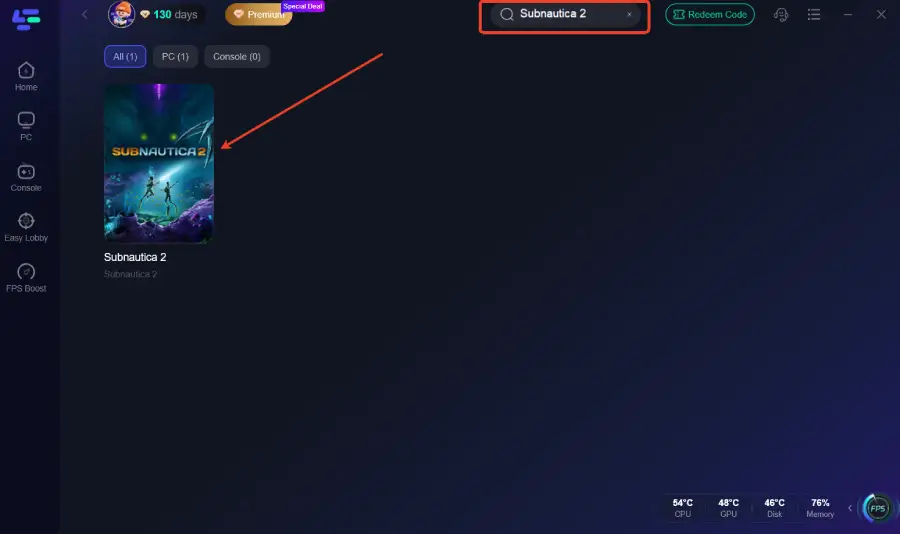
Step 2: Open LagoFast, then click the PC button on the left and search for Subnautica 2 in the search bar, and click it after it appears.
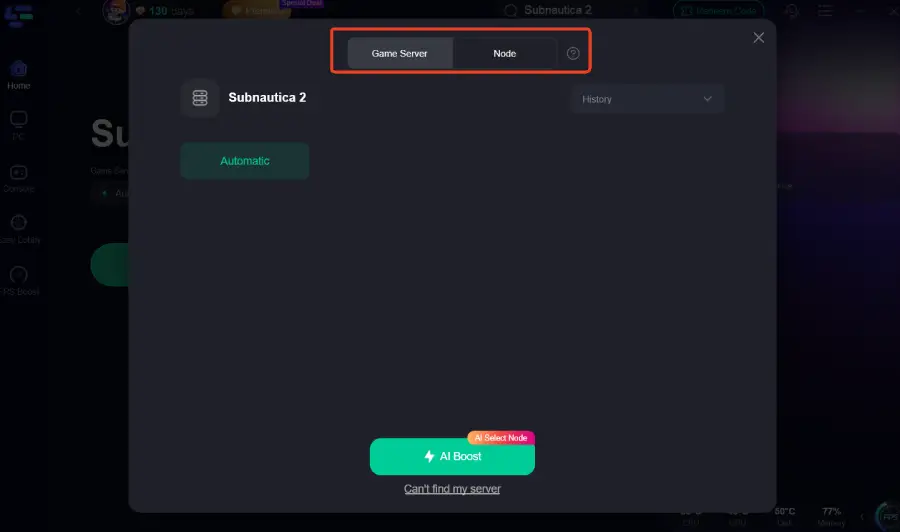
Step 3: Click “Server” to switch to a better server, which can improve the gaming experience. Then click “Smart Boost” to resolve the common issues.
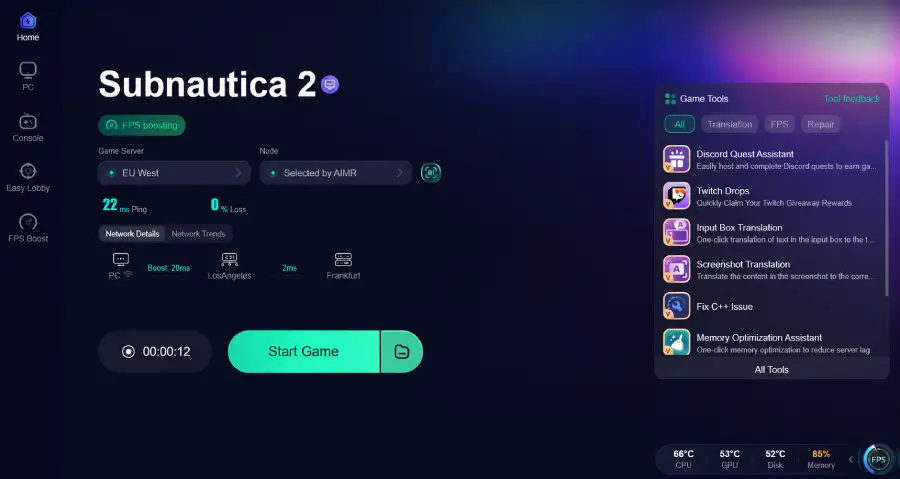
Step 4: Check the specific game ping, packet loss, and multiple path connections on the right side. Finally, click the “Start Game” to play the game.
Method 2: Update Graphics Drivers and Enable Resizable BAR
Old drivers are the leading cause of "day one" stuttering.
Step 1. Open NVIDIA App or AMD Software.
Step 2. Check for the latest "Game Ready" driver specifically optimized for Subnautica 2.
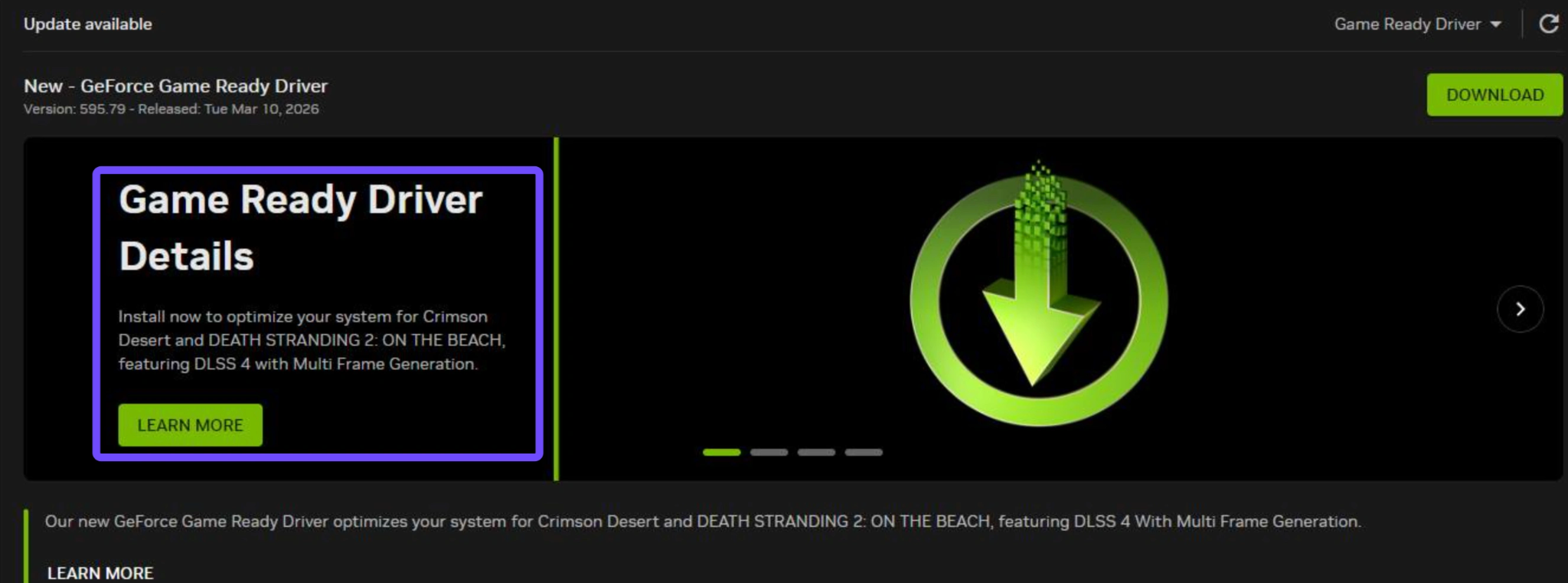
Step 3. If you have a modern GPU, ensure Resizable BAR is enabled in your BIOS. This allows the CPU to access the entire GPU frame buffer at once, which significantly reduces stuttering in open-world asset streaming.
Method 3: Change Power Plan to "Ultimate Performance"
Windows often tries to save energy, which can cause the CPU to "sleep" for milliseconds, leading to stutters.
Step 1. Press Win + R, type powercfg.cpl, and hit Enter.
Step 2. Look for High Performance. If it's not there, click "Show additional plans."
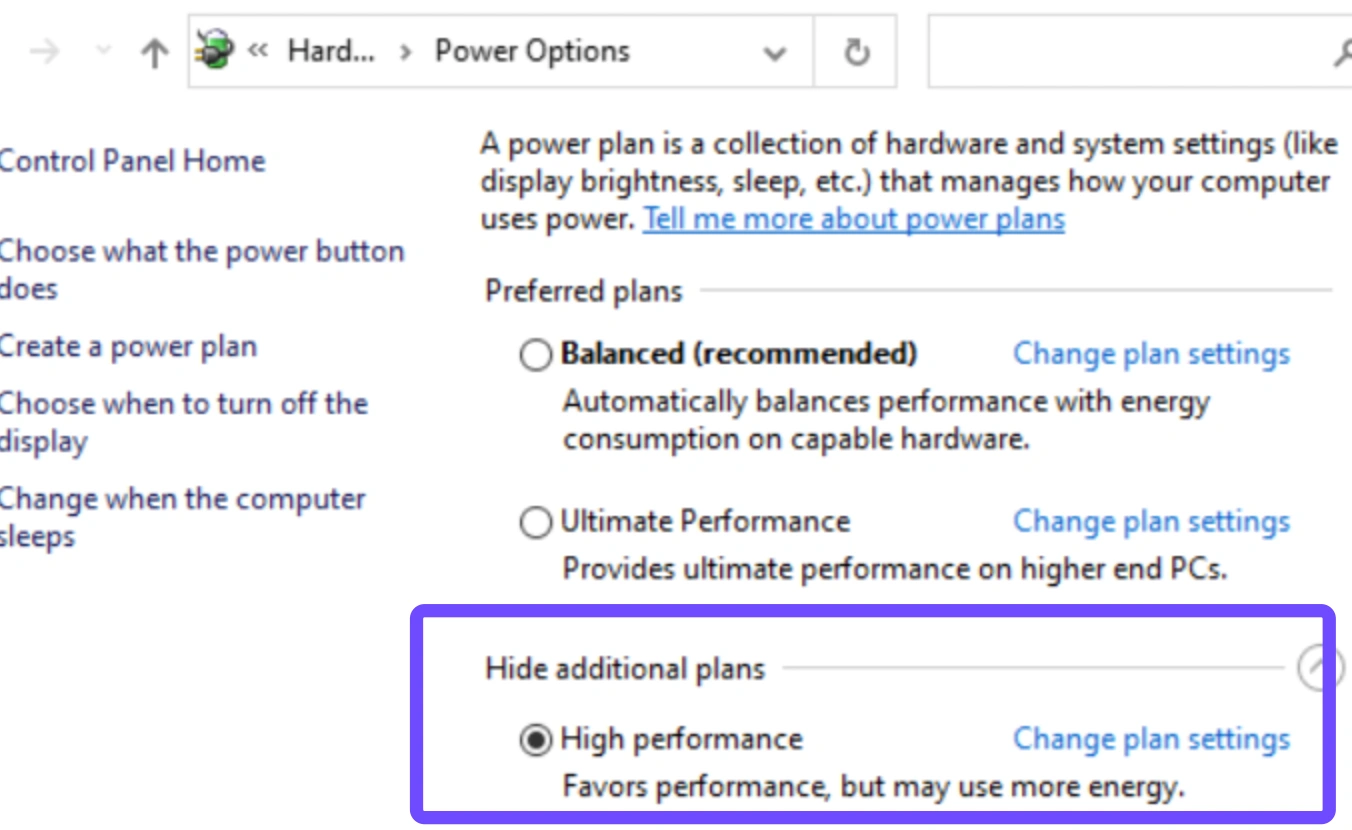
Step 3. For advanced users, open Command Prompt as Admin and paste: powercfg -duplicatescheme e9a42b02-d5df-448d-aa00-03f14749eb61 to unlock the Ultimate Performance plan.
Method 4: Clear the Shader Cache
If your stutters feel like they are getting worse over time, your shader cache might be corrupted.
Step 1. Open NVIDIA Control Panel and select Manage 3D Settings.
Step 2. Find Shader Cache Size and set it to 10GB or Unlimited.
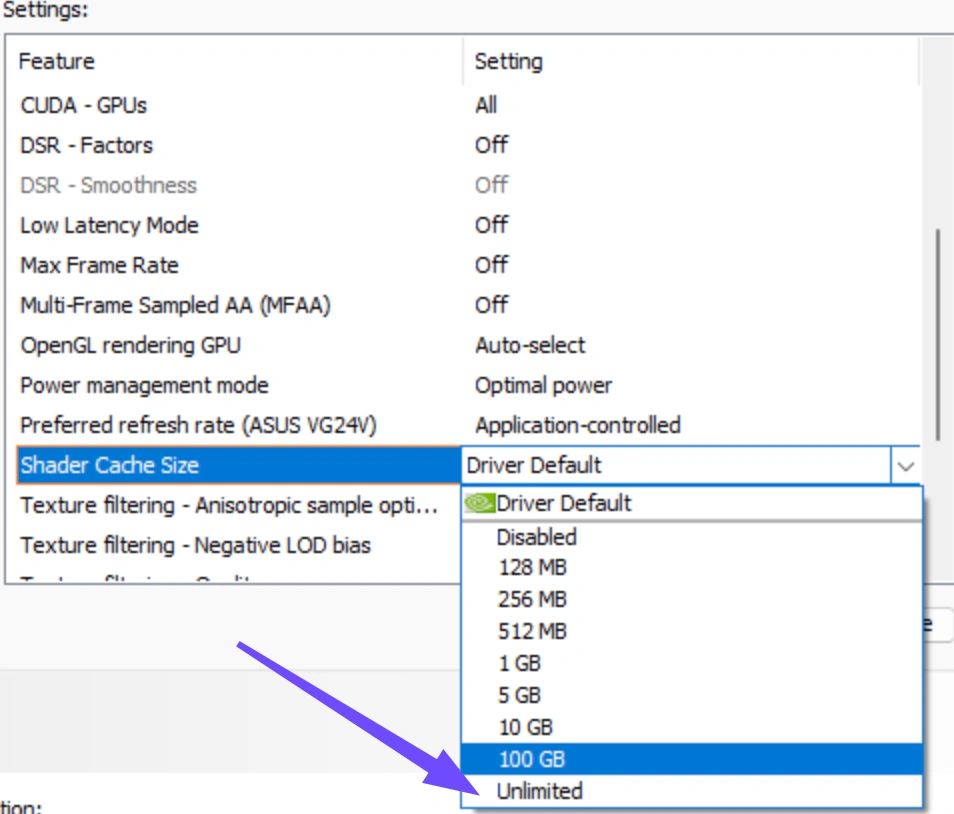
Step 3. Apply and restart. This gives the game more "breathing room" to store pre-compiled shaders.
Method 5: Disable Fullscreen Optimizations
Windows' "Fullscreen Optimizations" can sometimes conflict with how Unreal Engine 5 handles overlays.
Step 1. Right-click Subnautica 2 in your Steam library.
Step 2. Go to Manage, and select Browse local files.
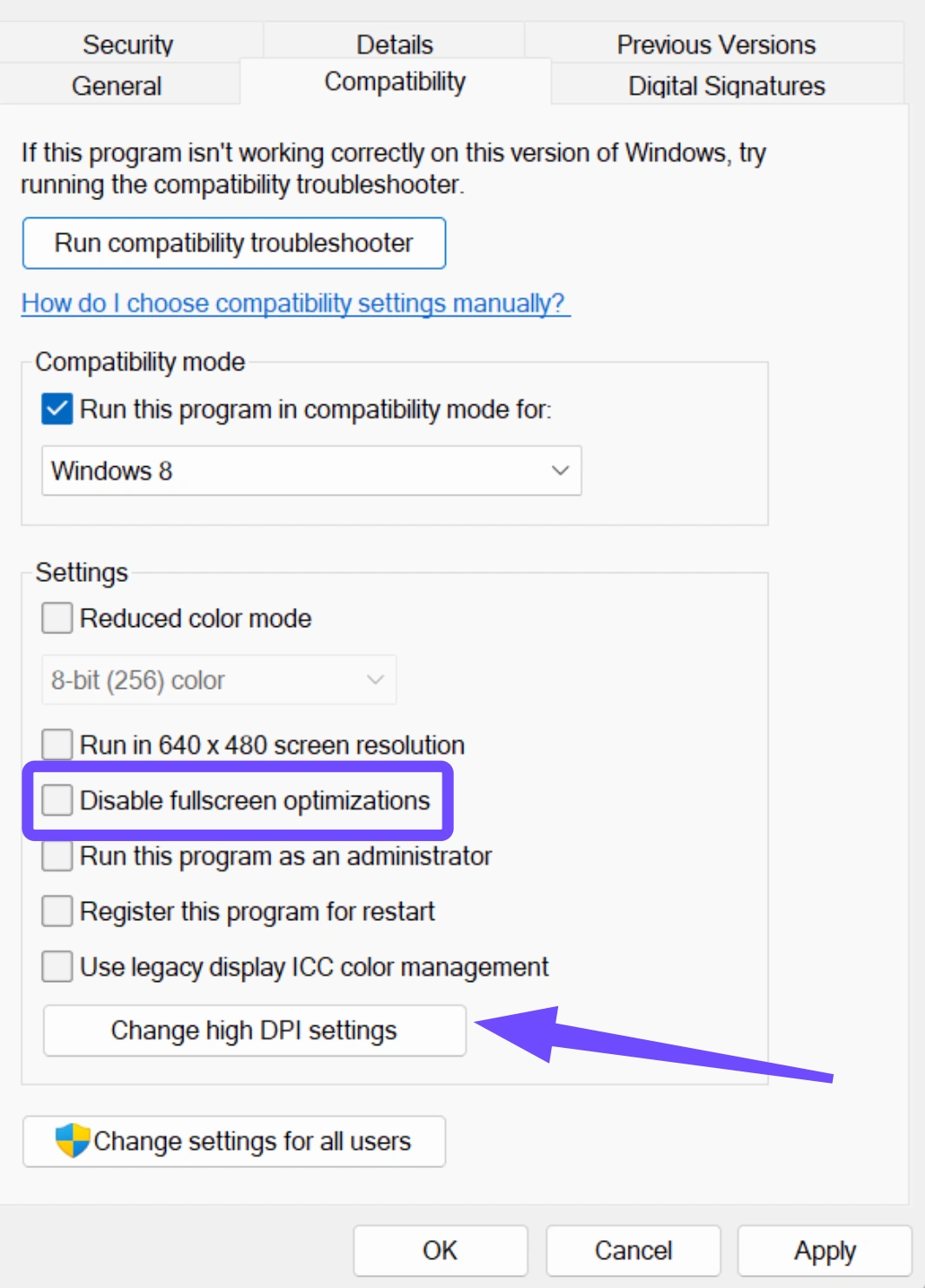
Step 3. Right-click the game’s .exe file, go to Properties, and select Compatibility.
Step 4. Check the box "Disable fullscreen optimizations" and click "Change high DPI settings" to ensure "Override high DPI scaling behavior" is also checked.
Part 4: Bonus Tips: Subnautica 2 Settings Adjustments for Better FPS
If your hardware is struggling, use these optimized settings to balance visuals and performance.
|
Setting |
Recommended Value |
Impact on Stuttering |
|
Window Mode |
Fullscreen |
High (Reduces input lag/stutter) |
|
Resolution Scale |
100% (Use DLSS/FSR instead) |
High |
|
Upscaling (DLSS/FSR) |
Quality / Balanced |
Critical (Major FPS gain) |
|
Depth of Field |
Off |
Medium (Often causes blur-related hitching) |
|
Water Quality |
Medium |
High (Heavy on GPU) |
|
Ambient Occlusion |
Low |
Medium |
|
Screen Space Reflections |
Low / Off |
High (Very intensive in UE5) |
|
Shadow Quality |
Medium |
High (CPU/GPU heavy) |
Key Takeaways
Subnautica 2 stuttering is often a data-streaming issue; ensure the game is on an SSD.
Difference between low FPS and stuttering: Low FPS is a hardware ceiling; stuttering is an optimization/instability issue.
LagoFast is the best all-in-one tool to stabilize your connection and boost FPS simultaneously.
Adjusting in-game settings like Depth of Field and Reflections can provide immediate relief for mid-range PCs.
Boost Your Game with LagoFast for Epic Speed
Play harder, faster. LagoFast game booster eliminates stutter and lags on PC, mobile, or Mac—win every match!
Quickly Reduce Game Lag and Ping!
Boost FPS for Smoother Gameplay!