
Navigating the vast systems of the Settled Systems requires more than just a fast ship and a steady aim; it demands a deep understanding of the galactic economy. Whether you are offloading a mountain of contraband or hunting for rare resources to upgrade your latest ship from the Terran Armada DLC, the vendor restock mechanic is your most vital tool. Many players find themselves stranded with a cargo hold full of loot and no one with enough credits to buy it. This starfield vendor restock guide is designed to solve that exact problem.
We will explore the intricacies of how merchants refresh their inventories, the impact of the latest 1.16.236 update, and the most efficient ways to turn your hard-earned loot into cold, hard credits. By the end of this guide, you will be a master of the Starfield economy, ensuring your journey through the stars is as profitable as it is adventurous.

- ✅ Reduce Lag and High Ping.
- ✅ Boost FPS at the Same Time.
✅ Starfield Translation Tool.
✅ Popular Mods Supported.
✅ Boost Game Loading Speed.
Part 1. What Is Vendor Restock in Starfield?
Part 2. How Vendor Restock Works
Part 3. How Long Does It Take for Vendors to Restock
Part 4. Why Vendor Restock Matters
Part 5. Best Ways to Force Vendor Restock
Part 6. Best Vendor Locations for Farming
Part 7. Advanced Farming Strategies
Part 8. Common Mistakes Players Make
Part 9. How to Enhance Your Game Experience with LagoFast Game Booster
Part 10. Bonus Tips: Troubleshooting Vendor Restock Issues
Part 1. What Is Vendor Restock in Starfield?
Understanding the Vendor Economy System in Starfield
In Starfield, vendor restock refers to the process by which merchants refresh their available credits and inventory pools. Every vendor operates under a controlled economic system designed to limit instant wealth generation.
Each merchant has:
- A fixed credit pool: Determines how much they can buy from you
- A predefined loot table: Controls what items appear in their inventory
- A timed refresh cycle: Triggers restock
Once you:
- Sell enough items to drain their credits, or
- Purchase most of their valuable inventory
you will need to wait for a reset before continuing efficient trading.
This system is fundamental to maintaining balance and is the backbone of any optimized Starfield Farming Guide Cluster. Without understanding it, your trading efficiency will drop significantly as you move across your Starfield Vendor Restock Locations Map routes.
Part 2. How Vendor Restock Works in Starfield
Time-Based Vendor Reset System Explained
Unlike many RPGs that rely on distance-based resets or area reloads, Starfield uses a time-based system tied to Universal Time (UT).
When a vendor restocks:
- Credits are fully replenished
- Inventory is refreshed and randomized
- Item pools are re-rolled based on vendor type
Vendor Types and Credit Differences
Not all vendors are equal. Their effectiveness depends on their role:
- Small Outpost Vendors: Low credits, limited inventory
- City Vendors: Balanced credits and item variety
- Trade Authority Vendors: High credits, accept almost everything
- DLC Vendors (Terran Armada): Specialized, high-value inventory
The 1.16.236 update improved vendor script stability and fixed issues where some vendors would fail to refresh correctly. It also subtly improved inventory rotation for high-tier vendors, especially those introduced in the Terran Armada DLC.
Part 3. How Long Does It Take for Vendors to Restock
Universal Time vs Local Time Explained
The standard vendor restock time is:
- 48 hours of Universal Time (UT)
However, one of the most misunderstood mechanics is the difference between:
- Local Time: Based on a planet’s rotation speed
- Universal Time: Fixed across the entire game
This difference directly affects how fast vendors reset.
The Venus Method (Fastest Reset Strategy)
One of the most powerful tricks in any starfield vendor restock guide:
- On Venus (Sol System)
- 1 hour of local time = 100 hours UT
This means:
- Waiting just 1 hour triggers a full vendor reset
- Every vendor across the galaxy refreshes instantly
This makes Venus the most efficient anchor point for any Starfield Farming Guide Cluster strategy.
Part 4. Why Vendor Restock Matters for Progression
Economic Importance in Starfield Gameplay
Vendor restocking is critical because Starfield’s economy scales rapidly as you progress.
You will need large amounts of credits for:
- Ship building and upgrades
- Weapon modifications
- Outpost construction and logistics
- Resource acquisition at scale
Without efficient restocking:
- You become inventory-locked
- Farming slows down
- Profit potential is wasted
With the addition of the Terran Armada DLC, new high-tier ship parts and weapons have made vendor interaction even more important. Many of these items only appear through rotating inventories, making restock manipulation essential.
Part 5. Best Ways to Force Vendor Restock in Starfield
Efficient Reset Methods
Wait Mechanic
- Sit or use a chair near vendors
- Wait until 48 UT hours pass
Sleep Method
- Use a bed instead of a chair
- Gain Well Rested XP bonus
- Slightly more efficient overall
Venus Method (Best Overall Strategy)
- Travel to Venus
- Wait 1 hour
- Reset all vendors instantly
Gameplay Settings Adjustment
- Increase Vendor Credits in settings
- Reduces frequency of restocking
- Comes with a minor XP penalty
This option is especially useful for players who prefer fewer interruptions in their farming loops.
Part 6. Best Vendor Locations for Farming in Starfield
Optimized Routes Using Starfield Vendor Restock Locations Map
To maximize efficiency, you need high-density vendor areas.
Neon (Volii Alpha)
- Trade Authority
- Neon Tactical
- Kore Kinetics
- Extremely compact layout
The Key (Kryx System)
- Best for contraband
- Requires Crimson Fleet access
- High efficiency for illegal goods
New Atlantis (Jemison)
- The Well: Budget vendors
- Residential District: Premium vendors
- Balanced trading hub
Akila City (Akila)
- Rowland Arms
- Shepherd’s General Store
- Great for early-to-mid game
These locations form the backbone of a practical Starfield Vendor Restock Locations Map and can be chained into efficient loops.
Part 7. Advanced Starfield Farming Strategies
Trade Authority Loop Strategy
The most efficient late-game method:
Cycle between:
- New Atlantis
- Neon
- Cydonia
Benefits:
- High credit availability
- Accept stolen items
- Minimal restrictions
Cluster Farming Strategy (Starfield Farming Guide Cluster)
A more advanced approach involves grouping:
- Multiple vendor hubs
- Fast travel points
- Restock trigger locations (like Venus)
This creates a repeatable loop where:
- Sell → Reset → Travel → Sell again
DLC Integration Strategy
Terran Armada DLC introduces:
- Specialized vendors
- Rare ship components
- Rotating high-tier inventory
Adding these vendors into your farming loop significantly increases long-term profit and gear quality.
Part 8. Common Mistakes Players Make
Avoid These Frequent Errors
- Waiting only 24 hours: Not enough for reset
- Ignoring UT system: Causes failed refresh attempts
- Skipping kiosks: Miss quick-sell opportunities
- Not investing in Commerce skill: Reduces profit margins
Commerce Skill Importance
The Commerce skill provides:
- Better selling prices
- Lower buying costs
It acts as a multiplier for every trading action, making it essential for serious farming.
Part 9. How to Enhance Your Game Experience with LagoFast Game Booster
Why Performance Optimization Still Matters
Even though Starfield is primarily single-player, performance issues can still impact gameplay:
- Inventory lag when carrying large amounts
- Stuttering during fast travel
- Delays during vendor interactions
These issues may seem minor at first, but during extended sessions—especially when following a Starfield Farming Guide Cluster—they can reduce overall farming efficiency and make the gameplay feel less responsive.
To address these issues and maintain a consistently smooth experience, using a performance optimization tool like LagoFast becomes a practical solution rather than just an optional upgrade.
Key Benefits of LagoFast
- Reduces latency: Improves system responsiveness
- Stabilizes performance: Minimizes stuttering
- Optimizes background processes: Frees system resources
- Improves update and sync stability
How to Use LagoFast
Step 1: Click the Free Trial button to download and install LagoFast.
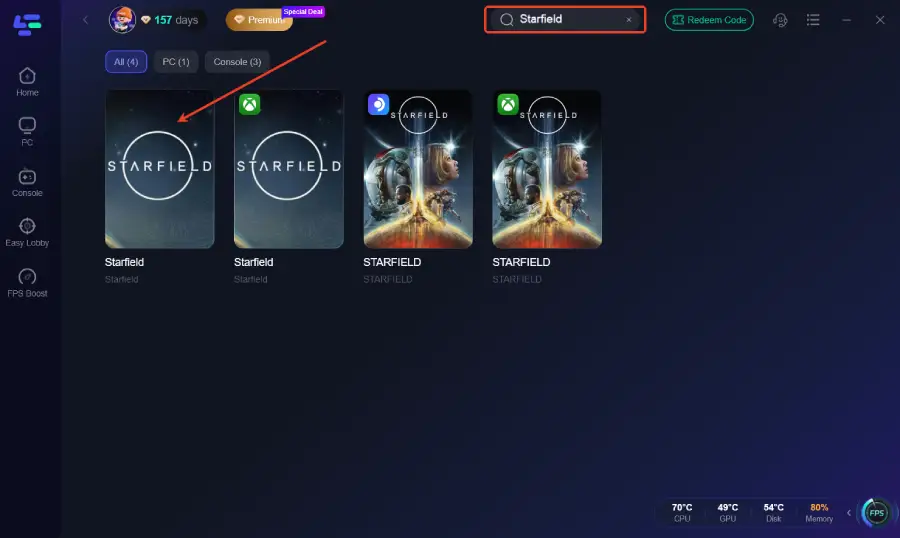
Step 2: After installation, search "Starfield" in the search bar and select the game.
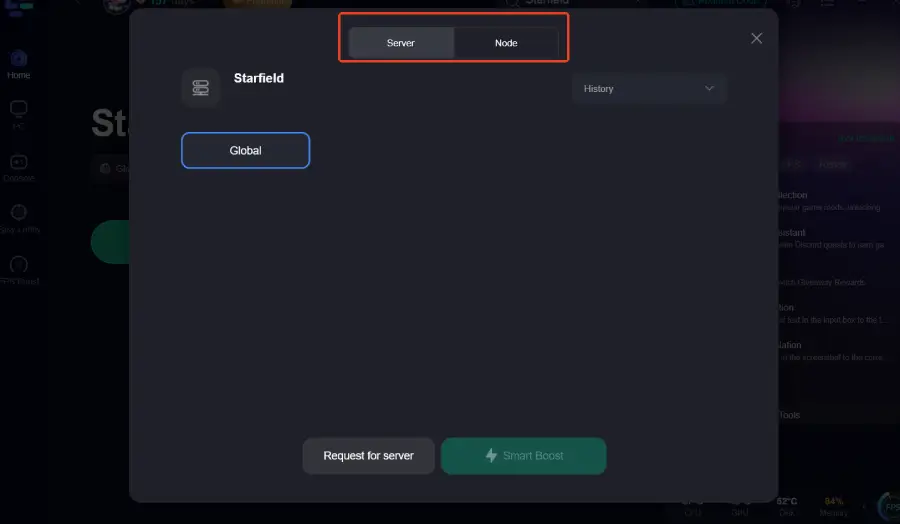
Step 3: Choose your preferred server node and click "Smart Boost" to start optimizing.
Step 4: Launch your game and enjoy smooth, optimized gameplay with lower ping and packet loss.
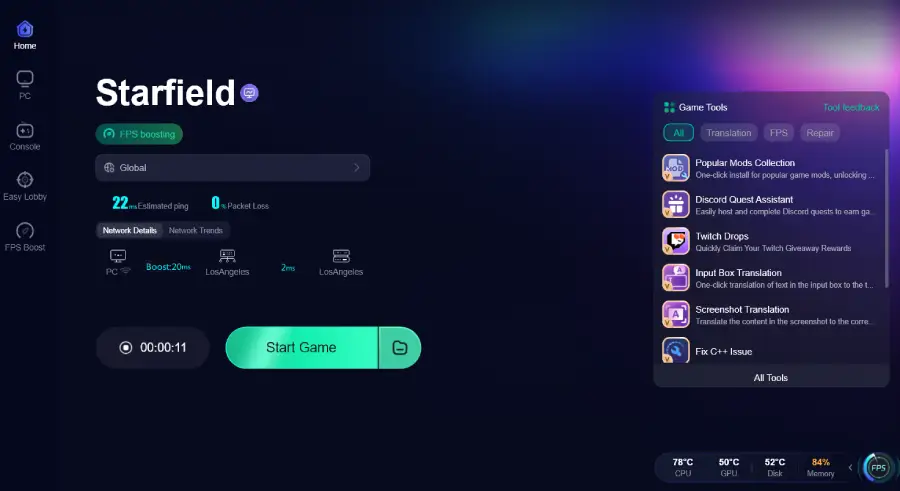
This ensures smoother execution of your vendor restock loops and farming cycles.
Part 10. Bonus Tips: Troubleshooting Vendor Restock Issues
Why Vendor Restock Sometimes Doesn’t Work
In most cases, vendor restock issues are not actual bugs, but the result of how Starfield handles Universal Time (UT), cell loading, and script triggers.
A vendor will only reset when:
- 48 hours of UT have passed
- The game registers a state change (waiting, sleeping, or reloading)
- The vendor’s location is properly reloaded
If any of these conditions are missing, the restock may fail.
Common Issues and Quick Fixes
1. Not Enough Time Passed
Many players wait 24 hours and expect a reset.
Fix: Always wait 48 UT hours, or use the Venus method for instant refresh.
2. Vendor Area Didn’t Reload
If you stay too close, the vendor may not update.
Fix:
- Fast travel away and return
- Take off in your ship
- Force a location reload
3. Quest or DLC Interference
Some missions (especially from Terran Armada DLC) can temporarily lock vendor behavior.
Fix: Progress or complete the related quest before retrying.
4. Mod Conflicts After 1.16.236
Older economy mods may break vendor resets.
Fix:
- Update or disable mods
- Test without mods if needed
Reliable Reset Method (Best Practice)
For consistent results, combine:
- Venus waiting method
- Fast travel to another system
- Save & reload if needed
This ensures both time progression and proper vendor refresh, making it the most reliable solution during long farming sessions.
Part 11. FAQs
Q: Does the "Wait" time change based on difficulty?
A: No, the 48-hour UT restock timer is consistent across all difficulty levels.
Q: Can I restock ship technicians?
A: Yes, ship technicians also restock their credits and available ship parts every 48 hours UT, though their specific ship inventory may take longer to rotate.
Q: Do vendors in the Terran Armada DLC have more credits?
A: Some specialized vendors in the DLC areas do have higher-than-average credit pools to accommodate the expensive new ship parts they sell.
Q: Will stolen items prevent a restock?
A: No, but only the Trade Authority and certain "shady" vendors will buy stolen items. Selling them to a standard vendor isn't possible without the right skills.
Q: How does the 1.16.236 update affect vendors?
A: The update improved the stability of the restock scripts and fixed a bug where certain kiosks would permanently run out of credits.
Conclusion
Mastering the vendor restock cycle is the key to unlocking the full potential of Starfield’s economy. By understanding the 48-hour UT rule, utilizing the Venus method, and optimizing your Starfield Vendor Restock Locations Map routes, you can turn trading into a highly efficient credit engine.
Whether you are building advanced ships through the Terran Armada DLC or optimizing your Starfield Farming Guide Cluster, these strategies ensure consistent profit and smooth progression.
With the right knowledge and optimization, you will never run out of credits—and your journey through the Settled Systems will always remain profitable.

Boost Your Game with LagoFast for Epic Speed
Play harder, faster. LagoFast game booster eliminates stutter and lags on PC, mobile, or Mac—win every match!
Quickly Reduce Game Lag and Ping!
Boost FPS for Smoother Gameplay!