
As the excitement builds for the upcoming release of Rust Mobile, gamers worldwide are eagerly anticipating the chance to experience the beloved survival game on their mobile devices. Developed by Facepunch Studios, this mobile adaptation promises to bring the same intense gameplay and immersive world that has captivated millions on PC and console. While the official global release date is still unconfirmed, Rust Mobile has now entered regional public testing, giving players an early chance to experience the game's mobile adaptation. This guide covers the latest availability, how to download and play Rust Mobile on Android and iOS, the current system requirements, and tips for achieving the best gaming experience.

- ✅ Reduce Lag and High Ping.
✅ Boost FPS at the Same Time.
✅ Support 8000+ Online Games
✅ Change Server Without Latency.
✅ Multiplatform: PC, Console, Mobile.
✅ End Stuck, Connection & Crashing Issues
Part 1. Rust Mobile Release Date & 1st Closed Beta
Part 2. How to Download and Play Rust Mobile on Android & iOS
Part 3. Rust Mobile System Requirements
Part 4. How to Ensure Smooth Gaming in Rust Mobile
Part 1. Rust Mobile Release Date & 1st Closed Beta
Rust Mobile still does not have a confirmed global release date. However, development has reached another major milestone with the launch of its regional open beta, giving players their first opportunity to experience the game in a public test.
The regional open beta officially launched on July 9, 2026, and is currently available for Android players in Hong Kong and Macau. According to the developers, a broader rollout across mainland China is expected in the near future, while a global release date for regions such as North America and Europe has not yet been announced.
The public test is available on Android devices in supported regions. Availability on iOS and additional regions may expand in future testing phases.
Supported languages in the current test include:
- English
- Japanese
- Thai
- Traditional Chinese
The regional open beta focuses on evaluating server stability, gameplay balance, and mobile performance while gathering player feedback ahead of a wider release.
Players are also allowed to record gameplay, livestream, and create content during the test.
Part 2: How to Download and Play Rust Mobile on Android & iOS
Before following the standard download steps, there’s one extra option worth knowing—especially for players facing regional restrictions or store availability issues.
Bonus Tip: Use LagoFast Mobile to Download Rust Mobile Without Region Limits
If Rust Mobile is not available in your local App Store or Google Play region, LagoFast Mobile offers an alternative way to access the game files.
By using LagoFast Mobile, players can bypass regional limitations and download the Rust Mobile game package directly, no matter where they are located. This is especially helpful for players in regions where the closed beta or future releases are not officially listed yet.
How it works:
Step 1: Search “LagoFast Mobile booster” in the App Store or Google Play, as it is globally available. Or scan the QR code below to start a free trial.

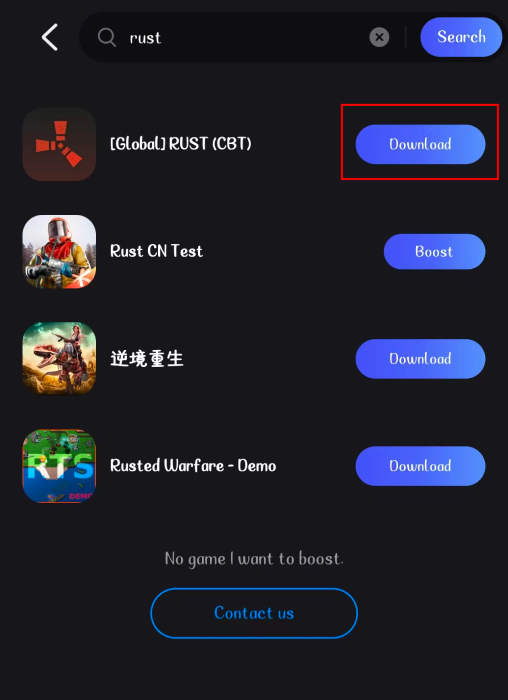
Step 2. Please search for Rust and select [Global] RUST (CBT). Click Download.
In addition to helping with downloads, LagoFast Mobile can also optimize network routing, which is useful during testing phases when servers may be unstable.
Common Method to Download Rust Mobile
To download and play Rust Mobile normally, follow these steps:
Step 1: Check Device Compatibility
Ensure your mobile device meets the minimum requirements for Rust Mobile.
Step 2: Download the Game
For Android:
- Open the Google Play Store.
- Search for Rust Mobile.
- Tap on Install to download the game.
For iOS:
- Open the App Store.
- Search for "Rust Mobile."
- Tap on Get to download the game.
Step 3: Create an Account
- Launch the game after installation.
- Follow the prompts to create a new account or log in if you already have one.
Part 3: Rust Mobile System Requirements
Rust Mobile System Requirements: Android
Minimum Requirements:
- OS: Android 7.0 and above
- Processor: Qualcomm Snapdragon 660 / MediaTek Helio P60 or similar
- RAM: 3 GB Disk space: 3-4 GB of available space
- Graphics: Adreno 512 / Mali-G72 or similar
- Internet connection: Stable internet connection
Recommended requirements for Rust Mobile:
- OS: Android 10.0 and above
- Processor: Qualcomm Snapdragon 845 / MediaTek Dimensity 700 or higher
- RAM: 6 GB or more Disk space: 5-6 GB of available space
- Graphics: Adreno 630 / Mali-G76 or higher
- Internet connection: High-speed internet connection (Wi-Fi 5 GHz or LTE/5G)
Rust Mobile System Requirements: iOS
Minimum Requirements:
- OS:iOS 12 or later
- Device: iPhone 6s or later, iPad (5th generation) or later, iPod touch (7th generation)
- RAM: 2 GB or more
Recommended Requirements:
- OS: iOS 14 or later
- Device: iPhone 8 or later, iPad Pro, iPad Air (3rd generation) or later
- RAM: 4 GB or more
Part 4. How to Ensure Smooth Gaming in Rust Mobile
Rust Mobile is coming soon, and I'm sure you're very excited, but performance issues like lag and high latency can disrupt the experience. To enhance your gameplay, using LagoFast can make a significant difference.
LagoFast is a dedicated game optimization tool designed to improve gaming performance on mobile devices. It optimizes network connections, reduces ping, and allocates system resources more effectively, ensuring a seamless gaming experience.
Key LagoFast Features for Rust Mobile
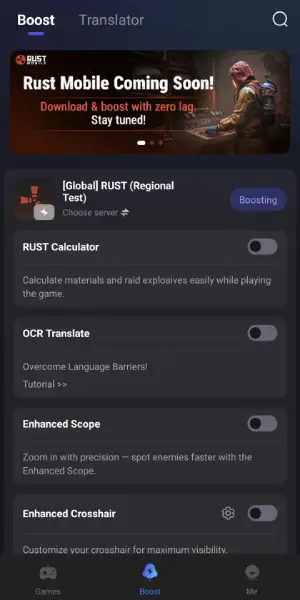
- Reduce Lag & High Ping: Optimize your network route to lower latency, reduce packet loss, and maintain a more stable connection during PvP, raids, and exploration.
- Rust Calculator: Plan raids more efficiently by calculating exactly what you'll need to destroy enemy defenses. Simply select structures such as Wood Doors, Sheet Metal Doors, Stone Walls, or Armored Walls, and the calculator instantly shows the most resource-efficient raid method along with the required crafting materials, including sulfur, charcoal, and stone.
- OCR Translation: Instantly translate in-game text, menus, and other interface elements without leaving the game, making it easier to communicate and understand content in different languages.
- Enhanced Scope: Zoom in with greater precision to improve long-range visibility, helping you spot enemies more quickly during combat.
- Enhanced Crosshair: Customize your crosshair for better visibility and aiming accuracy, making gunfights more comfortable across different environments.
How to Use LagoFast to Boost FPS and Reduce High Ping in Rust on Mobile:
Step 1: Search “LagoFast Mobile booster” in the App Store or Google Play, as it is globally available. Or scan the QR code below to start a free trial.
Step 2. Search for your game and select it.
Step 3. Pick the server that suits you best.
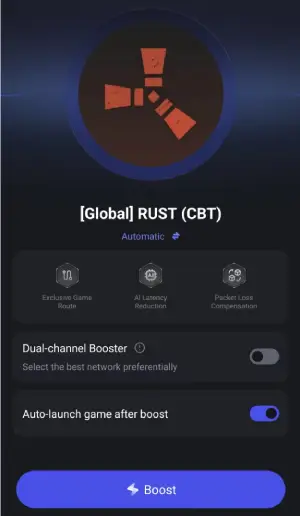
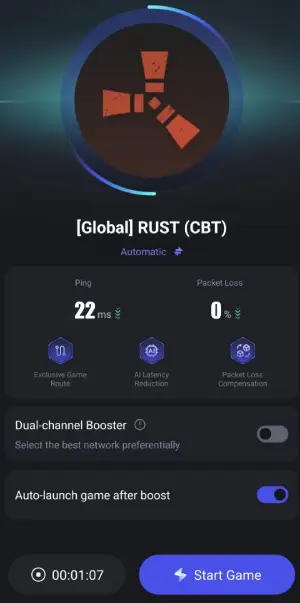
Step 4. Tap Boost, and LagoFast will display real-time ping and packet loss stats.
So if you want to elevate your gaming experience in Rust Mobile, consider using LagoFast Game Booster. With its ability to lower latency, stabilize connections, and manage resources effectively, LagoFast is an essential tool for any serious gamer looking to excel in the world of Rust. Enjoy smoother gameplay and focus on what truly matters—surviving and thriving in the game!
Conclusion
With the regional open beta now live, players can finally get an early hands-on experience with Rust Mobile before its wider release. Although a global launch date has not yet been confirmed, additional regional testing is expected in the coming months. By following this guide, you'll be ready to download the game, check whether your device meets the requirements, and enjoy a smoother experience with tools like LagoFast. Stay tuned to the official channels for the latest announcements on future beta phases and the global launch.

Boost Your Game with LagoFast for Epic Speed
Play harder, faster. LagoFast game booster eliminates stutter and lags on PC, mobile, or Mac—win every match!
Quickly Reduce Game Lag and Ping!
Boost FPS for Smoother Gameplay!